
深度学习标注结果可视化
对于VMRD数据集:https://gr.xjtu.edu.cn/zh/web/zeuslan/dataset,其中:目标识别是xml格式标注;抓取位置检测是txt格式标注;xml格式标注结果可视化import xml.etree.ElementTree as ETimport os, cv2xml_file = 'C:/Users/00/Desktop/VMRD V2 fixed/Annotat
·
对于VMRD数据集:https://gr.xjtu.edu.cn/zh/web/zeuslan/dataset,其中:
- 目标识别是xml格式标注;
- 抓取位置检测是txt格式标注;
xml格式标注结果可视化
import xml.etree.ElementTree as ET
import os, cv2

xml_file = 'C:/Users/00/Desktop/VMRD V2 fixed/Annotations/00077.xml'
tree = ET.parse(xml_file)
root = tree.getroot()
imgfile = 'C:/Users/00/Desktop/VMRD V2 fixed/JPEGImages/00077.jpg'
im = cv2.imread(imgfile)
for object in root.findall('object'):
    object_name = object.find('name').text
    Xmin = int(object.find('bndbox').find('xmin').text)
    Ymin = int(object.find('bndbox').find('ymin').text)
    Xmax = int(object.find('bndbox').find('xmax').text)
    Ymax = int(object.find('bndbox').find('ymax').text)
    print(object)
    color = (0, 0, 255)
    cv2.rectangle(im, (Xmin, Ymin), (Xmax, Ymax), color, 2)
    font = cv2.FONT_HERSHEY_SIMPLEX
    cv2.putText(im, object_name, (Xmin, Ymin - 7), font, 0.5, (6, 230, 230), 2)
    cv2.imshow('img', im)
    cv2.imwrite('C:/Users/00/Desktop/VMRD V2 fixed/guyue/00077-ob.jpg', im)
    cv2.waitKey(0)
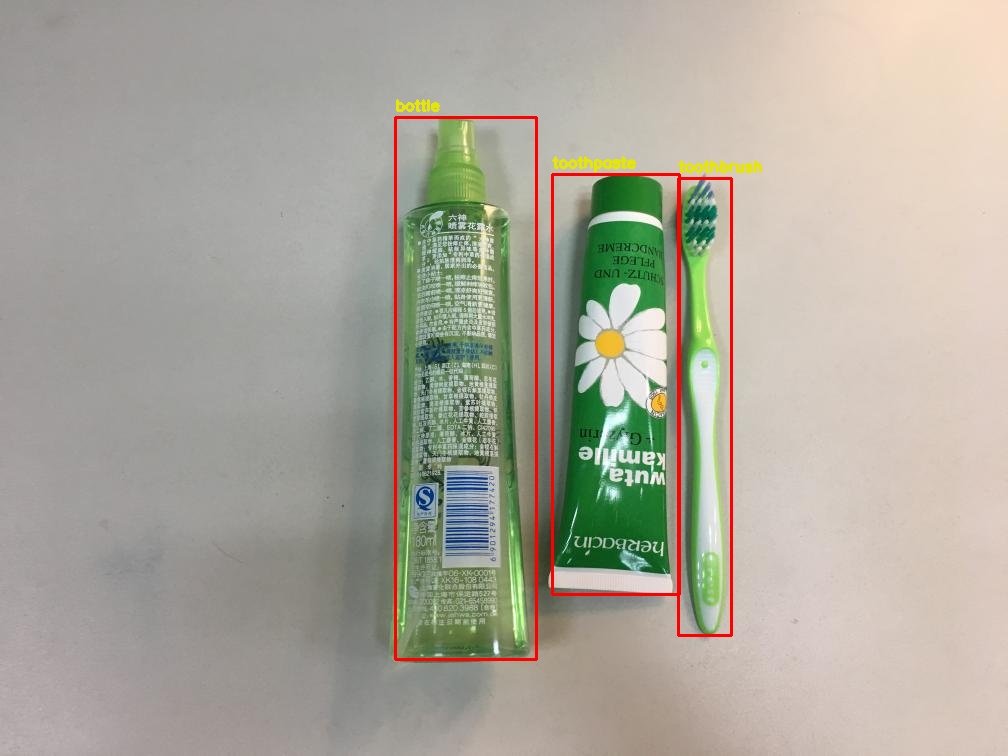
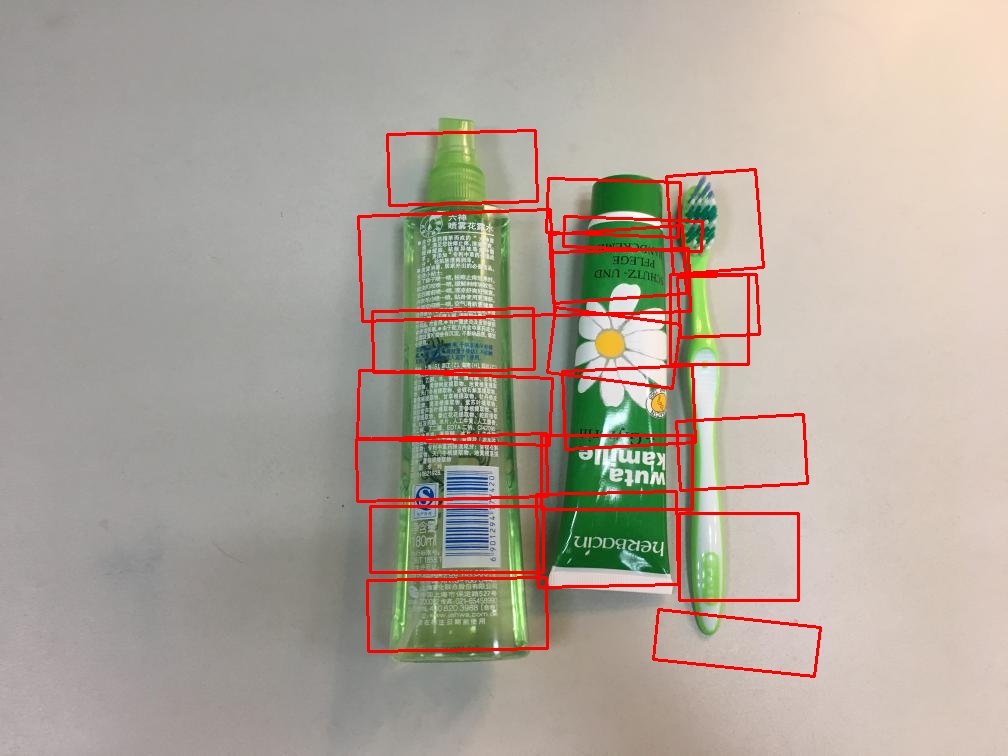
txt标注结果可视化
# This is a sample Python script.

# Press Shift+F10 to execute it or replace it with your code.
# Press Double Shift to search everywhere for classes, files, tool windows, actions, and settings.

import os, cv2
import numpy as np

imgfile = 'C:/Users/00/Desktop/VMRD V2 fixed/JPEGImages/00077.jpg'
filename = 'C:/Users/00/Desktop/VMRD V2 fixed/Grasps/00077.txt'
im = cv2.imread(imgfile)
step, dis, gan = [], [], []
# 相比open(),with open()不用手动调用close()方法
with open(filename, 'r') as f:
    # 将txt中的数据逐行存到列表lines里 lines的每一个元素对应于txt中的一行。
    # 然后将每个元素中的不同信息提取出来
    lines = f.readlines()
    for line in lines:
        location = line.split(' ')
        x0 = float(location[0])
        y0 = float(location[1])
        x1 = float(location[2])
        y1 = float(location[3])
        x2 = float(location[4])
        y2 = float(location[5])
        x3 = float(location[6])
        y3 = float(location[7])
        newBox = [[x0, y0], [x1, y1], [x2, y2], [x3, y3]]
        color = (4, 250, 7)
        point = np.array(newBox).astype(int)
        box = np.int32(point)
        cv2.drawContours(im, [box], 0, (0, 0, 255), 2)
cv2.imwrite('C:/Users/00/Desktop/VMRD V2 fixed/guyue/00077.jpg', im)

汇聚全球AI编程工具,助力开发者即刻编程。
更多推荐


 1
1 0
0- 0


 已为社区贡献1条内容

所有评论(0)