
java map 行转列_hive中array嵌套map以及行转列的使用
1. 数据源信息{"student": {"name":"king","age":11,"sex":"M"},"sub_score":[{"subject":"语文","score":80},{"subject":"数学","score":80},{"subject":"英语","score":80}]}{"student": {"name":"king1","age":11,"sex":"M"}
1. 数据源信息
{"student": {"name":"king","age":11,"sex":"M"},"sub_score":[{"subject":"语文","score":80},{"subject":"数学","score":80},{"subject":"英语","score":80}]}
{"student": {"name":"king1","age":11,"sex":"M"},"sub_score":[{"subject":"语文","score":81},{"subject":"数学","score":80},{"subject":"英语","score":80}]}
{"student": {"name":"king2","age":12,"sex":"M"},"sub_score":[{"subject":"语文","score":82},{"subject":"数学","score":80},{"subject":"英语","score":80}]}
{"student": {"name":"king3","age":13,"sex":"M"},"sub_score":[{"subject":"语文","score":83},{"subject":"数学","score":80},{"subject":"英语","score":80}]}
{"student": {"name":"king4","age":14,"sex":"M"},"sub_score":[{"subject":"语文","score":84},{"subject":"数学","score":80},{"subject":"英语","score":80}]}
{"student": {"name":"king5","age":15,"sex":"M"},"sub_score":[{"subject":"语文","score":85},{"subject":"数学","score":80},{"subject":"英语","score":80}]}
{"student": {"name":"king5","age":16,"sex":"M"},"sub_score":[{"subject":"语文","score":86},{"subject":"数学","score":80},{"subject":"英语","score":80}]}
{"student": {"name":"king5","age":17,"sex":"M"},"sub_score":[{"subject":"语文","score":87},{"subject":"数学","score":80},{"subject":"英语","score":80}]}
2. 创建hive表
分析数据源,由于是json格式,
student字段使用map结构,sub_score字段使用array嵌套map的格式,
这样使用的好处是如果数据源中只要第一层字段不会改变,都不会有任何影响,兼容性较强。
创建表语句如下, 注意使用下面这个json包,这样解析json出错时不至于程序挂掉。
下载地址:
https://github.com/rcongiu/Hive-JSON-Serde
http://www.congiu.net/hive-json-serde/
create external table if not existsdw_stg.stu_score(
student mapcomment "学生信息",
sub_score array> comment '成绩表')
comment "学生成绩表"
row format serde'org.apache.hive.hcatalog.data.JsonSerDe'
ROW FORMAT SERDE 'org.openx.data.jsonserde.JsonSerDe'storedas textfile;
对于解析异常时报错的处理,可以加上一下属性:
ALTER TABLEdw_stg.stu_score SET SERDEPROPERTIES ( "ignore.malformed.json" = "true");
3. 上传数据
将score.txt数据上传到hive表stu_score目录:
hdfs dfs -put score.txt hdfs://dwtest-name1:9000/user/hive/warehouse/dw_stg.db/stu_score/
4. 数据查询
1)普通查询

2)查询单个学生的成绩

3)行转列explode ★★★
select explode(sub_score) from stu_score where student['name'] = 'king1';

4)更高级的写法:行转列lateral view .... explode ★★★
当使用explode时,不支持使用其他字段,如下会报错

所以使用另外一种用法
select student['name'],score['subject'],score['score']
fromstu_score
lateralview explode(sub_score) sc asscorewhere student['name'] = 'king1';

5)保留null字段值 。格式 lateral view outer explode(field)
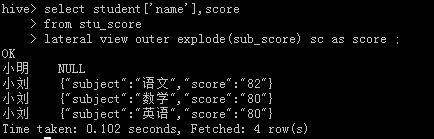
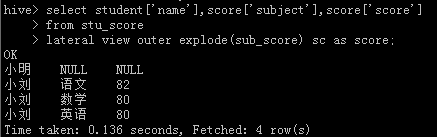
如果数据源中学生分数为空时,在查询时可能就不会显示出来。比如下面的数据中,小明没有成绩。

使用4)中的查询显示如下:

此时,如果希望将小明也显示出来,则可以使用lateral view outer explode(field) 格式。
select student['name'],scorefromstu_score
lateralview outerexplode(sub_score) sc as score
或者下面
通过3)、4)、5)步骤基本可以实现所有字段的任意查询和使用了。

汇聚全球AI编程工具,助力开发者即刻编程。
更多推荐
 0
0 0
0- 0



 已为社区贡献1条内容

所有评论(0)