
python读取表格数据将pdf文件转excel文件最新可用方法
可用看到表格内容位置一致,转换完成。【转换后Excel】
·
一、表格转换成果
【ptf】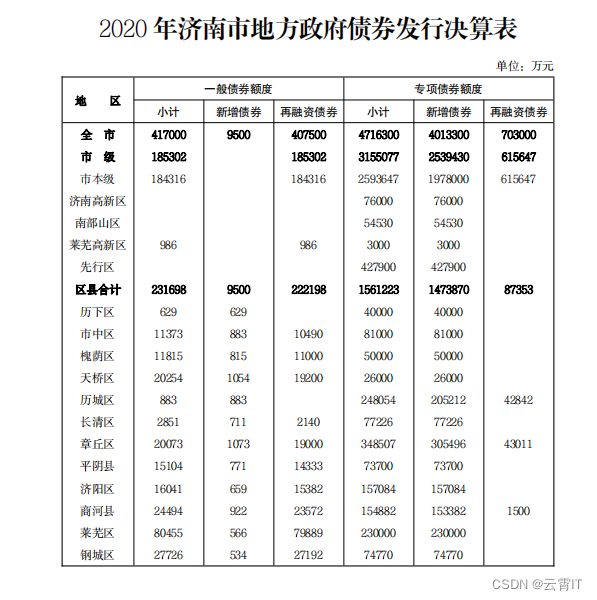
【转换后Excel】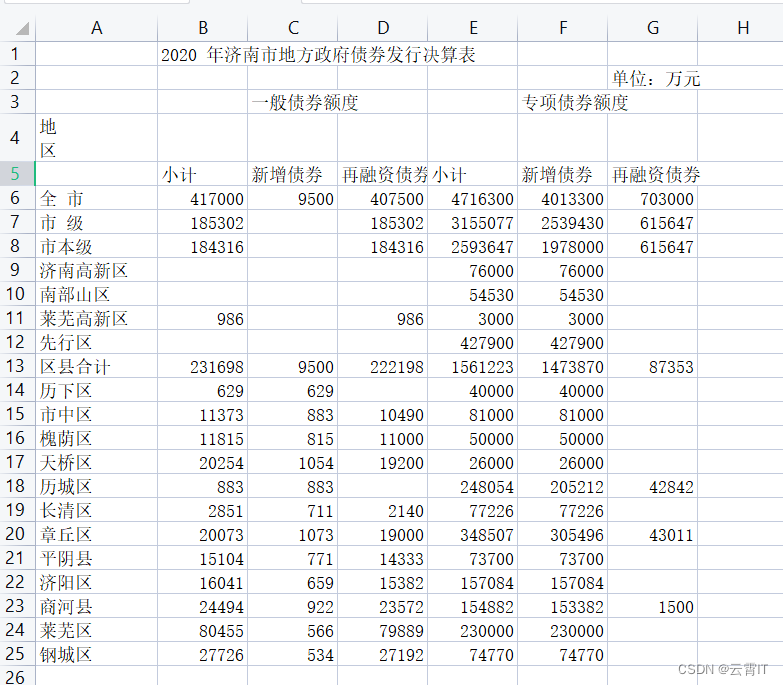
可用看到表格内容位置一致,转换完成
二、转换方法【一】(适用只有一页)
(1)安装camelot库
pip install "camelot-py[base]"
(2)转换代码
import camelot.io as camelot
data = camelot.read_pdf("abc.pdf", pages='1',flavor='stream')
data[0].to_excel('result.xlsx',encoding='utf_8_sig')
三、转换方法【二】(适用pdf含有多页转换excel)
import camelot.io as camelot
from openpyxl import Workbook

work = Workbook()
sheet = work.active

data = camelot.read_pdf("计算机技术拟录取名单.pdf", pages='all',flavor='stream')
for i in range(data.n):
    for rows in data[i].data:
        sheet.append(rows)
work.save('success.xlsx')

汇聚全球AI编程工具,助力开发者即刻编程。
更多推荐

 0
0 0
0- 0


 已为社区贡献1条内容

所有评论(0)