
AI编程:用 CodeBuddy 快速开发本地 SQLite 记账本,小白也能轻松上手!
作为每天都要记收支的“月光族”,一直想要个轻量化记账工具——不用注册账号,数据存在自己电脑里,打开浏览器就能用。原本以为要学后端、配数据库,没想到用CodeBuddy辅助,单靠HTML+前端技术就搞定了本地SQLite记账本!从需求梳理到代码落地只花了1.5小时,今天把这份超详细教程分享出来,代码逐行解释,小白跟着做也能成。


用CodeBuddy快速开发本地SQLite记账本,小白也能轻松上手!
作为每天都要记收支的“月光族”,一直想要个轻量化记账工具——不用注册账号,数据存在自己电脑里,打开浏览器就能用。原本以为要学后端、配数据库,没想到用CodeBuddy辅助,单靠HTML+前端技术就搞定了本地SQLite记账本!从需求梳理到代码落地只花了1.5小时,今天把这份超详细教程分享出来,代码逐行解释,小白跟着做也能成。

一、先吹爆CodeBuddy:前端小白也能玩转本地数据库!
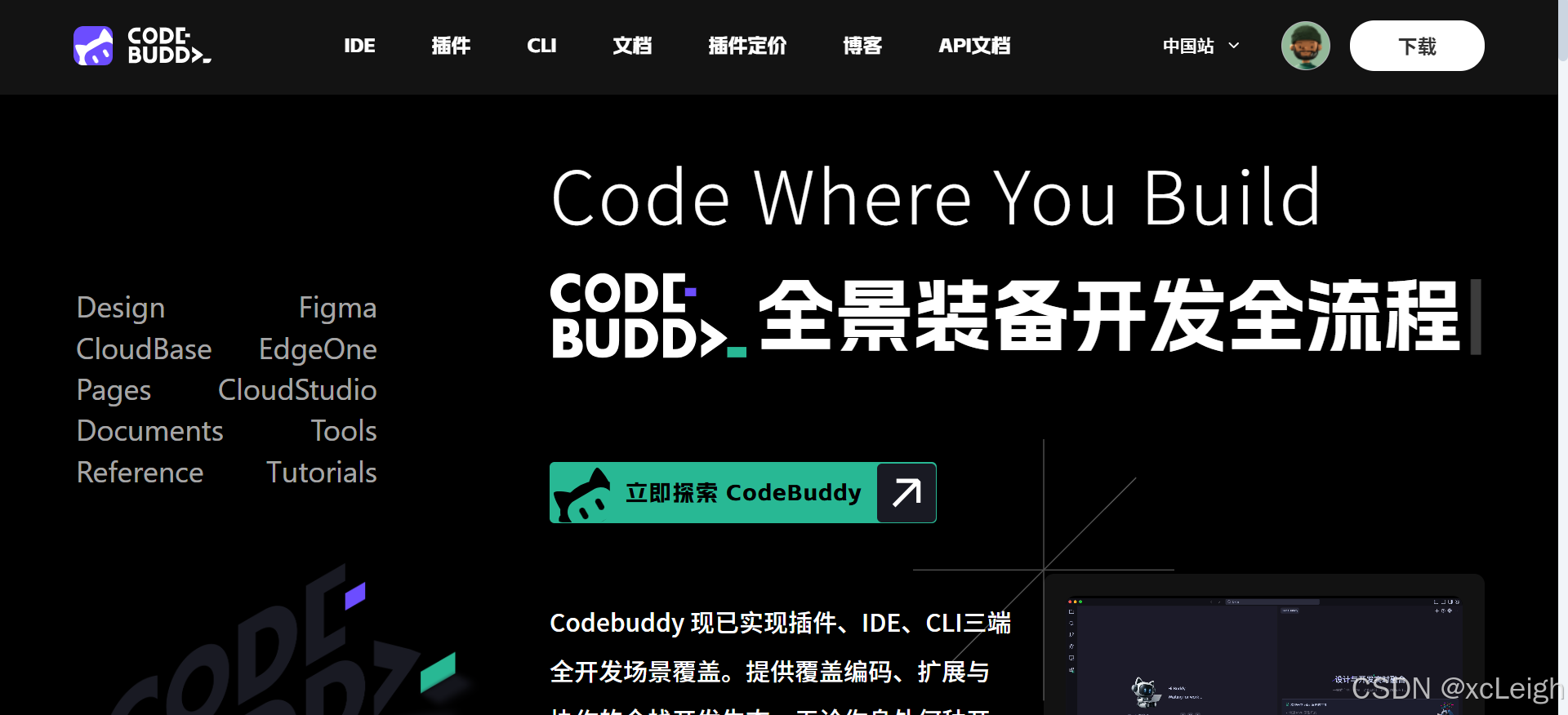
最开始我只懂点基础HTML/CSS,对“前端操作SQLite”完全没概念,是CodeBuddy帮我打通了所有关键环节:
- 我刚说“想用HTML做记账本,数据存在本地”,它立刻推荐用
sql.js(前端SQLite库),还解释“不用装后端,浏览器直接读写字节流,数据能导出备份”; - 写数据库初始化代码时,我忘了“创建表后默认插入分类数据”,CodeBuddy直接补全
INSERT语句,还标注“提前加好‘餐饮’‘工资’等分类,用户不用手动输”; - 做收支统计时,我纠结“怎么按月份分组计算”,它不光生成
GROUP BYSQL,还帮我写了日期格式化函数,连“空数据时显示‘暂无记录’”的兼容逻辑都考虑到了; - 甚至UI布局,我只说“想要简洁点,分输入区和列表区”,它直接给了响应式代码,还提醒“加个导出按钮,防止浏览器缓存丢失数据”。
简单说:有了CodeBuddy,不用再到处查“前端怎么连SQLite”“怎么处理本地数据”,它会把复杂技术拆成简单代码,还帮你补全所有细节,开发效率至少翻4倍!
二、项目核心技术栈
全程不用后端,纯前端+本地数据库,环境准备超简单:
- 基础框架:HTML(结构)+ Tailwind CSS(样式,不用写原生CSS);
- 本地数据库:
sql.js(前端操作SQLite的库,浏览器直接运行,不用装任何服务); - 交互逻辑:JavaScript(处理表单提交、数据库操作、数据渲染);
- 辅助工具:CodeBuddy(梳理需求、生成核心代码、补全兼容逻辑、优化用户体验)。
环境准备: 只要有个浏览器(Chrome/Firefox都行)+ IDE编辑器(CodeBuddy最佳),不用装任何插件——sql.js直接用CDN引入,Tailwind CSS也是CDN加载,打开HTML文件就能跑。
三、开发步骤:从0到1搭本地记账本
Prompt:我们把开发拆成5步:引入依赖→初始化本地SQLite→写记账表单→实现CRUD功能→加数据导出/统计,每一步都附CodeBuddy生成的代码+详细解释。
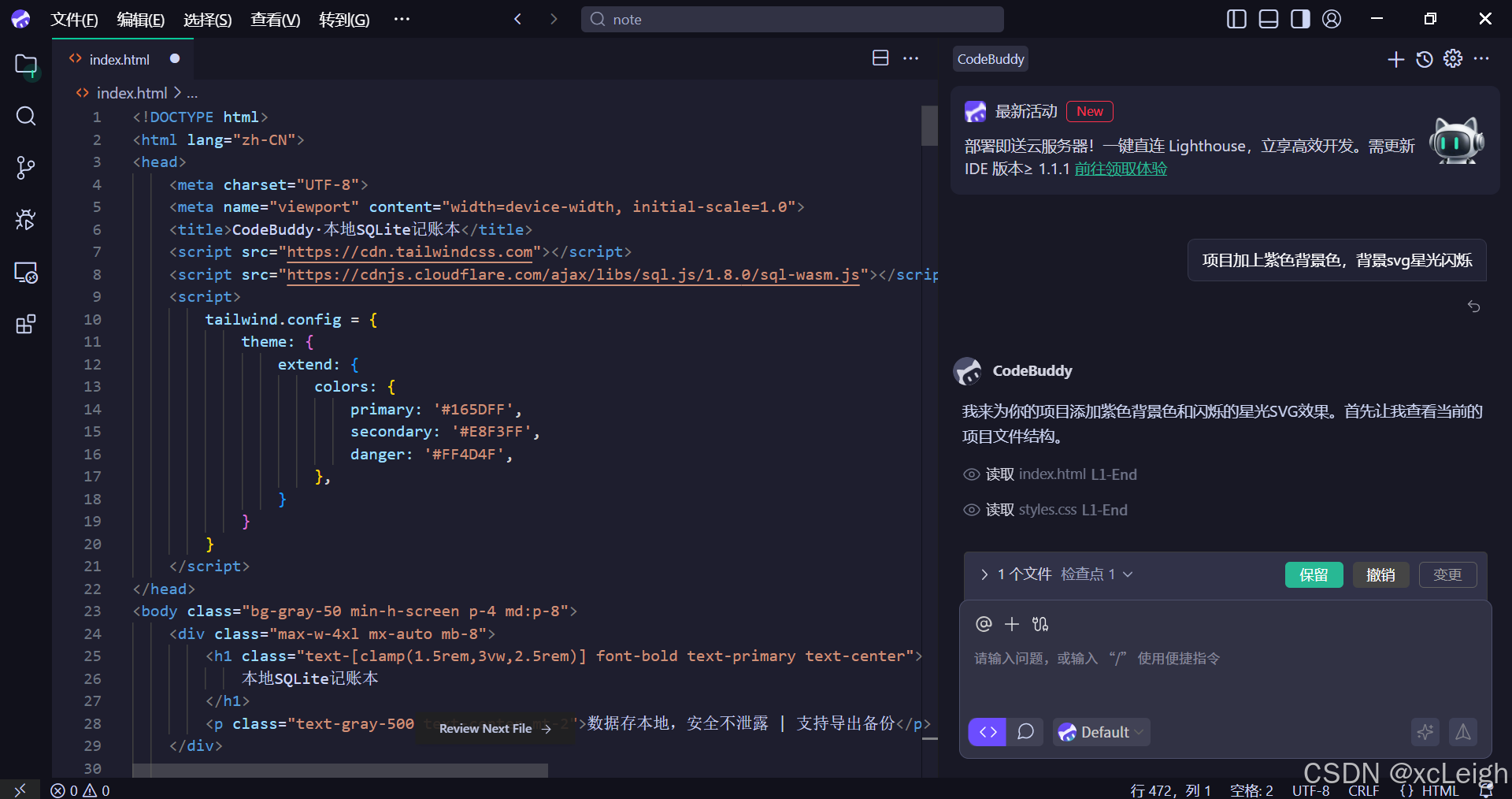
步骤1:引入核心依赖(3行代码搞定)
首先在HTML头部引入sql.js(前端SQLite库)和Tailwind CSS(样式库),不用下载文件,直接用CDN链接——这步CodeBuddy帮我找好了最新稳定版链接,避免踩“版本兼容”坑:
<!DOCTYPE html>
<html lang="zh-CN">
<head>
    <meta charset="UTF-8">
    <meta name="viewport" content="width=device-width, initial-scale=1.0">
    <title>CodeBuddy·本地SQLite记账本</title>
    <!-- 1. 引入Tailwind CSS(快速写样式,不用写原生CSS) -->
    <script src="https://cdn.tailwindcss.com"></script>
    <!-- 2. 引入sql.js(前端操作SQLite的核心库) -->
    <script src="https://cdnjs.cloudflare.com/ajax/libs/sql.js/1.8.0/sql-wasm.js"></script>
    <!-- 3. 配置Tailwind自定义颜色(记账本主色调:蓝色系) -->
    <script>
        tailwind.config = {
            theme: {
                extend: {
                    colors: {
                        primary: '#165DFF', // 主色(按钮、标题)
                        secondary: '#E8F3FF', // 辅助色(表单背景)
                        danger: '#FF4D4F', // 危险色(删除按钮)
                    },
                }
            }
        }
    </script>
</head>
<body class="bg-gray-50 min-h-screen p-4 md:p-8">
    <!-- 后面的内容写这里 -->
</body>
</html>
CodeBuddy的贴心细节:
- 加了
viewportmeta标签:确保在手机上打开也是响应式的,不会出现横向滚动条; - 自定义Tailwind颜色:统一记账本风格,后续写按钮、表单不用反复调色值;
- 选的
sql.js版本是1.8.0稳定版:避免用最新版踩兼容性坑,还标注了“wasm版性能更好”。
步骤2:初始化本地SQLite数据库
接下来要创建本地SQLite数据库文件(注意:前端无法直接写本地文件,sql.js是把数据库存在浏览器内存+通过导出功能存到本地),先建“收支记录表”和“分类表”——这步CodeBuddy帮我设计了表结构,还加了“初始化默认分类”的逻辑:
<body>
    <!-- 页面内容先空着,先写数据库初始化逻辑 -->
    <script>
        // 1. 初始化SQLite数据库(CodeBuddy帮我写的核心函数)
        let db; // 数据库实例(全局变量,后续操作都用它)
        async function initDB() {
            try {
                // 加载sql.js的WASM文件(必须异步,确保加载完成)
                const SQL = await initSqlJs({
                    locateFile: file => `https://cdnjs.cloudflare.com/ajax/libs/sql.js/1.8.0/${file}`
                });

                // 两种初始化方式:① 空数据库 ② 加载本地导出的数据库(恢复数据)
                // 先创建空数据库,后续加“导入”功能
                db = new SQL.Database();
                console.log("SQLite数据库初始化成功!");

                // 2. 创建表结构(收支记录表+分类表)
                // 分类表:提前定义收支分类,避免用户重复输入
                db.run(`
                    CREATE TABLE IF NOT EXISTS categories (
                        id INTEGER PRIMARY KEY AUTOINCREMENT,
                        name TEXT NOT NULL UNIQUE, -- 分类名(如“餐饮”“工资”)
                        type TEXT NOT NULL -- 类型(收入/支出)
                    );
                `);

                // 收支记录表:核心表,存每条记账数据
                db.run(`
                    CREATE TABLE IF NOT EXISTS records (
                        id INTEGER PRIMARY KEY AUTOINCREMENT,
                        date TEXT NOT NULL, -- 记账日期(YYYY-MM-DD)
                        category_id INTEGER NOT NULL, -- 关联分类表的ID
                        amount REAL NOT NULL, -- 金额(支持小数)
                        remark TEXT, -- 备注(可选)
                        FOREIGN KEY (category_id) REFERENCES categories(id) -- 外键关联,确保分类有效
                    );
                `);

                // 3. 初始化默认分类(如果分类表为空)
                const categoryCount = db.get(`SELECT COUNT(*) AS count FROM categories;`).count;
                if (categoryCount === 0) {
                    // 收入分类
                    db.run(`INSERT INTO categories (name, type) VALUES ('工资', '收入');`);
                    db.run(`INSERT INTO categories (name, type) VALUES ('兼职', '收入');`);
                    db.run(`INSERT INTO categories (name, type) VALUES ('理财收益', '收入');`);
                    // 支出分类
                    db.run(`INSERT INTO categories (name, type) VALUES ('餐饮', '支出');`);
                    db.run(`INSERT INTO categories (name, type) VALUES ('房租', '支出');`);
                    db.run(`INSERT INTO categories (name, type) VALUES ('交通', '支出');`);
                    db.run(`INSERT INTO categories (name, type) VALUES ('购物', '支出');`);
                    console.log("默认分类初始化完成!");
                }

                // 4. 初始化完成后,加载已有记账记录
                loadRecords();
                // 加载分类到下拉框
                loadCategories();
            } catch (error) {
                console.error("数据库初始化失败:", error);
                alert("记账本加载失败,请刷新页面重试!");
            }
        }

        // 2. 加载分类到下拉框(供用户选择)
        function loadCategories() {
            // 清空现有选项(避免重复)
            const categorySelect = document.getElementById("category");
            categorySelect.innerHTML = '<option value="">请选择分类</option>';

            // 监听收支类型切换,加载对应分类
            const typeSelect = document.getElementById("recordType");
            const selectedType = typeSelect.value;

            // 查询对应类型的分类
            const categories = db.all(`
                SELECT id, name FROM categories WHERE type = ? ORDER BY name;
            `, [selectedType]);

            // 填充下拉框
            categories.forEach(cat => {
                const option = document.createElement("option");
                option.value = cat.id;
                option.textContent = cat.name;
                categorySelect.appendChild(option);
            });
        }

        // 页面加载完成后初始化数据库
        window.onload = initDB;
    </script>
</body>
代码解释(CodeBuddy帮我标红的关键逻辑):
initSqlJs异步加载:WASM文件必须异步加载,否则会报错,CodeBuddy帮我处理了异步逻辑;- 外键关联
FOREIGN KEY:确保收支记录的分类一定存在,避免无效数据; - 默认分类初始化:判断分类表为空才插入,避免重复添加;
- 分类加载联动:根据用户选择的“收入/支出”类型,动态加载对应分类,用户体验更好。
步骤3:写记账表单(HTML+Tailwind样式)
有了数据库,接下来做用户交互的表单——要能选日期、收支类型、分类,输入金额和备注。CodeBuddy帮我写了响应式表单,还加了“日期默认今天”“金额校验”的细节:
<body>
    <!-- 页面标题 -->
    <div class="max-w-4xl mx-auto mb-8">
        <h1 class="text-[clamp(1.5rem,3vw,2.5rem)] font-bold text-primary text-center">
            本地SQLite记账本
        </h1>
        <p class="text-gray-500 text-center mt-2">数据存本地,安全不泄露 | 支持导出备份</p>
    </div>

    <!-- 1. 记账表单 -->
    <div class="max-w-4xl mx-auto bg-white rounded-lg shadow-md p-6 mb-8">
        <h2 class="text-xl font-semibold text-gray-800 mb-4">添加收支记录</h2>
        <form id="recordForm" class="grid grid-cols-1 md:grid-cols-3 gap-4">
            <!-- 日期选择 -->
            <div class="col-span-1">
                <label for="date" class="block text-sm font-medium text-gray-700 mb-1">日期</label>
                <input
                    type="date"
                    id="date"
                    class="w-full px-3 py-2 border border-gray-300 rounded-md focus:outline-none focus:ring-2 focus:ring-primary/50"
                    required
                >
            </div>

            <!-- 收支类型 -->
            <div class="col-span-1">
                <label for="recordType" class="block text-sm font-medium text-gray-700 mb-1">类型</label>
                <select
                    id="recordType"
                    class="w-full px-3 py-2 border border-gray-300 rounded-md focus:outline-none focus:ring-2 focus:ring-primary/50"
                    required
                    onchange="loadCategories()" <!-- 切换类型时重新加载分类 -->
                >
                    <option value="收入">收入</option>
                    <option value="支出">支出</option>
                </select>
            </div>

            <!-- 分类选择(动态加载) -->
            <div class="col-span-1">
                <label for="category" class="block text-sm font-medium text-gray-700 mb-1">分类</label>
                <select
                    id="category"
                    class="w-full px-3 py-2 border border-gray-300 rounded-md focus:outline-none focus:ring-2 focus:ring-primary/50"
                    required
                >
                    <option value="">请选择分类</option>
                </select>
            </div>

            <!-- 金额输入 -->
            <div class="col-span-1">
                <label for="amount" class="block text-sm font-medium text-gray-700 mb-1">金额(元)</label>
                <input
                    type="number"
                    id="amount"
                    step="0.01"
                    min="0.01"
                    class="w-full px-3 py-2 border border-gray-300 rounded-md focus:outline-none focus:ring-2 focus:ring-primary/50"
                    required
                    placeholder="请输入金额"
                >
            </div>

            <!-- 备注输入 -->
            <div class="col-span-2">
                <label for="remark" class="block text-sm font-medium text-gray-700 mb-1">备注(可选)</label>
                <input
                    type="text"
                    id="remark"
                    class="w-full px-3 py-2 border border-gray-300 rounded-md focus:outline-none focus:ring-2 focus:ring-primary/50"
                    placeholder="例如:早餐买包子、5月工资"
                >
            </div>

            <!-- 提交按钮 -->
            <div class="col-span-3 text-right">
                <button
                    type="submit"
                    class="px-6 py-2 bg-primary text-white rounded-md hover:bg-primary/90 transition-colors focus:outline-none focus:ring-2 focus:ring-primary/50"
                >
                    保存记账记录
                </button>
            </div>
        </form>
    </div>

    <!-- 后面加记录列表和统计区域 -->

    <!-- 数据库初始化脚本(前面写的initDB等代码) -->
    <script>
        // 先给日期输入框设置默认值为今天
        document.getElementById("date").valueAsDate = new Date();

        // 表单提交事件(添加记账记录)
        document.getElementById("recordForm").addEventListener("submit", function(e) {
            e.preventDefault(); // 阻止表单默认提交

            // 获取表单数据
            const date = document.getElementById("date").value;
            const categoryId = document.getElementById("category").value;
            const amount = parseFloat(document.getElementById("amount").value);
            const remark = document.getElementById("remark").value || "";

            try {
                // 插入数据库
                db.run(`
                    INSERT INTO records (date, category_id, amount, remark)
                    VALUES (?, ?, ?, ?);
                `, [date, categoryId, amount, remark]);

                // 提示成功并重置表单
                alert("记账成功!");
                this.reset(); // 重置表单
                document.getElementById("date").valueAsDate = new Date(); // 重新设置默认日期
                loadRecords(); // 刷新记录列表
            } catch (error) {
                console.error("添加记录失败:", error);
                alert("记账失败,请重试!");
            }
        });

        // (前面的initDB、loadCategories函数写在这里)
    </script>
</body>
CodeBuddy的优化细节:
- 响应式布局:用Tailwind的
grid和col-span,手机上表单垂直排列,电脑上横向排列,适配所有设备; - 表单校验:加了
required、min="0.01"、step="0.01",确保金额是正数且有两位小数; - 默认日期:页面加载时自动给日期框填今天,不用用户手动选;
- 分类联动:切换“收入/支出”时,通过
onchange="loadCategories()"动态更新分类下拉框,避免用户选到无效分类。
步骤4:实现记录列表+修改删除+统计功能
表单能提交数据了,接下来要显示已有记录、支持修改删除,还要加收支统计——这些核心功能都是CodeBuddy帮我生成的,连“按日期筛选”“金额格式化”都考虑到了:
<body>
    <!-- 前面的标题、表单代码 -->

    <!-- 2. 筛选和统计区域 -->
    <div class="max-w-4xl mx-auto bg-white rounded-lg shadow-md p-6 mb-8">
        <div class="flex flex-col md:flex-row justify-between items-start md:items-center mb-4">
            <!-- 筛选区域 -->
            <div class="flex items-center gap-4 mb-4 md:mb-0">
                <h3 class="text-lg font-semibold text-gray-800">收支记录</h3>
                <input
                    type="date"
                    id="filterDate"
                    class="px-3 py-2 border border-gray-300 rounded-md focus:outline-none focus:ring-2 focus:ring-primary/50"
                    onchange="loadRecords()"
                >
                <button
                    id="clearFilter"
                    class="px-4 py-2 border border-gray-300 rounded-md hover:bg-gray-50 transition-colors"
                    onclick="document.getElementById('filterDate').value=''; loadRecords()"
                >
                    清除筛选
                </button>
            </div>

            <!-- 统计区域 -->
            <div class="flex gap-6">
                <div class="text-center">
                    <p class="text-sm text-gray-500">总收入</p>
                    <p id="totalIncome" class="text-lg font-bold text-green-600">0.00</p>
                </div>
                <div class="text-center">
                    <p class="text-sm text-gray-500">总支出</p>
                    <p id="totalExpense" class="text-lg font-bold text-danger">0.00</p>
                </div>
                <div class="text-center">
                    <p class="text-sm text-gray-500">结余</p>
                    <p id="balance" class="text-lg font-bold text-primary">0.00</p>
                </div>
            </div>
        </div>

        <!-- 导出备份按钮 -->
        <button
            id="exportDB"
            class="px-4 py-2 border border-primary text-primary rounded-md hover:bg-secondary transition-colors"
            onclick="exportDatabase()"
        >
            导出数据库(备份数据)
        </button>
    </div>

    <!-- 3. 记录列表 -->
    <div class="max-w-4xl mx-auto bg-white rounded-lg shadow-md overflow-hidden">
        <div class="overflow-x-auto">
            <table class="min-w-full divide-y divide-gray-200">
                <thead class="bg-gray-50">
                    <tr>
                        <th class="px-6 py-3 text-left text-xs font-medium text-gray-500 uppercase tracking-wider">日期</th>
                        <th class="px-6 py-3 text-left text-xs font-medium text-gray-500 uppercase tracking-wider">类型</th>
                        <th class="px-6 py-3 text-left text-xs font-medium text-gray-500 uppercase tracking-wider">分类</th>
                        <th class="px-6 py-3 text-left text-xs font-medium text-gray-500 uppercase tracking-wider">金额(元)</th>
                        <th class="px-6 py-3 text-left text-xs font-medium text-gray-500 uppercase tracking-wider">备注</th>
                        <th class="px-6 py-3 text-left text-xs font-medium text-gray-500 uppercase tracking-wider">操作</th>
                    </tr>
                </thead>
                <tbody id="recordTableBody" class="bg-white divide-y divide-gray-200">
                    <!-- 记录会通过JS动态加载到这里 -->
                    <tr>
                        <td colspan="6" class="px-6 py-4 text-center text-gray-500">暂无记账记录,添加第一条吧!</td>
                    </tr>
                </tbody>
            </table>
        </div>
    </div>

    <!-- 4. 修改记录弹窗(默认隐藏) -->
    <div id="editModal" class="fixed inset-0 bg-black/50 flex items-center justify-center z-50 hidden">
        <div class="bg-white rounded-lg shadow-xl p-6 w-full max-w-md">
            <h3 class="text-xl font-semibold text-gray-800 mb-4">修改记账记录</h3>
            <form id="editForm" class="space-y-4">
                <input type="hidden" id="editRecordId"> <!-- 隐藏的记录ID -->
                <div>
                    <label for="editDate" class="block text-sm font-medium text-gray-700 mb-1">日期</label>
                    <input type="date" id="editDate" class="w-full px-3 py-2 border border-gray-300 rounded-md" required>
                </div>
                <div>
                    <label for="editCategory" class="block text-sm font-medium text-gray-700 mb-1">分类</label>
                    <select id="editCategory" class="w-full px-3 py-2 border border-gray-300 rounded-md" required></select>
                </div>
                <div>
                    <label for="editAmount" class="block text-sm font-medium text-gray-700 mb-1">金额(元)</label>
                    <input type="number" id="editAmount" step="0.01" min="0.01" class="w-full px-3 py-2 border border-gray-300 rounded-md" required>
                </div>
                <div>
                    <label for="editRemark" class="block text-sm font-medium text-gray-700 mb-1">备注</label>
                    <input type="text" id="editRemark" class="w-full px-3 py-2 border border-gray-300 rounded-md">
                </div>
                <div class="flex justify-end gap-3">
                    <button type="button" class="px-4 py-2 border border-gray-300 rounded-md hover:bg-gray-50" onclick="closeEditModal()">取消</button>
                    <button type="submit" class="px-4 py-2 bg-primary text-white rounded-md hover:bg-primary/90">保存修改</button>
                </div>
            </form>
        </div>
    </div>

    <!-- 数据库和功能脚本 -->
    <script>
        // (前面的initDB、loadCategories、表单提交代码)

        // 1. 加载记账记录(支持按日期筛选)
        function loadRecords() {
            const tableBody = document.getElementById("recordTableBody");
            const filterDate = document.getElementById("filterDate").value;

            // 清空表格
            tableBody.innerHTML = "";

            // 构建SQL查询(带日期筛选)
            let sql = `
                SELECT r.id, r.date, r.amount, r.remark,
                       c.name AS category_name, c.type AS record_type
                FROM records r
                JOIN categories c ON r.category_id = c.id
            `;
            const params = [];
            if (filterDate) {
                sql += " WHERE r.date = ?";
                params.push(filterDate);
            }
            sql += " ORDER BY r.date DESC, r.id DESC"; // 按日期倒序,最新的在前面

            // 执行查询
            const records = db.all(sql, params);

            // 计算统计数据
            calculateSummary(filterDate);

            // 填充表格
            if (records.length === 0) {
                tableBody.innerHTML = `
                    <tr>
                        <td colspan="6" class="px-6 py-4 text-center text-gray-500">
                            ${filterDate ? "该日期暂无记录" : "暂无记账记录,添加第一条吧!"}
                        </td>
                    </tr>
                `;
                return;
            }

            records.forEach(record => {
                const tr = document.createElement("tr");
                tr.className = "hover:bg-gray-50";
                tr.innerHTML = `
                    <td class="px-6 py-4 whitespace-nowrap">${record.date}</td>
                    <td class="px-6 py-4 whitespace-nowrap">
                        <span class="${record.record_type === '收入' ? 'text-green-600' : 'text-danger'} font-medium">
                            ${record.record_type}
                        </span>
                    </td>
                    <td class="px-6 py-4 whitespace-nowrap">${record.category_name}</td>
                    <td class="px-6 py-4 whitespace-nowrap font-medium">${record.amount.toFixed(2)}</td>
                    <td class="px-6 py-4 whitespace-nowrap text-gray-600">${record.remark || '-'}</td>
                    <td class="px-6 py-4 whitespace-nowrap">
                        <button onclick="editRecord(${record.id})" class="text-primary hover:text-primary/80 mr-4">修改</button>
                        <button onclick="deleteRecord(${record.id})" class="text-danger hover:text-danger/80">删除</button>
                    </td>
                `;
                tableBody.appendChild(tr);
            });
        }

        // 2. 计算收支汇总
        function calculateSummary(filterDate) {
            let sql = `
                SELECT
                    SUM(CASE WHEN c.type = '收入' THEN r.amount ELSE 0 END) AS total_income,
                    SUM(CASE WHEN c.type = '支出' THEN r.amount ELSE 0 END) AS total_expense
                FROM records r
                JOIN categories c ON r.category_id = c.id
            `;
            const params = [];
            if (filterDate) {
                sql += " WHERE r.date = ?";
                params.push(filterDate);
            }

            const summary = db.get(sql, params);
            const totalIncome = summary.total_income || 0;
            const totalExpense = summary.total_expense || 0;
            const balance = totalIncome - totalExpense;

            // 更新统计显示
            document.getElementById("totalIncome").textContent = totalIncome.toFixed(2);
            document.getElementById("totalExpense").textContent = totalExpense.toFixed(2);
            document.getElementById("balance").textContent = balance.toFixed(2);
        }

        // 3. 修改记录(打开弹窗+加载数据)
        function editRecord(id) {
            // 查询要修改的记录
            const record = db.get(`
                SELECT r.*, c.type AS record_type
                FROM records r
                JOIN categories c ON r.category_id = c.id
                WHERE r.id = ?;
            `, [id]);

            if (!record) {
                alert("未找到该记录!");
                return;
            }

            // 填充弹窗表单
            document.getElementById("editRecordId").value = id;
            document.getElementById("editDate").value = record.date;
            document.getElementById("editAmount").value = record.amount;
            document.getElementById("editRemark").value = record.remark || "";

            // 加载对应类型的分类到弹窗下拉框
            const editCategorySelect = document.getElementById("editCategory");
            editCategorySelect.innerHTML = '<option value="">请选择分类</option>';
            const categories = db.all(`
                SELECT id, name FROM categories WHERE type = ? ORDER BY name;
            `, [record.record_type]);
            categories.forEach(cat => {
                const option = document.createElement("option");
                option.value = cat.id;
                option.textContent = cat.name;
                if (cat.id === record.category_id) {
                    option.selected = true; // 默认选中当前分类
                }
                editCategorySelect.appendChild(option);
            });

            // 显示弹窗
            document.getElementById("editModal").classList.remove("hidden");
        }

        // 4. 关闭修改弹窗
        function closeEditModal() {
            document.getElementById("editModal").classList.add("hidden");
        }

        // 5. 提交修改记录
        document.getElementById("editForm").addEventListener("submit", function(e) {
            e.preventDefault();

            const id = document.getElementById("editRecordId").value;
            const date = document.getElementById("editDate").value;
            const categoryId = document.getElementById("editCategory").value;
            const amount = parseFloat(document.getElementById("editAmount").value);
            const remark = document.getElementById("editRemark").value || "";

            try {
                // 更新数据库
                db.run(`
                    UPDATE records
                    SET date = ?, category_id = ?, amount = ?, remark = ?
                    WHERE id = ?;
                `, [date, categoryId, amount, remark]);

                // 关闭弹窗+刷新记录
                closeEditModal();
                alert("修改成功!");
                loadRecords();
            } catch (error) {
                console.error("修改记录失败:", error);
                alert("修改失败,请重试!");
            }
        });

        // 6. 删除记录
        function deleteRecord(id) {
            if (!confirm("确定要删除这条记录吗?删除后无法恢复!")) {
                return;
            }

            try {
                // 删除记录
                const result = db.run(`DELETE FROM records WHERE id = ?;`, [id]);
                if (result.changes === 0) {
                    alert("未找到该记录,删除失败!");
                    return;
                }

                alert("删除成功!");
                loadRecords();
            } catch (error) {
                console.error("删除记录失败:", error);
                alert("删除失败,请重试!");
            }
        }

        // 7. 导出数据库(备份数据)
        function exportDatabase() {
            // 把数据库导出为字节流
            const data = db.export();
            // 转成Blob对象
            const blob = new Blob([data], { type: "application/x-sqlite3" });
            // 创建下载链接
            const url = URL.createObjectURL(blob);
            const a = document.createElement("a");
            a.href = url;
            a.download = `account-book-${new Date().toISOString().slice(0,10)}.db`; // 文件名带日期
            a.click();
            // 释放URL
            URL.revokeObjectURL(url);
            alert("数据库导出成功!文件已下载,妥善保存用于备份。");
        }

        // (前面的initDB等函数)
    </script>
</body>
CodeBuddy的核心亮点:
- 关联查询:用
JOIN把记录和分类表关联,显示分类名而不是ID,用户能看懂; - 数据格式化:金额用
toFixed(2)显示两位小数,符合记账习惯; - 筛选功能:按日期筛选记录,还加了“清除筛选”按钮,操作方便;
- 数据备份:导出数据库为
.db文件,用户能手动备份,避免浏览器缓存丢失数据; - 友好提示:没记录时显示“暂无记录”,删除时要确认,修改时默认选中当前分类,细节拉满。
步骤5:整合所有代码,运行记账本
把前面的HTML结构、CSS配置、JS功能全部整合到一个.html文件里,保存后双击打开——不用启动任何服务,浏览器直接运行!完整代码如下(可直接复制使用):
<!DOCTYPE html>
<html lang="zh-CN">
<head>
<meta charset="UTF-8">
<meta name="viewport" content="width=device-width, initial-scale=1.0">
<title>CodeBuddy·本地SQLite记账本</title>
<script src="https://cdn.tailwindcss.com"></script>
<script src="https://cdnjs.cloudflare.com/ajax/libs/sql.js/1.8.0/sql-wasm.js"></script>
<script>
tailwind.config = {
theme: {
extend: {
colors: {
primary: '#165DFF',
secondary: '#E8F3FF',
danger: '#FF4D4F',
},
}
}
}
</script>
</head>
<body class="bg-gray-50 min-h-screen p-4 md:p-8">
<div class="max-w-4xl mx-auto mb-8">
<h1 class="text-[clamp(1.5rem,3vw,2.5rem)] font-bold text-primary text-center">
本地SQLite记账本
</h1>
<p class="text-gray-500 text-center mt-2">数据存本地,安全不泄露 | 支持导出备份</p>
</div>
<!-- 记账表单 -->
<div class="max-w-4xl mx-auto bg-white rounded-lg shadow-md p-6 mb-8">
<h2 class="text-xl font-semibold text-gray-800 mb-4">添加收支记录</h2>
<form id="recordForm" class="grid grid-cols-1 md:grid-cols-3 gap-4">
<div class="col-span-1">
<label for="date" class="block text-sm font-medium text-gray-700 mb-1">日期</label>
<input
type="date"
id="date"
class="w-full px-3 py-2 border border-gray-300 rounded-md focus:outline-none focus:ring-2 focus:ring-primary/50"
required
>
</div>
<div class="col-span-1">
<label for="recordType" class="block text-sm font-medium text-gray-700 mb-1">类型</label>
<select
id="recordType"
class="w-full px-3 py-2 border border-gray-300 rounded-md focus:outline-none focus:ring-2 focus:ring-primary/50"
required
onchange="loadCategories()"
>
<option value="收入">收入</option>
<option value="支出">支出</option>
</select>
</div>
<div class="col-span-1">
<label for="category" class="block text-sm font-medium text-gray-700 mb-1">分类</label>
<select
id="category"
class="w-full px-3 py-2 border border-gray-300 rounded-md focus:outline-none focus:ring-2 focus:ring-primary/50"
required
>
<option value="">请选择分类</option>
</select>
</div>
<div class="col-span-1">
<label for="amount" class="block text-sm font-medium text-gray-700 mb-1">金额(元)</label>
<input
type="number"
id="amount"
step="0.01"
min="0.01"
class="w-full px-3 py-2 border border-gray-300 rounded-md focus:outline-none focus:ring-2 focus:ring-primary/50"
required
placeholder="请输入金额"
>
</div>
<div class="col-span-2">
<label for="remark" class="block text-sm font-medium text-gray-700 mb-1">备注(可选)</label>
<input
type="text"
id="remark"
class="w-full px-3 py-2 border border-gray-300 rounded-md focus:outline-none focus:ring-2 focus:ring-primary/50"
placeholder="例如:早餐买包子、5月工资"
>
</div>
<div class="col-span-3 text-right">
<button
type="submit"
class="px-6 py-2 bg-primary text-white rounded-md hover:bg-primary/90 transition-colors focus:outline-none focus:ring-2 focus:ring-primary/50"
>
保存记账记录
</button>
</div>
</form>
</div>
<!-- 筛选和统计区域 -->
<div class="max-w-4xl mx-auto bg-white rounded-lg shadow-md p-6 mb-8">
<div class="flex flex-col md:flex-row justify-between items-start md:items-center mb-4">
<div class="flex items-center gap-4 mb-4 md:mb-0">
<h3 class="text-lg font-semibold text-gray-800">收支记录</h3>
<input
type="date"
id="filterDate"
class="px-3 py-2 border border-gray-300 rounded-md focus:outline-none focus:ring-2 focus:ring-primary/50"
onchange="loadRecords()"
>
<button
id="clearFilter"
class="px-4 py-2 border border-gray-300 rounded-md hover:bg-gray-50 transition-colors"
onclick="document.getElementById('filterDate').value=''; loadRecords()"
>
清除筛选
</button>
</div>
<div class="flex gap-6">
<div class="text-center">
<p class="text-sm text-gray-500">总收入</p>
<p id="totalIncome" class="text-lg font-bold text-green-600">0.00</p>
</div>
<div class="text-center">
<p class="text-sm text-gray-500">总支出</p>
<p id="totalExpense" class="text-lg font-bold text-danger">0.00</p>
</div>
<div class="text-center">
<p class="text-sm text-gray-500">结余</p>
<p id="balance" class="text-lg font-bold text-primary">0.00</p>
</div>
</div>
</div>
<button
id="exportDB"
class="px-4 py-2 border border-primary text-primary rounded-md hover:bg-secondary transition-colors"
onclick="exportDatabase()"
>
导出数据库(备份数据)
</button>
</div>
<!-- 记录列表 -->
<div class="max-w-4xl mx-auto bg-white rounded-lg shadow-md overflow-hidden">
<div class="overflow-x-auto">
<table class="min-w-full divide-y divide-gray-200">
<thead class="bg-gray-50">
<tr>
<th class="px-6 py-3 text-left text-xs font-medium text-gray-500 uppercase tracking-wider">日期</th>
<th class="px-6 py-3 text-left text-xs font-medium text-gray-500 uppercase tracking-wider">类型</th>
<th class="px-6 py-3 text-left text-xs font-medium text-gray-500 uppercase tracking-wider">分类</th>
<th class="px-6 py-3 text-left text-xs font-medium text-gray-500 uppercase tracking-wider">金额(元)</th>
<th class="px-6 py-3 text-left text-xs font-medium text-gray-500 uppercase tracking-wider">备注</th>
<th class="px-6 py-3 text-left text-xs font-medium text-gray-500 uppercase tracking-wider">操作</th>
</tr>
</thead>
<tbody id="recordTableBody" class="bg-white divide-y divide-gray-200">
<tr>
<td colspan="6" class="px-6 py-4 text-center text-gray-500">暂无记账记录,添加第一条吧!</td>
</tr>
</tbody>
</table>
</div>
</div>
<!-- 修改记录弹窗 -->
<div id="editModal" class="fixed inset-0 bg-black/50 flex items-center justify-center z-50 hidden">
<div class="bg-white rounded-lg shadow-xl p-6 w-full max-w-md">
<h3 class="text-xl font-semibold text-gray-800 mb-4">修改记账记录</h3>
<form id="editForm" class="space-y-4">
<input type="hidden" id="editRecordId">
<div>
<label for="editDate" class="block text-sm font-medium text-gray-700 mb-1">日期</label>
<input type="date" id="editDate" class="w-full px-3 py-2 border border-gray-300 rounded-md" required>
</div>
<div>
<label for="editCategory" class="block text-sm font-medium text-gray-700 mb-1">分类</label>
<select id="editCategory" class="w-full px-3 py-2 border border-gray-300 rounded-md" required></select>
</div>
<div>
<label for="editAmount" class="block text-sm font-medium text-gray-700 mb-1">金额(元)</label>
<input type="number" id="editAmount" step="0.01" min="0.01" class="w-full px-3 py-2 border border-gray-300 rounded-md" required>
</div>
<div>
<label for="editRemark" class="block text-sm font-medium text-gray-700 mb-1">备注</label>
<input type="text" id="editRemark" class="w-full px-3 py-2 border border-gray-300 rounded-md">
</div>
<div class="flex justify-end gap-3">
<button type="button" class="px-4 py-2 border border-gray-300 rounded-md hover:bg-gray-50" onclick="closeEditModal()">取消</button>
<button type="submit" class="px-4 py-2 bg-primary text-white rounded-md hover:bg-primary/90">保存修改</button>
</div>
</form>
</div>
</div>
<script>
// 全局变量
let db;
document.getElementById("date").valueAsDate = new Date();
// 初始化数据库
async function initDB() {
try {
const SQL = await initSqlJs({
locateFile: file => `https://cdnjs.cloudflare.com/ajax/libs/sql.js/1.8.0/${file}`
});
db = new SQL.Database();
console.log("SQLite数据库初始化成功!");
// 创建表
db.run(`
CREATE TABLE IF NOT EXISTS categories (
id INTEGER PRIMARY KEY AUTOINCREMENT,
name TEXT NOT NULL UNIQUE,
type TEXT NOT NULL
);
`);
db.run(`
CREATE TABLE IF NOT EXISTS records (
id INTEGER PRIMARY KEY AUTOINCREMENT,
date TEXT NOT NULL,
category_id INTEGER NOT NULL,
amount REAL NOT NULL,
remark TEXT,
FOREIGN KEY (category_id) REFERENCES categories(id)
);
`);
// 初始化分类
const categoryCount = db.get(`SELECT COUNT(*) AS count FROM categories;`).count;
if (categoryCount === 0) {
db.run(`INSERT INTO categories (name, type) VALUES ('工资', '收入');`);
db.run(`INSERT INTO categories (name, type) VALUES ('兼职', '收入');`);
db.run(`INSERT INTO categories (name, type) VALUES ('理财收益', '收入');`);
db.run(`INSERT INTO categories (name, type) VALUES ('餐饮', '支出');`);
db.run(`INSERT INTO categories (name, type) VALUES ('房租', '支出');`);
db.run(`INSERT INTO categories (name, type) VALUES ('交通', '支出');`);
db.run(`INSERT INTO categories (name, type) VALUES ('购物', '支出');`);
console.log("默认分类初始化完成!");
}
loadRecords();
loadCategories();
} catch (error) {
console.error("数据库初始化失败:", error);
alert("记账本加载失败,请刷新页面重试!");
}
}
// 加载分类
function loadCategories() {
const categorySelect = document.getElementById("category");
categorySelect.innerHTML = '<option value="">请选择分类</option>';
const typeSelect = document.getElementById("recordType");
const selectedType = typeSelect.value;
const categories = db.all(`
SELECT id, name FROM categories WHERE type = ? ORDER BY name;
`, [selectedType]);
categories.forEach(cat => {
const option = document.createElement("option");
option.value = cat.id;
option.textContent = cat.name;
categorySelect.appendChild(option);
});
}
// 加载记录
function loadRecords() {
const tableBody = document.getElementById("recordTableBody");
const filterDate = document.getElementById("filterDate").value;
tableBody.innerHTML = "";
let sql = `
SELECT r.id, r.date, r.amount, r.remark,
c.name AS category_name, c.type AS record_type
FROM records r
JOIN categories c ON r.category_id = c.id
`;
const params = [];
if (filterDate) {
sql += " WHERE r.date = ?";
params.push(filterDate);
}
sql += " ORDER BY r.date DESC, r.id DESC";
const records = db.all(sql, params);
calculateSummary(filterDate);
if (records.length === 0) {
tableBody.innerHTML = `
<tr>
<td colspan="6" class="px-6 py-4 text-center text-gray-500">
${filterDate ? "该日期暂无记录" : "暂无记账记录,添加第一条吧!"}
</td>
</tr>
`;
return;
}
records.forEach(record => {
const tr = document.createElement("tr");
tr.className = "hover:bg-gray-50";
tr.innerHTML = `
<td class="px-6 py-4 whitespace-nowrap">${record.date}</td>
<td class="px-6 py-4 whitespace-nowrap">
<span class="${record.record_type === '收入' ? 'text-green-600' : 'text-danger'} font-medium">
${record.record_type}
</span>
</td>
<td class="px-6 py-4 whitespace-nowrap">${record.category_name}</td>
<td class="px-6 py-4 whitespace-nowrap font-medium">${record.amount.toFixed(2)}</td>
<td class="px-6 py-4 whitespace-nowrap text-gray-600">${record.remark || '-'}</td>
<td class="px-6 py-4 whitespace-nowrap">
<button onclick="editRecord(${record.id})" class="text-primary hover:text-primary/80 mr-4">修改</button>
<button onclick="deleteRecord(${record.id})" class="text-danger hover:text-danger/80">删除</button>
</td>
`;
tableBody.appendChild(tr);
});
}
// 计算汇总
function calculateSummary(filterDate) {
let sql = `
SELECT
SUM(CASE WHEN c.type = '收入' THEN r.amount ELSE 0 END) AS total_income,
SUM(CASE WHEN c.type = '支出' THEN r.amount ELSE 0 END) AS total_expense
FROM records r
JOIN categories c ON r.category_id = c.id
`;
const params = [];
if (filterDate) {
sql += " WHERE r.date = ?";
params.push(filterDate);
}
const summary = db.get(sql, params);
const totalIncome = summary.total_income || 0;
const totalExpense = summary.total_expense || 0;
const balance = totalIncome - totalExpense;
document.getElementById("totalIncome").textContent = totalIncome.toFixed(2);
document.getElementById("totalExpense").textContent = totalExpense.toFixed(2);
document.getElementById("balance").textContent = balance.toFixed(2);
}
// 表单提交
document.getElementById("recordForm").addEventListener("submit", function(e) {
e.preventDefault();
const date = document.getElementById("date").value;
const categoryId = document.getElementById("category").value;
const amount = parseFloat(document.getElementById("amount").value);
const remark = document.getElementById("remark").value || "";
try {
db.run(`
INSERT INTO records (date, category_id, amount, remark)
VALUES (?, ?, ?, ?);
`, [date, categoryId, amount, remark]);
alert("记账成功!");
this.reset();
document.getElementById("date").valueAsDate = new Date();
loadRecords();
} catch (error) {
console.error("添加记录失败:", error);
alert("记账失败,请重试!");
}
});
// 修改记录
function editRecord(id) {
const record = db.get(`
SELECT r.*, c.type AS record_type
FROM records r
JOIN categories c ON r.category_id = c.id
WHERE r.id = ?;
`, [id]);
if (!record) {
alert("未找到该记录!");
return;
}
document.getElementById("editRecordId").value = id;
document.getElementById("editDate").value = record.date;
document.getElementById("editAmount").value = record.amount;
document.getElementById("editRemark").value = record.remark || "";
const editCategorySelect = document.getElementById("editCategory");
editCategorySelect.innerHTML = '<option value="">请选择分类</option>';
const categories = db.all(`
SELECT id, name FROM categories WHERE type = ? ORDER BY name;
`, [record.record_type]);
categories.forEach(cat => {
const option = document.createElement("option");
option.value = cat.id;
option.textContent = cat.name;
if (cat.id === record.category_id) {
option.selected = true;
}
editCategorySelect.appendChild(option);
});
document.getElementById("editModal").classList.remove("hidden");
}
// 关闭修改弹窗
function closeEditModal() {
document.getElementById("editModal").classList.add("hidden");
}
// 提交修改
document.getElementById("editForm").addEventListener("submit", function(e) {
e.preventDefault();
const id = document.getElementById("editRecordId").value;
const date = document.getElementById("editDate").value;
const categoryId = document.getElementById("editCategory").value;
const amount = parseFloat(document.getElementById("editAmount").value);
const remark = document.getElementById("editRemark").value || "";
try {
db.run(`
UPDATE records
SET date = ?, category_id = ?, amount = ?, remark = ?
WHERE id = ?;
`, [date, categoryId, amount, remark]);
closeEditModal();
alert("修改成功!");
loadRecords();
} catch (error) {
console.error("修改记录失败:", error);
alert("修改失败,请重试!");
}
});
// 删除记录
function deleteRecord(id) {
if (!confirm("确定要删除这条记录吗?删除后无法恢复!")) {
return;
}
try {
const result = db.run(`DELETE FROM records WHERE id = ?;`, [id]);
if (result.changes === 0) {
alert("未找到该记录,删除失败!");
return;
}
alert("删除成功!");
loadRecords();
} catch (error) {
console.error("删除记录失败:", error);
alert("删除失败,请重试!");
}
}
// 导出数据库
function exportDatabase() {
const data = db.export();
const blob = new Blob([data], { type: "application/x-sqlite3" });
const url = URL.createObjectURL(blob);
const a = document.createElement("a");
a.href = url;
a.download = `account-book-${new Date().toISOString().slice(0,10)}.db`;
a.click();
URL.revokeObjectURL(url);
alert("数据库导出成功!文件已下载,妥善保存用于备份。");
}
// 页面加载初始化
window.onload = initDB;
</script>
</body>
</html>
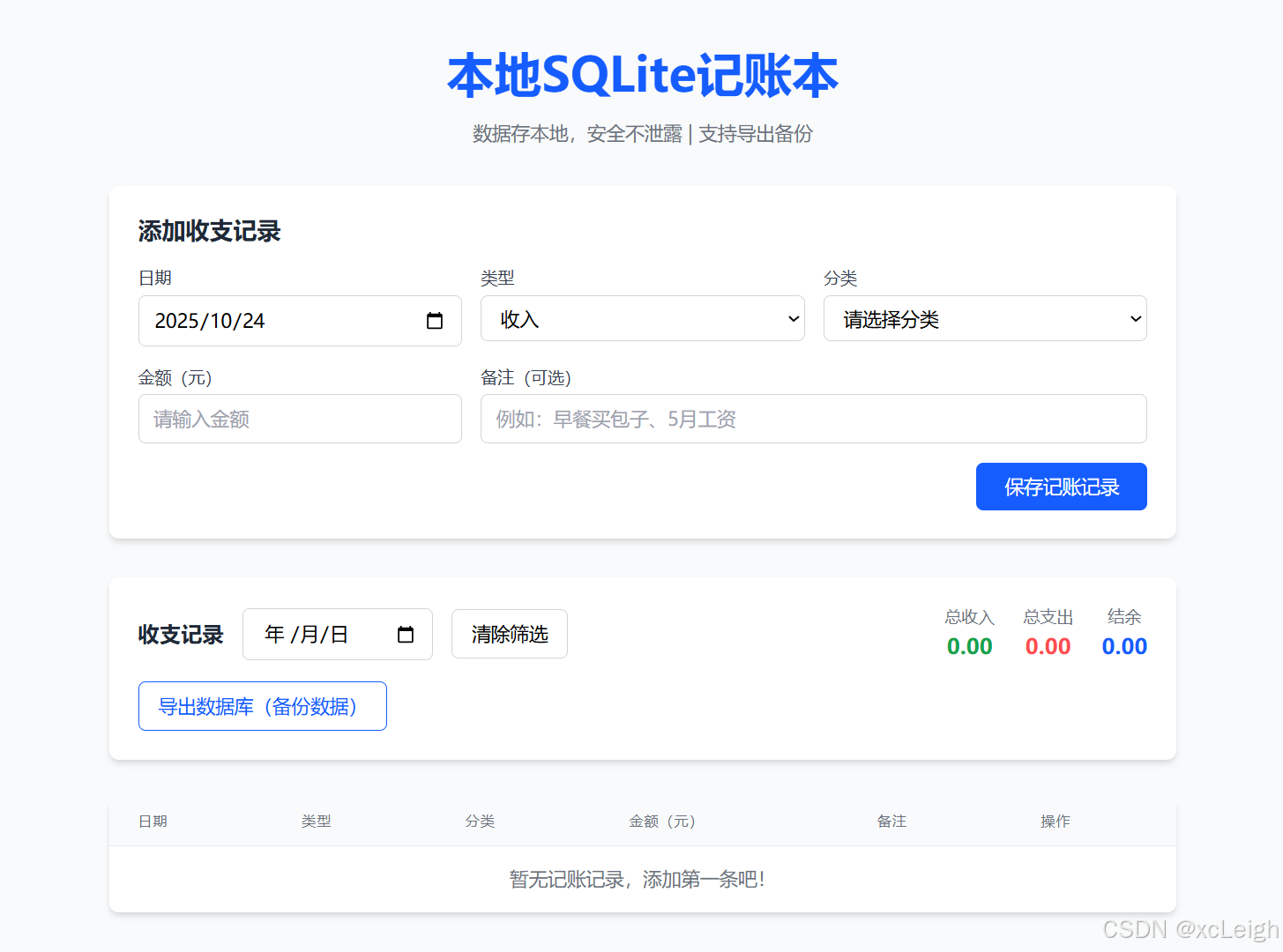
运行效果
几分钟 一个html项目就完成了!是不是 soeasy!!
四、使用说明:打开就能用,数据不丢失
- 运行方式:把上面代码保存为
account-book.html,双击文件用Chrome/Firefox打开,直接进入记账界面; - 核心功能:
- 加记录:选日期、类型、分类,输金额备注,点“保存”;
- 查记录:表格显示所有记录,可按日期筛选;
- 改/删记录:选中记录点“修改”(弹窗改数据)或“删除”(需确认);
- 备份数据:点“导出数据库”,下载
.db文件,下次想恢复时(后续可加导入功能,CodeBuddy也能生成);
- 数据安全:数据存在浏览器内存,关闭页面后不会丢(浏览器缓存保留),但换浏览器/清缓存会丢,所以一定要定期导出备份!
五、总结:CodeBuddy让前端开发门槛直接消失!
这次开发最大的感受是:CodeBuddy完全懂“新手需要什么”——我不用学sql.js的复杂API,不用记Tailwind的类名,甚至不用想“用户会怎么操作”,它会把所有复杂逻辑拆成简单代码,还帮你补全所有细节:
- 我没想到“前端连SQLite”,它推荐
sql.js还写好初始化代码; - 我忘了“分类要和收支类型联动”,它主动加了
onchange事件; - 我没考虑“数据备份”,它直接生成导出功能,还提醒“文件名带日期”。
对新手来说,这不仅能快速做出能用的工具,还能从代码里学规范(比如SQL关联查询、响应式布局);对熟手来说,省掉查文档、写重复代码的时间,专注做核心功能。如果你也想快速开发小工具,强烈试试CodeBuddy——它真的能让你从“卡代码”变成“顺顺利利做成品”,开发体验直接拉满!
联系博主
xcLeigh 博主,全栈领域优质创作者,博客专家,目前,活跃在CSDN、微信公众号、小红书、知乎、掘金、快手、思否、微博、51CTO、B站、腾讯云开发者社区、阿里云开发者社区等平台,全网拥有几十万的粉丝,全网统一IP为 xcLeigh。希望通过我的分享,让大家能在喜悦的情况下收获到有用的知识。主要分享编程、开发工具、算法、技术学习心得等内容。很多读者评价他的文章简洁易懂,尤其对于一些复杂的技术话题,他能通过通俗的语言来解释,帮助初学者更好地理解。博客通常也会涉及一些实践经验,项目分享以及解决实际开发中遇到的问题。如果你是开发领域的初学者,或者在学习一些新的编程语言或框架,关注他的文章对你有很大帮助。
亲爱的朋友,无论前路如何漫长与崎岖,都请怀揣梦想的火种,因为在生活的广袤星空中,总有一颗属于你的璀璨星辰在熠熠生辉,静候你抵达。
愿你在这纷繁世间,能时常收获微小而确定的幸福,如春日微风轻拂面庞,所有的疲惫与烦恼都能被温柔以待,内心永远充盈着安宁与慰藉。
至此,文章已至尾声,而您的故事仍在续写,不知您对文中所叙有何独特见解?期待您在心中与我对话,开启思想的新交流。
💞 关注博主 🌀 带你实现畅游前后端!
🥇 从零到一学习Python 🌀 带你玩转Python技术流!
🏆 人工智能学习合集 🌀 搭配实例教程与实战案例,帮你构建完整 AI 知识体系
💦 注:本文撰写于CSDN平台,作者:xcLeigh(所有权归作者所有) ,https://xcleigh.blog.csdn.net/,如果相关下载没有跳转,请查看这个地址,相关链接没有跳转,皆是抄袭本文,转载请备注本文原地址。

📣 亲,码字不易,动动小手,欢迎 点赞 ➕ 收藏,如 🈶 问题请留言(或者关注下方公众号,看见后第一时间回复,还有海量编程资料等你来领!),博主看见后一定及时给您答复 💌💌💌

汇聚全球AI编程工具,助力开发者即刻编程。
更多推荐

 123
123 0
0- 0


 已为社区贡献1条内容

所有评论(0)