
利用qoder开发React + HanziWriter 实现幼儿园汉字描红(支持笔顺演示 / 判错 / 拼音 / 组词)
本文基于 Qoder 编程工具,结合 React + TypeScript 技术栈,实现了一个面向幼儿园及小学低年级的汉字描红学习 Web 应用。项目以 HanziWriter 作为核心描红引擎,实现汉字笔顺校验、描红判错与动画演示;同时引入 cnchar 库补充汉字拼音、笔画数、笔画名称及常见组词等教学信息。在功能设计上,系统支持汉字逐笔画演示、错误自动重试、描红成功反馈以及自定义汉字输入,整体
本文基于 Qoder 编程工具,结合 React + TypeScript 技术栈,实现了一个面向幼儿园及小学低年级的汉字描红学习 Web 应用。项目以 HanziWriter 作为核心描红引擎,实现汉字笔顺校验、描红判错与动画演示;同时引入 cnchar 库补充汉字拼音、笔画数、笔画名称及常见组词等教学信息。
在功能设计上,系统支持汉字逐笔画演示、错误自动重试、描红成功反馈以及自定义汉字输入,整体交互过程更符合儿童认知与学习习惯。开发过程中,利用 Qoder 提升了组件封装、复杂交互逻辑实现及 TypeScript 类型约束的效率。
本文重点介绍了项目的技术选型、核心实现思路及关键代码实现方式,可为前端开发者在 汉字教育类 Web 应用、交互式书写练习系统 等场景下的开发提供参考。
效果如下:
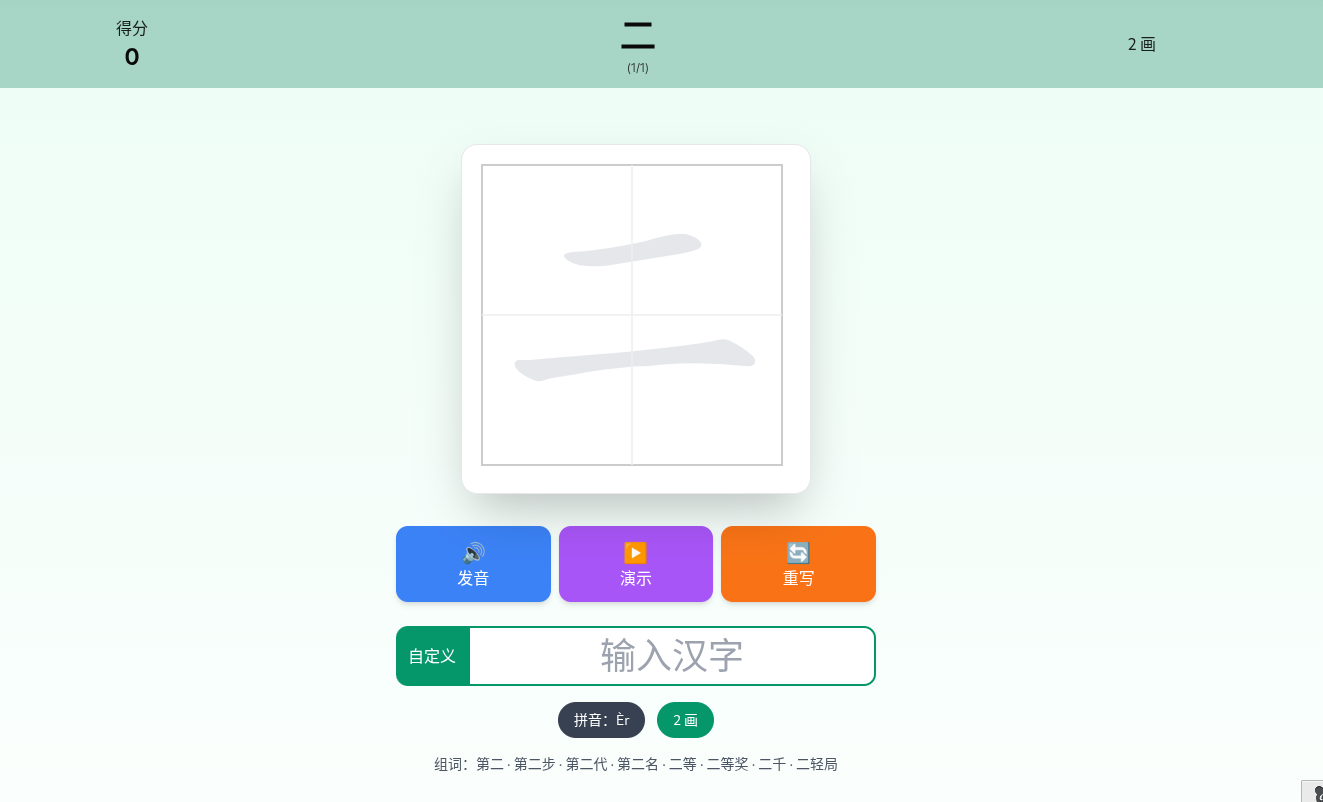
测试地址
可以注册体验AI编程 https://qoder.com/referral?referral_code=uItp8xNSq1aVeHoMGcLvtLU9atHrK8LH
二、技术选型(基于 Qoder 开发)
本项目整体采用 Qoder 作为主要开发工具,结合成熟的前端技术栈,快速完成汉字描红教学应用的实现。
1️⃣ Qoder(核心开发环境)
Qoder 是一款面向程序员的 AI 编程工具,适合用于:
- 项目整体架构设计
- 复杂逻辑的代码生成与重构
- 第三方库(如 HanziWriter、cnchar)的整合
- TypeScript 类型推导与错误修复
在本项目中,Qoder 主要用于:
- 快速生成 React + TypeScript 项目结构
- 协助封装汉字数据处理逻辑
- 优化描红判定、笔顺演示等复杂交互代码
- 提升开发效率,减少重复性编码工作
实际开发过程中,Qoder 更像一个 “智能协作者”,而不是替代人工编程。
三、安装依赖
npm install hanzi-writer cnchar cnchar-draw cnchar-order cnchar-poly cnchar-words cnchar-voice
如果使用 Vite:
npm create vite@latest hanzi-trace -- --template react-ts
cd hanzi-trace
npm install
npm run dev
四、全局类型声明(TypeScript 必须)
由于 cnchar 和 confetti 挂载在 window 上,需要声明全局类型:
declare global {
  interface Window {
    cnchar: any;
    confetti: any;
  }
}
五、汉字数据结构设计
interface Character {
  id: string;
  name: string;
  pinyin: string;
  strokeCount: number;
  strokeNames: string[];
  words: string[];
}
该结构用于 一次性承载一个汉字完整教学信息。
六、使用 cnchar 获取汉字信息
1️⃣ 封装统一方法
const getCharacterInfo = (char: string): Character => {
  const cnchar = window.cnchar;

  let pinyin = char;
  let strokeCount = 1;
  let strokeNames = ['未知'];
  let words: string[] = [];

  try { pinyin = cnchar.spell(char, 'tone'); } catch {}
  try { strokeCount = cnchar.stroke(char); } catch {}
  try { strokeNames = cnchar.order.strokeNames(char); } catch {}
  try { words = cnchar.words(char).slice(0, 8); } catch {}

  return {
    id: char,
    name: char,
    pinyin,
    strokeCount,
    strokeNames,
    words
  };
};
2️⃣ 获取的数据内容
- 拼音:
hǎo - 笔画数:
6 - 笔画顺序:横 → 竖 → 撇 …
- 常见组词:好人 · 好看 · 好吃
七、描红核心:HanziWriter Quiz 模式
初始化描红区域
writer = HanziWriter.create(container, char, {
  width: 320,
  height: 320,
  showOutline: true,
  showCharacter: false,
  leniency: 0.8
});
开启描红判定
writer.quiz({
  onCorrectStroke(data) {
    if (data.strokesRemaining === 0) {
      // 写完一个字
    }
  },
  onMistake() {
    // 错误反馈
  }
});
八、错误 3 次自动重来(幼儿友好)
if (mistakeCount >= 3) {
  显示“写错了”
  1.2 秒后重置
}
✔ 不需要孩子点击
✔ 自动进入下一轮练习
九、逐步笔画演示(重点)
为什么不用内置动画?
- 幼儿需要 “一步一步看清楚”
- 每一画都要能单独展示
实现思路
HanziWriter.loadCharacterData- 获取
strokes(SVG Path) - 每次
slice(0, i + 1) - 渲染为独立 SVG
核心代码
const charData = await HanziWriter.loadCharacterData(char);

for (let i = 0; i < charData.strokes.length; i++) {
  const strokes = charData.strokes.slice(0, i + 1);
  renderFanningStrokes(wrapper, strokes);
}
SVG 渲染
const renderFanningStrokes = (target, strokes) => {
  const svg = document.createElementNS('http://www.w3.org/2000/svg', 'svg');
  const group = document.createElementNS('http://www.w3.org/2000/svg', 'g');

  const transform = HanziWriter.getScalingTransform(75, 75);
  group.setAttribute('transform', transform.transform);

  strokes.forEach(d => {
    const path = document.createElementNS('http://www.w3.org/2000/svg', 'path');
    path.setAttribute('d', d);
    path.style.fill = '#1e40af';
    group.appendChild(path);
  });

  svg.appendChild(group);
  target.appendChild(svg);
};
📌 这是目前最稳定、不会错位的逐步演示方案
十、带编号的笔画动画演示
writer.animateCharacter();
在 onLoadCharDataSuccess 中:
- 读取
stroke.points[0] - 计算缩放比例
- 在起笔位置显示 红色编号
非常适合教学展示。
十一、汉字发音(双重兜底)
try {
  cnchar.voice(char);
} catch {
  speechSynthesis.speak(new SpeechSynthesisUtterance(char));
}
✔ 优先 cnchar 真人语音
✔ 浏览器 SpeechSynthesis 兜底
十二、自定义汉字输入
<input maxLength="1" />
逻辑说明:
- 输入一个字 → 单字练习模式
- 清空输入 → 回到系统字库
十五、完整代码
import { useState, useRef, useEffect } from 'react';
import HanziWriter from 'hanzi-writer';
import 'cnchar';
import 'cnchar-draw';
import 'cnchar-order';
import 'cnchar-poly';
import 'cnchar-words';
import 'cnchar-voice';

declare global {
  interface Window {
    cnchar: any;
    confetti: any;
  }
}

interface Character {
  id: string;
  name: string;
  pinyin: string;
  strokeCount: number;
  strokeNames: string[];
  words: string[];
}

const defaultCharacterList = [
'一', '二', '三', '十', '口', '人', '入', '八', '九', '了',
'儿', '几', '刀', '力', '又', '工', '土', '才', '寸', '大',
'小', '山', '川', '千', '万', '上', '下', '中', '五', '六',
'七', '八', '九', '十', '厂', '广', '门', '丫', '丸', '飞',
'马', '女', '子', '弓', '己', '已', '卫', '也', '习', '乡',
'书', '买', '乱', '乳', '乾', '云', '互', '井', '天', '夫',
'太', '夫', '区', '历', '尤', '友', '匹', '车', '牙', '屯',
'戈', '比', '毛', '气', '升', '长', '仁', '什', '片', '仆',
'化', '仇', '今', '介', '父', '从', '今', '凶', '分', '乏',
'公', '仓', '月', '氏', '勿', '欠', '风', '丹', '匀', '乌',
'勾', '凤', '六', '文', '方', '火', '为', '斗', '忆', '计',
'订', '户', '认', '冗', '讥', '心', '尺', '引', '丑', '巴',
'孔', '队', '办', '以', '允', '予', '邓', '劝', '双', '书',
'幻', '玉', '刊', '未', '末', '示', '击', '打', '巧', '正',
'扑', '扒', '功', '扔', '去', '甘', '世', '艾', '古', '节',
'本', '术', '可', '丙', '左', '厉', '石', '右', '布', '龙',
'平', '灭', '轧', '东', '卡', '北', '占', '凸', '卢', '业',
'旧', '帅', '归', '旦', '目', '且', '叶', '甲', '申', '电',
'田', '由', '史', '只', '央', '兄', '叼', '叫', '叩', '叨',
'另', '叹', '冉', '皿', '凹', '四', '生', '失', '禾', '丘',
'付', '仗', '代', '仙', '们', '仪', '白', '仔', '他', '斥',
'瓜', '乎', '丛', '令', '用', '甩', '印', '乐', '句', '匆',
'册', '卯', '犯', '外', '处', '冬', '鸟', '务', '包', '饥',
'主', '市', '立', '玄', '闪', '兰', '半', '汁', '汇', '头',
'汉', '宁', '穴', '它', '讨', '写', '让', '礼', '训', '议',
'必', '讯', '记', '永', '司', '尼', '民', '弗', '弘', '出',
'辽', '奶', '奴', '加', '召', '皮', '边', '发', '圣', '对',
'台', '矛', '纠', '母', '幼', '丝', '邦', '式', '刑', '戎',
'动', '扛', '寺', '吉', '扣', '考', '托', '老', '巩', '执',
'扩', '扫', '地', '场', '扬', '耳', '芋', '共', '芒', '亚',
'芝', '朽', '朴', '机', '权', '过', '臣', '再', '协', '西',
'压', '厌', '在', '百', '有', '存', '而', '页', '匠', '夸',
'夺', '灰', '达', '列', '死', '成', '夹', '夷', '轨', '邪',
'尧', '划', '迈', '毕', '至', '此', '贞', '师', '尘', '尖',
'劣', '光', '当', '早', '吐', '吓', '虫', '曲', '团', '同',
'吊', '吃', '因', '吸', '吗', '吆', '屿', '屹', '岁', '帆',
'回', '岂', '则', '刚', '网', '肉', '年', '朱', '先', '丢',
'廷', '舌', '竹', '迁', '乔', '迄', '伟', '传', '乒', '乓',
'休', '伍', '伏', '优', '臼', '伐', '延', '仲', '件', '任',
'伤', '价', '份', '华', '仰', '仿', '伙', '伪', '自', '伊',
'血', '向', '似', '后', '行', '舟', '全', '会', '杀', '合',
'兆', '企', '众', '爷', '伞', '创', '肌', '肋', '朵', '杂',
'危', '旬', '旨', '旭', '负', '匈', '名', '各', '多', '争',
'色', '壮', '冲', '妆', '冰', '庄', '庆', '亦', '刘', '齐',
'交', '衣', '次', '产', '决', '充', '妄', '闭', '问', '闯',
'羊', '并', '关', '米', '灯', '州', '汗', '污', '江', '池',
'汤', '忙', '兴', '宇', '守', '宅', '字', '安', '讲', '讳',
'军', '许', '论', '农', '讽', '设', '访', '寻', '那', '迅',
'尽', '导', '异', '弛', '孙', '阵', '阳', '收', '阶', '阴',
'防', '奸', '如', '妇', '好', '她', '妈', '戏', '羽', '观',
'欢', '买', '红', '纤', '级', '约', '纪', '驰', '纫', '巡',
'寿', '弄', '麦', '玖', '玛', '形', '进', '戒', '吞', '远',
'违', '运', '扶', '抚', '坛', '技', '坏', '抠', '扼', '找',
'批', '址', '扯', '走', '抄', '贡', '汞', '坝', '攻', '赤',
'折', '抓', '扳', '抡', '扮', '抢', '孝', '坎', '均', '抑',
'抛', '投', '坟', '抗', '坑', '坊', '抖', '护', '壳', '志',
'扭', '块', '声', '把', '报', '拟', '却', '抒', '劫', '芙',
'芜', '苇', '芽', '花', '芹', '芥', '苍', '芳', '严', '芦',
'芯', '劳', '克', '芭', '苏', '杆', '杠', '杜', '材', '村',
'杖', '杏', '杉', '巫', '极', '李', '杨', '求', '甫', '匣',
'更', '束', '吾', '豆', '两', '酉', '丽', '医', '辰', '励',
'否', '还', '尬', '歼', '来', '连', '轩', '步', '卤', '坚',
'肖', '旱', '盯', '呈', '时', '吴', '助', '县', '里', '呆',
'吱', '吠', '呕', '园', '围', '呀', '吨', '足', '邮', '男',
'困', '吵', '串', '员', '呐', '听', '吟', '吩', '呛', '吻',
'吹', '吼', '吧', '邑', '吼', '囤', '别', '吮', '岖', '岗',
'帐', '财', '针', '钉', '牡', '告', '我', '乱', '利', '秃',
'秀', '私', '每', '兵', '估', '体', '何', '佐', '佑', '但',
'伸', '佃', '作', '伯', '伶', '佣', '低', '你', '住', '位',
'伴', '身', '皂', '伺', '佛', '囱', '近', '彻', '役', '返',
'余', '希', '坐', '谷', '妥', '含', '邻', '岔', '肝', '肚',
'肘', '肠', '龟', '免', '狂', '犹', '狈', '狐', '狗', '狞',
'状', '狈', '狙', '猪', '猫', '猛', '猜', '猪', '猎', '猫',
'凰', '狠', '率', '猴', '猩', '猾', '现', '琢', '班', '狸',
'球', '琅', '理', '琉', '琉', '琅', '斑', '琢', '斑', '理',
'琉', '琅', '斑', '琢', '班', '狸', '球', '琅', '理', '琉',
'琉', '琅', '斑', '琢', '班', '狸', '球', '琅', '理', '琉'
];

const getCharacterInfo = (char: string): Character => {
  if (!char || char.length !== 1) return { id: '', name: '', pinyin: '', strokeCount: 1, strokeNames: ['未知'], words: [] };

  const cnchar = (window as any).cnchar;
  if (!cnchar) return { id: char, name: char, pinyin: char, strokeCount: 1, strokeNames: ['未知'], words: [] };

  let pinyin = char;
  let strokeCount = 1;
  let strokeNames: string[] = ['未知'];
  let words: string[] = [];

  try { const spell = cnchar.spell(char, 'tone'); if (spell) pinyin = spell; } catch {}
  try { const count = cnchar.stroke(char); if (typeof count === 'number' && count > 0) strokeCount = count; } catch {}
  try { const names = cnchar.order.strokeNames(char); if (Array.isArray(names) && names.length > 0) strokeNames = names; } catch {}
  try { const wordList = cnchar.words(char); if (Array.isArray(wordList)) words = wordList.slice(0, 8); } catch {}

  return { id: char, name: char, pinyin, strokeCount, strokeNames, words };
};

// ====== 你提供的经典逐步演示函数(已转成 TS 并优化) ======
const renderFanningStrokes = (target: HTMLDivElement, strokes: string[]) => {
  const svg = document.createElementNS('http://www.w3.org/2000/svg', 'svg');
  svg.style.width = '90px';
  svg.style.height = '90px';
  svg.style.border = '2px solid #e5e7eb';
  svg.style.borderRadius = '12px';
  svg.style.background = '#ffffff';
  svg.style.boxShadow = '0 4px 10px rgba(0,0,0,0.1)';
  svg.style.margin = '0 8px';
  target.appendChild(svg);

  const group = document.createElementNS('http://www.w3.org/2000/svg', 'g');
  const transformData = HanziWriter.getScalingTransform(75, 75);
  group.setAttributeNS(null, 'transform', transformData.transform);
  svg.appendChild(group);

  strokes.forEach(strokePath => {
    const path = document.createElementNS('http://www.w3.org/2000/svg', 'path');
    path.setAttributeNS(null, 'd', strokePath);
    path.style.fill = '#1e40af';
    group.appendChild(path);
  });
};

export default function App() {
  const [currentIndex, setCurrentIndex] = useState(0);
  const [score, setScore] = useState(0);
  const [showSuccess, setShowSuccess] = useState(false);
  const [showMistake, setShowMistake] = useState(false);
  const [customChar, setCustomChar] = useState('');
  const [customInfo, setCustomInfo] = useState<Character | null>(null);

  const displayRef = useRef<HTMLDivElement>(null);
  const fanningRef = useRef<HTMLDivElement>(null);
  const writerRef = useRef<any>(null);
  const mistakeCountRef = useRef(0);

  const list = customInfo ? [customInfo] : defaultCharacterList.map(getCharacterInfo);
  const currentChar = customInfo || list[currentIndex];

  useEffect(() => {
    const script = document.createElement('script');
    script.src = 'https://cdnjs.cloudflare.com/ajax/libs/canvas-confetti/1.9.3/confetti.min.js';
    script.async = true;
    document.body.appendChild(script);

    return () => {
      document.body.removeChild(script);
    };
  }, []);

  const fireConfetti = () => {
    if (!window.confetti) return;
    window.confetti({
      particleCount: 150,
      spread: 70,
      origin: { y: 0.6 },
      zIndex: 9999
    });
  };

  // ====== 逐步笔画演示:使用你提供的可靠方式 ======
  const renderProgressiveStrokes = async () => {
    if (!fanningRef.current) return;
    fanningRef.current.innerHTML = '';

    const charData = await HanziWriter.loadCharacterData(currentChar.name);
    if (!charData || !charData.strokes) return;

    for (let i = 0; i < charData.strokes.length; i++) {
      const strokesPortion = charData.strokes.slice(0, i + 1);

      const wrapper = document.createElement('div');
      wrapper.className = 'flex flex-col items-center flex-shrink-0';

      renderFanningStrokes(wrapper, strokesPortion);

      const label = document.createElement('div');
      label.textContent = `${i + 1}`;
      label.className = 'mt-3 w-10 h-10 rounded-full bg-emerald-600 text-white flex items-center justify-center text-lg font-bold shadow';

      wrapper.appendChild(label);
      fanningRef.current.appendChild(wrapper);
    }
  };

  const destroyWriter = () => {
    if (writerRef.current) {
      writerRef.current.cancelQuiz?.();
      writerRef.current = null;
    }
    if (displayRef.current) displayRef.current.innerHTML = '';
  };

  const initQuiz = () => {
    if (!displayRef.current || !currentChar) return;
    destroyWriter();
    mistakeCountRef.current = 0;

    const size = Math.min(window.innerWidth - 40, 340);
    const inner = size - 40;

    writerRef.current = HanziWriter.create(displayRef.current, currentChar.name, {
      width: size,
      height: size,
      padding: 20,
      showOutline: true,
      outlineColor: '#e5e7eb',
      strokeColor: '#166534',
      showCharacter: false,
      drawingWidth: 50,
      showHintAfterMisses: 5,
      leniency: 0.8,
      highlightOnComplete: true,
      onLoadCharDataSuccess: () => {
        const grid = `
          <svg width="${size}" height="${size}" style="position:absolute;top:0;left:0;pointer-events:none;z-index:1;">
            <rect x="20" y="20" width="${inner}" height="${inner}" fill="none" stroke="#ccc" stroke-width="2"/>
            <line x1="${size/2}" y1="20" x2="${size/2}" y2="${size-20}" stroke="#eee" stroke-width="1.5"/>
            <line x1="20" y1="${size/2}" x2="${size-20}" y2="${size/2}" stroke="#eee" stroke-width="1.5"/>
          </svg>`;
        displayRef.current!.insertAdjacentHTML('afterbegin', grid);
      }
    });

    writerRef.current.quiz({
      onCorrectStroke: (data: any) => {
        mistakeCountRef.current = 0;
        if (data.strokesRemaining === 0) {
          setScore(s => s + 10);
          setShowSuccess(true);
          fireConfetti();
          setTimeout(() => {
            setShowSuccess(false);
            if (!customInfo && currentIndex < defaultCharacterList.length - 1) {
              setCurrentIndex(i => i + 1);
            }
          }, 2500);
        }
      },
      onMistake: () => {
        navigator.vibrate?.([150]);
        writerRef.current.hideIncorrectStroke?.();
        writerRef.current.flashStroke({ color: '#ef4444', duration: 600 });

        mistakeCountRef.current += 1;
        if (mistakeCountRef.current >= 3) {
          setShowMistake(true);
          setTimeout(() => {
            setShowMistake(false);
            initQuiz();
          }, 1200);
        }
      }
    });
  };

  const showAnimationWithNumbers = () => {
    destroyWriter();
    if (!displayRef.current || !currentChar) return;

    const size = Math.min(window.innerWidth - 40, 340);
    const inner = size - 40;

    writerRef.current = HanziWriter.create(displayRef.current, currentChar.name, {
      width: size,
      height: size,
      padding: 20,
      showOutline: true,
      outlineColor: '#e5e7eb',
      strokeColor: '#166534',
      showCharacter: false,
      drawingWidth: 45,
      onLoadCharDataSuccess: (data: any) => {
        const grid = `
          <svg width="${size}" height="${size}" style="position:absolute;top:0;left:0;pointer-events:none;z-index:1;">
            <rect x="20" y="20" width="${inner}" height="${inner}" fill="none" stroke="#ccc" stroke-width="2"/>
            <line x1="${size/2}" y1="20" x2="${size/2}" y2="${size-20}" stroke="#eee" stroke-width="1.5"/>
            <line x1="20" y1="${size/2}" x2="${size-20}" y2="${size/2}" stroke="#eee" stroke-width="1.5"/>
          </svg>`;
        displayRef.current!.insertAdjacentHTML('afterbegin', grid);

        data.strokes.forEach((stroke: any, i: number) => {
          if (stroke.points?.length > 0) {
            const start = stroke.points[0];
            const scale = inner / 1024;
            const x = 20 + (size - inner - 40) / 2 + start.x * scale;
            const y = 20 + (size - inner - 40) / 2 + start.y * scale - 25;

            const num = document.createElement('div');
            num.textContent = `${i + 1}`;
            num.className = 'absolute text-5xl font-black text-red-600 pointer-events-none z-10 drop-shadow-lg';
            num.style.left = `${x}px`;
            num.style.top = `${y}px`;
            displayRef.current!.appendChild(num);
          }
        });
      }
    });

    writerRef.current.animateCharacter();
  };

  const playVoice = () => {
    const cnchar = (window as any).cnchar;
    try {
      cnchar.voice(currentChar.name);
    } catch {
      speechSynthesis.speak(new SpeechSynthesisUtterance(currentChar.name));
    }
  };

  useEffect(() => {
    if (!currentChar) return;

    // 渲染逐步演示
    renderProgressiveStrokes();

    setTimeout(initQuiz, 300);

    return () => destroyWriter();
  }, [currentChar]);

  const handleCustomInput = (e: React.ChangeEvent<HTMLInputElement>) => {
    const val = e.target.value.trim();
    setCustomChar(val);
    if (val.length === 1) {
      setCustomInfo(getCharacterInfo(val));
      setCurrentIndex(0);
      setScore(0);
    } else {
      setCustomInfo(null);
    }
  };

  const prev = () => { if (!customInfo && currentIndex > 0) setCurrentIndex(i => i - 1); };
  const next = () => { if (!customInfo && currentIndex < defaultCharacterList.length - 1) setCurrentIndex(i => i + 1); };

  return (
    <div className="min-h-screen bg-gradient-to-b from-emerald-50 to-white flex flex-col">
      <header className="bg-emerald-600 text-white py-3 shadow-lg">
        <div className="container mx-auto px-4">
          <h1 className="text-2xl font-bold text-center">幼儿园汉字描红</h1>
          <div className="flex justify-around items-center mt-2 text-sm">
            <div className="text-center">
              <p className="opacity-90">得分</p>
              <p className="text-2xl font-bold">{score}</p>
            </div>
            <div className="text-center">
              <p className="text-4xl font-black my-1">{currentChar.name}</p>
              {!customInfo && <p className="text-xs opacity-80">({currentIndex + 1}/{defaultCharacterList.length})</p>}
            </div>
          </div>
        </div>
      </header>

      <main className="flex-1 container mx-auto px-4 py-4 max-w-lg">
        <div className="relative bg-white rounded-2xl shadow-xl overflow-hidden mb-5" style={{ maxHeight: '380px' }}>
          <div ref={displayRef} className="w-full h-full" />
          {showMistake && mistakeCountRef.current >= 3 && (
            <div className="absolute inset-0 bg-red-600/95 rounded-2xl flex flex-col items-center justify-center text-white z-50 animate-pulse">
              <div className="text-8xl mb-4">✗</div>
              <div className="text-3xl font-bold">写错了!</div>
              <div className="text-xl mt-2">重新开始</div>
            </div>
          )}
        </div>

        <div className="grid grid-cols-3 gap-3 mb-5">
          <button onClick={playVoice} className="bg-blue-500 hover:bg-blue-600 text-white font-medium py-4 rounded-xl shadow-md active:scale-95 transition">
            <span className="text-2xl">🔊</span><br />发音
          </button>
          <button onClick={showAnimationWithNumbers} className="bg-purple-500 hover:bg-purple-600 text-white font-medium py-4 rounded-xl shadow-md active:scale-95 transition">
            <span className="text-2xl">▶️</span><br />演示
          </button>
          <button onClick={initQuiz} className="bg-orange-500 hover:bg-orange-600 text-white font-medium py-4 rounded-xl shadow-md active:scale-95 transition">
            <span className="text-2xl">🔄</span><br />重写
          </button>
        </div>

        {/* 自定义输入框 - 高度适中 */}
          <div className="flex w-full mb-4">
        <span
          className="
            bg-emerald-600 text-white
            px-3 sm:px-5
            py-2 sm:py-3
            rounded-l-xl
            font-medium
            flex items-center
            text-base sm:text-lg
            whitespace-nowrap
          "
        >
          自定义
        </span>

        <input
          type="text"
          value={customChar}
          onChange={handleCustomInput}
          placeholder="输入汉字"
          maxLength={1}
          className="
            flex-1 min-w-0
            text-center
            text-2xl sm:text-4xl
            py-2 sm:py-3
            border-2 border-emerald-600
            rounded-r-xl
            focus:outline-none
            focus:ring-4 focus:ring-emerald-300
          "
        />
      </div>


        <div className="flex flex-wrap justify-center gap-2 mb-4">
          <span className="bg-gray-700 text-white px-4 py-2 rounded-full text-sm">拼音:{currentChar.pinyin}</span>
          <span className="bg-emerald-600 text-white px-4 py-2 rounded-full text-sm">{currentChar.strokeCount} 画</span>
        </div>
        {currentChar.strokeNames.length > 1 && (
          <p className="text-center text-sm text-gray-600 mb-3">
            笔画:{currentChar.strokeNames.join(' → ')}
          </p>
        )}
        {currentChar.words.length > 0 && (
          <p className="text-center text-sm text-gray-600 mb-5">
            组词:{currentChar.words.join(' · ')}
          </p>
        )}

        {/* 逐步笔画演示 - 现在一定正确显示! */}
        <div className="mb-6">
          <p className="text-center font-semibold text-gray-800 mb-3 text-lg">逐步笔画演示(← 左右滑动查看 →)</p>
          <div className="overflow-x-auto pb-3">
            <div ref={fanningRef} className="flex" />
          </div>
        </div>

        {!customInfo && (
          <div className="flex justify-center gap-8 mt-4">
            <button onClick={prev} disabled={currentIndex === 0} className="bg-gray-200 hover:bg-gray-300 disabled:opacity-50 px-8 py-3 rounded-xl font-medium text-lg shadow active:scale-95">
              ← 上一个
            </button>
            <button onClick={next} disabled={currentIndex === defaultCharacterList.length - 1} className="bg-gray-200 hover:bg-gray-300 disabled:opacity-50 px-8 py-3 rounded-xl font-medium text-lg shadow active:scale-95">
              下一个 →
            </button>
          </div>
        )}
      </main>

      {showSuccess && (
        <div className="fixed inset-0 bg-black/50 flex items-center justify-center z-50">
          <div className="bg-white rounded-3xl px-12 py-10 text-center shadow-2xl animate-bounce">
            <p className="text-7xl mb-4">🎉</p>
            <p className="text-3xl font-bold text-emerald-600">写对了!</p>
            <p className="text-2xl mt-2">+10 分</p>
          </div>
        </div>
      )}
    </div>
  );
}

汇聚全球AI编程工具,助力开发者即刻编程。
更多推荐

 14
14 0
0- 0


 已为社区贡献1条内容

所有评论(0)