
本地安装 light RAG + ollama 本地启动
LightRAG是由***大学数据科学实验室开发的轻量级开源RAG解决方案,支持文档索引、知识图谱构建和语义检索。本文介绍了两种安装方式:通过PyPI安装lightrag-hku[api]或从源码安装。配置方面,需修改lightrag_ollama_demo.py文件中的模型参数和本地文本路径,并运行测试文件。项目兼容Ollama接口,可轻松集成到AI对话平台中。文中还提供了修改pip依赖源的方法
引言
以下是一段为您的文章撰写的引言(Introduction),适用于介绍 LightRAG 项目的背景、功能及其使用方式:
随着人工智能技术的快速发展,基于大语言模型(LLM)的知识检索与问答系统在企业级应用中变得越来越重要。为了更好地结合知识图谱与 RAG(Retrieval-Augmented Generation)技术,实现对私有文档内容的高效查询与理解,LightRAG 应运而生。
LightRAG 是由香港大学数据科学实验室开发的一个轻量级开源项目,旨在提供一个灵活、高效的本地化 RAG 解决方案。它不仅支持通过 Web UI 和 API 接口进行文档索引、知识图谱构建和语义检索,还兼容 Ollama 模型接口,使得用户可以轻松地将其集成到各类 AI 对话平台中,如 Open WebUI 等。
本文将详细介绍如何从 GitHub 下载并安装 LightRAG,包括通过源码安装 LightRAG Core 及其 API 支持模块,并演示如何配置本地 Ollama 环境,使其与 LightRAG 集成运行。此外,还将展示如何修改核心配置文件以适配本地文本数据,并通过运行 lightrag_ollama_demo.py 文件来测试系统的完整流程。
无论您是希望搭建一个本地知识库检索系统,还是想深入了解 RAG 技术的实际应用,本文都将为您提供清晰的操作指引与实践参考。

下载地址: https://github.com/HKUDS/LightRAG
这是一个python项目, 下载下来后直接用编辑器运行就行了, 我用的 1.3.9 这个版本
--------------------------下列信息来自github--------------------------
Install LightRAG Server
The LightRAG Server is designed to provide Web UI and API support. The Web UI facilitates document indexing, knowledge graph exploration, and a simple RAG query interface. LightRAG Server also provide an Ollama compatible interfaces, aiming to emulate LightRAG as an Ollama chat model. This allows AI chat bot, such as Open WebUI, to access LightRAG easily.
- Install from PyPI
pip install "lightrag-hku[api]"
- Installation from Source
git clone https://github.com/HKUDS/LightRAG.git
cd LightRAG
# create a Python virtual enviroment if neccesary
# Install in editable mode with API support
pip install -e ".[api]"
- Launching the LightRAG Server with Docker Compose
git clone https://github.com/HKUDS/LightRAG.git
cd LightRAG
cp env.example .env
# modify LLM and Embedding settings in .env
docker compose up
Historical versions of LightRAG docker images can be found here: LightRAG Docker Images
Install LightRAG Core
- Install from source (Recommend)
cd LightRAG
pip install -e .
- Install from PyPI
pip install lightrag-hku
--------------------------上列信息来自github--------------------------
修改 pip 依赖地址
# 永久换源(阿里)pip
config set global.index-url https://mirrors.aliyun.com/pypi/simple/
# 临时换源(阿里)
pip install markdown -i https://mirrors.aliyun.com/pypi/simple/
参考: https://zhuanlan.zhihu.com/p/1905263530468448140
我用的安装方式
git clone https://github.com/HKUDS/LightRAG.git
cd LightRAG
Install LightRAG Core
pip install -e .
# create a Python virtual enviroment if neccesary
# Install in editable mode with API support
pip install -e ".[api]"
执行到这里基本上可以启动了, 接下来开始探索lightRAG
安装依赖
# 在源码上安装
cd LightRAG
pip install -e .
# 在安装 lightRag的API包
pip install -e ".[api]"
本地启动 ollama+lightRAG
ollama 安装可以参考这个:
https://editor.csdn.net/md/?articleId=148744583
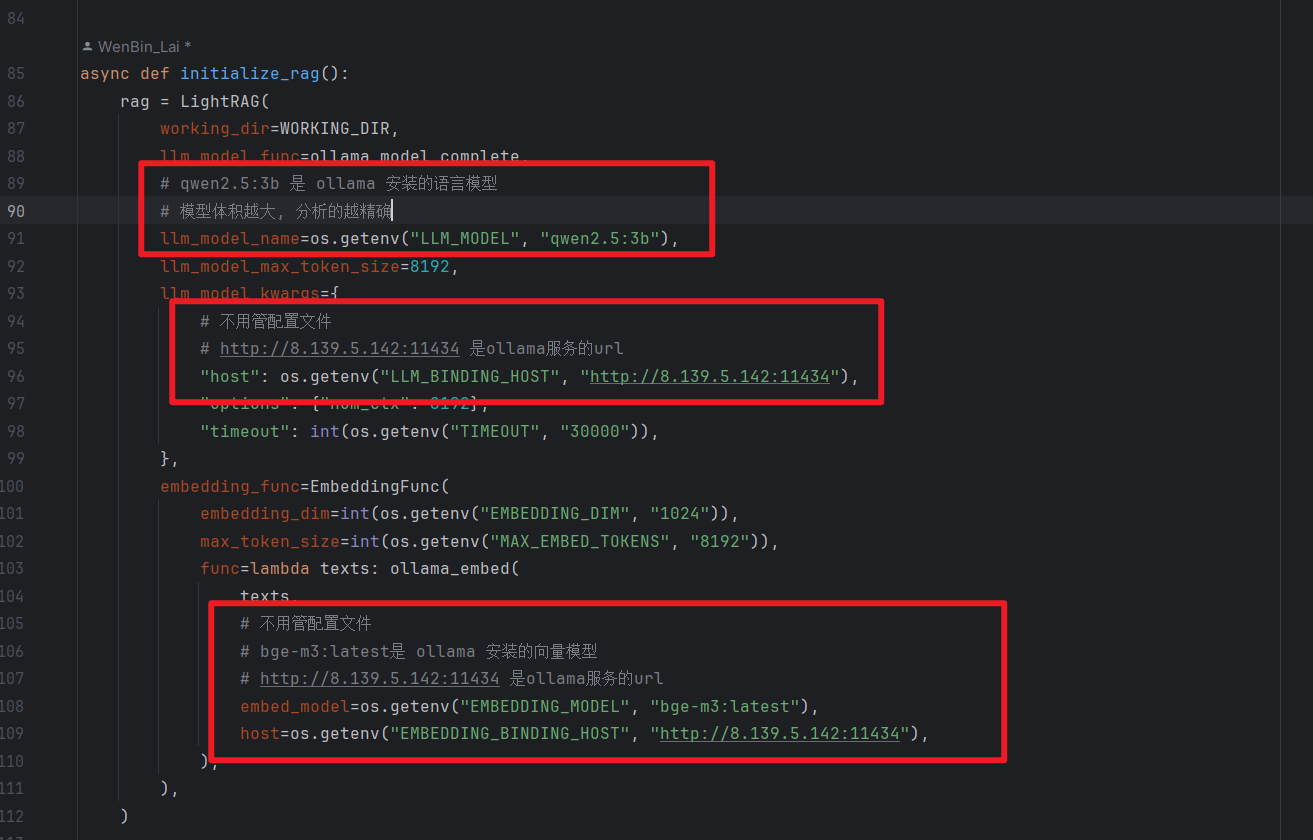
修改配置
修改: examples/lightrag_ollama_demo.py
第85行的 async def initialize_rag()方法
async def initialize_rag():
    rag = LightRAG(
        working_dir=WORKING_DIR,
        llm_model_func=ollama_model_complete,
        # qwen2.5:3b 是 ollama 安装的语言模型
        # 模型体积越大, 分析的越精确
        llm_model_name=os.getenv("LLM_MODEL", "qwen2.5:3b"),
        llm_model_max_token_size=8192,
        llm_model_kwargs={
            # 不用管配置文件
            # http://8.139.5.142:11434 是ollama服务的url
            "host": os.getenv("LLM_BINDING_HOST", "http://8.139.5.142:11434"),
            "options": {"num_ctx": 8192},
            "timeout": int(os.getenv("TIMEOUT", "30000")),
        },
        embedding_func=EmbeddingFunc(
            embedding_dim=int(os.getenv("EMBEDDING_DIM", "1024")),
            max_token_size=int(os.getenv("MAX_EMBED_TOKENS", "8192")),
            func=lambda texts: ollama_embed(
                texts,
                # 不用管配置文件
                # bge-m3:latest是 ollama 安装的向量模型
                # http://8.139.5.142:11434 是ollama服务的url
                embed_model=os.getenv("EMBEDDING_MODEL", "bge-m3:latest"),
                host=os.getenv("EMBEDDING_BINDING_HOST", "http://8.139.5.142:11434"),
            ),
        ),
    )

    await rag.initialize_storages()
    await initialize_pipeline_status()

    return rag
修改demo 的分析文件, 改成本地的文本文件, 可以
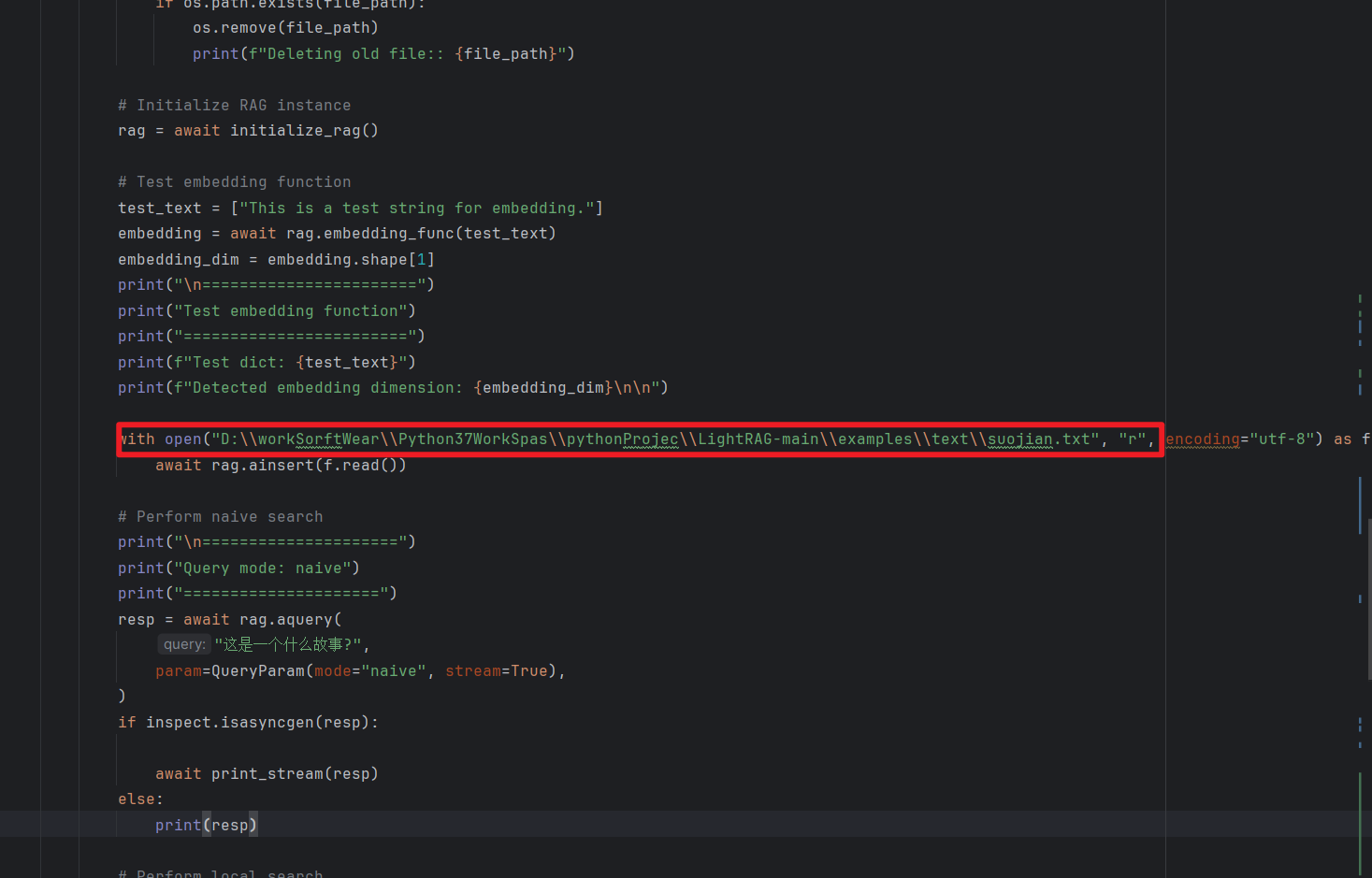
运行当前文件
我性能不够, 跑到这里就算完事了, 后续可以看API版使用千问大模型的效果吧
LightRAG compatible demo log file: D:\workSorftWear\Python37WorkSpas\pythonProjec\LightRAG-main\examples\lightrag_ollama_demo.log

Deleting old file:: ./dickens\kv_store_doc_status.json
INFO: Process 28572 Shared-Data created for Single Process
INFO: Created new empty graph
INFO:nano-vectordb:Init {'embedding_dim': 1024, 'metric': 'cosine', 'storage_file': './dickens\\vdb_entities.json'} 0 data
INFO:nano-vectordb:Init {'embedding_dim': 1024, 'metric': 'cosine', 'storage_file': './dickens\\vdb_relationships.json'} 0 data
INFO:nano-vectordb:Init {'embedding_dim': 1024, 'metric': 'cosine', 'storage_file': './dickens\\vdb_chunks.json'} 0 data
INFO: Process 28572 initialized updated flags for namespace: [full_docs]
INFO: Process 28572 ready to initialize storage namespace: [full_docs]
INFO: Process 28572 KV load full_docs with 0 records
INFO: Process 28572 initialized updated flags for namespace: [text_chunks]
INFO: Process 28572 ready to initialize storage namespace: [text_chunks]
INFO: Process 28572 KV load text_chunks with 0 records
INFO: Process 28572 initialized updated flags for namespace: [entities]
INFO: Process 28572 initialized updated flags for namespace: [relationships]
INFO: Process 28572 initialized updated flags for namespace: [chunks]
INFO: Process 28572 initialized updated flags for namespace: [chunk_entity_relation]
INFO: Process 28572 initialized updated flags for namespace: [llm_response_cache]
INFO: Process 28572 ready to initialize storage namespace: [llm_response_cache]
INFO: Process 28572 KV load llm_response_cache with 0 records
INFO: Process 28572 initialized updated flags for namespace: [doc_status]
INFO: Process 28572 ready to initialize storage namespace: [doc_status]
INFO: Process 28572 doc status load doc_status with 0 records
INFO: Process 28572 storage namespace already initialized: [full_docs]
INFO: Process 28572 storage namespace already initialized: [text_chunks]
INFO: Process 28572 storage namespace already initialized: [llm_response_cache]
INFO: Process 28572 storage namespace already initialized: [doc_status]
INFO: Process 28572 Pipeline namespace initialized
INFO: limit_async: 16 new workers initialized
INFO: Storage Initialization completed!

=======================
Test embedding function
========================
Test dict: ['This is a test string for embedding.']
Detected embedding dimension: 1024


INFO: Stored 1 new unique documents
INFO: Processing 1 document(s)
INFO: Extracting stage 1/1: unknown_source
INFO: Processing d-id: doc-9092c7fe620f2f55621ceae8c3d77f4a
INFO: limit_async: 4 new workers initialized
INFO:  == LLM cache == saving default: 5e2a429552b4ea38acaa37c0dcc5ac24
INFO: Document processing pipeline completed


汇聚全球AI编程工具,助力开发者即刻编程。
更多推荐


 25
25 0
0- 0


 已为社区贡献2条内容

所有评论(0)