
ollama+qwen2.5vl:7b多模态做图片和文件分析
·
目录
序言
这个没啥可说,就是调本地ollama的接口.
下载多模型和接口测试
先下一个能分析图片和文件的模型,这里就是qwen2.5vl:7b 了
下载模型
ollama pull qwen2.5vl:7b

运行模型
ollama pull qwen2.5vl:7b
然后先用postman 测一下吧,直接看图
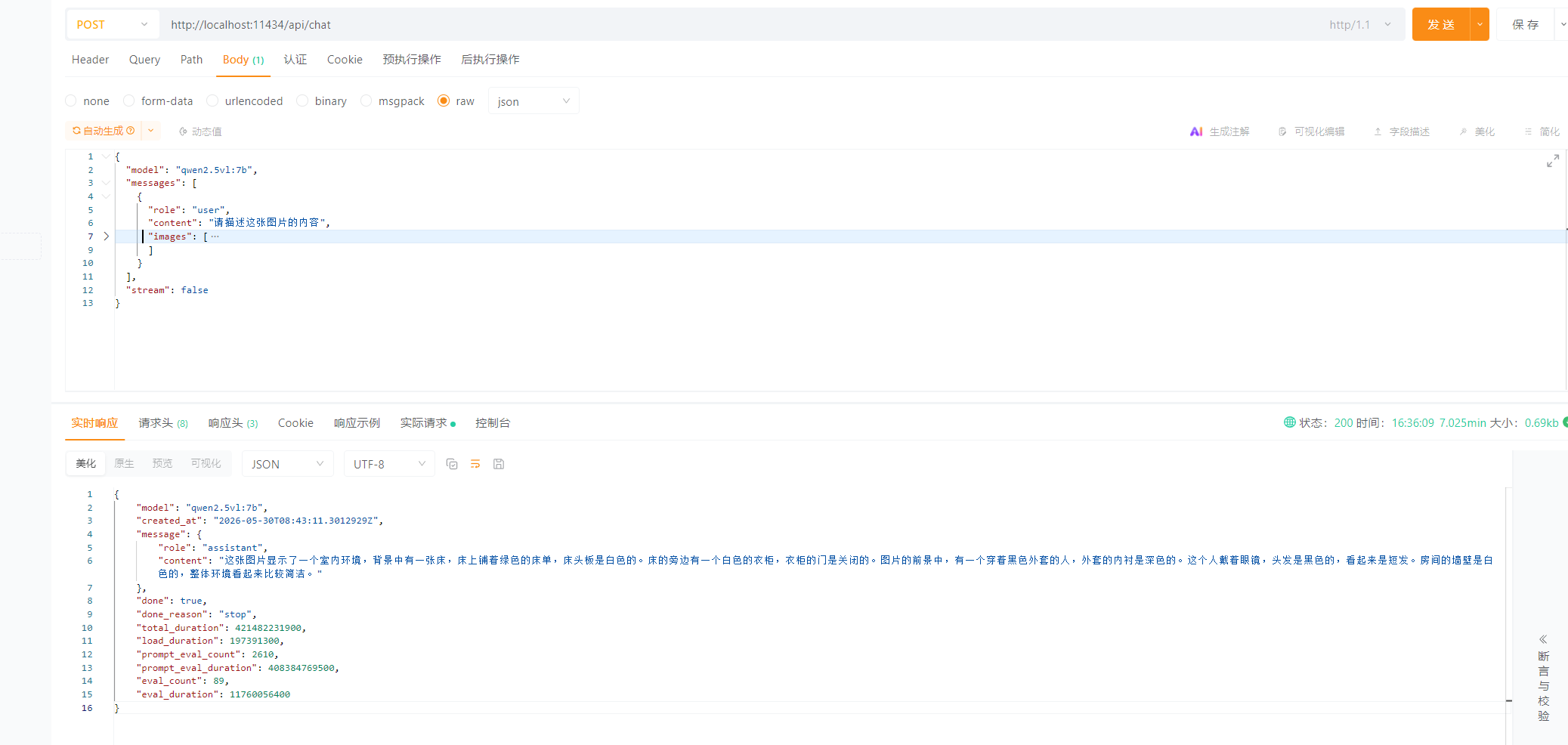
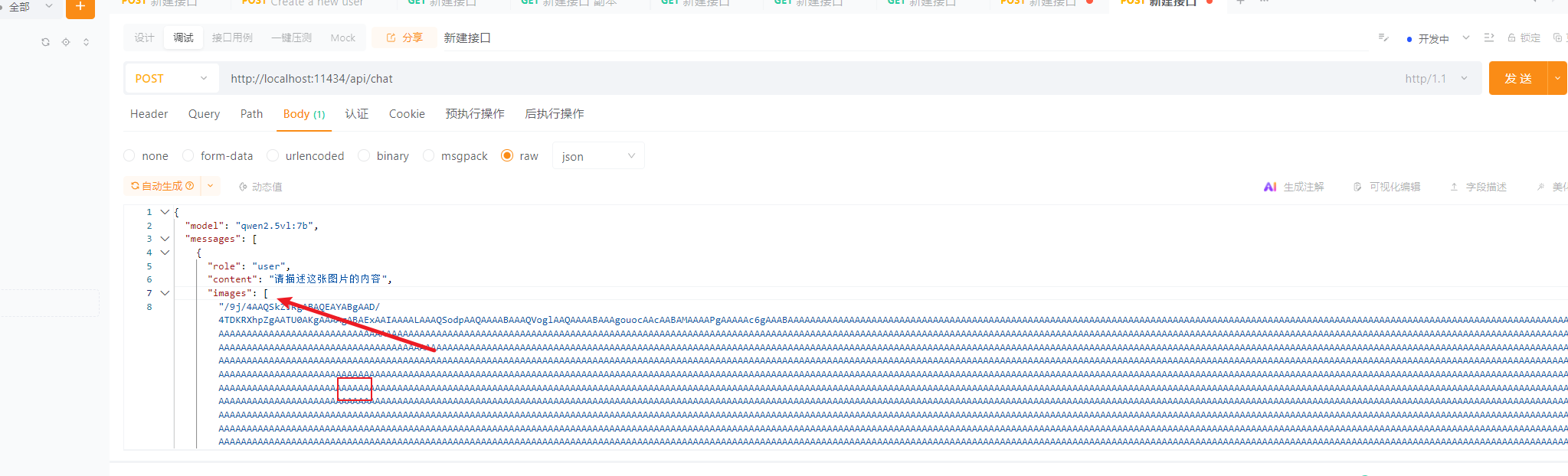
接口要求传入的图片和文件是base64的,并且开头要把base64的标识给拿掉。
因为我们用转文件的工具得到的编码是这样的:
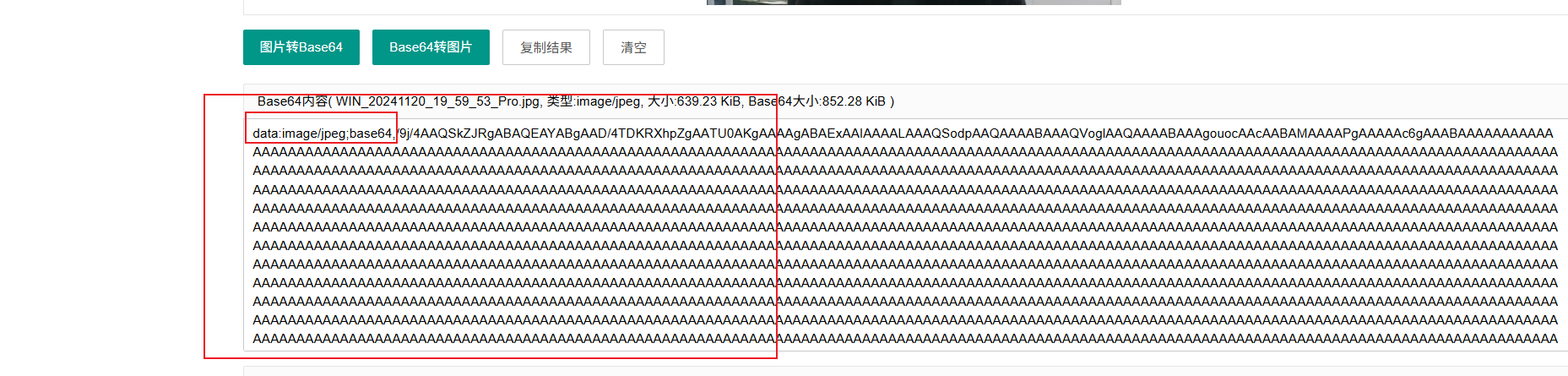
要把前面那一段base64给拿掉。
代码
代码地址:https://download.csdn.net/download/csdnliuxin123524/92924211
下载后,执行命令安装、打包、启动命令就行了
- npm install
- npm run build
- npm start
效果如下:
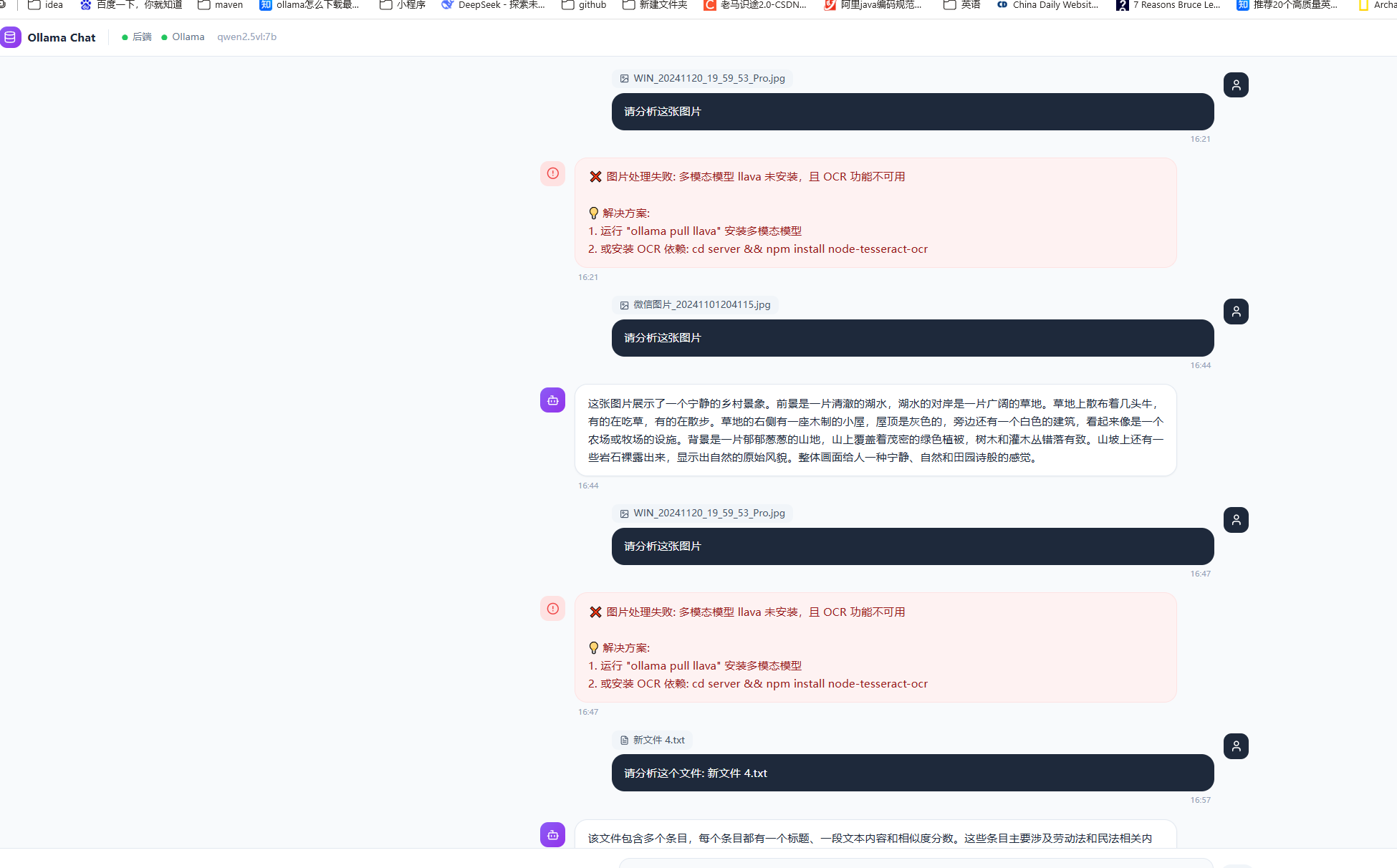
总体一般,因为是本地电脑,性能一般,所以处理很慢,处理几K的文件或图片还行,视频都没试,如果是7、8百k的文件就报错了。
部分代码
代码没啥好讲的,后端接口在server/index.js:
/**
 * Ollama Chat - Node.js 原生 HTTP 服务
 *
 * 纯 Node.js http 模块实现,不依赖 Express
 * 统一端口 3000,同时托管 API + 前端静态文件
 *
 * 启动方式:
 *   开发: npm run dev   (vite --watch 编译 + node server)
 *   生产: npm start     (直接运行,需先 npm run build)
 */

// ========== 1. 加载环境变量 ==========
const path = require('path');
const dotenv = require('dotenv');
dotenv.config({ path: path.resolve(__dirname, '..', '.env') });

console.log('[env] OLLAMA_URL =', process.env.OLLAMA_URL);
console.log('[env] TEXT_MODEL =', process.env.TEXT_MODEL);
console.log('[env] VISION_MODEL =', process.env.VISION_MODEL);
console.log('[env] PORT =', process.env.PORT);

// ========== 2. 内置模块 ==========
const http = require('http');
const fs = require('fs');
const fsPromises = fs.promises;
const url = require('url');
const multiparty = require('multiparty');

// ========== 3. 业务模块 ==========
const ollama = require('./services/ollama');
const fileProcessor = require('./services/fileProcessor');

// 常量
const PORT = process.env.PORT || 3000;
const distPath = path.resolve(__dirname, '..', 'dist');
const uploadsDir = path.join(__dirname, 'uploads');

// 确保上传目录存在
if (!fs.existsSync(uploadsDir)) {
  fs.mkdirSync(uploadsDir, { recursive: true });
}

// MIME 类型映射
const MIME_TYPES = {
  '.html': 'text/html',
  '.js': 'application/javascript',
  '.css': 'text/css',
  '.json': 'application/json',
  '.png': 'image/png',
  '.jpg': 'image/jpeg',
  '.jpeg': 'image/jpeg',
  '.gif': 'image/gif',
  '.svg': 'image/svg+xml',
  '.ico': 'image/x-icon',
  '.woff2': 'font/woff2',
  '.woff': 'font/woff',
  '.ttf': 'font/ttf',
};

/**
 * 发送 JSON 响应
 */
function json(res, statusCode, data) {
  res.writeHead(statusCode, {
    'Content-Type': 'application/json; charset=utf-8',
    'Access-Control-Allow-Origin': '*',
    'Access-Control-Allow-Methods': 'GET, POST, OPTIONS',
    'Access-Control-Allow-Headers': 'Content-Type',
  });
  res.end(JSON.stringify(data));
}

/**
 * 解析 JSON 请求体
 */
function parseBody(req) {
  return new Promise((resolve, reject) => {
    const chunks = [];
    req.on('data', chunk => chunks.push(chunk));
    req.on('end', () => {
      try {
        const body = Buffer.concat(chunks).toString('utf-8');
        resolve(body ? JSON.parse(body) : {});
      } catch (e) {
        reject(e);
      }
    });
    req.on('error', reject);
  });
}

/**
 * 解析 multipart/form-data(文件上传)
 * 返回 { fields: {}, files: {} }
 */
function parseMultipart(req) {
  return new Promise((resolve, reject) => {
    const form = new multiparty.Form({
      uploadDir: uploadsDir,
      maxFilesSize: 500 * 1024 * 1024, // 500MB
    });
    form.parse(req, (err, fields, files) => {
      if (err) reject(err);
      else resolve({ fields, files });
    });
  });
}

// ========== 4. 路由处理器 ==========

const routes = {
  // GET /api/health
  'GET /api/health': async (req, res) => {
    const status = await ollama.checkOllama();
    json(res, 200, { status: 'ok', ollama: status, timestamp: new Date().toISOString() });
  },

  // POST /api/chat
  'POST /api/chat': async (req, res) => {
    const body = await parseBody(req);
    const { message, history = [], systemPrompt } = body;

    if (!message) {
      return json(res, 400, { error: '消息不能为空' });
    }

    const response = await ollama.chat(message, history, systemPrompt);
    json(res, 200, { success: true, response, model: ollama.DEFAULT_TEXT_MODEL });
  },

  // POST /api/chat/image
  'POST /api/chat/image': async (req, res) => {
    const { fields, files } = await parseMultipart(req);
    const message = (fields.message?.[0] || '请详细描述这张图片的内容');
    const imageFile = files.image?.[0];

    if (!imageFile) {
      return json(res, 400, { error: '请上传图片' });
    }

    // 读取图片文件转 base64
    const buffer = await fsPromises.readFile(imageFile.path);
    const base64 = buffer.toString('base64');

    // 删除临时文件
    try { await fsPromises.unlink(imageFile.path); } catch (e) {}

    try {
        console.log("调用ollama图片分析接口", imageFile.fileName)
      const response = await ollama.analyzeImage(base64, message);
      json(res, 200, { success: true, response, model: ollama.DEFAULT_VISION_MODEL, method: 'vision' });
    } catch (visionError) {
      // llava 不可用,尝试 OCR
      console.log('llava 不可用,尝试 OCR:', visionError.message);

      const tempDir = path.join(uploadsDir, 'temp');
      await fsPromises.mkdir(tempDir, { recursive: true });
      const tempPath = path.join(tempDir, `${Date.now()}_ocr.jpg`);
      await fsPromises.writeFile(tempPath, buffer);

      try {
        const ocrResult = await fileProcessor.ocrImage(tempPath);
        const prompt = `用户上传了一张图片,OCR 识别出的文字内容如下:\n${ocrResult.content}\n\n请根据这些内容回答用户的问题:${message}`;
        const response = await ollama.chat(prompt);

        json(res, 200, {
          success: true, response,
          model: ollama.DEFAULT_TEXT_MODEL,
          method: 'ocr',
          ocrText: ocrResult.content,
        });
      } catch (ocrError) {
        json(res, 500, {
          error: '图片处理失败',
          message: '多模态模型 llava 未安装,且 OCR 功能不可用',
          details: { visionError: visionError.message, ocrError: ocrError.message },
          solution: '方案1: 运行 "ollama pull llava" 安装多模态模型\n方案2: 安装 OCR 依赖',
        });
      } finally {
        try { await fsPromises.unlink(tempPath); } catch (e) {}
      }
    }
  },

  // POST /api/chat/file
  'POST /api/chat/file': async (req, res) => {
    const { fields, files } = await parseMultipart(req);
    const message = (fields.message?.[0] || '请分析这个文件的内容');
    const uploadedFile = files.file?.[0];

    if (!uploadedFile) {
      return json(res, 400, { error: '请上传文件' });
    }

    const filePath = uploadedFile.path;
    const originalName = uploadedFile.originalFilename || 'unknown';

    console.log(`处理文件: ${originalName}`);

    try {
      const fileData = await fileProcessor.processFile(filePath, originalName);

      let response;
      let extraData = {};

      if (fileData.type === 'image') {
        try {
          response = await ollama.analyzeImage(fileData.base64, message);
          extraData = { model: ollama.DEFAULT_VISION_MODEL, method: 'vision' };
        } catch (e) {
          response = await ollama.chat(
            `用户上传了一张图片(${originalName}),但无法直接查看。请告诉用户如需图片分析,请安装 llava 模型:ollama pull llava`
          );
          extraData = { model: ollama.DEFAULT_TEXT_MODEL, method: 'fallback' };
        }
      } else if (fileData.type === 'video') {
        const videoInfo = fileData.info || {};
        const keyframesInfo = fileData.keyframes?.length > 0
          ? `\n已提取 ${fileData.keyframes.length} 张关键帧图片` : '';
        const transcriptionInfo = fileData.transcription
          ? `\n语音转写内容:\n${fileData.transcription}` : '';

        const prompt = `用户上传了一个视频文件:${originalName}\n视频信息:\n- 时长: ${videoInfo.duration ? (videoInfo.duration / 60).toFixed(2) : '?'} 分钟\n- 分辨率: ${videoInfo.width || '?'} x ${videoInfo.height || '?'}\n- 编码格式: ${videoInfo.codec || '?'}\n- 文件大小: ${(videoInfo.size / 1024 / 1024).toFixed(2)} MB\n${keyframesInfo}\n${transcriptionInfo}\n\n用户问题:${message}\n请根据视频信息进行分析。`;

        response = await ollama.chat(prompt);
        extraData = { model: ollama.DEFAULT_TEXT_MODEL, method: 'video', videoInfo };
      } else {
        const prompt = `用户上传了一个文件:${originalName}\n文件类型:${fileData.type}\n${fileData.pages ? `页数:${fileData.pages}` : ''}\n${fileData.sheets ? `工作表:${fileData.sheets.join(', ')}` : ''}\n\n文件内容:\n${fileData.content}\n\n用户问题:${message}\n请根据文件内容进行分析,如果内容较多,请总结重点。`;

        response = await ollama.chat(prompt);
        extraData = { model: ollama.DEFAULT_TEXT_MODEL, method: 'text', fileType: fileData.type };
      }

      json(res, 200, {
        success: true, response,
        fileName: originalName, fileType: fileData.type,
        ...extraData,
      });
    } finally {
      try { await fsPromises.rm(path.dirname(filePath), { recursive: true, force: true }); } catch (e) {}
    }
  },

  // POST /api/structured
  'POST /api/structured': async (req, res) => {
    const body = await parseBody(req);
    const { content, schema } = body;

    if (!content || !schema) {
      return json(res, 400, { error: '内容和格式 schema 不能为空' });
    }

    const response = await ollama.structuredOutput(content, schema);
    json(res, 200, { success: true, response, model: ollama.DEFAULT_TEXT_MODEL });
  },
};

// ========== 5. 静态文件服务 ==========

/**
 * 托管 dist/ 目录下的静态文件
 */
async function serveStatic(reqPath, res) {
  // 安全处理:防止目录遍历攻击
  const safePath = path.normalize(reqPath).replace(/^(\.\.[\/\\])+/, '');
  const filePath = path.join(distPath, safePath);

  // 确保不超出 dist 目录
  if (!filePath.startsWith(distPath)) {
    res.writeHead(403);
    return res.end('Forbidden');
  }

  let stat;
  try {
    stat = await fsPromises.stat(filePath);
  } catch {
    return false; // 文件不存在,交给 fallback 处理
  }

  if (stat.isDirectory()) {
    // 目录则尝试返回 index.html
    const indexPath = path.join(filePath, 'index.html');
    try {
      const indexStat = await fsPromises.stat(indexPath);
      if (indexStat.isFile()) {
        const content = await fsPromises.readFile(indexPath);
        res.writeHead(200, { 'Content-Type': 'text/html; charset=utf-8' });
        return res.end(content);
      }
    } catch {
      return false;
    }
  }

  // 读取文件
  const ext = path.extname(filePath).toLowerCase();
  const contentType = MIME_TYPES[ext] || 'application/octet-stream';

  const content = await fsPromises.readFile(filePath);
  res.writeHead(200, {
    'Content-Type': contentType,
    'Content-Length': stat.size,
  });
  return res.end(content);
}

// ========== 6. 主服务器 ==========

const server = http.createServer(async (req, res) => {
  const parsedUrl = url.parse(req.url, true);
  const pathname = parsedUrl.pathname;
  const method = req.method;

  // CORS 预检
  if (method === 'OPTIONS') {
    res.writeHead(204, {
      'Access-Control-Allow-Origin': '*',
      'Access-Control-Allow-Methods': 'GET, POST, OPTIONS',
      'Access-Control-Allow-Headers': 'Content-Type',
    });
    return res.end();
  }

  // API 路由匹配
  const routeKey = `${method} ${pathname}`;
  const handler = routes[routeKey];

  if (handler) {
    try {
      await handler(req, res);
    } catch (error) {
      console.error(`[API Error] ${routeKey}:`, error);
      json(res, 500, { error: '服务器内部错误', message: error.message });
    }
    return;
  }

  // 静态文件服务(仅当 dist 存在时)
  if (fs.existsSync(distPath)) {
    const staticPath = pathname === '/' ? 'index.html' : pathname;
    const served = await serveStatic(staticPath, res);
    if (served !== false) return;

    // 未匹配到静态文件 → SPA fallback(返回 index.html,让 React Router 处理)
    try {
      const indexHtml = await fsPromises.readFile(path.join(distPath, 'index.html'));
      res.writeHead(200, { 'Content-Type': 'text/html; charset=utf-8' });
      return res.end(indexHtml);
    } catch (e) {
      res.writeHead(500);
      return res.end('Server Error');
    }
  }

  // 无任何匹配
  json(res, 404, { error: 'Not Found', path: pathname });
});

server.listen(PORT, () => {
  const hasDist = fs.existsSync(distPath);
  console.log('='.repeat(55));
  console.log('🤖 Ollama Chat 服务已启动 [Node.js 原生 http]');
  console.log(`📦 运行模式: ${hasDist ? '前后端合一' : 'API-only(请先 npm run build)'}`);
  console.log('='.repeat(55));
  console.log(`🌐 访问地址: http://localhost:${PORT}`);
  console.log(`📡 API 地址: http://localhost:${PORT}/api`);
  console.log('');
  console.log('📋 API 接口:');
  console.log('   GET  /api/health         - 健康检查');
  console.log('   POST /api/chat           - 文本对话');
  console.log('   POST /api/chat/image     - 图片分析');
  console.log('   POST /api/chat/file      - 文件分析');
  console.log('   POST /api/structured     - 结构化输出');
  console.log('');
  console.log('⚙️  环境变量:');
  console.log(`   OLLAMA_URL:   ${process.env.OLLAMA_URL || 'http://localhost:11434'}`);
  console.log(`   TEXT_MODEL:   ${process.env.TEXT_MODEL || 'qwen2.5:7b'}`);
  console.log(`   VISION_MODEL: ${process.env.VISION_MODEL || 'llava'}`);
  console.log('');
  console.log('💡 提示: 请确保 Ollama 服务已启动 (ollama serve)');
  console.log('='.repeat(55));
});

// 优雅关闭
process.on('SIGINT', () => {
  console.log('\n👋 正在关闭服务...');
  server.close(() => {
    console.log('✅ 服务已关闭');
    process.exit(0);
  });
});
index中的接口再调用ollama提供的接口:
server/services/ollama.js
/**
 * Ollama API 服务
 * 负责与本地 Ollama 服务通信,支持文本对话、图片分析等
 */

const OLLAMA_BASE_URL = process.env.OLLAMA_URL || 'http://localhost:11434';
const DEFAULT_TEXT_MODEL = process.env.TEXT_MODEL || 'qwen2.5:7b';
const DEFAULT_VISION_MODEL = process.env.VISION_MODEL || 'llava';

/**
 * 检查 Ollama 服务是否运行
 */
async function checkOllama() {
  try {
    const response = await fetch(`${OLLAMA_BASE_URL}/api/tags`);
    if (!response.ok) throw new Error('Ollama 服务未响应');
    const data = await response.json();
    return {
      running: true,
      models: data.models || []
    };
  } catch (error) {
    return {
      running: false,
      error: error.message
    };
  }
}

/**
 * 文本对话(使用 qwen2.5:7b)
 * @param {string} message - 用户消息
 * @param {Array} history - 历史对话记录
 * @param {string} systemPrompt - 系统提示词
 */
async function chat(message, history = [], systemPrompt = null) {
  const messages = [];

  if (systemPrompt) {
    messages.push({ role: 'system', content: systemPrompt });
  }

  // 添加历史记录
  history.forEach(msg => {
    messages.push({ role: msg.role, content: msg.content });
  });

  // 添加当前消息
  messages.push({ role: 'user', content: message });

  const response = await fetch(`${OLLAMA_BASE_URL}/api/chat`, {
    method: 'POST',
    headers: { 'Content-Type': 'application/json' },
    body: JSON.stringify({
      model: DEFAULT_TEXT_MODEL,
      messages,
      stream: false
    })
  });

  if (!response.ok) {
    const error = await response.text();
    throw new Error(`Ollama API 错误: ${error}`);
  }

  const data = await response.json();
  return data.message?.content || '';
}

/**
 * 图片分析(使用 llava 多模态模型)
 * @param {string} imageBase64 - Base64 编码的图片
 * @param {string} prompt - 分析提示词
 */
async function analyzeImage(imageBase64, prompt = '请详细描述这张图片的内容') {
  console.log(imageBase64)
  const response = await fetch(`${OLLAMA_BASE_URL}/api/chat`, {
    method: 'POST',
    headers: { 'Content-Type': 'application/json' },
    body: JSON.stringify({
      model: DEFAULT_VISION_MODEL,
      messages: [{
        role: 'user',
        content: prompt,
        images: [imageBase64]
      }],
      stream: false
    })
  });

  if (!response.ok) {
    // 如果 llava 不可用,返回错误信息
    const error = await response.text();
    throw new Error(`VISION_MODEL_ERROR: ${error}`);
  }

  const data = await response.json();
  return data.message?.content || '';
}

/**
 * 结构化输出(JSON 格式)
 * @param {string} content - 需要分析的内容
 * @param {string} schema - JSON 格式描述
 */
async function structuredOutput(content, schema) {
  const prompt = `请分析以下内容,并严格按照以下 JSON 格式输出,只输出 JSON 内容,不要输出其他文字:
${schema}

内容:
${content}`;

  const response = await fetch(`${OLLAMA_BASE_URL}/api/chat`, {
    method: 'POST',
    headers: { 'Content-Type': 'application/json' },
    body: JSON.stringify({
      model: DEFAULT_TEXT_MODEL,
      messages: [{
        role: 'user',
        content: prompt
      }],
      stream: false,
      format: 'json'
    })
  });

  if (!response.ok) {
    const error = await response.text();
    throw new Error(`Ollama API 错误: ${error}`);
  }

  const data = await response.json();
  return data.message?.content || '';
}

module.exports = {
  checkOllama,
  chat,
  analyzeImage,
  structuredOutput,
  OLLAMA_BASE_URL,
  DEFAULT_TEXT_MODEL,
  DEFAULT_VISION_MODEL
};

汇聚全球AI编程工具,助力开发者即刻编程。
更多推荐
 2
2 0
0- 0


 已为社区贡献3条内容

所有评论(0)