
Claude Code + CC-Switch + 任意模型 10分钟极速安装!即刻使用、免登录!
没有废话,直接上干货
一.安装claude code
这里提供两种方式进行安装
1.npm安装
npm install -g @anthropic-ai/claude-code@2.1.153注:这里为什么指定2.1.153版本,是因为在5.29号claudecode的更新中(v2.1.156)调整了对模型的对接方式,第三方的模型则不被支持,会报400的错误。当然如果你就是要使用claude模型,无需理会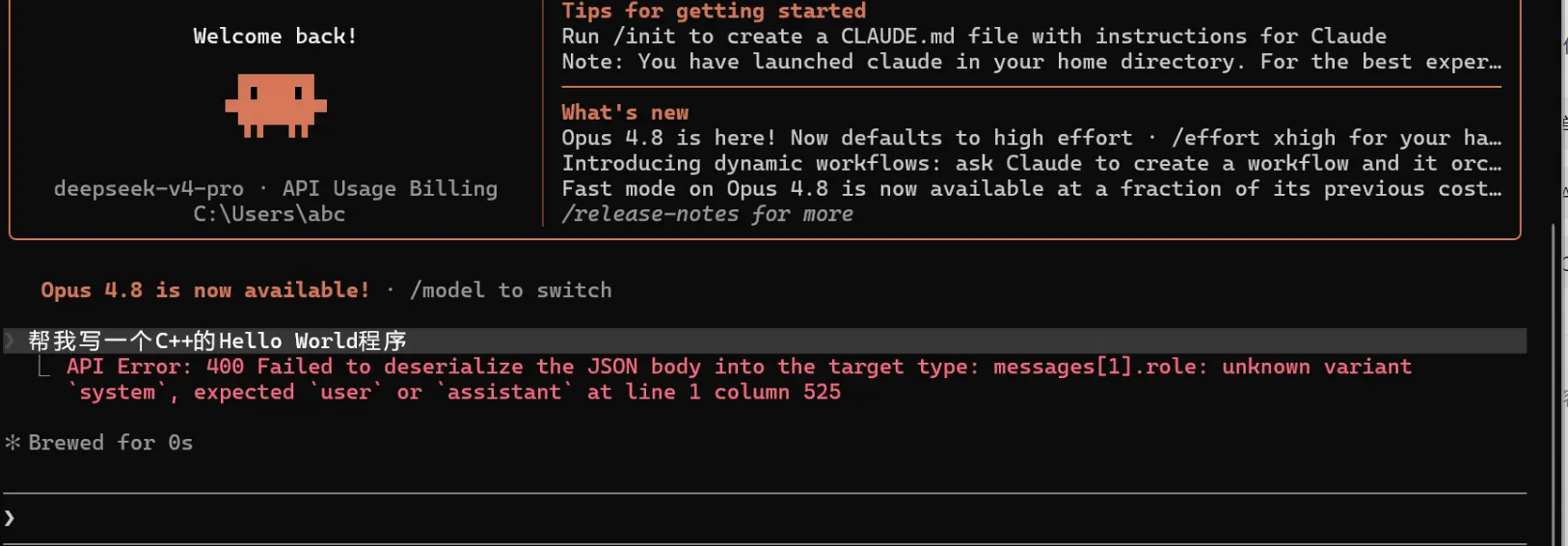
2.脚本安装
如果上一种方式出了问题安装不了,就使用这种分方式。
为了同时兼容最新版本和指定版本安装,这里也给出两种方式:
安装最新版
irm https://daheiai.com/cc.ps1 | iex安装指定版本
因为目前最新版v2.1.156对第三方模型有兼容性问题,下面给出指定版本进行安装的方式
1. 复制下面这段脚本,本文绑定资源也可自取
param(
    [Parameter(Position=0)]
    [ValidatePattern('^(stable|latest|\d+\.\d+\.\d+(-[^\s]+)?)$')]
    [string]$Target = "latest",
    [switch]$Bootstrapped
)

# if (-not $Bootstrapped) {
#     $tempScript = Join-Path $env:TEMP "cc-bootstrap.ps1"
#     try {
#         Invoke-WebRequest -Uri "https://daheiai.com/cc.ps1" -OutFile $tempScript -UseBasicParsing
#     }
#     catch {
#         Write-Error "Failed to stage installer script: $_"
#         exit 1
#     }

#     & powershell.exe -NoLogo -NoProfile -ExecutionPolicy Bypass -File $tempScript -Target $Target -Bootstrapped
#     exit $LASTEXITCODE
# }

Set-StrictMode -Version Latest
$ErrorActionPreference = "Stop"
$ProgressPreference = 'SilentlyContinue'

# Check for 32-bit Windows
if (-not [Environment]::Is64BitProcess) {
    Write-Error "Claude Code does not support 32-bit Windows. Please use a 64-bit version of Windows."
    exit 1
}

$GCS_BUCKET = "https://storage.googleapis.com/claude-code-dist-86c565f3-f756-42ad-8dfa-d59b1c096819/claude-code-releases"
$DOWNLOAD_DIR = "$env:USERPROFILE\.claude\downloads"
$INSTALL_BASE = "$env:USERPROFILE\.local\share\claude"
$VERSIONS_DIR = "$INSTALL_BASE\versions"
$BIN_DIR = "$env:USERPROFILE\.local\bin"
$LINK_PATH = "$BIN_DIR\claude.exe"
$CONFIG_PATH = "$env:USERPROFILE\.claude.json"
$LOCKS_DIR = "$env:USERPROFILE\.local\state\claude\locks"
$CACHE_DIR = "$env:USERPROFILE\.cache\claude\staging"
$DOWNLOADS_DIR = "$env:USERPROFILE\.claude\downloads"

function Write-Config {
    param(
        [string]$ConfigPath,
        [string]$FirstStartTime
    )

    $data = @{}
    if (Test-Path $ConfigPath) {
        try {
            $existing = Get-Content -Raw -Path $ConfigPath | ConvertFrom-Json -AsHashtable
            if ($existing) {
                $data = $existing
            }
        }
        catch {
            $data = @{}
        }
    }

    $data["installMethod"] = "native"
    $data["autoUpdates"] = $false
    $data["autoUpdatesProtectedForNative"] = $true
    if (-not $data.ContainsKey("firstStartTime")) {
        $data["firstStartTime"] = $FirstStartTime
    }

    $json = $data | ConvertTo-Json -Depth 10
    Set-Content -Path $ConfigPath -Value $json -Encoding UTF8
}

function Get-RemoteText {
    param(
        [string]$Url
    )

    if (Get-Command curl.exe -ErrorAction SilentlyContinue) {
        try {
            $result = & curl.exe -fsSL --ssl-no-revoke --http1.1 --retry 5 --retry-delay 2 $Url
            if ($LASTEXITCODE -eq 0) {
                if ($result -is [array]) {
                    return ($result -join "`n")
                }
                return $result
            }
            Write-Warning "curl.exe failed with exit code $LASTEXITCODE, falling back to Invoke-RestMethod"
        }
        catch {
            Write-Warning "curl.exe failed: $_. Falling back to Invoke-RestMethod"
        }
    }

    return Invoke-RestMethod -Uri $Url -ErrorAction Stop
}

# Use native ARM64 binary on ARM64 Windows, x64 otherwise
if ($env:PROCESSOR_ARCHITECTURE -eq "ARM64") {
    $platform = "win32-arm64"
} else {
    $platform = "win32-x64"
}
New-Item -ItemType Directory -Force -Path $DOWNLOAD_DIR | Out-Null

# Always download latest version (which has the most up-to-date installer)
try {
    if ($Target -eq "latest") {
        $version = (Get-RemoteText -Url "$GCS_BUCKET/latest").ToString().Trim()
    }
    elseif ($Target -eq "stable") {
        $version = (Get-RemoteText -Url "$GCS_BUCKET/stable").ToString().Trim()
    }
    else {
        $version = $Target
    }

    Write-Output "Selected version: $version"
}
catch {
    Write-Error "Failed to resolve version: $_"
    exit 1
}

try {
    $manifestText = Get-RemoteText -Url "$GCS_BUCKET/$version/manifest.json"
    if ($manifestText -is [string]) {
        $manifest = $manifestText | ConvertFrom-Json
    }
    else {
        $manifest = $manifestText
    }
    $checksum = $manifest.platforms.$platform.checksum
    $expectedSize = $manifest.platforms.$platform.size

    if (-not $checksum) {
        Write-Error "Platform $platform not found in manifest"
        exit 1
    }
}
catch {
    Write-Error "Failed to get manifest: $_"
    exit 1
}

# Download and verify
$binaryPath = "$DOWNLOAD_DIR\claude-$version-$platform.exe"
$downloadUrl = "$GCS_BUCKET/$version/$platform/claude.exe"

Write-Output "Claude Code version: $version"
Write-Output "Platform: $platform"
Write-Output "Download source: $downloadUrl"
Write-Output "Downloading Claude Code binary..."

try {
    if (Get-Command curl.exe -ErrorAction SilentlyContinue) {
        & curl.exe -fL --ssl-no-revoke --http1.1 --retry 5 --retry-delay 2 -o $binaryPath $downloadUrl
        if ($LASTEXITCODE -ne 0) {
            throw "curl.exe failed with exit code $LASTEXITCODE"
        }
    }
    else {
        Invoke-WebRequest -Uri $downloadUrl -OutFile $binaryPath -ErrorAction Stop
    }

    if ($expectedSize) {
        $actualSize = (Get-Item -Path $binaryPath).Length
        if ($actualSize -ne [int64]$expectedSize) {
            throw "Downloaded file size mismatch. Expected $expectedSize bytes, got $actualSize bytes"
        }
    }
}
catch {
    Write-Error "Failed to download binary: $_"
    if (Test-Path $binaryPath) {
        Remove-Item -Force $binaryPath
    }
    exit 1
}

# Calculate checksum
$actualChecksum = (Get-FileHash -Path $binaryPath -Algorithm SHA256).Hash.ToLower()

if ($actualChecksum -ne $checksum) {
    Write-Error "Checksum verification failed"
    Remove-Item -Force $binaryPath
    exit 1
}

# Install directly without invoking the bundled installer
Write-Output "Setting up Claude Code..."
try {
    New-Item -ItemType Directory -Force -Path $VERSIONS_DIR | Out-Null
    New-Item -ItemType Directory -Force -Path $BIN_DIR | Out-Null
    New-Item -ItemType Directory -Force -Path $LOCKS_DIR | Out-Null
    New-Item -ItemType Directory -Force -Path $CACHE_DIR | Out-Null
    New-Item -ItemType Directory -Force -Path $DOWNLOADS_DIR | Out-Null
    New-Item -ItemType Directory -Force -Path "$env:USERPROFILE\.claude\backups" | Out-Null

    $finalPath = "$VERSIONS_DIR\$version.exe"
    if (Test-Path $finalPath) {
        Remove-Item -Force $finalPath
    }
    Move-Item -Force $binaryPath $finalPath
    Copy-Item -Force $finalPath $LINK_PATH

    if (Test-Path $CONFIG_PATH) {
        Copy-Item -Force $CONFIG_PATH "$env:USERPROFILE\.claude\backups\.claude.json.backup.$([DateTimeOffset]::UtcNow.ToUnixTimeMilliseconds())" -ErrorAction SilentlyContinue
    }

    $firstStartTime = [DateTime]::UtcNow.ToString("yyyy-MM-ddTHH:mm:ssZ")
    Write-Config -ConfigPath $CONFIG_PATH -FirstStartTime $firstStartTime

    Write-Output ""
    Write-Output "Claude Code successfully installed!"
    Write-Output ""
    Write-Output "Version: $version"
    Write-Output "Location: $LINK_PATH"
    Write-Output ""
    Write-Output "PATH target: $BIN_DIR"
    Write-Output "If claude is not found, add that directory to your user PATH and reopen PowerShell."
}
finally {
    try {
        if (Test-Path $binaryPath) {
            Remove-Item -Force $binaryPath
        }
    }
    catch {
        Write-Warning "Could not remove temporary file: $binaryPath"
    }
}

Write-Output ""
Write-Output "$([char]0x2705) Installation complete!"
Write-Output ""2.创建一个文件,把这段脚本粘贴进去。并命名为cc-install.ps1
3.在cc-install.ps1的文件目录下打开powershell终端
4.输入命令执行脚本
powershell -ExecutionPolicy Bypass -File .\cc-isntall.ps1 -Target 2.1.153等待安装完成
二.设置环境变量
打开环境变量设置
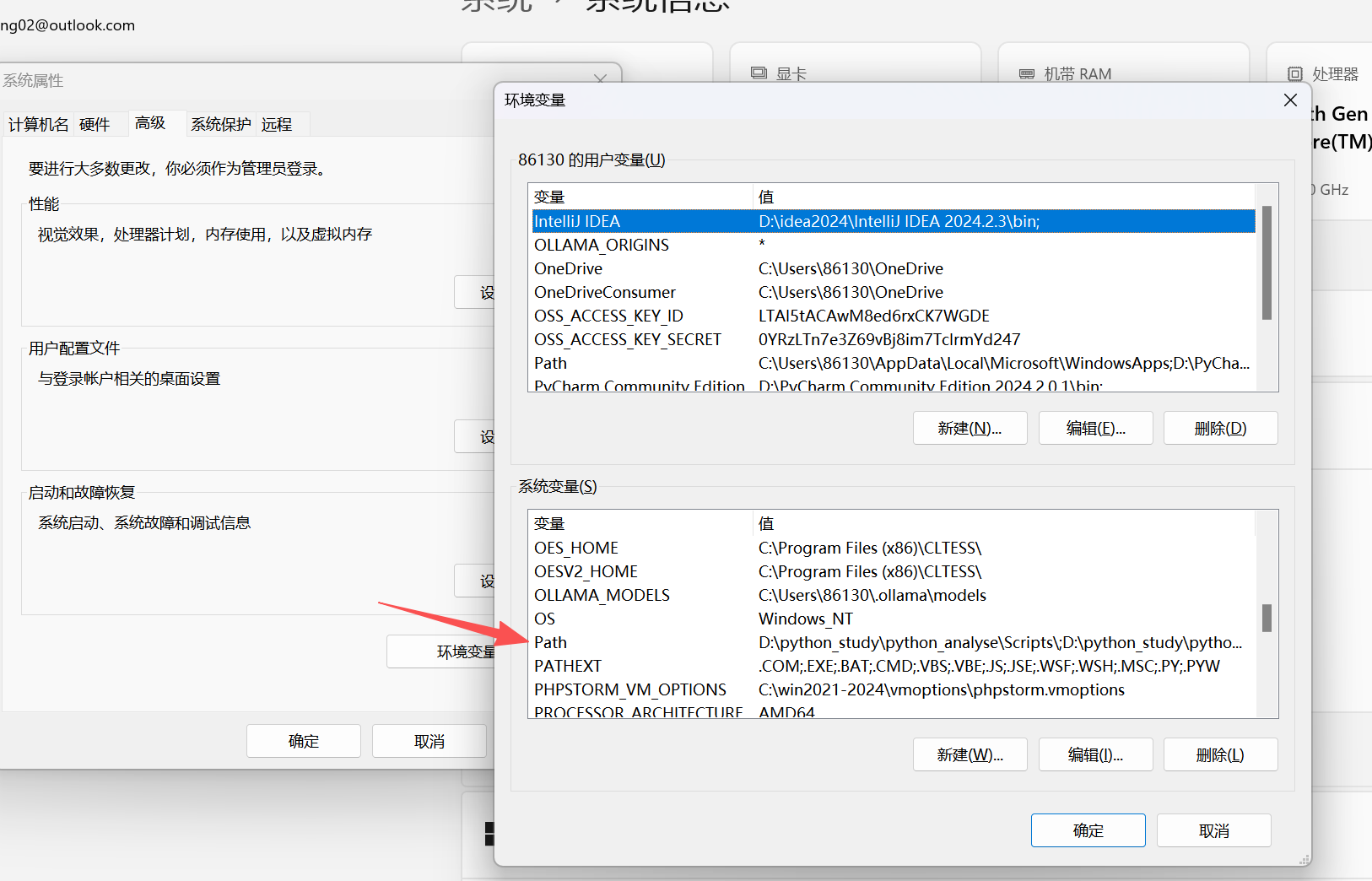
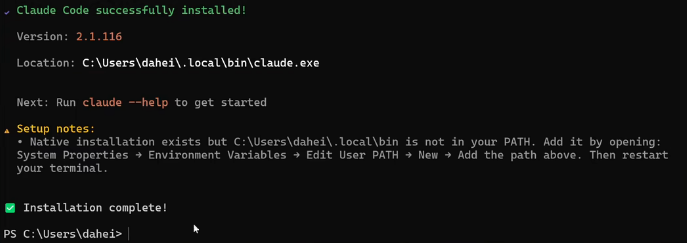
在Path中添加一行:C:\Users\你的用户名\.local\bin\claude.exe 这行信息在安装成功的界面中可以看到

三.安装CC-Switch
打开一个新的命令行界面,输入claude
claude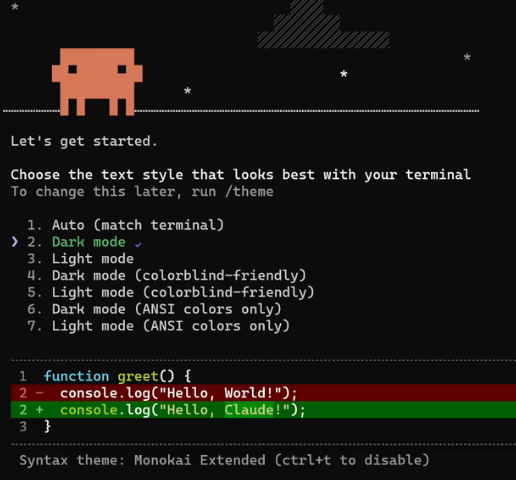
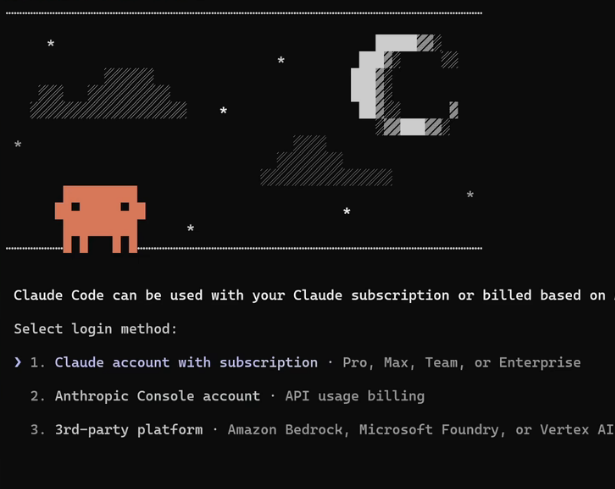
到这里对有anthropic账号并且始终使用claude的用户来说已经可以了。下面介绍如何使用cc switch绕过登录并支持第三方模型
访问这个页面安装CC-Switch
安装成功后打开界面: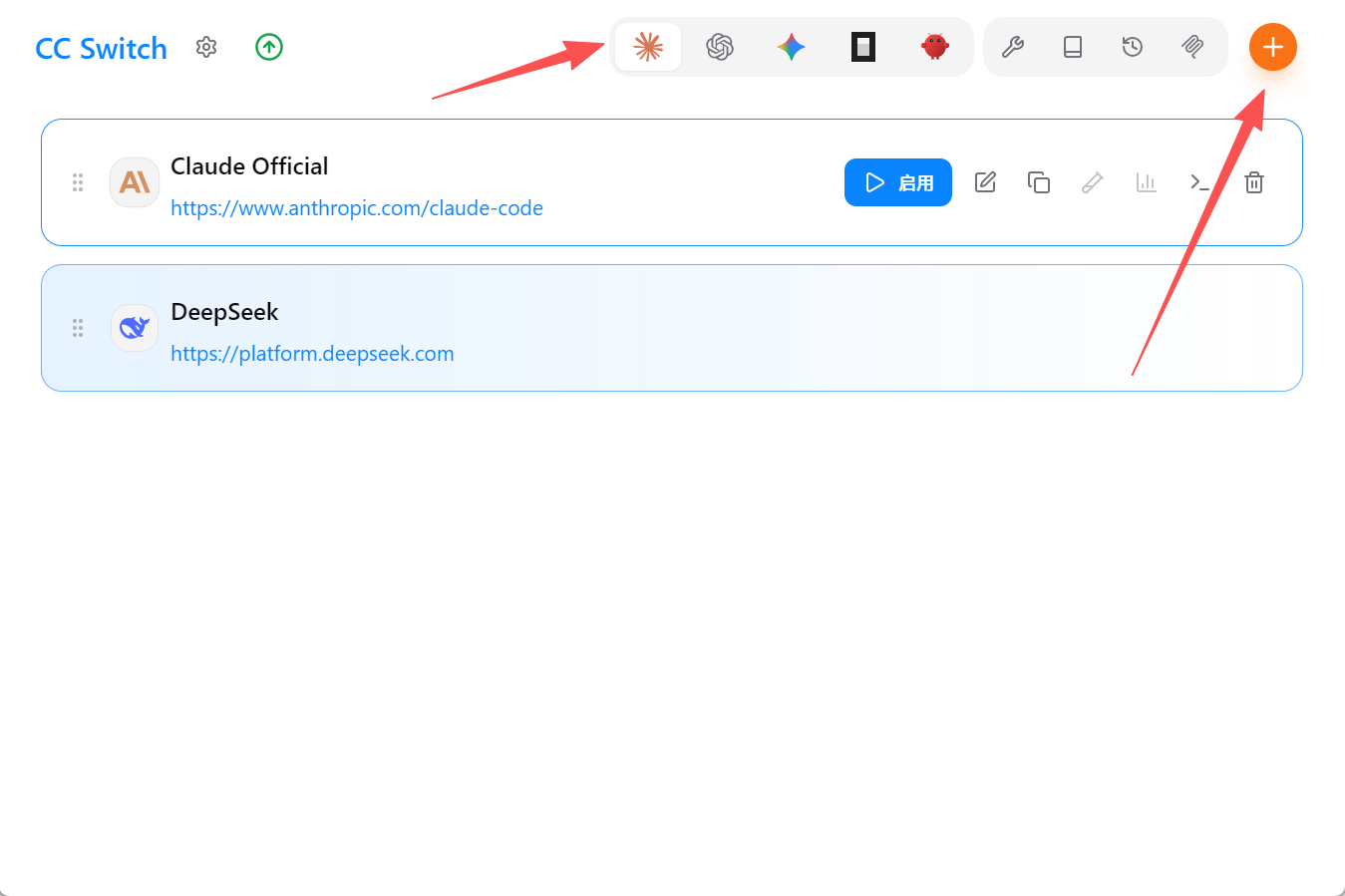
在claude下点击右上角加号新增供应商
我这里以DeepSeek-V4进行示例
填写完apikey等信息后进行环境变量配置,这段配置是你的claude code配置
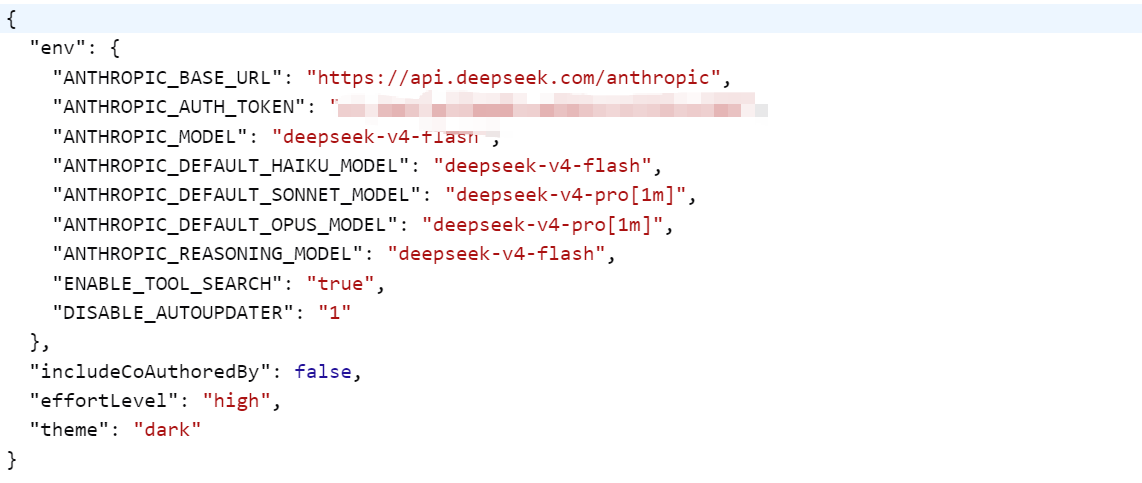
我这里已经给出了一个示例,可以直接复制。
注意: "DISABLE_AUTOUPDATER": "1" 这一行在v2.1.153版本及以下不要丢了,一定要配置。避免软件自动更新至v2.1.156导致第三方模型不可用。(如果后续版本以及各厂商解决了这个问题可忽略)
{
  "env": {
    "ANTHROPIC_BASE_URL": "https://api.deepseek.com/anthropic",
    "ANTHROPIC_AUTH_TOKEN":<API_KEY>,
    "ANTHROPIC_MODEL": "deepseek-v4-flash",
    "ANTHROPIC_DEFAULT_HAIKU_MODEL": "deepseek-v4-flash",
    "ANTHROPIC_DEFAULT_SONNET_MODEL": "deepseek-v4-pro[1m]",
    "ANTHROPIC_DEFAULT_OPUS_MODEL": "deepseek-v4-pro[1m]",
    "ANTHROPIC_REASONING_MODEL": "deepseek-v4-flash",
    "ENABLE_TOOL_SEARCH": "true",
    "DISABLE_AUTOUPDATER": "1"
  },
  "includeCoAuthoredBy": false,
  "effortLevel": "high",
  "theme": "dark"
}
配置完成后点击保存,并启用。
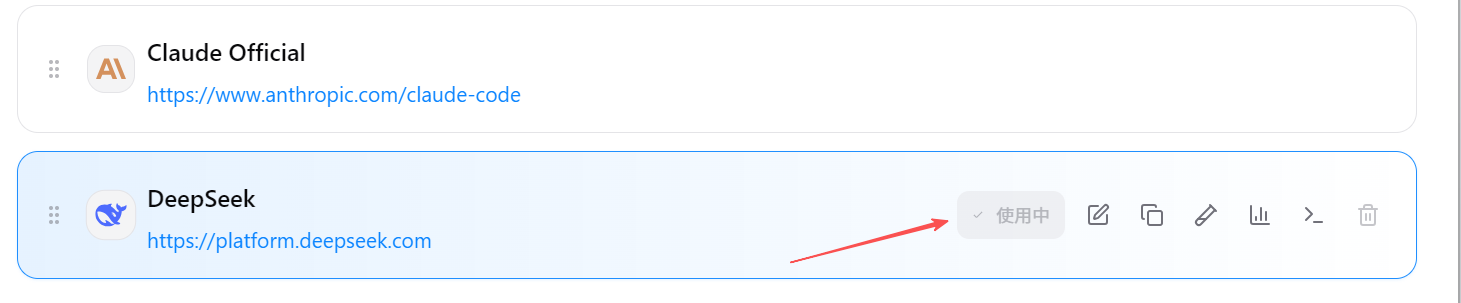
四.测试
此时打开一个新的终端,启动claudecode
此时已经不需要在登录了
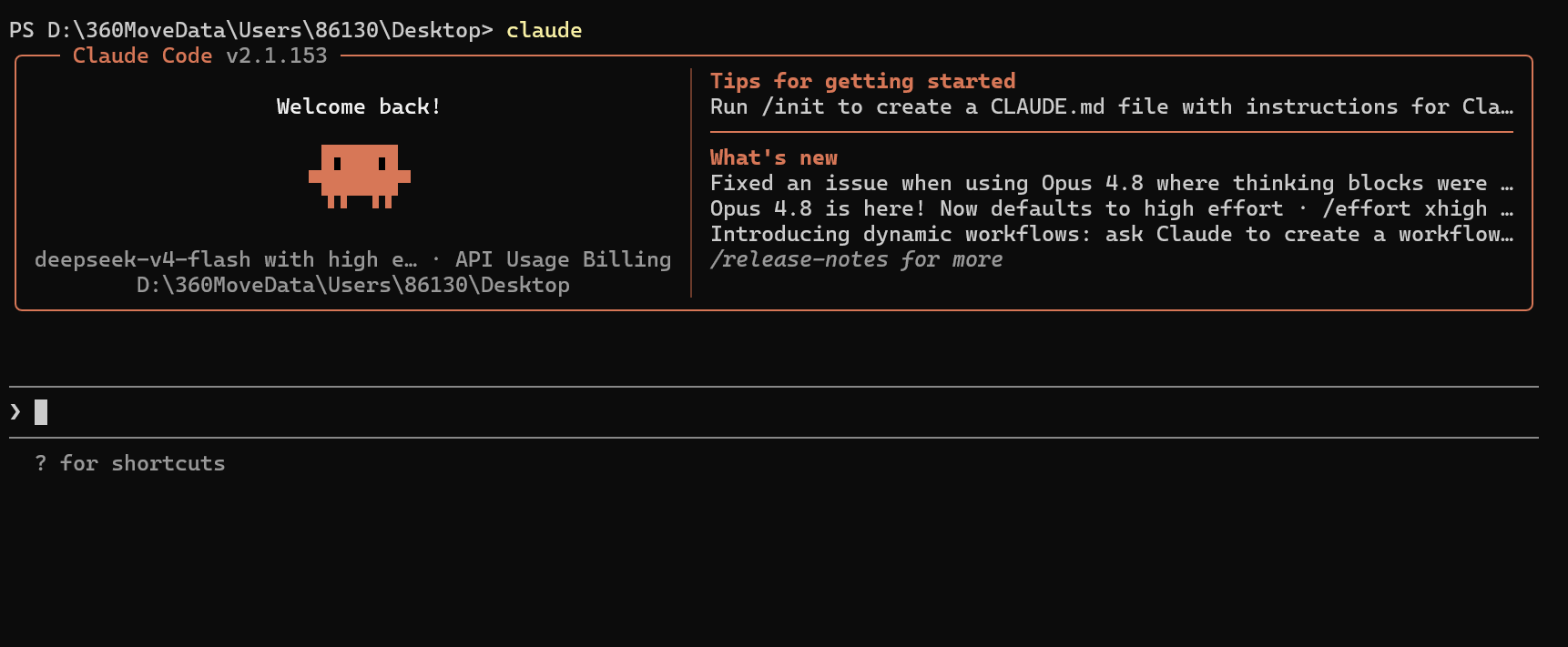
注意版本为v2.1.153,对于第三方模型报400的用户来说,claude code不要高于这个版本号。
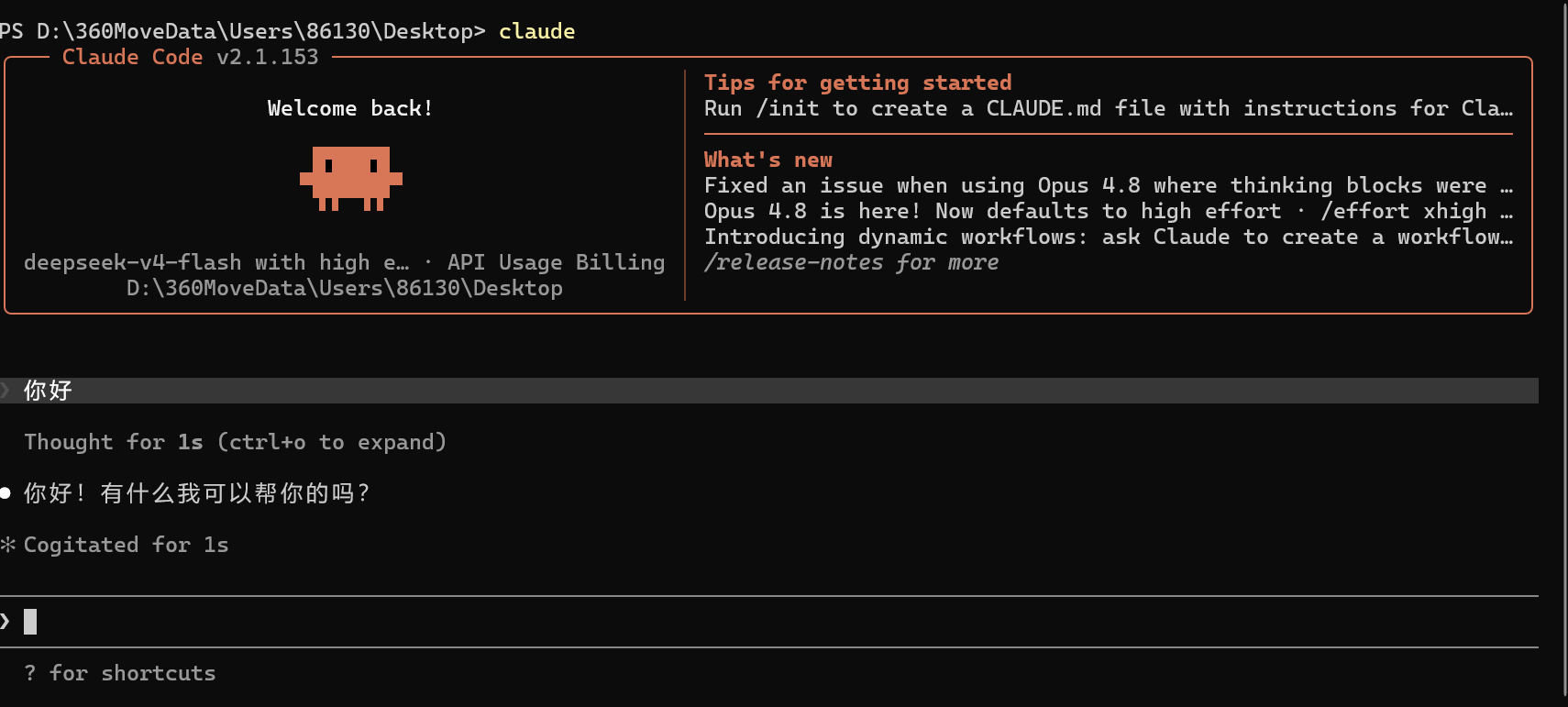
发送消息正常得到响应,测试通过。

汇聚全球AI编程工具,助力开发者即刻编程。
更多推荐


 3
3 0
0- 0


 已为社区贡献3条内容

所有评论(0)