
03 claude的工具系统
参考文献:
一,claude要加载哪些工具?
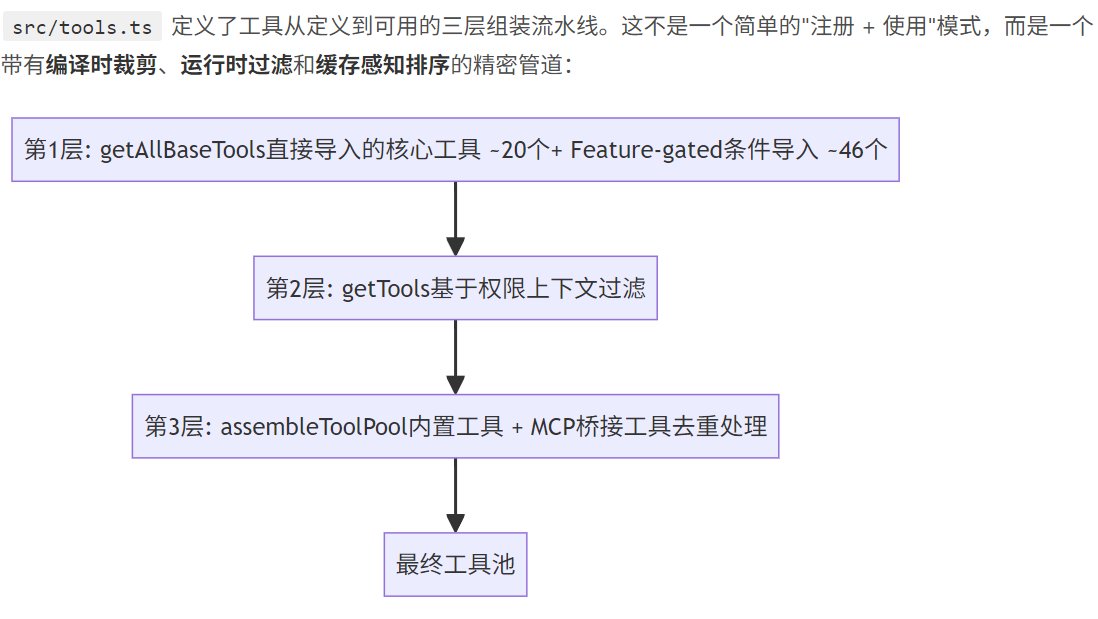
接下来我使用大白话对内容进行讲解:
Layer 1:getAllBaseTools() — 编译时工具裁剪
首先是Layer 1:getAllBaseTools() — 编译时工具裁剪,总而言之就是通过调用getAllBaseTools()方法返回所有的工具,包括核心工具和Feature-gated 工具。
其中Feature-gated是计算机中的专业术语,意思如下:

其中核心工具就是一些常见使用的工具
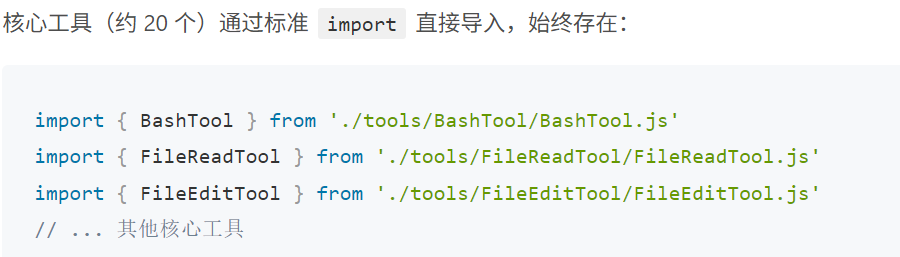
其中的feature-gated工具有如下几种情况:

众所周知,代码分为运行和编译两种,再说为什么叫编译时?
其实就是其中的Feature-gated工具是在编译时进行删除的。
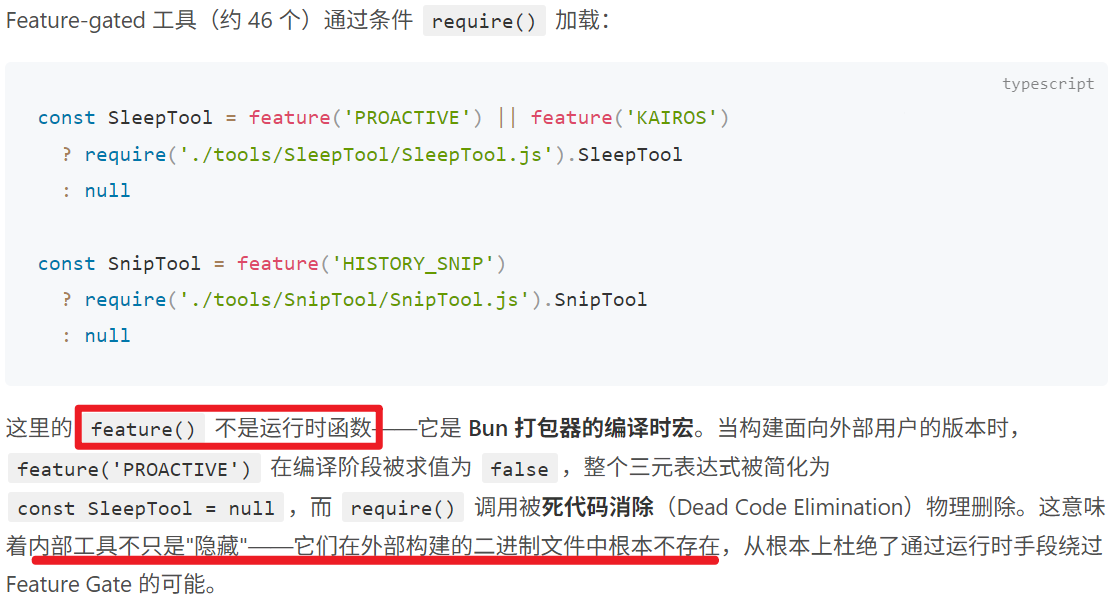
Layer 2:getTools() — 运行时上下文过滤
接下来是Layer 2:getTools() — 运行时上下文过滤,有四层过滤,主要是在运行时根据当前环境和权限上下文判断一些工具是否开启。
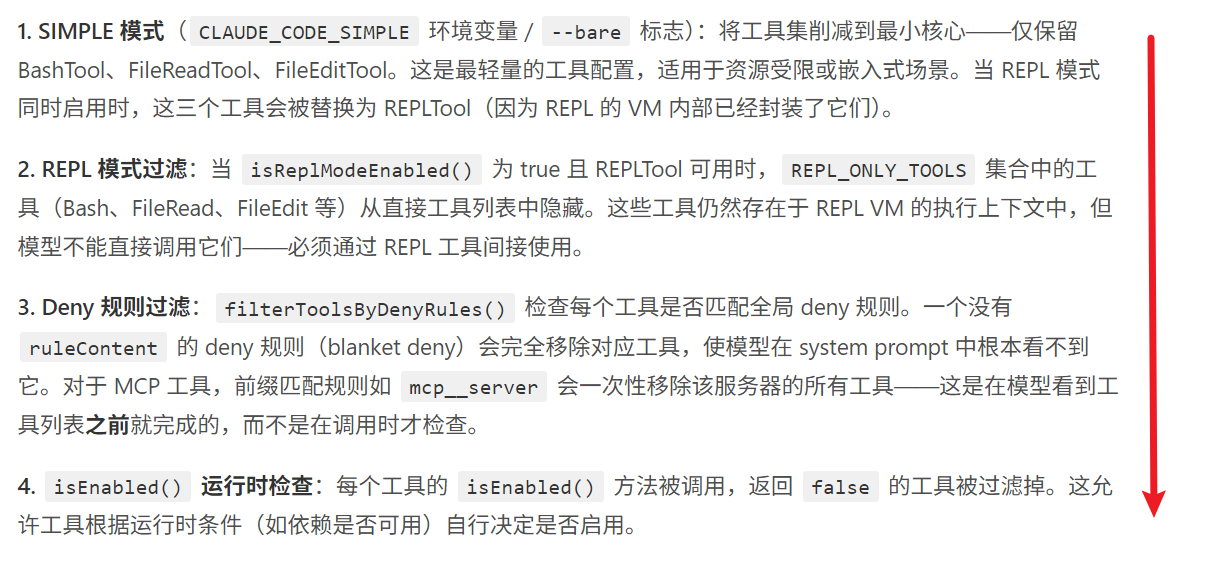
其中又存在一个问题,什么是simple和repl模式?
REPL 模式就是它的默认交互形态。REPL = Read → Eval → Print → Loop,即读取-求值-打印-循环。
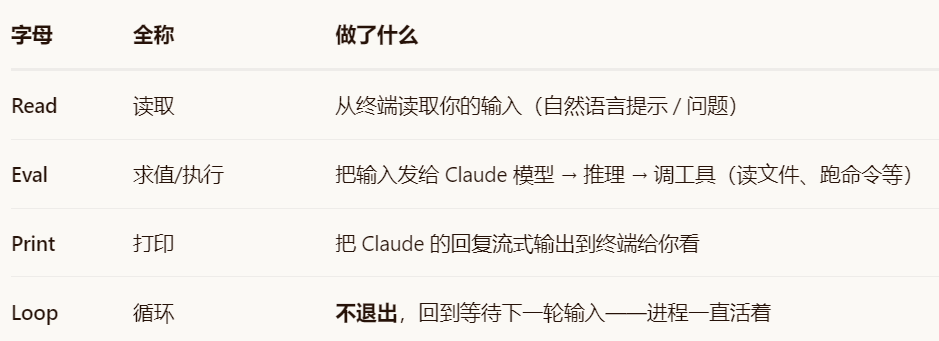
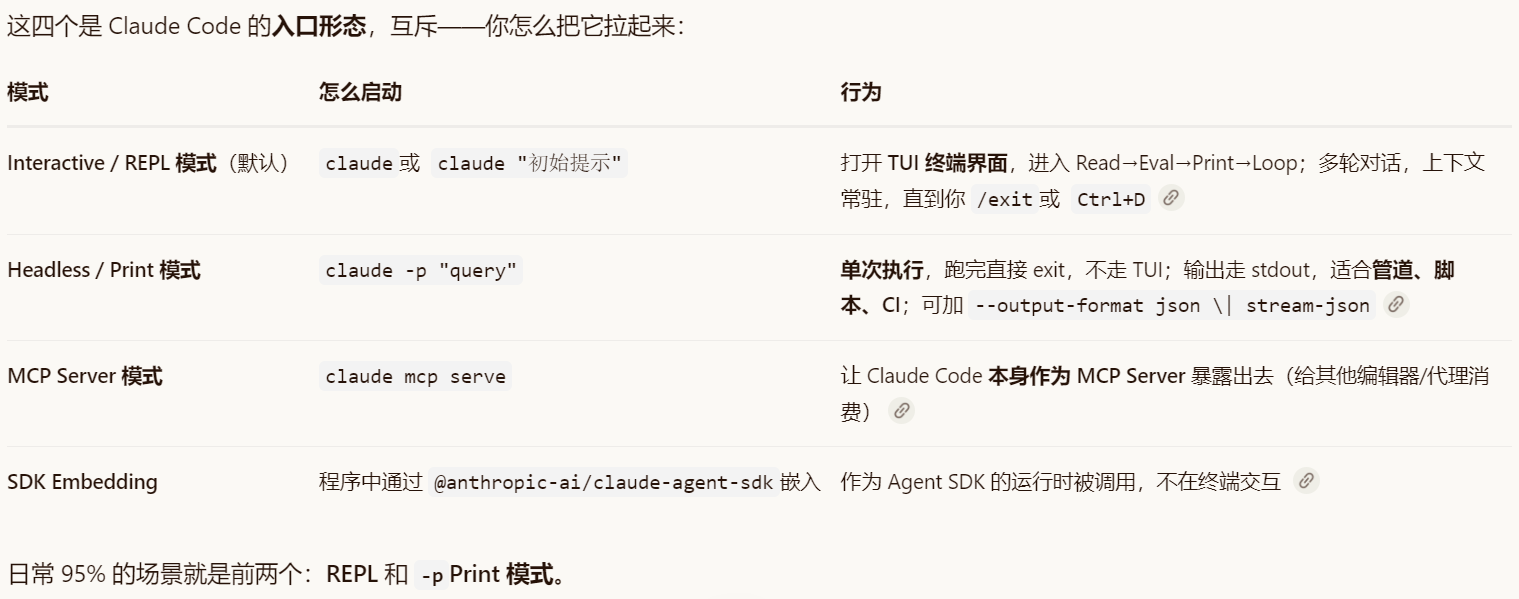
总共有四种模式
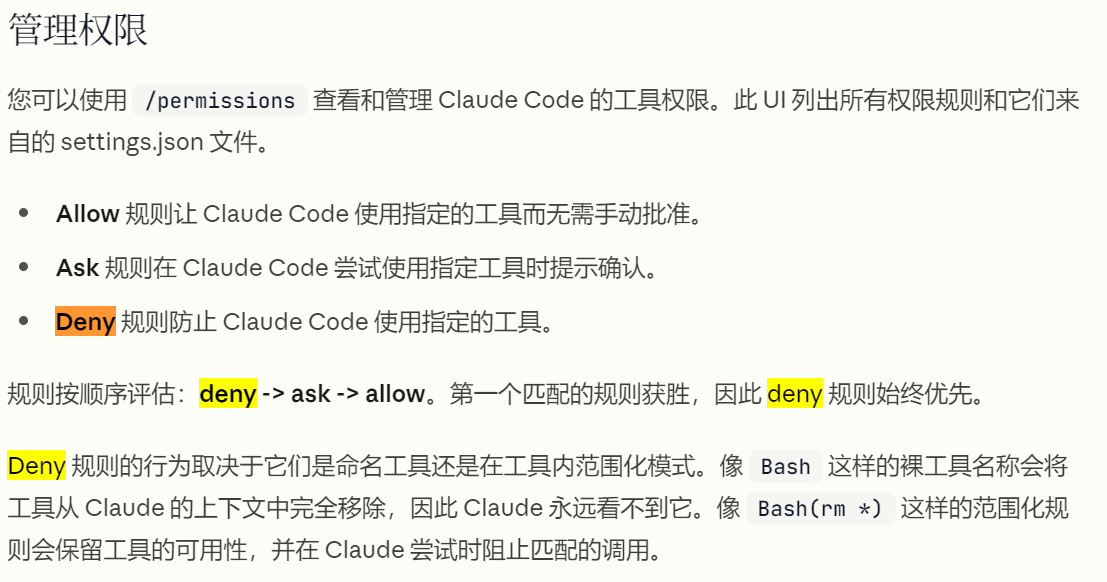
其中deny是在settings.json 中配置的:
对于其中的isEnabled(),示例如下:
这里的 isEnabled()不是 Claude API 的某个开关,而是 Claude Code / Agent SDK 内部每个 Tool 的自检方法,位于工具装配流水线的最后一道过滤器(运行时终检)
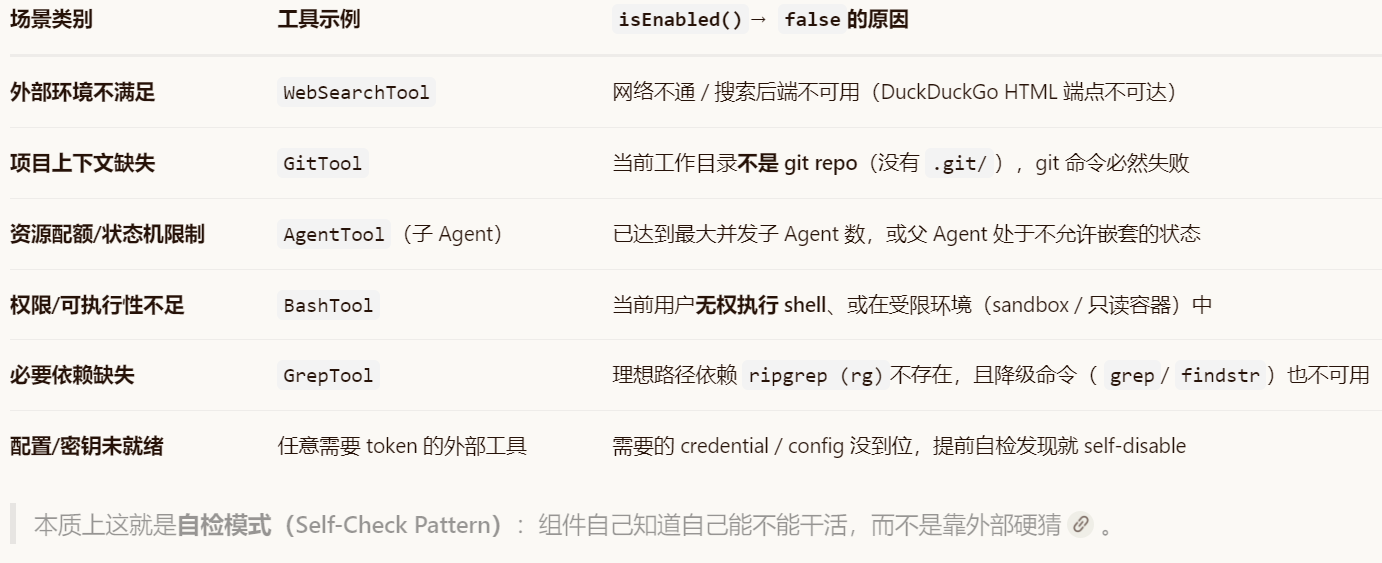
总而言之就是两方面,一方面是你自己得允许,另一方面是这个tool能调用。
Layer 3:assembleToolPool() — 合并与缓存感知排序
最后是Layer 3:assembleToolPool() — 合并与缓存感知排序,首先介绍一下大模型的缓存命中机制。
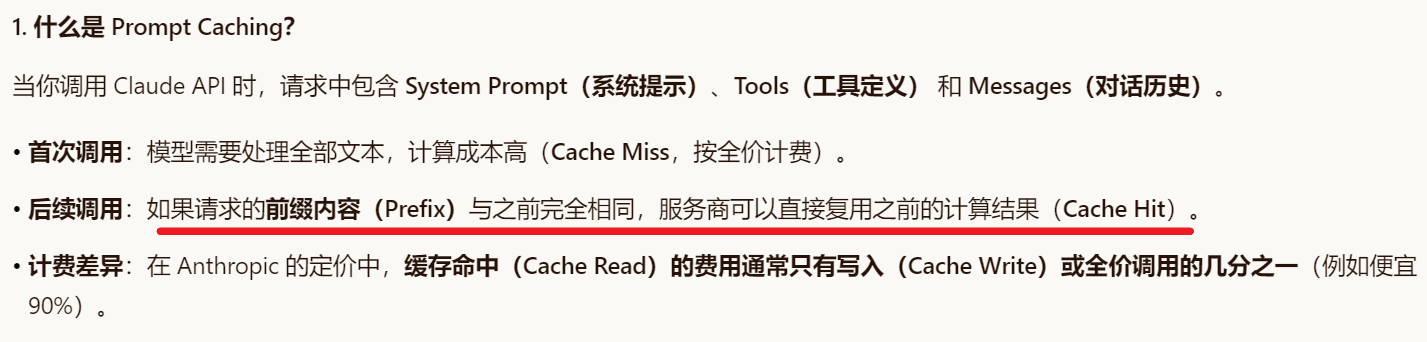
那么为了实现相同的前缀内容,是如何做排序的呢?
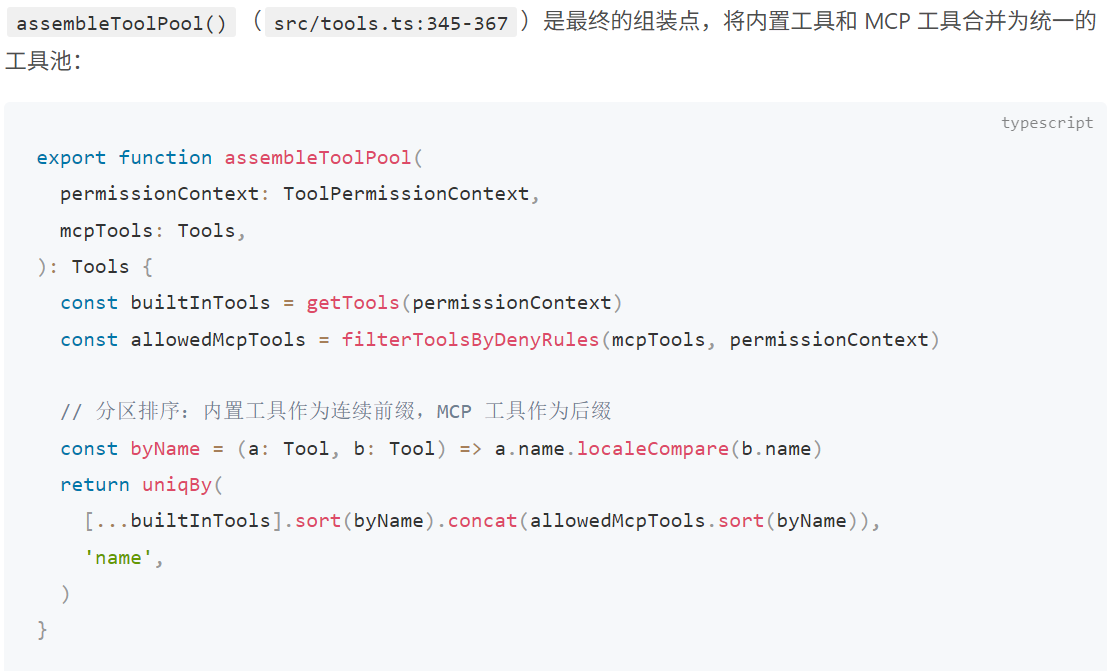
分区排序而非全局排序:内置工具按字母排序形成一个连续的前缀块,MCP 工具按字母排序后追加为后缀块。
uniqBy('name') 内置优先:当内置工具和 MCP 工具同名时,uniqBy 保留首次出现的(即内置工具),因为内置工具在拼接数组中排在前面。这确保了内置工具不会被 MCP 工具意外覆盖。
二,工具如何执行?
工具可用,但工具调用过程中又会存在哪些问题呢?线程安全决定是是否可以并发执行,工具输入是否正确,是否有权限,对于工具返回超长数据又要如何处理?接下来详细解释:
工具执行生命周期
首先总体说一下工具执行生命周期:
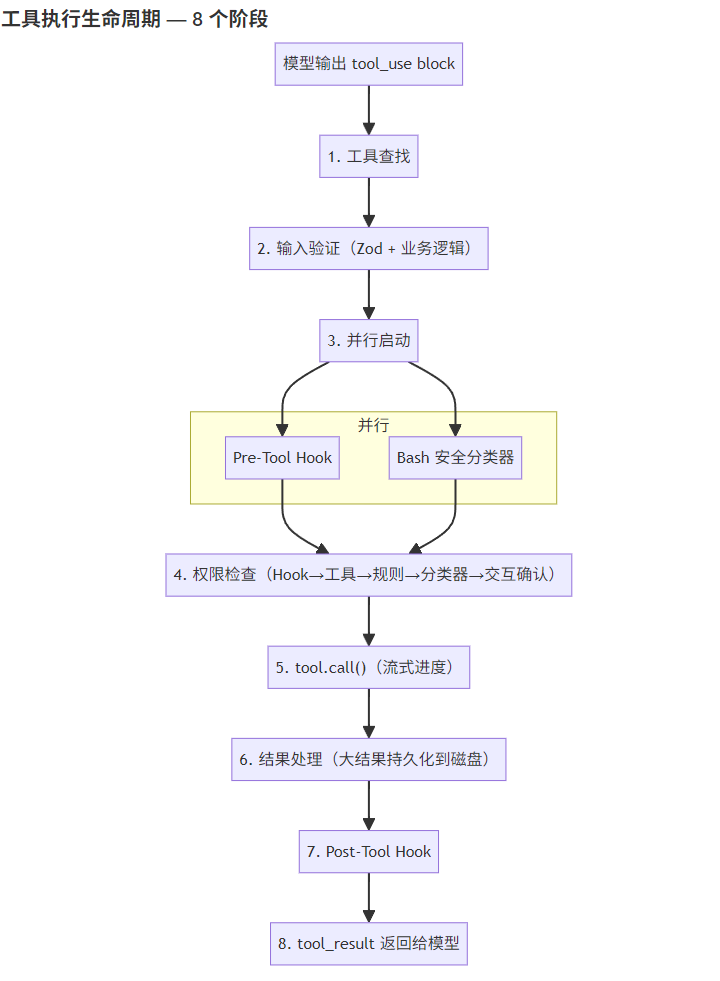
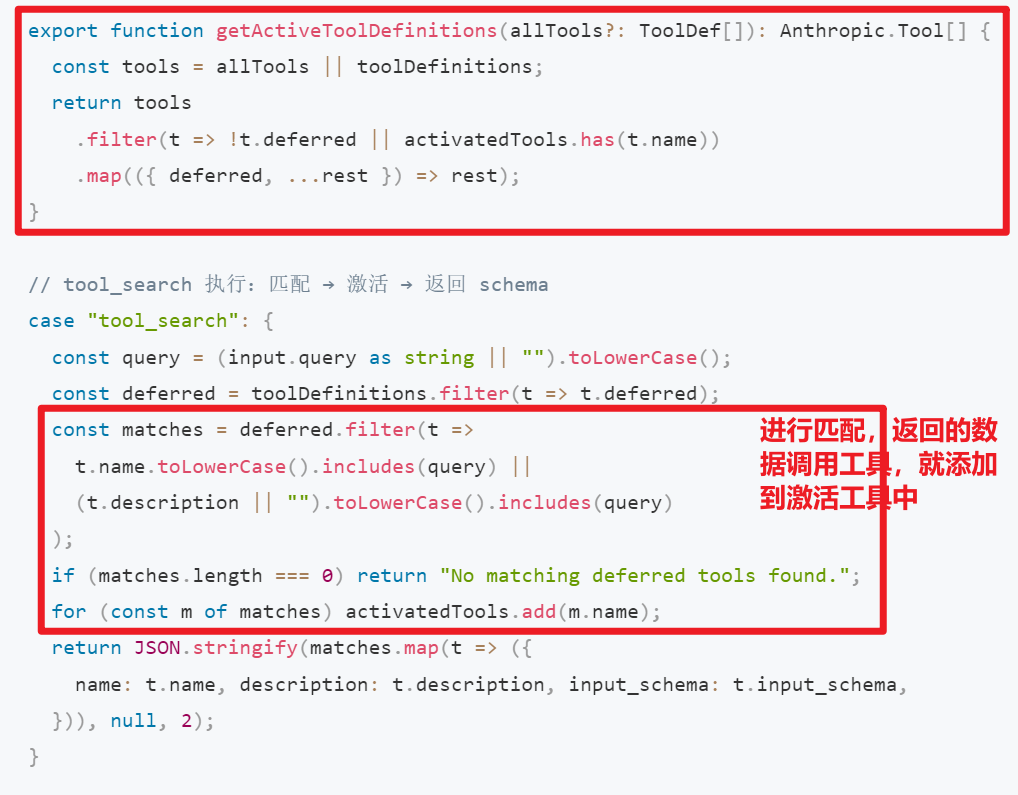
第一个阶段是工具查找,是因为当工具数量增多时(66+ 工具),把所有工具的 schema 都发给 API 会浪费大量 token。Claude Code 的做法是延迟加载:不常用的工具只发名称,模型需要时通过 ToolSearch 按需激活。
deferred翻译就是“延后、推迟”。
工作流程:
- API 调用时,
getActiveToolDefinitions()过滤掉未激活的 deferred 工具(只发名称,不发 schema) - System prompt 中通过
getDeferredToolNames()告知模型哪些工具可以通过tool_search激活 - 模型需要时调用
tool_search,匹配的工具被加入activatedToolsSet - 下一次 API 调用自动包含已激活工具的完整 schema
接下来是第二个阶段,检查输入格式以及一些需要的业务条件:
上面的zod是一个ts的类型检查库,总而言之就是Schema 层做结构验证(字段存在性、类型)
然后业务层做语义验证(如 FileEditTool 检查文件是否存在、FileWriteTool 检查是否已读过文件再写入)。behavior: 'ask' 模式允许工具在不确定的情况下把决策权交给用户,而非直接拒绝。
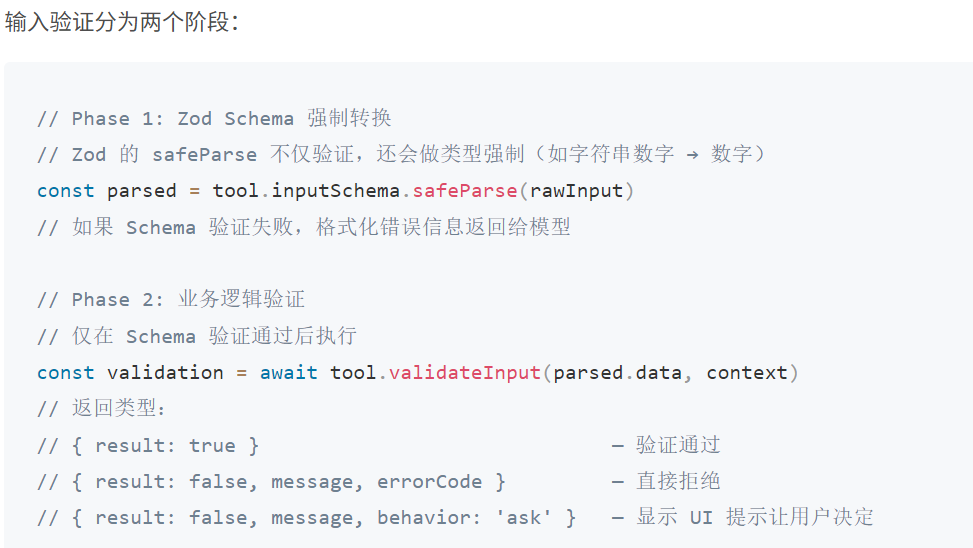
接下来是第三阶段,并行启动:
其中Pre-Tool Hook是在工具调用前的一个钩子,用于自己写一些条件判断来确定是否能执行tool:
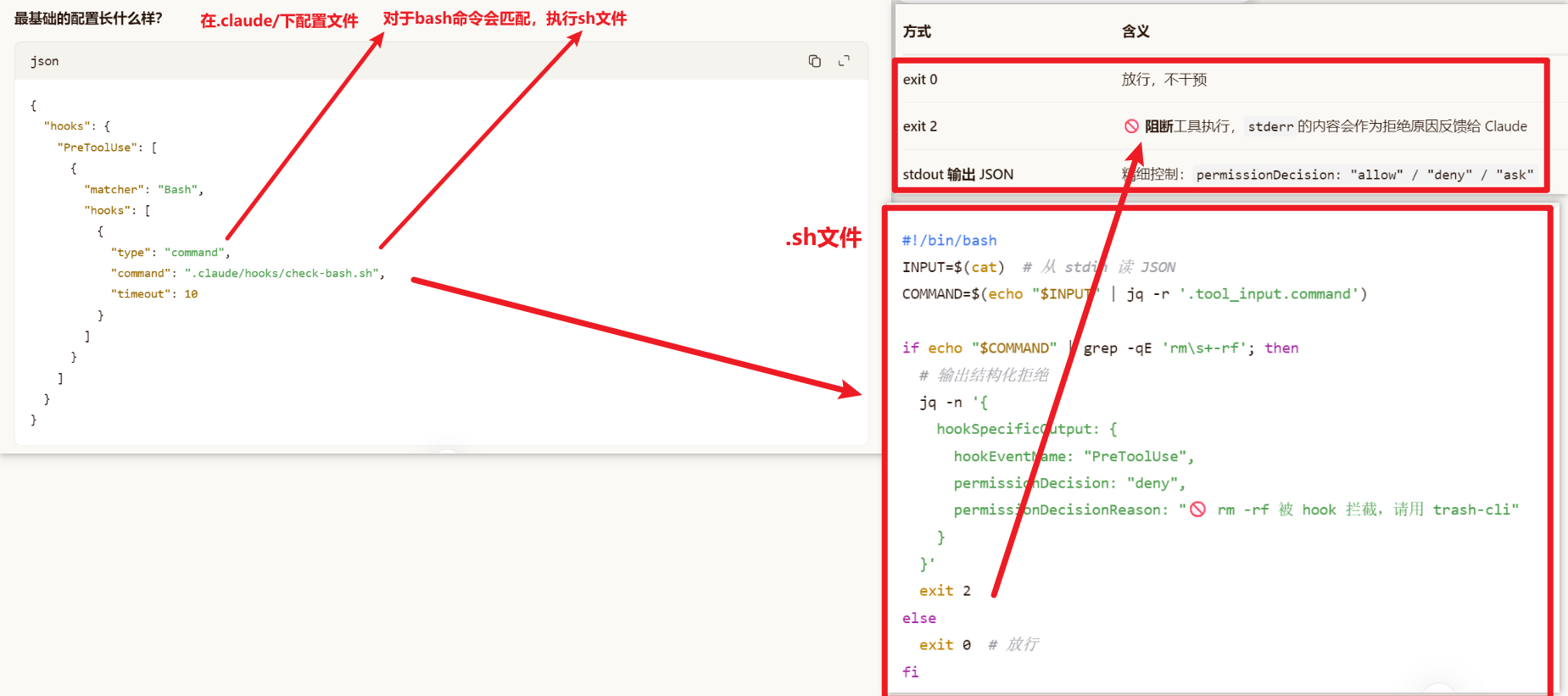
Pre-Tool Hook 和 Bash 分类器同时启动,而不是串行等待。这两个操作可能各需要数十到数百毫秒,并行化可以显著降低权限检查的总延迟。
- Pre-Tool Hook:执行用户在
hooks.preToolUse中配置的外部脚本,可以返回allow、deny或不干预 - Bash 分类器:对 BashTool 调用进行投机性安全分类(判断命令是否只读),结果缓存以供权限检查使用
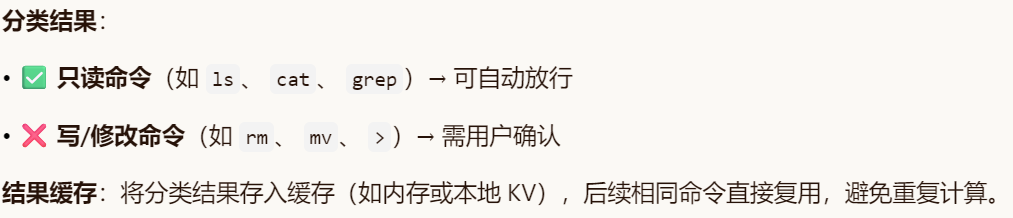
大结果处理:结果超过 maxResultSizeChars 时,完整内容保存到 ~/claude-code/tool-results/,模型收到文件路径 + 截断指示符,需要时通过 FileReadTool 主动拉取。
工具设计与并发执行:
非并发安全的工具必须独占执行;多个并发安全工具可以同时跑。
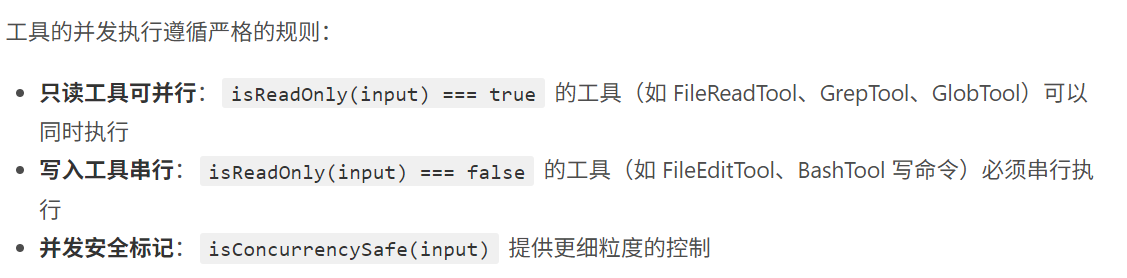
其中的isConcurrencySafe是Tool定义时自带的函数,默认是false
是否可以并发执行判断如下
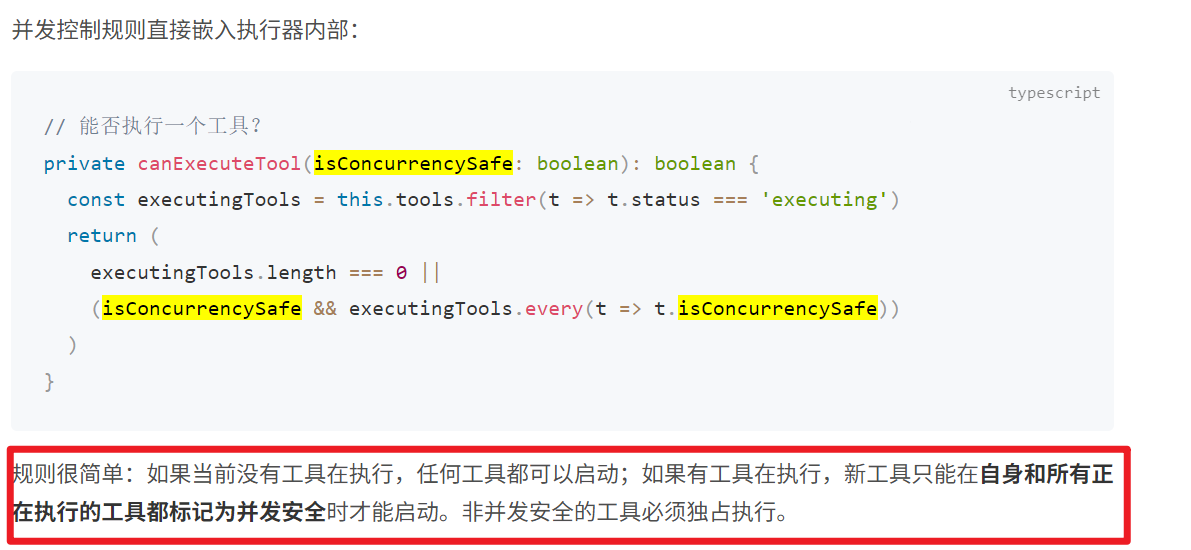
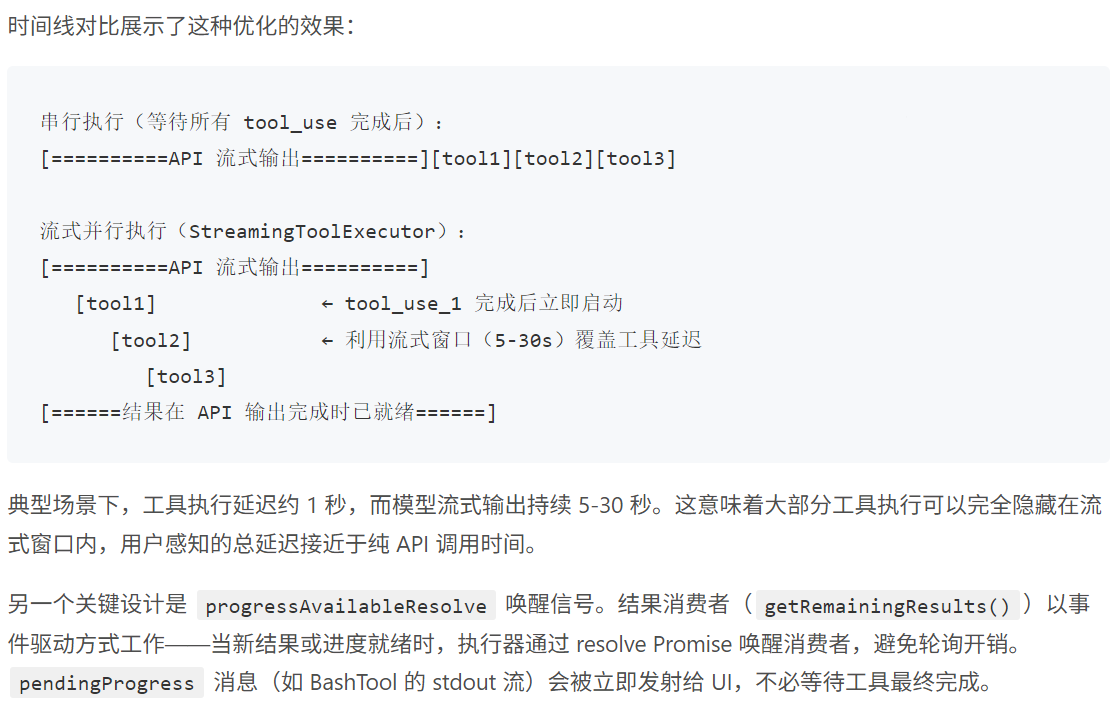
需要注意的是模型是流式输出,然后在输出的途中就会判断是否调用。实际上,模型的流式输出需要 5-30 秒,一个 tool_use block 可能在流式输出的前几秒就已完整——何必等到最后?
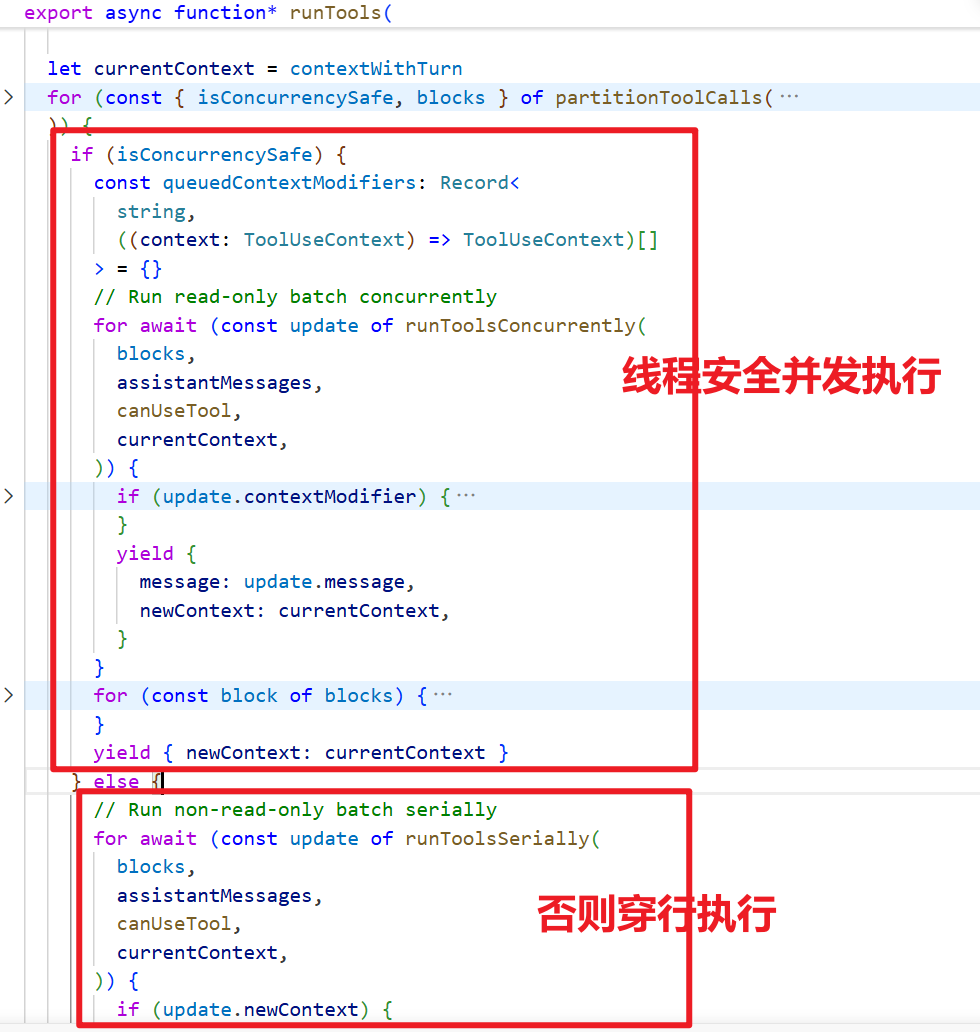
源代码跟踪:
调用链路
query.ts (主循环)
└── runTools() ← toolOrchestration.ts
        └── runToolUse() ← toolExecution.ts
                └── streamedCheckPermissionsAndCallTool()
                        └── tool.call() ← 各具体 Tool 实现
1. src/query.ts — 主 agentic loop 触发工具执行
在每轮迭代中,收集模型返回的 tool_use block,调用 runTools(): query.ts:1655-1658

2. src/services/tools/toolOrchestration.ts — runTools() 调度器
负责将一批 ToolUseBlock 按并发安全性分组,并发或串行执行: toolOrchestration.ts
硅基流动流式多工具调用示例:
import json, time
from datetime import datetime
from openai import OpenAI

def now():
    return datetime.now().strftime("%H:%M:%S.%f")[:-3]

client = OpenAI(
    base_url="https://api.siliconflow.cn/v1",
    api_key="",
)

tools = [
    {
        "type": "function",
        "function": {
            "name": "get_weather",
            "description": "获取城市天气",
            "parameters": {
                "type": "object",
                "properties": {"city": {"type": "string"}},
                "required": ["city"],
            },
        },
    },
    {
        "type": "function",
        "function": {
            "name": "get_time",
            "description": "获取城市当前时间",
            "parameters": {
                "type": "object",
                "properties": {"city": {"type": "string"}},
                "required": ["city"],
            },
        },
    },
]

def execute_tool(tc_id, name, args_raw):
    args = json.loads(args_raw)
    if name == "get_weather":
        return f"[mock] {args['city']} 晴 22°C"
    if name == "get_time":
        return f"[mock] {args['city']} 当前时间 {time.strftime('%H:%M')}"
    return "[unknown tool]"

messages = [
    {"role": "user", "content": "帮我查一下巴黎的天气和当地时间"}
]

# ── 第一轮:模型可能一次返回多个 tool_calls ──────────────────────
resp = client.chat.completions.create(
    model="Pro/zai-org/GLM-5.1",
    messages=messages,
    tools=tools,
    stream=True,
)

tc_acc = {}
final_text_parts = []

for chunk in resp:
    if not chunk.choices: continue
    d = chunk.choices[0].delta

    if d.content:
        final_text_parts.append(d.content)
        print(d.content, end="", flush=True)

    if d.tool_calls:
        for tc in d.tool_calls:
            idx = tc.index
            tc_acc.setdefault(idx, {"id": "", "name": "", "args": ""})
            if tc.id: tc_acc[idx]["id"] = tc.id
            if tc.function and tc.function.name:
                tc_acc[idx]["name"] = tc.function.name
                print(f"\n[{now()}] 🛠️  工具 {tc.function.name} 被调用")
            if tc.function and tc.function.arguments:
                tc_acc[idx]["args"] += tc.function.arguments
                print(f"\n[{now()}] 🛠️  工具参数:{tc.function.arguments}")

tool_calls_ready = list(tc_acc.values())

if tool_calls_ready:
    print(f"\n[{now()}] ✅ 本回合触发 {len(tool_calls_ready)} 个工具调用")

    # 1) 把 assistant 的 tool_calls 写回
    messages.append({
        "role": "assistant",
        "content": "".join(final_text_parts) or None,
        "tool_calls": [
            {
                "id": t["id"],
                "type": "function",
                "function": {"name": t["name"], "arguments": t["args"]},
            }
            for t in tool_calls_ready
        ],
    })

    # 2) 逐个回传工具结果(串行;要并行就换 ThreadPoolExecutor)
    for t in tool_calls_ready:
        print(f"[{now()}] 🚀 {t['name']}({t['args']})")
        result = execute_tool(t["id"], t["name"], t["args"])
        messages.append({
            "role": "tool",
            "tool_call_id": t["id"],
            "content": result,
        })

    # 3) 第二轮:模型整合多个工具结果给最终答复
    print(f"\n[{now()}] 🔁 发送工具结果,等待最终回答...\n")
    resp2 = client.chat.completions.create(
        model="Pro/zai-org/GLM-5.1",
        messages=messages,
        tools=tools,
        stream=True,
    )
    for chunk in resp2:
        if not chunk.choices: continue
        c = chunk.choices[0].delta.content
        if c: print(c, end="", flush=True)
        if chunk.choices[0].finish_reason:
            print(f"\n[{now()}] ✅ 对话结束")
else:
    print("\n(未触发工具调用)")
三,工具仅仅是简单的调用吗?
Read-before-edit + mtime 防护
Claude Code 的一个重要安全机制:编辑文件前必须先读取。这防止模型在不了解文件当前内容的情况下盲目修改,同时检测外部修改避免覆盖用户的手动编辑。这个是通过mtime,就是修改时间来进行判断是否有人修改过。类似于乐观锁的思想。
- mtime 比较:读取时记录 mtime,写入前比较。如果不一致,说明文件在 Agent 读取后被用户或其他进程修改了,返回警告而非静默覆盖
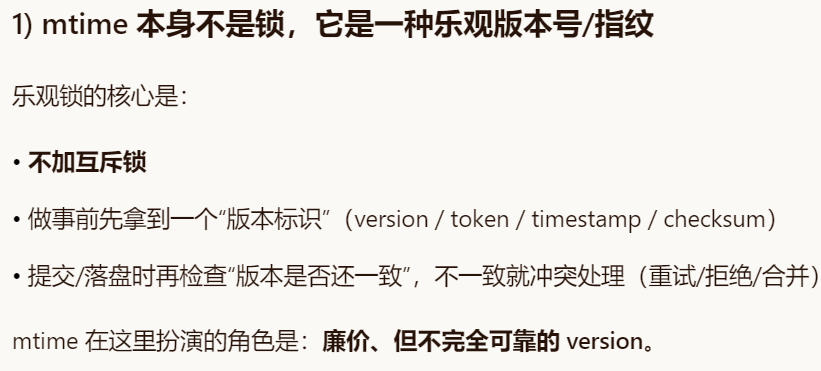
- readFileState Map 在 Agent 实例中维护,key 是绝对路径,value 是上次读取时的
mtimeMs - 新文件跳过检查:
existsSync(absPath)为 false 时不强制先读——创建新文件不需要先读
// tools.ts — executeTool 中的 mtime 追踪

export async function executeTool(
  name: string,
  input: Record<string, any>,
  readFileState?: Map<string, number>  // filepath → mtimeMs
): Promise<string> {
  switch (name) {
    case "read_file":
      result = readFile(input as { file_path: string });
      // 记录文件的修改时间
      if (readFileState && !result.startsWith("Error")) {
        const absPath = resolve(input.file_path);
        try { readFileState.set(absPath, statSync(absPath).mtimeMs); } catch {}
      }
      break;

    case "write_file": {
      const absPath = resolve(input.file_path);
      // 已存在的文件必须先 read
      if (readFileState && existsSync(absPath)) {
        if (!readFileState.has(absPath)) {
          return "Error: You must read this file before writing. Use read_file first.";
        }
        // mtime 变化说明文件被外部修改
        const cur = statSync(absPath).mtimeMs;
        if (cur !== readFileState.get(absPath)!) {
          return "Warning: file was modified externally. Please read_file again.";
        }
      }
      result = writeFile(input as { file_path: string; content: string });
      // 更新 mtime
      if (readFileState && !result.startsWith("Error")) {
        try { readFileState.set(absPath, statSync(absPath).mtimeMs); } catch {}
      }
      break;
    }
    // edit_file 同理...
  }
}
edit_file — 最关键的工具
唯一匹配检查是核心:出现 0 次说明模型对文件内容记忆有误(幻觉检测),出现 > 1 次则要求模型提供更多上下文来唯一标识修改点。"宁可失败也不猜测"——静默替换第一个匹配远比告知失败危险。
def _edit_file(inp: dict) -> str:
    try:
        path = Path(inp["file_path"])
        content = path.read_text()

        # 引号容错匹配
        actual = _find_actual_string(content, inp["old_string"])
        if not actual:
            return f"Error: old_string not found in {inp['file_path']}"

        count = content.count(actual)
        if count > 1:
            return f"Error: old_string found {count} times in {inp['file_path']}. Must be unique."

        new_content = content.replace(actual, inp["new_string"], 1)
        path.write_text(new_content)

        diff = _generate_diff(content, actual, inp["new_string"])
        quote_note = " (matched via quote normalization)" if actual != inp["old_string"] else ""
        return f"Successfully edited {inp['file_path']}{quote_note}\n\n{diff}"
    except Exception as e:
        return f"Error editing file: {e}"
引号容错 + Diff 输出
关键细节:匹配成功后返回文件中的原始字符串而非标准化版本,替换时保持文件原始字符风格。
def _normalize_quotes(s: str) -> str:
    s = re.sub("[\u2018\u2019\u2032]", "'", s)
    s = re.sub('[\u201c\u201d\u2033]', '"', s)
    return s

def _find_actual_string(file_content: str, search_string: str) -> str | None:
    if search_string in file_content:
        return search_string
    norm_search = _normalize_quotes(search_string)
    norm_file = _normalize_quotes(file_content)
    idx = norm_file.find(norm_search)
    if idx != -1:
        return file_content[idx:idx + len(search_string)]
    return None
汇聚全球AI编程工具,助力开发者即刻编程。
更多推荐

 16
16 0
0- 0


 已为社区贡献3条内容

所有评论(0)