
对langChain4j的补充
首先把表给展示一下:
# 数据库初始化
# @author <a href="https://github.com/liyupi">程序员鱼皮</a>
# @from <a href="https://codefather.cn">编程导航学习圈</a>

-- 创建库
create database if not exists yu_ai_code_mother;

-- 切换库
use yu_ai_code_mother;

-- 用户表
-- 以下是建表语句

-- 用户表
create table if not exists user
(
    id           bigint auto_increment comment 'id' primary key,
    userAccount  varchar(256)                           not null comment '账号',
    userPassword varchar(512)                           not null comment '密码',
    userName     varchar(256)                           null comment '用户昵称',
    userAvatar   varchar(1024)                          null comment '用户头像',
    userProfile  varchar(512)                           null comment '用户简介',
    userRole     varchar(256) default 'user'            not null comment '用户角色:user/admin',
    editTime     datetime     default CURRENT_TIMESTAMP not null comment '编辑时间',
    createTime   datetime     default CURRENT_TIMESTAMP not null comment '创建时间',
    updateTime   datetime     default CURRENT_TIMESTAMP not null on update CURRENT_TIMESTAMP comment '更新时间',
    isDelete     tinyint      default 0                 not null comment '是否删除',
    UNIQUE KEY uk_userAccount (userAccount),
    INDEX idx_userName (userName)
) comment '用户' collate = utf8mb4_unicode_ci;

-- 应用表
create table app
(
    id           bigint auto_increment comment 'id' primary key,
    appName      varchar(256)                       null comment '应用名称',
    cover        varchar(512)                       null comment '应用封面',
    initPrompt   text                               null comment '应用初始化的 prompt',
    codeGenType  varchar(64)                        null comment '代码生成类型(枚举)',
    deployKey    varchar(64)                        null comment '部署标识',
    deployedTime datetime                           null comment '部署时间',
    priority     int      default 0                 not null comment '优先级',
    userId       bigint                             not null comment '创建用户id',
    editTime     datetime default CURRENT_TIMESTAMP not null comment '编辑时间',
    createTime   datetime default CURRENT_TIMESTAMP not null comment '创建时间',
    updateTime   datetime default CURRENT_TIMESTAMP not null on update CURRENT_TIMESTAMP comment '更新时间',
    isDelete     tinyint  default 0                 not null comment '是否删除',
    UNIQUE KEY uk_deployKey (deployKey), -- 确保部署标识唯一
    INDEX idx_appName (appName),         -- 提升基于应用名称的查询性能
    INDEX idx_userId (userId)            -- 提升基于用户 ID 的查询性能
) comment '应用' collate = utf8mb4_unicode_ci;

-- 对话历史表
create table chat_history
(
    id          bigint auto_increment comment 'id' primary key,
    message     text                               not null comment '消息',
    messageType varchar(32)                        not null comment 'user/ai',
    appId       bigint                             not null comment '应用id',
    userId      bigint                             not null comment '创建用户id',
    createTime  datetime default CURRENT_TIMESTAMP not null comment '创建时间',
    updateTime  datetime default CURRENT_TIMESTAMP not null on update CURRENT_TIMESTAMP comment '更新时间',
    isDelete    tinyint  default 0                 not null comment '是否删除',
    INDEX idx_appId (appId),                       -- 提升基于应用的查询性能
    INDEX idx_createTime (createTime),             -- 提升基于时间的查询性能
    INDEX idx_appId_createTime (appId, createTime) -- 游标查询核心索引
) comment '对话历史' collate = utf8mb4_unicode_ci;
对于chatmemory的补充
MessageWindowChatMemory 是 LangChain4j 提供的「消息窗口对话记忆」组件,它本身是内存级的缓存层(控制最多存 20 条消息),但通过绑定 redisChatMemoryStore(Redis 实现的 ChatMemoryStore),所有对话记忆最终会持久化到 Redis,而非仅存于 JVM 内存。
现在配置类配置:
@Bean
public RedisChatMemoryStore redisChatMemoryStore() {
    RedisChatMemoryStore.Builder builder = RedisChatMemoryStore.builder()
            .host(host) // 从配置文件读取 Redis 地址
            .port(port) // 端口
            .password(password) // 密码
            .ttl(ttl); // 记忆的过期时间(秒/毫秒,由配置决定)
    if (StrUtil.isNotBlank(password)) {
        builder.user("default");
    }
    return builder.build();
}
业务中这样用: 这就是获取历史消息从redis中通过appid为条件
  MessageWindowChatMemory chatMemory = MessageWindowChatMemory
                .builder()
                .id(appId)
                .chatMemoryStore(redisChatMemoryStore)
                .maxMessages(20)
                .build();
关于历史消息怎么存的问题如下:
public Flux<String> chatToGenCode(Long appId, String message, User loginUser) {
        // 1. 参数校验
        ThrowUtils.throwIf(appId == null || appId <= 0, ErrorCode.PARAMS_ERROR, "应用 ID 错误");
        ThrowUtils.throwIf(StrUtil.isBlank(message), ErrorCode.PARAMS_ERROR, "提示词不能为空");
        // 2. 查询应用信息
        App app = this.getById(appId);
        ThrowUtils.throwIf(app == null, ErrorCode.NOT_FOUND_ERROR, "应用不存在");
        // 3. 权限校验,仅本人可以和自己的应用对话
        if (!app.getUserId().equals(loginUser.getId())) {
            throw new BusinessException(ErrorCode.NO_AUTH_ERROR, "无权限访问该应用");
        }
        // 4. 获取应用的代码生成类型
        String codeGenType = app.getCodeGenType();
        CodeGenTypeEnum codeGenTypeEnum = CodeGenTypeEnum.getEnumByValue(codeGenType);
        if (codeGenTypeEnum == null) {
            throw new BusinessException(ErrorCode.PARAMS_ERROR, "应用代码生成类型错误");
        }
        // 5. 在调用 AI 前,先保存用户消息到数据库中
        chatHistoryService.addChatMessage(appId, message, ChatHistoryMessageTypeEnum.USER.getValue(), loginUser.getId());
        // 6. 设置监控上下文(用户 ID 和应用 ID)
        MonitorContextHolder.setContext(
                MonitorContext.builder()
                        .userId(loginUser.getId().toString())
                        .appId(appId.toString())
                        .build()
        );
        // 7. 调用 AI 生成代码(流式)
        Flux<String> codeStream = aiCodeGeneratorFacade.generateAndSaveCodeStream(message, codeGenTypeEnum, appId);
        // 8. 收集 AI 响应的内容,并且在完成后保存记录到对话历史
        return streamHandlerExecutor.doExecute(codeStream, chatHistoryService, appId, loginUser, codeGenTypeEnum)
                .doFinally(signalType -> {
                    // 流结束时清理(无论成功/失败/取消)
                    MonitorContextHolder.clearContext();
                });
// 5. 在调用 AI 前,先保存用户消息到数据库中 chatHistoryService.addChatMessage(appId, message, ChatHistoryMessageTypeEnum.USER.getValue(), loginUser.getId());
这里就是把消息存入数据库中。再看这里面的代码。
@Override
    public boolean addChatMessage(Long appId, String message, String messageType, Long userId) {
        // 基础校验
        ThrowUtils.throwIf(appId == null || appId <= 0, ErrorCode.PARAMS_ERROR, "应用ID不能为空");
        ThrowUtils.throwIf(StrUtil.isBlank(message), ErrorCode.PARAMS_ERROR, "消息内容不能为空");
        ThrowUtils.throwIf(StrUtil.isBlank(messageType), ErrorCode.PARAMS_ERROR, "消息类型不能为空");
        ThrowUtils.throwIf(userId == null || userId <= 0, ErrorCode.PARAMS_ERROR, "用户ID不能为空");
        // 验证消息类型是否有效
        ChatHistoryMessageTypeEnum messageTypeEnum = ChatHistoryMessageTypeEnum.getEnumByValue(messageType);
        ThrowUtils.throwIf(messageTypeEnum == null, ErrorCode.PARAMS_ERROR, "不支持的消息类型");
        // 插入数据库
        ChatHistory chatHistory = ChatHistory.builder()
                .appId(appId)
                .message(message)
                .messageType(messageType)
                .userId(userId)
                .build();
        return this.save(chatHistory);
    }
妥妥的存入数据库中根据appid存的。
再看这个代码这是最后的业务代码:
  private AiCodeGeneratorService createAiCodeGeneratorService(long appId, CodeGenTypeEnum codeGenType) {
        log.info("为 appId: {} 创建新的 AI 服务实例", appId);
        // 根据 appId 构建独立的对话记忆
        MessageWindowChatMemory chatMemory = MessageWindowChatMemory
                .builder()
                .id(appId)
                .chatMemoryStore(redisChatMemoryStore)
                .maxMessages(20)
                .build();
        // 从数据库中加载对话历史到记忆中
        chatHistoryService.loadChatHistoryToMemory(appId, chatMemory, 20);
        return switch (codeGenType) {
            // Vue 项目生成,使用工具调用和推理模型
            case VUE_PROJECT -> {
                // 使用多例模式的 StreamingChatModel 解决并发问题
                StreamingChatModel reasoningStreamingChatModel = SpringContextUtil.getBean("reasoningStreamingChatModelPrototype", StreamingChatModel.class);
                yield AiServices.builder(AiCodeGeneratorService.class)
                        .chatModel(chatModel)
                        .streamingChatModel(reasoningStreamingChatModel)
                        .chatMemoryProvider(memoryId -> chatMemory)
                        .tools(toolManager.getAllTools())
                        // 处理工具调用幻觉问题
                        .hallucinatedToolNameStrategy(toolExecutionRequest ->
                                ToolExecutionResultMessage.from(toolExecutionRequest,
                                        "Error: there is no tool called " + toolExecutionRequest.name())
                        )
                        .maxSequentialToolsInvocations(20)  // 最多连续调用 20 次工具
                        .inputGuardrails(new PromptSafetyInputGuardrail()) // 添加输入护轨
//                        .outputGuardrails(new RetryOutputGuardrail()) // 添加输出护轨,为了流式输出,这里不使用
                        .build();
            }
            // HTML 和 多文件生成,使用流式对话模型
            case HTML, MULTI_FILE -> {
                // 使用多例模式的 StreamingChatModel 解决并发问题
                StreamingChatModel openAiStreamingChatModel = SpringContextUtil.getBean("streamingChatModelPrototype", StreamingChatModel.class);
                yield AiServices.builder(AiCodeGeneratorService.class)
                        .chatModel(chatModel)
                        .streamingChatModel(openAiStreamingChatModel)
                        .chatMemory(chatMemory)
                        .inputGuardrails(new PromptSafetyInputGuardrail()) // 添加输入护轨
//                        .outputGuardrails(new RetryOutputGuardrail()) // 添加输出护轨,为了流式输出,这里不使用
                        .build();
            }
            default ->
                    throw new BusinessException(ErrorCode.SYSTEM_ERROR, "不支持的代码生成类型: " + codeGenType.getValue());
        };
    }
MessageWindowChatMemory chatMemory = MessageWindowChatMemory
.builder()
.id(appId)
.chatMemoryStore(redisChatMemoryStore)
.maxMessages(20)
.build();
先与redis进行绑定,再看最关键的代码
// 从数据库中加载对话历史到记忆中 chatHistoryService.loadChatHistoryToMemory(appId, chatMemory, 20);
代码如下:
@Override
public int loadChatHistoryToMemory(Long appId, MessageWindowChatMemory chatMemory, int maxCount) {
try {
QueryWrapper queryWrapper = QueryWrapper.create()
.eq(ChatHistory::getAppId, appId)
.orderBy(ChatHistory::getCreateTime, false)
.limit(1, maxCount);
List<ChatHistory> historyList = this.list(queryWrapper);
if (CollUtil.isEmpty(historyList)) {
return 0;
}
// 反转列表,确保按照时间正序(老的在前,新的在后)
historyList = historyList.reversed();
// 按照时间顺序将消息添加到记忆中
int loadedCount = 0;
// 先清理历史缓存,防止重复加载
chatMemory.clear();
for (ChatHistory history : historyList) {
if (ChatHistoryMessageTypeEnum.USER.getValue().equals(history.getMessageType())) {
chatMemory.add(UserMessage.from(history.getMessage()));
} else if (ChatHistoryMessageTypeEnum.AI.getValue().equals(history.getMessageType())) {
chatMemory.add(AiMessage.from(history.getMessage()));
}
loadedCount++;
}
log.info("成功为 appId: {} 加载 {} 条历史消息", appId, loadedCount);
return loadedCount;
} catch (Exception e) {
log.error("加载历史对话失败,appId: {}, error: {}", appId, e.getMessage(), e);
// 加载失败不影响系统运行,只是没有历史上下文
return 0;
}
}QueryWrapper queryWrapper = QueryWrapper.create()
.eq(ChatHistory::getAppId, appId)
.orderBy(ChatHistory::getCreateTime, false)
.limit(1, maxCount);
List<ChatHistory> historyList = this.list(queryWrapper);
if (CollUtil.isEmpty(historyList)) {
return 0;
}
// 反转列表,确保按照时间正序(老的在前,新的在后)
historyList = historyList.reversed();
就是从数据库查maxcount条数据。
// 先清理历史缓存,防止重复加载 chatMemory.clear();
就是先清理历史会话消息因为我们用的是redis存的所以也相当于删除redis里面的数据。看这个clear的源码。这里其实可以把chatmemory当成redis。
for (ChatHistory history : historyList) {
if (ChatHistoryMessageTypeEnum.USER.getValue().equals(history.getMessageType())) {
chatMemory.add(UserMessage.from(history.getMessage()));
} else if (ChatHistoryMessageTypeEnum.AI.getValue().equals(history.getMessageType())) {
chatMemory.add(AiMessage.from(history.getMessage()));
}
loadedCount++;
}这就是存储数据到chatmemory中
下面直接看clear和add的源码:
先看clear的:
}
public void clear() {
this.store.deleteMessages(this.id);
}
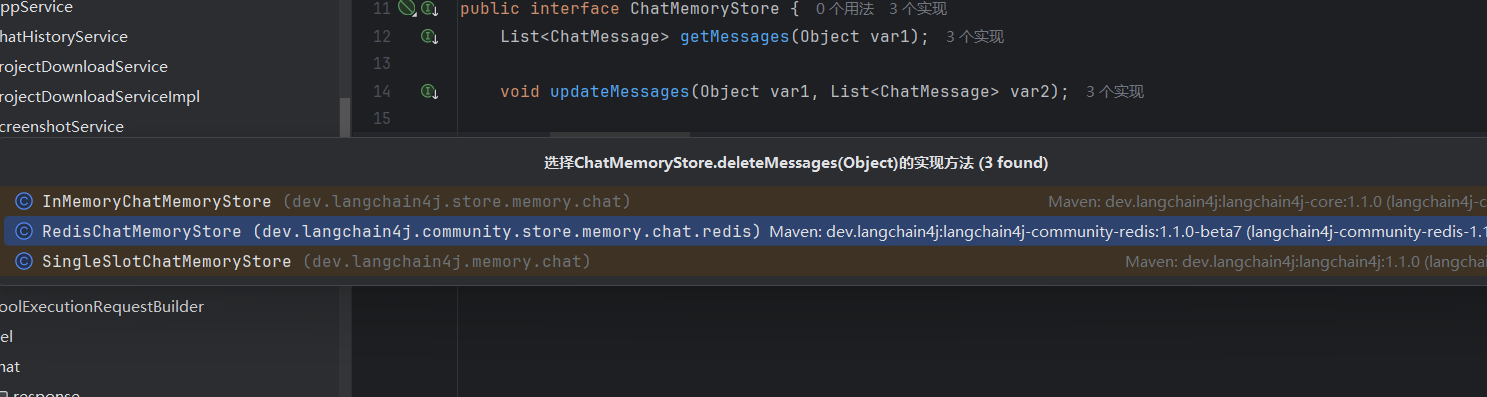
选redis的。
public void deleteMessages(Object memoryId) {
this.client.del(this.toRedisKey(memoryId));
}public long del(String key) {
return (Long)this.executeCommand(this.commandObjects.del(key));
}这就是删除数据,会不会有人问id也没有传啊,其实上面
MessageWindowChatMemory chatMemory = MessageWindowChatMemory
        .builder()
        .id(appId)
        .chatMemoryStore(redisChatMemoryStore)
        .maxMessages(20)
        .build();
这里已经把redis的id给你绑定好了不管删除还是add都是这个id。
再看add的源码:
    public void add(ChatMessage message) {
        List<ChatMessage> messages = this.messages();
        if (message instanceof SystemMessage) {
            Optional<SystemMessage> systemMessage = findSystemMessage(messages);
            if (systemMessage.isPresent()) {
                if (((SystemMessage)systemMessage.get()).equals(message)) {
                    return;
                }

                messages.remove(systemMessage.get());
            }
        }

        messages.add(message);
        ensureCapacity(messages, this.maxMessages);
        this.store.updateMessages(this.id, messages);
    }
如果添加的是 UserMessage(用户消息)或 AiMessage(AI 消息):
- 跳过 SystemMessage 的判断逻辑;
- 直接追加到消息列表;
- 触发容量控制(超出 max 则删旧);
- 同步到存储。

依旧选择redis的。
  public void updateMessages(Object memoryId, List<ChatMessage> messages) {
        String json = ChatMessageSerializer.messagesToJson((List)ValidationUtils.ensureNotEmpty(messages, "messages"));
        String key = this.toRedisKey(memoryId);
        String res;
        if (this.ttl > 0L) {
            res = this.client.setex(key, this.ttl, json);
        } else {
            res = this.client.set(key, json);
        }

        if (!"OK".equals(res)) {
            throw new RedisChatMemoryStoreException("Set memory error, msg=" + res);
        }
    }
即存入redis中。
所以流程就是先存数据库,再从数据库中查然后存入chatmemory(redis,key为appid)中此前还有一步是clear先删除原来的chatmemory以便填入最新的20条。
完整对象的详解:在
createAiCodeGeneratorService 里面
   // Vue 项目生成,使用工具调用和推理模型
            case VUE_PROJECT -> {
                // 使用多例模式的 StreamingChatModel 解决并发问题
                StreamingChatModel reasoningStreamingChatModel = SpringContextUtil.getBean("reasoningStreamingChatModelPrototype", StreamingChatModel.class);
                yield AiServices.builder(AiCodeGeneratorService.class)
                        .chatModel(chatModel)
                        .streamingChatModel(reasoningStreamingChatModel)
                        .chatMemoryProvider(memoryId -> chatMemory)
                        .tools(toolManager.getAllTools())
                        // 处理工具调用幻觉问题
                        .hallucinatedToolNameStrategy(toolExecutionRequest ->
                                ToolExecutionResultMessage.from(toolExecutionRequest,
                                        "Error: there is no tool called " + toolExecutionRequest.name())
                        )
                        .maxSequentialToolsInvocations(20)  // 最多连续调用 20 次工具
                        .inputGuardrails(new PromptSafetyInputGuardrail()) // 添加输入护轨
//                        .outputGuardrails(new RetryOutputGuardrail()) // 添加输出护轨,为了流式输出,这里不使用
                        .build();
            }
StreamingChatModel reasoningStreamingChatModel = SpringContextUtil.getBean("reasoningStreamingChatModelPrototype", StreamingChatModel.class);此为获取相应的bean
下面看这个bean的定义:
import dev.langchain4j.model.chat.StreamingChatModel;
import dev.langchain4j.model.openai.OpenAiStreamingChatModel;
import org.springframework.context.annotation.Bean;
import org.springframework.context.annotation.Configuration;
import org.springframework.context.annotation.Scope;

/**
 * AI大模型配置类(创建StreamingChatModel相关Bean)
 */
@Configuration // 标记为配置类,Spring会扫描并创建其中的@Bean
public class ChatModelConfig {

    /**
     * 定义名称为 reasoningStreamingChatModelPrototype 的原型Bean
     * @Scope("prototype"):原型作用域,每次getBean都返回新实例(适配不同请求的个性化配置)
     */
    @Bean(name = "reasoningStreamingChatModelPrototype") // 指定Bean名称
    @Scope("prototype") // 原型作用域(关键:和单例singleton区分)
    public StreamingChatModel reasoningStreamingChatModelPrototype() {
        // 构建StreamingChatModel实例(以OpenAI为例,也可能是讯飞/百度等国产模型)
        return OpenAiStreamingChatModel.builder()
                .apiKey("你的大模型API密钥")
                .modelName("gpt-3.5-turbo")
                .temperature(0.7)
                .build();
    }

    // 其他Bean定义...
}
就是根据这个"reasoningStreamingChatModelPrototype", StreamingChatModel.class去找相应的bean吗,为什么要把bean区分呢,是因为一些问题的难度不同可能,你要提升模型就得选模型高的那个bean。
接着往下:
yield AiServices.builder(AiCodeGeneratorService.class)
- 核心作用:启动
AiCodeGeneratorService接口的代理实例构建流程。 - 底层逻辑:
AiServices是 LangChain4j 的核心工具,能基于「业务接口(AiCodeGeneratorService)」动态生成代理类(无需你手动写接口实现);yield:Java 生成器语法(通常用在Iterable/Stream中),表示 “产出” 这个构建好的 AI 服务实例,供后续调用;AiCodeGeneratorService.class:指定要构建的 AI 服务接口(接口中定义了generateHtmlCodeStream、generateVueCode等代码生成方法)。
.chatModel(chatModel)
- 作用:配置「非流式聊天模型」(比如
ChatModel接口的实现)。 - 业务价值:
- 流式模型(
streamingChatModel)用于长文本 / 代码的流式输出,非流式模型用于短文本交互(比如工具调用前的简短推理、参数校验); - 两者互补,提升 AI 交互的效率(短文本用非流式更快,长文本用流式更友好)。
- 流式模型(
.streamingChatModel(reasoningStreamingChatModel)
- 作用:配置「流式聊天模型」(就是第一步获取的
reasoningStreamingChatModel)。 - 业务价值:
- 代码生成是典型的 “长文本输出场景”,流式模型能「逐行返回代码」(比如先返回
<template>,再返回<script>),前端可以实时渲染,避免用户等待整个代码生成完成; - 这是代码生成平台 “流式输出” 功能的核心配置。
- 代码生成是典型的 “长文本输出场景”,流式模型能「逐行返回代码」(比如先返回
.chatMemoryProvider(memoryId -> chatMemory)
- 作用:配置「对话记忆提供者」,指定 “根据记忆 ID(memoryId)获取对应的对话记忆(chatMemory)”。
- 底层逻辑:
memoryId:对应你的appId(每个应用的唯一标识);- Lambda 表达式
memoryId -> chatMemory:表示 “无论传入哪个 memoryId,都返回当前绑定的 chatMemory 实例”(保证每个应用的对话记忆隔离); - 核心价值:让 AI 能读取当前应用的历史对话(比如用户之前要求 “生成登录页”,后续要求 “加个验证码”,AI 能基于记忆理解上下文)。
.tools(toolManager.getAllTools())
- 作用:注册 AI 可调用的所有工具(Tool)。
- 业务场景:
toolManager.getAllTools():获取工具管理器中注册的所有工具(比如代码语法校验工具、文件保存工具、Vue 工程初始化工具、HTML 模板生成工具等);- AI 生成代码时,会根据需求自动调用这些工具(比如生成完代码后,自动调用 “语法校验工具” 检查是否有语法错误);
- 这是 “AI 智能体” 的核心能力(不仅能生成文本,还能调用工具完成实际操作)。
(5) .hallucinatedToolNameStrategy(...)
- 作用:处理「工具调用幻觉」(AI 虚构不存在的工具名称)。
- 问题背景:AI 可能因为模型偏差,调用一个你没注册的工具(比如你只有
checkCodeSyntax工具,AI 却调用checkCodeError),导致工具调用失败; - 解决方案:当 AI 调用不存在的工具时,执行 lambda 表达式中的逻辑:返回一个错误提示(
Error: there is no tool called xxx),并封装成ToolExecutionResultMessage,让 AI 感知到 “调用失败”,避免流程中断。
(6) .maxSequentialToolsInvocations(20)
- 作用:限制「最大连续工具调用次数」。
- 业务价值:防止 AI 无限循环调用工具(比如代码校验失败→重新生成→再校验→再失败,无限循环);限制为 20 次后,超过次数会停止调用,保护系统资源(避免 CPU / 内存耗尽)。
(7) .inputGuardrails(new PromptSafetyInputGuardrail())
- 作用:添加「输入防护栏」,过滤有害 / 违规的用户输入。
- 业务价值:
PromptSafetyInputGuardrail是自定义的输入防护类(比如包含敏感词过滤、恶意 prompt 检测);比如用户输入 “生成钓鱼网站代码”,防护栏会拦截该请求,避免 AI 生成违规内容;这是平台合规性的核心配置(防止滥用 AI)。
(8) 注释掉的 .outputGuardrails(...)
- 作用:原本用于添加「输出防护栏」(校验 AI 输出的内容是否合规)。
- 为什么注释:输出防护栏需要「完整获取 AI 输出后再校验」,但代码生成是「流式输出」(逐段返回),无法提前获取完整输出;如果启用,会阻断流式返回(必须等所有内容生成完才能校验),影响用户体验,所以注释掉。
(9) .build()
- 作用:完成所有配置,构建最终的
AiCodeGeneratorService代理实例。 - 底层逻辑:LangChain4j 会根据上述配置,动态生成
AiCodeGeneratorService接口的实现类,封装「模型调用、记忆读取、工具调用、安全防护」等所有逻辑;后续调用aiCodeGeneratorService.generateHtmlCodeStream()时,实际执行的是这个动态生成的代理方法。
用户发起 “生成 HTML 登录页” 请求 → 代码构建 AI 服务实例:
- 获取独立的流式模型实例(避免多请求串配置);
- 配置流式模型(保证代码流式返回)+ 对话记忆(读取历史需求);
- 注册代码生成相关工具(支持语法校验、文件保存等);
- 配置工具调用防护(处理幻觉、限制调用次数);
- 配置输入防护(过滤违规请求);
- 构建 AI 服务实例,处理用户请求并流式返回代码
chatToGenCode中最后的响应部分
 return streamHandlerExecutor.doExecute(codeStream, chatHistoryService, appId, loginUser, codeGenTypeEnum)
                    .doFinally(signalType -> {
                        // 流结束时清理(无论成功/失败/取消)
                        MonitorContextHolder.clearContext();
                    });
下面直接来看doExecute方法:
public Flux<String> doExecute(Flux<String> originFlux,
                                  ChatHistoryService chatHistoryService,
                                  long appId, User loginUser, CodeGenTypeEnum codeGenType) {
        return switch (codeGenType) {
            case VUE_PROJECT -> // 使用注入的组件实例
                    jsonMessageStreamHandler.handle(originFlux, chatHistoryService, appId, loginUser);
            case HTML, MULTI_FILE -> // 简单文本处理器不需要依赖注入
                    new SimpleTextStreamHandler().handle(originFlux, chatHistoryService, appId, loginUser);
        };
    }
case VUE_PROJECT -> // 使用注入的组件实例
jsonMessageStreamHandler.handle(originFlux, chatHistoryService, appId, loginUser);先看这一行。
看handle方法:
   public Flux<String> handle(Flux<String> originFlux,
                               ChatHistoryService chatHistoryService,
                               long appId, User loginUser) {
        StringBuilder aiResponseBuilder = new StringBuilder();
        return originFlux
                .map(chunk -> {
                    // 收集AI响应内容
                    aiResponseBuilder.append(chunk);
                    return chunk;
                })
                .doOnComplete(() -> {
                    // 流式响应完成后,添加AI消息到对话历史
                    String aiResponse = aiResponseBuilder.toString();
                    chatHistoryService.addChatMessage(appId, aiResponse, ChatHistoryMessageTypeEnum.AI.getValue(), loginUser.getId());
                })
                .doOnError(error -> {
                    // 如果AI回复失败,也要记录错误消息
                    String errorMessage = "AI回复失败: " + error.getMessage();
                    chatHistoryService.addChatMessage(appId, errorMessage, ChatHistoryMessageTypeEnum.AI.getValue(), loginUser.getId());
                });
    }
}
就是会对ai输出的话进行一个收集
aiResponseBuilder.append(chunk);
然后转成String类型的存储到chatmemory中
String aiResponse = aiResponseBuilder.toString();
chatHistoryService.addChatMessage(appId, aiResponse, ChatHistoryMessageTypeEnum.AI.getValue(), loginUser.getId())。
然后
// 如果AI回复失败,也要记录错误消息
String errorMessage = "AI回复失败: " + error.getMessage();
chatHistoryService.addChatMessage(appId, errorMessage, ChatHistoryMessageTypeEnum.AI.getValue(), loginUser.getId());
即使失败也存入到chatmemory中

汇聚全球AI编程工具,助力开发者即刻编程。
更多推荐
 9
9 0
0- 0


 已为社区贡献3条内容

所有评论(0)