
从零学 Claude code: 不要放到脑子里,Agent 外显规划之道,todo 策略
模型不是忘了,是没有一块稳定的地方来锚定"我在做什么"。这一章给 Agent 装上一块外置工作面板,让计划从注意力里跑出来,变成可观察的结构化状态。
上一篇,我们给 Agent 装上了工具箱——读文件、写文件、跑命令,一口气扩展到四个工具,而循环一行未动。但工具能力上去了,新问题随之浮现:一旦任务变成多步骤,Agent 就开始漂。
你让它"帮我重构这个模块,顺便补上测试",它能动,但是东一榔头西一棒,做完第一步就忘了第二步,明明验证过的东西过会儿又重新验证。这不是工具不够,而是没有计划状态

为什么多步任务会漂
大语言模型的注意力,本质上是上下文窗口里信息在竞争权重。对话越来越长,早期写下的计划句子就在竞争中慢慢败退——它没被删掉,只是影响力稀释了。
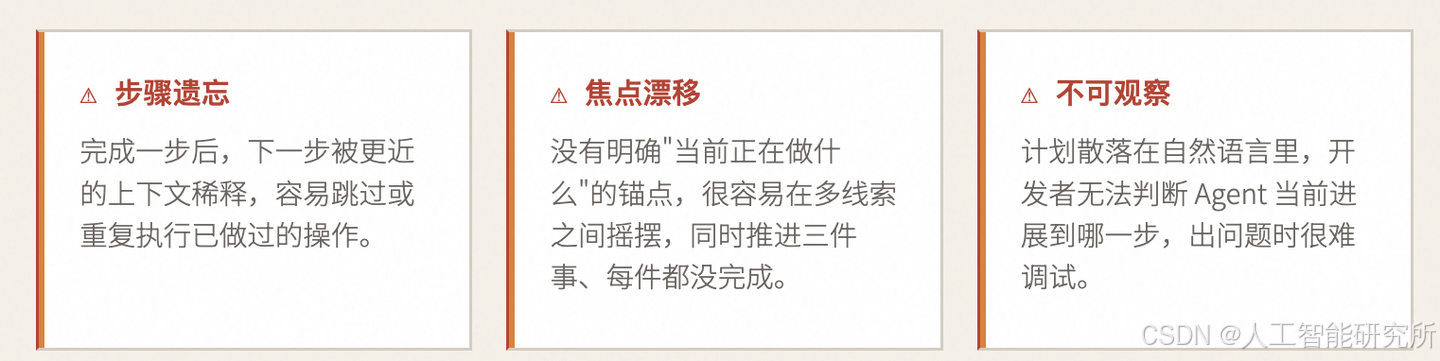
解法很直觉:
与其让 Agent 把计划装在脑子里,不如让它把计划写到一个外部结构里,随着任务推进持续改写。这就是todo工具存在的意义。
架构:messages + planning_state
s02 之前,主循环维护的核心数据只有一个:对话历史 messages。这一章,循环开始同时维护第二块状态——当前会话的计划面板。
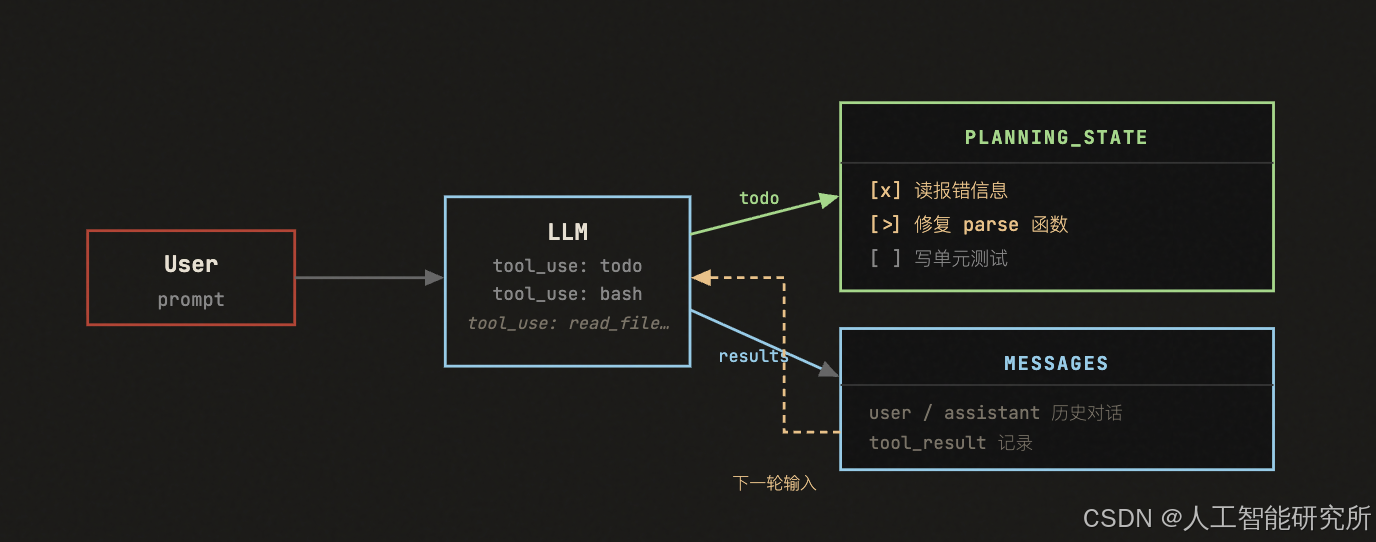
关键变化在于:todo 工具调用后,更新的是 PlanningState——一块独立于对话历史的结构化状态。模型下一轮通过工具返回值感知到计划已更新,而开发者也能在任意时刻直接读取这块状态,无需解析自然语言。
核心数据结构
PlanItem:一个条目,三个字段
一个计划条目最小只需要三个字段:
@dataclass
class PlanItem:
    content:     str          # 这一步要做什么
    status:      str = "pending"    # pending | in_progress | completed
    active_form: str = ""          # 进行时描述(可选)
activeForm是给人看的友好标签——当一步处于in_progress时,用进行时描述(如 "Fixing the parse function")让计划面板更直观。它是可选的,不影响逻辑。
PlanningState:计划 + 健康指标
@dataclass
class PlanningState:
    items:               list[PlanItem] = field(default_factory=list)
    rounds_since_update: int           = 0
rounds_since_update 记录"已经过了几轮,计划还没被刷新"。这不是业务字段,而是系统的自监控指标——一旦超过阈值,循环就会插入提醒。
渲染效果:一眼看清进度
[x]读报错信息
[>]修复 parse 函数(Fixing the parse function)
[ ]写单元测试
[ ]验证测试通过
(1/4 completed)
关键约束:同一时间只允许一个 in_progress
这是 s03 里最重要的一条规则,也是最容易被误解的。
in_progress_count = 0
for item in items:
    if item["status"] == "in_progress":
        in_progress_count += 1

if in_progress_count > 1:
raise ValueError("Only one item can be in_progress")这不是模拟真实工作流的约束,而是刻意设计的教学约束:强制模型在任意时刻明确表态"我现在在做这一件事",而不是同时推进三件、最终每件都没做完。
当系统把"焦点管理"变成强制执行的规则,而不是靠模型自觉,Agent 在长任务中的漂移就会明显减少。
提醒机制:主循环开始有了过程意识
如果 Agent 连续几轮都没有更新计划,系统会主动插入一条提醒:
PLAN_REMINDER_INTERVAL = 3   # 连续几轮没更新就提醒

def reminder(self) -> str | None:
    if not self.state.items:
        return None
    if self.state.rounds_since_update < PLAN_REMINDER_INTERVAL:
        return None
    return "<reminder>Refresh your current plan before continuing.</reminder>"

# 在 agent_loop 里,每轮结束后检查
if used_todo:
    TODO.state.rounds_since_update = 0
else:
    TODO.note_round_without_update()
    reminder = TODO.reminder()
    if reminder:
        results.insert(0, {"type": "text", "text": reminder})
很多人第一眼会觉得"这不就是个小提示"。不是的。
提醒机制说明了一件重要的事:主循环不仅负责执行动作,还开始主动监控过程中的结构化状态是否健康。一个会自我监控的循环,和一个只会执行命令的循环,是本质不同的两种架构。
代码深度解析
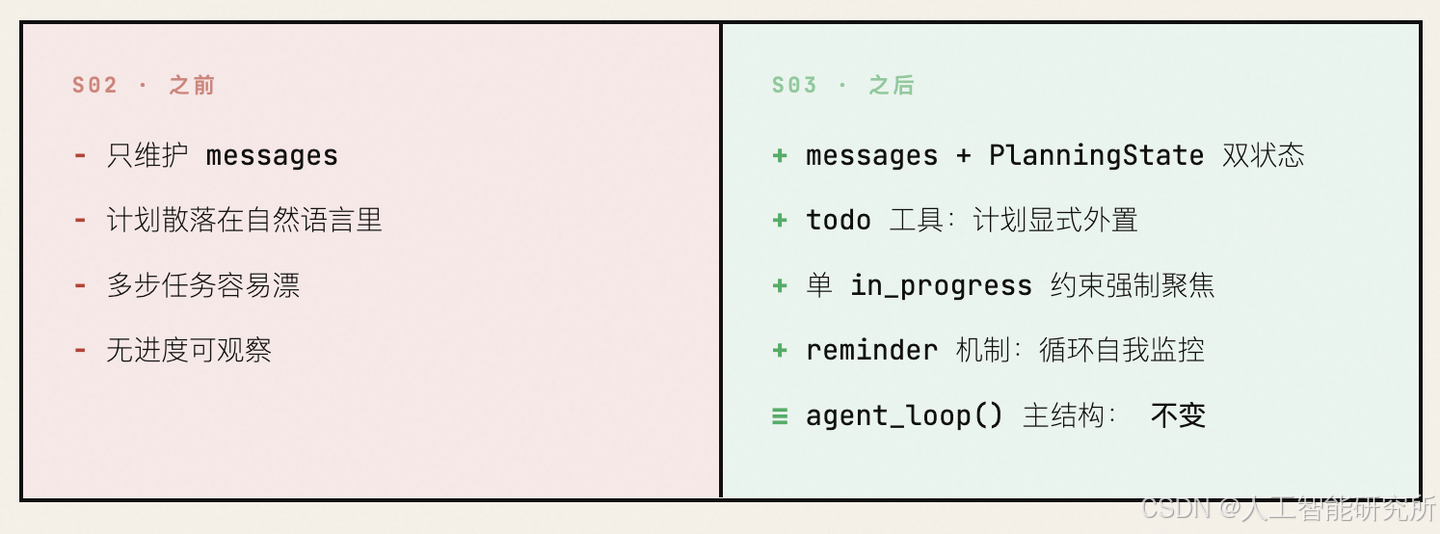
一、S02 → S03:到底变了什么?
S02                              S03
─────────────────────────────    ─────────────────────────────
                                 ✅ TodoManager 类      ← 新增
                                 ✅ SYSTEM prompt 更新  ← 修改
  TOOL_HANDLERS (4个工具)         ✅ + "todo" handler   ← 新增
  TOOLS (4个工具定义)             ✅ + todo schema      ← 新增
                                 ✅ rounds_since_todo   ← 新增
  agent_loop() (简单分发)         ✅ + nag 注入逻辑     ← 新增
                                 ✅ + try/except 包裹   ← 新增
─────────────────────────────    ─────────────────────────────
核心问题:为什么需要 todo?
没有 todo 的 10 步重构:
轮次  模型行为
────  ────────────────────────────────
 1    读文件,列计划(在脑子里)
 2    改第1处 ✅
 3    改第2处 ✅
 4    开始改第3处... 等等,第3处是什么来着?
 5    (上下文已经被工具结果填满,system prompt 影响力下降)
 6    跳到第7步(幻觉:以为3-6都做过了)
 7    即兴发挥,做一些多余的事
 8    声称完成 ← 实际只做了 2/10
有了 todo:模型把计划"外化"到工具结果中,每轮都能看到完整的进度清单,不会丢失。

二、逐段解析
SYSTEM Prompt 的变化
# s02
SYSTEM = f"You are a coding agent at {WORKDIR}. Use tools to solve tasks. Act, don't explain."
# s03
SYSTEM = f"""You are a coding agent at {WORKDIR}.
Use the todo tool to plan multi-step tasks. Mark in_progress before starting, completed when done.
Prefer tools over prose."""
指令	含义
Use the todo tool to plan multi-step tasks	遇到多步任务,先用 todo 列计划
Mark in_progress before starting	开始做某一步之前,先把它的状态改为 in_progress
completed when done	做完之后改为 completed
Prefer tools over prose	能用工具就用工具,别光说废话
注意从三引号——s02 是单行字符串,s03 变成多行,说明 system prompt 变复杂了,需要给模型更明确的"行为规范"。
TodoManager类——带状态的任务管理器
这是 s03 的核心新增,一个完整的类,包含两个方法:
__init__
class TodoManager:
    def __init__(self):
self.items = []- self.items:存储所有待办项的列表
- 初始为空,模型第一次调用 todo 工具时填充
update()—— 更新待办列表(核心方法)
    def update(self, items: list) -> str:
        if len(items) > 20:
            raise ValueError("Max 20 todos allowed")
第一道防线:数量限制。 防止模型生成过多待办项,把上下文撑爆。
        validated = []
        in_progress_count = 0
for i, item in enumerate(items):- validated:经过校验的待办项,最终存入 self.items
- in_progress_count:统计当前有多少个 in_progress 状态的项
- enumerate(items):遍历时带索引,用于生成默认 id
            text = str(item.get("text", "")).strip()
            status = str(item.get("status", "pending")).lower()
            item_id = str(item.get("id", str(i + 1)))
逐字段提取 + 默认值 + 类型安全:
# 模型传入的 item 可能是这样:
{ "id": "1", "text": "Read hello.py", "status": "completed" }
# .get("text", ""):如果模型没传 text,默认空字符串
# str(...):防御性转型,防止模型传入 int 或其他类型
# .strip():去除首尾空白
# .lower():status 统一小写,"In_Progress" 和 "in_progress" 都能处理
# .get("id", str(i+1)):如果没传 id,用序号作为默认值(从1开始)
            if not text:
                raise ValueError(f"Item {item_id}: text required")
校验 text 非空——一个没有描述的待办项没有意义。
            if status not in ("pending", "in_progress", "completed"):
                raise ValueError(f"Item {item_id}: invalid status '{status}'")
校验 status 枚举值——只允许三种状态,防止模型"创新"。
            if status == "in_progress":
                in_progress_count += 1
            validated.append({"id": item_id, "text": text, "status": status})
计数 + 存入已验证列表。
        if in_progress_count > 1:
            raise ValueError("Only one task can be in_progress at a time")
        self.items = validated
        return self.render()
最关键的一行:强制同一时间只能有一个 in_progress。
为什么?
同时多个 in_progress 的问题:

[>] 任务 A: 添加类型注解       ← 模型在改这个
[>] 任务 B: 添加 docstring     ← 模型也在改这个
[ ] 任务 C: 添加 main guard
[ ] 任务 D: 运行测试
模型不知道自己"当前"在做什么,注意力分散,
可能改了 A 的类型注解后跳到 B 的 docstring,
然后又回去改 A,来回跳跃,效率极低。
只允许一个 in_progress:
[>] 任务 A: 添加类型注解 ← 聚焦!只做这一个
[ ] 任务 B: 添加 docstring
[ ] 任务 C: 添加 main guard
[ ] 任务 D: 运行测试
模型必须先完成 A,标记为 completed,
然后才能把 B 标记为 in_progress。
→ 强制顺序执行,不跳步。render()—— 渲染为人类可读的文本
    def render(self) -> str:
        if not self.items:
            return "No todos."
如果没有待办项,返回简短提示。
        lines = []
        for item in self.items:
            marker = {"pending": "[ ]", "in_progress": "[>]", "completed": "[x]"}[item["status"]]
            lines.append(f"{marker} #{item['id']}: {item['text']}")
状态 → 标记符的映射:
[ ] #1: Read hello.py         ← pending
[>] #2: Add type hints        ← in_progress(当前正在做)
[x] #3: Add docstrings        ← completed
[>] 而不是 [*]——箭头暗示"正在前进",比星号更有动态感。
        done = sum(1 for t in self.items if t["status"] == "completed")
        lines.append(f"\n({done}/{len(self.items)} completed)")
        return "\n".join(lines)
底部追加完成度统计:
[ ] #1: Read hello.py
[>] #2: Add type hints
[x] #3: Add docstrings
(1/3 completed)
这个渲染结果会作为 todo 工具的返回值,喂回给 LLM——所以每一轮循环模型都能看到完整的进度。

TODO全局实例
TODO = TodoManager()创建一个全局单例。整个程序生命周期内只有一个 TodoManager,状态跨轮次持久化。
# 生命周期:
# 用户第一次输入 → agent_loop 启动 → 模型调用 todo → TODO.items 被填充
# 循环继续 → 模型再次调用 todo → TODO.items 被更新(不是重置!)
# 循环结束 → 返回用户
# 用户第二次输入 → agent_loop 启动 → TODO.items 仍然保留上次的值!
这意味着:同一个 REPL 会话中,上一次任务的 todo 不会自动清空。模型需要在下一次任务开始时主动覆盖。
工具定义变化
TOOL_HANDLERS 新增一行
TOOL_HANDLERS = {
    "bash":       lambda **kw: run_bash(kw["command"]),
    "read_file":  lambda **kw: run_read(kw["path"], kw.get("limit")),
    "write_file": lambda **kw: run_write(kw["path"], kw["content"]),
    "edit_file":  lambda **kw: run_edit(kw["path"], kw["old_text"], kw["new_text"]),
    "todo":       lambda **kw: TODO.update(kw["items"]),    # ← 新增
}
todo 工具的处理函数:直接调用 TODO.update(),传入模型生成的 items 列表。
TOOLS 数组新增 todo schema
    {"name": "todo", "description": "Update task list. Track progress on multi-step tasks.",
     "input_schema": {
         "type": "object",
         "properties": {
             "items": {
                 "type": "array",
                 "items": {
                     "type": "object",
                     "properties": {
                         "id": {"type": "string"},
                         "text": {"type": "string"},
                         "status": {
                             "type": "string",
                             "enum": ["pending", "in_progress", "completed"]
                         }
                     },
                     "required": ["id", "text", "status"]
                 }
             }
         },
         "required": ["items"]
}},这是一个嵌套 schema——items 是一个数组,每个元素是一个对象:
todo 工具的输入结构:
{
    "items": [                          ← 外层数组
        {                               ← 每个待办项
            "id": "1",                  ← 标识符
            "text": "Read hello.py",    ← 描述
            "status": "in_progress"     ← 状态(枚举值)
        },
        {
            "id": "2",
            "text": "Add type hints",
            "status": "pending"
        }
    ]
}
enum 约束告诉模型:“status 只能是这三个值之一”。配合 TodoManager 的校验,双重保险。
agent_loop()—— 循环体的三处变化
s02 的循环体到 s03,改了三处。逐一拆解:
变化一:rounds_since_todo计数器
def agent_loop(messages: list):
    rounds_since_todo = 0        # ← 新增:距上次更新 todo 的轮次数
    while True:
# 语义:
# rounds_since_todo = 0 → 刚更新过 todo
# rounds_since_todo = 1 → 1轮没更新
# rounds_since_todo = 2 → 2轮没更新
# rounds_since_todo = 3 → 3轮没更新 → 触发 nag reminder变化二:used_todo标记 + 计数器更新
        results = []
        used_todo = False                          # ← 新增:本轮是否调用了 todo
        for block in response.content:
            if block.type == "tool_use":
                handler = TOOL_HANDLERS.get(block.name)
                try:                                # ← 新增:try/except 包裹
                    output = handler(**block.input) if handler else f"Unknown tool: {block.name}"
                except Exception as e:              # ← 新增:捕获异常
                    output = f"Error: {e}"          # ← 新增:错误信息作为工具结果返回
                print(f"> {block.name}:")
                print(str(output)[:200])
                results.append({"type": "tool_result", "tool_use_id": block.id, "content": str(output)})
                if block.name == "todo":            # ← 新增:检测是否调用了 todo
                    used_todo = True
逐行分析新增部分:
used_todo = False每轮循环开始时重置为 False。
try:
    output = handler(**block.input) if handler else f"Unknown tool: {block.name}"
except Exception as e:
    output = f"Error: {e}"
s02 中没有 try/except! 为什么 s03 加了?
# s02 的 run_bash、run_read 等都有自己的 try/except,所以外部不需要。
# 但 s03 新增的 TodoManager.update() 会 raise ValueError!
# 如果模型传入无效数据(比如两个 in_progress),没有外层 try/except,
# 整个 agent_loop 就会崩溃。
# ValueError: "Only one task can be in_progress at a time"
# → 被 except Exception as e 捕获
# → output = "Error: Only one task can be in_progress at a time"
# → 作为 tool_result 返回给模型
# → 模型看到错误,修正行为,重新调用 todo
# → 不会崩溃!
if block.name == "todo":
used_todo = True标记本轮是否调用了 todo 工具。
rounds_since_todo = 0 if used_todo else rounds_since_todo + 1三元表达式,等价于:
if used_todo:
    rounds_since_todo = 0       # 调用了 todo,计数器归零
else:
    rounds_since_todo += 1      # 没调用,计数器 +1
变化三:Nag Reminder 注入
        if rounds_since_todo >= 3:
            results.append({"type": "text", "text": "<reminder>Update your todos.</reminder>"})
当连续 3 轮没有调用 todo 时,往工具结果中注入一条提醒。
# 注入的位置:results 列表的最末尾
# results 结构:
[
    {"type": "tool_result", "tool_use_id": "xxx", "content": "..."},  # 正常工具结果
    {"type": "tool_result", "tool_use_id": "yyy", "content": "..."},  # 正常工具结果
    {"type": "text", "text": "<reminder>Update your todos.</reminder>"}  # ← 注入的提醒
]
然后这整个 results 被追加到 messages:
messages.append({"role": "user", "content": results})从模型的角度看,下一轮它收到的最后一条消息是:
[user message with content]:
  - tool_result for bash: "file written successfully"
  - text: "<reminder>Update your todos.</reminder>"
模型会看到这条 <reminder>,意识到自己太久没更新进度了,于是调用 todo 更新状态。
为什么是 3 轮而不是 1 轮或 5 轮?
太小(1-2轮):模型每一步都要调 todo,浪费 token太大(5+轮):模型可能已经偏离计划很远3 轮是经验上的平衡点
三、Nag Reminder 的注入时机可视化
轮次  模型调用的工具          rounds_since_todo   是否注入 reminder
────  ───────────────────    ──────────────────   ─────────────────
 1    todo (列计划)           0 → 归零             ❌
 2    read_file               1                    ❌
 3    edit_file               2                    ❌
 4    bash (运行测试)         3 → ≥3!             ✅ 注入 "<reminder>"
 5    todo (更新进度)         0 → 归零             ❌
 6    edit_file               1                    ❌
 7    edit_file               2                    ❌
 8    bash                    3 → ≥3!             ✅ 注入 "<reminder>"
更直观的时间线:
1 2 3 4 5 6 7 8
│ │ │ │ │ │ │ │
todo read edit bash todo edit edit bash
│ │ │
└── rounds=0 ── 1 ── 2 ── 3 ──┘ │
↑ │
注入 reminder │
┌──────┘
└── rounds=0 ── 1 ── 2 ── 3
↑
注入 reminder四、用一个完整例子走完整个流程
用户输入:Refactor hello.py: add type hints, docstrings, and a main guard
循环第 1 轮
────────────────────────────────────────────────
messages = [{ role: "user", content: "Refactor hello.py..." }]
    │
    ▼ LLM 思考
"这是一个多步任务,先用 todo 列计划"
    │
    ▼ 响应
tool_use: todo(items=[
    { id: "1", text: "Read hello.py", status: "in_progress" },
    { id: "2", text: "Add type hints", status: "pending" },
    { id: "3", text: "Add docstrings", status: "pending" },
    { id: "4", text: "Add main guard", status: "pending" },
    { id: "5", text: "Run tests", status: "pending" },
])
    │
    ▼ TODO.update() 处理
in_progress_count = 1 ✅ → 通过校验
    │
    ▼ render() 返回
[>] #1: Read hello.py
[ ] #2: Add type hints
[ ] #3: Add docstrings
[ ] #4: Add main guard
[ ] #5: Run tests

(0/5 completed)
    │
    ▼ 追加到 messages
rounds_since_todo = 0 (刚调了 todo)

循环第 2 轮
────────────────────────────────────────────────
    │
    ▼ LLM 思考
"第1步是读文件,用 read_file"
    │
    ▼ 响应
tool_use: read_file(path="hello.py")
    │
    ▼ 执行,返回文件内容
rounds_since_todo = 1

循环第 3 轮
────────────────────────────────────────────────
    │
    ▼ LLM 思考
"读完了,现在更新 todo:第1步完成,第2步开始"
    │
    ▼ 响应
tool_use: todo(items=[
    { id: "1", text: "Read hello.py", status: "completed" },     ← 改了
    { id: "2", text: "Add type hints", status: "in_progress" },  ← 改了
    { id: "3", text: "Add docstrings", status: "pending" },
    { id: "4", text: "Add main guard", status: "pending" },
    { id: "5", text: "Run tests", status: "pending" },
])
    │
    ▼ TODO.update() 处理
[x] #1: Read hello.py
[>] #2: Add type hints
[ ] #3: Add docstrings
[ ] #4: Add main guard
[ ] #5: Run tests

(1/5 completed)
    │
    ▼ 追加到 messages
rounds_since_todo = 0 (刚调了 todo)

循环第 4 轮
────────────────────────────────────────────────
    │
    ▼ LLM 思考
"开始加类型注解,用 edit_file"
    │
    ▼ 响应
tool_use: edit_file(path="hello.py", old_text="...", new_text="...")
    │
    ▼ 执行
rounds_since_todo = 1

循环第 5 轮
────────────────────────────────────────────────
    │
    ▼ LLM 思考
"再改一处类型注解"
    │
    ▼ 响应
tool_use: edit_file(path="hello.py", old_text="...", new_text="...")
    │
    ▼ 执行
rounds_since_todo = 2

循环第 6 轮
────────────────────────────────────────────────
    │
    ▼ LLM 思考
"再改一处...等等,我改了几处了?"
    │
    ▼ 响应
tool_use: edit_file(path="hello.py", old_text="...", new_text="...")
    │
    ▼ 执行
rounds_since_todo = 3 → ≥3!
    │
    ▼ 注入 nag reminder
results 末尾追加:
{"type": "text", "text": "<reminder>Update your todos.</reminder>"}

循环第 7 轮
────────────────────────────────────────────────
    │
    ▼ LLM 看到上一轮的结果 + reminder
"哦对,我应该更新进度了。类型注解加完了,标记完成,开始 docstring"
    │
    ▼ 响应
tool_use: todo(items=[
    { id: "1", text: "Read hello.py", status: "completed" },
    { id: "2", text: "Add type hints", status: "completed" },    ← 完成!
    { id: "3", text: "Add docstrings", status: "in_progress" },  ← 开始
    { id: "4", text: "Add main guard", status: "pending" },
    { id: "5", text: "Run tests", status: "pending" },
])

... 以此类推,直到全部完成 ...

最终轮
────────────────────────────────────────────────
    │
    ▼ LLM
"所有 todo 都完成了,直接回复用户"
    │
    ▼ 响应
stop_reason = "end_turn"
"Done! hello.py has been refactored with type hints, docstrings, and a main guard."
    │
    ▼ 循环退出
五、try/except的深层意义
s03 在循环中加了 try/except,虽然看起来只是"错误处理",但它解决了一个架构级问题:
# 没有 try/except 的情况(s02):
# 所有 handler 自己处理异常,返回错误字符串
# 因为 s02 的 handler(run_bash, run_read 等)内部都有 try/except

# s03 的情况:
# TodoManager.update() 用 raise ValueError 来校验
# 这是设计选择:校验逻辑放在 TodoManager 内部,通过异常传播
# 但如果不在循环层捕获,异常会冒泡到 agent_loop 顶层
# → 整个程序崩溃

# s03 的设计:
# handler 层:可以 raise(让调用者知道发生了什么)
# 循环层:统一捕获,转为错误字符串,返回给模型
# → 模型看到错误,自我修正
# → 优雅降级,不会崩溃
# 错误流转过程:
TodoManager.update()
→ raise ValueError("Only one task can be in_progress at a time")
→ agent_loop 的 except 捕获
→ output = "Error: Only one task can be in_progress at a time"
→ results.append(tool_result: "Error: ...")
→ messages.append(user: [tool_result: "Error: ..."])
→ LLM 看到错误
→ 修正行为,只标记一个 in_progress
→ 重新调用 todo六、安全与校验全景图
                        模型调用 todo 工具
                              │
                              ▼
              ┌─── TodoManager.update() 校验链 ───┐
              │                                     │
              │ ① len(items) > 20?                  │
              │    → "Max 20 todos allowed"          │
              │                                     │
              │ ② item.text 为空?                    │
              │    → "Item X: text required"         │
              │                                     │
              │ ③ status 不合法?                     │
              │    → "Item X: invalid status 'xxx'"  │
              │                                     │
              │ ④ in_progress > 1?                  │
              │    → "Only one task can be           │
              │       in_progress at a time"         │
              │                                     │
              └──────────────┬──────────────────────┘
                             │ 全部通过
                             ▼
                   validated 列表构建完成
                             │
                             ▼
                   self.items = validated
                             │
                             ▼
                     render() → 返回文本
                             │
                             ▼
                   作为 tool_result 喂回 LLM
七、设计思想总结
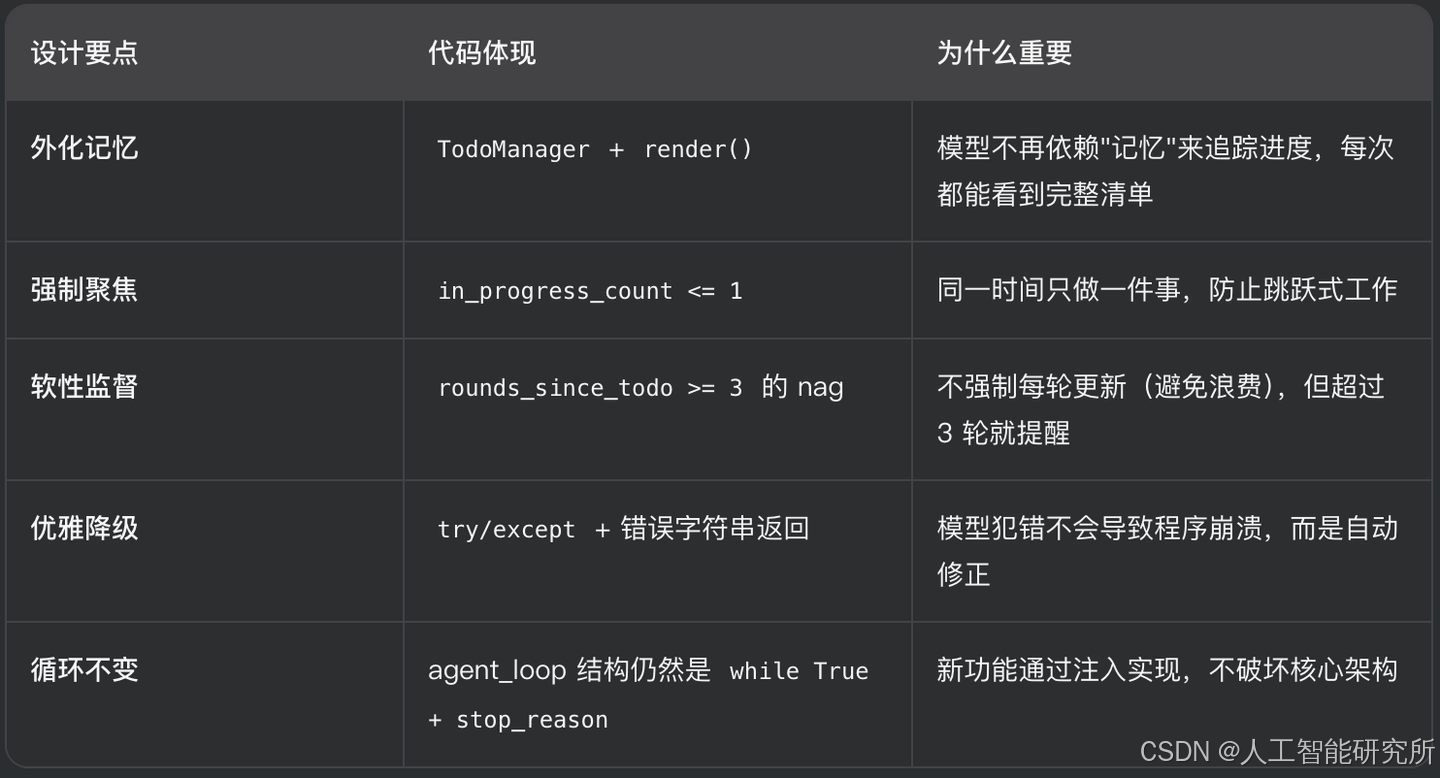
核心洞察:“The agent can track its own progress – and I can see it.” —— 模型通过 todo 工具自我管理进度,而人类开发者也能从控制台输出中看到 [>]、[x] 标记,实时了解 Agent 在做什么。可观测性是这个设计最大的价值。
没有 Todo vs 有 Todo:10 步重构的对比
没有 Todo:模型全靠"脑子记"
轮次  模型行为                            上下文状态
────  ──────────────────────────────────  ──────────────────────
 1    读文件,在脑子里列了10步计划          system prompt 很醒目
 2    改第1处 ✅                          工具结果开始堆积
 3    改第2处 ✅                          计划仍然"隐式"存在
 4    开始改第3处... 等等,第3步是什么?    system prompt 被挤到顶部
 5    (工具结果已经占了大半上下文)         最初的计划越来越模糊
 6    跳到第7步(幻觉:以为3-6都做过了)    计划彻底丢失
 7    即兴发挥,做一些多余的事             模型在"自由发挥"
 8    声称完成                             实际只做了 2/10
问题根因:计划只存在于模型的"隐式思维"中。上下文每增加一轮工具结果,计划就被稀释一点。到第 4-5 轮,计划已经被挤出注意力窗口。
有 Todo:计划外化,每轮可见
轮次  模型行为                            上下文状态
────  ──────────────────────────────────  ──────────────────────
 1    调用 todo 列出10步,第1步 in_progress  清单白纸黑字写在消息里
 2    改第1处 ✅ → 更新 todo               清单:[x] [>] [ ] ... [ ]
 3    第2步 in_progress → 改第2处 ✅        清单:[x] [x] [>] ... [ ]
 4    第3步 in_progress → 改第3处 ✅        清单:[x] [x] [x] [>] ...
 5    第4步 in_progress → 改第4处 ✅        清单依然清晰可见
 6    (忘了更新 todo 3轮)                 系统注入 <reminder>
 7    模型看到提醒 → 更新 todo             清单:[x]×6 [>] [ ] [ ]
8 继续第7步 → 完成 实际做了 10/10 ✅为什么有效:计划不再是"脑子里想的",而是每次循环都以工具结果的形式出现在消息列表中。不管上下文多长,模型都能在最近的几条消息里看到完整的进度清单。
并排对比:同一时刻,模型"看到"的东西
假设到了第 5 轮,模型正在处理第 3 步:
❌ 没有 Todo                              ✅ 有 Todo
────────────────────────                  ────────────────────────
messages 最后几条:                        messages 最后几条:

[user] 请重构 hello.py                     [user] 请重构 hello.py
[assistant] read_file("hello.py")         [assistant] todo(items=[...])
[user] <file content 200行>               [user] [>] #1: Read... ← 渲染结果
[assistant] edit_file(...)                [assistant] read_file("hello.py")
[user] Edited hello.py                    [user] <file content 200行>
[assistant] edit_file(...)                [assistant] edit_file(...)
[user] Edited hello.py                    [user] Edited hello.py
[assistant] edit_file(...)  ← 当前轮      [assistant] edit_file(...)
                                         [user] Edited hello.py
                                         [assistant] edit_file(...) ← 当前轮

                                         ↑ 在最近的消息里,清单一直都在
↑ 计划?什么计划?                           模型随时能看到自己做到哪了
上下文里找不到任何计划的痕迹
一句话总结
没有 Todo:计划是模型的"短期记忆",上下文一长就丢失。
有 Todo:计划是工具结果中的"外部存储",每轮循环都自动出现在模型的视野里,丢不了。
更多transformer,VIT,swin tranformer
参考头条号:人工智能研究所
v号:人工智能研究Suo, 启示AI科技
动画详解transformer 在线视频教程



汇聚全球AI编程工具,助力开发者即刻编程。
更多推荐

 10
10 0
0- 0


 已为社区贡献12条内容

所有评论(0)