
Jetson Thor测试 Qwen-VL
环境搭建
Jetson Thor安装pytorch等常用库的方法和桌面pc端不一样,和之前的jetson系列也略有不同。新建conda python=3.12环境根据https://forums.developer.nvidia.com/t/how-to-install-pytorch-in-thor/344438/4
torch、torchvision等包可以在https://pypi.jetson-ai-lab.io/sbsa/cu130中下载。
执行
import torch
若报错
ImportError: libnvpl_lapack_lp64_gomp.so.0: cannot open shared object file: No such file or directory
需要在https://developer.nvidia.com/nvpl-downloads中下载nvpl包和在https://developer.nvidia.com/cudss-downloads
中下载cudss包。
若报错
    from torch._C import *  # noqa: F403
    ^^^^^^^^^^^^^^^^^^^^^^
ImportError: libcublas.so.12: cannot open shared object file: No such file or directory
以及
    from torch._C import *  # noqa: F403
    ^^^^^^^^^^^^^^^^^^^^^^
ImportError: libnvJitLink.so.12: cannot open shared object file: No such file or directory
则说明缺少cublas和nvJitLink库,需要在https://developer.nvidia.com/hpc-sdk/downloads下载hpc-sdk,并在添加环境变量:
export LD_LIBRARY_PATH=/opt/nvidia/hpc_sdk/Linux_aarch64/25.11/math_libs/12.9/targets/sbsa-linux/lib/:$LD_LIBRARY_PATH
export LD_LIBRARY_PATH=/opt/nvidia/hpc_sdk/Linux_aarch64/25.11/cuda/12.9/targets/sbsa-linux/lib:$LD_LIBRARY_PATH
demo测试
import os
import sys
import time
import shlex
import argparse
import tempfile
import base64
from io import BytesIO
import numpy as np
import cv2
import torch
from PIL import Image, ImageFont, ImageDraw, ImageOps
from transformers import Qwen3VLForConditionalGeneration, AutoProcessor

MODEL_PATH = "Qwen3-VL-2B-Instruct"
PRE_PROMPT_FIND = """
【任务】
从指令中提取出目标物体,并检测图像中的目标物体,以坐标的形式返回其位置。
【回复示例】
如果我的指令是“查找橙子”,
假如你找到了橙子,你输出这样的格式:
x1, y1, x2, y2
假如你找不到这个物体,你输出:
0, 0, 0, 0
【格式强调】
不要弄乱格式。
只回复坐标即可。不要回复其它任何内容,不要输出包含```json的开头或结尾,不要输出label等文字。
【指令】
我现在的指令是:
"""

class VLModel:
    _instance = None

    def __new__(cls):
        if cls._instance is None:
            cls._instance = super().__new__(cls)
            cls._instance._load()
        return cls._instance

    def _load(self):
        print("模型加载路径:", MODEL_PATH)
        self.model = Qwen3VLForConditionalGeneration.from_pretrained(
            MODEL_PATH,
            torch_dtype=torch.float16,
            device_map="auto",
            trust_remote_code=True,
            local_files_only=True,
        )
        self.processor = AutoProcessor.from_pretrained(
            MODEL_PATH, trust_remote_code=True,local_files_only=True
        )

    @torch.inference_mode()
    def generate(self, prompt: str, image_b64: str, max_new_tokens: int = 16) -> str:
        image = Image.open(BytesIO(base64.b64decode(image_b64))).convert("RGB")
        messages = [
            {
                "role": "user",
                "content": [
                    {"type": "image", "image": image},
                    {"type": "text", "text": prompt},
                ],
            }
        ]
        text = self.processor.apply_chat_template(
            messages, tokenize=False, add_generation_prompt=True
        )
        inputs = self.processor(
            text=[text], images=[image], padding=True, return_tensors="pt"
        ).to(self.model.device)

        generated_ids = self.model.generate(
            **inputs, max_new_tokens=max_new_tokens, do_sample=False
        )
        generated = generated_ids[:, inputs.input_ids.shape[1] :]
        return self.processor.batch_decode(
            generated, skip_special_tokens=True, clean_up_tokenization_spaces=False
        )[0].strip()

vl = VLModel()

def run_once(prompt: str, img_path: str):
   # 1. 读图、编码
    orig = cv2.imread(img_path)
    if orig is None:
        raise FileNotFoundError(img_path)

    with tempfile.NamedTemporaryFile(suffix=".jpg", delete=False) as tmp:
        tmp_path = tmp.name
    cv2.imwrite(tmp_path, orig)
    with open(tmp_path, "rb") as f:
        img_b64 = base64.b64encode(f.read()).decode()
    os.remove(tmp_path)

    # 2. 推理
    raw = vl.generate(PRE_PROMPT_FIND + prompt, img_b64, max_new_tokens=16)
    print(f"模型原始输出: {raw}")

    # 3. 解析坐标
    parts = [int(v) for v in raw.replace(",", ",").split(",") if v.strip().lstrip("-").isdigit()]
    while len(parts) < 4:
        parts.append(0)
    x1, y1, x2, y2 = parts[:4]

    # 4. 可视化
    cx, cy = (x1 + x2) // 2, (y1 + y2) // 2
    vis = cv2.rectangle(orig.copy(), (x1, y1), (x2, y2), (0, 0, 255), 3)
    vis = cv2.circle(vis, (cx, cy), 6, (0, 0, 255), -1)

    # 中文字体:如系统无 SimHei.ttf,可换成路径或删除文字
    try:
        font = ImageFont.truetype("asset/SimHei.ttf", 26)
    except OSError:
        font = ImageFont.load_default()
    img_pil = Image.fromarray(cv2.cvtColor(vis, cv2.COLOR_BGR2RGB))
    draw = ImageDraw.Draw(img_pil)
    label = prompt.replace("查找", "").strip() if parts != [0, 0, 0, 0] else "NONE"
    draw.text((x1, y1 - 32), label, font=font, fill=(255, 0, 0))
    vis = cv2.cvtColor(np.array(img_pil), cv2.COLOR_RGB2BGR)

    os.makedirs("results", exist_ok=True)
    save_path = f"results/vlm_{int(time.time())}.jpg"
    cv2.imwrite(save_path, vis)
    print(f"可视化结果已保存: {save_path}")
    print(f"识别中心点: X={cx}, Y={cy}")


def repl():
    print("--------------------------------------------------")
    print("输入命令,例如:")
    print("  --command find orange --pic test.jpg")
    print("  --command locate 药盒 --pic ./desk.png")
    print("按下 Ctrl+C 或 输入 q 或 quit 退出")
    print("--------------------------------------------------")
    while True:
        try:
            line = input(">>> ").strip()
        except (KeyboardInterrupt, EOFError):
            print("\nBye~")
            break
        if line.lower() in {"q", "quit", "exit"}:
            print("Bye~")
            break
        if not line:
            continue

        # 使用 argparse 解析用户输入
        try:
            argv = shlex.split(line)
        except ValueError as e:
            print("解析错误:", e)
            continue

        parser = argparse.ArgumentParser()
        parser.add_argument("--command", nargs="+", required=True)
        parser.add_argument("--pic", required=True)
        try:
            args = parser.parse_args(argv)
        except SystemExit:
            continue

        prompt = " ".join(args.command)
        img_path = args.pic
        try:
            #cost = run_once(prompt, img_path)
            run_once(prompt, img_path)
            print(f"运行成功")
        except Exception as e:
            print("运行出错:", e)
        print("--------------------------------------------------")


if __name__ == "__main__":

    repl()
其中模型权重文件在https://huggingface.co/collections/Qwen/qwen3-vl中可以下载。
把下载好的模型放在测试demo同级目录下,运行程序,输出:
模型加载路径: Qwen3-VL-2B-Instruct
Loading weights: 100%|██████████████████████████████████████████████████████████████████████████████████████████████████████████████████████████████████████████████████████████████████████| 625/625 [00:00<00:00, 2211.70it/s]
--------------------------------------------------
输入命令,例如:
  --command find orange --pic test.jpg
  --command locate 药盒 --pic ./desk.png
按下 Ctrl+C 或 输入 q 或 quit 退出
--------------------------------------------------
>>>
此时再键入
--command find bus --pic bus.jpg
输出
The following generation flags are not valid and may be ignored: ['temperature', 'top_p', 'top_k']. Set `TRANSFORMERS_VERBOSITY=info` for more details.
模型原始输出: 2, 212, 999, 685
可视化结果已保存: results/vlm_1773819568.jpg
识别中心点: X=500, Y=448
运行成功
--------------------------------------------------
可视化图片为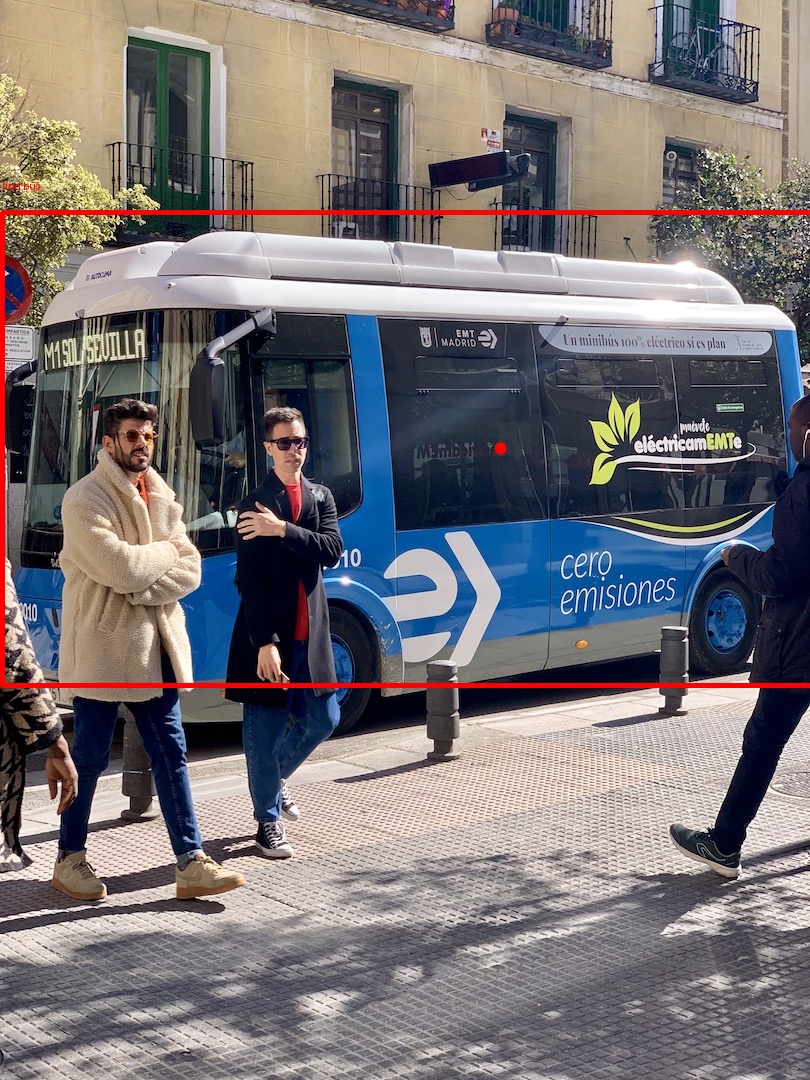
性能测试:

安装包、模型文件和测试代码资源分享:
通过网盘分享的文件:Qwen3-VL
链接: https://pan.baidu.com/s/1ctb29O80–vqXt2fnsq7xg 提取码: qkjm

汇聚全球AI编程工具,助力开发者即刻编程。
更多推荐



 8
8 0
0- 0


 已为社区贡献1条内容

所有评论(0)