
【Everything Claude Code】贡献WSL桌面通知支持
为 Everything Claude Code 添加 WSL 桌面通知支持
背景
Everything Claude Code 是一个热门的开源 Claude Code 插件集合,在 GitHub 上已获得超过 117k stars 和 15.3k forks,社区活跃度极高。该项目提供丰富的 agents、skills、hooks 和 commands 资源,极大提升了开发者使用 Claude Code 的日常开发效率。
WSL 桌面通知功能改进
原 desktop-notify 钩子仅支持 macOS 系统,通过 osascript 在 Claude Code 每轮对话结束后发送原生通知。这一限制导致 WSL(Windows Subsystem for Linux) 或windows用户无法获得桌面通知,开发者必须频繁检查运行结果,严重影响工作效率。
考虑到 Windows 环境配置的复杂性和 Linux/macos 已成为事实上的默认环境选择,多数开发者选择 WSL + 命令行 Claude Code 组合方案来贴近linux的开发体验。由于 WSL 环境与 Windows 系统的通知机制不互通,传统解决方案如linux的 notify-send 命令无法直接使用。
解决方案技术实现
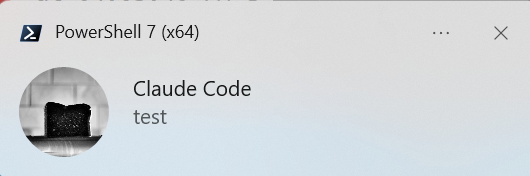
通过调用 PowerShell + BurntToast 模块为 WSL 环境添加 Windows 桌面通知支持,完美解决了跨系统通知难题。该改进已合并至主分支,显著提升了 Windows 开发者的用户体验。
功能实现 PR:feat(hooks): add WSL desktop notification support via PowerShell + BurntToast
效果图
实现原理
1. WSL 环境检测
通过读取 /proc/version 文件判断是否运行在 WSL 环境中:
let isWSL = false;
if (process.platform === 'linux') {
  try {
    isWSL = require('fs').readFileSync('/proc/version', 'utf8')
      .toLowerCase().includes('microsoft');
  } catch {
    isWSL = false;
  }
}
为了避免重复 I/O 操作,WSL 检测在模块加载时执行一次,并将结果缓存供后续使用。
2. PowerShell 路径查找
支持多种 PowerShell 查找方式,优先级从高到低:
const candidates = [
  'pwsh.exe',        // WSL 互操作(从 Windows PATH 解析)
  'powershell.exe',  // WSL 互操作
  '/mnt/c/Program Files/PowerShell/7/pwsh.exe',      // PowerShell 7
  '/mnt/c/Windows/System32/WindowsPowerShell/v1.0/powershell.exe', // Windows PowerShell
];
将 pwsh.exe 和 powershell.exe 放在前面,可以利用 WSL 的互操作机制自动从 Windows PATH 中查找,无需硬编码路径。
3. Windows 通知发送
使用 PowerShell 的 BurntToast 模块发送 Windows Toast 通知:
function notifyWindows(pwshPath, title, body) {
  const safeBody = body.replace(/'/g, "''");
  const safeTitle = title.replace(/'/g, "''");
  const command = `Import-Module BurntToast; New-BurntToastNotification -Text '${safeTitle}', '${safeBody}'`;
  const result = spawnSync(pwshPath, ['-Command', command],
    { stdio: ['ignore', 'pipe', 'pipe'], timeout: 5000 });
  return result.status === 0;
}
设计演进:合并 PowerShell 调用
在最初的设计中,发送一条通知需要三次 spawnSync 调用:
- 版本探测:调用
findPowerShell()验证 PowerShell 是否可用 - 模块检查:调用
isBurntToastAvailable()检查 BurntToast 模块是否已安装 - 发送通知:调用
notifyWindows()发送实际通知
这样的设计思路是:先确保环境准备就绪,再执行实际操作。
然而在后续 code review 中发现,findPowerShell() 返回的版本号实际上并未被使用,而 isBurntToastAvailable() 的检查也可以省略——既然最终都要调用 notifyWindows(),不如直接尝试发送,如果失败再尝试下一个 PowerShell 路径即可。
合并后的流程只需要一次 spawnSync 调用:如果发送成功,返回 true;如果失败(可能是模块未安装、权限问题或其他错误),返回错误原因,调用方据此决定是否尝试下一个 PowerShell 路径。
技术要点
错误处理
- 区分 BurntToast 模块未安装与其他 PowerShell 错误
- 提供有意义的错误日志和安装提示
- 所有
spawnSync调用都设置了超时,防止阻塞
安全性
- PowerShell 路径进行单引号转义(
'→'') - 日志输出不包含敏感信息
- 不在用户可见输出中包含外部链接
使用方法
前提条件:
- WSL 环境中可使用 PowerShell 7 或 Windows PowerShell
- Windows 端已安装 BurntToast 模块
安装 BurntToast(仅首次需要):
# 在 Windows PowerShell 中以管理员身份运行
Install-Module -Name BurntToast -Scope CurrentUser
结语
本文介绍了为 Claude Code 插件添加 WSL 桌面通知支持的全过程。核心思路是利用 WSL 与 Windows 的互操作性,通过 PowerShell 和 BurntToast 模块发送原生通知。

汇聚全球AI编程工具,助力开发者即刻编程。
更多推荐


 9
9 0
0- 0


 已为社区贡献1条内容

所有评论(0)