
VisionPro中Coglmage16Grey转成Coglmae16Range方法
·
最近要用VisionPro做项目,网上一找资料少的可怜。未来有空就多写一些有关博文,不费话了,直接上代码。
1.先添加好输入与输出
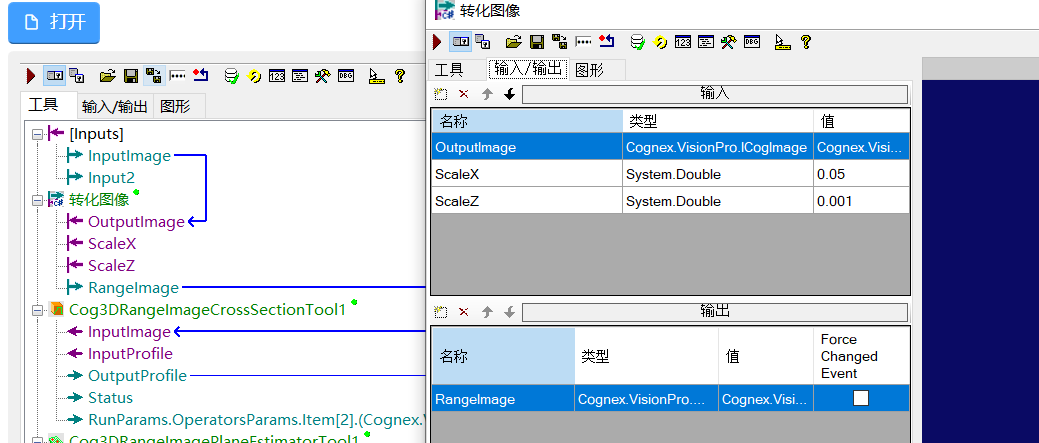
2.脚本代码
public override bool GroupRun(ref string message, ref CogToolResultConstants result)
  {
    CogImage16Grey inputimage = this.Inputs.OutputImage as CogImage16Grey;
    int imagewidth = inputimage.Width;
    double scaleX = 1 / this.Inputs.ScaleX;
    double scaleY = 1 / (this.Inputs.ScaleX);
    double scaleZ = 1 / this.Inputs.ScaleZ;
    Cog3DMatrix3x3 matRootFromSensor3D = new Cog3DMatrix3x3(scaleX,0,0,0,-scaleY,0,0,0,scaleZ);
    Cog3DVect3 vectRootFromSensor3D = new Cog3DVect3((imagewidth), 0, 65536/2);
    Cog3DTransformLinear transformRootFromSensor3D = new Cog3DTransformLinear(matRootFromSensor3D,vectRootFromSensor3D);
    CogImage16Range rangeimage = new CogImage16Range(inputimage, 0, transformRootFromSensor3D);
    CogTransform2DLinear linearRootFromSensor2D = new CogTransform2DLinear();
    linearRootFromSensor2D.SetMatrixElementsTranslation(scaleX, 0,  0, -scaleY, vectRootFromSensor3D.X,vectRootFromSensor3D.Y);
    rangeimage.CoordinateSpaceTree.AddSpace("@", "Sensor2D", linearRootFromSensor2D, true, CogAddSpaceConstants.ReplaceDuplicate);
    rangeimage.SelectedSpaceName = "Sensor2D";
    rangeimage.SelectedSpaceName3D = "Sensor3D";
    CogTransform2DLinear pixelFromRootTransform = new CogTransform2DLinear();
    pixelFromRootTransform.SetMatrixElementsTranslation(1, 0, 0, 1, 0, 0);
    Cog3DTransformLinear pixelFromRoot3DTransform = new Cog3DTransformLinear(new Cog3DMatrix3x3(1, 0, 0, 0, 1, 0, 0, 0, 1), new Cog3DVect3(0, 0, 0));
    //rangeimage.PixelFromRootTransform = pixelFromRootTransform;
    rangeimage.PixelFromRootTransform3D = pixelFromRoot3DTransform;
    this.Outputs.RangeImage = rangeimage;
    return false;
  }
3.结尾
最后注意,这边X Y分辨率是一致的,如果不一致记得把Y方向分辨率也添加个输入变量


汇聚全球AI编程工具,助力开发者即刻编程。
更多推荐



 5
5 0
0- 0


 已为社区贡献1条内容

所有评论(0)