
基于Langchain、Ollama、Milvus构建RAG demo案例
·
1.准备材料
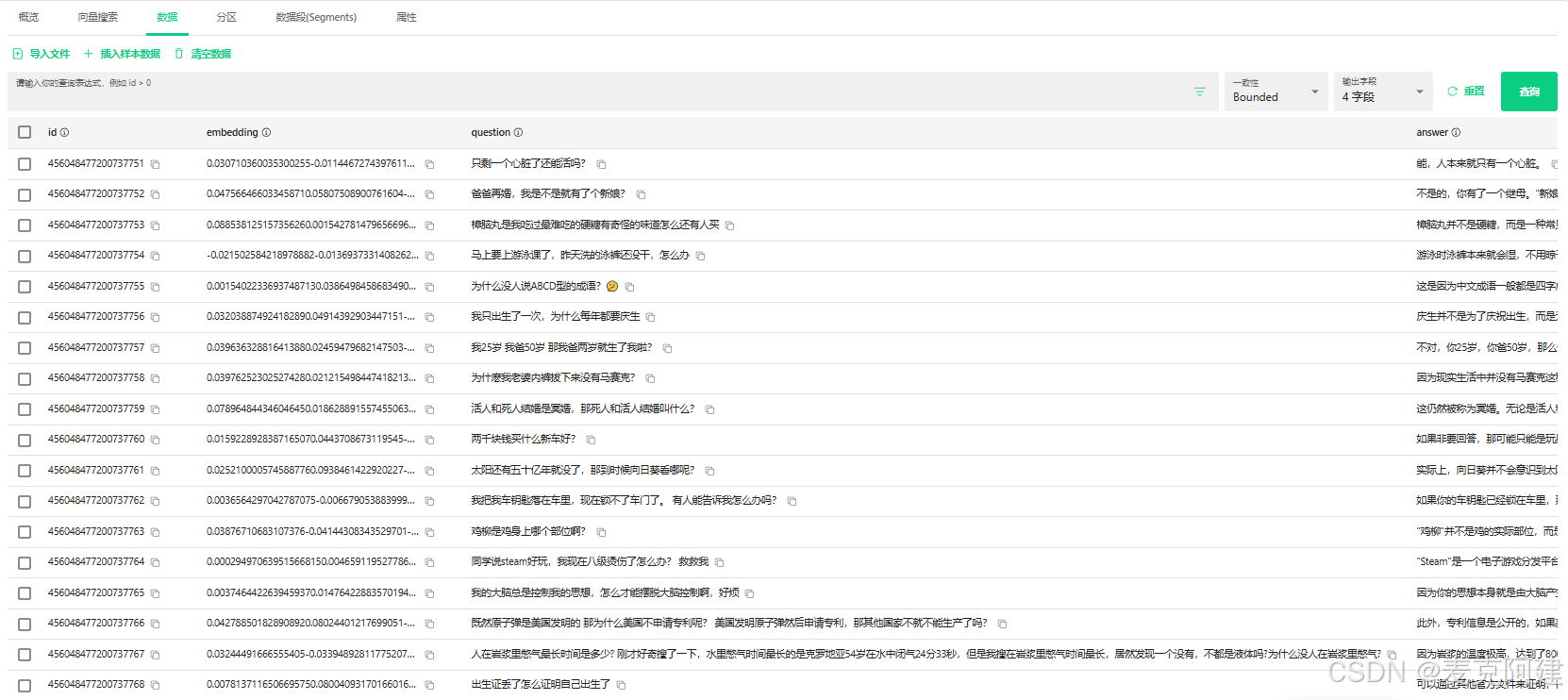
本案例以弱智吧问答对为材料,进行向量转化存储,文件格式为json。部分内容如下所示
[
    {
        "Q": "只剩一个心脏了还能活吗?",
        "A": "能,人本来就只有一个心脏。"
    },
    {
        "Q": "爸爸再婚,我是不是就有了个新娘?",
        "A": "不是的,你有了一个继母。\"新娘\"是指新婚的女方,而你爸爸再婚,他的新婚妻子对你来说是继母。"
    },
    {
        "Q": "樟脑丸是我吃过最难吃的硬糖有奇怪的味道怎么还有人买",
        "A": "樟脑丸并不是硬糖,而是一种常见的驱虫药,不能食用。虽然它的味道可能不太好,但是由于其有效的驱虫效果,所以仍然有很多人会购买。"
    },
    {
        "Q": "马上要上游泳课了,昨天洗的泳裤还没干,怎么办",
        "A": "游泳时泳裤本来就会湿,不用晾干。"
    },
    {
        "Q": "为什么没人说ABCD型的成语?🤔",
        "A": "这是因为中文成语一般都是四字成语,每个字都有其特定的含义,四个字合在一起构成一个完整的意思。而ABCD型的成语最常见,所以大家不会刻意强调。"
    }
]
转化后效果如下
2.数据集导入
# 1. 设置要创建的集合的名称。
import json

from langchain_ollama import OllamaEmbeddings
from pymilvus import connections, FieldSchema, CollectionSchema, DataType, Collection

#设置嵌入的维度。
DIMENSION = 1024
#设置Milvus服务器的连接参数。
URI = 'http://192.168.154.129:19530'


# 步骤 1: 读取 JSON 文件
def read_json_file(file_path):
    with open(file_path, 'r', encoding='utf-8') as file:
        data = json.load(file)
    return data

# 步骤 2: 数据嵌入
def embed_data(data, embedding_model):
    texts = [item['Q'] for item in data]  # 对问题进行嵌入
    embeddings = embedding_model.embed_documents(texts)
    return embeddings

# 步骤 3: 连接到 Milvus
def connect_to_milvus():
    connections.connect(
        alias="default",
        host='192.168.154.129',  # Milvus 服务器地址
        port='19530'  # Milvus 服务器端口
    )
# 步骤 4: 创建集合(如果需要)
def create_milvus_collection(collection_name, dimension):
    fields = [
        FieldSchema(name="id", dtype=DataType.INT64, is_primary=True, auto_id=True),
        FieldSchema(name="embedding", dtype=DataType.FLOAT_VECTOR, dim=dimension),
        FieldSchema(name="question", dtype=DataType.VARCHAR, max_length=512),  # 存储问题
        FieldSchema(name="answer", dtype=DataType.VARCHAR, max_length=2048)  # 存储答案
    ]
    schema = CollectionSchema(fields=fields)
    collection = Collection(name=collection_name, schema=schema)
    index_params = {
        "metric_type": "L2",
        "index_type": "IVF_FLAT",
        "params": {"nlist": 128}
    }
    collection.create_index(
        field_name="embedding",
        index_params=index_params
    )
    collection.load()
    return collection

# 步骤 5: 插入数据到 Milvus
def insert_data_to_milvus(collection, embeddings, data):
    questions = [item['Q'] for item in data]
    answers = [item['A'] for item in data]
    entities = [
        embeddings,
        questions,
        answers
    ]
    collection.insert(entities)
    collection.flush()
# 主函数
def main():
    file_path = '../data/outputs.json'  # 替换为你的 JSON 文件路径
    collection_name = 'doc_qa_db_ruozhi'  # 替换为你要创建的集合名称

    # 读取 JSON 文件
    data = read_json_file(file_path)

    # 初始化嵌入模型
    embedding_model =  OllamaEmbeddings(
    base_url="127.0.0.1:11434",
    model="paraphrase-multilingual"
    )

    # 数据嵌入
    embeddings = embed_data(data, embedding_model)

    # 连接到 Milvus
    connect_to_milvus()

    # 获取嵌入向量的维度
    dimension = len(embeddings[0])

    # 创建集合
    collection = create_milvus_collection(collection_name, dimension)

    # 插入数据到 Milvus
    insert_data_to_milvus(collection, embeddings, data)

    print("数据插入成功!")

if __name__ == "__main__":
    main()
3.langchain 查询
from langchain.chains.retrieval_qa.base import RetrievalQA
from langchain_core.prompts import ChatPromptTemplate
from langchain_milvus import Milvus
from langchain_ollama import ChatOllama
from langchain_ollama import OllamaEmbeddings
from pymilvus import connections

# 连接到 Milvus
connections.connect(
    alias="default",
    host='192.168.154.129',
    port='19530'
)

# 初始化 Ollama 嵌入模型
embeddings = OllamaEmbeddings(
    base_url="127.0.0.1:11434",
    model="paraphrase-multilingual")


# 初始化 Ollama 聊天模型
llm = ChatOllama(base_url="127.0.0.1:11434", model="qwen2.5:7b")

# 获取检索器,选择 top-2 相关的检索结果
# 从 Milvus 中加载向量数据库
vector_db = Milvus(
    embedding_function=embeddings,
    collection_name='doc_qa_db_ruozhi',  # 替换为你之前创建的集合名称
    connection_args= {'uri': 'http://192.168.154.129:19530'},
    vector_field='embedding',
    text_field='answer'
)
retriever = vector_db.as_retriever(search_kwargs={"k": 2})

# 创建带有 system 消息的模板
prompt_template = ChatPromptTemplate.from_messages([
    ("system", """你是一个问答机器人。
               你的任务是根据下述给定的已知信息回答用户问题。
               确保你的回复完全依据下述已知信息。不要编造答案。
               请用中文回答用户问题。

               已知信息:
               {context} """),
    ("user", "{question}")
])

# 自定义的提示词参数
chain_type_kwargs = {
    "prompt": prompt_template,
}
print(prompt_template)
# 定义RetrievalQA链
qa_chain = RetrievalQA.from_chain_type(
    llm=llm,
    chain_type="stuff",  # 使用stuff模式将上下文拼接到提示词中
    chain_type_kwargs=chain_type_kwargs,
    retriever=retriever
)
while True:
#     循环获取用户问题
    question = input("请输入问题:")
    if question == "exit":
        break
    print(qa_chain.run(question))

汇聚全球AI编程工具,助力开发者即刻编程。
更多推荐

 3
3 0
0- 0


 已为社区贡献1条内容

所有评论(0)