
【慧游鲁博】【14】后端 · 改为调用deepseekv3模型 · 加快响应速度
·
文章目录
本次更新
改成V3后,响应速度显然要快了很多……
DeepSeek v3 模型对接
1. 配置管理
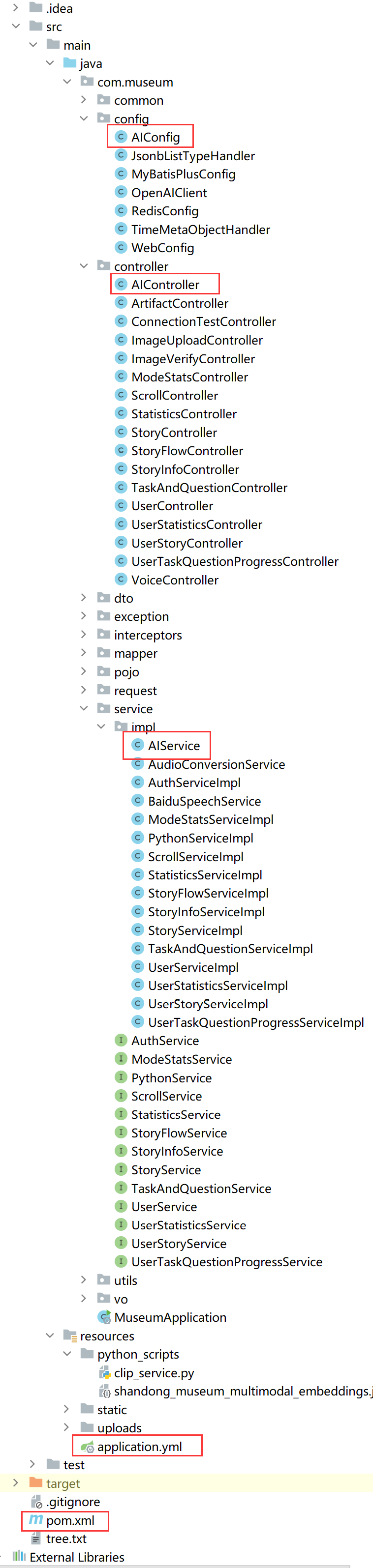
在 application.yml 中配置了 DeepSeek API 的相关参数:
deepseek:
  api:
    key: # 替换为你的 DeepSeek API Key,去开发平台申请领免费额度
    base-url: https://api.deepseek.com         # DeepSeek 的 API 地址
这种配置方式使得 API 密钥和基础 URL 可以通过配置文件管理,便于在不同环境(开发、测试、生产)中切换。
2. 服务层实现
AIService.java 是核心的服务类,负责实际与 DeepSeek API 的交互:
2.1 构造函数注入配置
public AIService(
        RestTemplate restTemplate,
        @Value("${deepseek.api.key}") String apiKey,
        @Value("${deepseek.api.base-url}") String baseUrl
) {
    this.restTemplate = restTemplate;
    this.apiKey = apiKey;
    this.baseUrl = baseUrl;
}
通过 @Value 注解从配置文件中注入必要的参数,符合 Spring 的最佳实践。
2.2 API 请求构建
getAIResponse 方法构建了符合 DeepSeek v3 API 规范的请求:
-
请求头设置:
HttpHeaders headers = new HttpHeaders();
headers.setContentType(MediaType.APPLICATION_JSON);
headers.set("Authorization", "Bearer " + apiKey);
正确设置了
Content-Type和Authorization头。 -
请求体构建:
ObjectNode requestBody = mapper.createObjectNode();
requestBody.put("model", MODEL_NAME); // 使用常量
requestBody.put("temperature", 0.7); // 添加温度参数控制随机性
requestBody.put("max_tokens", 2000); // 限制最大token数
设置了模型名称、温度和最大 token 数等参数。
-
消息格式:
ArrayNode messages = mapper.createArrayNode();
// 添加系统提示
ObjectNode systemMessage = mapper.createObjectNode();
systemMessage.put("role", "system");
systemMessage.put("content", "你是一个专业的博物馆讲解助手");
messages.add(systemMessage);

// 添加用户消息
ObjectNode userMessage = mapper.createObjectNode();
userMessage.put("role", "user");
userMessage.put("content", fullPrompt);
messages.add(userMessage);
使用了 DeepSeek v3 支持的
system和user角色消息格式。
2.3 API 调用
ResponseEntity<String> response = restTemplate.exchange(
        baseUrl + "/v1/chat/completions",
        HttpMethod.POST,
        requestEntity,
        String.class
);
正确调用了 DeepSeek 的 /v1/chat/completions 端点。
2.4 响应处理
if (response.getStatusCode().is2xxSuccessful()) {
    JsonNode root = mapper.readTree(response.getBody());
    JsonNode choices = root.path("choices");
    if (choices.isArray() && choices.size() > 0) {
        return choices.get(0).path("message").path("content").asText();
    }
    throw new RuntimeException("API 响应中没有有效的choices");
}
正确处理了 API 响应,提取了返回的消息内容。
3. 控制器层
AIController.java 提供了 RESTful API 接口:
3.1 提示词管理
// 基础系统提示词
private static final String BASE_SYSTEM_PROMPT = """
    你是山东省博物馆的智能讲解员...""";

// 不同模式的特定提示词
private static final Map<String, String> MODE_PROMPTS = Map.of(
    "normal", "...",
    "professional", "...",
    "education", "..."
);
定义了不同场景下的提示词模板,使 AI 能够根据用户需求以不同风格回应。
3.2 API 接口
@PostMapping("/chat")
public ResponseEntity<?> chat(@RequestBody Map<String, String> request) {
    // 参数校验
    if (prompt == null || prompt.trim().isEmpty()) {
        return ResponseEntity.badRequest().body(...);
    }

    // 组合完整的提示词
    String fullPrompt = String.format(...);

    // 调用服务层
    String response = aiService.getAIResponse(fullPrompt);

    // 返回响应
    return ResponseEntity.ok(...);
}
提供了 /api/ai/chat 接口,正确处理了请求参数、提示词组合和响应格式。
4. 配置类
AIConfig.java 提供了必要的 Bean 配置:
@Bean
public RestTemplate restTemplate() {
    return new RestTemplate();
}
配置了 RestTemplate 用于 HTTP 请求。

汇聚全球AI编程工具,助力开发者即刻编程。
更多推荐
 26
26 0
0- 0


 已为社区贡献1条内容

所有评论(0)