
手搓Claude Code-第五章 todo_write
写在前面
有没有遇到过这样的场景:当你vibecoding的时候,给模型下达一个任务,模型执行某一步时遇到问题,陷入寻找解决该问题的办法,忘记了自己一开始要干什么。这是因为主流的LLM基于Transformer架构,都面临注意力涣散的问题(注意和上下文窗口问题区分,放在最后总结了)。第五章讲述了todo_write,就是给agent列一个待办表,按照这个表去行动,期间也会不断更新这个表的操作。完整代码见:
https://github.com/shareAI-lab/learn-claude-code/blob/main/s05_todo_write/code.py
我们的任务是:
1,一步步为agent增加规划能力
2,滤清todo_write的工作流程
3,感受在长任务中的区别
其实在原项目对应的readme中有许多没有提到的修改,本文都会一一提到,那么开始吧。
一、实现规划能力
首先,注册一个全局列表,这个全局列表的格式模仿的就是一次模型对话,一次模型对话response.content是由许多block组成,每个block是一个字典。两者都是json格式。
并稍微修改一下system提示词,system的权重很高,让模型注重待办列表的执行。
CURRENT_TODOS: list[dict] = []

SYSTEM = (
    f"You are a coding agent at {WORKDIR}. "
    "Before starting any multi-step task, use todo_write to plan your steps. "
    "Update status as you go."
)
因为我们在后端和模型交互,其实本质上还是和他对话,在一个个response中,我们能拿到的也只有string,所以应该设计一个转化函数或者说标准化函数,将字符串转换成我们想要的这种json格式。
def _normalize_todos(todos):
    """
    对输入的数据进行一个标准化的操作,最终我们希望把todos由字符串解析成json结构
    """
    # 如果是字符串
    if isinstance(todos, str):
        try:
            todos = json.loads(todos)
        except json.JSONDecodeError:
            try:
                todos = ast.literal_eval(todos)
            except (SyntaxError, ValueError):
                """
                这两个异常是什么?
                第一个是结构残缺,第二个是列表,字典格式错误
                """
                return None, "Error: todos must be a list or JSON array string"
这里其实有个问题。为什么不直接用ast来解析,还要先用json?我自己试了一下。
import json, ast

todos = "({'content':'test'},)"

# 会报错,是因为标准json中键值都是双引号
# print(json.loads(todos))

print(ast.literal_eval(todos))

# 会报错,因为ast能解析的结果更为宽松
# print(ast.literal_eval("hahaha"))
总结来说,其实就是容错性。前者对字符串的解析更加严格(标准的json格式),后者会解析出一些python独有的语法,甚至不是json格式也可以。然后下面贴出标准化的所有操作。
def _normalize_todos(todos):
    """
    对输入的数据进行一个标准化的操作,最终我们希望把todos由字符串解析成json结构
    """
    # 如果是字符串
    if isinstance(todos, str):
        try:
            todos = json.loads(todos)
        except json.JSONDecodeError:
            try:
                """
                为什么不只用ast?
                大部分标准 JSON 场景多一层不必要解析;
                容易混入元组、集合等非法数据,增加校验成本;
                代码失去对标准输入的约束,模型输出再离谱都能混进来,增加隐藏 bug。
                """
                todos = ast.literal_eval(todos)
            except (SyntaxError, ValueError):
                """
                这两个异常是什么?
                第一个是结构残缺,第二个是列表,字典格式错误
                """
                return None, "Error: todos must be a list or JSON array string"

    # 如果转换完不是list,说明模型输出了什么乱七八糟的东西,而不是字符串的list。
    if not isinstance(todos, list):
        return None, "Error: todos must be a list"

    # 便利列表,同时记录下标和元素,返回值是个二元组,第一个是todos,第二个是报错信息
    for i, t in enumerate(todos):
        if not isinstance(t, dict):
            return None, f"Error: todos[{i}] must be an object"
        # 如果t里没有content和status,说明模型给的清单不完整,但凡有一个不存在就不完整
        if "content" not in t or "status" not in t:
            return None, f"Error: todos[{i}] missing 'content' or 'status'"
        # 判断status是否在这三个状态里,不在说明status内容不合规
        if t["status"] not in ("pending", "in_progress", "completed"):
            return None, f"Error: todos[{i}] has invalid status '{t['status']}'"
    return todos, None
接下来,来实现更新CURRENT_TODOS的工具函数(实际上整个规划能力也是被封装成了工具)。这个函数首先将todos通过_normalize_todos提出来,打印一些需要的参数,最后返还字符串。
def run_todu_write(todos: list) -> str:
    global CURRENT_TODOS
    todos, error = _normalize_todos(todos)
    if error:
        return error
    CURRENT_TODOS = todos
    lines = ["\n\033[33m## Current Tasks\033[0m"]
    for t in CURRENT_TODOS:
        # 根据status的值选择对应的图标,添加到lines里去,最后打印一下lines,但并不存储
        icon = {"pending": " ",
                "in_progress": "\033[36m▸\033[0m",
                "completed": "\033[32m✓\033[0m"}[t["status"]]
        lines.append(f"  [{icon}] {t['content']}")
    print("\n".join(lines))
    return f"Updated {len(CURRENT_TODOS)} tasks"
搞定之后,我们把这个工具函数注册到TOOLS中。这个说明书套了好多层,来跟我一步步拆解出来。
    {
    # 第一层:工具整体基础信息(最外层)
    "name": "todo_write",
    "description": "Create and manage a task list for your current coding session.",
    "input_schema": {
        # 第二层:工具入参总结构
        "type": "object",
        "properties": {
            # 第三层:参数 todos 的定义
            "todos": {
                "type": "array",
                "items": {
                    # 第四层:数组里每一条待办任务对象
                    "type": "object",
                    "properties": {
                        "content": {"type": "string"},
                        "status": {
                            "type": "string",
                            "enum": ["pending", "in_progress", "completed"]
                        }
                    },
                    "required": ["content", "status"]
                }
            }
        },
        "required": ["todos"]
    }
}
其实在这里就看出来了,这个required是在向模型强调,说明书中的某些参数是必须要生成的。最后别忘记在TOOL_HANDLERS添加上。
仔细观察,其实可以发现,原项目中将large_output_hook这个钩子删去了,可能作者觉得这个教学功能太冗余了。
现在我们在agentloop里插入这个函数。试想一下,该如何处理这个逻辑?如果仅仅让模型输出一次CURRENT_TODOS够吗?答案肯定是不行的,本来待办表是为了不让模型跑偏,如果只列一次,那不就跟原来一样,咋能保证模型不会跑偏?所以就要一遍遍强调,不断给模型任务让它更新这个待办表。原项目就是这样,每三轮让模型更新一次。
# 看s05做了什么修改
def agent_loop(messages: list):
    global rounds_since_todo
    while True:

        # 但凡大于等于三轮并且message存在(message存在说明模型以前做过事,实际证明这个去掉也是可以的)
        if rounds_since_todo >= 3 and messages:
            messages.append({"role": "user",
                             "content": "<reminder>Update your todos.</reminder>"})
            rounds_since_todo = 0

        response = client.messages.create(
            model=MODEL, system=SYSTEM, messages=messages,
            tools=TOOLS, max_tokens=8000,
        )
        messages.append({"role": "assistant", "content": response.content})

        if response.stop_reason != "tool_use":
            force = trigger_hooks("Stop", messages)
            if force:
                messages.append({"role": "user", "content": force})
                continue
            return

        # 相当于每三轮就更新一下todolist,只有进入了工具调用才会自增
        rounds_since_todo += 1

        results = []
        for block in response.content:
            if block.type != "tool_use":
                continue

            # s04 change: hook replaces hard-coded check_permission()
            blocked = trigger_hooks("PreToolUse", block)
            if blocked:
                results.append({"type": "tool_result", "tool_use_id": block.id,
                                "content": str(blocked)})
                continue

            handler = TOOL_HANDLERS.get(block.name)
            output = handler(**block.input) if handler else f"Unknown: {block.name}"

            trigger_hooks("PostToolUse", block, output)  # s04: post hook

            # 在这不止一次的工具调用当中,有可能会夹在着列表更新,如果更新,那就重置计数器。
            if block.name == "todo_write":
                rounds_since_todo = 0

            results.append({"type": "tool_result", "tool_use_id": block.id, "content": output})

        messages.append({"role": "user", "content": results})
二、看看工作流程
我现在文件夹下创建一个测试文件,并给agent一个任务让他重构。
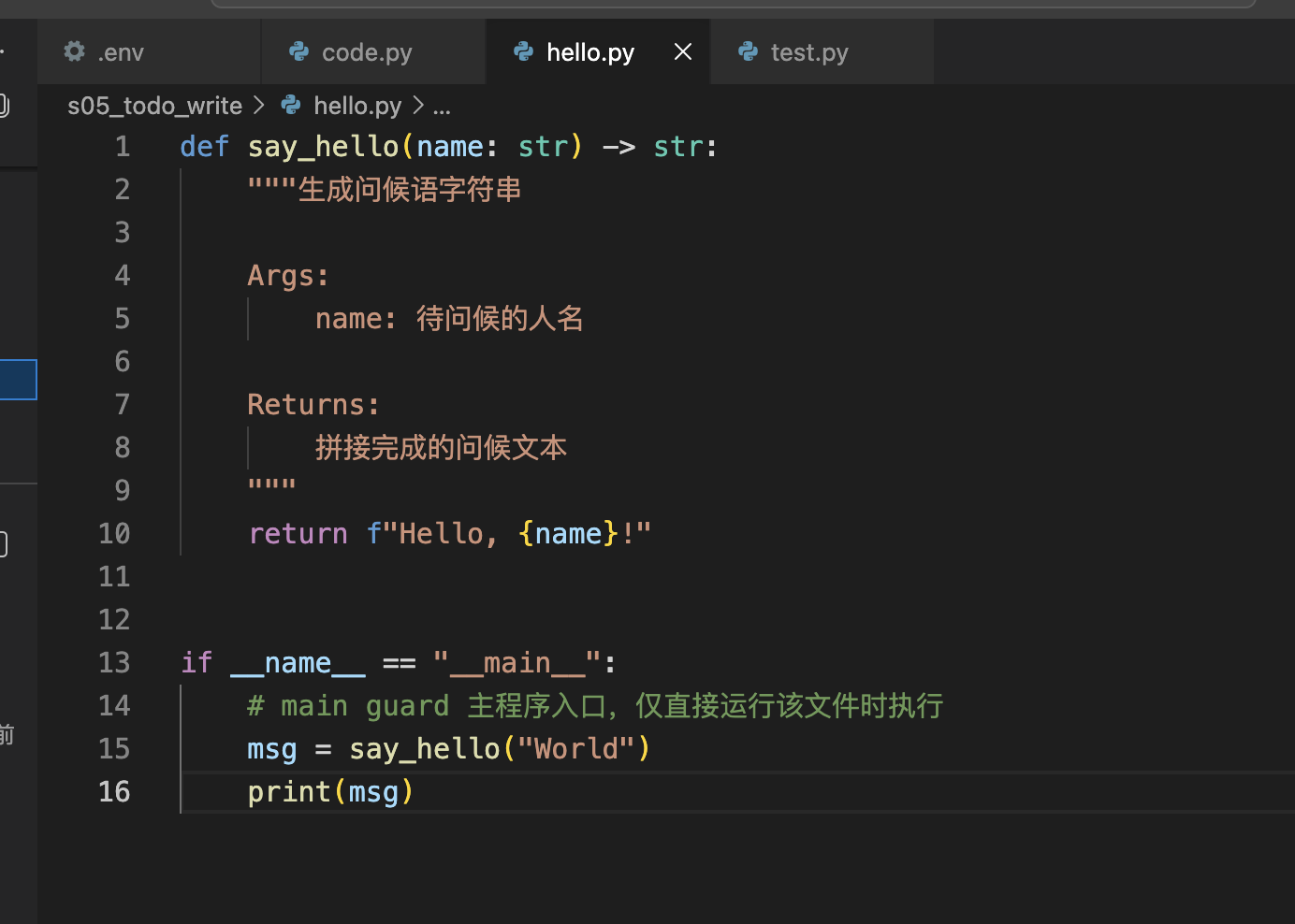
观察终端,重点看钩子日志。
s04 >> Refactor s05_todo_write/hello.py: add type hints, docstrings, and a main guard
[HOOK] UserPromptSubmit: working in /Users/bx/Documents/coding/learn_cladudecode
[HOOK] read_file(['/Users/bx/Documents/coding/learn_cladudecode/s05_todo_writ)
[HOOK] todo_write([[{'content': 'Add type hints to any missing parameters/retu)
[HOOK] write_file(['"""Simple greeting utility module.\n\nProvides a helper to)
[HOOK] todo_write([[{'content': 'Add type hints to any missing parameters/retu)
[HOOK] Stop: session used 4 tool calls
All tasks are complete! The refactored file now has:

1. **Type hints** — on both the function signature and the local variable in the main guard
2. **Docstrings** — a module-level docstring plus a Google-style function docstring (in English)
3. **Main guard** — `if __name__ == "__main__":` to prevent execution on import

s04 >>
可以看到,模型首先是调用了todo_write工具。你可以在函数中再打印当前的CURRENT_TODOS看看会输出什么。
总结
至此算是为模型加入了简单的规划能力。不过,当你动手去执行一遍时,会发现,整个任务执行的非常慢,而且整个过程会十分消耗token。期待learn claude code后续教程会对此做些优化,你也可以自己先思考如何解决?
注意力涣散 vs 上下文窗口,其实这是两个完全不同的概念。
注意力注意力涣散通常是指一个agent在执行长任务时,会忽视前面约束,漏掉一些内容等问题,这是由于底层算法架构决定的(感兴趣可以了解下注意力机制的数学缺陷),但依旧可以在工程上去缓解,比如本章的todolist实际上就是一种解决办法。
注意力上下文窗口是说现在基于Transformer架构的模型训练样本时,通常将样本想象成一个三维张量,横轴就是所谓的上下文窗口,通常是一个截断,因为不可能使窗口无限的长,这样会引起计算量的爆炸(感兴趣可以了解下qkv矩阵的计算)。那解决办法实际上很多,比如在预训练阶段:直接将超过窗口的训练样本截成小于最大窗口长度的段,然后分别作为不同的样本或者更复杂的,用一些分析模型(bert,roberta等)将过长的样本尽量在不减少信息丢失的情况下缩短长度等等。
注意力其实虽然原因不同,但表现都是一样的。比如一句话为:条件A,条件B,任务C。那前者长度不够截断A,后者忽视A,在执行C时本质上都没有约束。

汇聚全球AI编程工具,助力开发者即刻编程。
更多推荐



 4
4 0
0- 0


 已为社区贡献4条内容

所有评论(0)