
火爆了!Codex和Claude Code必装的6个MCP,附GitHub地址
MCP是什么?
MCP(Model Context Protocol) 模型上下文协议,是由Anthropic推出的一项开放标准,主要是为大预言模型和AI助手提供一个统一、标准化的接口、使AI能够轻松操作外部工具并完成更复杂的任务。
MCP的作用?
AI处理的数据只能基于预训练数据或者上传的数据,知识库数据有限,就算很强大的AI模型,也会有数据隔离的问题,无法直接访问在线数据。MCP解决了这个问题,突破了模型对静态知识库的依赖,使其具备更强大的动态交互能力,能够像人类一样调用搜索引擎、访问本地文件、链接API服务,甚至直接操作第三方库。推荐Claude Code、Codex的6个关键MCP(可理解为增强功能的插件),让其从单纯的写代码AI升级为强大的AI开发工作台。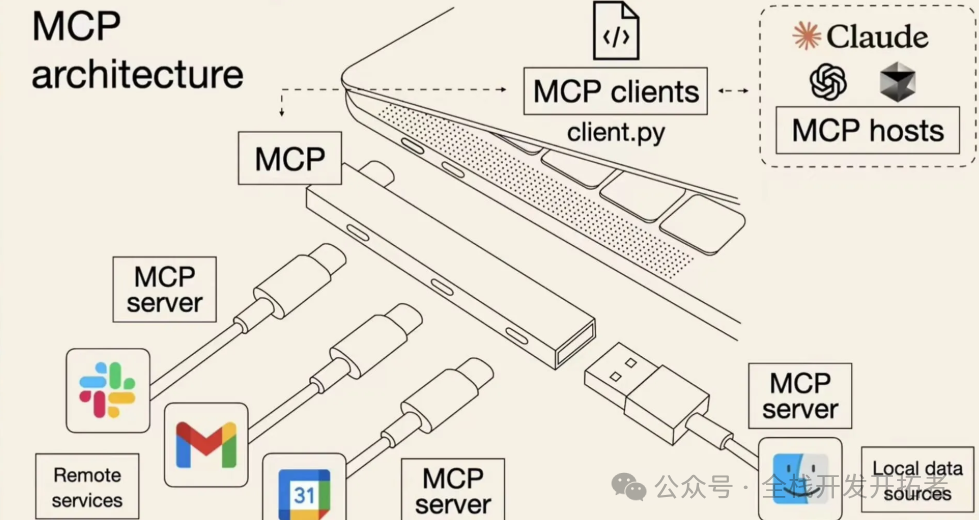
playwright
用于浏览器操作,可让Claude Code、Codex自动完成打开网页、点击按钮、填写表单、检查报错等操作,助力前端测试等场景。
安装:
claude mcp add playwright \
  -- npx -y @playwright/mcp@latest
MCP配置:
{
  "mcpServers": {
    "playwright": {
      "command": "npx",
      "args": [
        "-y",
        "@playwright/mcp@latest"
      ]
    }
  }
}
GitHub地址:https://github.com/microsoft/playwright-mcp
filesystem
用于本地项目理解,能让Claude Code、Codex读取和管理本地文件,理解项目结构,查找入口文件、查看配置、分析依赖关系。
安装:
claude mcp add filesystem \
  -- npx -y @modelcontextprotocol/server-filesystem .
MCP配置:
{
  "mcpServers": {
    "filesystem": {
      "command": "npx",
      "args": ["-y", "@modelcontextprotocol/server-filesystem", "/你的/项目/绝对路径"]
    }
  }
}
GitHub地址:https://github.com/modelcontextprotocol/servers/tree/main/src/filesystem
sequential-thinking
用于复杂推理,面对如BUG排查等复杂问题,可将其拆分为确认现象、提出假设、逐个排查的步骤,像有经验的工程师一样分析问题。
安装:
claude mcp add sequential-thinking \
  -- npx -y @modelcontextprotocol/server-sequential-thinking
MCP配置:
{
  "mcpServers": {
    "sequential-thinking": {
      "command": "npx",
      "args": [
        "-y",
        "@modelcontextprotocol/server-sequential-thinking"
      ]
    }
  }
}
GitHub地址:https://github.com/modelcontextprotocol/servers/tree/main/src/sequentialthinking
context7
用于获取最新文档,防止AI使用过时的框架、SDK、API写法,可查询Next.js、React、Prisma、Supabase等工具的最新官方文档,提升代码准确率。
安装:
claude mcp add context7 \
  -- npx -y @upstash/context7-mcp@latest
MCP配置:
{
  "mcpServers": {
    "context7": {
      "command": "npx",
      "args": ["-y", "context7-mcp"]
    }
  }
}
GitHub地址:https://github.com/nicholasgriffintn/context7-mcp
github
用于协作流程,能让Claude Code、Codex读取issue、查看PR、分析commit,理解协作上下文,助力真实开发流程中的需求理解、代码修改、PR准备等工作。
安装:
claude mcp add github \
  -e GITHUB_TOKEN=你的Token \
  -- npx -y @modelcontextprotocol/server-github
MCP配置:
{
  "mcpServers": {
    "github": {
      "command": "npx",
      "args": [
        "-y",
        "@modelcontextprotocol/server-github"
      ],
      "env": {
        "GITHUB_TOKEN": "ghp_xxxxxxxxx"
      }
    }
  }
}
GitHub地址:https://github.com/github/github-mcp-server
memos
用于长期记忆,可让Claude Code、Codex记住项目偏好、代码规范、常用工作流、避坑经验等长期信息,成为熟悉项目的长期搭档。
安装:
claude mcp add memory \
  -e MEMORY_FILE_PATH=./.claude/memory.json \
  -- npx -y @modelcontextprotocol/server-memory
MCP配置:
{
  "mcpServers": {
    "memory": {
      "command": "npx",
      "args": ["-y", "@modelcontextprotocol/server-memory"]
    }
  }
}
GitHub地址:https://github.com/modelcontextprotocol/servers/tree/main/src/memory

汇聚全球AI编程工具,助力开发者即刻编程。
更多推荐


 2
2 0
0- 0


 已为社区贡献3条内容

所有评论(0)