
Claude Code 源码里的 Harness 设计:从主循环到 4 层压缩的工程细节
文章目录
- Claude Code 源码里的 Harness 设计:从主循环到 4 层压缩的工程细节
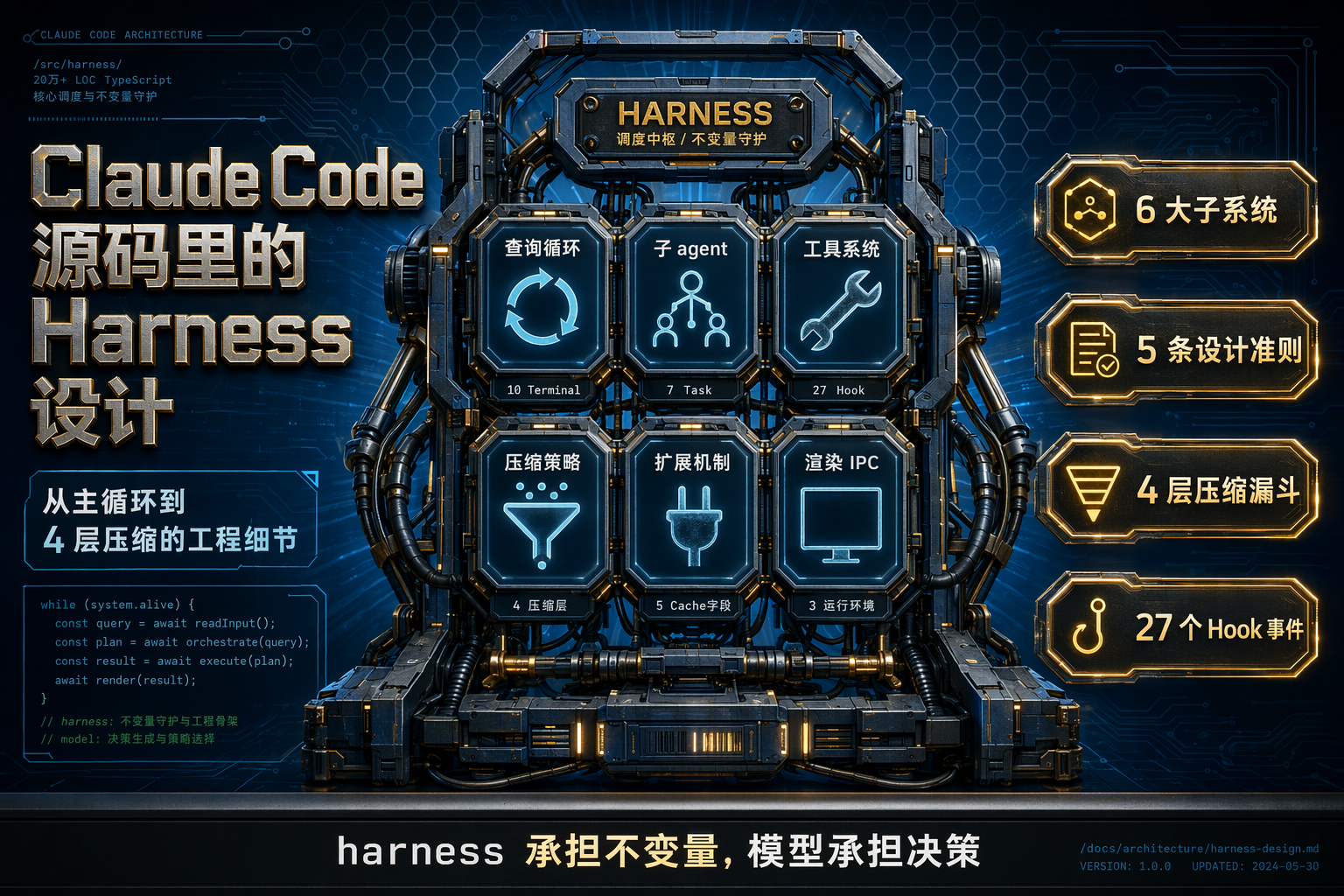
摘要:从 Claude Code 近 20 万行 TypeScript 源码里拆出 harness 的 6 大子系统与 5 条可迁移的设计准则,带走你能抄进自己 agent 产品的心智模型。
Claude Code 源码里的 Harness 设计:从主循环到 4 层压缩的工程细节
一、开场:为什么要读 harness,而不是读 prompt
在绝大多数关于 Claude Code、Cursor、Cline 的文章里,讨论的重点都是"怎么写提示词"。但如果你仔细看一下它们的源码(2026 年 3 月 31 日 Claude Code v2.1.88 意外 ship 了 59.8 MB 的 cli.js.map 到 npm,相当于把 512K 行 TypeScript 公开 —— 来源:ccleaks.com/news/how-the-leak-started),会发现一个很反直觉的事实:prompt 只是 harness 的一个字段,真正决定 agent 产品力的是 harness 本身。
Addy Osmani 在《Agent Harness Engineering》里给出一句我读过最好的判断:
“Today’s agent products are post-trained with harnesses in the loop. The model gets specifically better at the actions the harness designers think it should be good at… A genuinely general model wouldn’t care whether you used apply_patch or str_replace, but co-training creates overfitting.”
(来源:addyosmani.com/blog/agent-harness-engineering/)
翻译成工程语言就是:Anthropic 在后训练时是把 harness 和模型一起训的。所以 Opus 4.6(Addy Osmani 原文,我们现在用的是 4.7)装进 Claude Code 的 harness 里,会比装进 OpenClaw 或者你自己手搓的 while 循环里好用一大截。这既解释了为什么 2026 年 4 月 Anthropic 切断了第三方 harness 的订阅配额(来源:ccleaks.com/news/anthropic-kills-third-party-harnesses),也解释了为什么"把一套 prompt 照着抄"永远抄不出 Claude Code 的效果。
“harness” 这个词在 Claude Code 源码里不是我自己安的。它在 src/memdir/memdir.ts 的 L114、L452、L477 三处明确出现,指代外层 CLI 程序对模型做出的不变量保证:目录存在、权限已查、图像已剥离、prompt cache 已对齐 —— 让模型不用浪费 turn 去 mkdir、ls 或自检。
这就是 Claude Code 给 harness 下的操作性定义:harness 承担不变量,模型承担决策。
这篇文章会沿着 6 个主题扒源码:
- 主循环(AsyncGenerator + 10 种 Terminal)
- 子 agent 系统(隔离膜 + cache 共享)
- Tool 系统(并发哲学 + fail-closed)
- 4 层压缩(Snip → Microcompact → Collapse → AutoCompact)
- Hooks / Skills / Plugins(27 个生命周期事件)
- 自写 Ink 渲染 + Bridge 跨端
最后给你 5 条可以明天就抄进自己项目的心智模型。文章主要数据来自源码 notes(src/ 1884 个 .ts/.tsx 文件、约 205K 行代码),以及公开的 ccleaks 观察和 Anthropic 官方 engineering blog。
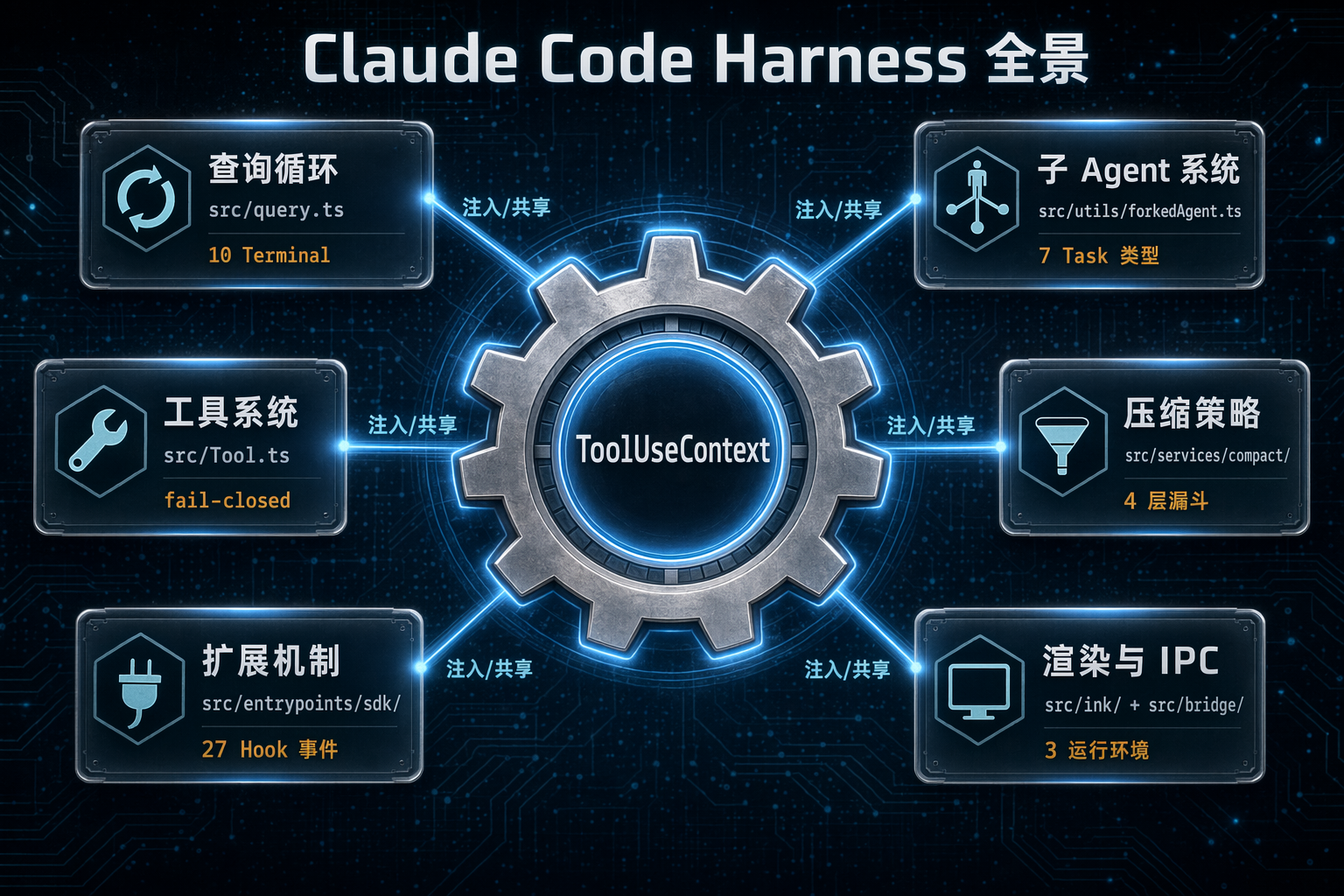
图 2:Claude Code 的 6 大子系统 —— 查询循环、子 agent、工具系统、压缩策略、扩展机制、渲染与 IPC,它们被 ToolUseContext 这一个类型粘在一起。
二、主循环:为什么用 AsyncGenerator 而不是 while
心智模型:一个被 AsyncGenerator 包裹的状态机
把 Claude Code 的主循环想象成一台状态机,而不是一个 while (response.stop_reason === 'tool_use') 循环。主入口是 src/query.ts 的 queryLoop,签名长这样:
// file: src/query.ts, L204-L220
type State = {
  messages: Message[]
  toolUseContext: ToolUseContext
  autoCompactTracking: AutoCompactTrackingState | undefined
  maxOutputTokensRecoveryCount: number
  hasAttemptedReactiveCompact: boolean
  pendingToolUseSummary: Promise<ToolUseSummaryMessage | null> | undefined
  stopHookActive: boolean | undefined
  turnCount: number
  transition: Continue | undefined  // 上一次 iteration 因为什么 reason 被 continue
}
export async function* query(params: QueryParams): AsyncGenerator<..., Terminal>
为什么是 AsyncGenerator 而不是 Rx.Observable 或 EventEmitter?因为 consumer 可以用 for await 以同步语义暂停再 resume,而 Observable/EventEmitter 都是 push 模型,消费方没法自然地"卡住"上游。AsyncGenerator 还自带 try/finally 资源清理路径,对 agent 这种长时间跑、随时可能 abort 的场景更省心。
三个关键设计点:
-
State 是一个显式盒子。跨迭代的 9 个变量被封进同一个对象,每个
continue站点只写一次state = { ...state, ... }。这看起来只是编码洁癖,但它解决了一个生产 agent 系统最棘手的问题:“我上一轮到底是因为什么才继续的?”transition.reason字段把答案显式写进去,测试可以断言某条恢复路径被触发,而不必扫消息内容。 -
返回值是
Terminal枚举,不是void。源码里明确列出 10 种reason:blocking_limit/image_error/model_error/aborted_streaming/prompt_too_long/completed/stop_hook_prevented/aborted_tools/hook_stopped/max_turns。每一种对应一个生产故障模式,能直接进 dashboard 做分类统计。 -
循环终止的唯一信号是"这一轮有没有新 tool_use block",而不是
stop_reason === 'tool_use'。源码里有一行注释明确写着:stop_reason === 'tool_use'在流式响应里不可靠,不总是正确设置(not always set correctly)—— 所以改用 block 扫描。这是 Anthropic 自己对自己 API 的锐评,值得任何自己写 agent loop 的工程师记在小本本上。
一次 iteration 的固定流水线
Snip(丢老 round,免费)
  → Microcompact(工具结果去重,免费)
  → ContextCollapse(段折叠)
  → AutoCompact(LLM 摘要)
  → BlockingLimit 校验
  → API streaming
  → 工具执行(可并行)
  → Stop hooks
  → Token budget 决策
  → continue 或 return
这个流水线是"非此即彼"的:前四层压缩每一层成功了后面就 no-op;任何一步失败都不是抛异常,而是改写 state 然后 continue。
Recovery 不是 try/catch,而是改 state 再 continue
最硬核的例子是 max_output_tokens 截断恢复:
// file: src/query.ts, L1223-L1252
if (maxOutputTokensRecoveryCount < MAX_OUTPUT_TOKENS_RECOVERY_LIMIT) {
  const recoveryMessage = createUserMessage({
    content:
      `Output token limit hit. Resume directly — no apology, no recap of what you were doing. ` +
      `Pick up mid-thought if that is where the cut happened. Break remaining work into smaller pieces.`,
    isMeta: true,
  })
  state = {
    ...state,
    messages: [...messagesForQuery, ...assistantMessages, recoveryMessage],
    maxOutputTokensRecoveryCount: maxOutputTokensRecoveryCount + 1,
    transition: {
      reason: 'max_output_tokens_recovery',
      attempt: maxOutputTokensRecoveryCount + 1,
    },
  }
  continue
}
这段代码几乎把 harness 工程师的全部经验浓缩进一条 meta message:“直接继续写,不要道歉,不要回顾,拆小一点”。不这么写的话,模型会花几百 tokens 给你写一段"抱歉,我刚才被截断了,让我从头讲起…"的废话。
主循环的错误恢复是分层嵌套的:
max_output_tokens截断:3 次重试 + 一次 8K→64K 预算升级prompt_too_long:先走collapse_drain_retry(丢老的段),不够再走reactive_compact_retry(强制调用 compact)- 模型不可用:自动切 fallback model,并 strip 掉 thinking signatures(因为切模型时 thinking 不兼容)
和 Stop hook 的死循环保护也值得一看:
// file: src/query.ts, L1062-L1075 (截断后重组)
if (!needsFollowUp) {
  const lastMessage = assistantMessages.at(-1)
  if (lastMessage?.isApiErrorMessage) {
    void executeStopFailureHooks(lastMessage, toolUseContext)
    return { reason: 'completed' }
  }
  const stopHookResult = yield* handleStopHooks(...)
  if (stopHookResult.preventContinuation) return { reason: 'stop_hook_prevented' }
  if (stopHookResult.blockingErrors.length > 0) {
    state = { ...state,
      messages: [...messagesForQuery, ...assistantMessages, ...stopHookResult.blockingErrors],
      stopHookActive: true,  // 防止 hook 二次打断自己造成无限循环
      transition: { reason: 'stop_hook_blocking' } }
    continue
  }
  return { reason: 'completed' }
}
stopHookActive 这个布尔位本质是生产踩出来的 guardrail:允许 hook 强制让 agent 再跑一轮,但不允许 hook 连续两次这么干。
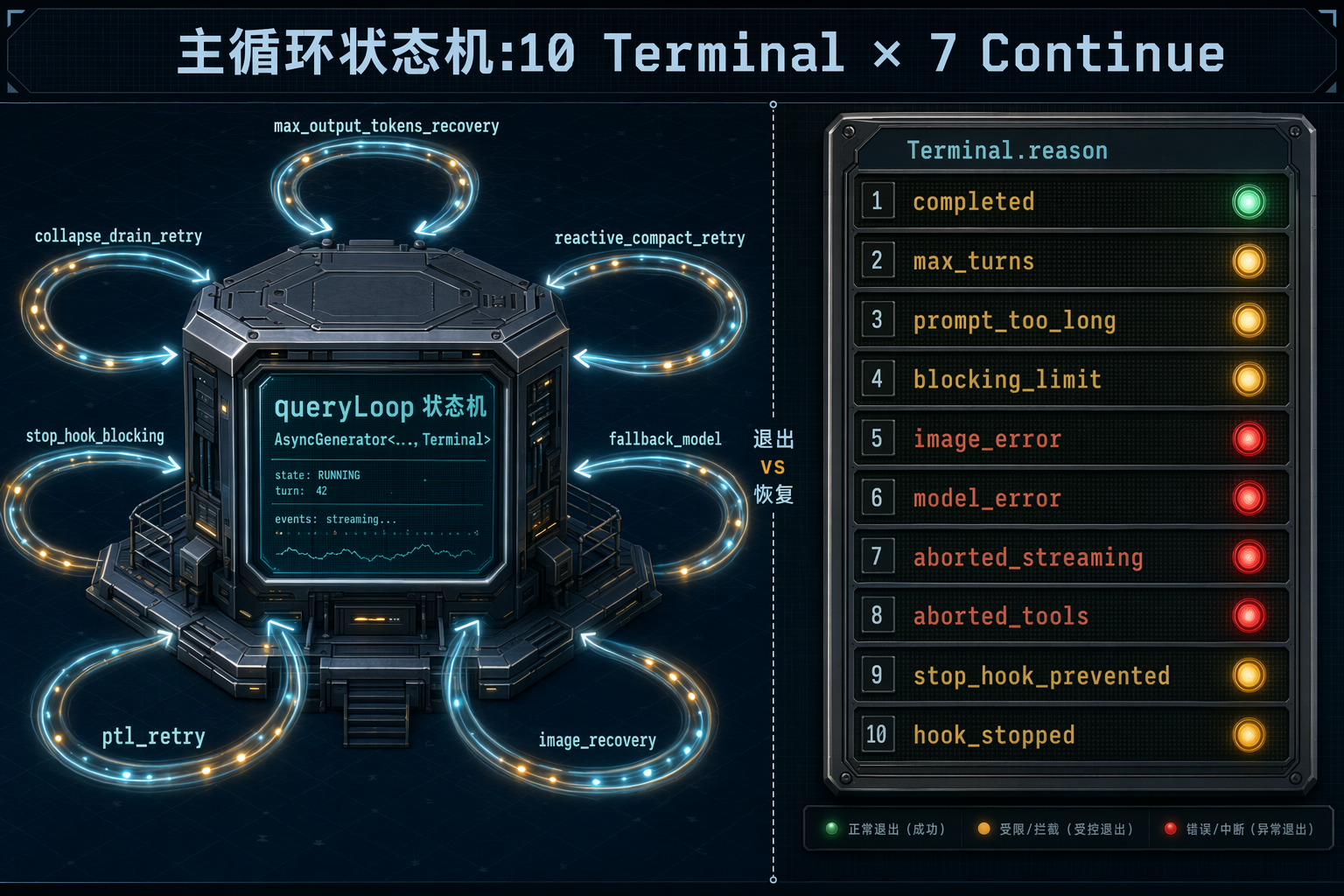
图 3:主循环的状态机视图 —— 10 种 Terminal.reason 对应 10 种退出,7 处 continue 对应 7 种恢复路径。每一次恢复都写入 transition.reason 以便测试断言。
Takeaway
如果你在写自己的 agent loop:把 while 改成 AsyncGenerator、把退出原因做成枚举、把恢复路径写成"改 state 再 continue"而不是 try/catch —— 就这三件事,你的 agent 的可观测性会上一个台阶。生产监控可以按 Terminal.reason 画饼图,测试可以按 transition.reason 断言,而不是扫文字。
三、子 agent:隔离膜 + Prompt Cache 的双重哲学
心智模型:带隔离膜的独立 query() 调用
Claude Code 里的 Task tool 是一个底层 primitive,它 spawn 一个完全独立的、有 200K context 的 Claude worker,最多 10 并发。iBuildWith.ai 的分层解释最清晰:Task tool 是基础并行引擎,subagents 是管理层(来源:ibuildwith.ai/blog/task-tool-vs-subagents-how-agents-work-in-claude-code/)。
源码里总共有 7 种 Task 类型(src/Task.ts L1-L125):local_bash / local_agent / remote_agent / in_process_teammate / local_workflow / monitor_mcp / dream。Task ID 用前缀区分(‘a’/‘r’/‘t’/‘b’/‘w’/‘m’/‘d’),后缀是 8 位随机 alphabet —— 这是防 symlink brute-force 的细节。
子 agent 不能再 spawn 子 agent,这是刻意的约束(来源:amitkoth.com/claude-code-task-tool-vs-subagents/)。父 agent 只拿子 agent 的最终输出文本,看不到 reasoning history —— 这是 Claude Code 控制 context 污染的核心手段。
默认全隔离,opt-in 共享
子 agent 的上下文创建在 src/utils/forkedAgent.ts,核心就 30 行:
// file: src/utils/forkedAgent.ts, L376-L425 (精简)
export function createSubagentContext(parent, overrides?) {
  return {
    readFileState: cloneFileStateCache(parent.readFileState),
    abortController: createChildAbortController(parent.abortController),
    setAppState: overrides?.shareSetAppState ? parent.setAppState : () => {},
    setAppStateForTasks: parent.setAppStateForTasks ?? parent.setAppState,
    setInProgressToolUseIDs: () => {},
    addNotification: undefined,
    setToolJSX: undefined,
    agentId: overrides?.agentId ?? createAgentId(),
  }
}
看懂这 20 行就懂子 agent 的隔离设计了:
- readFileState 克隆:子 agent 读的文件缓存是父 agent 的副本,不会互相污染
- abortController 链接子:父被 cancel 会传到子,子自己 abort 不影响父
- setAppState 默认 no-op:子 agent 再 setState 也不会污染主 UI 树
- setInProgressToolUseIDs / addNotification / setToolJSX 全清:没有任何 UI 副作用
- agentId 独立:transcript 走 sidechain
想共享的必须显式 shareSetAppState: true。这是典型的 fail-closed 默认值 —— 所有 mutable 都默认被替换成 no-op 或副本,除非你主动要求共享。
为什么有个 setAppStateForTasks 逃生通道?
注意上面那段代码里有一个反模式:setAppState 被 no-op 了,但还保留了 setAppStateForTasks 直连父 store。源码注释写得很直白:
otherwise async agents’ background bash tasks are never registered and never killed (PPID=1 zombie)
翻译:后台 bash 任务和 session hook 必须能写根 AppState 才能被正确 kill,不然就变成 PPID=1 的僵尸进程。把它和常规 setAppState 分开是"让大多数状态隔离,只开一个窄的逃生通道"—— 抽象工程的经典做法。
Prompt Cache 是头号成本维度
子 agent 最硬核的优化是 prompt cache 共享。Anthropic API 的 cache key 由 5 个东西组成,只要任意一个字节对不上,就是 cache miss:
// file: src/utils/forkedAgent.ts, L46-L68
/**
 * Parameters that must be identical between the fork and parent API requests
 * to share the parent's prompt cache. The Anthropic API cache key is composed of:
 * system prompt, tools, model, messages (prefix), and thinking config.
 */
export type CacheSafeParams = {
  systemPrompt: SystemPrompt
  userContext: { [k: string]: string }
  systemContext: { [k: string]: string }
  toolUseContext: ToolUseContext
  forkContextMessages: Message[]
}
注释里还有一句扎心的话:“a different budget_tokens will invalidate the cache — thinking config is part of the cache key”。切个 thinking budget 整个 cache 就失效,难怪切模型时要 strip thinking signatures。
Explore / Plan agent 的生产优化:每周省 5-15B tokens
最能体现 Claude Code 团队"生产经验"的一段代码,是 Explore 类只读 agent 的 context 精简:
// file: src/tools/AgentTool/runAgent.ts, L386-L410 (精简)
const shouldOmitClaudeMd =
  agentDefinition.omitClaudeMd &&
  !override?.userContext &&
  getFeatureValue_CACHED_MAY_BE_STALE('tengu_slim_subagent_claudemd', true)
// Read-only agents (Explore, Plan) don't act on commit/PR/lint rules from
// CLAUDE.md — the main agent has full context and interprets their output.
// Dropping claudeMd here saves ~5-15 Gtok/week across 34M+ Explore spawns.
const { claudeMd: _omittedClaudeMd, ...userContextNoClaudeMd } = baseUserContext
const { gitStatus: _omittedGitStatus, ...systemContextNoGit } = baseSystemContext
注释直接写:“每周在 3400 万次 Explore 调用上省 5-15 Gtok”。这是只有在跑到 fleet-scale 才会发现的优化 —— 只读 agent 不需要 CLAUDE.md 里的"commit message 要遵循 conventional commits"这种规则,因为它们本来就不写文件。但这种 context 删减不是免费的,要用 feature flag (tengu_slim_subagent_claudemd) 门控,说明他们也不敢一次全削完。
MindStudio 在 2026 年初的文章里补充了同一个现象:“parent agent receives only the sub-agent’s output, not its internal reasoning history”(来源:mindstudio.ai/blog/sub-agents-claude-code-context-management/)—— 这和源码的 extractResultText 函数是一致的:主 agent 只拿子 agent 最后一条 assistant message 的文本,reasoning 全部丢进 subagents/<runId>/ 的 sidechain。
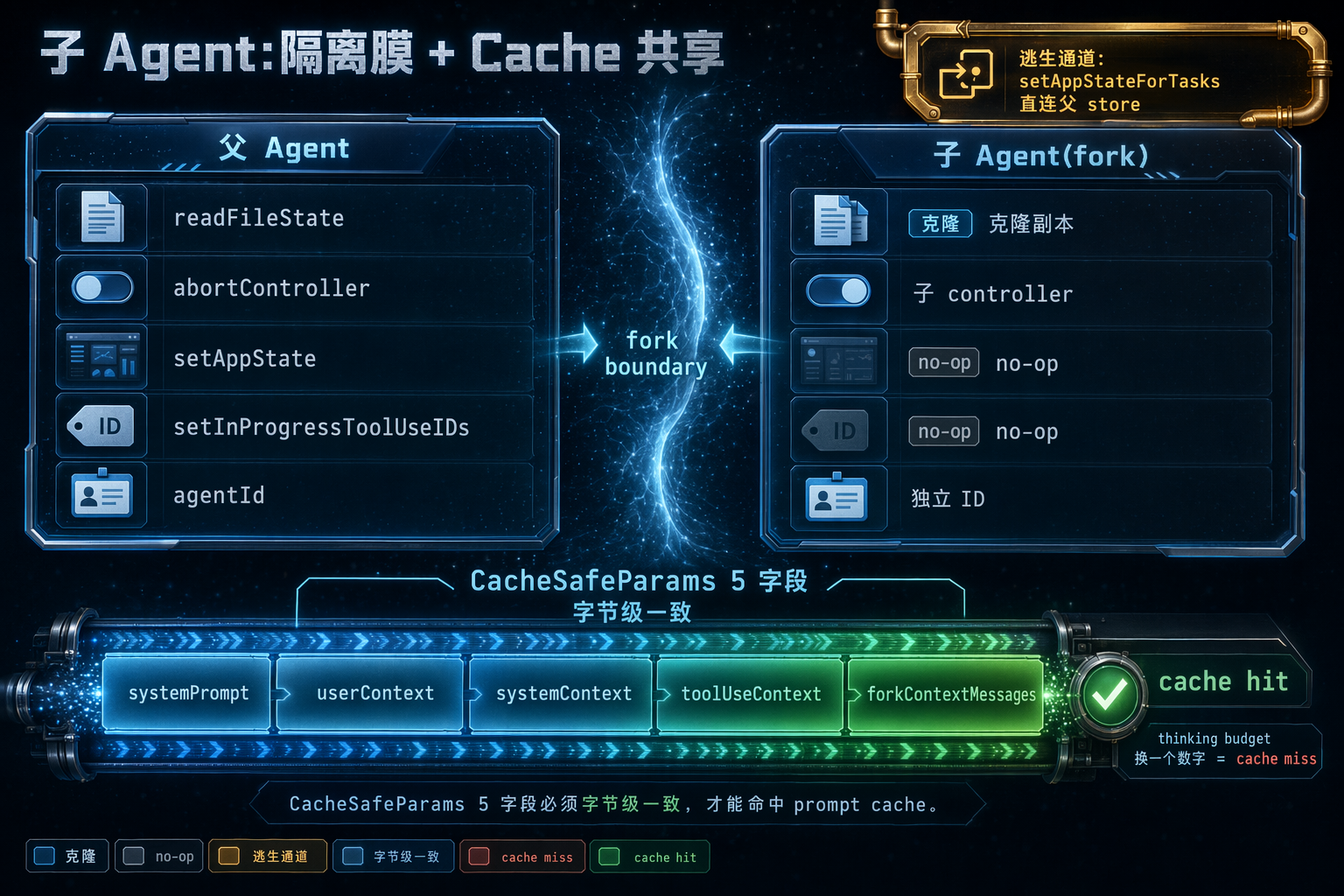
图 4:fork 子 agent 时,mutable state 要么变 no-op 要么克隆,但 5 个 CacheSafeParams 字段必须和父 agent 字节级一致才能命中 prompt cache。
Opus 4.7 带来的一个新变量
2026 年初 Anthropic 发布 Opus 4.7(来源:anthropic.com/news/claude-opus-4-7),官方明确提到一个 harness 相关行为变化:“Fewer subagents spawned by default. Steerable through prompting.”(来源:platform.claude.com/docs/en/about-claude/models/whats-new-claude-4-7)。
这意味着 harness 的 agent 调度策略和模型后训练耦合在一起 —— 你要是拿 Opus 4.6 的默认 subagent 数量经验迁到 4.7,会发现默认少了很多,要靠 prompt 显式触发。这正是 Addy Osmani 说的 “harness co-training creates overfitting”。
Takeaway
做自己的多 agent 系统时,别直接给所有子 agent 共享父的状态。默认 no-op 一切 mutable state,只开必要的逃生通道(比如后台任务注册、abort 链接)。然后花力气把 prompt cache key 的字段精确对齐 —— 对 Anthropic 用户来说这是真金白银,cache read 费用通常是 cache write 的 10%。
四、Tool 系统:并发哲学 + fail-closed 默认值
心智模型:metadata + 运行时回调
Claude Code 的 Tool 接口(src/Tool.ts L362-L695)异常详细,每个工具都声明自己的 metadata:
isConcurrencySafe(input)—— 这次调用是否能并发isReadOnly(input)—— 是否只读isDestructive(input)—— 是否有破坏性isEnabled()—— 当前是否启用validateInput(input)—— 输入是否合法checkPermissions(input, ctx)—— 是否需要用户批准prompt/description/userFacingName(input)/searchHint
再加上 10+ 个可选的 render 回调(renderToolUseMessage / renderToolResultMessage / renderToolUseRejectedMessage…),UI 关心什么就实现什么回调。
注意 isConcurrencySafe 是per-input 动态判断,不是静态 boolean —— 例如 Bash tool 跑 ls 和跑 rm -rf 同样走 BashTool,但只读判断靠 utils/bash/ 里的 shell-quote AST 解析。这是 Claude Code 把安全判断下沉到数据而不是类型的一个小例子。
并发调度:只读批量,写入串行
核心调度在 src/services/tools/toolOrchestration.ts:
// file: src/services/tools/toolOrchestration.ts, L19-L82 (精简)
export async function* runTools(toolUseMessages, assistantMessages, canUseTool, toolUseContext)
  : AsyncGenerator<MessageUpdate, void> {
  let currentContext = toolUseContext
  for (const { isConcurrencySafe, blocks } of partitionToolCalls(toolUseMessages, currentContext)) {
    if (isConcurrencySafe) {
      for await (const update of runToolsConcurrently(blocks, ..., currentContext)) {
        yield { message: update.message, newContext: currentContext }
      }
    } else {
      for await (const update of runToolsSerially(blocks, ..., currentContext)) {
        if (update.newContext) currentContext = update.newContext
        yield { message: update.message, newContext: currentContext }
      }
    }
  }
}
13 行代码讲清楚了 Claude Code 的并发哲学:连续的 isConcurrencySafe=true 打成一个并行批次一起跑;只要插一个不安全的工具,就切回串行。
默认并发数 10,可以用环境变量 CLAUDE_CODE_MAX_TOOL_USE_CONCURRENCY 覆盖。partitionToolCalls 的实现也很聪明:
// file: src/services/tools/toolOrchestration.ts, L91-L116
function partitionToolCalls(toolUseMessages, toolUseContext): Batch[] {
  return toolUseMessages.reduce((acc, toolUse) => {
    const tool = findToolByName(toolUseContext.options.tools, toolUse.name)
    const parsedInput = tool?.inputSchema.safeParse(toolUse.input)
    const isConcurrencySafe = parsedInput?.success
      ? (() => { try { return Boolean(tool?.isConcurrencySafe(parsedInput.data)) }
                 catch { return false /* 保守: 报错就不并发 */ } })()
      : false
    if (isConcurrencySafe && acc[acc.length - 1]?.isConcurrencySafe) {
      acc[acc.length - 1]!.blocks.push(toolUse)
    } else {
      acc.push({ isConcurrencySafe, blocks: [toolUse] })
    }
    return acc
  }, [])
}
safeParse 失败时默认为不并发;isConcurrencySafe 回调抛错时默认不并发 —— 两层 fail-closed。如果你自己写一套 agent 工具系统,这个细节值得抄。
Fail-closed 默认值
所有工具的默认值集中在一个常量里:
// file: src/Tool.ts, L757-L770 (buildTool 默认值)
const TOOL_DEFAULTS = {
  isEnabled: () => true,
  isConcurrencySafe: (_input?: unknown) => false,
  isReadOnly: (_input?: unknown) => false,
  isDestructive: (_input?: unknown) => false,
  checkPermissions: (input, _ctx?) =>
    Promise.resolve({ behavior: 'allow', updatedInput: input }),
  toAutoClassifierInput: (_input?: unknown) => '',
  userFacingName: (_input?: unknown) => '',
}
export function buildTool<D extends AnyToolDef>(def: D): BuiltTool<D> {
  return { ...TOOL_DEFAULTS, userFacingName: () => def.name, ...def } as BuiltTool<D>
}
除了 isEnabled 和 checkPermissions,其他全部默认"保守"的那一侧。不显式声明的工具 默认不能并发、默认不是只读、默认有可能破坏。这意味着新增工具时忘了声明 metadata 不会让系统更激进,只会让它更保守。
这里 checkPermissions 默认 allow 看起来和 fail-closed 矛盾,其实不是:Claude Code 的 fail-closed 是分层的,真正守门的是外层的 filterToolsByDenyRules + Bash AST 扫 + 交互式提示,tool 自身的 checkPermissions 只是"工具自声明层",表达"我这一层没有额外反对意见"。fail-closed 的重量压在 isConcurrencySafe / isReadOnly / isDestructive 这组元数据默认不安全/破坏性上。
权限是两层 + 三态
Ccleaks 的 audit 页面把权限系统整理得很清楚(来源:ccleaks.com/audit):
filterToolsByDenyRules():在 system prompt 构建前就过滤掉 deny 列表里的工具,模型根本看不到。checkPermissions():每次调用时判断 allow/deny/ask。- 交互式提示:没有规则命中时弹 once/always/deny。选 allow always 会回写到 settings。
除此之外还有一条旁路:Bash AST parser(utils/bash/)在 canUseTool 之前就跑,哪怕你 deny list 为空、permission 全部 allow,AST 扫到 rm -rf /、fork bomb、curl | bash、sudo 提权、tty 注入、history 篡改 —— 一律拒绝。
还有一个叫 YOLO classifier 的东西(src/utils/permissions/yoloClassifier.tsx):auto mode 下,一个旁路 LLM 会评估 Claude 自己的 tool_use 安全性,返回 LOW/MEDIUM/HIGH 风险(来源:ccleaks.com/audit)。Jannes Klaas 在 2025 年的 reverse-engineering 里也提到:“Claude Code sends commands which the main model is about to execute to Claude Haiku… Helps Claude Code avoid bad consequences without slowing down the main loop too much.”(来源:jannesklaas.github.io/ai/2025/07/20/claude-code-agent-design.html)—— 所以你可能同时在做正向决策和反向审计,只是 Haiku 成本几乎可以忽略。
还有一个 Claude Code 设计精妙的折中:backfillObservableInput。模型看到的是一份 input 的 clone;hooks / transcript / canUseTool 看到的是 backfill 版本(比如 FileRead 把相对路径展开成绝对路径);而喂回 API 的永远是原始 input。这是在 “transcript 可读性 vs cache 稳定性” 之间做的精细折中 —— 如果你把路径展开的版本喂回 API,prompt cache 就碎了。
StreamingToolExecutor:模型还在说话就开跑
src/services/tools/StreamingToolExecutor.ts 里有一个很 aggressive 的优化:模型还在流式输出 tool_use block 时,executor 已经开始执行,不等模型把整个 block 发完。
失败怎么办?用一个叫 siblingAbortController 的东西(父 abortController 的子)一次 abort 掉所有兄弟工具。这样不会出现"bash 失败但还在跑 grep"的半完成状态。
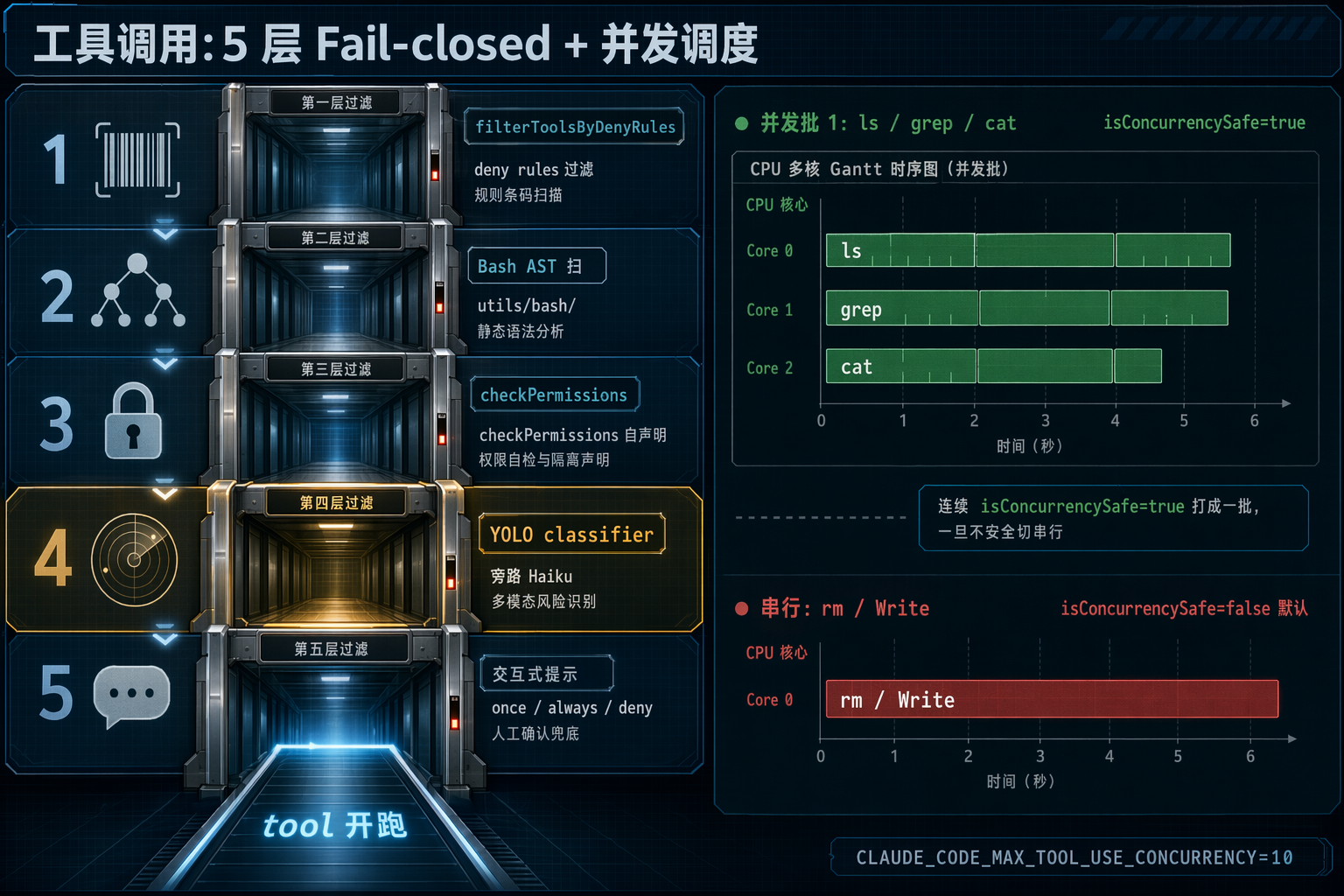
图 5:工具调用的完整生命周期:deny rules 先过滤,bash AST 扫危险命令,checkPermissions 问用户,partitionToolCalls 打包并发。fail-closed 贯穿 5 层。
Takeaway
如果你自己的 agent 有多工具并发执行:
- 把
isConcurrencySafe做成 per-input 函数而不是 per-tool 布尔 - 所有默认值选"保守"的一侧,忘了声明不会让系统更激进
- 把
canUseTool之外再做一道 AST 级的危险命令扫描(AST 级,不是 regex 级,regex 扛不住rm -rf/) - 想极致优化就用流式 executor + sibling abort controller,别等模型把 tool_use block 说完
五、4 层压缩:为什么压缩需要漏斗
心智模型:从最便宜到最贵的漏斗
Claude Code 的压缩不是一个开关,是 4 层递进漏斗:
- Snip —— 丢掉最老的 API round(粒度最粗但最便宜,不调 LLM)
- Microcompact —— 按 tool_use_id 做工具结果去重
- Context Collapse —— 把老段落折叠成 summary(committed log,可 projection 回放)
- AutoCompact —— LLM 生成整体摘要,保留最近 tail
query.ts L401-L467 顺序调用,早层如果把 token 降到阈值以下,后层就是 no-op。这个设计的本质是:LLM 调用是最贵的手段,所以放在最后;免费的手段放在最前。
Anthropic 的官方 engineering blog(2025-09-29)对 AutoCompact 的描述是最权威的(来源:anthropic.com/engineering/effective-context-engineering-for-ai-agents):
“In Claude Code, for example, we implement this by passing the message history to the model to summarize and compress the most critical details. The model preserves architectural decisions, unresolved bugs, and implementation details while discarding redundant tool outputs or messages. The agent can then continue with this compressed context plus the five most recently accessed files.”
这里面每一个决策都能在源码里找到对应:
// file: src/services/compact/compact.ts, L122-L131 (post-compact 预算)
export const POST_COMPACT_MAX_FILES_TO_RESTORE = 5
export const POST_COMPACT_TOKEN_BUDGET = 50_000
export const POST_COMPACT_MAX_TOKENS_PER_FILE = 5_000
export const POST_COMPACT_MAX_TOKENS_PER_SKILL = 5_000
export const POST_COMPACT_SKILLS_TOKEN_BUDGET = 25_000
“preserves… implementation details” = 最近 5 个文件、每个截到 5K;“discards redundant tool outputs” = Microcompact 按 tool_use_id 去重。
阈值计算:200K 窗口其实只能用 180K
// file: src/services/compact/autoCompact.ts, L62-L91
export const AUTOCOMPACT_BUFFER_TOKENS = 13_000
export const WARNING_THRESHOLD_BUFFER_TOKENS = 20_000
export const MANUAL_COMPACT_BUFFER_TOKENS = 3_000
const MAX_CONSECUTIVE_AUTOCOMPACT_FAILURES = 3  // 熔断

export function getAutoCompactThreshold(model: string): number {
  const effectiveContextWindow = getEffectiveContextWindowSize(model)
  const autocompactThreshold = effectiveContextWindow - AUTOCOMPACT_BUFFER_TOKENS
  return autocompactThreshold
}
// effectiveContextWindow = contextWindow - max_output_tokens (为输出预留!)
// 所以 200K 窗口实际只能用到约 180K
这解释了很多人问过的问题:为什么我感觉 context 还远没满就开始压缩了? 因为 effectiveContextWindow = contextWindow - max_output_tokens,200K 的 Sonnet 4.6 要给输出预留 ~7K(max_output)到 64K(ultra thinking 模式),再减 13K 的 buffer,实际可用就是 180K 上下。
熔断:生产踩出来的 MAX_CONSECUTIVE_AUTOCOMPACT_FAILURES = 3
最触目惊心的数字是 MAX_CONSECUTIVE_AUTOCOMPACT_FAILURES = 3。注释里写:生产统计有 1279 个 session 曾陷入 50+ 连续 autocompact 失败(最多一次 3272 次),每天浪费 25 万次 API 调用。熔断后停止重试。
这是典型的先踩坑再加 guardrail。如果你在做 agent 产品,压缩的死循环熔断一定要有,别等到每天烧 25 万次 API 调用才想起来加。
Compact 的 PTL 重试:compact 自己也可能爆
Compact 请求自己也可能 prompt_too_long。源码里的 truncateHeadForPTLRetry 会按 tokenGap 估算要砍多少 oldest group,或者 fallback 砍 20%。最多重试 3 次,保底保留至少 1 个 group。
压缩前剥离图片
这是一个让我拍大腿的细节:stripImagesFromMessages 把 compact 请求里的 image / document 都替换成 [image] 文本。原因很简单:summary 用不上图,而图会让 compact 请求自己 413。
Cache-safe compact:fleet 每天省 38B tokens
Compact 调用 runForkedAgent 时刻意共享父 prompt prefix,目的就是让 compact 请求命中父 agent 的 cache。源码注释写着这让 fleet 每天省 38B tokens 的 cache miss 成本。所以压缩不仅自己省 token,还省自己的 compute 费用。
badlogic 的跨产品对比
跨产品对比很有意思(来源:gist.github.com/badlogic/cd2ef65b0697c4dbe2d13fbecb0a0a5f):
- Codex:默认 180K/244K 阈值按模型变化
- OpenCode:
isOverflow()直接判断 - Claude Code:支持
/compact [instructions]定制摘要,4 层渐进漏斗
Victor Dibia 在《Context Engineering 101》里给了一个叫 thrashing 的概念:过度压缩导致 agent 重复读文件、重跑 tool(来源:newsletter.victordibia.com/p/context-engineering-101-how-agents)。Claude Code 的 post-compact 保留 5 个最近文件、plan、已调用 skills —— 就是为了避免 thrashing:压缩后立马又去读同一批文件。
MEMORY.md 的两处"harness guarantee"
MAX_ENTRYPOINT_LINES = 200
MAX_ENTRYPOINT_BYTES = 25000
超过就截断到 200 行 / 25KB 并附加警告。源码注释里反复出现 “Harness guarantees” 这个词 —— 目录存在、权限正确、编码干净,全都由 harness 保证。模型完全不需要 mkdir -p 或 chmod。这正是第一节讲的 harness 定义:“外层 CLI 程序对模型做出的不变量保证”。
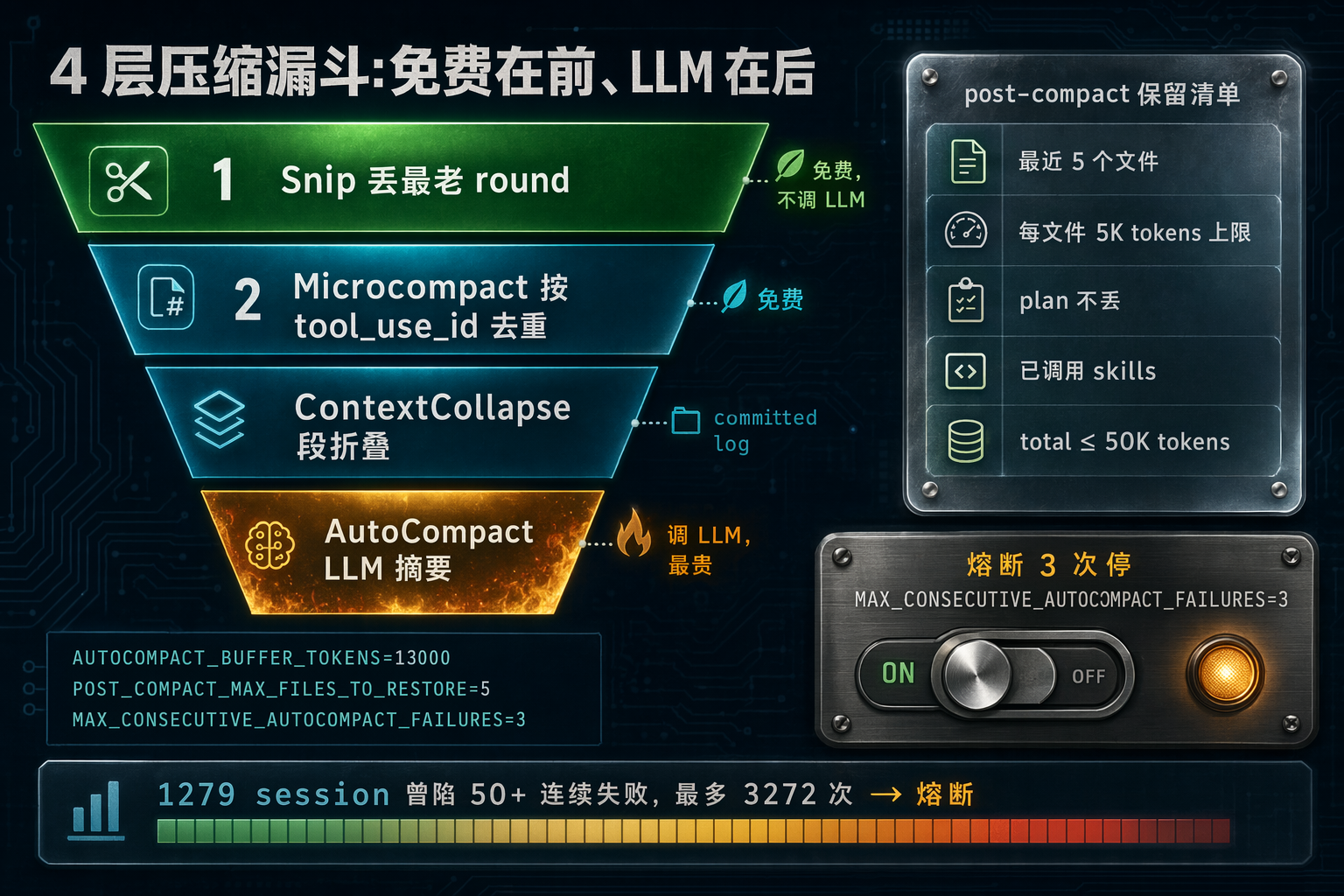
图 6:压缩的 4 层漏斗 —— 从免费的 Snip 到最贵的 AutoCompact,每层失败熔断 3 次。压缩后保留 5 个最近文件、plan、已调用 skills。
Takeaway
压缩策略的 3 条最核心设计:
- 分层漏斗:免费的 Snip/Microcompact 放前面,LLM 调用放最后
- 熔断必须有:连续失败 N 次就停,别信"下一次能成"
- 保留策略比压缩策略更重要:压缩后保留最近文件 + plan + skills 来避免 thrashing
六、Hooks / Skills / Plugins:三层扩展机制的分工
心智模型:27 个生命周期事件 + 懒加载 Markdown + 打包分发单元
这三者经常被搞混。Anthropic 官方文档的框架最清晰:hooks = 确定性生命周期钩子(shell 命令,系统触发,0 context 成本);skills = 能力扩展(Claude 按 description 匹配调用,full content lazy load)(来源:code.claude.com/docs/en/skills + code.claude.com/docs/en/hooks-guide)。MindStudio 的总结更精炼:“hooks are about controlling behavior, skills are about expanding capability”(来源:mindstudio.ai/blog/claude-code-skills-vs-hooks-difference/)。
源码里的 27 种 hook 事件:
// file: src/entrypoints/sdk/coreTypes.ts, L25-L53
export const HOOK_EVENTS = [
  'PreToolUse', 'PostToolUse', 'PostToolUseFailure',
  'Notification', 'UserPromptSubmit',
  'SessionStart', 'SessionEnd', 'Stop', 'StopFailure',
  'SubagentStart', 'SubagentStop',
  'PreCompact', 'PostCompact',
  'PermissionRequest', 'PermissionDenied',
  'Setup', 'TeammateIdle', 'TaskCreated', 'TaskCompleted',
  'Elicitation', 'ElicitationResult',
  'ConfigChange', 'WorktreeCreate', 'WorktreeRemove',
  'InstructionsLoaded', 'CwdChanged', 'FileChanged',
] as const
这 27 个事件覆盖主循环所有关键节点 —— 从 session 开始、每次 tool 前后、compact 前后、worktree 创建销毁,一直到 file 变化。注意 PreToolUse hook 可以改命:
- 返回
continue: false—— 阻止工具执行 - 返回
updatedInput—— 改写模型的参数 - 返回
additionalContexts—— 给后续 turn 注入提示文本
这是典型的"harness 可以代模型决策"的设计。比如你可以在 PreToolUse for Write 里强制所有写 .ts 文件都先跑一遍 Prettier(来源:medium.com/@davidroliver/skills-and-hooks-starter-kit-for-claude-code-c867af2ace32)。
Hook 事件的队列:迟到也不漏
事件系统有个小优雅的设计:
// file: src/utils/hooks/hookEvents.ts, L57-L81
const pendingEvents: HookExecutionEvent[] = []
let eventHandler: HookEventHandler | null = null
const MAX_PENDING_EVENTS = 100

export function registerHookEventHandler(handler) {
  eventHandler = handler
  if (handler && pendingEvents.length > 0) {
    for (const event of pendingEvents.splice(0)) handler(event)
  }
}
function emit(event) {
  if (eventHandler) eventHandler(event)
  else {
    pendingEvents.push(event)
    if (pendingEvents.length > MAX_PENDING_EVENTS) pendingEvents.shift()
  }
}
handler 还没注册的时候,事件先进队列(最多 100 条),handler 上线时批量 flush。这是"迟到订阅者也能拿到启动事件"的标准做法,对插件和 skill 的动态加载非常关键 —— 你不能要求插件在 SessionStart 之前就注册 handler。
Skill:懒加载的 Markdown
Skill 是个很有意思的设计。启动时只加载 frontmatter(name / description / whenToUse / allowed-tools / paths ~100 tokens),正文只在 SkillTool 被调用时才读:
// file: src/skills/loadSkillsDir.ts, L97-L105
export function estimateSkillFrontmatterTokens(skill: Command): number {
  const frontmatterText = [skill.name, skill.description, skill.whenToUse]
    .filter(Boolean)
    .join(' ')
  return roughTokenCountEstimation(frontmatterText)
}
// 正文 (可能 20KB+) 只在 SkillTool 被调用时才 fetch
这种"description-only 注册 + full body on-demand 加载"的模式非常值得抄。如果你有 50 个 skill,启动成本是 50×100=5K tokens(frontmatter),而不是 50×20KB=1M tokens。只有当模型决定调用某个 skill 时,才吃那 20K。
Skill 还有两种执行模式:默认是内嵌主循环的 turn;executionContext: 'fork' 则 spawn 子 agent 跑 —— 适用于"skill 本身就是一个长任务"的场景(比如 feishu-chat-history 要翻几千条消息)。
Plugin:打包分发单元
Plugin 和 skill 的区别:plugin 是独立的 npm/git 包,内含 skill + command + hook + MCP 配置的组合;skill 是单个 Markdown 文件。Source tagging 区分 builtin@builtin 和 marketplace@npm。
有一个企业重要的小开关:isRestrictedToPluginOnly('hooks' | 'skills' | 'mcp')。企业管理员可以强制"只允许官方 plugin 提供这三类扩展",防止开发者自己装个 skill 就把公司代码上传到外部服务。这是 Claude Code 的 3 个 CVE 安全事件后(来源:ccleaks.com/news/claude-code-cve-rce-credential-theft,包括 CVE-2025-59536 MCP 同意绕过和 CVE-2026-21852 API key 外泄)逐步加强的企业特性。
Anti-Distillation:harness 里有你看不到的东西
ccleaks 揭露了一个很野的 harness 特性:src/services/api/antiDistillation.ts 在系统 prompt 里注入假的 tool 定义来污染竞品的训练数据。Gated 在 ANTI_DISTILLATION_CC + tengu_anti_distill_fake_tool_injection(来源:ccleaks.com/news/undercover-mode-fake-tools-frustration-regex)。
这说明一件事:你在 UI 上看到的 tool_use 流,不一定是模型真正收到的完整工具集。harness 可以悄悄注入东西进 system prompt,也可以悄悄过滤掉东西(比如 filterToolsByDenyRules)。这种"模型看到的世界 vs 用户看到的世界"的非对称,是任何生产级 agent 系统都要想清楚的。
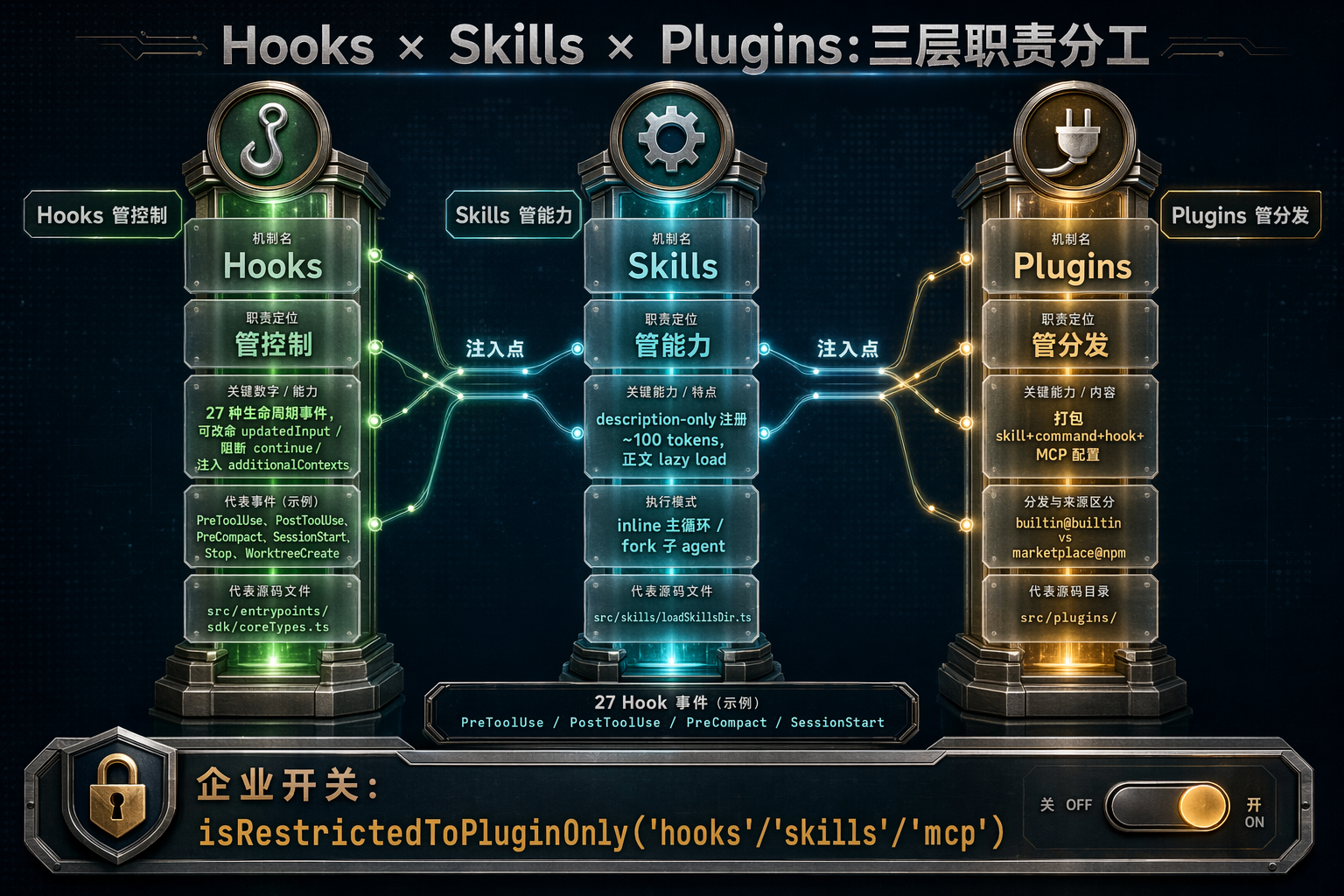
图 7:Hooks 管控制、Skills 管能力、Plugins 管分发。27 个 hook 事件 + lazy-load frontmatter + plugin 打包 —— 三层各自独立可启用。
Takeaway
要做可扩展的 agent 产品:
- hook 事件分得越细越好:Pre/PostToolUse 不够,加上 PreCompact、SessionStart、WorktreeCreate、CwdChanged
- skill 用 description-only 注册 + 正文 lazy load:50 个 skill 不能花 5K tokens 开销
- plugin 做成打包分发:skill 只是 plugin 里的一种资源
- 考虑企业的
isRestrictedToPluginOnly:安全团队会感谢你
七、渲染 / IPC / Bridge:同一个主循环跑三种环境
自写 Ink 替代公共库
Claude Code 团队自己写了一套 Ink 实现(src/ink/),而不是用公共的 ink 库。核心原因写在 src/ink/renderer.ts 的注释里:用了 react-reconciler 的 LegacyRoot 而不是 ConcurrentRoot,因为 ConcurrentRoot 的 scheduler backlog 会跨 root 泄漏(一个 root 的 backlog 会拖慢另一个 root 的渲染)。
// file: src/ink/render-to-screen.ts, L36-L82 (精简)
let root, container, stylePool, charPool, hyperlinkPool, output

export function renderToScreen(el: ReactElement, width: number): { screen; height } {
  if (!root) {
    root = createNode('ink-root')
    stylePool = new StylePool()
    charPool = new CharPool()
    hyperlinkPool = new HyperlinkPool()
    container = reconciler.createContainer(root, LegacyRoot, ...)
  }
}
三个 pool(StylePool / CharPool / HyperlinkPool)做字符串去重,让每次 render 命中缓存 —— 终端 diff 渲染的典型优化。
renderToScreen(el, width) 还支持离屏渲染,把单条 message 渲染到独立 Screen buffer(~1-3ms/call),然后扫 buffer 找 query 精确到 (row, col, len)。这就是搜索高亮和 /share 导出截图的底层机制。
ToolUseContext:同一个类型服务三种环境
Claude Code 有三种运行模式:REPL(终端)、Headless/SDK、Remote Control(手机/VS Code/Slack)。但它们共享同一个 queryLoop。区分靠 ToolUseContext 里的可选回调:
// file: src/Tool.ts, L158-L250 (精简)
export type ToolUseContext = {
  options: { /* tools, mcpClients, commands, ... */ }
  abortController: AbortController
  readFileState: FileStateCache
  getAppState(): AppState
  setAppState(f): void
  setToolJSX?: SetToolJSXFn
  addNotification?: (...)
  setStreamMode?: (mode)
  handleElicitation?: (serverName, params, signal) => Promise<ElicitResult>
  requestPrompt?: (sourceName, summary) => (req) => Promise<PromptResponse>
  agentId?: AgentId
}
注意那些 ?: —— 非本环境的回调直接 undefined,实现时跳过就行,不要写 if (mode === 'repl') { ... } else if (mode === 'sdk') { ... }。这是一个小细节但非常重要:Claude Code 的主循环代码不 care 自己跑在哪个环境,只 care “这个回调在不在”。
Bridge:JWT + workSecret 把本地状态 pipe 给手机
src/bridge/replBridge.ts 有 2406 行,负责跨设备同步。认证走 JWT + 一个叫 workSecret 的东西,token 每 3 小时 55 分自动刷新(token 寿命 ~4 小时)(来源:ccleaks.com/audit)。
有一个叫 capacityWake 的机制:Bridge 会感知父进程空闲 → 自动从后台拉起。这实现了"手机戳一下"唤醒本地 Claude Code 的体验。2026 年 4 月 Claude Code 的 desktop 重新上线(来源:ccleaks.com/news/claude-code-desktop-redesign),worktree-per-session 已经是默认 UX,不再是高级用户的 trick。
sidechain transcript:主清爽、旁路完整
每个子 agent 的消息都落盘到 subagents/<runId>/,主 transcript 只保留主 agent 的消息流。这是"可观测 harness"的最后一块拼图 —— 事后想知道子 agent 在想什么,去 sidechain 文件里翻;想看整体流程,看主 transcript。
Takeaway
三种运行环境(REPL / SDK / Bridge 远端)共享同一个 queryLoop,区分只靠 ToolUseContext 上的可选回调在不在,主循环代码完全不 care 自己跑在哪个环境。想把 agent 扩展到多端,这就是最小接口 —— 别在主循环里写 if (mode === 'repl')。
八、实战:什么时候抄哪部分
你在做自己的 agent 产品,不可能全套抄。按常见场景给点建议:
| 你在做 | 抄哪部分 |
|---|---|
| 代码助手(Cursor 类) | 工具系统(metadata + fail-closed)+ 并发调度 + Bash AST 审计 |
| 文档/写作 agent | 4 层压缩 + skill 的 description-only 注册 + auto memory |
| 客服/RAG agent | 主循环 Terminal 枚举 + prompt cache alignment + Microcompact 工具结果去重 |
| 多 agent 协作平台 | 子 agent 隔离膜 + sidechain transcript + in-process teammate via AsyncLocalStorage |
| 跨设备/移动端 agent | ToolUseContext 可选回调模式 + Bridge 式 capacityWake |
| IDE 插件 | Hook 事件系统(至少 PreToolUse / PreCompact / WorktreeCreate) |
特别提醒 2026 年新趋势:
- Opus 4.7 默认生成更少 subagent(来源:anthropic.com/news/claude-opus-4-7)—— 如果你的 harness 强依赖"多 subagent 并发"的 prompt,要准备针对新 tokenizer 和新默认行为重调
- Cline v3.58 (2026-02)原生支持 subagent(来源:morphllm.com/comparisons/cline-vs-claude-code)—— 开源 harness 正在追赶 Claude Code
- Anthropic 官方 context engineering blog 2025 年 9 月给了 compaction 的保留/丢弃清单 —— 是目前最权威的一手文档
九、常见坑(和为什么 Claude Code 不会踩)
- “压缩把关键信息压没了” —— Claude Code 的解法是 post-compact 强制保留 5 个最近文件 + plan + skills。你的解法不能只是"调 LLM 出摘要",必须加显式保留清单。
- “subagent 把主 context 污染了” —— 默认 no-op 所有 UI 回调,只给 subagent 看 fork 时的消息前缀;只让主 agent 拿子 agent 的最终 summary 文本。
- “切模型后 thinking signatures 乱了” —— 切模型前 strip 掉 thinking signatures。这是 Anthropic API 的硬约束,不是 bug。
- “prompt cache 命中率低” —— 检查你的 fork 请求里 5 个 CacheSafeParams 字段是不是字节级一致。budget_tokens 换一个数字 cache 就全没。
- “tool 并发跑飞了其中一个还在跑” —— 用 siblingAbortController(父 abortController 的子),一个失败 abort 掉所有兄弟。
- “autocompact 死循环” —— 加熔断,
MAX_CONSECUTIVE_AUTOCOMPACT_FAILURES = 3是 Claude Code 踩出来的数字。 - “hook 把 agent 卡死成无限循环” —— 加
stopHookActive位,不允许 hook 连续两次强制 continue。 - “tool 错误恢复吃不了复杂情况” —— 别用 try/catch,改 state 然后 continue,每次 continue 写
transition.reason。
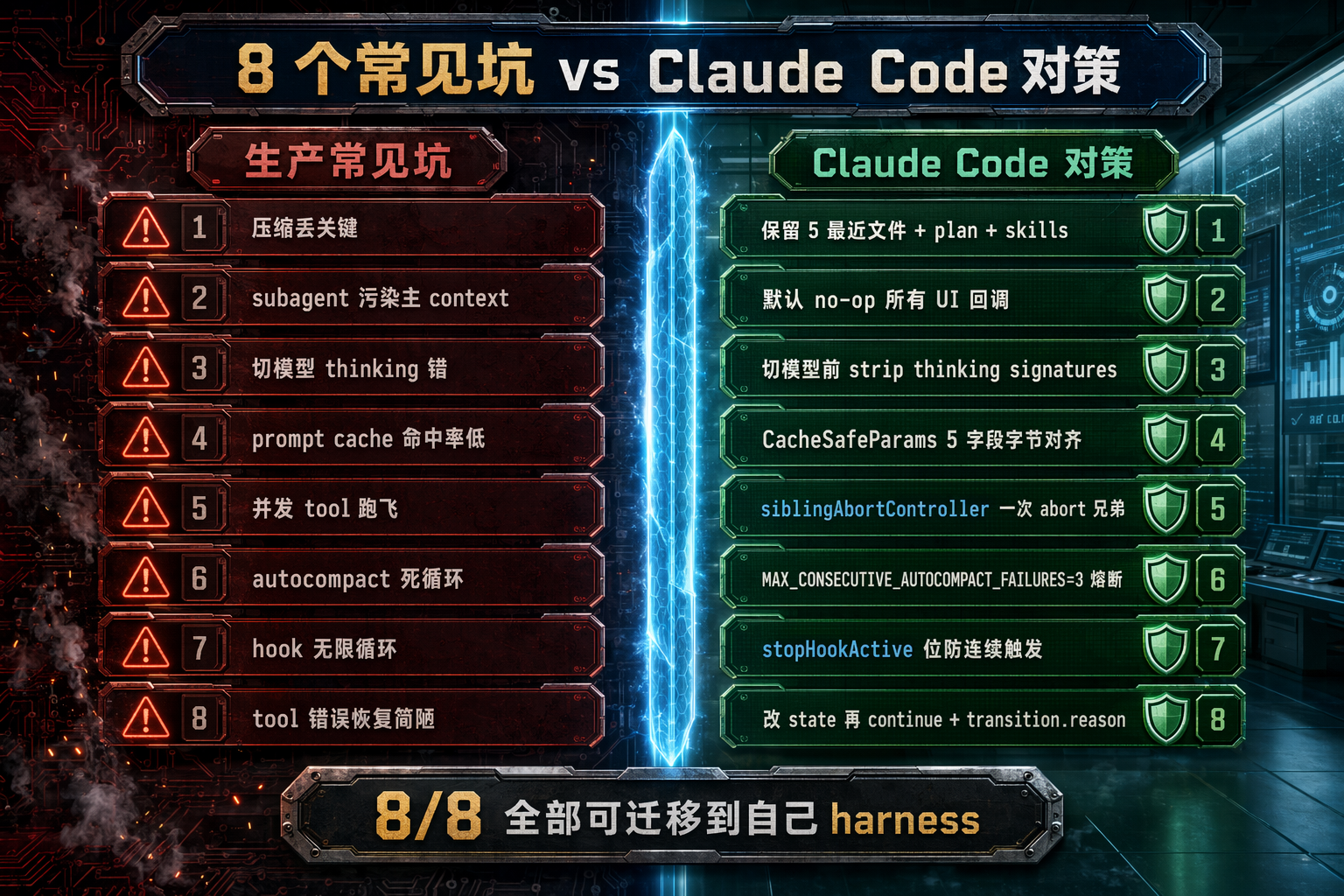
图 8:8 个生产级 agent 系统的常见坑,Claude Code 源码里对应的对策。大多数对策可以直接抄进你自己的 harness。
十、总结:5 条可迁移到你自己项目的心智模型
读完 6 个主题,我会把 Claude Code harness 提炼成 5 条设计准则。这 5 条不是"工程师的最佳实践"层面的 tips,而是被代码里的类型和常量固化下来的产品力。
1. Harness 承担不变量,模型承担决策。
目录存在、工具可用、权限已查、image 已剥离、cwd 正确 —— 这些由 harness 保证,别让模型浪费 turn 自检。源码里 “Harness guarantees” 这个词在 memdir.ts 出现过 3 次,这是定义级别的承诺。
2. Fail-closed 默认值。isConcurrencySafe = false、isDestructive = false、autocompact after 3 failures halt、subagent setAppState = no-op、safeParse 失败时不并发、callback 抛错时不并发 —— 所有默认值都选"安全但可能保守"的一侧。新增工具时忘了声明 metadata,只会让系统更保守,不会让它更激进。
3. 分层递进 + 熔断。
压缩 4 层、错误恢复 3 层(collapse_drain → reactive_compact → surface error)、max_output_tokens 3 次重试 + 1 次 8K→64K 升级 —— 每层独立,早层成功则后层 no-op。熔断是必备 guardrail,不是"以防万一"的可选项。
4. 可观测状态机而非 try/catch。Terminal.reason 10 种退出原因、transition.reason 记录每次 continue 原因。生产故障可以按 reason 分类统计,测试可以断言具体恢复路径。Recovery 不是 try/catch,是"改 state 然后 continue"。
5. Prompt cache 是头号成本维度。CacheSafeParams 精心对齐 5 字段、compact 共享父 prefix、thinking signature 切模型时 strip、input backfill 分"API-bound copy"和"observable copy"—— 所有 fork 路径都在榨取 Anthropic cache。Explore agent 剥离 claudeMd 每周省 5-15 Gtok 这种优化只有在 fleet 级别才会发现,但任何规模的 agent 产品都能从这种思路里受益。
这 5 条准则是任何 agent harness 都应该抄的。把它们从"工程师嘴上的最佳实践"固化成"代码里的类型定义和常量",就是 Claude Code 最大的产品力 —— 你不需要每个工程师都记得这 5 条,代码的类型系统会替你记住。
最后放一张总图:
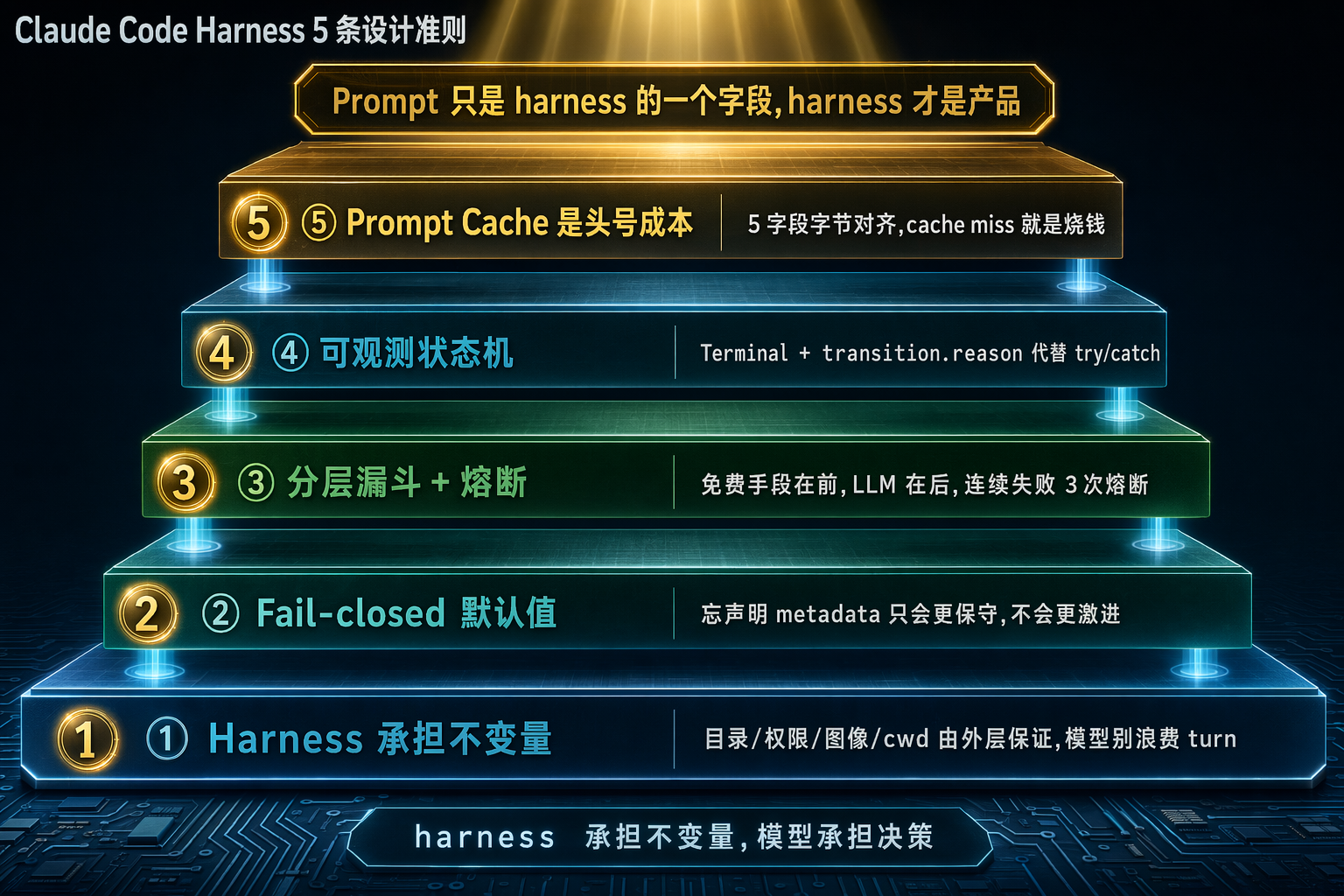
图 9:5 条设计准则的层级关系 —— harness 承担不变量是地基,fail-closed 是纪律,分层漏斗是模式,可观测状态机是工程基础设施,prompt cache 是成本天花板。
如果你只能带走一句话:prompt 只是 harness 的一个字段,harness 才是产品。
参考资料
源码与 ccleaks 观察:
src/query.ts、src/QueryEngine.ts(主循环)src/tools/AgentTool/runAgent.ts、src/utils/forkedAgent.ts(子 agent)src/Tool.ts、src/services/tools/toolOrchestration.ts(工具系统)src/services/compact/、src/memdir/(压缩和记忆)src/entrypoints/sdk/coreTypes.ts、src/skills/、src/plugins/(扩展)src/ink/、src/bridge/replBridge.ts(渲染和 IPC)- https://ccleaks.com/architecture、/audit、/leaks(公开泄露分析)
- https://ccleaks.com/news/how-the-leak-started(provenance)
2025-11 至 2026-05 时效性补充(tavily 检索):
- Anthropic, “Effective context engineering for AI agents”, 2025-09-29
- Anthropic, “Introducing Claude Opus 4.7” & “What’s new in Claude Opus 4.7”, 2026
- Addy Osmani, “Agent Harness Engineering”, 2026
- Fareed Khan, “Building Claude Code with Harness Engineering”, 2026-04-06
- Jannes Klaas, “Agent design lessons from Claude Code”, 2025-07-20
- iBuildWith.ai, “Task Tool vs. Subagents”
- MindStudio, “Claude Code Skills vs Hooks” / “Sub-Agents”
- badlogic, “Context Compaction Research” (GitHub Gist)
- Morph, “Claude Code vs Cline (2026)”
- claudefa.st, “Claude Code Dreams / Auto-Dream”
- Victor Dibia, “Context Engineering 101”
(本文的数字、代码片段、代号、节省指标均来自上述源码或公开材料,未作自创。)

汇聚全球AI编程工具,助力开发者即刻编程。
更多推荐

 7
7 0
0- 0


 已为社区贡献2条内容

所有评论(0)