
【Sentinel 熔断降级实战】从踩坑到优雅降级的完整记录
Sentinel 熔断降级实战:从踩坑到优雅降级的完整记录
前言
在微服务架构中,熔断降级是保障系统稳定性的最后一道防线。Sentinel 作为阿里开源的流量治理组件,凭借其轻量级、多维度控制等特性,成为 Spring Cloud Alibaba 生态中的首选。然而,在将 Sentinel 集成到 Spring Boot 4.0 / Spring Cloud 2025 项目的过程中,我遇到了规则不生效、降级无法触发、响应格式不友好等一系列问题。经过反复排查与验证,最终总结出一套完整的解决方案。本文将详细记录从问题出现到最终落地的全过程,并提供可直接使用的配置模板和代码示例。
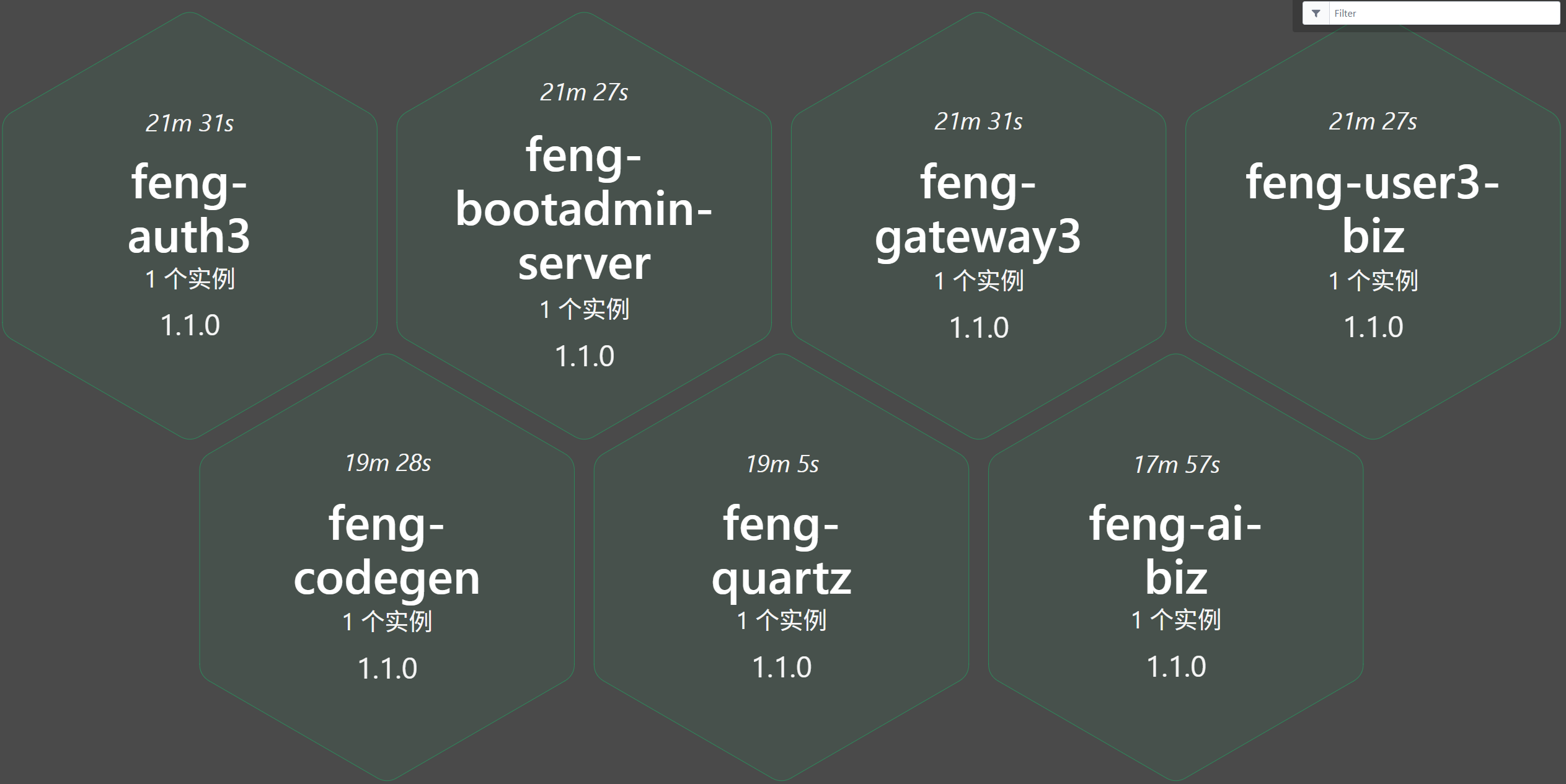
一、环境信息
| 组件 | 版本 | 备注 |
|---|---|---|
| Spring Boot | 4.0.3 | 微服务基础框架 |
| Spring Cloud | 2025.1.1 | 服务发现与治理 |
| Spring Cloud Alibaba | 2025.1.0.0 | 包含 Sentinel 集成 |
| Sentinel | 1.8.9 (客户端) / 1.7.2 (Dashboard) | 版本兼容性问题 |
| Nacos | 3.2.x | 注册中心 & 配置中心 & 规则持久化 |
| Java | 17 | JDK 版本 |
二、问题现象
2.1 降级规则不生效
在 Sentinel Dashboard 中配置了降级规则(RT=1000ms),但无论发送多少次请求,始终返回 OK,从未触发降级响应。
2.2 限流规则同样失效
配置 QPS=1 的流控规则,快速发送两个请求,第二个请求仍正常通过,未被限流。
2.3 Sentinel Dashboard 降级规则保存报错
使用 Dashboard 1.8.9/1.8.10 时,配置降级规则提示 undefined,或接口返回 404。
2.4 降级响应格式不友好
触发降级后返回 {"code":1,"msg":null,"data":500},msg 字段为空,前端无法展示友好提示。
2.5 规则无法持久化
Dashboard 配置的规则保存在内存中,每次微服务重启后规则全部丢失,需要重新配置,无法投入生产。
2.6 Nacos 配置后规则仍无法加载
按照官方文档配置 Nacos 数据源后,应用启动时未加载规则,actuator/sentinel 中 rules 仍为空。
三、问题排查过程
3.1 确认 Sentinel 是否正常启用
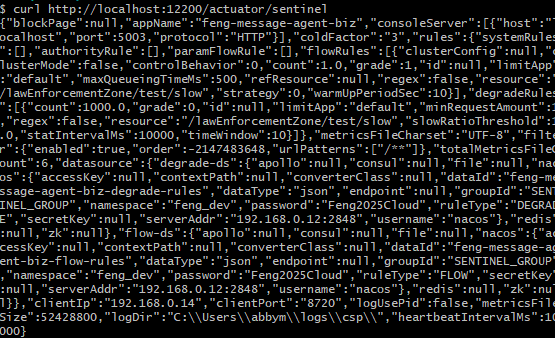
访问 actuator/sentinel 端点:
curl -s http://localhost:12200/actuator/sentinel | jq '.filter.enabled'
# 输出 true,说明过滤器已启用
3.2 检查规则是否推送到客户端
curl -s http://localhost:12200/actuator/sentinel | jq '.rules'
发现 flowRules 和 degradeRules 均为空,说明 Dashboard 配置的规则未同步到客户端。
3.3 Dashboard 版本兼容性问题
通过 F12 开发者工具发现,Dashboard 1.8.9 创建降级规则时请求的是:
GET /degrade/new.json?app=xxx&count=1000&grade=0&resource=testSlow&timeWindow=10
返回 404 Not Found,说明 API 路径已变更。换用 1.7.2 版本后功能正常。
3.4 阈值未达到导致降级不触发
即使规则存在,单窗口执行测试也无法触发降级。原因是 Sentinel 降级规则默认需要达到 最小请求数(minRequestAmount,默认 5)才会计算统计值。单次循环请求间隔过长,未满足条件。
验证:同时开启三个终端并行发送请求,降级立即触发。
3.5 响应消息为空
FengUrlBlockHandler 中原返回 R.failed(e.getMessage()),而 e.getMessage() 为 null,导致前端收到空消息。
3.6 Nacos 数据源依赖缺失
排查发现 feng-library3-sentinel 模块的 pom.xml 中未引入 sentinel-datasource-nacos 依赖,导致 Spring Cloud Alibaba 的 SentinelDataSourceHandler 无法解析 Nacos 配置,规则无法加载。
四、完整解决方案
4.1 统一 Sentinel Dashboard 与客户端版本
由于 1.8.x 版本 Dashboard 存在 API 兼容性问题,最终回退到 1.7.2 版本:
# Sentinel Dashboard 启动脚本(1.7.2)
java -Dserver.port=5003 -jar sentinel-dashboard-1.7.2.jar
访问 http://localhost:5003,默认账号密码均为 sentinel。
4.2 使用 Nacos 持久化规则(生产推荐)
在 Nacos 中创建规则配置文件,避免 Dashboard 内存规则丢失。
Nacos 配置 - 流控规则(feng-message-agent-biz-flow-rules,Group: SENTINEL_GROUP):
[
  {
    "resource": "/lawEnforcementZone/test/slow",
    "limitApp": "default",
    "grade": 1,
    "count": 1,
    "strategy": 0,
    "controlBehavior": 0,
    "clusterMode": false
  }
]
Nacos 配置 - 降级规则(feng-message-agent-biz-degrade-rules,Group: SENTINEL_GROUP):
[
  {
    "resource": "/lawEnforcementZone/test/slow",
    "limitApp": "default",
    "grade": 0,
    "count": 1000,
    "timeWindow": 10,
    "minRequestAmount": 1,
    "statIntervalMs": 10000
  }
]
application.yml 配置:
spring:
  cloud:
    sentinel:
      eager: true
      transport:
        dashboard: localhost:5003
      datasource:
        flow-ds:
          nacos:
            server-addr: ${NACOS_HOST:127.0.0.1}:${NACOS_PORT:2848}
            namespace: feng_${spring.profiles.active}
            dataId: ${spring.application.name}-flow-rules
            groupId: SENTINEL_GROUP
            data-type: json
            rule-type: flow
            username: ${spring.cloud.nacos.username}
            password: ${spring.cloud.nacos.password}
        degrade-ds:
          nacos:
            server-addr: ${NACOS_HOST:127.0.0.1}:${NACOS_PORT:2848}
            namespace: feng_${spring.profiles.active}
            dataId: ${spring.application.name}-degrade-rules
            groupId: SENTINEL_GROUP
            data-type: json
            rule-type: degrade
            username: ${spring.cloud.nacos.username}
            password: ${spring.cloud.nacos.password}
    openfeign:
      sentinel:
        enabled: true
4.3 补充 Nacos 数据源依赖(解决规则加载问题)
在 feng-library3-sentinel 的 pom.xml 中增加以下依赖:
<!-- Sentinel Nacos 数据源(必须) -->
<dependency>
    <groupId>com.alibaba.csp</groupId>
    <artifactId>sentinel-datasource-nacos</artifactId>
</dependency>
<!-- 解析和管理 Sentinel 数据源(Spring Cloud Alibaba 集成) -->
<dependency>
    <groupId>com.alibaba.cloud</groupId>
    <artifactId>spring-cloud-alibaba-sentinel-datasource</artifactId>
</dependency>
说明:缺少这两个依赖会导致 Spring Cloud Alibaba 的 SentinelDataSourceAutoConfiguration 无法创建 Nacos 数据源 Bean,规则配置无法生效。
4.4 优化降级响应处理器
修改 FengUrlBlockHandler,返回友好提示且 msg 不为空:
package ltd.huntinginfo.feng.common.sentinel.handle;

import cn.hutool.json.JSONUtil;
import com.alibaba.csp.sentinel.adapter.spring.webmvc_v6x.callback.BlockExceptionHandler;
import com.alibaba.csp.sentinel.slots.block.BlockException;
import com.alibaba.csp.sentinel.slots.block.degrade.DegradeException;
import com.alibaba.csp.sentinel.slots.block.flow.FlowException;
import ltd.huntinginfo.feng.common.core.util.R;
import lombok.extern.slf4j.Slf4j;
import org.springframework.http.HttpStatus;

import jakarta.servlet.http.HttpServletRequest;
import jakarta.servlet.http.HttpServletResponse;

@Slf4j
public class FengUrlBlockHandler implements BlockExceptionHandler {

    @Override
    public void handle(HttpServletRequest request, HttpServletResponse response,
                       String resourceName, BlockException e) throws Exception {
        log.error("Sentinel 降级/限流,资源名称: {}", resourceName);

        String msg = "系统繁忙,请稍后再试";
        if (e instanceof FlowException) {
            msg = "请求过于频繁,已被限流!";
        } else if (e instanceof DegradeException) {
            msg = "服务已被熔断降级!";
        }

        response.setContentType("application/json;charset=utf-8");
        response.setStatus(HttpStatus.TOO_MANY_REQUESTS.value());
        response.getWriter().print(JSONUtil.toJsonStr(R.failed(msg)));
    }
}
4.5 自定义资源名(避免路径匹配问题)
在 Controller 方法上使用 @SentinelResource 显式指定资源名:
@GetMapping("/test/slow")
@SentinelResource("testSlow")
public String slow() throws InterruptedException {
    Thread.sleep(1500);
    return "OK";
}
4.6 触发降级测试
开启三个终端窗口并行执行:
# 终端 1
for i in {1..30}; do
  curl -s -w "\n" -H "Authorization: Bearer xxx" http://localhost:12200/test/slow
done

# 终端 2、3 执行相同命令
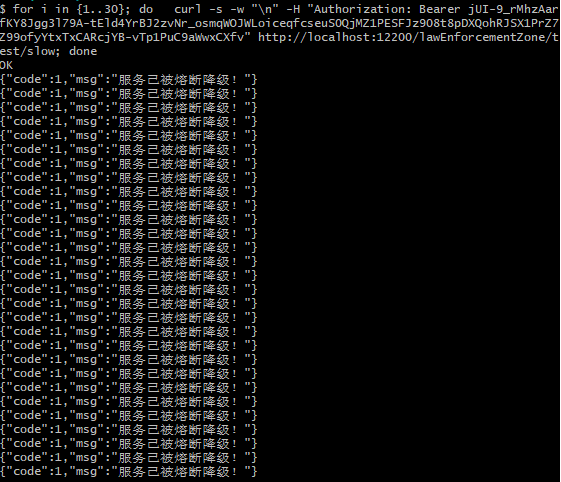
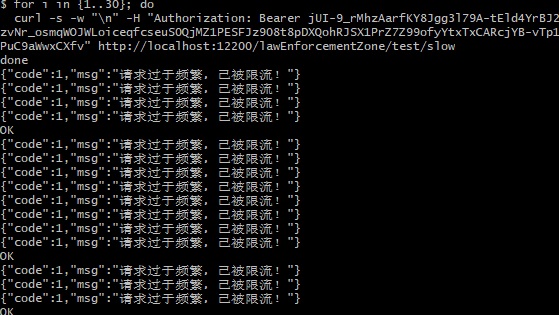
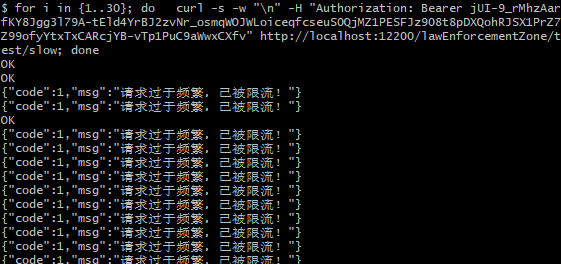
观察结果,当请求数超过阈值后,返回:
{"code":1,"msg":"服务已被熔断降级!"}
4.7 Sentinel Dashboard 启动脚本(可选)
若希望以独立进程运行 Dashboard,可使用 PowerShell 脚本:
# 启动 Sentinel Dashboard 1.7.2
java -Dserver.port=5003 -jar sentinel-dashboard-1.7.2.jar
或保存为 start-sentinel-dashboard.ps1 以便快速启动。
五、feng-library3-sentinel 模块介绍
5.1 模块定位
feng-library3-sentinel 是一个为微服务提供 Sentinel 降级、熔断、限流能力的公共组件,封装了以下核心功能:
| 功能 | 说明 |
|---|---|
| Feign 自动降级 | 为所有 @FeignClient 提供 Sentinel 资源保护,支持 fallback/fallbackFactory 自动降级 |
| 全局异常处理 | 通过 @RestControllerAdvice 捕获 BusinessException,统一返回业务错误码 |
| 限流/降级响应 | 自定义 BlockExceptionHandler,返回友好的降级提示 |
| 请求来源解析 | 支持从请求头提取来源标识,用于黑白名单规则 |
| 自动配置 | 通过 SentinelAutoConfiguration 自动注入上述 Bean |
| Nacos 数据源集成 | 引入 sentinel-datasource-nacos,支持规则持久化 |
5.2 模块结构
feng-library3-sentinel/
├── src/main/java/.../common/sentinel/
│   ├── SentinelAutoConfiguration.java          # 自动配置类
│   ├── feign/
│   │   ├── FengSentinelFeign.java              # 自定义 Feign Builder
│   │   └── FengSentinelInvocationHandler.java  # 降级调用处理器
│   ├── handle/
│   │   ├── FengUrlBlockHandler.java            # 限流/降级响应处理器
│   │   └── GlobalBizExceptionHandler.java      # 全局异常处理器
│   └── parser/
│       └── FengHeaderRequestOriginParser.java  # 请求来源解析器
├── src/main/resources/META-INF/services/
│   └── org.springframework.boot.autoconfigure.AutoConfiguration.imports
└── pom.xml (包含 sentinel-datasource-nacos 依赖)
5.3 使用方式
1. 添加依赖:
<dependency>
    <groupId>ltd.huntinginfo</groupId>
    <artifactId>feng-library3-sentinel</artifactId>
</dependency>
2. 开启 Sentinel:
spring:
  cloud:
    sentinel:
      enabled: true
      transport:
        dashboard: localhost:5003
feign:
  sentinel:
    enabled: true
3. 定义 Feign 降级类:
@FeignClient(name = "remote-service", fallback = RemoteServiceFallback.class)
public interface RemoteServiceClient {
    @GetMapping("/api/data")
    R<String> getData();
}

@Component
public class RemoteServiceFallback implements RemoteServiceClient {
    @Override
    public R<String> getData() {
        return R.failed("服务暂时不可用,请稍后重试");
    }
}
5.4 Nacos 规则持久化配置模板
spring:
  cloud:
    sentinel:
      datasource:
        flow-ds:
          nacos:
            server-addr: ${NACOS_HOST:127.0.0.1}:${NACOS_PORT:2848}
            dataId: ${spring.application.name}-flow-rules
            groupId: SENTINEL_GROUP
            rule-type: flow
            data-type: json
        degrade-ds:
          nacos:
            server-addr: ${NACOS_HOST:127.0.0.1}:${NACOS_PORT:2848}
            dataId: ${spring.application.name}-degrade-rules
            groupId: SENTINEL_GROUP
            rule-type: degrade
            data-type: json
六、踩坑经验总结
| 问题现象 | 错误原因 | 解决方案 |
|---|---|---|
| 降级规则不生效 | 请求未达到 minRequestAmount 阈值 | 并行发送足够多的请求,或降低 minRequestAmount |
| Dashboard 保存报错 | 1.8.x Dashboard API 路径变更 | 回退到 1.7.2 版本 |
| 规则未同步到客户端 | Nacos 配置未生效或命名空间错误 | 检查 namespace、dataId、groupId 是否正确 |
响应 msg 为空 | e.getMessage() 返回 null | 自定义 BlockExceptionHandler,明确指定消息 |
| 限流/降级未触发 | 资源名不匹配 | 使用 @SentinelResource 显式指定资源名 |
| Feign 降级不生效 | 未配置 fallback 或 fallbackFactory | 在 @FeignClient 中指定降级类 |
| 微服务重启后规则丢失 | Dashboard 规则存储于内存 | 配置 Nacos 数据源持久化 |
| Nacos 规则无法加载 | 缺失 sentinel-datasource-nacos 依赖 | 在 pom.xml 中添加该依赖 |
七、最佳实践建议
- 统一版本:确保 Sentinel Dashboard 与客户端版本一致,推荐使用 1.7.2(稳定且兼容)。
- 规则持久化:生产环境务必使用 Nacos/Apollo 等配置中心持久化规则,避免重启丢失。
- 资源名规范:优先使用
@SentinelResource自定义资源名,避免路径变化导致规则失效。 - 合理设置阈值:
minRequestAmount不宜过高(建议 1-5),以便快速触发降级。 - 降级响应优化:自定义
BlockExceptionHandler,返回业务友好的提示信息。 - 监控告警:接入 Sentinel Dashboard 实时监控,配合告警机制及时发现异常。
- 依赖完整性:使用 Nacos 数据源时务必引入
sentinel-datasource-nacos和spring-cloud-alibaba-sentinel-datasource。
八、结语
Sentinel 作为流量治理的利器,功能强大但配置细节繁多。本文记录了从集成到落地的完整过程,希望帮助大家快速绕过这些“坑”,顺利实现服务的熔断降级能力。feng-library3-sentinel 模块已封装上述最佳实践,可直接引入项目使用。
如果大家有任何疑问或更好的建议,欢迎交流讨论!

汇聚全球AI编程工具,助力开发者即刻编程。
更多推荐



 10
10 0
0- 0


 已为社区贡献4条内容

所有评论(0)