
Spring Boot Admin 自定义 Actuator 路径导致自身 DOWN 的完整解决实录
Spring Boot Admin 自定义 Actuator 路径导致自身 DOWN 的完整解决实录
前言
在搭建 Spring Boot Admin 监控平台时,我遇到了一个令人困惑的问题:Admin Server 自身在监控面板上显示为 DOWN,但直接访问健康检查端点却返回 200 OK。更奇怪的是,元数据在 UI 中收起时显示有数量,展开后却为空。经过反复排查,最终发现是自定义 Actuator 路径未正确传递给 SBA Server,以及 SBA 版本自身的 bug 导致的。本文将完整记录从问题出现、排查过程到最终解决的全过程,并给出生产可用的配置模板。
一、环境信息
| 组件 | 版本 | 备注 |
|---|---|---|
| Spring Boot | 4.0.x | 微服务基础框架 |
| Spring Boot Admin | 4.0.1 → 4.1.1 | 版本升级解决元数据显示问题 |
| Spring Cloud | 2025.1.x | 服务发现组件 |
| Nacos | 3.2.x | 注册中心 |
| Java | 17 | JDK 版本 |
二、问题现象
2.1 Admin UI 显示 DOWN
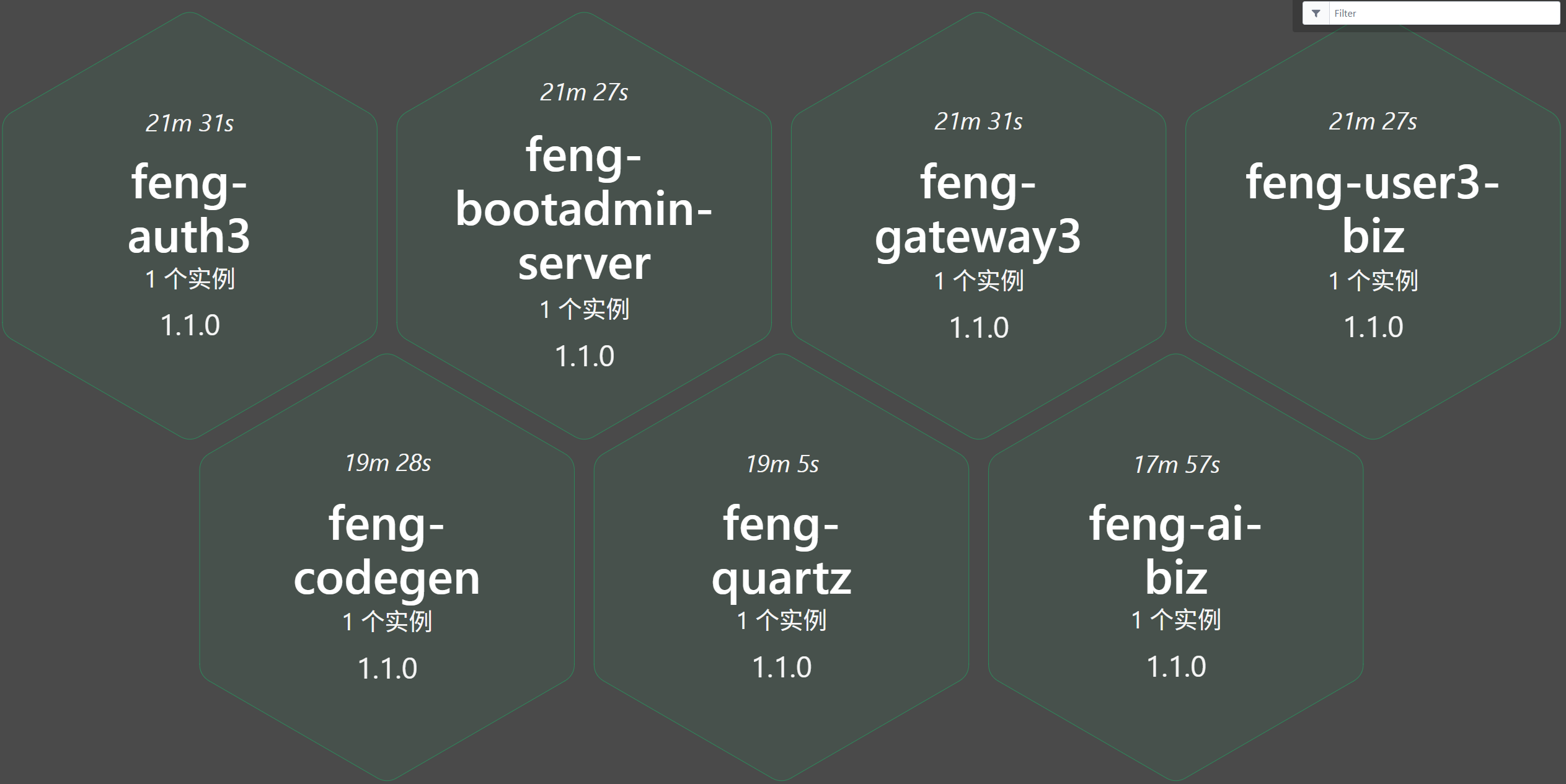
feng-bootadmin-server 自身在监控列表中显示为 DOWN,状态码为 404(不是 401)。
2.2 健康检查接口实际正常
使用 curl 直接访问自定义路径的健康检查端点(路径为 /bootadmin/health):
curl -v http://localhost:12006/bootadmin/health
返回 200 OK,且响应体包含完整的健康信息:
{
  "status": "UP",
  "components": { ... }
}
2.3 元数据显示异常
在 Admin UI 中,查看该实例的元数据区域:
- 收起时:显示
元数据 (11),表示有 11 条元数据 - 展开时:显示
未提供元数据,内容为空
三、问题排查过程
3.1 初步分析:路径不匹配
项目将 Actuator 的基础路径自定义为 /bootadmin:
management:
  endpoints:
    web:
      base-path: /bootadmin
而 SBA Server 通过 Nacos 服务发现获取该实例后,默认会请求 /actuator/health。由于路径已被更改,实际请求的是 /bootadmin/health,但 SBA 并不知道,因此收到了 404。
验证:查看 SBA Server 日志,发现它尝试访问 http://192.168.0.12:12006/actuator/health,返回 404。
3.2 尝试在 Nacos 元数据中传递路径信息
查阅 SBA 官方文档,发现可以通过 Nacos 元数据告知 SBA Server 自定义的管理路径。于是添加了以下元数据:
spring:
  cloud:
    nacos:
      discovery:
        metadata:
          management-path: /bootadmin   # 错误的 Key
重启后,SBA 仍然请求 /actuator/health,说明该 Key 未被识别。
3.3 发现正确的元数据 Key
通过搜索 SBA 源码和社区讨论,发现 SBA Server 通过服务发现获取实例时,默认查找的元数据 Key 是 management.context-path,而不是 management-path。
正确配置:
spring:
  cloud:
    nacos:
      discovery:
        metadata:
          management.context-path: /bootadmin   # 关键修正
再次重启后,SBA 成功请求 http://192.168.0.12:12006/bootadmin/health,健康状态变为 UP。
3.4 元数据显示问题的根因
元数据在收起时显示数量,展开时为空。排除配置问题后,通过搜索 GitHub issues 发现这是 Spring Boot Admin 4.0.1 的 UI bug(已确认在 4.1.0 中修复)。升级版本后,元数据正常显示。
<spring-boot-admin.version>4.1.1</spring-boot-admin.version>
升级后,元数据完整显示,包括 management.context-path、Nacos 相关元数据等。
四、完整解决方案
4.1 核心配置(application.yml)
spring:
  application:
    name: feng-bootadmin-server
  security:
    user:
      name: admin
      password: 123456
      roles: ADMIN
  boot:
    admin:
      client:
        enabled: true
        instance:
          service-base-url: http://${spring.cloud.client.ip-address}:${server.port}
          management-base-path: /bootadmin
          health-url: http://${spring.cloud.client.ip-address}:${server.port}/bootadmin/health
      discovery:
        enabled: true
        ignored-services:          # 留空,允许监控自己
        include-metadata: true     # 显示元数据
  cloud:
    nacos:
      discovery:
        metadata:
          # 关键:使用 SBA Server 默认查找的 Key
          management.context-path: /bootadmin
          # 显式指定完整健康检查 URL(优先级最高)
          health-url: http://${spring.cloud.client.ip-address}:${server.port}/bootadmin/health
          # 如果端点需要认证,提供凭据
          user.name: ${spring.security.user.name}
          user.password: ${spring.security.user.password}

management:
  endpoints:
    web:
      exposure:
        include: "*"
      base-path: /bootadmin
  endpoint:
    health:
      show-details: always
4.2 安全配置(放行健康端点)
在 AdminSecurityConfig 中,确保自定义路径被放行:
@Configuration
@EnableWebSecurity
public class AdminSecurityConfig {
    @Bean
    public SecurityFilterChain filterChain(HttpSecurity http) throws Exception {
        http.authorizeHttpRequests(authorize -> authorize
            .requestMatchers(adminServer.path("/assets/**")).permitAll()
            .requestMatchers(adminServer.path("/bootadmin/health")).permitAll()  // 放行健康检查
            .requestMatchers(adminServer.path("/bootadmin/**")).permitAll()      // 或放行整个路径
            .requestMatchers(adminServer.path("/login")).permitAll()
            .anyRequest().authenticated()
        )
        .formLogin(form -> form.loginPage(adminServer.path("/login")))
        .httpBasic(Customizer.withDefaults())
        .csrf(csrf -> csrf
            .csrfTokenRepository(CookieCsrfTokenRepository.withHttpOnlyFalse())
            .ignoringRequestMatchers(adminServer.path("/instances"), adminServer.path("/actuator/**"))
        );
        return http.build();
    }
}
4.3 显示应用信息(可选)
在子模块的 pom.xml 中,通过 spring-boot-maven-plugin 的 build-info 目标生成构建信息:
<!--时间构建插件-->
<plugin>
    <groupId>org.codehaus.mojo</groupId>
    <artifactId>build-helper-maven-plugin</artifactId>
    <version>${build-helper.version}</version>
    <executions>
        <execution>
            <id>local-timestamp-property</id>
            <phase>validate</phase>
            <goals>
                <goal>timestamp-property</goal>
            </goals>
            <configuration>
                <name>local.build.timestamp</name>
                <pattern>${maven.build.timestamp.format}</pattern>
                <timeZone>Asia/Shanghai</timeZone>
                <timeSource>build</timeSource>
            </configuration>
        </execution>
    </executions>
</plugin>
<plugin>
    <groupId>org.springframework.boot</groupId>
    <artifactId>spring-boot-maven-plugin</artifactId>
    <executions>
        <execution>
            <id>build-info</id>
            <goals>
                <goal>build-info</goal>
            </goals>
            <configuration>
                <!--自定义/actuator/info信息-->
                <additionalProperties>
                    <name>${project.description}</name>
                    <encoding.source>UTF-8</encoding.source>
                    <encoding.reporting>UTF-8</encoding.reporting>
                    <java.source>${maven.compiler.source}</java.source>
                    <java.target>${maven.compiler.target}</java.target>
                    <time>${local.build.timestamp}</time>
                </additionalProperties>
            </configuration>
        </execution>
    </executions>
</plugin>
4.4 升级 SBA 版本
在父 POM 中统一管理版本:
<properties>
    <spring-boot-admin.version>4.1.1</spring-boot-admin.version>
</properties>
五、验证结果
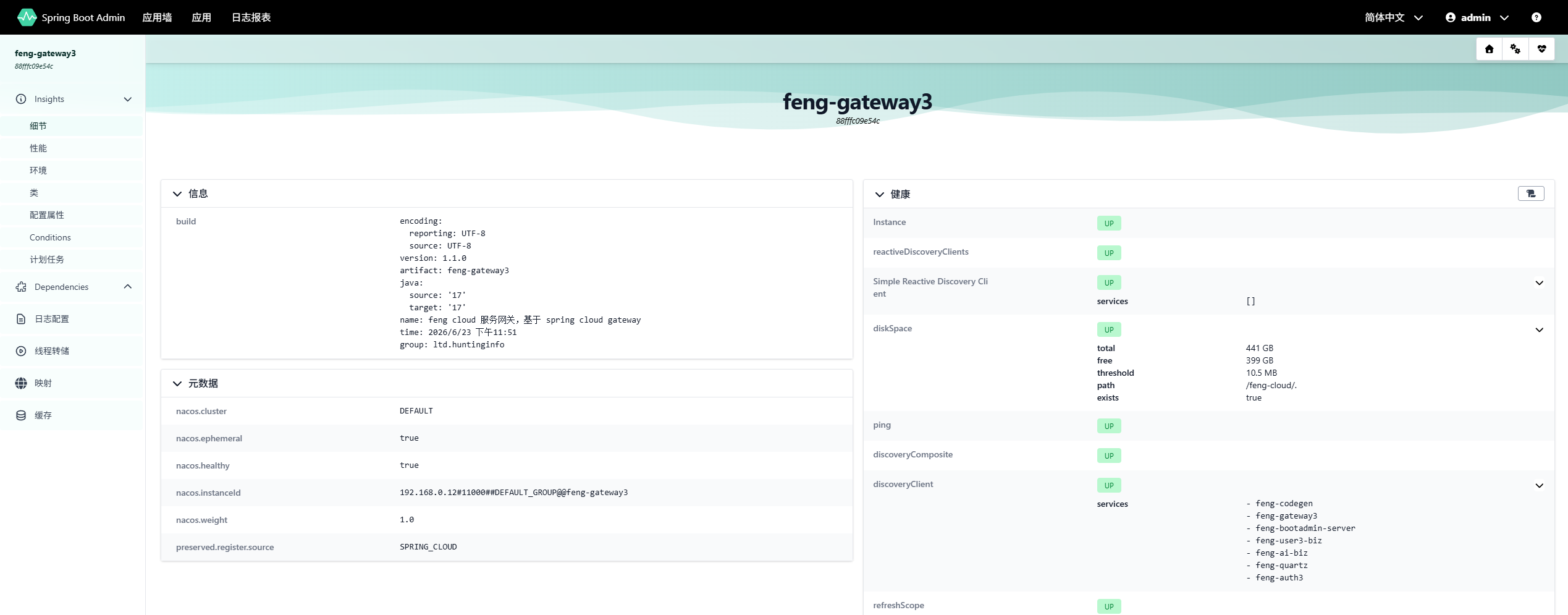
重启服务后,检查 Admin UI:
- 健康状态:
feng-bootadmin-server显示为绿色 UP。 - 应用信息:显示构建信息(版本、时间、描述等)。
- 元数据:展开后完整显示所有元数据(Nacos 元数据等)。
六、踩坑经验总结
| 现象 | 错误原因 | 正确做法 |
|---|---|---|
| Admin Server 自身 DOWN(404) | 自定义 Actuator 路径未同步到 SBA | 元数据设置 management.context-path |
| 元数据展开为空 | SBA 4.0.1 UI bug | 升级到 4.1.1+ |
使用 management-path 无效 | Key 拼写错误 | 使用 management.context-path |
启动时出现 PrematureCloseException | 其他服务尚未完全启动 | 增加超时时间,或忽略 |
七、最佳实践建议
- 自定义 Actuator 路径时,务必在 Nacos 元数据中设置
management.context-path。 - 优先使用
health-url显式指定完整 URL,优先级最高,最可靠。 - 保持 SBA 版本最新,避免已知 bug。
- 安全配置放行健康端点,否则仍需传递认证凭据。
- 启动时的临时错误可忽略,待所有服务稳定后自动恢复。
八、结语
通过这次排查,我深刻体会到微服务监控中路径映射、元数据传递和版本兼容性的重要性。Spring Boot Admin 本身是一个优秀的工具,但在自定义配置时需要仔细核对官方文档和实际行为。希望本文能帮助遇到类似问题的开发者快速定位并解决。
如果大家有任何疑问或更好的建议,欢迎交流讨论!

汇聚全球AI编程工具,助力开发者即刻编程。
更多推荐



 8
8 0
0- 0


 已为社区贡献4条内容

所有评论(0)