
How to open a file in vim in read-only mode on Linux/Unix
Dp need of opening necessary files in reading (read-only) mode to avoid accidental editing of files such as /etc/resolv.conf or a large config or programming file on a production server. Here are some tips to open files in read-only mode in a Vim text editor on a Linux or Unix-like system using the -R flag.
You can start vim or vi text editor in read-only mode. You will be protected from writing the files. There are various ways way to achieve write protection mode in vim.
How to open a file in readonly mode:
- Use view command within vim. The syntax is: view {file-name}
- Use vim/vi command line option. The syntax is: vim -R {file-name}
- Modifications not allowed using command line option: The syntax is: vim -M {file-name}
| Tutorial details | |
|---|---|
| Difficulty level | Easy |
| Root privileges | No |
| Requirements | Linux or Unix terminal |
| Category | Text Editor |
| OS compatibility | BSD • Linux • macOS • Unix |
| Est. reading time | 3 minutes |
Understanding options
The easiest syntax is:
view my-important.file
If you try to write, you will get an error as follows:
E45: 'readonly' option is set (add ! to override)
So just add ! to force overwrite it i.e. press the Esc+::w!:
:w!
OR
:x!
The -R option forces read-only mode. The ‘readonly’ option will be set. You can still edit the buffer, but will be prevented from accidentally overwriting a file. If you do want to overwrite a file, add an exclamation mark to the Ex command, as in “:w!” or “:x!“. For example:
vim -R /etc/httpd/httpd.conf
If you made some modification and want to save it forcefully, type:
:w!
The -m option forces modifying files is disabled mode. Resets the ‘write’ option. You can still modify the buffer, but writing a file is not possible at all:
vim -m mycode.py
The -M option forces the ‘modifiable’ and ‘write’ options to be unset, so that changes are not allowed and files can not be written.
vim -M my-service.sh
If you try to insert or modify text, you will get an error on screen, “E21: Cannot make changes, ‘modifiable’ is off“:
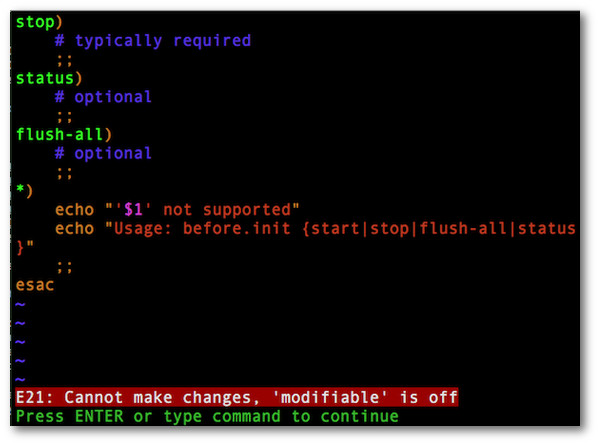
Fig.01: Open a file in a tab in vim in readonly mode using -M option

汇聚全球AI编程工具,助力开发者即刻编程。
更多推荐

 0
0 0
0- 0


 已为社区贡献338条内容

所有评论(0)