
Nacos 实战番外篇:Nacos 实战——多 GPU 推理服务的动态调度,自动选择最优显卡
前言
在大模型落地的浪潮中,很多团队都面临同一个问题:多张 GPU 卡各自部署了推理服务,但负载极不均衡。有的卡显存快爆了,有的卡还空着大半。能不能让客户端自动感知每张卡的剩余显存,把请求优先打到最空闲的卡上?
市面上常见的做法是引入额外的调度中间件(Redis + 自研调度器),或者使用 K8s 的 GPU 调度能力,但这会显著增加系统复杂度。其实 Nacos 本身的服务发现和元数据机制,就足够优雅地解决这个问题,而且代码量非常少。
本篇文章将带你走完一个测试环境可直接运行、具备生产级关键特性的方案:
-
Python 推理服务通过 HTTP API 注册到 Nacos,并定时上报显存等元数据
-
Java 客户端基于加权随机算法选择最优实例,并通过事件订阅保持元数据实时性
-
网络抖动重试、惊群效应防护、多维度评分等打磨细节全部包含
读完你会惊叹:原来 Nacos 还能这样用!
一、总体思路
我们把每张 GPU 卡视为一个独立的服务实例,注册到同一个 Nacos 服务名下(如 gpu-inference)。
每个实例的 metadata 中携带实时显存信息(memory_free_mb)、GPU 利用率(gpu_util)、当前并发请求数(concurrent_requests)等。
客户端订阅该服务,每次请求前通过加权随机算法选中一个最优实例,再将推理请求发送过去。架构图如下:
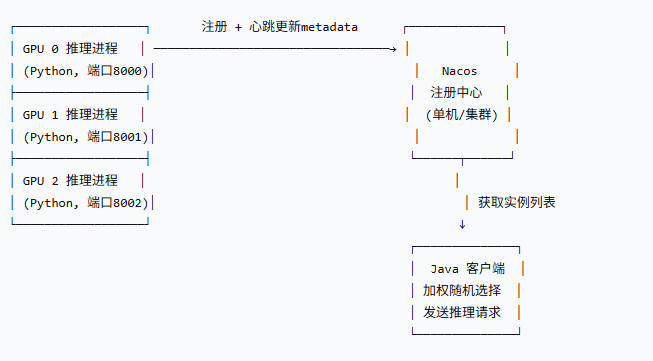
整个方案没有引入任何额外中间件,全部使用 Nacos 标准功能。
二、Python 模拟 GPU 实例(带重试机制)
真实环境中,需要安装 pynvml 库来读取真实显卡数据。这里为方便大家测试,我们用 随机数模拟显存变化,并重点加入了 请求重试逻辑,防止因网络瞬时抖动导致注册或心跳失败。
2.1 代码清单(mock_gpu_http.py)
import sys
import time
import random
import socket
import requests

NACOS_SERVER = "http://192.168.1.140:8848"  # 你的 Nacos 地址
SERVICE_NAME = "gpu-inference"
GROUP = "DEFAULT_GROUP"
BASE_PORT = 8000

# 可配置的元数据范围(总显存 80GB,已用随机 10~70GB)
def get_mock_metadata(gpu_index):
    total_mb = 80 * 1024
    used_mb = random.randint(10 * 1024, 70 * 1024)
    free_mb = total_mb - used_mb
    # 增加两个可选维度:GPU 利用率、并发请求数(模拟)
    gpu_util = random.randint(0, 100)
    concurrent = random.randint(0, 10)
    return {
        "gpu_index": str(gpu_index),
        "memory_total_mb": str(total_mb),
        "memory_used_mb": str(used_mb),
        "memory_free_mb": str(free_mb),
        "gpu_util": str(gpu_util),
        "concurrent_requests": str(concurrent),
        "model_name": "llama-7b-mock"
    }

# ---------- 重试包装 ----------
def request_with_retry(method, url, params, retries=3, delay=1):
    for attempt in range(retries):
        try:
            resp = method(url, params=params, timeout=5)
            if resp.status_code == 200:
                return resp
            else:
                print(f"HTTP {resp.status_code}, retry {attempt+1}")
        except Exception as e:
            print(f"请求异常 {e}, retry {attempt+1}")
        if attempt < retries - 1:
            time.sleep(delay * (attempt + 1))  # 指数退避
    print("操作最终失败,跳过本次")
    return None

# ---------- 核心操作 ----------
def register(ip, port, meta):
    params = {
        "serviceName": SERVICE_NAME,
        "groupName": GROUP,
        "ip": ip,
        "port": port,
        "ephemeral": "true",
        "metadata": ",".join(f"{k}={v}" for k,v in meta.items())
    }
    return request_with_retry(requests.post, f"{NACOS_SERVER}/nacos/v1/ns/instance", params)

def heartbeat(ip, port):
    params = {
        "serviceName": SERVICE_NAME,
        "groupName": GROUP,
        "ip": ip,
        "port": port,
        "ephemeral": "true"
    }
    return request_with_retry(requests.put, f"{NACOS_SERVER}/nacos/v1/ns/instance/beat", params)

def update_meta(ip, port, meta):
    params = {
        "serviceName": SERVICE_NAME,
        "groupName": GROUP,
        "ip": ip,
        "port": port,
        "metadata": ",".join(f"{k}={v}" for k,v in meta.items())
    }
    return request_with_retry(requests.put, f"{NACOS_SERVER}/nacos/v1/ns/instance", params)

def deregister(ip, port):
    params = {
        "serviceName": SERVICE_NAME,
        "groupName": GROUP,
        "ip": ip,
        "port": port
    }
    requests.delete(f"{NACOS_SERVER}/nacos/v1/ns/instance", params=params)

# ---------- 主循环 ----------
if __name__ == "__main__":
    if len(sys.argv) < 2:
        print("Usage: python mock_gpu_http.py <gpu_index>")
        sys.exit(1)
    gpu_idx = int(sys.argv[1])
    ip = socket.gethostbyname(socket.gethostname())
    port = BASE_PORT + gpu_idx

    meta = get_mock_metadata(gpu_idx)
    if register(ip, port, meta):
        print(f"[GPU {gpu_idx}] 注册成功: {ip}:{port}, free_mb={meta['memory_free_mb']}")
    else:
        print("首次注册失败,程序退出")
        sys.exit(1)

    try:
        while True:
            time.sleep(5)
            # 心跳是维持生命的必须操作,若连续失败可能导致被摘除,这里单独做重试
            if not heartbeat(ip, port):
                print("心跳失败,可能已被摘除,请检查 Nacos 状态")
            # 更新元数据(失败也不致命,下次再试)
            meta = get_mock_metadata(gpu_idx)
            if update_meta(ip, port, meta):
                print(f"[GPU {gpu_idx}] 更新: free_mb={meta['memory_free_mb']}, util={meta['gpu_util']}%")
            else:
                print(f"[GPU {gpu_idx}] 元数据更新失败,下次重试")
    except KeyboardInterrupt:
        deregister(ip, port)
        print(f"[GPU {gpu_idx}] 已注销")
2.2 启动多个实例
打开三个终端,分别运行:
python mock_gpu_http.py 0   # 模拟 GPU 0, 端口 8000
python mock_gpu_http.py 1   # 模拟 GPU 1, 端口 8001
python mock_gpu_http.py 2   # 模拟 GPU 2, 端口 8002
登录 Nacos 控制台,在 服务列表 -> gpu-inference -> 详情中就能看到三个实例,且 metadata 每 5 秒变化一次。
三、Java 客户端:加权随机 + 实时订阅
Java 端直接使用 nacos-client 原生 API,完全摆脱 Spring Cloud 版本匹配的困扰。核心改进点是加权随机选择和事件订阅,解决了惊群效应和缓存延迟问题。
3.1 依赖(pom.xml)
<dependency>
    <groupId>com.alibaba.nacos</groupId>
    <artifactId>nacos-client</artifactId>
    <version>2.3.2</version>
</dependency>
<dependency>
    <groupId>org.springframework.boot</groupId>
    <artifactId>spring-boot-starter</artifactId>
</dependency>
3.2 调度器代码
import com.alibaba.nacos.api.NacosFactory;
import com.alibaba.nacos.api.naming.NamingService;
import com.alibaba.nacos.api.naming.pojo.Instance;
import org.springframework.stereotype.Component;

import javax.annotation.PostConstruct;
import java.util.*;
import java.util.concurrent.atomic.AtomicReference;
import java.util.stream.Collectors;

@Component
public class GpuScheduler {

    private final String serverAddr = "192.168.1.140:8848";
    private NamingService namingService;
    private final AtomicReference<List<Instance>> instanceCache = new AtomicReference<>(new ArrayList<>());
    private final Random random = new Random();

    @PostConstruct
    public void init() throws Exception {
        namingService = NacosFactory.createNamingService(serverAddr);
        refreshInstances(); // 初始拉取
        // 订阅服务变更,实时刷新本地缓存
        namingService.subscribe("gpu-inference", event -> {
            System.out.println("实例列表变化,刷新本地缓存");
            refreshInstances();
        });
    }

    private void refreshInstances() {
        try {
            List<Instance> instances = namingService.getAllInstances("gpu-inference");
            List<Instance> healthy = instances.stream()
                    .filter(Instance::isHealthy)
                    .collect(Collectors.toList());
            instanceCache.set(healthy);
            System.out.println("当前健康实例数: " + healthy.size());
        } catch (Exception e) {
            System.err.println("刷新实例列表失败: " + e.getMessage());
        }
    }

    /**
     * 加权随机选择实例,综合考虑剩余显存、GPU 利用率、并发请求数
     * 防惊群:不总是选最大,而是按比例随机
     */
    public Instance selectBestWeighted() {
        List<Instance> healthy = instanceCache.get();
        if (healthy.isEmpty()) {
            throw new RuntimeException("没有可用的 GPU 实例");
        }

        // 计算每个实例的综合得分
        double[] scores = new double[healthy.size()];
        double totalScore = 0.0;
        for (int i = 0; i < healthy.size(); i++) {
            Instance inst = healthy.get(i);
            long freeMem = Long.parseLong(inst.getMetadata().getOrDefault("memory_free_mb", "0"));
            double gpuUtil = Double.parseDouble(inst.getMetadata().getOrDefault("gpu_util", "100"));
            double concurrent = Double.parseDouble(inst.getMetadata().getOrDefault("concurrent_requests", "0"));

            // 得分公式:剩余显存越大越好,利用率越低越好,并发越少越好
            double score = freeMem * 1.0 + (100 - gpuUtil) * 0.3 - concurrent * 50;
            scores[i] = Math.max(score, 1); // 最低权重为1,避免0
            totalScore += scores[i];
        }

        // 轮盘赌选择
    /**
         * 轮盘赌不需要排序,它靠“累积区间”决定概率
         * 拿你给的代码看,假设有三个实例,得分分别为:
         *
         * GPU 0:10000
         *
         * GPU 1:5000
         *
         * GPU 2:2000
         *
         * 总得分 totalScore = 17000。
         *
         * 轮盘赌做的事情是:
         * 把 [0, 17000) 的区间按得分切成三段:
         *
         * [0, 10000) → GPU 0(概率 10000/17000 ≈ 58.8%)
         *
         * [10000, 15000) → GPU 1(概率 5000/17000 ≈ 29.4%)
         *
         * [15000, 17000) → GPU 2(概率 2000/17000 ≈ 11.8%)
         *
         * 然后生成一个 [0, 17000) 的随机数,看它落在哪个区间。
         *
         * 这个区间划分完全靠 cumulative 的累加顺序,跟数组的原始顺序有关,但不需要排序。 因为每个实例的得分已经确定了区间长度,顺序只影响区间排列,不影响每个实例被选中的概率。比如同样三个得分,无论数组是 [10000,5000,2000] 还是 [2000,10000,5000],GPU 0 被选中的概率都是 10000/17000。
         *
         * 因此,排序不是必须的。
         */
        double rand = random.nextDouble() * totalScore;
        double cumulative = 0.0;
        for (int i = 0; i < healthy.size(); i++) {
            cumulative += scores[i];
            if (rand <= cumulative) {
                return healthy.get(i);
            }
        }
        return healthy.get(0); // 浮点精度兜底
    }

    // 简单获取最佳实例 URL
    public String getBestUrl() {
        Instance best = selectBestWeighted();
        return "http://" + best.getIp() + ":" + best.getPort() + "/inference";
    }
}
3.3 定时任务验证(可选)
import org.springframework.beans.factory.annotation.Autowired;
import org.springframework.boot.SpringApplication;
import org.springframework.boot.autoconfigure.SpringBootApplication;
import org.springframework.scheduling.annotation.EnableScheduling;
import org.springframework.scheduling.annotation.Scheduled;

@SpringBootApplication
@EnableScheduling
public class GpuClientApplication {

    @Autowired
    private GpuScheduler scheduler;

    public static void main(String[] args) {
        SpringApplication.run(GpuClientApplication.class, args);
    }

    @Scheduled(fixedRate = 5000)
    public void printBest() {
        try {
            String url = scheduler.getBestUrl();
            System.out.println("当前最佳实例: " + url);
        } catch (Exception e) {
            System.err.println("获取失败: " + e.getMessage());
        }
    }
}
启动后,控制台每隔 5 秒打印一次当前选中的最佳实例 URL,你会发现它不会总指向同一台机器,而是按照权重在实例间流转。
四、为什么这些打磨细节很重要?
从最初简单的“选最大 free_memory”Demo,到上面这个版本,我们做了三项关键优化:
-
重试机制(Python 端)
网络抖一下就会导致注册失败、心跳中断,进而实例被摘除。加入指数退避重试后,抗抖动能力大幅提升。 -
加权随机选择(Java 端)
如果所有客户端都盯着“显存最多”的那张卡,瞬间流量会把它压垮,随后又集体切换到下一张,形成震荡。加权随机让请求按比例分散,负载自然均衡。 -
事件订阅代替轮询
默认getAllInstances可能返回 10 秒前的缓存,当元数据变化时感知延迟较大。通过subscribe监听,可以秒级刷新本地实例列表,调度更及时。
这些打磨点,正是 Demo 与生产级方案之间的分水岭。
五、真实 GPU 环境如何适配?
只需将 Python 脚本中的 get_mock_metadata() 换成基于 pynvml 的真实采集即可,其余代码完全不变。示例:
from pynvml import nvmlInit, nvmlDeviceGetHandleByIndex, nvmlDeviceGetMemoryInfo

nvmlInit()
def get_real_metadata(gpu_index):
    handle = nvmlDeviceGetHandleByIndex(gpu_index)
    mem = nvmlDeviceGetMemoryInfo(handle)
    total_mb = mem.total // (1024*1024)
    used_mb = mem.used // (1024*1024)
    free_mb = mem.free // (1024*1024)
    return {
        "gpu_index": str(gpu_index),
        "memory_total_mb": str(total_mb),
        "memory_used_mb": str(used_mb),
        "memory_free_mb": str(free_mb),
        # gpu_util 和 concurrent 需另外采集,此处略
    }
Java 客户端无需任何改动。
六、总结
这篇文章给出了一套轻量、可落地的多 GPU 动态调度方案,核心价值在于:
-
零中间件:完全复用 Nacos 的服务发现和元数据能力,架构极简
-
生产级打磨:重试防抖动、加权随机防惊群、事件订阅保实时
-
代码量少:Python 端不到 90 行,Java 端一个类搞定
-
可平滑迁移:从模拟环境到真实 GPU,只需替换数据采集函数
如果你正在为多 GPU 推理服务的负载均衡头疼,不妨花半小时跑通这个 Demo,相信你会打开一扇新的大门。
本系列持续更新,从 Nacos 核心原理到高阶实战。如果文章对你有帮助,欢迎点赞、收藏,你的支持是我持续创作的动力!

汇聚全球AI编程工具,助力开发者即刻编程。
更多推荐


 2
2 0
0- 0


 已为社区贡献23条内容

所有评论(0)