
02(上)| K8s 资源管理全流程:命令、配置、生产避坑
目录
Kubernetes 中的资源管理实战手册
1.1 资源管理介绍
原文:
- 在 kubernetes 中,所有的内容都抽象为资源,用户需要通过操作资源来管理 kubernetes。
- kubernetes 的本质上就是一个集群系统,用户可以在集群中部署各种服务
- 所谓的部署服务,其实就是在 kubernetes 集群中运行一个个的容器,并将指定的程序跑在容器中。
- kubernetes 的最小管理单元是 pod 而不是容器,只能将容器放在 Pod 中,kubernetes 一般也不会直接管理 Pod, 而是通过 Pod 控制器来管理 Pod 的。
- Pod 中服务的访问是由 kubernetes 提供的 Service 资源来实现。
- Pod 中程序的数据需要持久化是由 kubernetes 提供的各种存储系统来实现
资源层级图(请在此处插入架构图):
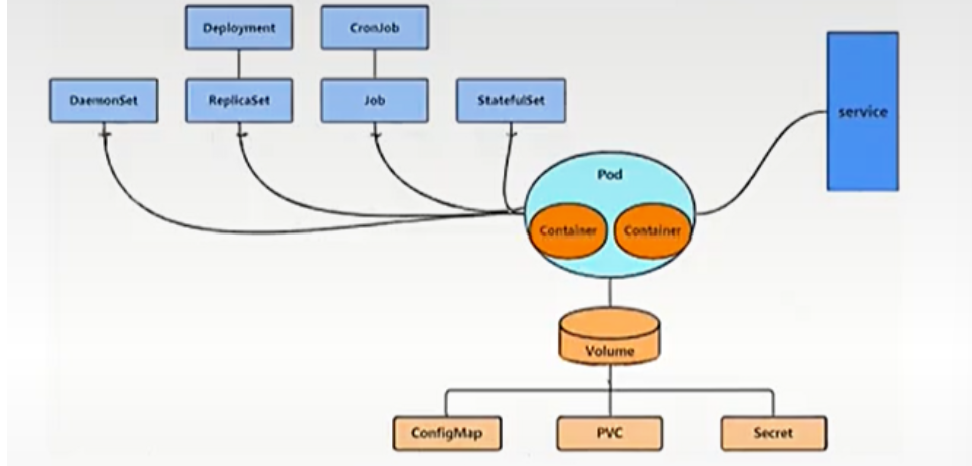
Drployiment CronJob
Demonset Replkcaset Job Statefuiset service
Pod
Volume
ConfigMap PVC Secret
生活类比
Kubernetes 就像一个大型物流公司:
- 资源 = 物流公司的所有设施(仓库、货车、快递员、分拣中心)
- Pod = 最小的运输单元(快递包裹),里面装着你的货物(容器)
- Pod 控制器 = 快递调度员,负责管理包裹的收发、数量和位置
- Service = 快递网点,统一对外提供收件和派件服务
- 存储系统 = 仓库,用来存放需要长期保存的货物
核心解释
Kubernetes 采用 "一切皆资源" 的设计哲学,所有操作都通过 API 对资源进行 CRUD。容器不能直接运行在集群中,必须被 Pod 包裹。Pod 是一次性的、易逝的,所以需要控制器来保证其可用性和期望状态。
企业级生产应用
在千万级并发场景下,这种分层架构是高可用的基础:
- 控制器保证服务副本数,单个 Pod 挂掉自动重建
- Service 提供稳定的访问入口,Pod 漂移不影响客户端
- 存储系统实现数据持久化,解决容器无状态问题
优化空间:
- 使用 HPA 自动扩缩容,根据 CPU / 内存使用率动态调整 Pod 数量
- 采用 StatefulSet 管理有状态服务,保证网络标识和存储的稳定性
- 使用 PV/PVC 分离存储和计算,实现存储资源的动态调度
课后防宕机指南
常见错误 1:直接管理 Pod 而不使用控制器
- 报错:Pod 意外终止后不会自动重建
- 排查思路:
kubectl get pods查看 Pod 状态,检查是否有对应的 Deployment/StatefulSet
常见错误 2:Service 标签选择器与 Pod 标签不匹配
- 报错:访问 Service 时出现 Connection Refused
- 排查思路:
kubectl describe svc <service-name>查看 Endpoints 是否为空
1.2 资源管理方式
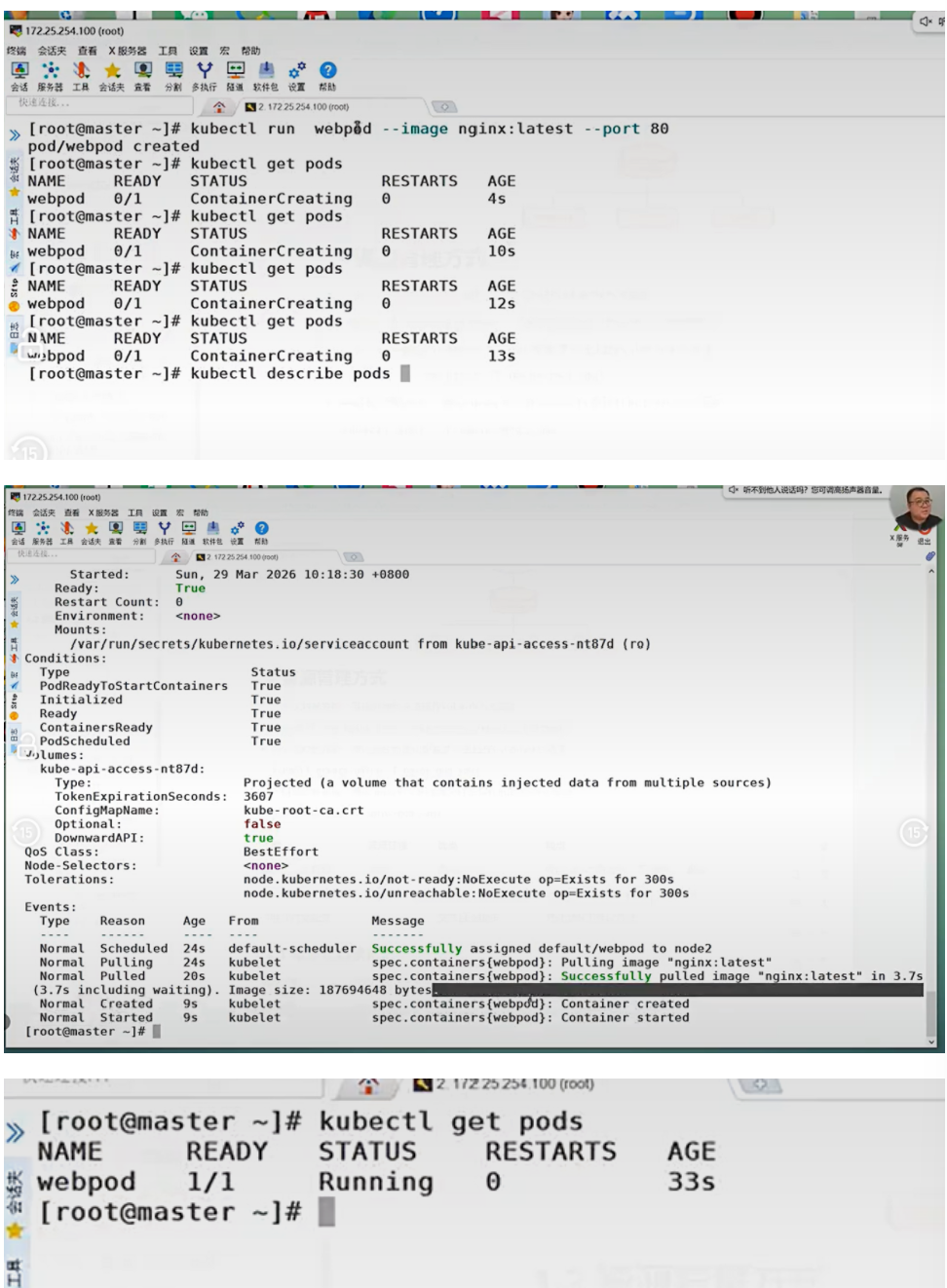
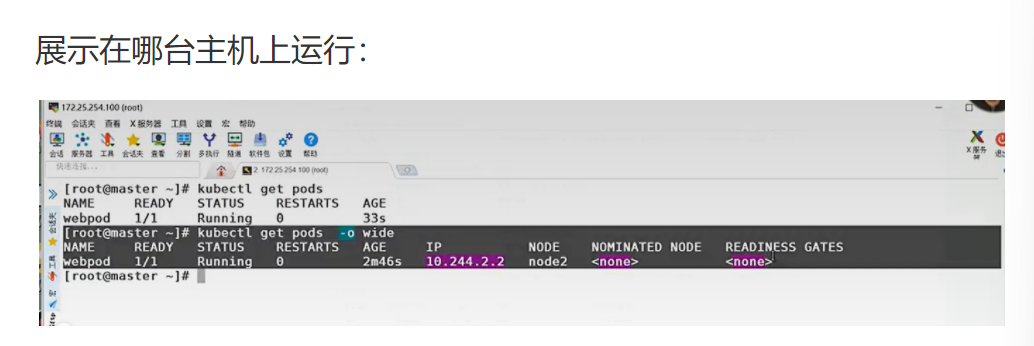
原文:命令式对象管理:直接使用命令去操作 kubernetes 资源
kubectl run nginx-pod --image=nginx:latest --port=80
- 命令式对象配置:通过命令配置和配置文件去操作 kubernetes 资源kubectl create/patch -f nginx-pod.yaml
- 声明式对象配置:通过 apply 命令和配置文件去操作 kubernetes 资源kubectl apply -f nginx-pod.yaml
表格
| 类型 | 适用环境 | 优点 | 缺点 |
|---|---|---|---|
| 命令式对象管理 | 测试 | 简单 | 只能操作活动对象,无法审计、跟踪 |
| 命令式对象配置 | 开发 | 可以审计、跟踪 | 项目大时,配置文件多,操作麻烦 |
| 声明式对象配置 | 开发 | 支持目录操作 | 意外情况下难以调试 |
生活类比
- 命令式对象管理 = 口头告诉厨师 "给我做一份番茄炒蛋"
- 命令式对象配置 = 写一张纸条给厨师 "番茄炒蛋:番茄 2 个,鸡蛋 3 个,盐少许"
- 声明式对象配置 = 给厨师看一张番茄炒蛋的照片,说 "我就要这个样子的"
核心解释
三种方式代表了 Kubernetes 管理的不同阶段:
- 命令式:快速验证,适合临时测试
- 命令式配置:可以版本控制,但操作繁琐
- 声明式配置:生产环境标准,只关心最终状态,由 Kubernetes 负责实现
企业级生产应用
生产环境必须使用声明式对象配置:
- 所有配置文件纳入 Git 版本控制
- 使用 CI/CD 流水线自动 apply 配置
- 支持回滚和审计,符合企业合规要求
优化空间:
- 使用 Kustomize 或 Helm 管理复杂配置
- 采用 GitOps 模式,配置变更自动触发部署
- 使用 OPA Gatehouse 进行配置合规性检查
课后防宕机指南
常见错误 1:混合使用 kubectl create 和 kubectl apply
- 报错:
The object already exists - 排查思路:统一使用 apply 管理所有资源,避免 create 和 apply 混用
常见错误 2:apply 时使用 --force 参数
- 报错:可能导致资源被意外删除重建
- 排查思路:除非明确知道后果,否则永远不要使用 --force 参数
1.2.1 命令式对象管理
原文:kubectl 是 kubernetes 集群的命令行工具,通过它能够对集群本身进行管理,并能够在集群上进行容器 化应用的安装部署
kubectl 命令的语法如下:
kubectl [command] [type] [name] [flags]
comand: 指定要对资源执行的操作,例如 create、get、delete
type: 指定资源类型,比如 deployment、pod、service
name: 指定资源的名称,名称大小写敏感
flags: 指定额外的可选参数
查看所有 pod
kubectl get pod

查看某个 pod
kubectl get pod pod_name

查看某个 pod, 以 yaml 格式展示结果
kubectl get pod pod_name -o yaml
核心代码逐行解析
kubectl get pod
- 底层动作:向 Kubernetes API Server 发送 GET 请求,获取 default 命名空间下所有 Pod 资源的列表
- 作用:快速查看集群中 Pod 的运行状态
- 坑:默认只显示 default 命名空间的 Pod,其他命名空间需要加
-n <namespace>参数
kubectl get pod pod_name -o yaml
- 底层动作:向 API Server 发送 GET 请求,获取指定 Pod 的完整资源定义,并以 YAML 格式输出
- 作用:查看 Pod 的详细配置和状态,用于问题排查
- 坑:输出内容包含 status 字段,这是只读的,不能直接修改后 apply
企业级生产应用
在生产环境中,kubectl 是最常用的排障工具:
- 快速查看资源状态
- 查看日志和事件
- 临时进入容器调试
优化空间:
- 配置 kubectl 别名和自动补全,提高操作效率
- 使用 kubectl 插件(如 kubectx、kubens)快速切换集群和命名空间
- 限制生产环境 kubectl 的访问权限,使用 RBAC 进行细粒度控制
课后防宕机指南
常见错误 1:误删生产环境 Pod
- 报错:Pod 被删除,服务中断
- 排查思路:如果是控制器管理的 Pod,会自动重建;如果是裸 Pod,需要重新创建
常见错误 2:使用 root 权限运行 kubectl
- 报错:可能导致意外操作,造成严重后果
- 排查思路:使用普通用户和 RBAC 权限运行 kubectl
1.2.2 资源类型
kubernetes 中所有的内容都抽象为资源
kubectl api-resources
资源类型表(部分):
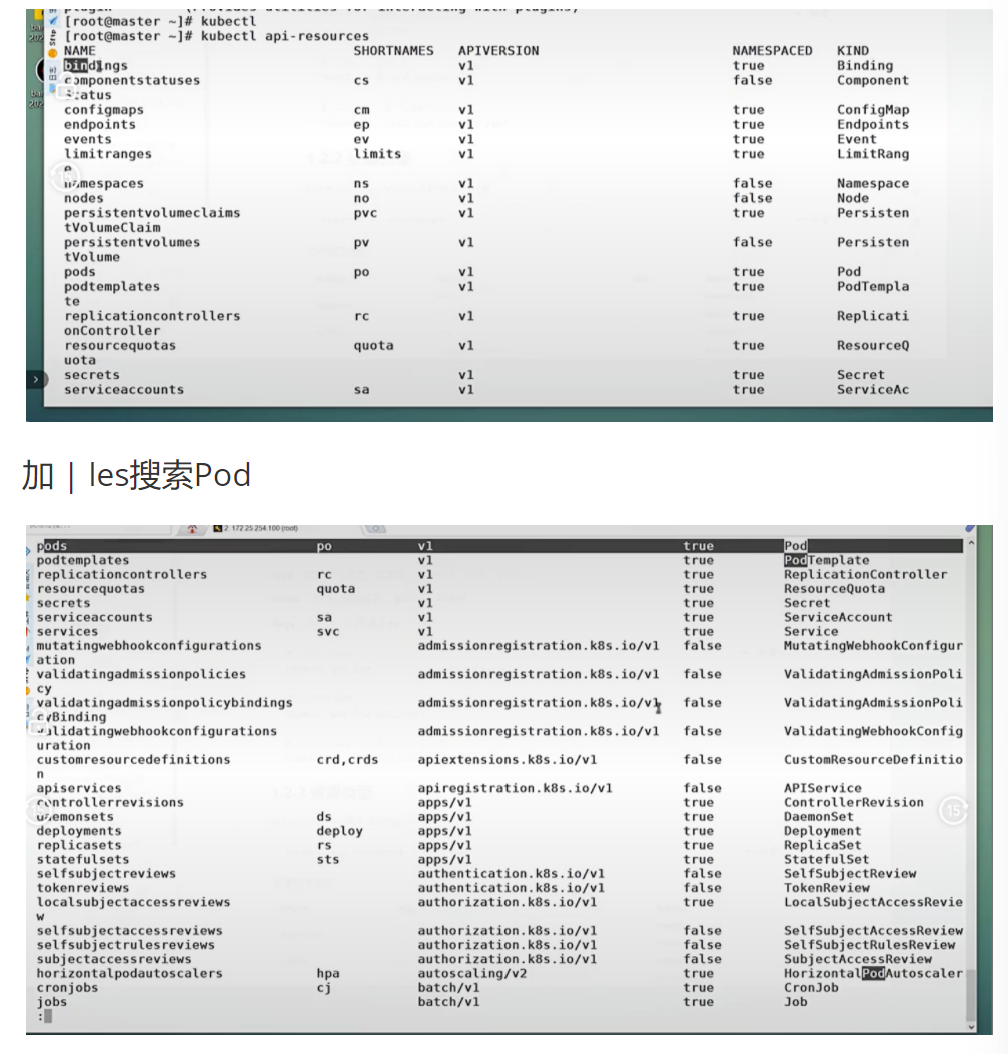
| pods | po | v1 | true | Pod |
|---|---|---|---|---|
| podtemplates | v1 | true | PodTemplate | |
| replicationcontrollers | FC | v1 | true | ReplicationController |
| resourcequotas | quota | v1 | true | ResourceQuota |
| secrets | v1 | true | Secret | |
| serviceaccounts | 50 | v1 | true | ServiceAccount |
| services | SVC | v1 | true | Service |
| mutatingwebookconfigurations | admissionregistration.k8s.io/v1 | false | MutatingWebhookConfigur | |
| validatingadmissionpolicies | admissionregistration.k8s.io/v1 | false | ValidatingAdmissionPoli | |
| validatingadmissionpolicybindings | admissionregistration.kBs.io/v1 | false | ValidatingAdmissionPoli | |
| validatingwebhookconfigurations | admissionregistration.kbs.io/v1 | false | ValidatingWebhookConfig | |
| customresourcefinitions | crd,crds | apiextensions.kBs.io/v1 | false | CustomResourceDefinition |
| apiservices | apiregistration.kBs.io/v1 | false | APIService | |
| controllerrevisions | apps/v1 | true | ControllerRevision | |
| daemonsets | ds | apps/v1 | true | DaemonSet |
| deployments | deploy | apps/v1 | true | Deployment |
| replicasets | rs | apps/v1 | true | ReplicaSet |
| statefulsets | sts | apps/v1 | true | StatefulSet |
| selfsubjectreviews | authentication.kBs.io/v1 | false | SelfSubject Review | |
| tokenreviews | authentication.k8s.io/v1 | false | TokenReview | |
| localsubjectaccessreviews | authorization.k8s.io/v1 | true | LocalSubject AccessRevie | |
| selfsubjectaccessreviews | authorization.kBs.io/v1 | false | SelfSubject AccessReview | |
| selfsubjectrulesreviews | authorization.k8s.io/v1 | false | SelfSubject RulesReview | |
| subjectaccessreviews | authorization.kBs.io/v1 | false | Subject AccessReview | |
| horizontalpodautoscalers | hpa | autoscaling/v2 | true | HorizontalPodAutoscaler |
| cronjobs | cj | batch/v1 | true | CronJob |
| jobs | batch/v1 | true | Job |
常用资源类型:
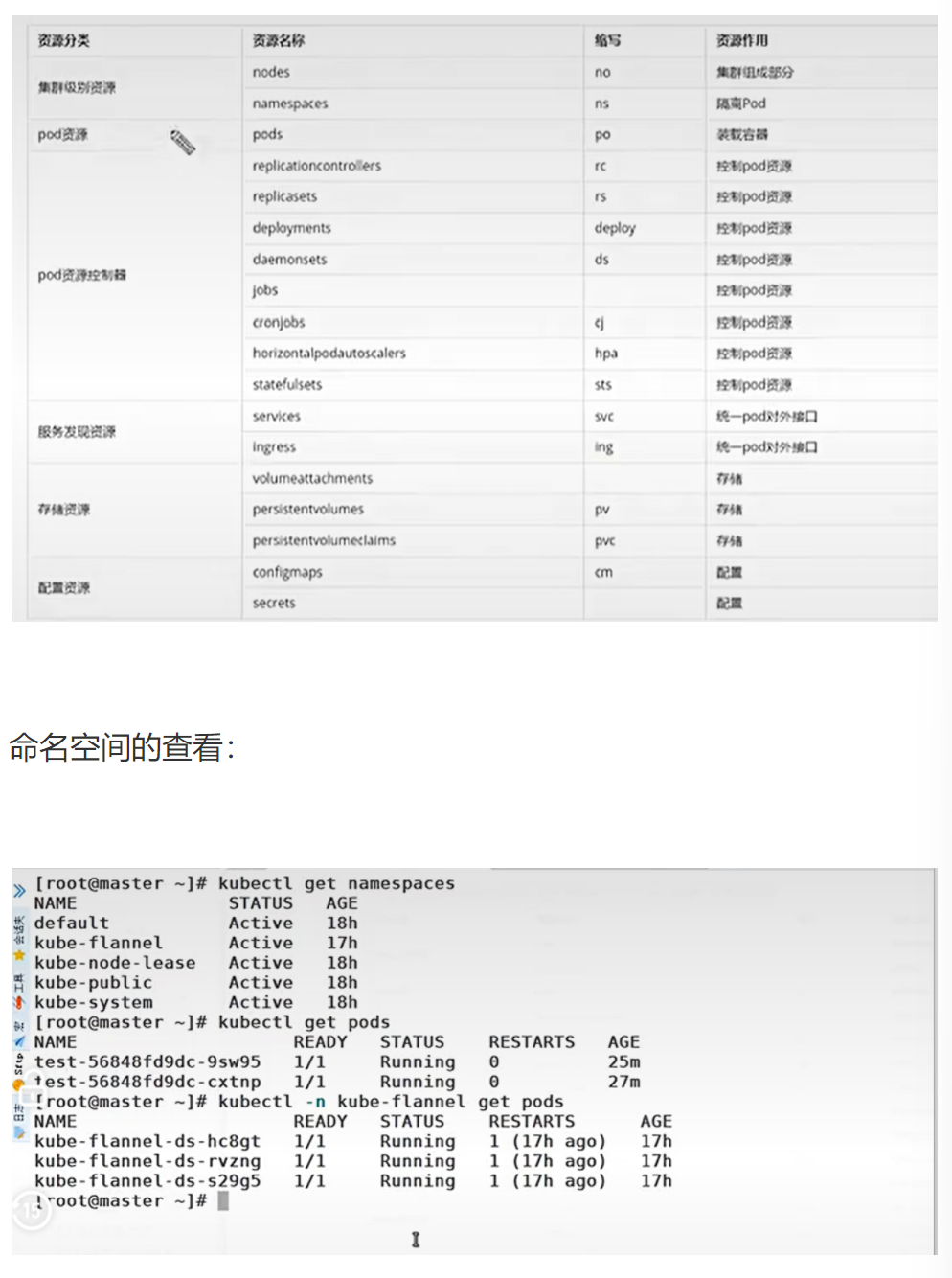
| 资源分类 | 资源名称 | 缩写 | 资源作用 |
|---|---|---|---|
| 集群级别资源 | nodes | no | 集群组成部分 |
| namespaces | ns | 隔离 Pod | |
| pod 资源 | pods | po | 装载容器 |
| pod 资源控制器 | replicationcontrollers | rc | 控制 pod 资源 |
| replicasets | rs | 控制 pod 资源 | |
| deployments | deploy | 控制 pod 资源 | |
| daemonsets | ds | 控制 pod 资源 | |
| jobs | 控制 pod 资源 | ||
| cronjobs | cj | 控制 pod 资源 | |
| horizontalpodautoscalers | hpa | 控制 pod 资源 | |
| statefulsets | sts | 控制 pod 资源 | |
| 服务发现资源 | services | svc | 统一 pod 对外接口 |
| Ingress | ing | 统一 pod 对外接口 | |
| 存储资源 | volumeattachments | 存储 | |
| persistentvolumes | PV | 存储 | |
| persistentvolumeclaims | PVC | 存储 | |
| 配置资源 | configmaps | cm | 配置 |
| secrets | 配置 |
命名空间的查看:
[ root@master ~]# kubectl get namespaces
NAME STATUS AGE
default Active 17h
kube-flannel Active 18h
kube-node-lease Active 18h
kube-public Active 18h
kube-system Active 18h

[ root@master ~]# kubectl get pods
test-56848fd9dc-cxtnp 1/1 Running 0 25m
test-56848fd9dc-9sw95 1/1 Running 0 27m

[ root@master ~]# kubectl -n kube-flannel get pods
NAME READY STATUS RESTARTS AGE
kube-flannel-ds-hc8gt 1/1 Running 1(17h ago) 17h
kube-flannel-ds-rvzng 1/1 Running 1(17h ago) 17h
kube-flannel-ds-s29g5 1/1 Running 1(17h ago) 17h
核心代码逐行解析
kubectl api-resources
- 底层动作:向 API Server 发送请求,获取当前集群支持的所有 API 资源类型
- 作用:查看集群支持的资源类型和缩写,是学习 Kubernetes 的必备命令
- 坑:不同 Kubernetes 版本支持的资源类型可能不同,升级集群后需要重新查看
bash
运行
kubectl get namespaces
- 底层动作:获取集群中所有命名空间的列表
- 作用:查看集群的命名空间划分,是资源隔离的基础
- 坑:不要在 default 命名空间部署生产服务,应该为每个项目创建独立的命名空间
bash
运行
kubectl -n kube-flannel get pods
- 底层动作:获取 kube-flannel 命名空间下的所有 Pod
- 作用:查看指定命名空间的资源状态
- 坑:如果省略
-n参数,默认只查看 default 命名空间的资源
企业级生产应用
在生产环境中,资源类型的正确使用是集群稳定的关键:
- 使用 Namespace 进行环境隔离(开发、测试、生产)
- 使用 Deployment 管理无状态服务
- 使用 StatefulSet 管理有状态服务(数据库、消息队列)
- 使用 DaemonSet 部署节点级服务(监控、日志收集)
优化空间:
- 使用 ResourceQuota 限制命名空间的资源使用
- 使用 LimitRange 限制 Pod 的资源请求和限制
- 使用 NetworkPolicy 进行 Pod 间的网络隔离
课后防宕机指南
常见错误 1:在 kube-system 命名空间部署业务服务
- 报错:可能影响系统组件的正常运行
- 排查思路:将业务服务部署在独立的命名空间中
常见错误 2:忘记指定命名空间,导致资源创建在错误的位置
- 报错:找不到创建的资源
- 排查思路:使用
kubectl get pods --all-namespaces查看所有命名空间的资源
kubectl 常见命令操作
原文:
| 命令分类 | 命令 | 翻译 | 命令作用 |
|---|---|---|---|
| 基本命令 | create | 创建 | 创建一个资源 |
| edit | 编辑 | 编辑一个资源 | |
| get | 获取 | 获取一个资源 | |
| patch | 更新 | 更新一个资源 | |
| delete | 删除 | 删除一个资源 | |
| explain | 解释 | 展示资源文档 | |
| 运行和调试 | run | 运行 | 在集群中运行一个指定的镜像 |
| expose | 暴露 | 暴露资源为 Service | |
| describe | 描述 | 显示资源内部信息 | |
| logs | 日志 | 输出容器在 pod 中的日志 | |
| attach | 缠绕 | 进入运行中的容器 | |
| exec | 执行 | 执行容器中的一个命令 | |
| cp | 复制 | 在 Pod 内外复制文件 | |
| rollout | 发布管理 | 管理资源的发布 | |
| scale | 规模 | 扩 (缩) 容 Pod 的数量 | |
| autoscale | 自动调整 | 自动调整 Pod 的数量 | |
| 高级命令 | apply | 应用 | 通过文件对资源进行配置 |
| label | 标签 | 更新资源上的标签 | |
| 其他命令 | cluster-info | 集群信息 | 显示集群信息 |
| version | 版本 | 显示当前 Server 和 Client 的版本 |
原文:
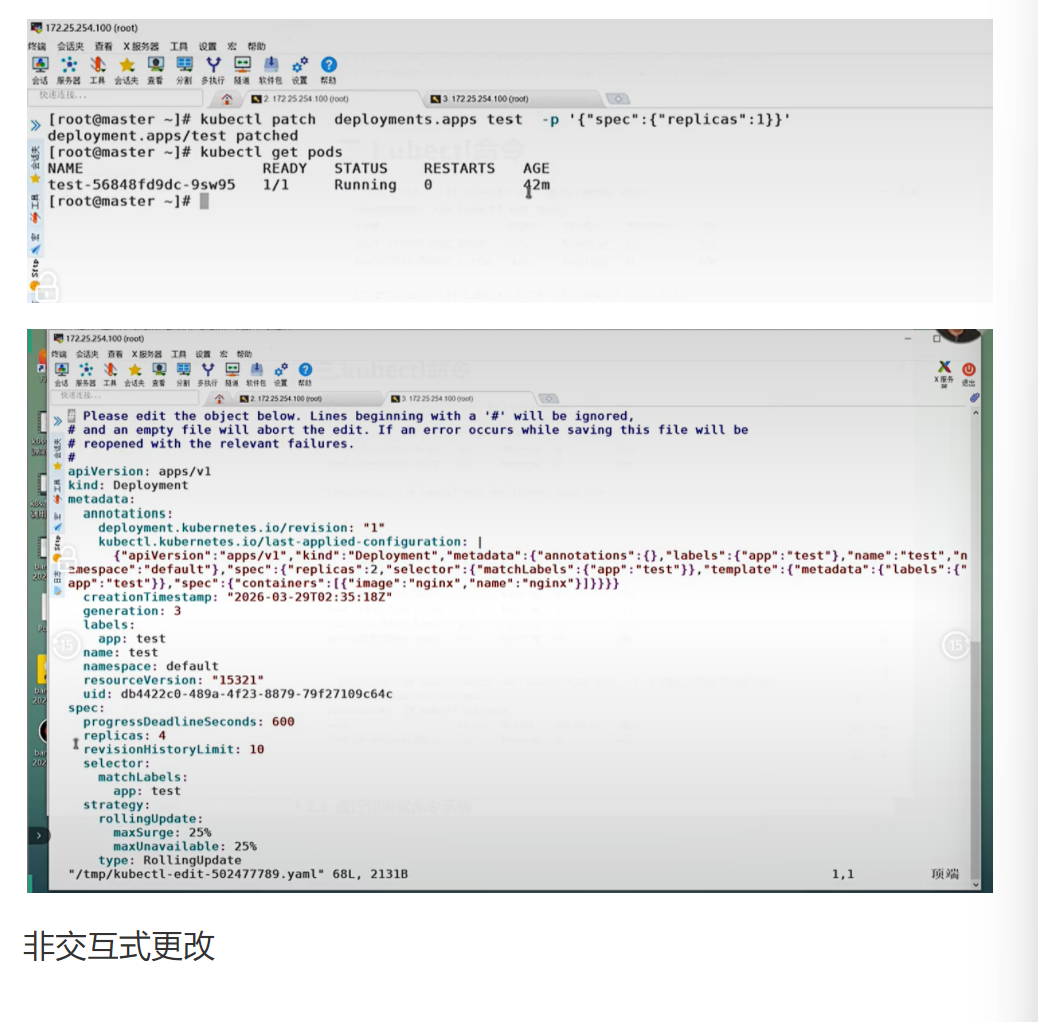
[root@master~]#vim test.yml
[ root@master ~]# kubectl edit deployments.apps test
编辑内容:
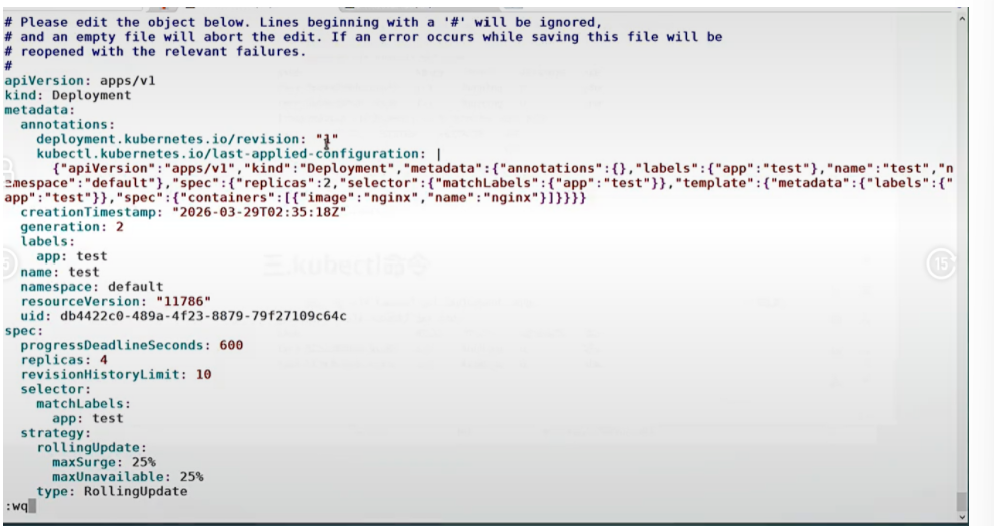
即改即生效
原文:
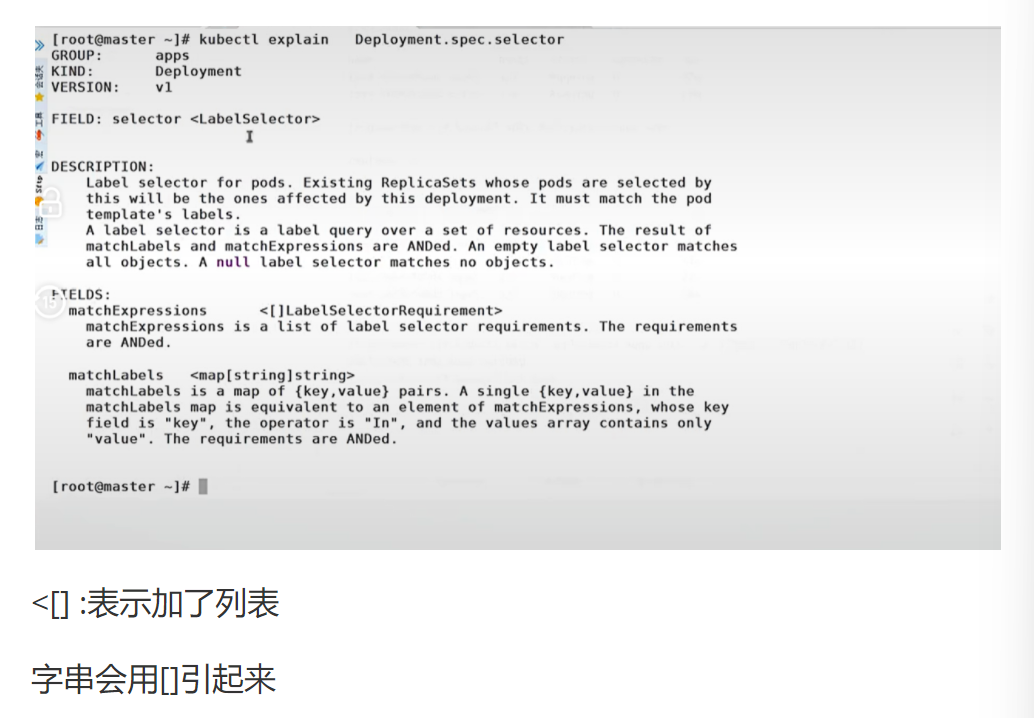
不知道意思的可以这样:
[root@master~]# kubectl explain deployment.spec.replicas
apps
KIND: Deployment
VERSION: v1
FIELD: replicas <integer>
DESCRIPTION: Number of desired pods.This is a pointer to distinguish between explicit
zero and not specified.Defaults to1.
核心代码逐行解析
kubectl edit deployments.apps test
- 底层动作:
- 从 API Server 获取 test Deployment 的当前配置
- 打开默认编辑器(vim)让用户编辑
- 保存退出后,将修改后的配置提交给 API Server
- API Server 验证配置无误后,更新资源状态
- 作用:实时编辑运行中的资源配置
- 坑:
- 编辑的是内存中的配置,不会更新原始的 YAML 文件
- 如果配置有语法错误,会保存失败并提示
- 生产环境不建议直接 edit,应该修改 YAML 文件后 apply
bash
运行
kubectl explain deployment.spec.replicas
- 底层动作:向 API Server 发送请求,获取 Deployment 资源 spec.replicas 字段的文档
- 作用:查看资源字段的详细说明,是学习 Kubernetes API 的最佳方式
- 坑:不同 Kubernetes 版本的字段说明可能不同,要使用与集群版本匹配的文档
企业级生产应用
在生产环境中:
kubectl explain是最权威的 API 文档,比任何第三方资料都准确kubectl edit只能用于紧急排障,正常变更应该通过 GitOps 流程kubectl rollout用于管理 Deployment 的发布和回滚
优化空间:
- 使用
kubectl explain --recursive查看完整的资源结构 - 使用
kubectl rollout history查看发布历史 - 使用
kubectl rollout undo回滚到上一个版本
课后防宕机指南
常见错误 1:edit 时修改了只读字段
- 报错:
the object has been modified; please apply your changes to the latest version and try again - 排查思路:重新获取资源配置,只修改可写字段
常见错误 2:edit 时误删了必要字段
- 报错:资源配置验证失败
- 排查思路:放弃修改,重新编辑,确保必要字段完整
1.2.3 基本命令示例
原文:kubectl 的详细说明地址:https://kubernetes.io/docs/reference/generated/kubectl/kubectl-commands
#显示集群版本
[root@k8s-master ~]# kubectl version
Client Version: v1.30.0
Kustomize Version: v5.0.4-0.20230601165947-6ce0bf390ce3
Server Version: v1.30.0
#显示集群信息
[root@k8s-master ~]# kubectl cluster-info
Kubernetes control plane is running at https://172.25.254.100:6443
CoreDNS is running at https://172.25.254.100:6443/api/v1/namespaces/kube-system/services/kube-dns:dns/proxy
#创建一个 webcluster 控制器,控制器中 pod 数量为 2
[root@k8s-master ~]# kubectl create deployment webcluster --image nginx --replicas 2#查看控制器
[root@k8s-master ~]# kubectl get deployments.apps
NAME READY UP-TO-DATE AVAILABLE AGE
web 3/3 3 3 69m
#查看资源帮助
[root@k8s-master ~]# kubectl explain deployment
apps
KIND: Deployment
GROUP: apps
VERSION: v1
DESCRIPTION:
Deployment enables declarative updates for Pods and ReplicaSets.
FIELDS:
apiVersion <string>
APIVersion defines the versioned schema of this representation of an object.
Servers should convert recognized schemas to the latest internal value, and
may reject unrecognized values. More info:
https://git.k8s.io/community/contributors/devel/sig-architecture/api-conventions.md#resources

kind <string>
Kind is a string value representing the REST resource this object
represents. Servers may infer this from the endpoint the client submits
requests to. Cannot be updated. In CamelCase. More info:
https://git.k8s.io/community/contributors/devel/sig-architecture/api-conventions.md#types-kinds

metadata <ObjectMeta>
Standard object's metadata. More info:
https://git.k8s.io/community/contributors/devel/sig-architecture/api-conventions.md#metadata

spec <DeploymentSpec>
Specification of the desired behavior of the Deployment.

status <DeploymentStatus>
Most recently observed status of the Deployment.
#查看控制器参数帮助
[root@k8s-master ~]# kubectl explain deployment.spec
GROUP: apps
KIND: Deployment
VERSION: v1
FIELD: spec <DeploymentSpec>
DESCRIPTION:
Specification of the desired behavior of the Deployment.
DeploymentSpec is the specification of the desired behavior of the Deployment.
FIELDS:
minReadySeconds <integer>
Minimum number of seconds for which a newly created pod should be ready without any of its container crashing, for it to be considered available. Defaults to 0 (pod will be considered available as soon as it is ready)

paused <boolean>
Indicates that the deployment is paused.

progressDeadlineSeconds <integer>
The maximum time in seconds for which a deployment to make progress before it is considered to be failed. The deployment controller will continue to process failed deployments and a condition with a ProgressDeadlineExceeded reason will be surfaced in the deployment status. Note that progress will not be estimated during the time a deployment is paused. Defaults to 600s.

replicas <integer>
Number of desired pods. This is a pointer to distinguish between explicit zero and not specified. Defaults to 1.

revisionHistoryLimit <integer>
The number of old ReplicaSets to retain to allow rollback. This is a pointer to distinguish between explicit zero and not specified. Defaults to 10.

selector <LabelSelector> -required
Label selector for pods. Existing ReplicaSets whose pods are selected by this will be the ones affected by this deployment. It must match the pod template's labels.

strategy <DeploymentStrategy>
The deployment strategy to use to replace existing pods with new ones.

template <PodTemplateSpec> -required
Template describes the pods that will be created. The only allowed template.spec.restartPolicy value is "Always".
#编辑控制器配置
[root@k8s-master ~]# kubectl edit deployments.apps web编辑内容:
yaml
spec:
  progressDeadlineSeconds: 600
  replicas: 2
[root@k8s-master ~]# kubectl get deployments.apps NAME READY UP-TO-DATE AVAILABLE AGE web 2/2 2 2 73m#利用补丁更改控制器配置
[root@k8s-master ~]# kubectl patch deployments.apps web -p '{"spec":{"replicas":4}}'
deployment.apps/web patched
[root@k8s-master ~]# kubectl get deployments.apps NAME READY UP-TO-DATE AVAILABLE AGE web 4/4 4 4 74m
#删除资源
[root@k8s-master ~]# kubectl delete deployments.apps web
deployment.apps "web" deleted
[root@k8s-master ~]# kubectl get deployments.apps
No resources found in default namespace.
核心代码逐行解析
kubectl create deployment webcluster --image nginx --replicas 2
- 底层动作:
- 向 API Server 发送 POST 请求,创建一个 Deployment 资源
- Deployment 控制器监听到新的 Deployment,创建一个 ReplicaSet
- ReplicaSet 控制器监听到新的 ReplicaSet,创建 2 个 Pod
- Scheduler 将 Pod 调度到合适的节点上
- Kubelet 在节点上拉取镜像并启动容器
- 作用:快速创建一个部署,运行指定数量的 Pod 副本
- 坑:
--replicas参数默认值是 1,如果不指定只会创建 1 个 Pod- 创建的 Deployment 没有 Service,无法从集群外部访问
kubectl patch deployments.apps web -p '{"spec":{"replicas":4}}'
- 底层动作:
- 向 API Server 发送 PATCH 请求,更新 web Deployment 的 spec.replicas 字段为 4
- Deployment 控制器发现期望副本数从 2 变为 4
- 创建新的 ReplicaSet(如果需要),并增加 Pod 数量到 4
- 作用:部分更新资源配置,比 edit 更适合自动化脚本
- 坑:
- JSON 格式必须正确,引号和逗号不能少
- 只能更新可写字段,不能更新只读字段
企业级生产应用
在千万级并发场景下:
- 使用
kubectl scale或 HPA 进行快速扩缩容 - 使用
kubectl rollout进行灰度发布和回滚 - 使用
kubectl patch进行紧急配置变更
优化空间:
- 设置
minReadySeconds为 30-60 秒,确保新 Pod 完全就绪后再接收流量 - 设置
revisionHistoryLimit为 5-10,保留足够的回滚历史 - 使用
strategy配置滚动更新策略,避免服务中断
课后防宕机指南
常见错误 1:扩缩容时忘记设置资源请求和限制
- 报错:Pod 无法调度,或者节点资源耗尽
- 排查思路:
kubectl describe pod <pod-name>查看调度失败原因
常见错误 2:删除 Deployment 时忘记加--cascade=orphan
- 报错:所有关联的 ReplicaSet 和 Pod 都会被删除
- 排查思路:如果需要保留 Pod,使用
kubectl delete deployment <name> --cascade=orphan
1.2.3 运行和调试命令示例
# 运行 pod
[root@k8s-master ~]# kubectl run testpod --image nginx
pod/testpod created
[root@k8s-master ~]# kubectl get pods NAME READY STATUS RESTARTS AGE testpod 1/1 Running 0 7s#端口暴露
[root@k8s-master ~]# kubectl get services
NAME TYPE CLUSTER-IP EXTERNAL-IP PORT(S) AGE
kubernetes ClusterIP 10.96.0.1 <none> 443/TCP 2d14h
[root@k8s-master ~]# kubectl expose pod testpod --port 80 --target-port 80 service/testpod exposed[root@k8s-master ~]# kubectl get services NAME TYPE CLUSTER-IP EXTERNAL-IP PORT(S) AGE kubernetes ClusterIP 10.96.0.1 <none> 443/TCP 2d14h testpod ClusterIP 10.106.78.42 <none> 80/TCP 18s[root@k8s-master ~]# curl 10.106.78.42 <!DOCTYPE html> <html> <head> <title>Welcome to nginx!</title>#查看资源详细信息
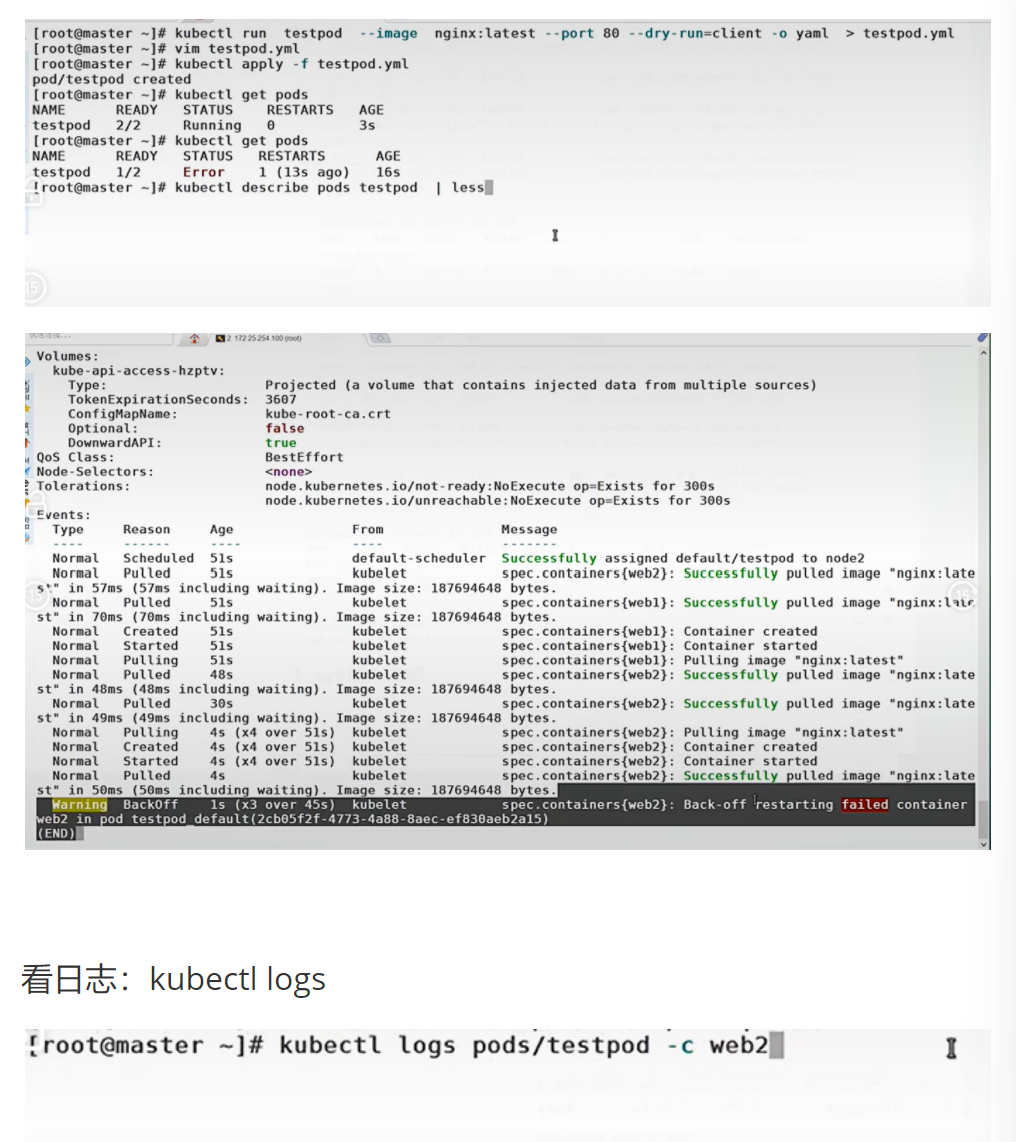
[root@k8s-master ~]# kubectl describe pods testpod#查看资源日志
[root@k8s-master ~]# kubectl logs pods/testpod
/docker-entrypoint.sh: /docker-entrypoint.d/ is not empty, will attempt to perform configuration
/docker-entrypoint.sh: Looking for shell scripts in /docker-entrypoint.d/
2024/08/29 05:37:29 [notice] 1#1: using the "epoll" event method
2024/08/29 05:37:29 [notice] 1#1: nginx/1.27.1
2024/08/29 05:37:29 [notice] 1#1: built by gcc 12.2.0 (Debian 12.2.0-14)
2024/08/29 05:37:29 [notice] 1#1: OS: Linux 5.14.0-427.13.1.el9_4.x86_64
2024/08/29 05:37:29 [notice] 1#1: getrlimit(RLIMIT_NOFILE): 1073741816:1073741816
2024/08/29 05:37:29 [notice] 1#1: start worker processes
2024/08/29 05:37:29 [notice] 1#1: start worker process 29
10.244.0.0 - - [29/Aug/2024:05:41:11 +0000] "GET / HTTP/1.1" 200 615 "-" "curl/7.76.1" "-"
10.244.0.0 - - [29/Aug/2024:05:42:51 +0000] "GET / HTTP/1.1" 200 615 "-" "curl/7.76.1" "-"
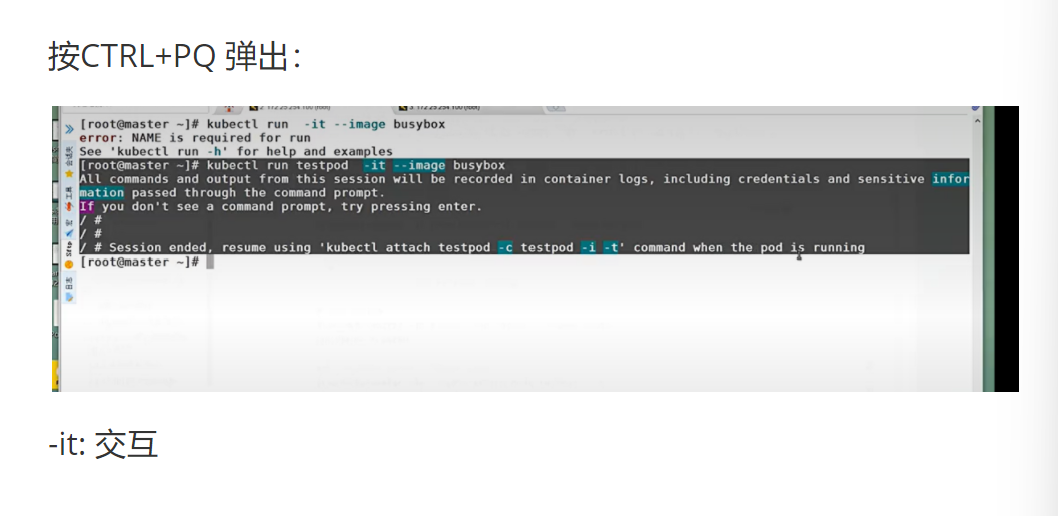
#运行交互 pod
[root@k8s-master ~]# kubectl run -it testpod --image busybox
If you don't see a command prompt, try pressing enter.
/ #
# ctrl+pq退出不停止pod
#运行非交互 pod
[root@k8s-master ~]# kubectl run nginx --image nginx
pod/nginx created
#进入到已经运行的容器,且容器有交互环境
[root@k8s-master ~]# kubectl attach pods/testpod -it
If you don't see a command prompt, try pressing enter.
/ #
#在已经运行的 pod 中运行指定命令
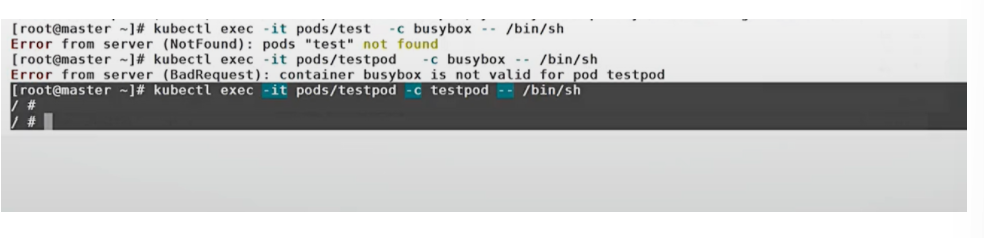
[root@k8s-master ~]# kubectl exec -it pods/nginx /bin/bash
kubectl exec [POD] [COMMAND] is DEPRECATED and will be removed in a future version. Use kubectl exec [POD] -- [COMMAND] instead.
root@nginx:/#
#复制文件到 pod 中
[root@k8s-master ~]# kubectl cp anaconda-ks.cfg nginx:/[root@k8s-master ~]# kubectl exec -it pods/nginx /bin/bash kubectl exec [POD] [COMMAND] is DEPRECATED and will be removed in a future version. Use kubectl exec [POD] -- [COMMAND] instead. root@nginx:/# ls anaconda-ks.cfg boot docker-entrypoint.d etc lib media opt root sbin dev home lib64 mnt proc run srv sys usr bin docker-entrypoint.sh tmp var#复制 pod 中的文件到本机
[root@k8s-master ~]# kubectl cp nginx:/anaconda-ks.cfg anaconda-ks.cfg
tar: Removing leading `/' from member names
核心代码逐行解析
kubectl expose pod testpod --port 80 --target-port 80
- 底层动作:
- 创建一个 ClusterIP 类型的 Service
- Service 的标签选择器自动设置为 testpod 的标签
- kube-proxy 在所有节点上更新 iptables 规则
- 访问 Service 的 ClusterIP:80 会被转发到 Pod 的 80 端口
- 作用:为 Pod 提供一个稳定的访问入口
- 坑:
--port是 Service 暴露的端口,--target-port是 Pod 监听的端口- 如果 Pod 有多个容器,需要指定
--container参数
kubectl exec -it pods/nginx -- /bin/bash
- 底层动作:
- 向 API Server 发送 exec 请求
- API Server 将请求转发到 Pod 所在节点的 Kubelet
- Kubelet 调用容器运行时,在容器中执行 /bin/bash 命令
- 建立一个双向的 WebSocket 连接,实现交互式终端
- 作用:进入运行中的容器进行调试
- 坑:
- 必须使用
--分隔 Pod 名称和命令,这是新的语法要求 - 容器中必须有 /bin/bash 或 /bin/sh 才能进入交互式终端
- 必须使用
企业级生产应用
在生产环境中:
kubectl logs是排查应用问题的首选工具kubectl exec只能用于紧急调试,正常情况下不应该进入容器kubectl cp用于临时复制文件,不应该用于部署应用
优化空间:
- 使用
kubectl logs -f实时查看日志 - 使用
kubectl logs --previous查看上一个容器的日志 - 使用
kubectl exec --执行非交互式命令,避免进入终端
课后防宕机指南
常见错误 1:exec 时忘记加-it参数
- 报错:无法进入交互式终端
- 排查思路:加上
-it参数,-i表示标准输入,-t表示分配终端
常见错误 2:cp 时路径写错
- 报错:
tar: /path: Cannot stat: No such file or directory - 排查思路:检查源路径和目标路径是否正确,Pod 中的路径必须是绝对路径
1.2.3 高级命令示例
原文:
# 利用命令生成 yaml 模板文件
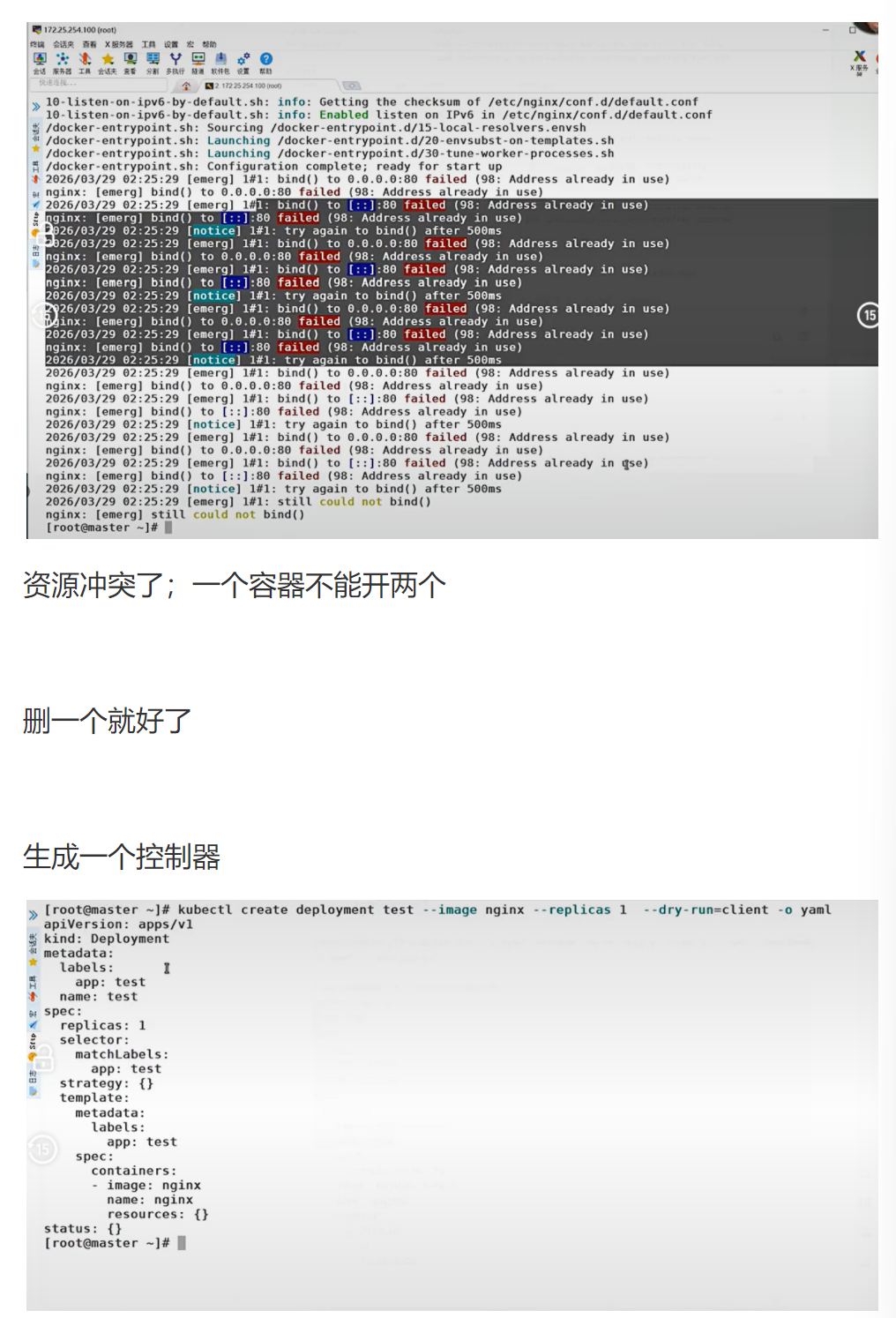
[root@k8s-master ~]# kubectl create deployment --image nginx webcluster --dry-run=client -o yaml > webcluster.yml#利用 yaml 文件生成资源
[root@k8s-master ~]# vim webcluster.yml文件内容:
yaml
apiVersion: apps/v1
kind: Deployment
metadata:
  creationTimestamp: null
  labels:
    app: webcluster
  name: webcluster
spec:
  replicas: 2
  selector:
    matchLabels:
      app: webcluster
  template:
    metadata:
      creationTimestamp: null
      labels:
        app: webcluster
    spec:
      containers:
      - image: nginx
        name: nginx
[root@k8s-master ~]# kubectl apply -f webcluster.yml deployment.apps/webcluster created[root@k8s-master ~]# kubectl get deployments.apps NAME READY UP-TO-DATE AVAILABLE AGE webcluster 2/2 2 2 21s[root@k8s-master ~]# kubectl delete -f webcluster.yml deployment.apps "webcluster" deleted#管理资源标签
[root@k8s-master ~]# kubectl run nginx --image nginx
[root@k8s-master ~]# kubectl get pods --show-labels
NAME READY STATUS RESTARTS AGE LABELS
nginx 1/1 Running 0 12s run=nginx
[root@k8s-master ~]# kubectl label pods nginx app=lee
[root@k8s-master ~]# kubectl get pods --show-labels
NAME READY STATUS RESTARTS AGE LABELS
nginx 1/1 Running 0 57s app=lee,run=nginx
#更改标签
[root@k8s-master ~]# kubectl label pods nginx app=webcluster --overwrite
#删除标签
[root@k8s-master ~]# kubectl label pods nginx app-
pod/nginx unlabeled
[root@k8s-master ~]# kubectl get pods nginx --show-labels
NAME READY STATUS RESTARTS AGE LABELS
nginx 1/1 Running 0 7m56s run=nginx
#标签是控制器识别 pod 的标识
[root@k8s-master ~]# kubectl get pods --show-labels
NAME READY STATUS RESTARTS AGE LABELS
nginx 1/1 Running 0 11m run=nginx
webcluster-7c584f774b-66zbd 1/1 Running 0 2m10s app=webcluster,pod-template-hash=7c584f774b
webcluster-7c584f774b-9x2x2 1/1 Running 0 35m app=webcluster,pod-template-hash=7c584f774b
#删除 pod 上的标签
[root@k8s-master ~]# kubectl label pods webcluster-7c584f774b-66zbd app-
pod/webcluster-7c584f774b-66zbd unlabeled
#控制器会重新启动新 pod
[root@k8s-master ~]# kubectl get pods --show-labels
NAME READY STATUS RESTARTS AGE LABELS
nginx 1/1 Running 0 11m run=nginx
webcluster-7c584f774b-66zbd 1/1 Running 0 2m39s pod-template-hash=7c584f774b
webcluster-7c584f774b-9x2x2 1/1 Running 0 36m app=webcluster,pod-template-hash=7c584f774b
webcluster-7c584f774b-hgprn 1/1 Running 0 2s app=webcluster,pod-template-hash=7c584f774b
核心代码逐行解析
kubectl create deployment --image nginx webcluster --dry-run=client -o yaml > webcluster.yml
- 底层动作:
- 在客户端生成 Deployment 的 YAML 配置
- 不向 API Server 发送任何请求
- 将生成的 YAML 输出到文件中
- 作用:快速生成标准的 YAML 模板,避免手动编写容易出错
- 坑:
--dry-run=client表示只在客户端运行,不创建实际资源- 生成的 YAML 包含一些默认值,可以根据需要修改
kubectl label pods webcluster-7c584f774b-66zbd app-
- 底层动作:
- 向 API Server 发送 PATCH 请求,删除 Pod 的 app 标签
- Deployment 控制器发现有一个 Pod 不再匹配标签选择器
- 创建一个新的 Pod 来替换它
- 旧的 Pod 不会被删除,只是不再被 Deployment 管理
- 作用:演示标签选择器的工作原理
- 坑:
- 删除标签时,标签名后面要加
- - 这会导致控制器创建新的 Pod,可能会影响服务可用性
- 删除标签时,标签名后面要加
企业级生产应用
在生产环境中:
- 使用
--dry-run生成 YAML 模板是标准做法 - 标签是 Kubernetes 的核心概念,用于资源选择和分组
- 控制器通过标签选择器管理 Pod,这是 Kubernetes 声明式 API 的基础
优化空间:
- 使用
kubectl create的--dry-run参数生成所有资源的 YAML 模板 - 制定标签规范,使用统一的标签命名方式
- 使用标签进行资源筛选和管理,提高运维效率
课后防宕机指南
常见错误 1:修改了 Pod 模板的标签,但没有修改 selector
- 报错:
Deployment.apps "webcluster" is invalid: spec.template.metadata.labels: Invalid value: map[string]string{"app":"new-webcluster"}:selectordoes not match templatelabels` - 排查思路:确保 selector 和 template 的标签完全一致
常见错误 2:删除了控制器管理的 Pod 的标签
- 报错:控制器会创建新的 Pod,导致 Pod 数量翻倍
- 排查思路:重新添加标签,或者删除多余的 Pod

汇聚全球AI编程工具,助力开发者即刻编程。
更多推荐

 10
10 0
0- 0


 已为社区贡献14条内容

所有评论(0)