
SpringCloud快速入门(9)---- OpenFeign(进阶配置)
1. 日志
openFeign可以设置请求日志,在每次请求调用时输出详细的请求信息
1.设置日志级别:
#设置com.ting.order.feign包下日志级别为debug
logging:
  level:
    com.ting.order.feign: debug
2. 配置 OpenFeign 的完整请求日志输出
    @Bean
    Logger.Level feignLoggerLevel() {
        return Logger.Level.FULL;
    }
放在配置类即可
2. 超时控制
OpenFeign 调用远程服务时:
- 超过指定时间还没返回
- 就直接报错,不继续等待
- 避免请求阻塞、拖垮整个服务
这就是 超时控制。
- 连接超时(connectTimeout):发起 HTTP 请求,建立连接的最大时间连不上就报错。
- 读取超时(readTimeout):连接建立成功后,等待服务返回数据的最大时间服务处理太慢 → 超时。
OpenFeign 默认:
- connectTimeout:10 秒
- readTimeout:60 秒
配置方法:
spring:
  cloud:
    openfeign:
      client:
        config:
          #当前服务所有接口生效
          default:
            connect-timeout: 1000
            read-timeout: 2000
spring:
cloud:
openfeign:
client:
config:
# 只对 servers-product 生效
#注意这里对应的是openFeign客户端接口
#即@FeignClient(value = "service-product")中的value
service-product:
connect-timeout: 1000
read-timeout: 2000也可以合并:
spring:
  cloud:
    openfeign:
      client:
        config:
          default:
            connect-timeout: 2000
            read-timeout: 5000
          service-product:
            connect-timeout: 1000
            read-timeout: 2000
表示除了service-product使用1秒和2秒配置,其它使用2秒和5秒配置
如果超时会返回报错信息:
Read timed out 或connect timed out,对应读取超时和连接超时
示例:
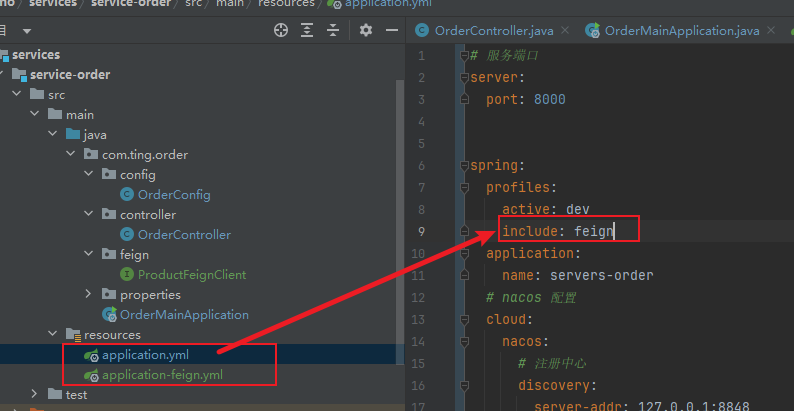
新建一个配置文件单独配置feign,注意要在application文件种使用spring.profiles.include包含feign,让其生效
3. 重试机制
OpenFeign提供了一个组件可以在远程调用失败后自动进行重试:
在配置类中把下面bean注册到spring容器中:
    @Bean
    public Retryer feignRetryer() {
        // 参数说明:
        // 1. 重试间隔(初始间隔):100ms
        // 2. 最大重试间隔:1000ms
        // 3. 最大重试次数:3次(总共会执行 1+2=3次请求),第一次请求和两次重试请求
        //注意,只有第一次重试间隔是100ms,以后每次会由之前的间隔*1.5
        //即第二次是100ms * 1.5 = 150ms,第三次则是150ms * 1.5
        //直到达到最大重试时间定格为最大重试时间即这里设置的1000ms
        return new Retryer.Default(100, 1000, 3);
    }
OpenFeign默认采用的是Retryer.NEVER.RETRY 即永不重试。
注意:即使这里设置了重试,也只会重试GET请求,防止自动重试了其它非幂等的请求造成意料之外的结果
4. 拦截器
OpenFeign提供了一套拦截器机制,可以在发送远程请求时对请求进行增强,例如携带一个令牌,也可也在接收响应时提前对响应做一个预处理,用法和springboot的拦截器相同,需要实现对应的拦截器接口:
import feign.RequestInterceptor;
import feign.RequestTemplate;
import org.springframework.stereotype.Component;

import java.util.UUID;
@Component
public class FeignRequestTokenInterceptor implements RequestInterceptor {
    @Override
    public void apply(RequestTemplate requestTemplate) {
        // 1. 添加令牌
        requestTemplate.header("Feign-Token", UUID.randomUUID().toString());

        // 2. 添加用户ID
        requestTemplate.header("userId", "1001");

        //还可以修改请求体、URL
        // requestTemplate.method("POST");
        // requestTemplate.uri("/new/url");
    }
}
package com.ting.order.interceptor;

import feign.InvocationContext;

import feign.ResponseInterceptor;
import org.springframework.stereotype.Component;

@Component
public class FeignResponseInterceptor implements ResponseInterceptor {
    @Override
    public Object intercept(InvocationContext invocationContext, Chain chain) throws Exception {
        // 调用链继续执行,拿到返回值(可能是Response,也可能是业务对象)
        Object result = chain.next(invocationContext);

        if (result != null) {
            System.out.println("Feign 返回业务对象:" + result.getClass().getSimpleName());
        }
        return result;
    }
}
5. Fallback 降级机制
在我们之前的代码中,如果远程请求失败了例如连接超时或者读取超时,会直接报错,有的情况,我们需要即使请求失败了业务也有数据继续运行下去,这时我们就可以使用Fallback机制,当请求失败时,返回一个预设的数据,这个数据可以是缓存的旧数据,也可以是假数据等,Fallback 不是 Feign 自带的,需要Sentinel。
1.导入依赖:
        <dependency>
            <groupId>com.alibaba.cloud</groupId>
            <artifactId>spring-cloud-starter-alibaba-sentinel</artifactId>
        </dependency>
2.实现要做fallback兜底返回的feign客户端接口:
package com.ting.order.feign.fallback;

import com.ting.order.feign.ProductFeignClient;
import com.ting.product.bean.Product;
import org.springframework.stereotype.Component;

import java.math.BigDecimal;

@Component
public class ProductFeignClientFallback implements ProductFeignClient {
    @Override
    public Product getProductById(Long id) {
        Product product = new Product();
        product.setId(666L);
        product.setPrice(new BigDecimal("636"));
        product.setProductName("xiaomi666");
        product.setNum(777);
        return product;
    }
}
3.在被实习fallback的客户端接口的@FeignClient注解里添加fallback属性并指定为实习的fallback类
package com.ting.order.feign;

import com.ting.order.feign.fallback.ProductFeignClientFallback;
import com.ting.product.bean.Product;
import org.springframework.cloud.openfeign.FeignClient;
import org.springframework.web.bind.annotation.GetMapping;
import org.springframework.web.bind.annotation.PathVariable;

@FeignClient(value = "service-product", fallback = ProductFeignClientFallback.class)
public interface ProductFeignClient {
    @GetMapping("/product/{id}")
    Product getProductById(@PathVariable("id") Long id);
}
4.添加配置
#让 OpenFeign 接口支持 Sentinel 的熔断、降级、限流功能
feign:
  sentinel:
    enabled: true
配置完成后,当ProductFeignClient 中的请求失败时就会调用ProductFeignClientFallback 中对应方法获取兜底数据返回

汇聚全球AI编程工具,助力开发者即刻编程。
更多推荐


 4
4 0
0- 0


 已为社区贡献9条内容

所有评论(0)