
【Linux 下编译和运行Uptane OTA Aktualizr 完整指南】
·
一、环境准备
1. 安装依赖(Ubuntu/Debian)
# 基础依赖
sudo apt update
sudo apt install -y \
    asn1c \
    build-essential \
    cmake \
    curl \
    git \
    libarchive-dev \
    libboost-dev \
    libboost-filesystem-dev \
    libboost-log-dev \
    libboost-program-options-dev \
    libcurl4-openssl-dev \
    libpthread-stubs0-dev \
    libsodium-dev \
    libsqlite3-dev \
    libssl-dev \
    python3

# 可选:测试工具
sudo apt install -y \
    net-tools \
    python3-dev \
    python3-openssl \
    python3-venv \
    sqlite3 \
    valgrind

# 可选:OSTree 支持(如果需要)
sudo apt install -y libostree-dev
2. 克隆代码
# 克隆项目(包含子模块)
git clone --recursive https://github.com/uptane/aktualizr.git
cd aktualizr

# 如果已经克隆,更新子模块
git submodule update --init --recursive
如果子模块初始化失败
# 尝试强制更新
git submodule update --init --recursive --force

# 或者手动克隆
cd third_party
git clone https://github.com/google/googletest.git
git clone https://github.com/open-source-parsers/jsoncpp.git
二、编译项目
# 创建构建目录
mkdir build
cd build

# 配置(基础配置)
cmake -DCMAKE_BUILD_TYPE=Release ..

# 或者带选项的配置
cmake -DCMAKE_BUILD_TYPE=Debug \
      -DBUILD_OSTREE=OFF \
      -DBUILD_SOTA_TOOLS=OFF \
      -DBUILD_P11=OFF \
      ..

# 如果出错可能是cmake版本问题,需要指定版本
cmake -DCMAKE_POLICY_VERSION_MINIMUM=3.5 ..

# 编译(使用所有CPU核心)
make -j$(nproc)

# 或者使用 Ninja(更快)
# cmake -GNinja -DCMAKE_BUILD_TYPE=Release ..
# ninja
编译完成后,主要可执行文件位于:
build/
├── src/aktualizr_primary/aktualizr              # 主客户端
├── src/aktualizr_secondary/aktualizr-secondary  # 次ECU客户端
├── src/aktualizr_info/aktualizr-info            # 信息工具
├── src/aktualizr_get/aktualizr-get              # HTTP工具
├── src/uptane_generator/uptane-generator        # 元数据生成器
├── src/libaktualizr/libaktualizr.so             # C++ 库
└── src/libaktualizr-c/libaktualizr-c.so         # C 绑定库
三、运行
Demo 1: 基础版本检查
# 检查编译是否成功
./src/aktualizr_primary/aktualizr --version

# 查看帮助
./src/aktualizr_primary/aktualizr --help
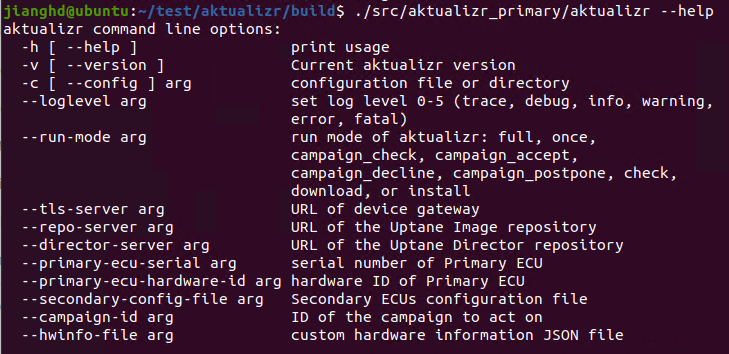
Demo 2: 使用 Fake 包管理器运行(无需真实OTA服务器)
# 回到项目根目录
cd ..

# 创建工作目录
mkdir -p demo && cd demo

# 创建配置文件 sota-local.toml
cat > sota-local.toml << 'EOF'
[provision]
mode = "AutoProvision"
primary_ecu_hardware_id = "local-fake"

[logger]
loglevel = 1

[storage]
path = "storage"
type = "sqlite"

[pacman]
type = "none"
images_path = "storage/images"

[uptane]
secondary_config_file = "virtualsec.json"
EOF

# 创建虚拟次ECU配置 virtualsec.json
cat > virtualsec.json << 'EOF'
{
  "virtual": [
    {
      "partial_verifying": false,
      "ecu_hardware_id": "demo-virtual",
      "full_client_dir": "storage/demo-vsec1",
      "ecu_private_key": "sec.private",
      "ecu_public_key": "sec.public",
      "firmware_path": "storage/demo-vsec1/firmware.bin",
      "target_name_path": "storage/demo-vsec1/target_name",
      "metadata_path": "storage/demo-vsec1/metadata"
    }
  ]
}
EOF

# 创建必要的目录
mkdir -p storage/images storage/demo-vsec1/metadata

# 持续运行,定期检查更新(默认模式)
../build/src/aktualizr_primary/aktualizr \
    --config sota-local.toml
【jianghd@ubuntu:~/test/aktualizr/demo$ sudo ../build/src/aktualizr_primary/aktualizr --config sota-local.toml
Aktualizr version 2020.10-359-ge5118a748 starting
Reading config: "sota-local.toml"
Current directory: /home/jianghd/test/aktualizr/demo
Use existing SQL storage: "storage/sql.db"
Couldn`t import data: empty path received
No serial found in database for this ECU, defaulting to empty serial
Not importing "/var/sota/import/repo/root.json" because it doesn't exist
Not importing "/var/sota/import/director/root.json" because it doesn't exist
Initializing virtual Secondaries...
Bootstrap empty SQL storage
Bootstraping DB to version 25
No valid Director metadata found in storage: Could not load latest root
No valid Image metadata found in storage: Could not load latest root
Adding Secondary with ECU serial: af00abece0676714a1d68d69b6e3bb35740cf0c8be42f19129f40cce01747800 with hardware ID: demo-virtual
No pending updates, continuing with initialization
Not provisioned yet:Device was not able provision on-line
Not provisioned yet:Device was not able provision on-line
Not provisioned yet:Device was not able provision on-line| 功能类别 | Demo 命令/测试 | 说明 |
| 基础运行 | aktualizr full | 持续运行模式 |
| aktualizr once | ||
| 活动管理 | aktualizr campaign_check | 检查活动 |
| aktualizr campaign_accept | 接受活动 | |
| 更新流程 | aktualizr check | 检查更新 |
| aktualizr download | 下载更新 | |
| aktualizr install | 安装更新 | |
| 设备管理 | ctest -R Provisioner | 设备注册 |
| ctest -R AddSecondary | 次ECU管理 | |
| 安全功能 | ctest -R uptane_key_test | 密钥管理 |
| ctest -R MetadataExpiration | 元数据过期 | |
| 故障处理 | ctest -R DownloadFailure | 下载失败 |
| ctest -R InstallationFailure | 安装失败 |

汇聚全球AI编程工具,助力开发者即刻编程。
更多推荐
 0
0 0
0- 0


 已为社区贡献16条内容

所有评论(0)