
配置镜像仓库,harbor,上传打包导出镜像,容器的常用操作,限制内存和cpu
·
docker上传镜像
#命令格式
sudo docker tag {镜像名称}:{版本名称} swr.cn-east-3.myhuaweicloud.com/{组织名称}/{镜像名称}:{版本名称}
sudo docker push swr.cn-east-3.myhuaweicloud.com/{组织名称}/{镜像名称}:{版本名称}
操作如下:
##登陆huawei云
[root@docker ~ 09:53:19]# docker login -u cn-east-3@HST3WI8PGUOC4EI7IYMK -p 442f39e3ab61b3f4c14
WARNING! Using --password via the CLI is insecure. Use --password-stdin.
WARNING! Your password will be stored unencrypted in /root/.docker/config.json.
Configure a credential helper to remove this warning. See
https://docs.docker.com/engine/reference/commandline/login/#credentials-store

[root@docker ~ 09:53:31]# docker images
REPOSITORY                  TAG        IMAGE ID       CREATED         SIZE
java.centos                 latest     a97d030fd858   41 hours ago    522MB
httpd.centos                latest     8b82a40260a4   42 hours ago    253MB
centos.sshd                 latest     916df8bd0267   42 hours ago    283MB
dockerfile5                 latest     c258c8c31ed4   43 hours ago    393MB
my-image                    latest     fcd4dede3cef   46 hours ago    4.42MB
image-debug                 latest     2cc5c0b6f35b   47 hours ago    4.42MB
ubuntu-with-vim-docker-2    latest     212bce962a05   47 hours ago    213MB
ubunt-with-vim-dockerfile   latest     d68fd3613b26   47 hours ago    213MB
ubuntu-with-vim             v1         cf9dcab86ce9   2 days ago      213MB
ubuntu                      latest     30ba44506a6d   2 weeks ago     100MB
dockerfile7                 latest     00117dd4e663   19 months ago   4.42MB
dockerfile4                 latest     b582fea38ecb   19 months ago   4.42MB
busybox                     latest     925ff61909ae   19 months ago   4.42MB
dockerfile1                 latest     2cba8611a943   19 months ago   4.42MB
##修改镜像名
[root@docker ~ 09:54:46]# docker tag dockerfile1:latest swr.cn-east-3.myhuaweicloud.com/study_oockerfile1:v1
[root@docker ~ 09:56:46]# docker images
REPOSITORY                                              TAG        IMAGE ID       CREATED      IZE
dockerfile2                                             latest     6ca049726a70   19 months ago.42MB
dockerfile4                                             latest     b582fea38ecb   19 months ago.42MB
dockerfile1                                             latest     2cba8611a943   19 months ago.42MB
swr.cn-east-3.myhuaweicloud.com/study_one/dockerfile1   v1         2cba8611a943   19
##上传镜像
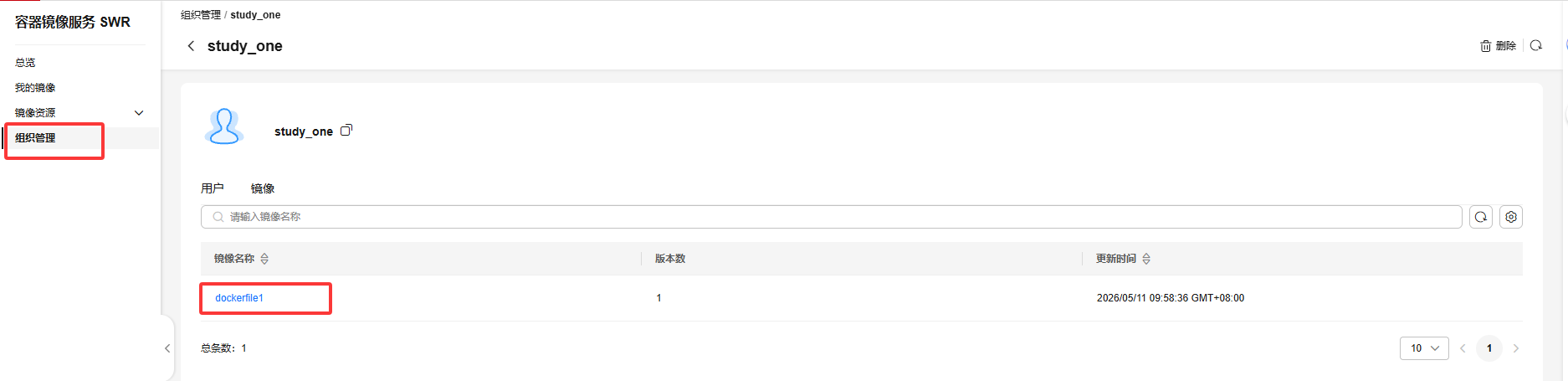
[root@docker ~ 09:56:53]# docker push swr.cn-east-3.myhuaweicloud.com/study_one/dockerfile1:v1
The push refers to repository [swr.cn-east-3.myhuaweicloud.com/study_one/dockerfile1]
7f74ca728556: Pushed
v1: digest: sha256:437c1fe8513d2c75e55b1bf3d2d9058355cd363dfca257391fce18386eac4a56 size: 527
##退出登陆
[root@docker ~ 09:57:52]# docker logout
Removing login credentials for https://index.docker.io/v1/
搭建本地registry仓库
##启动 registry 容器
[root@docker ~ 10:37:57]# docker run -d -p 5000:5000 -v /myregistry:/var/lib/registry registry:2
-d 是后台启动容器。
-p 将容器的 5000 端口映射到 Host 的 5000 端口。5000 是 registry 服务端口
-v 将容器 /var/lib/registry 目录映射到 Host 的 /myregistry,用于存放镜像数据。
ddfb77a22be543852034c844333e08467d458801c4c3420fc03c9b4e11c318e6

#通过 docker tag 重命名镜像,使之与 registry 匹配。
[root@docker ~ 10:37:58]# docker tag busybox:latest localhost:5000/busybox_1:v1
##上传镜像
[root@docker ~ 10:38:13]# docker push localhost:5000/busybox_1:v1
The push refers to repository [localhost:5000/busybox_1]
7f74ca728556: Pushed
v1: digest: sha256:11f85134f388cff5f4c66f9bb4c5942249c1f6f7eb8b3889948d953487b5f7a8 size: 527
##测试访问
[root@docker ~ 10:38:20]#  curl http://localhost:5000/v2/_catalog
{"repositories":["busybox_1"]}
配置私有仓库Harbor
前提:xftp托取harbor文件进root目录
[root@docker ~ 10:38:33]# ls
anaconda-ks.cfg  harbor-offline-installer-v2.9.1.tgz  index.html  ssh.centos
dirA             httpd                                porject
##解压
[root@docker ~ 10:57:18]# tar -xvf harbor-offline-installer-v2.9.1.tgz
harbor/harbor.v2.9.1.tar.gz
harbor/prepare
harbor/LICENSE
harbor/install.sh
harbor/common.sh
harbor/harbor.yml.tmpl
##将文件复制到目录中
[root@docker ~ 10:57:34]# mkdir /opt/harbor/
[root@docker ~ 10:57:55]# mv harbor/* /opt/harbor/
[root@docker ~ 10:58:17]# cd /opt/harbor/
[root@docker harbor 10:58:23]# ls
common.sh  harbor.v2.9.1.tar.gz  harbor.yml.tmpl  install.sh  LICENSE  prepare
##备份配置文件
[root@docker harbor 10:58:24]# cp -ar harbor.yml.tmpl harbor.yml
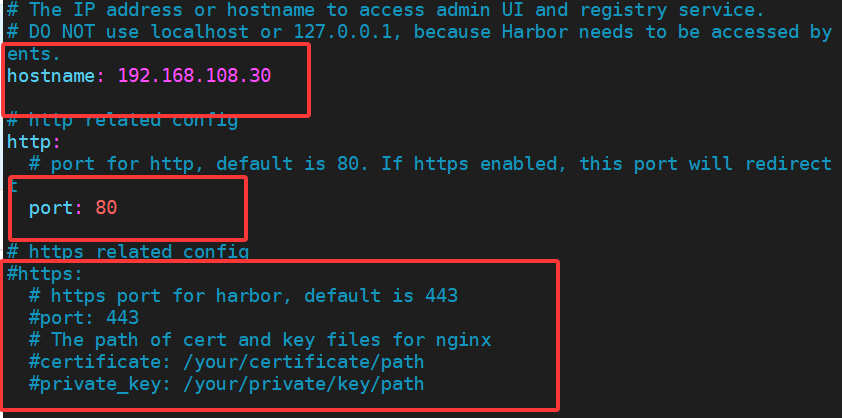
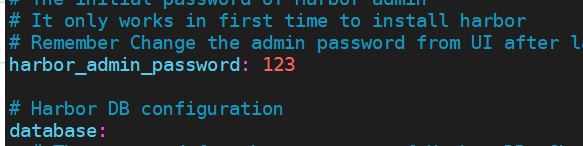
[root@docker harbor 10:59:18]# vim harbor.yml
##修改主机名为本机ip地址
##修改harbor登陆密码  ##如下面图片展示

##预处理更新配置文件
[root@docker harbor 11:00:19]# ./prepare
prepare base dir is set to /opt/harbor
Unable to find image 'goharbor/prepare:v2.9.1' locally
v2.9.1: Pulling from goharbor/prepare
634892f30522: Pull complete
906becd729e4: Pull complete
e58f76f9e52a: Pull complete
e41fbb12868c: Pull complete
ad28d7943816: Pull complete
960887ca092b: Pull complete
fc61eb4dedb0: Pull complete
89a061d97c90: Pull complete
5bb6cb96862f: Pull complete
3145ed01c09c: Pull complete
Digest: sha256:ab50c4c9cfe6342da4605665df7657be744227dcce604a12804cb023a99f51d6
Status: Downloaded newer image for goharbor/prepare:v2.9.1
WARNING:root:WARNING: HTTP protocol is insecure. Harbor will deprecate http protocol in the future. Please make sure to upgrade to https
Generated configuration file: /config/portal/nginx.conf
Generated configuration file: /config/log/logrotate.conf
Generated configuration file: /config/log/rsyslog_docker.conf
Generated configuration file: /config/nginx/nginx.conf
Generated configuration file: /config/core/env
Generated configuration file: /config/core/app.conf
Generated configuration file: /config/registry/config.yml
Generated configuration file: /config/registryctl/env
Generated configuration file: /config/registryctl/config.yml
Generated configuration file: /config/db/env
Generated configuration file: /config/jobservice/env
Generated configuration file: /config/jobservice/config.yml
Generated and saved secret to file: /data/secret/keys/secretkey
Successfully called func: create_root_cert
Generated configuration file: /compose_location/docker-compose.yml
Clean up the input dir
[root@docker harbor 11:01:00]# ./install.sh

[Step 0]: checking if docker is installed ...

Note: docker version: 26.1.3

[Step 1]: checking docker-compose is installed ...

Note: Docker Compose version v2.27.0

[Step 2]: loading Harbor images ...
4349dad1c75c: Loading layer  10.89MB/10.89MB
b3619b11127a: Loading layer  3.584kB/3.584kB
7b38a647487c: Loading layer   2.56kB/2.56kB
af63cee918f4: Loading layer  44.69MB/44.69MB
087e0e1d01ed: Loading layer  45.48MB/45.48MB
Loaded image: goharbor/harbor-jobservice:v2.9.1

3cb3537a6da7: Loading layer  173.9MB/173.9MB

[Step 3]: preparing environment ...

[Step 4]: preparing harbor configs ...
prepare base dir is set to /opt/harbor
WARNING:root:WARNING: HTTP protocol is insecure. Harbor will deprecate http protocol in the future. Please make sure to upgrade to https
Clearing the configuration file: /config/portal/nginx.conf
Clearing the configuration file: /config/log/logrotate.conf
Clearing the configuration file: /config/log/rsyslog_docker.conf
Clearing the configuration file: /config/nginx/nginx.conf
Clearing the configuration file: /config/core/env
Clearing the configuration file: /config/core/app.conf
Clearing the configuration file: /config/registry/passwd
Clearing the configuration file: /config/registry/config.yml
Clearing the configuration file: /config/registryctl/env
Clearing the configuration file: /config/registryctl/config.yml
Clearing the configuration file: /config/db/env
Clearing the configuration file: /config/jobservice/env
Clearing the configuration file: /config/jobservice/config.yml
Generated configuration file: /config/portal/nginx.conf
Clean up the input dir

Note: stopping existing Harbor instance ...
WARN[0000] /opt/harbor/docker-compose.yml: `version` is obsolete

[Step 5]: starting Harbor ...
WARN[0000] /opt/harbor/docker-compose.yml: `version` is obsolete
[+] Running 10/10
 ✔ Network harbor_harbor        Created                                            0.1s
 ✔ Container harbor-log         Started                                            0.4s
 ✔ Container harbor-db          Started                                            2.1s
 ✔ Container redis              Started                                            2.2s
 ✔ Container registryctl        Started                                            1.9s
 ✔ Container harbor-portal      Started                                            2.0s
 ✔ Container registry           Started                                            1.8s
 ✔ Container harbor-core        Started                                            2.6s
 ✔ Container harbor-jobservice  Started                                            3.1s
 ✔ Container nginx              Started                                            3.1s
✔ ----Harbor has been installed and started successfully.----
访问测试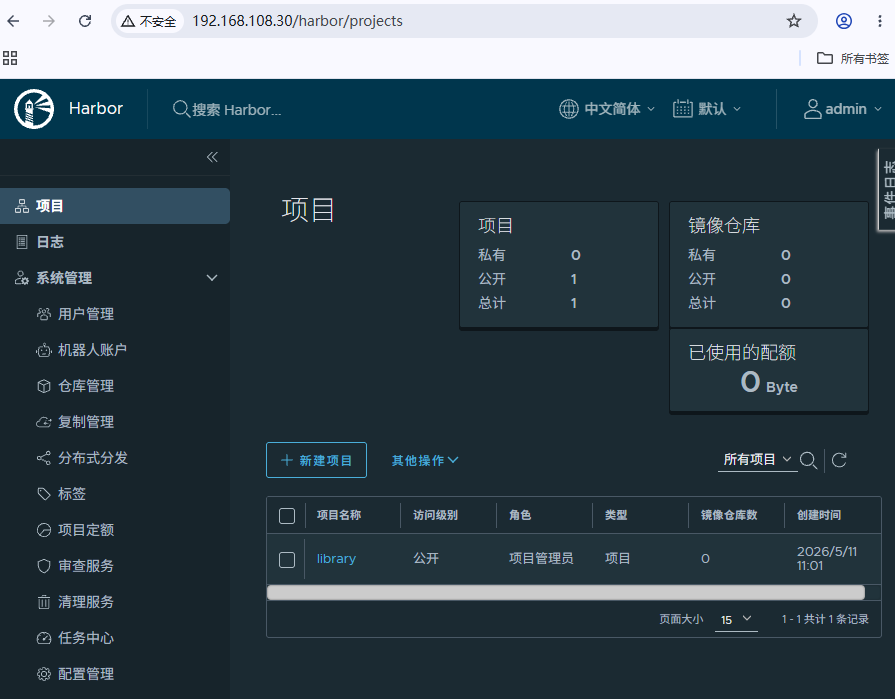
使用harbor上传镜像
##将内网服务器 IP 和端口配置到 daemon.json 文件中
[root@docker ~ 11:29:59]# vim /etc/docker/daemon.json
[root@docker ~ 11:30:36]# cat /etc/docker/daemon.json
{
        "insecure-registries": ["192.168.108.30"],
        "registry-mirrors": [ "https://019e062e72da7ba3b57dd0af5f1b273a.mirror.swr.myhua                    weicloud.com" ]
}
[root@docker ~ 11:30:44]# systemctl restart docker
[root@docker ~ 11:31:13]# ./install.sh
-bash: ./install.sh: No such file or directory
[root@docker ~ 11:31:28]# cd /opt/harbor/
##需要到opt目录下面的hardor进行重新加载安装命令
[root@docker harbor 11:31:41]# ./install.sh


##登陆harbor服务
[root@docker harbor 11:32:08]# docker login 192.168.108.30
Username: admin
Password:
WARNING! Your password will be stored unencrypted in /root/.docker/config.json.
Configure a credential helper to remove this warning. See
https://docs.docker.com/engine/reference/commandline/login/#credentials-store

Login Succeeded
[root@docker harbor 11:32:35]# cd
[root@docker ~ 11:32:47]# cd ~/.docker/
[root@docker .docker 11:32:57]# pwd
/root/.docker
[root@docker .docker 11:33:01]# cat config.json
{
        "auths": {
                "192.168.108.30": {   ##登陆记录
                        "auth": "YWRtaW46MTIz"  ##登陆密码(加密)
                },
                "swr.cn-east-3.myhuaweicloud.com": {
                        "auth": "Y24tZWFzdC0zQEhTVDNXSThQR1VPQzRFSTdJWU1LOjQ0MmYzOWUzYWI                    2MWIzZjRjMTRiNWZkNWU1MzkwYjM5YTMzMjUyOWVkOTNhMTUzMjk4MWFhYzk2NDI4ZjY0NDA="
                }
        }
##修改镜像名,打标签
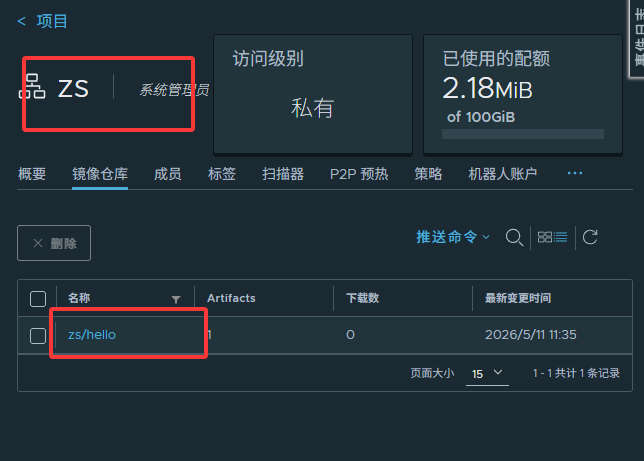
[root@docker .docker 11:33:48]# docker tag busybox:latest 192.168.108.30/zs/hello:v1
[root@docker .docker 11:34:54]# docker images | grep 192.168.108.30
192.168.108.30/zs/hello            v1         925ff61909ae   19 months ago   4.42MB
##上传镜像
[root@docker .docker 11:35:45]# docker push 192.168.108.30/zs/hello:v1
The push refers to repository [192.168.108.30/zs/hello]
7f74ca728556: Pushed
v1: digest: sha256:11f85134f388cff5f4c66f9bb4c5942249c1f6f7eb8b3889948d953487b5f7a8 size: 527
删除镜像
[root@docker ~ 13:53:08]# docker images
REPOSITORY                                              TAG        IMAGE ID       CREATED         SIZE
ubuntu-with-vim-docker-2                                latest     212bce962a05   2 days ago      213MB
ubunt-with-vim-dockerfile                               latest     d68fd3613b26   2 days ago      213MB
ubuntu-with-vim                                         v1         cf9dcab86ce9   2 days ago      213MB
ubuntu                                                  latest     30ba44506a6d   2 weeks ago     100MB
swr.cn-east-3.myhuaweicloud.com/study_one/dockerfile1   v1         2cba8611a943   19 months ago   4.42MB
192.168.108.30/zs/hello                                 v1         925ff61909ae   19 months ago   4.42MB
busybox                                                 latest     925ff61909ae   19 months ago   4.42MB
localhost:5000/busybox_1                                v1         925ff61909ae   19 months ago   4.42MB
goharbor/harbor-exporter                                v2.9.1     37bfd4fa26bc   2 years ago     105MB
goharbor/redis-photon                                   v2.9.1     67827413c0fd   2 years ago     209MB
goharbor/trivy-adapter-photon                           v2.9.1     a02695b8f8ea   2 years ago     469MB
goharbor/harbor-registryctl                             v2.9.1     a076218bb631   2 years ago     148MB
goharbor/registry-photon                                v2.9.1     2f01ea8b1853   2 years ago     82.7MB
goharbor/nginx-photon                                   v2.9.1     5200203dd7ef   2 years ago     153MB
goharbor/harbor-log                                     v2.9.1     ac1cdcc94a5f   2 years ago     162MB
goharbor/harbor-jobservice                              v2.9.1     d9ff6fc98cc8   2 years ago     139MB
goharbor/harbor-core                                    v2.9.1     0a3a7953409c   2 years ago     166MB
goharbor/harbor-portal                                  v2.9.1     345284db8ca1   2 years ago     161MB
goharbor/harbor-db                                      v2.9.1     69606d285be1   2 years ago     358MB
goharbor/prepare                                        v2.9.1     adb2d804c458   2 years ago     253MB
registry                                                2          26b2eb03618e   2 years ago     25.4MB
centos                                                  7          eeb6ee3f44bd   4 years ago     204MB
centos                                                  8.4.2105   5d0da3dc9764   4 years ago     231MB
[root@docker ~ 13:53:14]# docker images -aq
212bce962a05
d68fd3613b26
cf9dcab86ce9
30ba44506a6d
925ff61909ae
925ff61909ae
925ff61909ae
2cba8611a943
37bfd4fa26bc
67827413c0fd
a02695b8f8ea
a076218bb631
2f01ea8b1853
5200203dd7ef
ac1cdcc94a5f
d9ff6fc98cc8
0a3a7953409c
345284db8ca1
69606d285be1
adb2d804c458
26b2eb03618e
eeb6ee3f44bd
5d0da3dc9764
##删除所有镜像
[root@docker ~ 13:54:12]# docker rmi -f $(docker images -aq)
打包镜像,导入镜像
#准备
[root@docker ~ 13:55:27]# docker pull busybox
Using default tag: latest
latest: Pulling from library/busybox
481282afbc43: Already exists
Digest: sha256:1487d0af5f52b4ba31c7e465126ee2123fe3f2305d638e7827681e7cf6c83d5e
Status: Downloaded newer image for busybox:latest
docker.io/library/busybox:latest
[root@docker ~ 13:56:05]# docker pull httpd
Using default tag: latest
latest: Pulling from library/httpd
57fb71246055: Pull complete
4b31e7d9a3b8: Pull complete
4f4fb700ef54: Pull complete
6e3e6d1d5b56: Pull complete
777279f5ce9f: Pull complete
4b705a141cea: Pull complete
Digest: sha256:bac8021a9b7ad41a399dc72bb0e1f0b832b565632df7e62871e07d2aca8b293e
Status: Downloaded newer image for httpd:latest
docker.io/library/httpd:latest
[root@docker ~ 13:57:02]# docker images
REPOSITORY            TAG       IMAGE ID       CREATED         SIZE
httpd                 latest    c194ed9b9e8f   2 days ago      117MB
busybox               latest    925ff61909ae   19 months ago   4.42MB

###打包
[root@docker ~ 13:57:05]# docker save httpd -o httpd.tar
[root@docker ~ 13:57:26]# ls
anaconda-ks.cfg  dirA  harbor  harbor-offline-installer-v2.9.1.tgz  httpd  httpd.tar  index.html  porject  ssh.centos
[root@docker ~ 13:57:28]# docker save httpd:latest busybox:latest -o allimages.tar
##本地显示有tar包
[root@docker ~ 13:58:16]# ll
total 1017576
-rw-------  1 root root 124893184 May 11 13:58 allimages.tar
-rw-------. 1 root root      1093 Apr 30 14:07 anaconda-ks.cfg
drwxr-xr-x  2 root root        72 May  9 16:56 dirA
drwxr-xr-x  2 root root         6 May 11 10:58 harbor
-rw-r--r--  1 root root 796863822 May 11 10:57 harbor-offline-installer-v2.9.1.tgz
drwxr-xr-x  2 root root        42 May  9 16:09 httpd
-rw-------  1 root root 120228864 May 11 13:57 httpd.tar
-rw-r--r--  1 root root        12 May  9 16:07 index.html
drwxr-xr-x  2 root root        58 May  9 16:35 porject
drwxr-xr-x  2 root root        24 May  9 15:51 ssh.centos
#删除所有镜像
[root@docker ~ 14:01:29]# docker rmi -f $(docker images ps -aq)
[root@docker ~ 14:02:18]# docker images
REPOSITORY   TAG       IMAGE ID   CREATED   SIZE
##上传镜像
[root@docker ~ 14:02:29]# docker load -i httpd.tar
79dd1f4c855c: Loading layer [==================================================>]  81.04MB/81.04MB
f7244fdccfb8: Loading layer [==================================================>]   2.56kB/2.56kB
5f70bf18a086: Loading layer [==================================================>]  1.024kB/1.024kB
4190cd477538: Loading layer [==================================================>]  6.019MB/6.019MB
36881cdabbc8: Loading layer [==================================================>]  33.13MB/33.13MB
deae28725281: Loading layer [==================================================>]  3.584kB/3.584kB
Loaded image: httpd:latest
[root@docker ~ 14:03:09]# docker images
REPOSITORY   TAG       IMAGE ID       CREATED      SIZE
httpd        latest    c194ed9b9e8f   2 days ago   117MB
运行容器
[root@docker ~ 14:28:28]# docker images
REPOSITORY   TAG       IMAGE ID       CREATED         SIZE
httpd        latest    c194ed9b9e8f   2 days ago      117MB
busybox      latest    925ff61909ae   19 months ago   4.42MB
#使用busybox镜像创建容器
[root@docker ~ 14:28:35]# docker create busybox
0c45ff5192f51ec040739d6bf233eb2f4e11888ea6ed561e49846601c12443f0
[root@docker ~ 14:27:22]# docker create httpd
fd430e84e716724529dfa8a3cae008b36e91a7ad8b859b83da80b87d7a37e5c2
[root@docker ~ 14:28:50]# docker ps
CONTAINER ID   IMAGE     COMMAND   CREATED   STATUS    PORTS     NAMES
[root@docker ~ 14:29:08]# docker ps -a   ##-a是all所有
CONTAINER ID   IMAGE     COMMAND              CREATED              STATUS    PORTS     NAMES
0c45ff5192f5   busybox   "sh"                 37 seconds ago       Created             eloquent_bhaskara
fd430e84e716   httpd     "httpd-foreground"   About a minute ago   Created             musing_rubin
[root@docker ~ 14:29:27]# docker start fd430e84e716
fd430e84e716
[root@docker ~ 14:29:39]# docker start 0c45ff5192f5
0c45ff5192f5
[root@docker ~ 14:29:47]# docker ps
CONTAINER ID   IMAGE     COMMAND              CREATED              STATUS          PORTS     NAMES
fd430e84e716   httpd     "httpd-foreground"   About a minute ago   Up 13 seconds   80/tcp    musing_rubin
[root@docker ~ 14:29:52]# docker ps -a
CONTAINER ID   IMAGE     COMMAND              CREATED              STATUS                      PORTS     NAMES
0c45ff5192f5   busybox   "sh"                 About a minute ago   Exited (0) 14 seconds ago             eloquent_bhaskara
fd430e84e716   httpd     "httpd-foreground"   2 minutes ago        Up 22 seconds               80/tcp    musing_rubin
#查看busybox容器状态,启动了又退出了
让容器长期运行
[root@docker ~ 14:44:42]# docker run ubuntu /bin/bash -c "while true; do sleep 1; echo hh; done"
hh
hh
hh
hh
hh
hh
##复制会话
[root@docker ~ 14:46:47]# docker ps
CONTAINER ID   IMAGE     COMMAND                  CREATED              STATUS              PORTS     NAMES
b06a9fe50c02   ubuntu    "/bin/bash -c 'while…"   About a minute ago   Up About a minute             priceless_brahmagupta
[root@docker ~ 14:46:51]# docker stop b06a9fe50c02
b06a9fe50c02
#-d转后台运行
[root@docker ~]# docker run -d ubuntu /bin/bash -c "while true ; do sleep 1 ;
echo hahaha; done"
两种进入容器的方法
docker attach
通过 docker attach 可以 attach 到容器启动命令的终端,例如:
[root@docker ~]# docker run -d ubuntu /bin/bash -c "while true ; do sleep 1 ;
echo I_am_in_container ; done"
dc508b94447f83b46080267580607569a187fcc7f780433f646e9d66949731a6
[root@docker ~]#
[root@docker ~]# docker attach
dc508b94447f83b46080267580607569a187fcc7f780433f646e9d66949731a6
I_am_in_container
I_am_in_container
I_am_in_container
I_am_in_container
这次我们通过 “长ID” attach 到了容器的启动命令终端,之后看到的是 echo 每隔一秒打印的信息。
注:可通过 Ctrl+p 然后 Ctrl+q 组合键退出 attach 终端。
docker exec
[root@docker ~ 14:58:54]# docker run -i --name ubuntu1 ubuntu
ls
bin
boot
dev
etc
home
lib
lib64
media
mnt
opt
proc
root
run
sbin
srv
sys
tmp
usr
var
ll
/bin/bash: line 2: ll: command not found
pwd
/
cd /root
ls
exit
##-i发现没有交互界面,但是已经进入容器,可以执行命令
[root@docker ~ 15:00:03]# docker ps -a
CONTAINER ID   IMAGE     COMMAND                  CREATED          STATUS                        PORTS     NAMES
32655378ebbc   ubuntu    "/bin/bash"              56 seconds ago   Exited (0) 20 seconds ago               ubuntu1
b06a9fe50c02   ubuntu    "/bin/bash -c 'while…"   14 minutes ago   Exited (137) 13 minutes ago             priceless_brahmagupta
136ac11e2062   ubuntu    "/bin/bash"              15 minutes ago   Created                                 pensive_morse
c4c7069b9692   busybox   "/bin/bash -c 'while…"   22 minutes ago   Created                                 upbeat_elion
f480bf97ee31   busybox   "/bin/bash -c 'while…"   25 minutes ago   Created                                 stupefied_bartik
0c45ff5192f5   busybox   "sh"                     31 minutes ago   Exited (0) 30 minutes ago               eloquent_bhaskara
fd430e84e716   httpd     "httpd-foreground"       32 minutes ago   Exited (0) 23 minutes ago               musing_rubin
[root@docker ~ 15:00:23]# docker run -t --name ubuntu2 ubuntu
root@6a3b3db2d9c8:/# ls
ls
ls
pwd
^C^C
root@6a3b3db2d9c8:/# ^C^C
root@6a3b3db2d9c8:/# ^C^C
root@6a3b3db2d9c8:/# ^C^C
##-t发现进入交互,但是不执行命令

[root@docker ~ 15:01:45]# docker run -it --name ubuntu3 ubuntu
root@c73be7453593:/# ls
bin  boot  dev  etc  home  lib  lib64  media  mnt  opt  proc  root  run  sbin  srv  sys  tmp  usr  var
root@c73be7453593:/# pwd
/
root@c73be7453593:/# exit
exit
容器常用操作
stop/start/restart 容器
[root@docker ~ 15:24:17]# docker ps -a
CONTAINER ID   IMAGE     COMMAND   CREATED   STATUS    PORTS     NAMES
[root@docker ~ 15:24:21]# docker images
REPOSITORY   TAG       IMAGE ID       CREATED         SIZE
httpd        latest    c194ed9b9e8f   2 days ago      117MB
ubuntu       latest    30ba44506a6d   2 weeks ago     100MB
busybox      latest    925ff61909ae   19 months ago   4.42MB
[root@docker ~ 15:24:32]# docker run -d --name u1 ubuntu
73ffc37b5fd6a989712c9fa2a06b8c0a54d130ff1be72fbd4b640474e825dd95
[root@docker ~ 15:24:52]# docker run -d --name u2 ubuntu
c509a38ff7ed130c6ed132b8af3dbf05b2287a2816eec119a9d14c91b5f1525a
[root@docker ~ 15:24:57]# docker run -d --name httpd1 httpd
bd7e761310937a9aa07f2dbce9277c6f1d7d28e50d5590007dbf0849fd789fe6
[root@docker ~ 15:25:14]# docker ps -a
CONTAINER ID   IMAGE     COMMAND              CREATED          STATUS                      PORTS     NAMES
bd7e76131093   httpd     "httpd-foreground"   10 seconds ago   Up 9 seconds                80/tcp    httpd1
c509a38ff7ed   ubuntu    "/bin/bash"          28 seconds ago   Exited (0) 27 seconds ago             u2
73ffc37b5fd6   ubuntu    "/bin/bash"          32 seconds ago   Exited (0) 31 seconds ago             u1
[root@docker ~ 15:25:24]# docker stop httpd1
httpd1
[root@docker ~ 15:25:42]# docker ps -a
CONTAINER ID   IMAGE     COMMAND              CREATED          STATUS                      PORTS     NAMES
bd7e76131093   httpd     "httpd-foreground"   35 seconds ago   Exited (0) 7 seconds ago              httpd1
c509a38ff7ed   ubuntu    "/bin/bash"          53 seconds ago   Exited (0) 52 seconds ago             u2
73ffc37b5fd6   ubuntu    "/bin/bash"          57 seconds ago   Exited (0) 57 seconds ago             u1
[root@docker ~ 15:25:49]# docker start httpd1
httpd1
[root@docker ~ 15:25:59]# docker ps
CONTAINER ID   IMAGE     COMMAND              CREATED          STATUS         PORTS     NAMES
bd7e76131093   httpd     "httpd-foreground"   48 seconds ago   Up 2 seconds   80/tcp    httpd1
[root@docker ~ 15:26:02]# docker restart httpd1
httpd1
[root@docker ~ 15:26:17]# docker ps -a
CONTAINER ID   IMAGE     COMMAND              CREATED              STATUS                          PORTS     NAMES
bd7e76131093   httpd     "httpd-foreground"   About a minute ago   Up 4 seconds                    80/tcp    httpd1
c509a38ff7ed   ubuntu    "/bin/bash"          About a minute ago   Exited (0) About a minute ago             u2
73ffc37b5fd6   ubuntu    "/bin/bash"          About a minute ago   Exited (0) About a minute ago             u1
pause/unpause 容器
pause:暂停
unpause:恢复
[root@docker ~ 15:26:17]# docker ps -a
CONTAINER ID   IMAGE     COMMAND              CREATED              STATUS                          PORTS     NAMES
bd7e76131093   httpd     "httpd-foreground"   About a minute ago   Up 4 seconds                    80/tcp    httpd1
c509a38ff7ed   ubuntu    "/bin/bash"          About a minute ago   Exited (0) About a minute ago             u2
73ffc37b5fd6   ubuntu    "/bin/bash"          About a minute ago   Exited (0) About a minute ago             u1
##注意看httpd1的状态为pause
[root@docker ~ 15:26:22]# docker pause httpd1
httpd1
[root@docker ~ 15:27:50]# docker ps -a
CONTAINER ID   IMAGE     COMMAND              CREATED         STATUS                       PORTS     NAMES
bd7e76131093   httpd     "httpd-foreground"   2 minutes ago   Up About a minute (Paused)   80/tcp    httpd1
c509a38ff7ed   ubuntu    "/bin/bash"          3 minutes ago   Exited (0) 3 minutes ago               u2
73ffc37b5fd6   ubuntu    "/bin/bash"          3 minutes ago   Exited (0) 3 minutes ago               u1

[root@docker ~ 15:28:02]# docker unpause httpd1
httpd1
##注意看httpd1的状态
[root@docker ~ 15:28:28]# docker ps -a
CONTAINER ID   IMAGE     COMMAND              CREATED         STATUS                     PORTS     NAMES
bd7e76131093   httpd     "httpd-foreground"   3 minutes ago   Up 2 minutes               80/tcp    httpd1
c509a38ff7ed   ubuntu    "/bin/bash"          3 minutes ago   Exited (0) 3 minutes ago             u2
73ffc37b5fd6   ubuntu    "/bin/bash"          3 minutes ago   Exited (0) 3 minutes ago             u1
删除
docker rm 是删除容器,
而 docker rmi 是删除镜像
-f 强制删除
[root@docker ~ 15:28:28]# docker ps -a
CONTAINER ID   IMAGE     COMMAND              CREATED         STATUS                     PORTS     NAMES
bd7e76131093   httpd     "httpd-foreground"   3 minutes ago   Up 2 minutes               80/tcp    httpd1
c509a38ff7ed   ubuntu    "/bin/bash"          3 minutes ago   Exited (0) 3 minutes ago             u2
73ffc37b5fd6   ubuntu    "/bin/bash"          3 minutes ago   Exited (0) 3 minutes ago             u1
##删除状态为exited的容器
[root@docker ~ 15:28:33]# docker rm $(docker ps -a -f status=exited)
c509a38ff7ed
u1
##因为httpd1正在运行,所以删除不了
[root@docker ~ 15:31:23]# docker ps -a
CONTAINER ID   IMAGE     COMMAND              CREATED         STATUS         PORTS     NAMES
bd7e76131093   httpd     "httpd-foreground"   6 minutes ago   Up 5 minutes   80/tcp    httpd1
##慎用,删除所有状态的容器
[root@docker ~ 15:32:01]# docker rm -f $(docker ps -a)
[root@docker ~ 15:32:06]# docker ps -a
CONTAINER ID   IMAGE     COMMAND   CREATED   STATUS    PORTS     NAMES
限制容器对内存的使用
stress 是模拟压力测试的工具 在机器上模拟cpu、内存等使用率
内存限额
与操作系统类似,容器可使用的内存包括两部分:物理内存和 swap。 Docker 通过下面两组参数来控制 容器内存的使用量。
- -m 或 --memory :设置内存的使用限额,例如 100M, 2G。
- –memory-swap :设置 内存+swap 的使用限额。
如果–memory-swap 设置为0 或者不设置,则容器可以使用的swap大小为-m值的两倍。
如果 --memory-swap 的值和-m 值相同,则容器不能使用swap 如果 --memory-swap值为-1。
它表示容器程序使用的内存受限,而可以使用的swap空间不受限制 (宿主机有多少swap空间该容器就可以使用多少)
swap:内存置换,内存不够用,从硬盘分出空间交给内存属于逻辑内存
[root@docker ~ 16:20:34]# vim Dockerfile
[root@docker ~ 16:22:49]# cat Dockerfile
# Version
FROM ubuntu
MAINTAINER zzzz
RUN apt-get -y update && apt-get -y install stress
ENTRYPOINT ["usr/bin/stress"]
[root@docker ~ 16:22:52]# docker build -t ubuntu-with-stress .
[+] Building 30.7s (6/6) FINISHED                                                                         docker:default
 => [internal] load build definition from Dockerfile                                                                0.0s
 => => transferring dockerfile: 156B                                                                                0.0s
 => [internal] load metadata for docker.io/library/ubuntu:latest                                                    0.0s
 => [internal] load .dockerignore                                                                                   0.0s
 => => transferring context: 2B                                                                                     0.0s
 => CACHED [1/2] FROM docker.io/library/ubuntu:latest                                                               0.0s
 => [2/2] RUN apt-get -y update && apt-get -y install stress                                                       30.6s
 => exporting to image                                                                                              0.1s
 => => exporting layers                                                                                             0.1s
 => => writing image sha256:0659db69e9907f73239a46d1b45054bb97f03bab5086e4e7034ebc4458d69bc1                        0.0s
 => => naming to docker.io/library/ubuntu-with-stress                                                               0.0s
[root@docker ~ 16:23:55]# docker run -it -m 200M --momory-swap=300M ubuntu-with-stress --vm 1 --vm-bytes 280M -v
unknown flag: --momory-swap
See 'docker run --help'.
[root@docker ~ 16:25:50]# docker run -it -m 200M --memory-swap=300M ubuntu-with-stress --vm 1 --vm-bytes 280M -v
stress: info: [1] dispatching hogs: 0 cpu, 0 io, 1 vm, 0 hdd
stress: dbug: [1] using backoff sleep of 3000us
stress: dbug: [1] --> hogvm worker 1 [7] forked
stress: dbug: [7] allocating 293601280 bytes ...
stress: dbug: [7] touching bytes in strides of 4096 bytes ...
stress: dbug: [7] freed 293601280 bytes
stress: dbug: [7] allocating 293601280 bytes ...
stress: dbug: [7] touching bytes in strides of 4096 bytes ...
stress: dbug: [7] freed 293601280 bytes
stress: dbug: [7] allocating 293601280 bytes ...
stress: dbug: [7] touching bytes in strides of 4096 bytes ...
stress: dbug: [7] freed 293601280 bytes
stress: dbug: [7] allocating 293601280 bytes ...
stress: dbug: [7] touching bytes in strides of 4096 bytes ...
stress: dbug: [7] freed 293601280 bytes
stress: dbug: [7] allocating 293601280 bytes ...
stress: dbug: [7] touching bytes in strides of 4096 bytes ...
^Cstress: FAIL: [1] (425) <-- worker 7 got signal 2
stress: WARN: [1] (427) now reaping child worker processes
stress: FAIL: [1] (431) kill error: No such process
stress: FAIL: [1] (461) failed run completed in 8s
[root@docker ~ 16:26:12]# docker run -it -m 200M --memory-swap=300M ubuntu-with-stress --vm 1 --vm-bytes 300M -v
stress: info: [1] dispatching hogs: 0 cpu, 0 io, 1 vm, 0 hdd
stress: dbug: [1] using backoff sleep of 3000us
stress: dbug: [1] --> hogvm worker 1 [7] forked
stress: dbug: [7] allocating 314572800 bytes ...
stress: dbug: [7] touching bytes in strides of 4096 bytes ...
stress: FAIL: [1] (425) <-- worker 7 got signal 9
stress: WARN: [1] (427) now reaping child worker processes
stress: FAIL: [1] (431) kill error: No such process
stress: FAIL: [1] (461) failed run completed in 1s
[root@docker ~ 16:26:18]# docker run -it -m 200M --memory-swap=300M ubuntu-with-stress --vm 1 --vm-bytes 310M -v
stress: info: [1] dispatching hogs: 0 cpu, 0 io, 1 vm, 0 hdd
stress: dbug: [1] using backoff sleep of 3000us
stress: dbug: [1] --> hogvm worker 1 [7] forked
stress: dbug: [7] allocating 325058560 bytes ...
stress: dbug: [7] touching bytes in strides of 4096 bytes ...
stress: FAIL: [1] (425) <-- worker 7 got signal 9
stress: WARN: [1] (427) now reaping child worker processes
stress: FAIL: [1] (431) kill error: No such process
stress: FAIL: [1] (461) failed run completed in 1s
# Docker 限制:内存200M,swap100M,总可用300M
# 自带 stress 工具的镜像
# -vm 1:启动1个内存占用进程
# -vm-bytes 280M:让这个进程占用 280M 内存
# -v:显示详细日志
限制容器对cpu的使用
#-c 1024 CPU 权重值,默认 1024 作用:多容器竞争 CPU 时的优先级  数值越大,分到的 CPU 时间越多
#--cpu 4 启动 4 个 CPU 密集型进程 作用:把 CPU 跑满,做压测
#-v 显示详细日志
[root@docker ~ 16:52:23]# docker run --name container_A -it -c 1024 ubuntu-with-stress --cpu 4 -v
stress: info: [1] dispatching hogs: 4 cpu, 0 io, 0 vm, 0 hdd
stress: dbug: [1] using backoff sleep of 12000us
stress: dbug: [1] --> hogcpu worker 4 [7] forked
stress: dbug: [1] using backoff sleep of 9000us
stress: dbug: [1] --> hogcpu worker 3 [8] forked
stress: dbug: [1] using backoff sleep of 6000us
stress: dbug: [1] --> hogcpu worker 2 [9] forked
stress: dbug: [1] using backoff sleep of 3000us
stress: dbug: [1] --> hogcpu worker 1 [10] forked
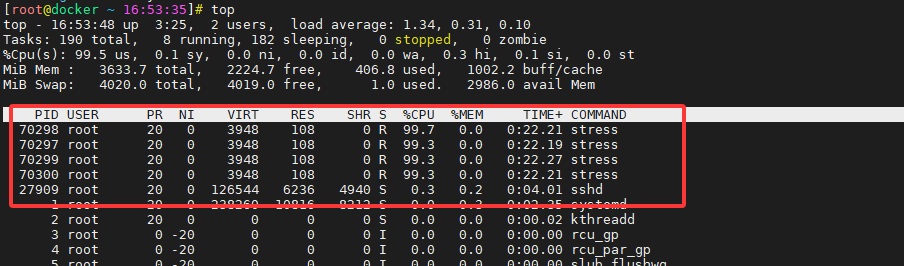
##docker查看cpu状态
[root@docker ~ 16:53:48]# docker stats

[root@docker ~ 16:54:07]# docker run --name container_B -it -c 512 ubuntu-with-stress --cpu 4 -v
stress: info: [1] dispatching hogs: 4 cpu, 0 io, 0 vm, 0 hdd
stress: dbug: [1] using backoff sleep of 12000us
stress: dbug: [1] --> hogcpu worker 4 [6] forked
stress: dbug: [1] using backoff sleep of 9000us
stress: dbug: [1] --> hogcpu worker 3 [7] forked
stress: dbug: [1] using backoff sleep of 6000us
stress: dbug: [1] --> hogcpu worker 2 [8] forked
stress: dbug: [1] using backoff sleep of 3000us
stress: dbug: [1] --> hogcpu worker 1 [9] forked
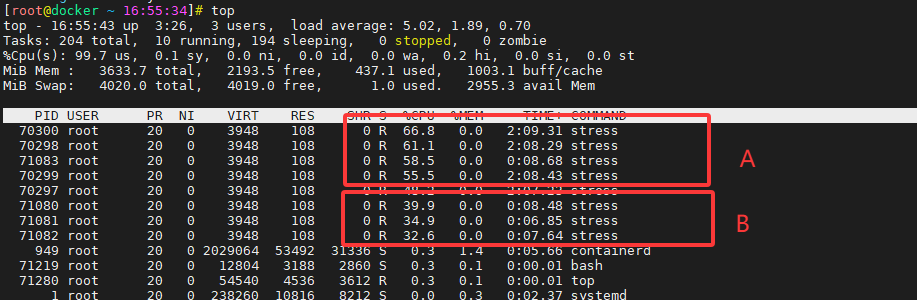
[root@docker ~ 16:55:43]# docker stats

CONTAINER ID   NAME          CPU %     MEM USAGE / LIMIT     MEM %     NET I/O       BLOCK I/O   PIDS
d5bc017b8fd4   container_B   154.72%   1.539MiB / 3.549GiB   0.04%     726B / 0B     0B / 0B     5
b12bdef97c61   container_A   240.37%   1.555MiB / 3.549GiB   0.04%     1.09kB / 0B   0B / 0B     5

[root@docker ~ 16:55:58]# docker stop container_A
CONTAINER ID   NAME          CPU %     MEM USAGE / LIMIT     MEM %     NET I/O     BLOCK I/O   PIDS
d5bc017b8fd4   container_B   397.50%   1.539MiB / 3.549GiB   0.04%     796B / 0B   0B / 0B     5

汇聚全球AI编程工具,助力开发者即刻编程。
更多推荐


 5
5 0
0- 0


 已为社区贡献4条内容

所有评论(0)