
Redis 安装(Ubuntu)
·
下载安装 Redis 服务
- 安装redis:sudo apt-get install -y redis-server
设置密码
- 设置密码:sudo vim /etc/redis/redis.conf
- 修改配置文件的密码,如下内容:
# Instead of configuring users here in this file, it is possible to use
# a stand-alone file just listing users. The two methods cannot be mixed:
# if you configure users here and at the same time you activate the external
# ACL file, the server will refuse to start.
#
# The format of the external ACL user file is exactly the same as the
# format that is used inside redis.conf to describe users.
#
# aclfile /etc/redis/users.acl

# IMPORTANT NOTE: starting with Redis 6 "requirepass" is just a compatibility
# layer on top of the new ACL system. The option effect will be just setting
# the password for the default user. Clients will still authenticate using
# AUTH <password> as usually, or more explicitly with AUTH default <password>
# if they follow the new protocol: both will work.
#
# The requirepass is not compatible with aclfile option and the ACL LOAD
# command, these will cause requirepass to be ignored.
#
requirepass 123456
- 重启redis:service redis restart
登陆 Redis 服务
- 进入 Redis:
<font style="color:#DF2A3F;background-color:rgb(255,255,255);">redis-cli</font> - 先进行登陆:
<font style="color:#DF2A3F;background-color:rgb(255,255,255);">AUTH 123456</font> - 再进行redis操作的时候就会提示输入密码了
root@VM-0-8-ubuntu:/etc/redis# redis-cli
127.0.0.1:6379> AUTH 123456
OK
127.0.0.1:6379> keys *
(empty array)
127.0.0.1:6379>
配置远程登陆
- 修改配置文件(/etc/redis/redis.conf)以下参数,让外部能够连接:
bind 0.0.0.0
protected-mode no
Redis 客户端连接
- 使用 RDM 客户端来连接 Redis
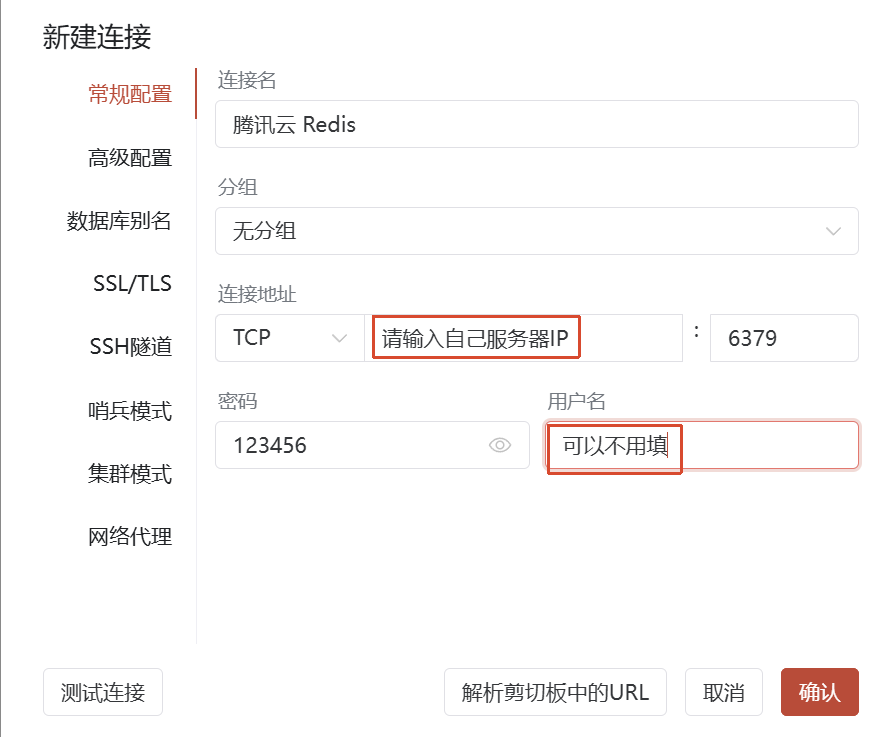
问题排查
如果连接不上,请按照下面排查:
- 检查配置文件:bind、protected-mode、requirepass参数
- 检查防火墙是否对6379端口打开
- 如果是腾讯云、阿里云等等服务器,请咨询是否在服务器外面还有安全组
- 配置文件修改后需要重启redis:service redis restart

汇聚全球AI编程工具,助力开发者即刻编程。
更多推荐

 0
0 0
0- 0


 已为社区贡献4条内容

所有评论(0)