
dify 创建搭建sql执行器的工作流
本文使用的dify为本地部署的在docker,mysql为本地部署。
第一次使用dify搭建的工作流的全流程
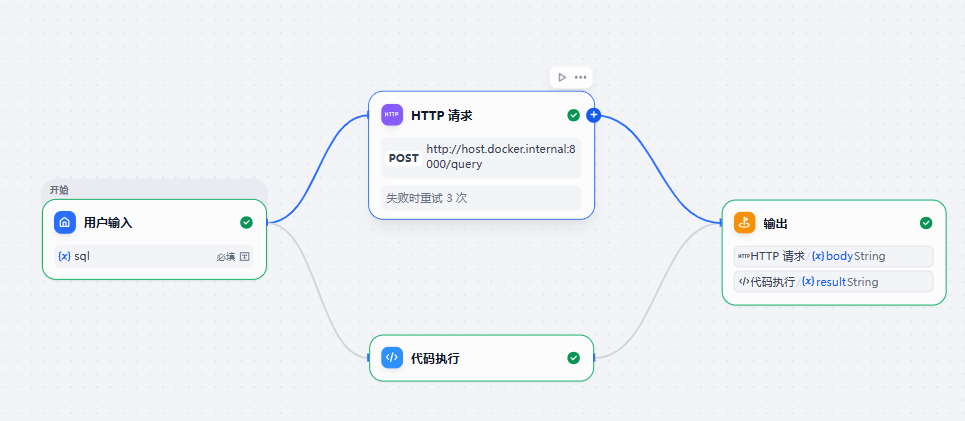 本文的流程如下
接收 Dify 发来的 SQL
↓
连接本地 MySQL
↓
执行查询
↓
把查询结果返回给 Dify
先创建一个服务用来连接本地的mysql
from fastapi import FastAPI, HTTPException
from pydantic import BaseModel, Field
import pymysql
import uvicorn
"""
MySQL 查询执行器接口文件
功能说明:
1. 提供 HTTP API 给 Dify 调用
2. 接收用户输入的 SQL 查询语句
3. 连接本地 MySQL 数据库 dify_test
4. 执行只读 SELECT 查询
5. 将查询结果以 JSON 格式返回给 Dify
当前接口:
- GET / 接口首页
- GET /health 健康检查
- GET /tables 查看当前数据库下的所有表
- POST /query 执行 SELECT 查询
注意:
当前版本只允许执行 SELECT 查询,不允许 INSERT、UPDATE、DELETE、DROP 等写操作。
"""
# 创建 FastAPI 应用
app = FastAPI(
title="Dify Local MySQL Executor",
description="一个供 Dify 调用的本地 MySQL 查询执行器,只允许执行 SELECT 查询。",
version="1.0.0",
)
# MySQL 数据库连接配置
DB_CONFIG = {
"host": "127.0.0.1",
"port": 3306,
"user": "你的用户名",
"password": "你的密码",
"database": "你的数据库名",
"charset": "utf8mb4",
"cursorclass": pymysql.cursors.DictCursor,
}
# 请求体格式
class QueryRequest(BaseModel):
sql: str = Field(
...,
description="需要执行的 SQL 查询语句,只允许 SELECT 查询",
example="SELECT * FROM students;"
)
def get_connection():
"""
创建 MySQL 数据库连接
"""
try:
conn = pymysql.connect(**DB_CONFIG)
return conn
except Exception as e:
print("MySQL Connection Error:", repr(e))
raise HTTPException(
status_code=500,
detail=f"MySQL 连接失败: {str(e)}"
)
def normalize_sql(sql: str) -> str:
"""
清洗和规范 SQL
"""
if not sql or not sql.strip():
raise HTTPException(
status_code=400,
detail="SQL 不能为空"
)
sql = sql.strip().rstrip(";")
return sql
def validate_select_sql(sql: str) -> str:
"""
校验 SQL 安全性
当前规则:
1. 只允许 SELECT 开头
2. 禁止常见危险关键字
3. 如果没有 LIMIT,自动添加 LIMIT 100
"""
lowered = sql.lower()
if not lowered.startswith("select"):
raise HTTPException(
status_code=400,
detail="只允许执行 SELECT 查询"
)
forbidden_keywords = [
"insert",
"update",
"delete",
"drop",
"alter",
"truncate",
"create",
"replace",
"grant",
"revoke",
"load",
"outfile",
]
for keyword in forbidden_keywords:
if keyword in lowered:
raise HTTPException(
status_code=400,
detail=f"SQL 中包含禁止关键字: {keyword}"
)
if "limit" not in lowered:
sql += " LIMIT 100"
return sql
@app.get("/")
def index():
"""
接口首页
"""
return {
"name": "Dify Local MySQL Executor",
"version": "1.0.0",
"status": "running",
"docs": "/docs",
"database": DB_CONFIG["database"],
"endpoints": {
"health": "GET /health",
"tables": "GET /tables",
"query": "POST /query"
}
}
@app.get("/health")
def health_check():
"""
健康检查接口
用来确认:
1. FastAPI 服务是否启动
2. MySQL 是否可以连接
"""
conn = None
try:
conn = get_connection()
with conn.cursor() as cursor:
cursor.execute("SELECT 1 AS ok;")
result = cursor.fetchone()
return {
"success": True,
"message": "FastAPI 服务正常,MySQL 连接正常",
"mysql": result
}
except Exception as e:
print("Health Check Error:", repr(e))
raise HTTPException(
status_code=500,
detail=f"健康检查失败: {str(e)}"
)
finally:
if conn:
conn.close()
@app.get("/tables")
def list_tables():
"""
查看当前数据库下的所有表
"""
conn = None
try:
conn = get_connection()
with conn.cursor() as cursor:
cursor.execute("SHOW TABLES;")
rows = cursor.fetchall()
return {
"success": True,
"database": DB_CONFIG["database"],
"tables": rows
}
except Exception as e:
print("List Tables Error:", repr(e))
raise HTTPException(
status_code=500,
detail=f"查询表列表失败: {str(e)}"
)
finally:
if conn:
conn.close()
@app.post("/query")
def query_mysql(req: QueryRequest):
"""
执行 SQL 查询接口
Dify 调用示例:
POST /query
Body:
{
"sql": "SELECT * FROM students;"
}
返回:
{
"success": true,
"sql": "SELECT * FROM students LIMIT 100",
"row_count": 5,
"rows": [...]
}
"""
conn = None
try:
sql = normalize_sql(req.sql)
safe_sql = validate_select_sql(sql)
conn = get_connection()
with conn.cursor() as cursor:
cursor.execute(safe_sql)
rows = cursor.fetchall()
return {
"success": True,
"sql": safe_sql,
"row_count": len(rows),
"rows": rows
}
except HTTPException:
raise
except Exception as e:
print("MySQL Query Error:", repr(e))
raise HTTPException(
status_code=500,
detail=f"MySQL 查询失败: {str(e)}"
)
finally:
if conn:
conn.close()
if __name__ == "__main__":
uvicorn.run(
"mysql_executor:app",
host="0.0.0.0",
port=8000,
reload=True
)
依赖安装pip install fastapi uvicorn pymysql cryptography后运行

在浏览器中打开验证是否连接成功Dify Local MySQL Executor - Swagger UI http://127.0.0.1:8000/docs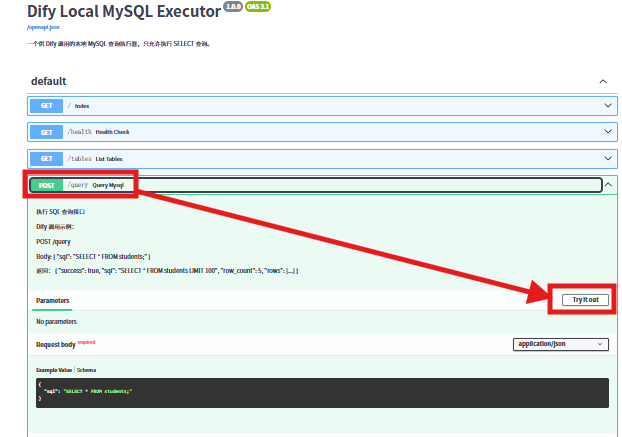
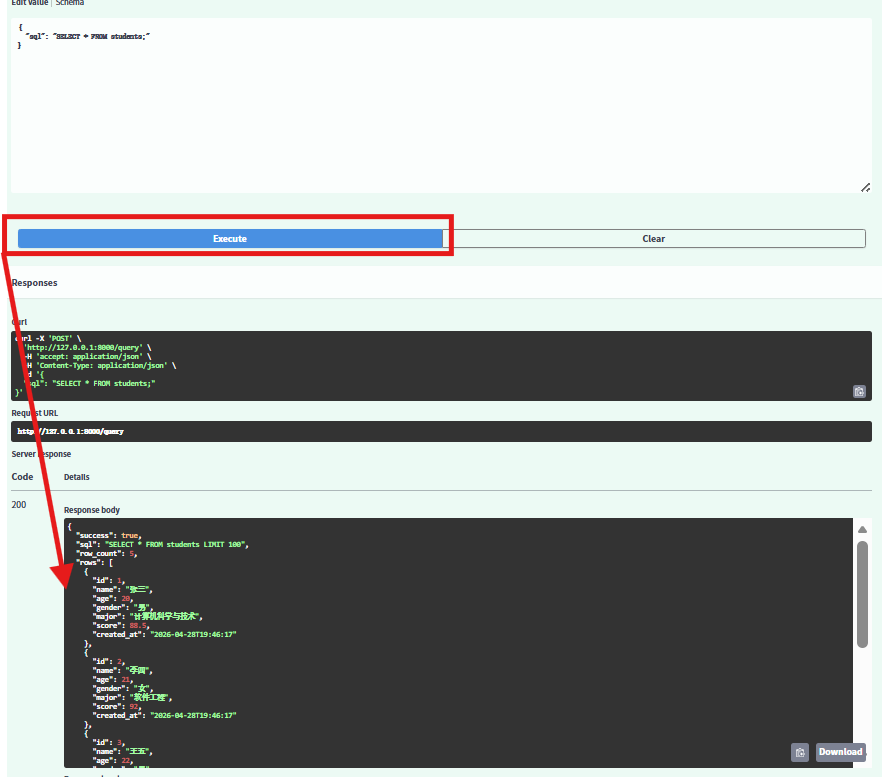
与本地数据库对比发现一致即可

如果出现105报错可能是依赖问题
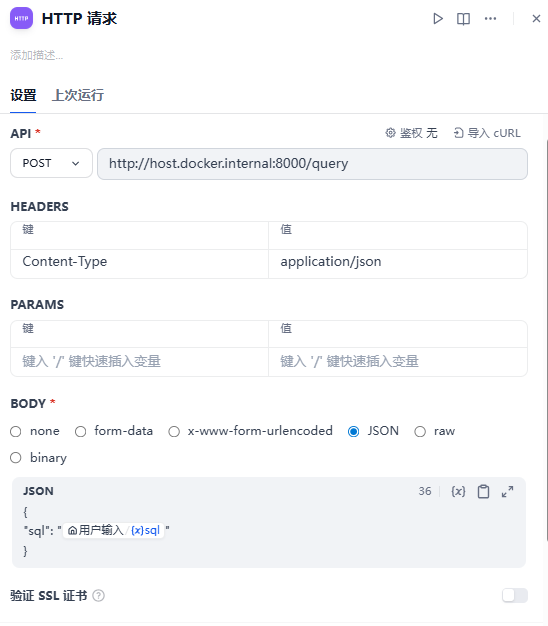
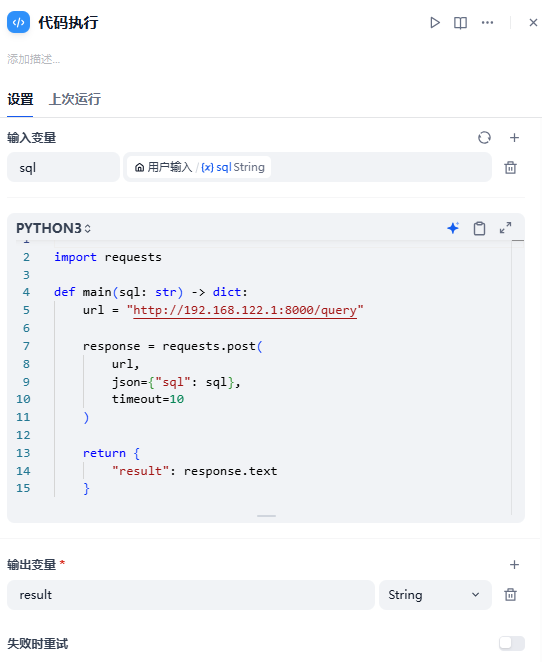
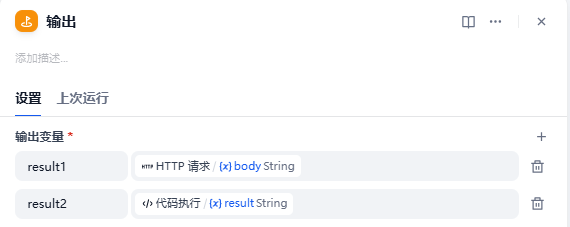
按要求配置即可

汇聚全球AI编程工具,助力开发者即刻编程。
更多推荐

 13
13 0
0- 0


 已为社区贡献1条内容

所有评论(0)