
证件照怎么自己制作?一文教你用 API 自动生成合规证件照(附 Python / Java / PHP / JS 示例)
在很多场景中,我们都需要用到标准证件照,比如:
-
身份证 / 护照 / 签证
-
简历 / 求职
-
各类考试报名
但现实问题是:
❌ 背景不合规(必须白底 / 蓝底 / 红底)
❌ 尺寸不标准(1寸 / 2寸 / 各国规格)
❌ 人像裁剪不规范(头部比例错误)
👉 那有没有办法自动生成合规证件照?
答案是:可以,通过证件照制作 API,一键完成。
一、证件照制作的核心流程
一个完整的证件照生成流程,其实可以拆成 4 步:
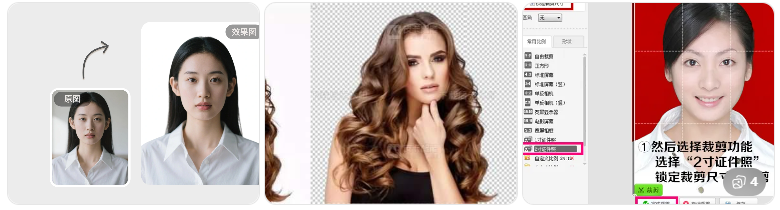
1️⃣ 人像检测
自动识别人脸位置
2️⃣ 抠图(去背景)
提取人物主体
3️⃣ 背景替换
生成白底 / 蓝底 / 红底
4️⃣ 尺寸裁剪
生成标准证件照尺寸
👉 传统方式:PS 手动操作
👉 API 方式:一次请求全部完成
二、为什么推荐用 API 做证件照?
在实际项目中(网站 / 小程序 / 工具站),用 API 有几个明显优势:
✅ 1. 自动化程度高
用户上传 → 自动生成 → 直接下载
✅ 2. 成本低
不需要人工修图
✅ 3. 可快速接入
适合:
-
工具站引流
-
SaaS 产品
-
API 变现
三、证件照制作 API 能做什么?
一个完整的证件照 API,一般支持:
-
✔ 自动抠图
-
✔ 背景颜色替换(红 / 白 / 蓝)
-
✔ 多尺寸生成(1寸 / 2寸 / 自定义)
-
✔ 人脸自动居中
-
✔ 高清输出
-
✔ 换衣服、美颜、证件照合格检测等附加功能
四、API 接入流程(通用)
整体流程非常简单:
Step 1:上传图片
用户上传原始照片
Step 2:调用 API
传入参数(背景色 / 尺寸等)
Step 3:获取结果
返回处理后的证件照
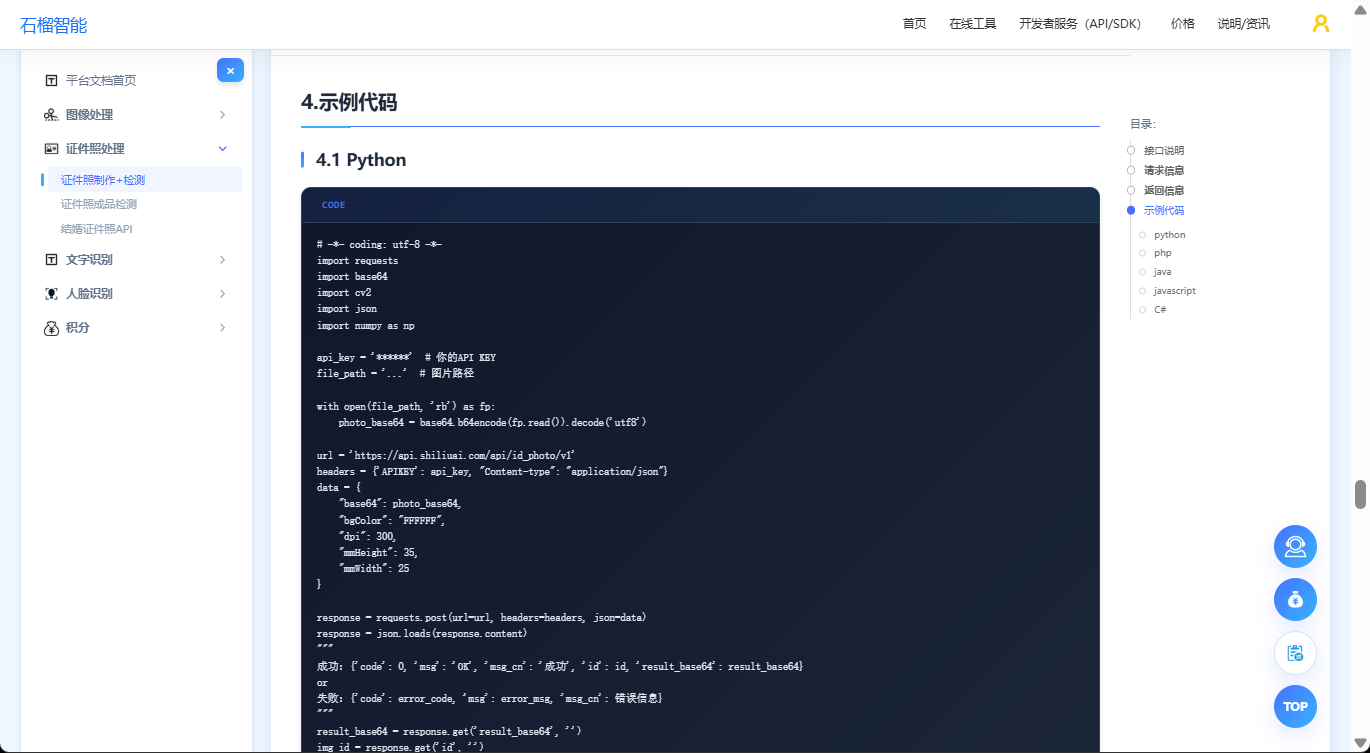
五、代码示例(示意)
Python 示例
# ==============================================================================
# API文档:https://www.shiliuai.com/api/zhengjianzhao
# 支持免费在线体验
# API文档清晰,提供多种接入语言示例(如python、js、C#、java、php等),以及自动化脚本语言(如天诺、懒人精灵、按键精灵、易语言、EasyClick、触动精灵等)
# ==============================================================================


import requests
import base64
import cv2
import json
import numpy as np

api_key = '******'  # 你的API KEY
file_path = '...'  # 图片路径

with open(file_path, 'rb') as fp:
    photo_base64 = base64.b64encode(fp.read()).decode('utf8')

url = 'https://api.shiliuai.com/api/id_photo/v1'
headers = {'APIKEY': api_key, "Content-type": "application/json"}
data = {
    "base64": photo_base64,
    "bgColor": "FFFFFF",
    "dpi": 300,
    "mmHeight": 35,
    "mmWidth": 25
}

response = requests.post(url=url, headers=headers, json=data)
response = json.loads(response.content)
"""
成功:{'code': 0, 'msg': 'OK', 'msg_cn': '成功', 'id': id, 'result_base64': result_base64}
or
失败:{'code': error_code, 'msg': error_msg, 'msg_cn': 错误信息}
"""
result_base64 = response.get('result_base64', '')
img_id = response.get('id', '')
file_bytes = base64.b64decode(result_base64) if result_base64 else b''
if file_bytes:
    with open('result.jpg', 'wb') as f:
        f.write(file_bytes)

    image = np.asarray(bytearray(file_bytes), dtype=np.uint8)
    image = cv2.imdecode(image, cv2.IMREAD_COLOR)
    cv2.imshow('result', image)
    cv2.waitKey(0)

# 同一张图片,参数改变,再次请求(复用 id)
data2 = {
    "id": img_id,
    "bgColor": "FF0000",
    "dpi": 300,
    "pxHeight": 640,
    "pxWidth": 480
}
response2 = requests.post(url=url, headers=headers, json=data2)
response2 = json.loads(response2.content)
Java示例
// ==============================================================================
// API文档:https://www.shiliuai.com/api/zhengjianzhao
// 支持免费在线体验
// API文档清晰,提供多种接入语言示例(如python、js、C#、java、php等),以及自动化脚本语言(如天诺、懒人精灵、按键精灵、易语言、EasyClick、触动精灵等)
// ==============================================================================


import java.io.*;
import java.net.HttpURLConnection;
import java.net.URL;
import java.nio.file.Files;
import java.util.Base64;
import org.json.JSONObject;

public class IDPhotoAPIExample {

    public static void main(String[] args) {
        String apiKey = "******"; // 你的API KEY
        String filePath = "path/to/your/image.jpg"; // 图片路径

        try {
            // 读取图片并编码为 Base64
            byte[] fileBytes = Files.readAllBytes(new File(filePath).toPath());
            String photoBase64 = Base64.getEncoder().encodeToString(fileBytes);

            // API 请求的 URL
            String apiUrl = "https://api.shiliuai.com/api/id_photo/v1";

            // 请求参数 (初次请求)
            JSONObject requestData = new JSONObject();
            requestData.put("base64", photoBase64);
            requestData.put("bgColor", "FFFFFF");
            requestData.put("dpi", 300);
            requestData.put("mmHeight", 35);
            requestData.put("mmWidth", 25);

            // 发送 POST 请求
            JSONObject response = sendPostRequest(apiUrl, apiKey, requestData);

            // 检查响应是否成功
            if (response.getInt("code") == 0) {
                String resultBase64 = response.getString("result_base64");
                String id = response.getString("id");

                // 解码并保存图片
                byte[] resultBytes = Base64.getDecoder().decode(resultBase64);
                try (FileOutputStream fos = new FileOutputStream("result.jpg")) {
                    fos.write(resultBytes);
                }

                System.out.println("图片生成成功,文件已保存为 result.jpg");

                // 同一张图片,参数改变,再次请求
                JSONObject newRequestData = new JSONObject();
                newRequestData.put("id", id);
                newRequestData.put("bgColor", "FF0000");
                newRequestData.put("dpi", 300);
                newRequestData.put("pxHeight", 640);
                newRequestData.put("pxWidth", 480);

                // 发送新的请求
                JSONObject newResponse = sendPostRequest(apiUrl, apiKey, newRequestData);
                if (newResponse.getInt("code") == 0) {
                    String newResultBase64 = newResponse.getString("result_base64");
                    byte[] newResultBytes = Base64.getDecoder().decode(newResultBase64);
                    try (FileOutputStream fos = new FileOutputStream("result_red_bg.jpg")) {
                        fos.write(newResultBytes);
                    }
                    System.out.println("参数改变后的图片生成成功,文件已保存为 result_red_bg.jpg");
                } else {
                    System.out.println("新的请求失败: " + newResponse.getString("msg_cn"));
                }

            } else {
                System.out.println("初次请求失败: " + response.getString("msg_cn"));
            }

        } catch (Exception e) {
            e.printStackTrace();
        }
    }

    // 发送 POST 请求
    private static JSONObject sendPostRequest(String urlStr, String apiKey, JSONObject jsonData) throws IOException {
        URL url = new URL(urlStr);
        HttpURLConnection conn = (HttpURLConnection) url.openConnection();
        conn.setRequestMethod("POST");
        conn.setRequestProperty("APIKEY", apiKey);
        conn.setRequestProperty("Content-Type", "application/json");
        conn.setDoOutput(true);

        // 写入请求数据
        try (OutputStream os = conn.getOutputStream()) {
            byte[] input = jsonData.toString().getBytes("utf-8");
            os.write(input, 0, input.length);
        }

        // 读取响应
        StringBuilder response = new StringBuilder();
        try (BufferedReader br = new BufferedReader(new InputStreamReader(conn.getInputStream(), "utf-8"))) {
            String responseLine;
            while ((responseLine = br.readLine()) != null) {
                response.append(responseLine.trim());
            }
        }

        return new JSONObject(response.toString());
    }
}
PHP示例
// ==============================================================================
// API文档:https://www.shiliuai.com/api/zhengjianzhao
// 支持免费在线体验
// API文档清晰,提供多种接入语言示例(如python、js、C#、java、php等),以及自动化脚本语言(如天诺、懒人精灵、按键精灵、易语言、EasyClick、触动精灵等)
// ==============================================================================


<?php
$url = "https://api.shiliuai.com/api/id_photo/v1";
$method = "POST";
$apikey = "******";
$header = array();
array_push($header, "APIKEY:" . $apikey);
array_push($header, "Content-Type:application/json");

$file_path = "...";
$handle = fopen($file_path, "r");
$photo = fread($handle, filesize($file_path));
fclose($handle);
$photo_base64 = base64_encode($photo);

$data = array(
  "base64"=> $photo_base64,
  "bgColor"=>"FFFFFF",
  "dpi"=>300,
  "mmHeight"=>35,
  "mmWidth"=>25
);
$post_data = json_encode($data);

$curl = curl_init();
curl_setopt($curl, CURLOPT_CUSTOMREQUEST, $method);
curl_setopt($curl, CURLOPT_URL, $url);
curl_setopt($curl, CURLOPT_HTTPHEADER, $header);
curl_setopt($curl, CURLOPT_POSTFIELDS, $post_data);
curl_setopt($curl, CURLOPT_RETURNTRANSFER, true);
curl_setopt($curl, CURLOPT_SSL_VERIFYPEER, false);
curl_setopt($curl, CURLOPT_SSL_VERIFYHOST, false);

$response = curl_exec($curl);
var_dump($response);
JS示例
// ==============================================================================
// API文档:https://www.shiliuai.com/api/zhengjianzhao
// 支持免费在线体验
// API文档清晰,提供多种接入语言示例(如python、js、C#、java、php等),以及自动化脚本语言(如天诺、懒人精灵、按键精灵、易语言、EasyClick、触动精灵等)
// ==============================================================================


const fs = require('fs');
const fetch = require('node-fetch'); // 需安装:npm install node-fetch

const apiKey = '******'; // 你的API KEY
const filePath = 'path/to/your/image.jpg'; // 图片路径

(async () => {
  try {
    // 读取图片并编码为 Base64
    const fileBuffer = fs.readFileSync(filePath);
    const photoBase64 = fileBuffer.toString('base64');

    // API 请求的 URL
    const apiUrl = 'https://api.shiliuai.com/api/id_photo/v1';

    // 请求参数 (初次请求)
    const requestData = {
      base64: photoBase64,
      bgColor: "FFFFFF",
      dpi: 300,
      mmHeight: 35,
      mmWidth: 25
    };

    // 发送 POST 请求
    let response = await fetch(apiUrl, {
      method: 'POST',
      headers: {
        'APIKEY': apiKey,
        'Content-Type': 'application/json'
      },
      body: JSON.stringify(requestData)
    });

    let responseData = await response.json();

    // 检查响应是否成功
    if (responseData.code === 0) {
      const resultBase64 = responseData.result_base64;
      const id = responseData.id;

      // 解码并保存图片
      const resultBuffer = Buffer.from(resultBase64, 'base64');
      fs.writeFileSync('result.jpg', resultBuffer);
      console.log("图片生成成功,文件已保存为 result.jpg");

      // 同一张图片,参数改变,再次请求
      const newRequestData = {
        id: id,
        bgColor: "FF0000",
        dpi: 300,
        pxHeight: 640,
        pxWidth: 480
      };

      response = await fetch(apiUrl, {
        method: 'POST',
        headers: {
          'APIKEY': apiKey,
          'Content-Type': 'application/json'
        },
        body: JSON.stringify(newRequestData)
      });

      responseData = await response.json();

      if (responseData.code === 0) {
        const newResultBase64 = responseData.result_base64;
        const newResultBuffer = Buffer.from(newResultBase64, 'base64');
        fs.writeFileSync('result_red_bg.jpg', newResultBuffer);
        console.log("参数改变后的图片生成成功,文件已保存为 result_red_bg.jpg");
      } else {
        console.error("新的请求失败:", responseData.msg_cn);
      }

    } else {
      console.error("初次请求失败:", responseData.msg_cn);
    }
  } catch (error) {
    console.error("发生错误:", error);
  }
})();
C#示例
// ==============================================================================
// API文档:https://www.shiliuai.com/api/zhengjianzhao
// 支持免费在线体验
// API文档清晰,提供多种接入语言示例(如python、js、C#、java、php等),以及自动化脚本语言(如天诺、懒人精灵、按键精灵、易语言、EasyClick、触动精灵等)
// ==============================================================================


using System;
using System.IO;
using System.Net.Http;
using System.Text;
using System.Text.Json;
using System.Threading.Tasks;

class Program
{
    static async Task Main()
    {
        var apiKey = "******";
        var filePath = "path/to/your/image.jpg";
        var url = "https://api.shiliuai.com/api/id_photo/v1";

        using var client = new HttpClient();
        client.DefaultRequestHeaders.Add("APIKEY", apiKey);

        var photoBase64 = Convert.ToBase64String(File.ReadAllBytes(filePath));

        var request1 = new
        {
            base64 = photoBase64,
            bgColor = "FFFFFF",
            dpi = 300,
            mmHeight = 35,
            mmWidth = 25
        };

        var json1 = JsonSerializer.Serialize(request1);
        var res1 = await client.PostAsync(url, new StringContent(json1, Encoding.UTF8, "application/json"));
        var body1 = await res1.Content.ReadAsStringAsync();

        using var doc1 = JsonDocument.Parse(body1);
        var root1 = doc1.RootElement;
        if (root1.GetProperty("code").GetInt32() != 0)
        {
            var msg = root1.TryGetProperty("msg_cn", out var msgCn) ? msgCn.GetString() : root1.GetProperty("msg").GetString();
            Console.WriteLine("初次请求失败: " + msg);
            return;
        }

        var resultBase64 = root1.GetProperty("result_base64").GetString();
        var id = root1.GetProperty("id").GetString();
        File.WriteAllBytes("result.jpg", Convert.FromBase64String(resultBase64));
        Console.WriteLine("图片生成成功,文件已保存为 result.jpg");

        var request2 = new
        {
            id = id,
            bgColor = "FF0000",
            dpi = 300,
            pxHeight = 640,
            pxWidth = 480
        };

        var json2 = JsonSerializer.Serialize(request2);
        var res2 = await client.PostAsync(url, new StringContent(json2, Encoding.UTF8, "application/json"));
        var body2 = await res2.Content.ReadAsStringAsync();

        using var doc2 = JsonDocument.Parse(body2);
        var root2 = doc2.RootElement;
        if (root2.GetProperty("code").GetInt32() != 0)
        {
            var msg = root2.TryGetProperty("msg_cn", out var msgCn) ? msgCn.GetString() : root2.GetProperty("msg").GetString();
            Console.WriteLine("二次请求失败: " + msg);
            return;
        }

        var resultBase642 = root2.GetProperty("result_base64").GetString();
        File.WriteAllBytes("result_red_bg.jpg", Convert.FromBase64String(resultBase642));
        Console.WriteLine("参数改变后的图片生成成功,文件已保存为 result_red_bg.jpg");
    }
}
六、在线体验
如果你不想自己写代码,也可以直接在线体验:
👉 如果只是临时使用,可以直接用在线工具体验效果,再考虑是否接入 API :https://www.shiliuai.com/id_photo/
👉 支持:
-
一键生成证件照
-
自动换背景
-
多尺寸下载
-
美颜、换衣服
-
分辨率DPI、大小KB调整
-
证件照审核指标检测
七、常见问题
❓ 1. 证件照背景颜色怎么选?
-
白底:身份证 / 护照
-
蓝底:简历
-
红底:部分考试
❓ 2. 图片模糊怎么办?
可以结合上一篇:
👉 图片高清修复 API(超分辨率)
❓ 3. 抠图不干净怎么办?
建议结合:
👉 AI 抠图 API(已实测效果更稳定)
八、总结
如果你正在做:
-
工具站
-
SaaS 平台
-
API 平台
-
AI 应用
👉 证件照制作 API 是一个非常适合引流 + 变现的场景。
它的优势在于:
-
需求刚需(考试 / 求职)
-
搜索量大
-
转化率高
#证件照制作 #证件照API #图片处理

汇聚全球AI编程工具,助力开发者即刻编程。
更多推荐

 7
7 0
0- 0


 已为社区贡献12条内容

所有评论(0)