
Java IO流核心知识点全解析
·
Hello,大家好,我是Yize,好久不见,今天给大家带来的内容是IO流,作为Javase中非常重要的模块,我们一起来学习:
目录
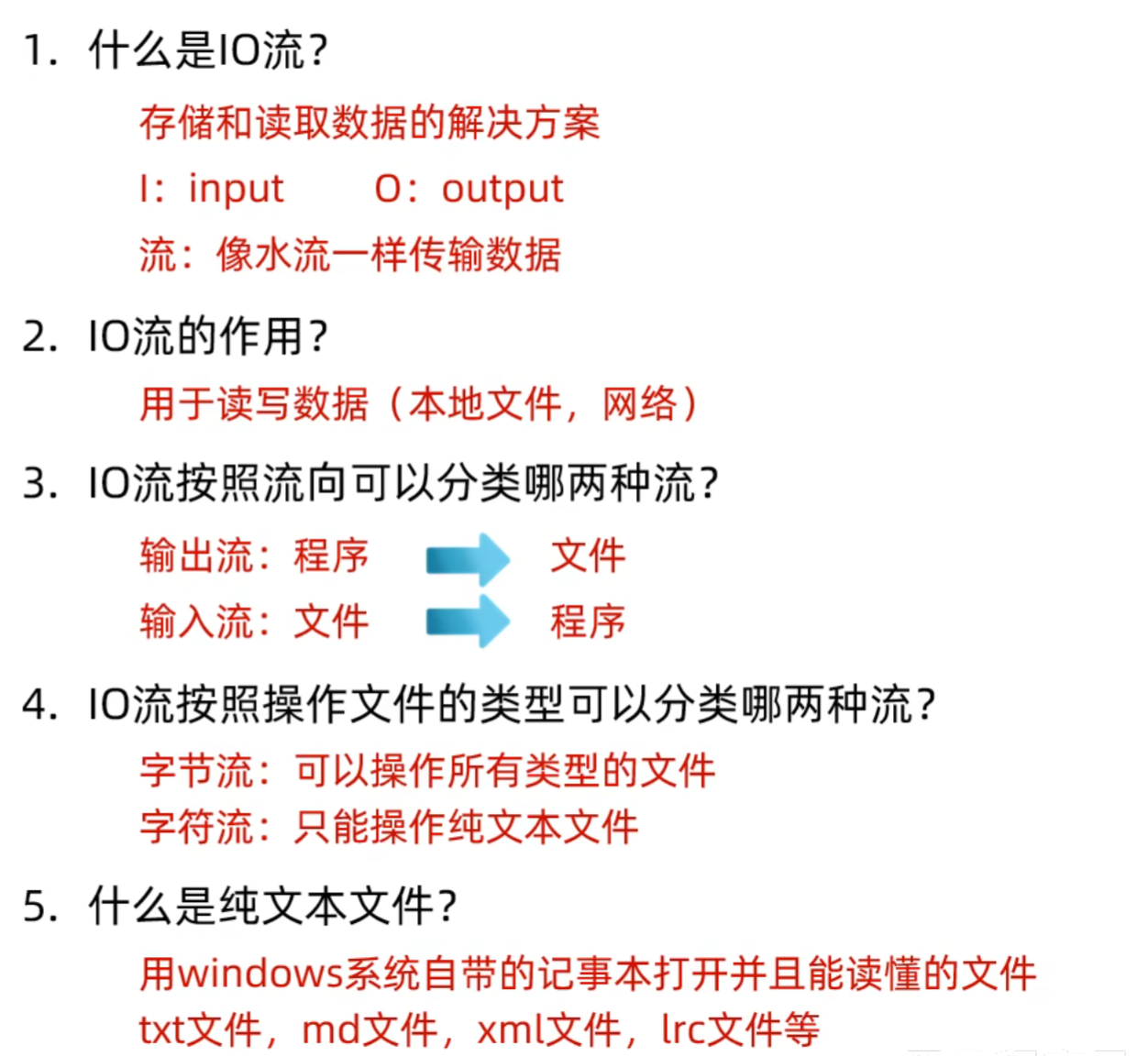
简单说就是存储和读取数据的解决方案
应用场景:
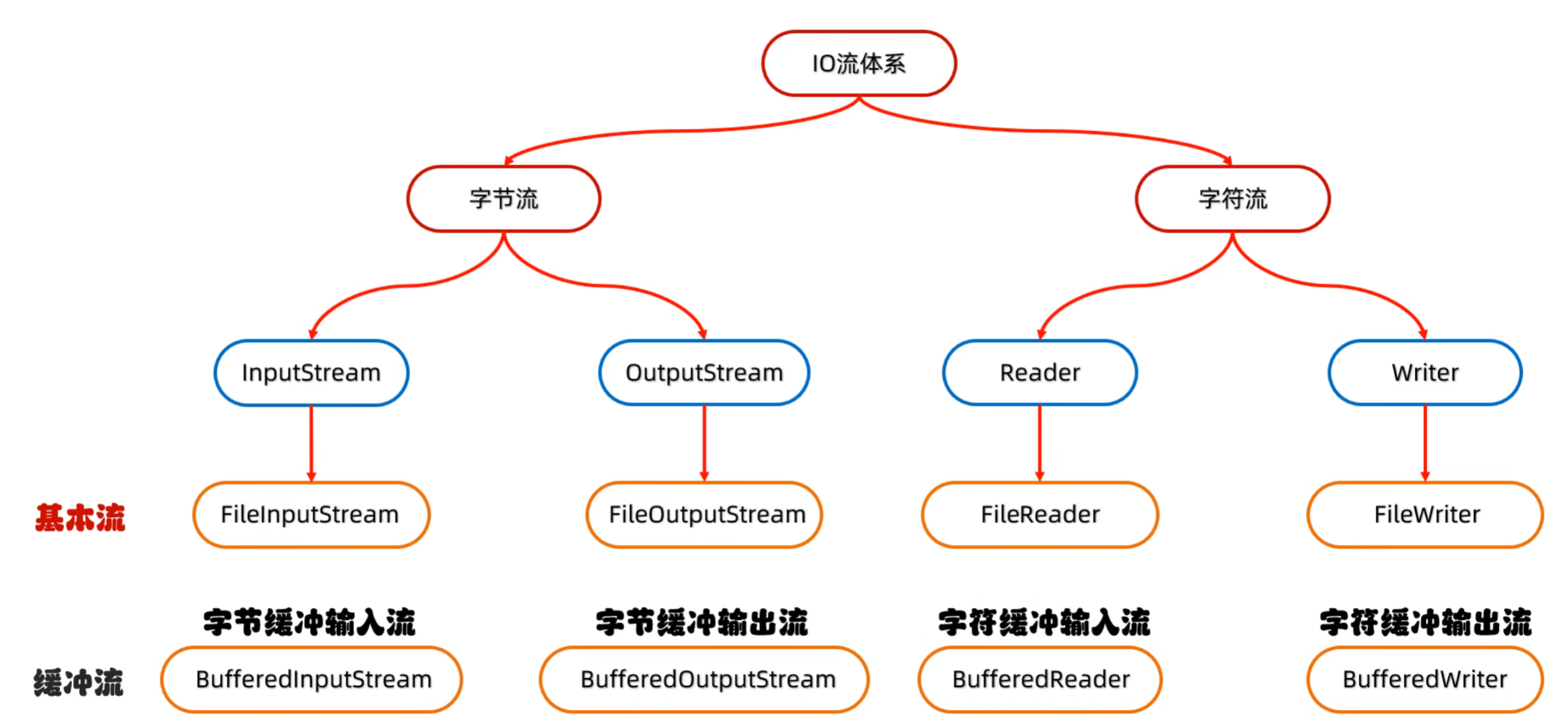
字节流:拷贝任意类型的文件
字符流:读取和写入纯文本文件的数据
框架
夺命五连问:
字节输出流与字节输入流
字节输出流写出数据的三种方式:

        //创建对象
        //细节1:参数是字符串表示的路径或者File对象都是可以的
        //细节2:如果文件不存在会创建一个新的文件,单要确保父级路径是存在的
        //细节3:如果文件已经存在,则会清空文件
        FileOutputStream fos1 = new FileOutputStream("F:\\aaa\\a.txt");
        //写出数据
        //write方法参数是整数,但实际写到本地文件中的是整数在ASCII码表中对应的字符
        fos1.write(97);
        //释放资源
        //每次使用流后都要释放资源
        fos1.close();

        FileOutputStream fos2 = new FileOutputStream("F:\\aaa\\a.txt");
        byte[] b1 = {97,98,99,100};
        fos2.write(b1);
        fos2.close();

        FileOutputStream fos3 = new FileOutputStream("F:\\aaa\\a.txt");
        byte[] b2 = {97,98,99,100};
        fos3.write(b2,1,2);
        fos3.close();


        //换行写
        //补写一个换行符即可
        //Windows:\r\n
        //Linux:\n
        //Mac:/r
        FileOutputStream fos4 = new FileOutputStream("F:\\aaa\\a.txt");
        String by1 = "jyzpsz";
        byte[] bytes1 = by1.getBytes();
        fos4.write(bytes1);

        String te = "\r\n";
        byte[] byt = te.getBytes();
        fos4.write(byt);

        String by2 = "1314";
        byte[] bytes2 = by2.getBytes();
        fos4.write(bytes2);
        fos4.close();

        //续写
        //如果想要续写,打开续写开关即可
        //续写开关是FileOutputStream的第二个参数,true则为开启续写
        FileOutputStream fos5 = new FileOutputStream("F:\\aaa\\a.txt",true);
        String by3 = "999";
        byte[] bytes3 = by3.getBytes();
        fos5.write(bytes3);
        fos5.close();
字节输入流读取数据:
        FileInputStream fis = new FileInputStream("F:\\aaa\\a.txt");
        int b;
        //为什么要定义变量??
        //read表示读取数据,并且每读取一个数据就移动一次光标(向后移动一位)
        while((b = fis.read()) != -1){
            System.out.println((char)b);
        }
        fis.close();
文件拷贝

        FileInputStream fis = new FileInputStream("被拷贝文件");
        FileOutputStream fos = new FileOutputStream("拷贝后文件");

        int b;
        while((b = fis.read()) != -1){
            fos.write(b);
        }

        fos.close();
        fis.close();
FileInputStream fis = new FileInputStream("");
FileOutputStream fos = new FileOutputStream("");
//一次读取一个字节数组
int len;
byte[] by = new byte[1024*1024*5];
while((len = fis.read(by)) != -1){
fos.write(by,0,len);
}
fos.close();
fis.close();字符流
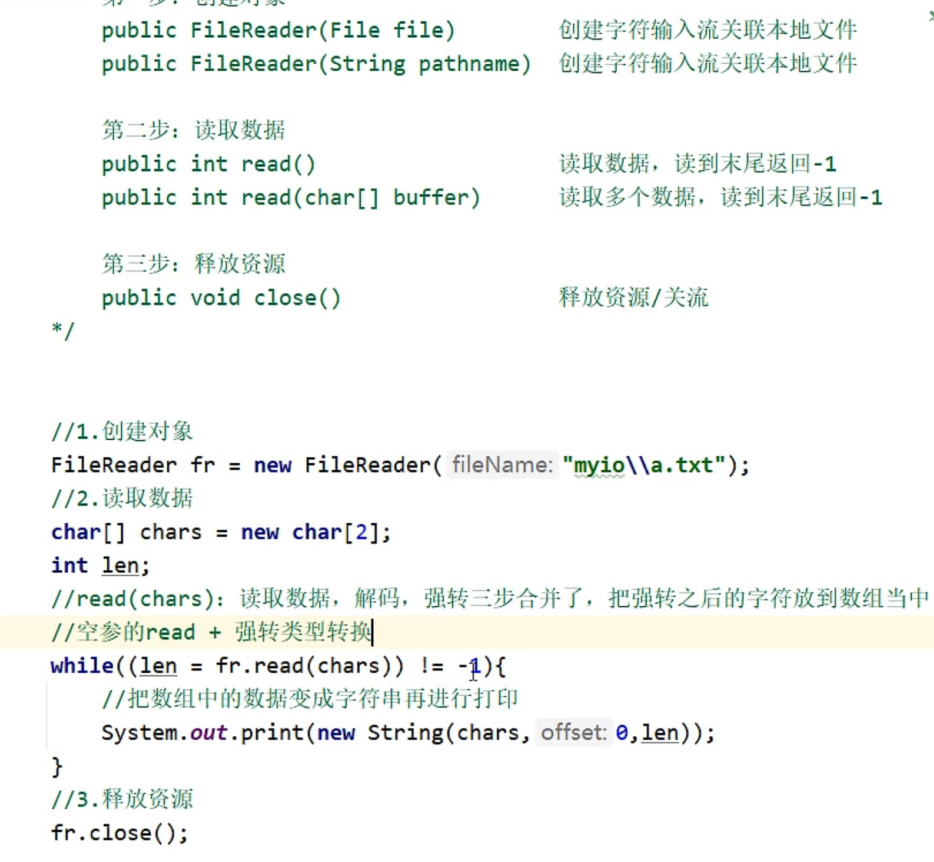
FileReader里的构造方法

FileReader里的成员方法

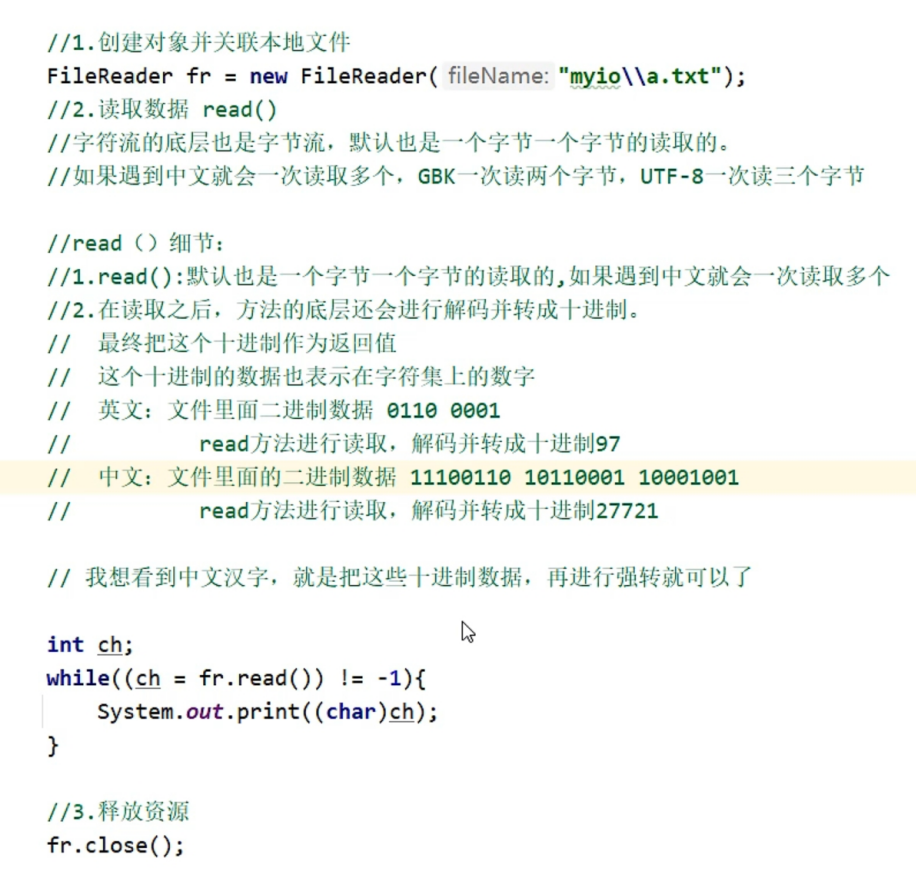
利用FileReader去创建并关联文本文件
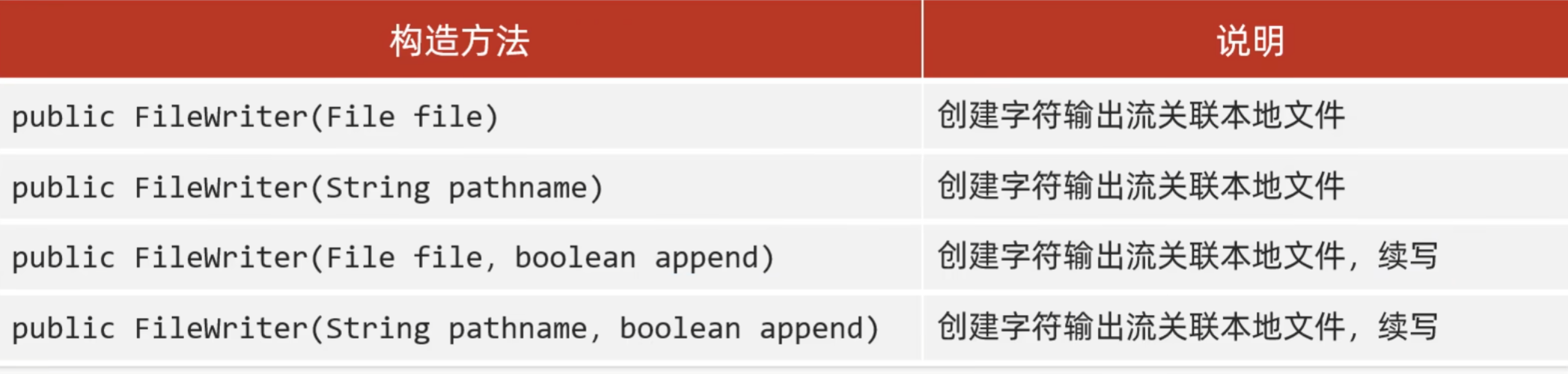
FileWriter里的构造方法:
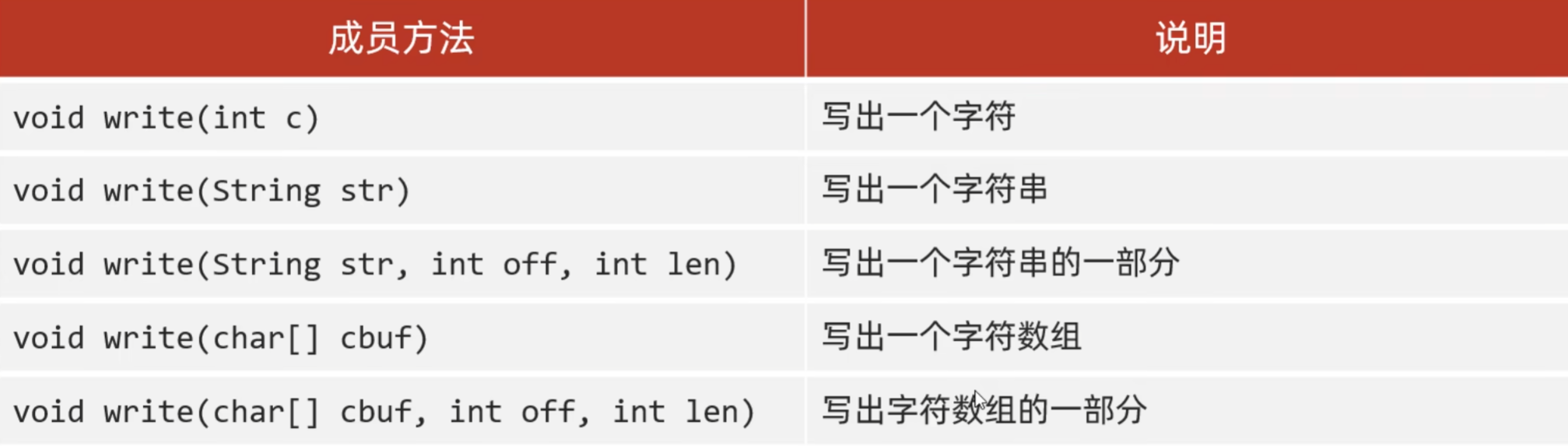
FileWriter里的成员方法:
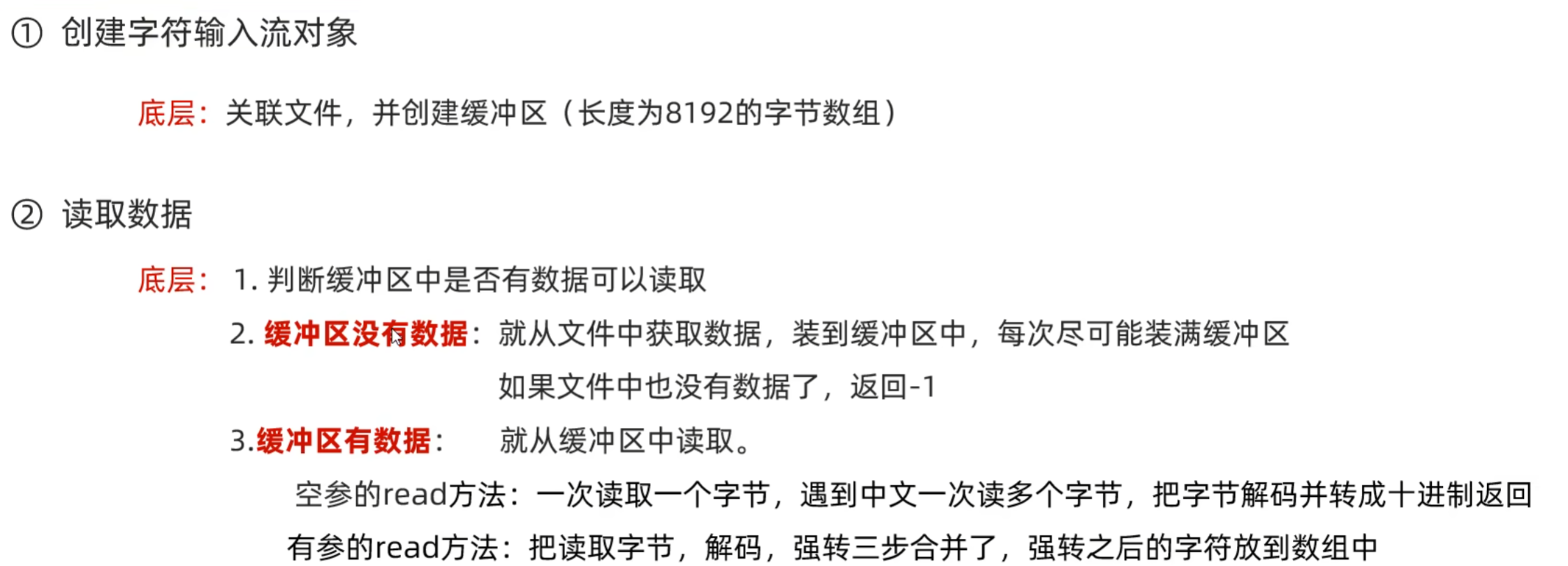
字符流原理解析
字符输入流
输出的数据会先进入缓冲区,不会直接保存到目的地
保存到目的地的三种方式:
1. 缓冲区装满了(会自动将缓冲区的8192个字节保存到目的地);
2. 调用flash方法进行手动刷新(将缓冲区的数据保存到目的地);
3. 关流(关流前会检查缓冲区内有没有数据,有的话就会全部保存至目的地)
综合练习
(将文件中的2-9-1-5-3进行排序为1-2-3-5-9)
常规方法
        //读取文件
        FileReader fr = new FileReader("F:\\aaa\\a.txt");
        StringBuilder sb = new StringBuilder();
        int t;
        while((t = fr.read()) != -1){
            sb.append((char)t);
        }

        String str = sb.toString();
        String[] arrstr = str.split("-");

        ArrayList list = new ArrayList();
        for (String s : arrstr) {
            int i = Integer.parseInt(s);
            list.add(i);
        }
        fr.close();

        //排序
        Collections.sort(list);

        //写入数据
        FileWriter fw = new FileWriter("F:\\aaa\\a.txt");
        for (int i = 0; i < list.size(); i++) {
            if(i == list.size()-1){
                fw.write(list.get(i) + "");
            }else{
                fw.write(list.get(i) + "-");
            }
        }
        fw.close();
利用之前所学Stream流
        //读取文件
        FileReader fr = new FileReader("F:\\aaa\\a.txt");
        StringBuilder sb = new StringBuilder();
        int t;
        while((t = fr.read()) != -1){
            sb.append((char)t);
        }
        fr.close();

        //排序
        Integer[] array = Arrays.stream(sb.toString()
                .split("-"))
                .map(Integer::parseInt)
                .sorted()
                .toArray(Integer[]::new);

        //写入数据
        FileWriter fw = new FileWriter("F:\\aaa\\a.txt");
        String replace = Arrays.toString(array).replace(", ", "-");
        String substring = replace.substring(1, replace.length() - 1);
        fw.write(substring);
        fw.close();
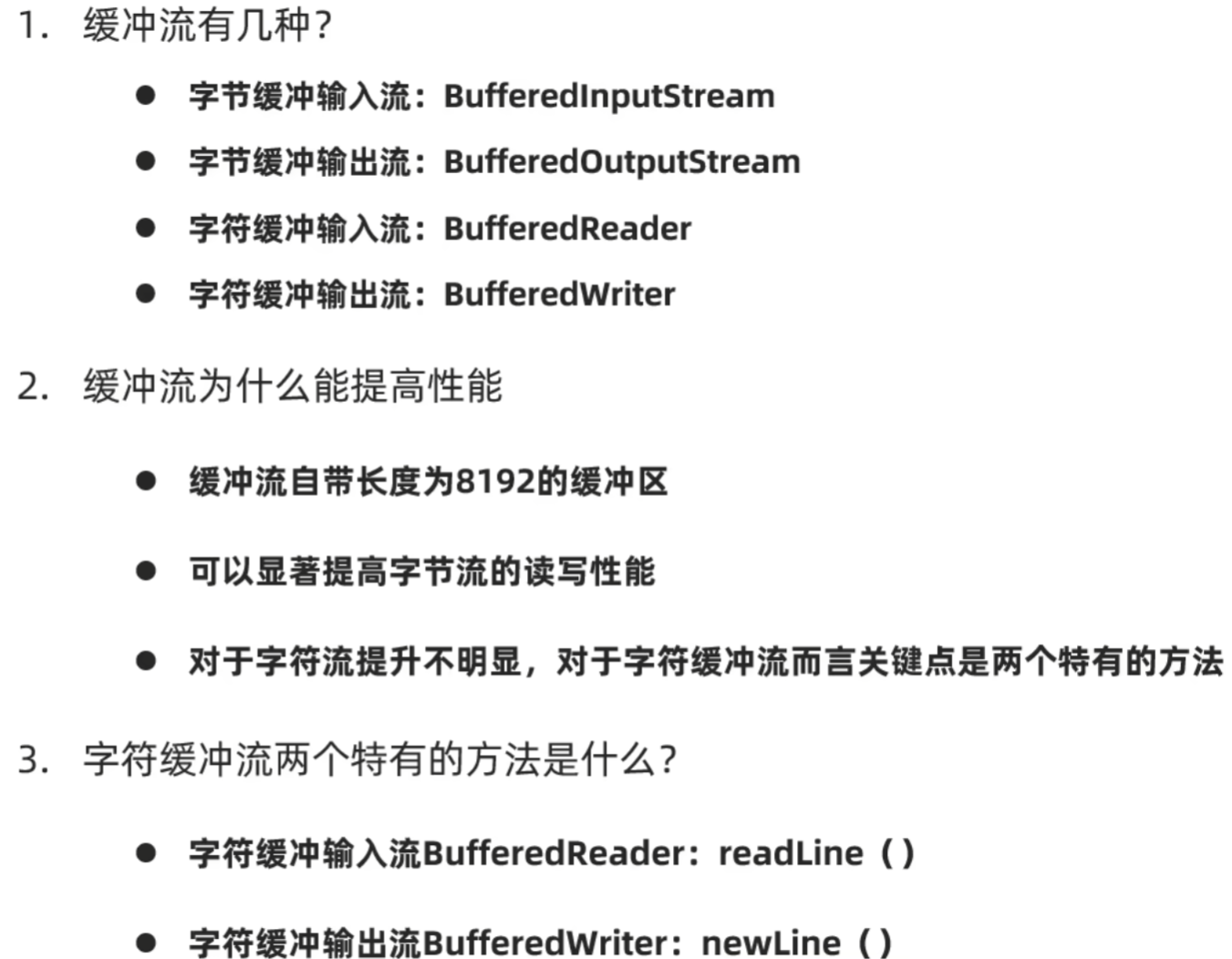
缓冲流
在底层创建一个8192的缓冲区增强效率
字节缓冲流

字符缓冲流

字符缓冲流中的特有方法

细节:readLine在读取数据一次读取一行,遇到回车换行结束,但不会将换行符读入内存

小结
综合练习:
(拷贝+排序)
常规方法
        //读取
        BufferedReader br = new BufferedReader(new FileReader("a.txt"));
        ArrayList<String> list = new ArrayList<>();
        String str;
        while((str = br.readLine()) != null){
            list.add(str);
        }
        br.close();
        //排序
        Collections.sort(list, new Comparator<String>() {
            @Override
            public int compare(String o1, String o2) {
                return Integer.parseInt(o1.split("\\.")[0]) - Integer.parseInt(o2.split("\\.")[0]);
            }
        });
        //写入
        BufferedWriter bw = new BufferedWriter(new FileWriter("b.txt"));
        for (String s : list) {
            bw.write(s);
            bw.newLine();
        }
        bw.close();
TreeMap优化
        //读取数据
        BufferedReader br = new BufferedReader(new FileReader("a.txt"));
        TreeMap<Integer,String> tm = new TreeMap();
        String str;
        while((str = br.readLine()) != null){
            tm.put(Integer.parseInt(str.split("\\.")[0]),str);
        }
        br.close();

        //写入数据
        BufferedWriter bw = new BufferedWriter(new FileWriter("b.txt"));
        Set<Map.Entry<Integer, String>> entries = tm.entrySet();
        for (Map.Entry<Integer, String> entry : entries) {
            String value = entry.getValue();
            bw.write(value);
            bw.newLine();
        }
        bw.close();
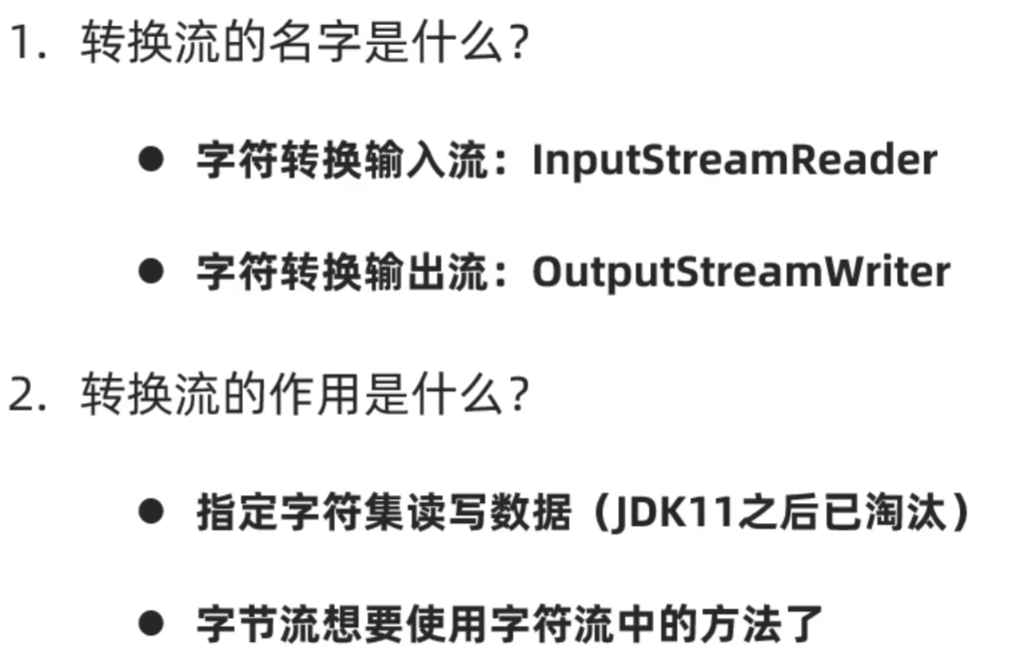
转换流(字符流的一种)
(对字节流和字符流进行转换,从而可以使用其方法)
例:将GBK文件拷贝并转成UTF-8
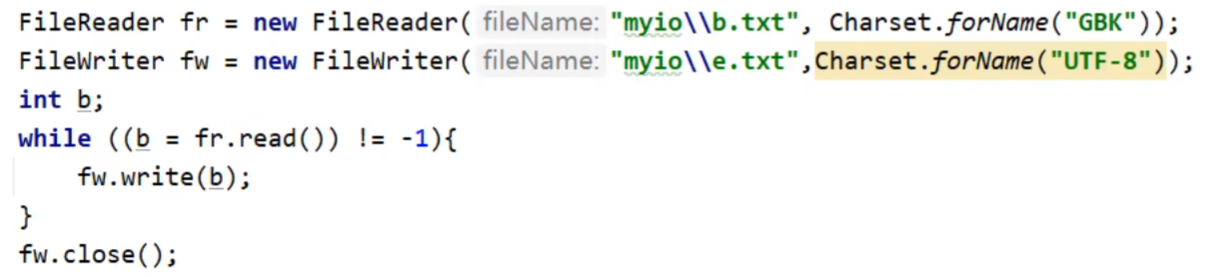
例:将字节流转为字符流再转为缓冲流,从而可以进行一整行读取,并且不会乱码

小结:
序列化流(字节流的一种)
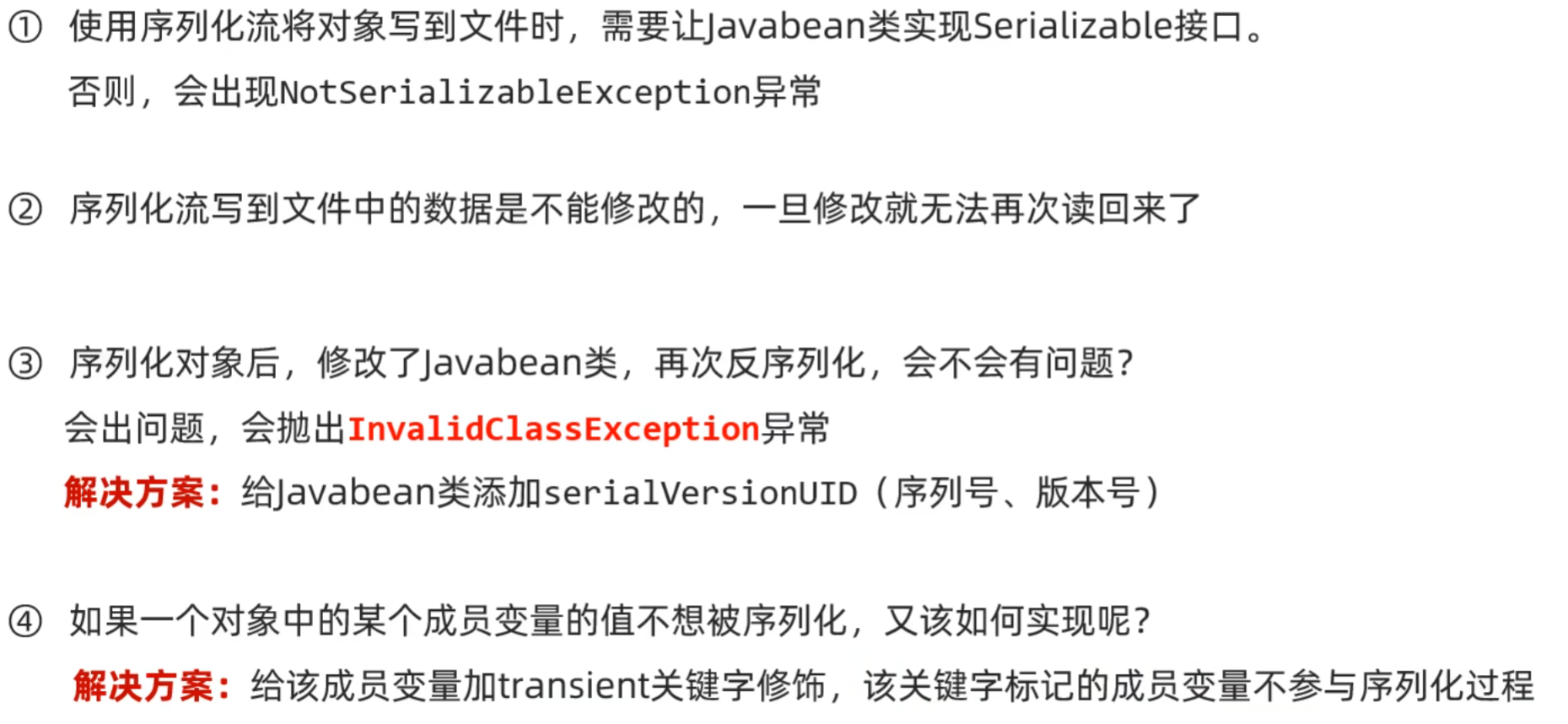
前提:实现serializable接口(标记型接口,代表这个类可以去进行序列化)
把Java中的对象写到文件当中


反序列化流
把序列化到本地的文件中的对象,读取到程序中


添加序列号:
private static final long serialVersionUID = -1469498933539678149L;
序列化流和反序列化流的小细节
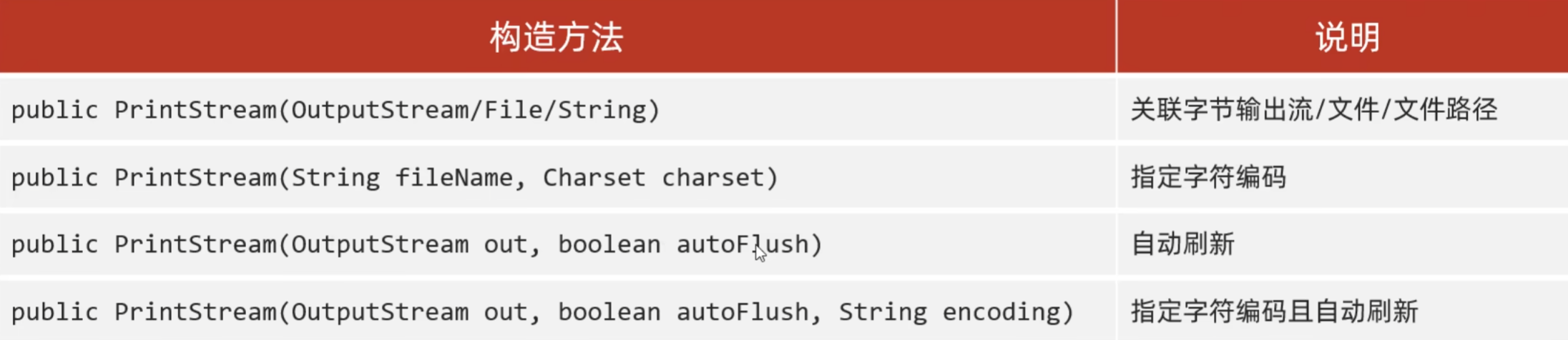
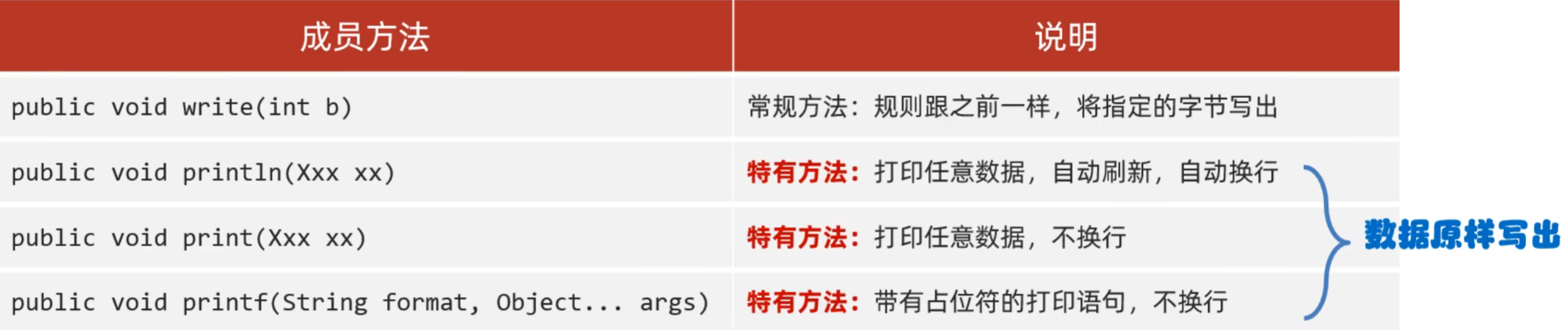
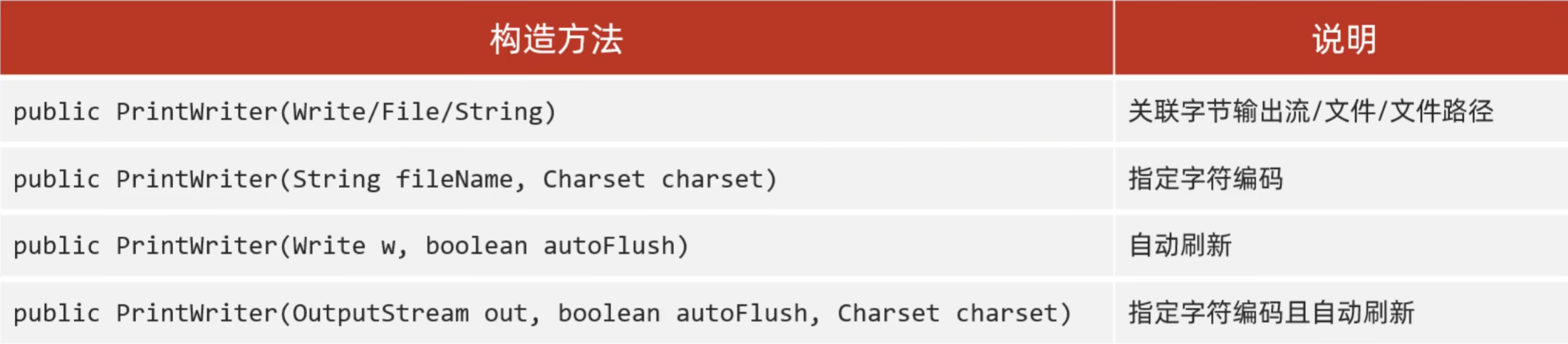
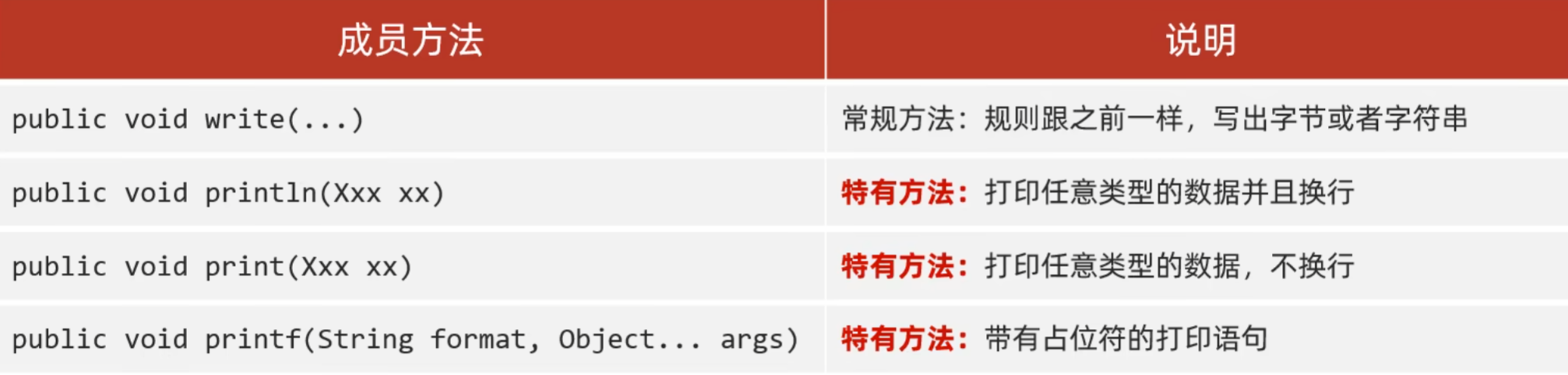
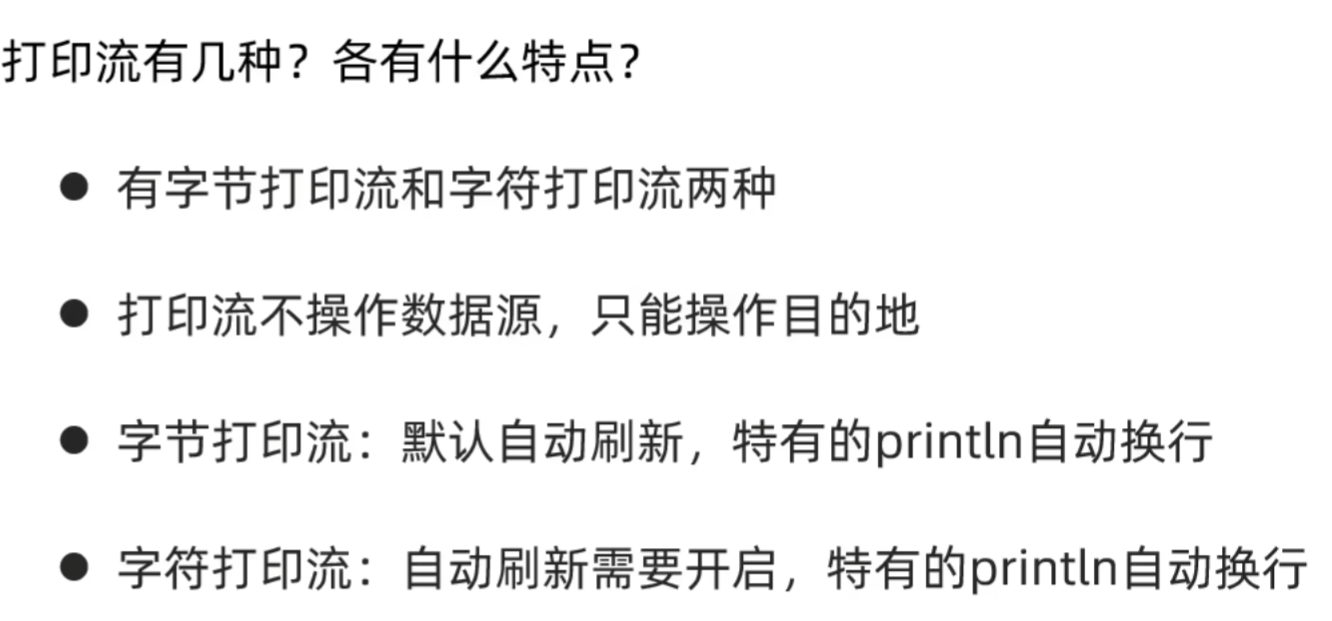
打印流(输出流的一种)(不能读,只能写)
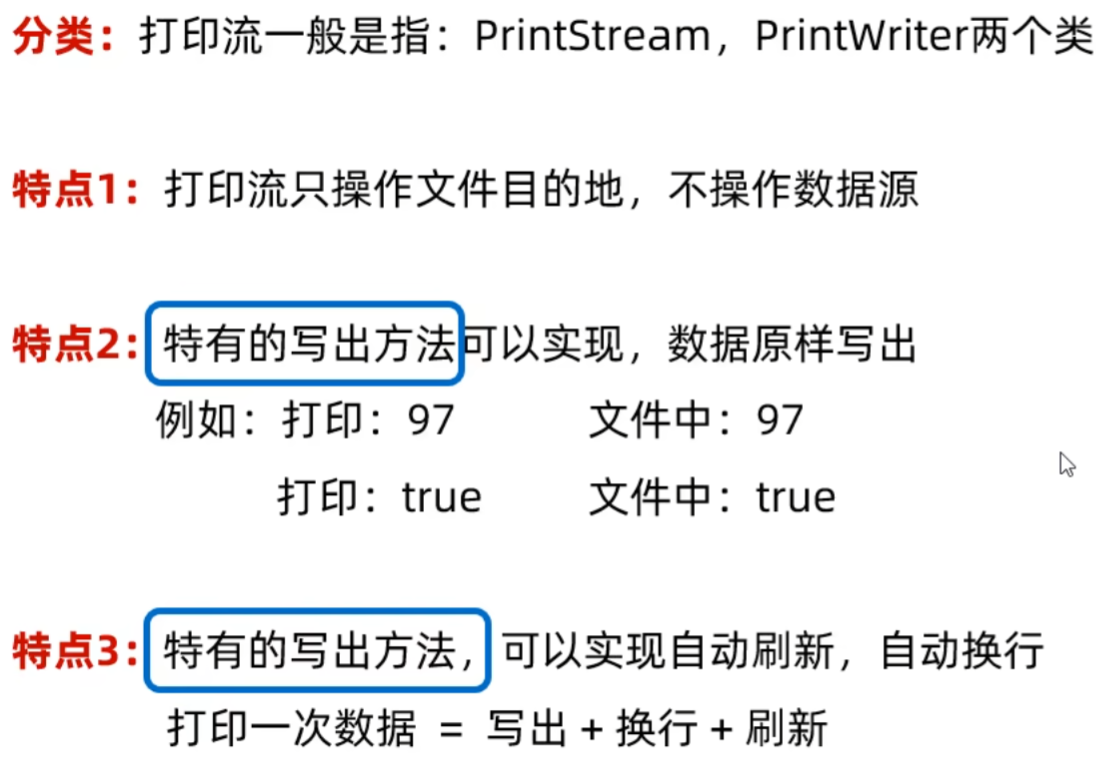
字节打印流
字符打印流
小结
解压缩流(字节流的一种)
解压缩流
    public static void unzip(File f1,File f2) throws IOException {
        //读取zip压缩文件
        ZipInputStream zis = new ZipInputStream(new FileInputStream(f1));

        ZipEntry zipEntry;
        while((zipEntry = zis.getNextEntry()) != null){
            //判断当前读取的是文件还是文件夹
            if(zipEntry.isDirectory()){
                //文件夹,创建一个文件夹
                File f = new File(f2,zipEntry.toString());
                f.mkdir();

            }else{
                //文件,拷贝转移
                FileOutputStream fos = new FileOutputStream(new File(f2,zipEntry.toString()));
                int ze;
                while((ze = zis.read()) != -1){
                    fos.write(ze);
                }
                fos.close();
                zis.closeEntry();
            }
        }
        zis.close();
    }
压缩流
拷贝单个文件或文件夹
public static void toZip(File f1,File f2) throws IOException {
        //创建压缩流关联压缩包
        ZipOutputStream zos = new ZipOutputStream(new FileOutputStream(new File(f2,"a.zip")));
        //创建ZipEntry对象,表示压缩包里面的每一个文件或文件夹
        ZipEntry ze = new ZipEntry("a.txt");
        //把ZipEntry对象放到压缩包中
        zos.putNextEntry(ze);

        FileInputStream fis = new FileInputStream(f1);
        int b;
        while((b = fis.read()) != -1){
            zos.write(b);
        }
        zos.closeEntry();
        zos.close();
    }
拷贝一整个文件夹
public class Zip_demo3 {
    static void main() throws IOException {
        //创建File对象表示要进行压缩的文件夹
        File f1 = new File("F:\\aaa");
        //创建File对象表示压缩包放在哪里(父级路径)
        File f1Parent = f1.getParentFile(); //F:\\
        //创建File对象表示压缩包的路径
        File f2 = new File(f1Parent,f1.getName()+".zip");
        //创建压缩流关联压缩包
        ZipOutputStream zos = new ZipOutputStream(new FileOutputStream(f2));
        //获取到f1里的每一个对象,变成ZipEntry对象,再放到压缩包当中
        totxt(f1,zos,f1.getName());
        //释放资源
        zos.close();
    }


    /*
    * 作用://获取到f1里的每一个对象,变成ZipEntry对象,再放到压缩包当中
    * 参数一:数据源
    * 参数二:压缩流
    * 参数三:压缩包内部的路径
    */
    public static void totxt(File f1, ZipOutputStream zos, String name) throws IOException {
        //获取数据源内的每一个对象
        File[] files = f1.listFiles();
        //进行遍历
        for (File file : files) {
            if(file.isFile()){
                //文件,变成ZipEntry对象,放到压缩包当中
                ZipEntry ze = new ZipEntry(name + "\\" + file.getName());
                zos.putNextEntry(ze);
                //读取数据,写到压缩包
                FileInputStream fis = new FileInputStream(file);
                int b;
                while((b = fis.read()) != -1){
                    zos.write(b);
                }
                fis.close();
                zos.closeEntry();

            }else{
                //文件夹,递归
                totxt(file,zos,name + "\\" + file.getName());
            }
        }

    }
}
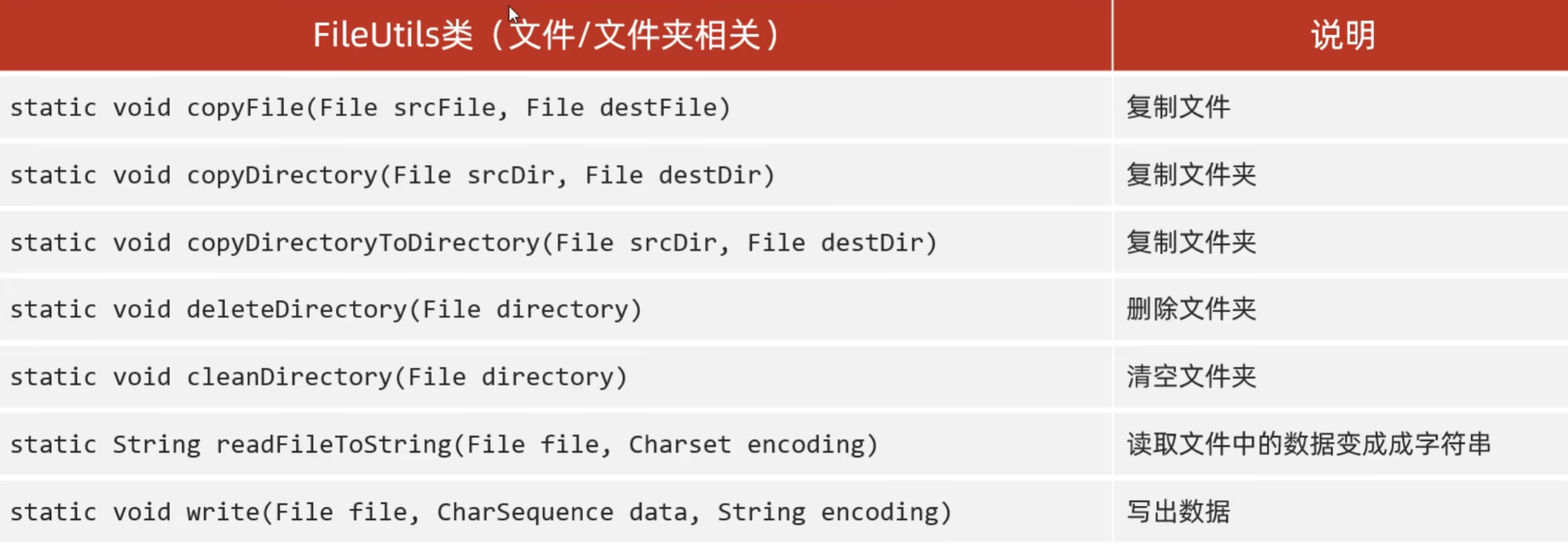
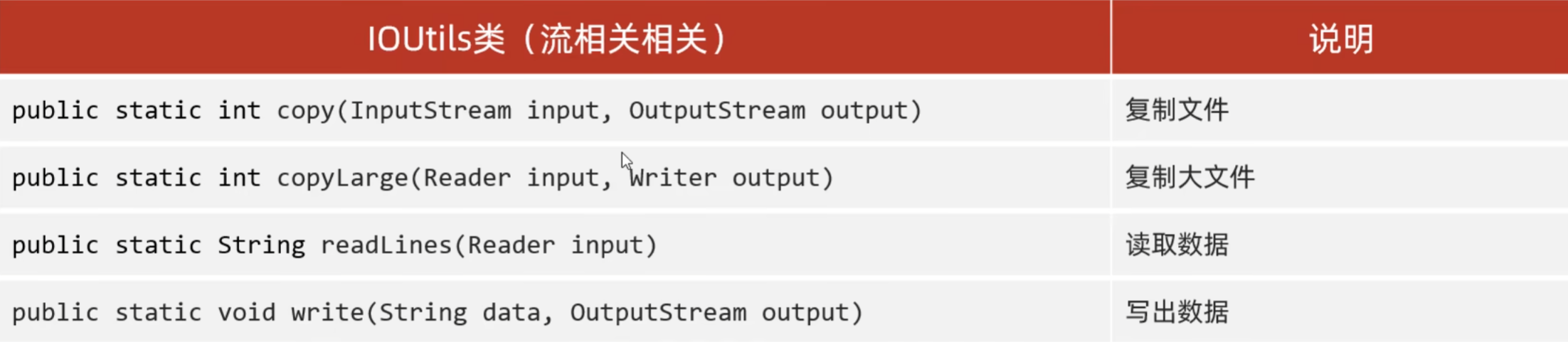
Commons-io(第三方工具类)
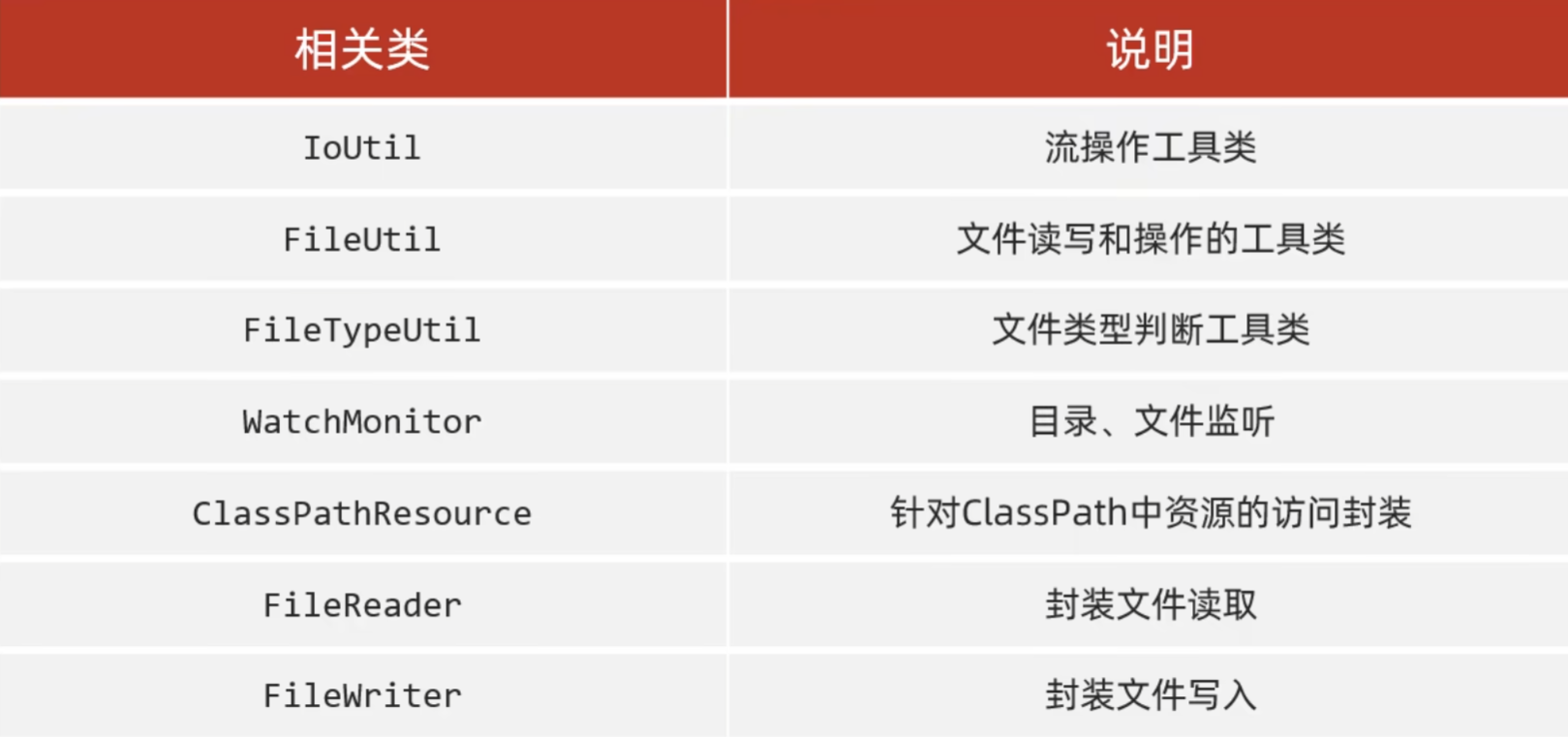
Hutool工具包
总结:(区分)
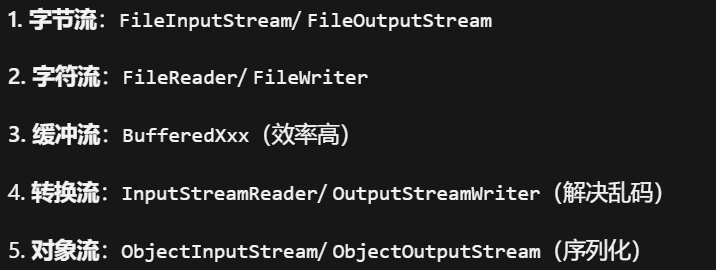
今天的内容比较多,也非常难记,但不必担心,虽然学习的路上布满荆棘,但我们终将迎来光明,好啦,本期的学习就到此结束啦,我们下次见!!!

汇聚全球AI编程工具,助力开发者即刻编程。
更多推荐


 15
15 0
0- 0


 已为社区贡献7条内容

所有评论(0)