
MySQL 8.0.43最大连接数沾满测试案例,通过管理端口和sock文件登录数据库抢救
MySQL 8.0.43最大连接数沾满测试案例
通过管理端口登录
概述:
模拟设置数据库最大连接为5,测试数据库管理端口是否可以在连接数沾满的情况下,连接数据库进行抢救。
管理端口(admin_port)是 MySQL 8.0.14 才开始引入的新功能。
查看管理端口信息
show global variables like ‘admin%’;
提前设置好数据库管理端口
admin_address = 127.0.0.1    # 建议只绑本机,更安全
admin_port = 33062           # 自定义端口,默认33062
create_admin_listener_thread = ON  # 建议开启独立监听线程
测试中发现当当连接数到了5个的时候,再次发起连接失败了。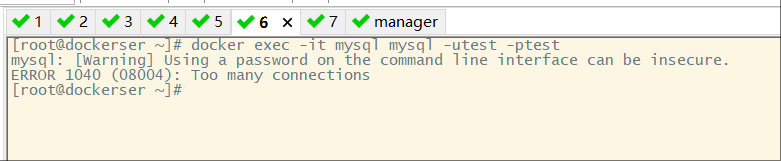
mysql> show full processlist;
+----+------+-----------+------+---------+------+-------+-----------------------+
| Id | User | Host      | db   | Command | Time | State | Info                  |
+----+------+-----------+------+---------+------+-------+-----------------------+
| 33 | test | localhost | NULL | Query   |    0 | init  | show full processlist |
| 34 | test | localhost | NULL | Sleep   |   48 |       | NULL                  |
| 35 | test | localhost | NULL | Sleep   |   46 |       | NULL                  |
| 36 | test | localhost | NULL | Sleep   |   44 |       | NULL                  |
| 37 | test | localhost | NULL | Sleep   |   41 |       | NULL                  |
+----+------+-----------+------+---------+------+-------+-----------------------+
5 rows in set, 1 warning (0.00 sec)

mysql> show variables like 'max_connections';
+-----------------+-------+
| Variable_name   | Value |
+-----------------+-------+
| max_connections | 5     |
+-----------------+-------+
1 row in set (0.01 sec)

mysql>
查看当前连接数正好是5
mysql> SHOW STATUS LIKE 'Threads_connected';
+-------------------+-------+
| Variable_name     | Value |
+-------------------+-------+
| Threads_connected | 5     |
+-------------------+-------+
1 row in set (0.00 sec)

mysql>
管理端口登录
修改登录方式:
docker exec -it mysql mysql -uroot -proot -h 127.0.0.1 --port=33062
docker exec -it mysql mysql -uroot -proot -h 127.0.0.1 --port=33062 --protocol=TCP
[root@dockerser conf.d]# docker exec -it mysql mysql -uroot -proot --port=33062
mysql: [Warning] Using a password on the command line interface can be insecure.
ERROR 1040 (HY000): Too many connections
[root@dockerser conf.d]# docker exec -it mysql mysql -uroot -proot -h 127.0.0.1 --port=33062
mysql: [Warning] Using a password on the command line interface can be insecure.
Welcome to the MySQL monitor.  Commands end with ; or \g.
Your MySQL connection id is 16
Server version: 8.0.43 MySQL Community Server - GPL

Copyright (c) 2000, 2025, Oracle and/or its affiliates.

Oracle is a registered trademark of Oracle Corporation and/or its
affiliates. Other names may be trademarks of their respective
owners.

Type 'help;' or '\h' for help. Type '\c' to clear the current input statement.

mysql>
mysql>
mysql> exit
Bye
[root@dockerser conf.d]# docker exec -it mysql mysql -uroot -proot -h 127.0.0.1 --port=33062 --protocol=TCP
mysql: [Warning] Using a password on the command line interface can be insecure.
Welcome to the MySQL monitor.  Commands end with ; or \g.
Your MySQL connection id is 17
Server version: 8.0.43 MySQL Community Server - GPL

Copyright (c) 2000, 2025, Oracle and/or its affiliates.

Oracle is a registered trademark of Oracle Corporation and/or its
affiliates. Other names may be trademarks of their respective
owners.

Type 'help;' or '\h' for help. Type '\c' to clear the current input statement.

mysql>
此时使用普通用户再次查看连接数信息, show full processlist;查看到的是5个会话,SHOW STATUS LIKE ‘Threads_connected’;当前连接数可以看到增加了一个会话。
mysql> show full processlist;
+----+------+-----------+------+---------+------+-------+-----------------------+
| Id | User | Host      | db   | Command | Time | State | Info                  |
+----+------+-----------+------+---------+------+-------+-----------------------+
| 33 | test | localhost | NULL | Query   |    0 | init  | show full processlist |
| 34 | test | localhost | NULL | Sleep   |  408 |       | NULL                  |
| 35 | test | localhost | NULL | Sleep   |  406 |       | NULL                  |
| 36 | test | localhost | NULL | Sleep   |  404 |       | NULL                  |
| 37 | test | localhost | NULL | Sleep   |  401 |       | NULL                  |
+----+------+-----------+------+---------+------+-------+-----------------------+
5 rows in set, 1 warning (0.00 sec)

mysql>
mysql>
mysql> SHOW STATUS LIKE 'Threads_connected';
+-------------------+-------+
| Variable_name     | Value |
+-------------------+-------+
| Threads_connected | 6     |
+-------------------+-------+
1 row in set (0.00 sec)

mysql>
mysql> select current_user();
+----------------+
| current_user() |
+----------------+
| test@%         |
+----------------+
1 row in set (0.00 sec)

mysql>
root用户通过管理端口登录查看的会话信息
[root@dockerser ~]# docker exec -it mysql mysql -uroot -proot -P33062
mysql: [Warning] Using a password on the command line interface can be insecure.
Welcome to the MySQL monitor.  Commands end with ; or \g.
Your MySQL connection id is 41
Server version: 8.0.43 MySQL Community Server - GPL

Copyright (c) 2000, 2025, Oracle and/or its affiliates.

Oracle is a registered trademark of Oracle Corporation and/or its
affiliates. Other names may be trademarks of their respective
owners.

Type 'help;' or '\h' for help. Type '\c' to clear the current input statement.

mysql> show full processlist;
+----+-----------------+-----------+------+---------+------+------------------------+-----------------------+
| Id | User            | Host      | db   | Command | Time | State                  | Info                  |
+----+-----------------+-----------+------+---------+------+------------------------+-----------------------+
|  5 | event_scheduler | localhost | NULL | Daemon  | 2072 | Waiting on empty queue | NULL                  |
| 33 | test            | localhost | NULL | Sleep   |   69 |                        | NULL                  |
| 34 | test            | localhost | NULL | Sleep   |  513 |                        | NULL                  |
| 35 | test            | localhost | NULL | Sleep   |  511 |                        | NULL                  |
| 36 | test            | localhost | NULL | Sleep   |  509 |                        | NULL                  |
| 37 | test            | localhost | NULL | Sleep   |  506 |                        | NULL                  |
| 41 | root            | localhost | NULL | Query   |    0 | init                   | show full processlist |
+----+-----------------+-----------+------+---------+------+------------------------+-----------------------+
7 rows in set, 1 warning (0.00 sec)

mysql> SHOW STATUS LIKE 'Threads_connected';
+-------------------+-------+
| Variable_name     | Value |
+-------------------+-------+
| Threads_connected | 6     |
+-------------------+-------+
1 row in set (0.00 sec)

mysql> select current_user();
+----------------+
| current_user() |
+----------------+
| root@localhost |
+----------------+
1 row in set (0.00 sec)

mysql>
通过sock文件跳过连接数限制登录
mysql -uroot -p -S /var/lib/mysql/mysql.sock
-S / --socket:强制走本地套接字,不走 TCP 网络
bash-5.1# mysql -uroot -p -S /var/lib/mysql/mysql.sock
Enter password:
ERROR 1045 (28000): Access denied for user 'root'@'localhost' (using password: YES)
bash-5.1#
bash-5.1# mysql -uroot -proot -S /var/lib/mysql/mysql.sock
mysql: [Warning] Using a password on the command line interface can be insecure.
Welcome to the MySQL monitor.  Commands end with ; or \g.
Your MySQL connection id is 43
Server version: 8.0.43 MySQL Community Server - GPL

Copyright (c) 2000, 2025, Oracle and/or its affiliates.

Oracle is a registered trademark of Oracle Corporation and/or its
affiliates. Other names may be trademarks of their respective
owners.

Type 'help;' or '\h' for help. Type '\c' to clear the current input statement.

mysql>

mysql> SHOW STATUS LIKE 'Threads_connected';
+-------------------+-------+
| Variable_name     | Value |
+-------------------+-------+
| Threads_connected | 6     |
+-------------------+-------+
1 row in set (0.00 sec)

mysql>
KILL会话
当通过以上方式紧急登录数据库之后,可以决定杀掉一些会话或者是临时增加最大连接数
select concat('kill ',id,';') from information_schema.processlist where command='Sleep' and time>30 and user='test';

set global max_connections=1000;
event_scheduler 会话研究
event_scheduler 不是真正的用户,而是MySQL内部的一个后台线程,负责执行定时任务(事件调度器)。
而且只有root用户登录可以看到,普通用户看不到。
mysql> show full processlist;
+----+-----------------+-----------+------+---------+------+------------------------+-----------------------+
| Id | User            | Host      | db   | Command | Time | State                  | Info                  |
+----+-----------------+-----------+------+---------+------+------------------------+-----------------------+
|  5 | event_scheduler | localhost | NULL | Daemon  | 1036 | Waiting on empty queue | NULL                  |
| 30 | root            | localhost | NULL | Query   |    0 | init                   | show full processlist |
+----+-----------------+-----------+------+---------+------+------------------------+-----------------------+
2 rows in set, 1 warning (0.00 sec)

mysql> select current_user();
+----------------+
| current_user() |
+----------------+
| root@localhost |
+----------------+
1 row in set (0.00 sec)

----

mysql> show full processlist;
+----+------+-----------+------+---------+------+-------+-----------------------+
| Id | User | Host      | db   | Command | Time | State | Info                  |
+----+------+-----------+------+---------+------+-------+-----------------------+
| 31 | test | localhost | NULL | Query   |    0 | init  | show full processlist |
+----+------+-----------+------+---------+------+-------+-----------------------+
1 row in set, 1 warning (0.00 sec)

mysql> select current_user();
+----------------+
| current_user() |
+----------------+
| test@%         |
+----------------+
1 row in set (0.00 sec)
Command = Daemon:表示这是一个守护进程线程
State = Waiting on empty queue:表示没有定时任务需要执行,正在等待
Time = 1036:已经运行了1036秒
但是从实际看这个线程并不占用连接数,查看当前的连接数情况。
当前发起了一个连接。
mysql>  SHOW STATUS LIKE 'Threads_connected';
+-------------------+-------+
| Variable_name     | Value |
+-------------------+-------+
| Threads_connected | 1     |  <<<<<<<<<<<<<<<<<<<<
+-------------------+-------+
1 row in set (0.00 sec)

mysql> show full processlist;
+----+-----------------+-----------+------+---------+------+------------------------+-----------------------+
| Id | User            | Host      | db   | Command | Time | State                  | Info                  |
+----+-----------------+-----------+------+---------+------+------------------------+-----------------------+
|  5 | event_scheduler | localhost | NULL | Daemon  | 1461 | Waiting on empty queue | NULL                  |
| 32 | root            | localhost | NULL | Query   |    0 | init                   | show full processlist |
+----+-----------------+-----------+------+---------+------+------------------------+-----------------------+
2 rows in set, 1 warning (0.00 sec)

汇聚全球AI编程工具,助力开发者即刻编程。
更多推荐
 1
1 0
0- 0


 已为社区贡献5条内容

所有评论(0)