
Kubernetes--note2-pod管理
·
一、简介
在k8s中,所有内容都抽象为资源,通过操作资源来管理k8s
最小管理单元是pod,容器放在pod中
一般通过pod控制器来管理pod
pod中的服务的访问由service实现
数据持久化通过存储系统实现
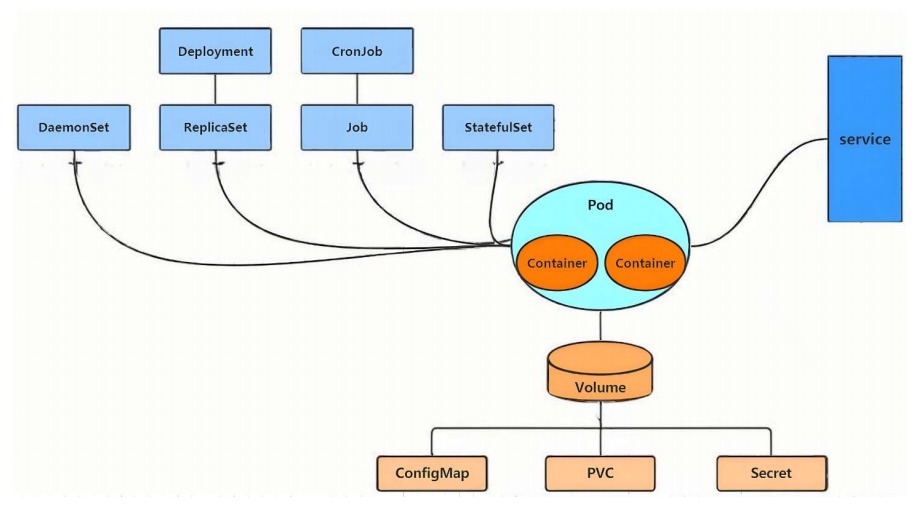
二、资源使用的方法
1.命令式
[root@master ~]# kubectl run  webpod --image nginx:latest --port 80

[root@master ~]# kubectl get pods
webpod   1/1     Running   0          33s

[root@master ~]# kubectl describe pods webpod
Name:             webpod
Namespace:        default
Priority:         0
Service Account:  default
Node:             node2/172.25.254.20
Start Time:       Sun, 29 Mar 2026 10:18:15 +0800
Labels:           run=webpod
Annotations:      <none>
Status:           Running
IP:               10.244.2.2
IPs:
  IP:  10.244.2.2
Containers:
  webpod:
    Container ID:   docker://688436b733ca8843f6946814f78bf59f865877081820ca43dda1c33f409ac10d
    Image:          nginx:latest
    Image ID:       docker-pullable://nginx@sha256:127262f8c4c716652d0e7863bba3b8c45bc9214a57d13786c854272102f7c945
    Port:           80/TCP
    Host Port:      0/TCP
    State:          Running
      Started:      Sun, 29 Mar 2026 10:18:30 +0800
    Ready:          True
    Restart Count:  0
    Environment:    <none>
    Mounts:
      /var/run/secrets/kubernetes.io/serviceaccount from kube-api-access-nt87d (ro)
Conditions:
  Type                        Status
  PodReadyToStartContainers   True
  Initialized                 True
  Ready                       True
  ContainersReady             True
  PodScheduled                True
Volumes:
  kube-api-access-nt87d:
    Type:                    Projected (a volume that contains injected data from multiple sources)
    TokenExpirationSeconds:  3607
    ConfigMapName:           kube-root-ca.crt
    Optional:                false
    DownwardAPI:             true
QoS Class:                   BestEffort
Node-Selectors:              <none>
Tolerations:                 node.kubernetes.io/not-ready:NoExecute op=Exists for 300s
                             node.kubernetes.io/unreachable:NoExecute op=Exists for 300s
Events:
  Type    Reason     Age   From               Message
  ----    ------     ----  ----               -------
  Normal  Scheduled  24s   default-scheduler  Successfully assigned default/webpod to node2
  Normal  Pulling    24s   kubelet            spec.containers{webpod}: Pulling image "nginx:latest"
  Normal  Pulled     20s   kubelet            spec.containers{webpod}: Successfully pulled image "nginx:latest" in 3.7s (3.7s including waiting). Image size: 187694648 bytes.
  Normal  Created    9s    kubelet            spec.containers{webpod}: Container created
  Normal  Started    9s    kubelet            spec.containers{webpod}: Container started


[root@master ~]# kubectl get pods  -o wide
NAME     READY   STATUS    RESTARTS   AGE     IP           NODE    NOMINATED NODE   READINESS GATES
webpod   1/1     Running   0          2m46s   10.244.2.2   node2   <none>           <none>

[root@master ~]# kubectl delete pods webpod
pod "webpod" deleted from default namespace
2.yaml文件方式
pod的方式

kubectl run testpod --image nginx:last --port 80 --dry-run=cliennt -o yaml > testpod.yml

控制器的方式
[root@master ~]# kubectl create deployment test --image nginx --replicas 1  --dry-run=client -o yaml  > test.yml
[root@master ~]# vim test.yml
apiVersion: apps/v1
kind: Deployment
metadata:
  labels:
    app: test
  name: test
spec:
  replicas: 1
  selector:
    matchLabels:
      app: test
  template:
    metadata:
      labels:
        app: test
    spec:
      containers:
      - image: nginx
        name: nginx

#建立式
[root@master ~]# kubectl create  -f test.yml
deployment.apps/test created
[root@master ~]# kubectl get pods
NAME                    READY   STATUS    RESTARTS   AGE
test-56848fd9dc-h2sct   1/1     Running   0          8s

[root@master ~]# kubectl delete -f test.yml
deployment.apps "test" deleted from default namespace
[root@master ~]# kubectl get pods
No resources found in default namespace.


#声明式
[root@master ~]# kubectl apply -f test.yml
deployment.apps/test created
[root@master ~]# kubectl get pods
NAME                    READY   STATUS    RESTARTS   AGE
test-56848fd9dc-cxtnp   1/1     Running   0          1s


#注意建立只能建立不能更新,声明可以
[root@master ~]# vim test.yml
apiVersion: apps/v1
kind: Deployment
metadata:
  labels:
    app: test
  name: test
spec:
  replicas: 2			#只修改pod数量
。。。。。。。。。。。。。。。。。。


[root@master ~]# kubectl create  -f test.yml
Error from server (AlreadyExists): error when creating "test.yml": deployments.apps "test" already exists

[root@master ~]# kubectl apply  -f test.yml
deployment.apps/test configured
[root@master ~]# kubectl get pods
NAME                    READY   STATUS    RESTARTS   AGE
test-56848fd9dc-9sw95   1/1     Running   0          8s
test-56848fd9dc-cxtnp   1/1     Running   0          2m42s
三、资源类型
1.node
[root@master ~]# kubectl get nodes NAME STATUS ROLES AGE VERSION master Ready control-plane 18h v1.35.3 node1 Ready <none> 17h v1.35.3 node2 Ready <none> 17h v1.35.3 [root@master ~]# kubeadm token create --print-join-command
重新生成加入集群的凭证(note1集群初始化)
2.namespace
命名空间 = K8s 里的 “文件夹”,用来隔离资源
查看命名空间(namespace)
[root@master ~]# kubectl get namespaces
NAME              STATUS   AGE
default           Active   18h
kube-flannel      Active   17h
kube-node-lease   Active   18h
kube-public       Active   18h
kube-system       Active   18h


查看 default 空间下的 Pod
[root@master ~]# kubectl get pods
NAME                    READY   STATUS    RESTARTS   AGE
test-56848fd9dc-9sw95   1/1     Running   0          25m
test-56848fd9dc-cxtnp   1/1     Running   0          27m

查看 kube-flannel 空间的 Pod
flannel 是集群网络插件
[root@master ~]# kubectl -n kube-flannel get pods
NAME                    READY   STATUS    RESTARTS      AGE
kube-flannel-ds-hc8gt   1/1     Running   1 (17h ago)   17h
kube-flannel-ds-rvzng   1/1     Running   1 (17h ago)   17h
kube-flannel-ds-s29g5   1/1     Running   1 (17h ago)   17h

创建新命名空间 timinglee
[root@master ~]# kubectl create namespace timinglee
namespace/timinglee created

[root@master ~]# kubectl get namespaces
NAME              STATUS   AGE
default           Active   18h
kube-flannel      Active   17h
kube-node-lease   Active   18h
kube-public       Active   18h
kube-system       Active   18h
timinglee         Active   6s


在 timinglee 里创建 Nginx Pod
[root@master ~]# kubectl -n timinglee  run testpod --image  nginx:latest
pod/testpod created
[root@master ~]# kubectl get pods
NAME                    READY   STATUS    RESTARTS   AGE
test-56848fd9dc-9sw95   1/1     Running   0          28m
test-56848fd9dc-cxtnp   1/1     Running   0          30m

[root@master ~]# kubectl -n timinglee  get pods
NAME      READY   STATUS    RESTARTS   AGE
testpod   1/1     Running   0          17s

[root@master ~]# kubectl -n timinglee  run testpod --image  nginx:latest
Error from server (AlreadyExists): pods "testpod" already exists
[root@master ~]# kubectl  run testpod --image  nginx:latest
pod/testpod created
四.kubectl命令
查看运行的控制器
kubectl get deployment
kubectl get deploy
kubectl get deployments.appsedit手动改patch命令改
打开并编辑名叫 test 的 Deployment 控制器的配置文件,修改为四个运行实例
root@master ~]# kubectl get pods
NAME                    READY   STATUS    RESTARTS   AGE
test-56848fd9dc-9sw95   1/1     Running   0          37m
test-56848fd9dc-cxtnp   1/1     Running   0          40m

[root@master ~]# kubectl edit deployments.apps test
.....
replicas: 4
.....

[root@master ~]# kubectl get pods
NAME                    READY   STATUS    RESTARTS   AGE
test-56848fd9dc-9sw95   1/1     Running   0          39m
test-56848fd9dc-cxtnp   1/1     Running   0          41m
test-56848fd9dc-kdm4h   1/1     Running   0          28s
test-56848fd9dc-lmpdt   1/1     Running   0          28s
kubectl patch:打补丁、修改配置
deployments.apps test:操作名为 test 的 Deployment 控制器
-p:后面跟要修改的 JSON 配置
{"spec":{"replicas":1}}:
spec:配置区域
replicas:1:副本数 = 1
[root@master ~]# kubectl patch  deployments.apps test  -p '{"spec":{"replicas":1}}'
deployment.apps/test patched
[root@master ~]# kubectl get pods
NAME                    READY   STATUS    RESTARTS   AGE
test-56848fd9dc-9sw95   1/1     Running   0          42m
端口暴露
#端口暴漏
[root@master ~]# kubectl expose  deployment test --port  80 --target-port 80
service/test exposed
[root@master ~]# kubectl describe service test
Name:                     test
Namespace:                default
Labels:                   app=test
Annotations:              <none>
Selector:                 app=test
Type:                     ClusterIP
IP Family Policy:         SingleStack
IP Families:              IPv4
IP:                       10.104.29.36
IPs:                      10.104.29.36
Port:                     <unset>  80/TCP
TargetPort:               80/TCP
Endpoints:                10.244.1.2:80,10.244.2.11:80,10.244.1.5:80 + 1 more...
Session Affinity:         None
Internal Traffic Policy:  Cluster
Events:                   <none>


[root@master ~]# curl  10.104.29.36


[root@master ~]# kubectl logs pods/test-68d8574cb-8xjdv
10.244.0.0 - - [29/Mar/2026:03:32:36 +0000] "GET / HTTP/1.1" 200 65 "-" "curl/7.76.1" "-"
10.244.0.0 - - [29/Mar/2026:03:32:42 +0000] "GET /hostname.html HTTP/1.1" 200 21 "-" "curl/7.76.1" "-"
10.244.0.0 - - [29/Mar/2026:03:32:59 +0000] "GET /hostname.html HTTP/1.1" 200 21 "-" "curl/7.76.1" "-"
10.244.0.0 - - [29/Mar/2026:03:33:00 +0000] "GET /hostname.html HTTP/1.1" 200 21 "-" "curl/7.76.1" "-"
run -it创建的容器,主进程就是/bin/shctrl + p + q退出但不关闭容器- 用
attach可以重新连回去
#attech
[root@master ~]# kubectl run testpod  -it --image busybox
All commands and output from this session will be recorded in container logs, including credentials and sensitive information passed through the command prompt.
If you don't see a command prompt, try pressing enter.
/ #
/ #  ctrl+pq
/ # Session ended, resume using 'kubectl attach testpod -c testpod -i -t' command when the pod is running

[root@master ~]# kubectl attach pods/testpod -it
All commands and output from this session will be recorded in container logs, including credentials and sensitive information passed through the command prompt.
If you don't see a command prompt, try pressing enter.
/ #
/ #
/ #


[root@master ~]# kubectl exec -it pods/testpod -c testpod -- /bin/sh
/ #
/ #


[root@master ~]# kubectl cp testpod.yml testpod:/ -c testpod
[root@master ~]# kubectl ^C
[root@master ~]# kubectl exec -it pods/testpod -c testpod -- /bin/sh
/ #
/ # ls
bin          etc          lib          proc         sys          tmp          var
dev          home         lib64        root         testpod.yml  usr
kubectl scale —— 一键扩缩容
#扩容
[root@master ~]# kubectl get pods
NAME                   READY   STATUS    RESTARTS        AGE
test-68d8574cb-8xjdv   1/1     Running   0               14m
test-68d8574cb-b9p9x   1/1     Running   0               14m
test-68d8574cb-lb9gq   1/1     Running   0               14m
test-68d8574cb-xkd56   1/1     Running   0               14m


[root@master ~]# kubectl scale deployment test --replicas 6
deployment.apps/test scaled
[root@master ~]# kubectl get pods
NAME                   READY   STATUS    RESTARTS        AGE
test-68d8574cb-5kbgs   1/1     Running   0               2s
test-68d8574cb-7nnmn   1/1     Running   0               2s
test-68d8574cb-8xjdv   1/1     Running   0               15m
test-68d8574cb-b9p9x   1/1     Running   0               15m
test-68d8574cb-lb9gq   1/1     Running   0               15m
test-68d8574cb-xkd56   1/1     Running   0               15m


[root@master ~]# kubectl scale deployment test --replicas 1
deployment.apps/test scaled
[root@master ~]# kubectl get pods
NAME                   READY   STATUS      RESTARTS        AGE
test-68d8574cb-5kbgs   0/1     Completed   0               26s
test-68d8574cb-8xjdv   0/1     Completed   0               15m
test-68d8574cb-lb9gq   1/1     Running     0               15m
test-68d8574cb-xkd56   0/1     Completed   0               15m
testpod                1/1     Running     1 (6m54s ago)   8m12s
[root@master ~]# kubectl get pods
NAME                   READY   STATUS    RESTARTS        AGE
test-68d8574cb-lb9gq   1/1     Running   0               15m
testpod                1/1     Running   1 (6m56s ago)   8m14s
--show-labels —— 查看 Pod 标签
kubectl label —— 给 Pod 打标签 / 删标签
[root@master ~]# kubectl get pods  --show-labels
NAME                   READY   STATUS    RESTARTS        AGE     LABELS
test-68d8574cb-lb9gq   1/1     Running   0               16m     app=test,pod-template-hash=68d8574cb
testpod                1/1     Running   1 (7m54s ago)   9m12s   run=testpod

[root@master ~]# kubectl label pods testpod  name=lee
pod/testpod labeled
[root@master ~]# kubectl get pods  --show-labels
NAME                   READY   STATUS    RESTARTS        AGE     LABELS
test-68d8574cb-lb9gq   1/1     Running   0               17m     app=test,pod-template-hash=68d8574cb
testpod                1/1     Running   1 (8m23s ago)   9m41s   name=lee,run=testpod


[root@master ~]# kubectl label pods testpod  name-
pod/testpod unlabeled
[root@master ~]# kubectl get pods  --show-labels
NAME                   READY   STATUS    RESTARTS        AGE   LABELS
test-68d8574cb-lb9gq   1/1     Running   0               18m   app=test,pod-template-hash=68d8574cb
testpod                1/1     Running   1 (9m10s ago)   10m   run=testpod
五.Pod应用
1.自助式管理pod
[root@master pod]# kubectl run  myappv2 --image  myapp:v2  --port 80
pod/myappv2 created
[root@master pod]# kubectl get pods
NAME      READY   STATUS              RESTARTS   AGE
myappv2   0/1     ContainerCreating   0          8s				#创建中
[root@master pod]# kubectl get pods
NAME      READY   STATUS         RESTARTS   AGE
myappv2   0/1     ErrImagePull   0          20s					#镜像拉取失败

[root@master pod]# kubectl get pods
NAME      READY   STATUS             RESTARTS   AGE
myappv2   0/1     ImagePullBackOff   0          3m48s			#尝试从新拉去镜像

[root@master pod]# kubectl get pods
NAME      READY   STATUS    RESTARTS   AGE
myappv2   1/1     Running   0          4m20s

[root@master pod]# kubectl delete pods myappv2
pod "myappv2" deleted from default namespace
[root@master pod]# kubectl get pods
No resources found in default namespace.
2.利用控制器管理pod
[root@master pod]# kubectl create deployment webcluster --image myapp:v2 --replicas 1
deployment.apps/webcluster created
//-o wide:显示更详细的信息
[root@master pod]# kubectl get deployments.apps -o wide
NAME         READY   UP-TO-DATE   AVAILABLE   AGE   CONTAINERS   IMAGES     SELECTOR
webcluster   1/1     1            1           14s   myapp        myapp:v2   app=webcluster


[root@master pod]# kubectl scale deployment webcluster --replicas 2
deployment.apps/webcluster scaled
[root@master pod]# kubectl scale deployment webcluster --replicas 1


[root@master pod]# kubectl label pods webcluster-6c8b4bb9d7-jsjws app-
pod/webcluster-6c8b4bb9d7-jsjws unlabeled
[root@master pod]# kubectl label pods webcluster-6c8b4bb9d7-jsjws app=webcluster
pod/webcluster-6c8b4bb9d7-jsjws labeled


#暴漏控制器(设定访问pod的vip)
[root@master pod]# kubectl expose deployment webcluster --port 80 --target-port 80
[root@master pod]# kubectl describe svc webcluster | tail -n 10
IP Family Policy:         SingleStack
IP Families:              IPv4
IP:                       10.98.36.168
IPs:                      10.98.36.168
Port:                     <unset>  80/TCP
TargetPort:               80/TCP
Endpoints:                10.244.1.12:80
Session Affinity:         None
Internal Traffic Policy:  Cluster
Events:                   <none>


[root@master pod]# curl  10.98.36.168
Hello MyApp | Version: v2 | <a href="hostname.html">Pod Name</a>


#更新版本
[root@master pod]# kubectl set image deployments webcluster myapp=myapp:v1
deployment.apps/webcluster image updated

[root@master pod]# curl 10.98.36.168
Hello MyApp | Version: v1 | <a href="hostname.html">Pod Name</a>

[root@master pod]# kubectl rollout history deployment webcluster
deployment.apps/webcluster
REVISION  CHANGE-CAUSE
1         <none>
2         <none>

[root@master pod]# kubectl rollout undo deployment webcluster --to-revision 1
deployment.apps/webcluster rolled back
[root@master pod]# curl 10.98.36.168
Hello MyApp | Version: v2 | <a href="hostname.html">Pod Name</a>
3.利用yaml文件部署应用
运行单个容器
apply = 声明式部署
#运行单个容器
[root@master pod]# kubectl run  lee1 --image myapp:v1  --dry-run=client -o yaml  > 1test.yml
[root@master pod]# vim 1test.yml
apiVersion: v1
kind: Pod
metadata:
  labels:
    name: lee1
  name: lee1
spec:
  containers:
  - image: myapp:v1
    name: myappv1

[root@master pod]# kubectl apply -f 1test.yml
pod/lee1 created
[root@master pod]# kubectl get pods
NAME   READY   STATUS    RESTARTS   AGE
lee1   1/1     Running   0          2s
[root@master pod]# kubectl describe  pods
Name:             lee1
Namespace:        default
Priority:         0
Service Account:  default
Node:             node2/172.25.254.20
Start Time:       Sun, 29 Mar 2026 15:15:50 +0800
Labels:           run=lee1
Annotations:      <none>
Status:           Running
IP:               10.244.2.23
IPs:
  IP:  10.244.2.23
Containers:
  myappv1:
    Container ID:   docker://3b8b569e18a5d8dcfa55fe7fb6b3abecde985e38ea1eaf72e5c5f160e638ca42
    Image:          myapp:v1
    Image ID:       docker-pullable://myapp@sha256:9eeca44ba2d410e54fccc54cbe9c021802aa8b9836a0bcf3d3229354e4c8870e
    Port:           <none>
    Host Port:      <none>
    State:          Running
      Started:      Sun, 29 Mar 2026 15:15:50 +0800
    Ready:          True
    Restart Count:  0
    Environment:    <none>
    Mounts:
      /var/run/secrets/kubernetes.io/serviceaccount from kube-api-access-x26c2 (ro)
Conditions:
  Type                        Status
  PodReadyToStartContainers   True
  Initialized                 True
  Ready                       True
  ContainersReady             True
  PodScheduled                True
Volumes:
  kube-api-access-x26c2:
    Type:                    Projected (a volume that contains injected data from multiple sources)
    TokenExpirationSeconds:  3607
    ConfigMapName:           kube-root-ca.crt
    Optional:                false
    DownwardAPI:             true
QoS Class:                   BestEffort
Node-Selectors:              <none>
Tolerations:                 node.kubernetes.io/not-ready:NoExecute op=Exists for 300s
                             node.kubernetes.io/unreachable:NoExecute op=Exists for 300s
Events:
  Type    Reason     Age   From               Message
  ----    ------     ----  ----               -------
  Normal  Scheduled  16s   default-scheduler  Successfully assigned default/lee1 to node2
  Normal  Pulled     16s   kubelet            spec.containers{myappv1}: Container image "myapp:v1" already present on machine and can be accessed by the pod
  Normal  Created    16s   kubelet            spec.containers{myappv1}: Container created
  Normal  Started    16s   kubelet            spec.containers{myappv1}: Container started


[root@master pod]# kubectl get pods
NAME   READY   STATUS    RESTARTS   AGE
lee1   1/1     Running   0          78s
[root@master pod]# kubectl get pods  -o wide
NAME   READY   STATUS    RESTARTS   AGE   IP            NODE    NOMINATED NODE   READINESS GATES
lee1   1/1     Running   0          82s   10.244.2.23   node2   <none>           <none>


[root@master pod]# kubectl delete -f 1test.yml
pod "lee1" deleted from default namespace
运行多个容器
[root@master pod]# cp 1test.yml  2test.yml
[root@master pod]# vim 2test.yml
apiVersion: v1
kind: Pod
metadata:
  labels:
    run: lee1
  name: lee1
spec:
  containers:
  - image: myapp:v1
    name: myappv1
  - image: busybox:latest
    name: busybox
    command:
      - /bin/sh
      - -c
      - sleep 20000

[root@master pod]# kubectl apply -f 2test.yml
pod/lee1 created
[root@master pod]# kubectl get pods
NAME   READY   STATUS    RESTARTS   AGE
lee1   2/2     Running   0          4s
[root@master pod]# kubectl delete -f 2test.yml  --force
理解pod间的网络整合
root@master pod]# cp 2test.yml 3test.yml
[root@master pod]# vim 3test.yml
apiVersion: v1
kind: Pod
metadata:
  labels:
    run: lee1
  name: lee1
spec:
  containers:
  - image: myapp:v1
    name: myappv1
  - image: busyboxplus:latest
    name: busybox
    command:
      - /bin/sh
      - -c
      - sleep 20000[
root@master pod]# kubectl apply -f 3test.yml
pod/lee1 created
[root@master pod]# kubectl get pods
NAME   READY   STATUS    RESTARTS   AGE
lee1   2/2     Running   0          17s

[root@master pod]# kubectl exec -it pods/lee1 -c busybox -- /bin/sh
[ root@lee1:/ ]$ curl localhost
Hello MyApp | Version: v1 | <a href="hostname.html">Pod Name</a>
端口映射
[root@master pod]# cp 1test.yml  4test.yml
[root@master pod]# vim 4test.yml
apiVersion: v1
kind: Pod
metadata:
  labels:
    run: lee1
  name: lee1
spec:
  containers:
  - image: myapp:v1
    name: myappv1
    ports:
    - name: webport
      containerPort: 80
      hostPort: 80
      protocol: TCP


[root@master pod]# kubectl apply -f 4test.yml
pod/lee1 created
[root@master pod]# kubectl get pods  -o wide
NAME   READY   STATUS    RESTARTS   AGE   IP            NODE    NOMINATED NODE   READINESS GATES
lee1   1/1     Running   0          7s    10.244.2.31   node2   <none>           <none>


[root@master pod]# curl  172.25.254.20
Hello MyApp | Version: v1 | <a href="hostname.html">Pod Name</a>
选择运行节点
- nodeSelector:节点选择器(用来选节点)
- kubernetes.io/hostname:K8s 内置的节点标签,代表节点主机名
- node1:你要指定的节点名称
[root@master pod]# cp 4test.yml 5test.yml
[root@master pod]# vim 5test.yml
apiVersion: v1
kind: Pod
metadata:
  labels:
    run: lee1
  name: lee1
spec:
  nodeSelector:
    kubernetes.io/hostname: node1
  containers:
  - image: myapp:v1
    name: myappv1
    ports:
    - name: webport
      containerPort: 80
      hostPort: 80
      protocol: TCP
[root@master pod]# kubectl apply -f 5test.yml
pod/lee1 created
[root@master pod]# kubectl get pods  -o wide
NAME   READY   STATUS    RESTARTS   AGE   IP            NODE    NOMINATED NODE   READINESS GATES
lee1   1/1     Running   0          5s    10.244.1.14   node1   <none>           <none>
共享宿主机网络
root@master pod]# cp  5test.yml  6test.yml
[root@master pod]# vim 6test.yml
apiVersion: v1
kind: Pod
metadata:
  labels:
    run: lee1
  name: lee1
spec:
  hostNetwork: true
  nodeSelector:
    kubernetes.io/hostname: node1
  containers:
  - image: busybox:latest
    name:  busybox
    command:
      - /bin/sh
      - -c
      - sleep 1000

[root@master pod]# kubectl apply -f 6test.yml
pod/lee1 created
[root@master pod]# kubectl exec -it pods/lee1 -c  busybox -- /bin/sh
/ #
/ # ip a
1: lo: <LOOPBACK,UP,LOWER_UP> mtu 65536 qdisc noqueue qlen 1000
    link/loopback 00:00:00:00:00:00 brd 00:00:00:00:00:00
    inet 127.0.0.1/8 scope host lo
       valid_lft forever preferred_lft forever
    inet6 ::1/128 scope host
       valid_lft forever preferred_lft forever
2: eth0: <BROADCAST,MULTICAST,UP,LOWER_UP> mtu 1500 qdisc mq qlen 1000
    link/ether 00:0c:29:67:23:76 brd ff:ff:ff:ff:ff:ff
    inet 172.25.254.10/24 brd 172.25.254.255 scope global noprefixroute eth0
       valid_lft forever preferred_lft forever
    inet6 fe80::7a35:2bf3:8ff4:9419/64 scope link noprefixroute
       valid_lft forever preferred_lft forever
3: docker0: <NO-CARRIER,BROADCAST,MULTICAST,UP> mtu 1500 qdisc noqueue
    link/ether 3a:0c:33:9f:d9:36 brd ff:ff:ff:ff:ff:ff
    inet 172.17.0.1/16 brd 172.17.255.255 scope global docker0
       valid_lft forever preferred_lft forever
4: flannel.1: <BROADCAST,MULTICAST,UP,LOWER_UP> mtu 1450 qdisc noqueue
    link/ether 06:c7:70:fe:6f:e6 brd ff:ff:ff:ff:ff:ff
    inet 10.244.1.0/32 scope global flannel.1
       valid_lft forever preferred_lft forever
    inet6 fe80::4c7:70ff:fefe:6fe6/64 scope link
       valid_lft forever preferred_lft forever
5: cni0: <NO-CARRIER,BROADCAST,MULTICAST,UP> mtu 1500 qdisc noqueue qlen 1000
    link/ether 7a:22:fc:84:3f:e2 brd ff:ff:ff:ff:ff:ff
    inet 10.244.1.1/24 brd 10.244.1.255 scope global cni0
       valid_lft forever preferred_lft forever
    inet6 fe80::7822:fcff:fe84:3fe2/64 scope link
       valid_lft forever preferred_lft forever
/ #

汇聚全球AI编程工具,助力开发者即刻编程。
更多推荐

 10
10 0
0- 0


 已为社区贡献2条内容

所有评论(0)