
【Linux】正则表达式
·
正则表达式
正则表达式概述
- 正则表达式作为一个
pattern,将pattern与要搜索的字符串进行匹配,以便查找一个或多个字符串。 - 正则表达式,自成体系,由普通字符(例如字符 a 到 z)和元字符组成的文字模式。
- 普通字符:没有显式指定为元字符的所有可打印和不可打印字符字符,包括所有大写和小写字母、所有数字、所有标点符号和其他一些符号。
- 元字符:除了普通字符之外的字符。
- 正则表达式,工具(vim、grep、less等)和程序语言(Perl、Python、C等)都使用正则表达式。
正则表达式分类:
- 普通正则表达式
- 扩展正则表示,支持更多的元字符。
环境准备
[harvy@CentOS7 ~ 17:22:06]$ cat > words <<'EOF'
> cat
> category
> acat
> concatenate
> cbt
> c1t
> cCt
> c-t
> c.t
> dog
> EOF
普通字符
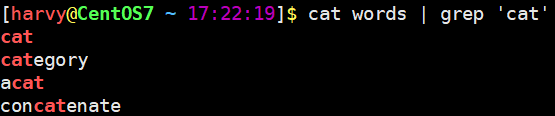
[harvy@CentOS7 ~ 17:22:19]$ cat words | grep 'cat'
cat
category
acat
concatenate
字符集
.
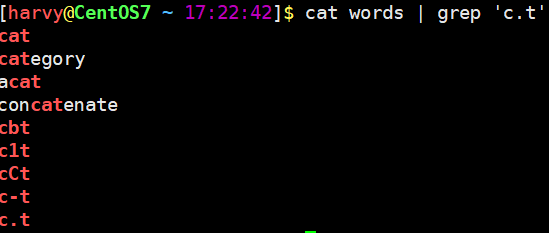
匹配除换行符(\n、\r)之外的任何单个字符,相等于[^\n\r]。
[harvy@CentOS7 ~ 17:22:42]$ cat words | grep 'c.t'
[…]
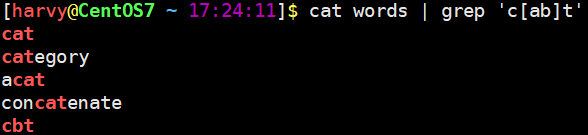
匹配 [...] 中的任意一个字符。
[harvy@CentOS7 ~ 17:24:11]$ cat words | grep 'c[ab]t'
cat
category
acat
concatenate
cbt
[a-z] [A-Z] [0-9]
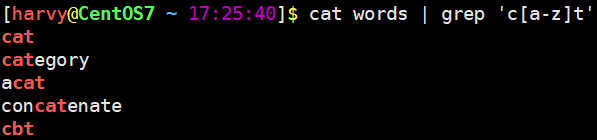
[a-z],匹配所有小写字母。[A-Z],匹配所有大写字母。[0-9],匹配所有数字。
[harvy@CentOS7 ~ 17:25:40]$ cat words | grep 'c[a-z]t'
[harvy@CentOS7 ~ 17:27:27]$ cat words | grep 'c[A-Z]t'
cCt

[lao[harvy@CentOS7 ~ 17:28:21]$ cat words | grep 'c[0-9]t'
c1t

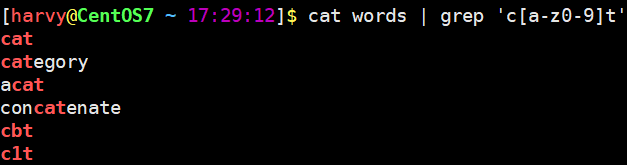
[harvy@CentOS7 ~ 17:29:12]$ cat words | grep 'c[a-z0-9]t'
cat
category
acat
concatenate
cbt
c1t
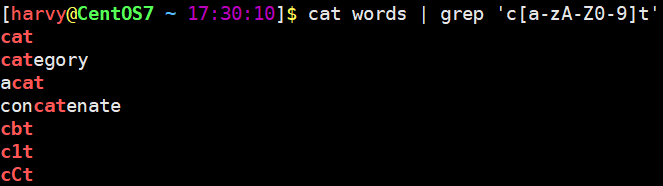
[harvy@CentOS7 ~ 17:30:10]$ cat words | grep 'c[a-zA-Z0-9]t'
cat
category
acat
concatenate
cbt
c1t
cCt
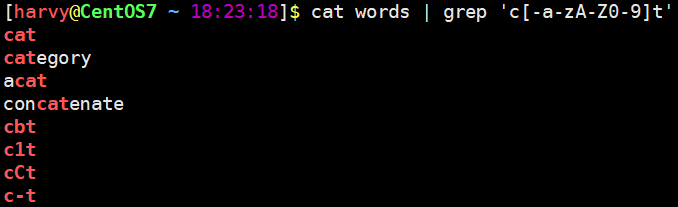
# 要想匹配-符号,将改符号写在第一个位置
[harvy@CentOS7 ~ 18:23:18]$ cat words | grep 'c[-a-zA-Z0-9]t'
cat
category
acat
concatenate
cbt
c1t
cCt
c-t
[^…]
匹配除了 [...] 中字符的所有字符。
[harvy@CentOS7 ~ 18:24:41]$ cat words | grep 'c[^ab]t'
c1t
cCt
c-t
c.t

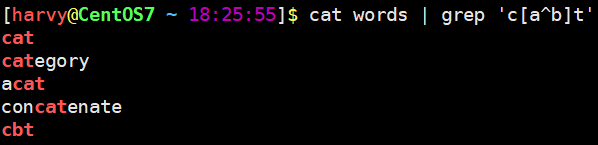
# ^放中间会被当做普通字符
[harvy@CentOS7 ~ 18:25:55]$ cat words | grep 'c[a^b]t'
cat
category
acat
concatenate
cbt
\
将下一个字符标记为或特殊字符、或原义字符、或向后引用、或八进制转义符。
例如, ‘n’ 匹配字符 ‘n’。\n 匹配换行符。序列 \\ 匹配 \,而 \( 则匹配 (。
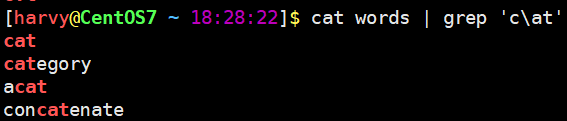
[harvy@CentOS7 ~ 18:28:16]$ cat words | grep 'c\.t'

# 匹配普通字符,虽然可以匹配,但强烈建议不要在前面加\
[harvy@CentOS7 ~ 18:28:22]$ cat words | grep 'c\at'
cat
category
acat
concatenate
|
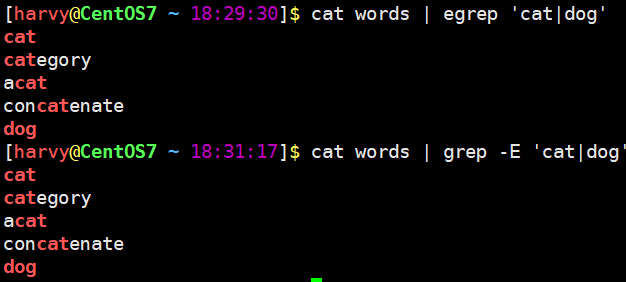
| 符号是扩展表达式中元字符,指明两项之间的一个选择。要匹配 |,请使用 \|。
# 使用egrep或者grep -E 匹配
[harvy@CentOS7 ~ 18:29:30]$ cat words | egrep 'cat|dog'
cat
category
acat
concatenate
dog
# 或者
[harvy@CentOS7 ~ 18:31:17]$ cat words | grep -E 'cat|dog'
cat
category
acat
concatenate
dog
字符集总结
| 选项 | 描述 |
|---|---|
| [[:digit:]] | 数字: 0 1 2 3 4 5 6 7 8 9 等同于[0-9] |
| [[:xdigit:]] | 十六进制数字: 0 1 2 3 4 5 6 7 8 9 A B C D E F a b c d e f 等同于[0-9a-fA-F] |
| [[:lower:]] | 小写字母:在 C 语言环境和ASCII字符编码中,对应于[a-z] |
| [[:upper:]] | 大写字母:在 C 语言环境和ASCII字符编码中,对应于[A-Z] |
| [[:alpha:]] | 字母字符:[[:lower:]和[[:upper:]];在C语言环境和ASCII字符编码中,等同于**[A-Za-z]** |
| [[:alnum:]] | 字母数字字符:[:alpha:]和[:digit:];在C语言环境和ASCII字符编码中,等同于**[0-9A-Za-z]** |
| [[:blank:]]或者[[:space:]] | 空白字符:在 C 语言环境中,它对应于制表符、换行符、垂直制表符、换页符、回车符和空格。 |
| [[:punct:]] | 标点符号:在C语言环境和ASCII字符编码中,它对应于!" # $ % &'()*+,-./:;<=>?@[]^_`{|}~ |
| [[:print:]]或者 [[:graph:]] | 可打印字符: [[:alnum:]]、[[:punct:]]。 |
| [[:cntrl:]] | 控制字符。在 ASCII中, 这些字符对应八进制代码000到037和 177 (DEL)。 |
非打印字符
终端中不显示的字符,例如换行符。
| 字符 | 描述 |
|---|---|
| \cx | 匹配由x指明的控制字符。例如, \cM 匹配一个 Control-M 或回车符。x 的值必须为 A-Z 或 a-z 之一。否则,将 c 视为一个原义的 ‘c’ 字符。 |
| \f | 匹配一个换页符。等价于 \x0c 和 \cL。 |
| \n | 匹配一个换行符。等价于 \x0a 和 \cJ。 |
| \r | 匹配一个回车符。等价于 \x0d 和 \cM。 |
| \s | 匹配任何空白字符,包括空格、制表符、换页符等等。等价于 [ \f\n\r\t\v]。注意 Unicode 正则表达式会匹配全角空格符。 |
| \S | 匹配任何**非空白字符**。等价于 [^ \f\n\r\t\v]。 |
| \w | 匹配字母、数字、下划线。等价于 [A-Za-z0-9_] |
| \W | 匹配任何非单词字符。等价于[^A-Za-z0-9_] |
| \t | 匹配一个制表符。等价于 \x09 和 \cI。 |
| \v | 匹配一个垂直制表符。等价于 \x0b 和 \cK。 |
grep 命令支持
\w、\W、\s、\S。
定位符
^
匹配行首位置。
[harvy@CentOS7 ~ 18:31:39]$ cat words | grep '^cat'

$
匹配行末位置。
[harvy@CentOS7 ~ 18:32:45]$ cat words | grep 'cat$'
cat
acat

# 查看 /var/log/message Aug 19 14:01 到 Aug 19 14:06 时间段发生的事件
[harvy@CentOS7 ~ 18:33:31]$ sudo cat /var/log/messages | egrep '^Apr 14 12:[1-6]'

# 只包含cat的行
[harvy@CentOS7 ~ 18:35:21]$ cat words | grep '^cat$'
cat

# 排除/etc/profile文件中以#开头的行
[harvy@CentOS7 ~ 18:35:56]$ cat /etc/profile | grep '^[^#]'

# 查询/etc/profile文件中有效行
[harvy@CentOS7 ~ 18:40:15]$ cat /etc/profile | egrep -v '^#|^$'
# -v 取反,不显示匹配的内容

# 查看系统中有哪些仓库
[harvy@CentOS7 ~ 18:43:21]$ yum-config-manager | grep '^\[' | grep -v main
[base]
[epel]
[extras]
[updates]
\b
匹配一个单词边界。
[harvy@CentOS7 ~ 18:44:44]$ cat words | grep '\bcat'
cat
category
hello cat kitty

[harvy@CentOS7 ~ 18:45:04]$ cat words | grep 'cat\b'

[harvy@CentOS7 ~ 18:49:59]$ cat words | grep '\bcat\b'
cat
hello cat kitty

\B(基本不用)
非单词边界匹配。
[harvy@CentOS7 ~ 18:50:51]$ cat words | grep '\Bcat\B'
< 和 >(基本不用)
\<,匹配一个单词左边界。\>,匹配一个单词右边界。
[harvy@CentOS7 ~ 18:53:33]$ cat words |grep '\<cat'
cat
category
hello cat

[harvy@CentOS7 ~ 18:54:49]$ cat words | grep 'cat\>'
cat
acat
hello cat
限定次数
*
*匹配前面的子表达式任意次数。
[harvy@CentOS7 ~ 18:55:11]$ echo dg >> words
[harvy@CentOS7 ~ 18:55:37]$ echo doog >> words
[harvy@CentOS7 ~ 18:55:44]$ cat words |grep 'do*g'
dog
dg
doog
+
+ 是扩展表达式元字符,匹配前面的子表达式==一次以上==次数。
[harvy@CentOS7 ~ 18:55:58]$ cat words | egrep 'do+g'
dog
doog
?
? 是扩展表达式元字符,匹配前面的子表达式==一次以下==次数。
[harvy@CentOS7 ~ 18:56:28]$ cat words | egrep 'do?g'
dog
dg
{n}
{} 是扩展表达式元字符,用于匹配==特定==次数。例如:{n},配置n次。
[harvy@CentOS7 ~ 18:57:55]$ cat words | egrep 'do{2}g'
doog
{m,n}
{m,n},是扩展表达式元字符,用于匹配次数==介于m-n之间==。
[harvy@CentOS7 ~ 19:00:46]$ echo dooog >> words
[harvy@CentOS7 ~ 19:01:03]$ echo doooog >> words
[harvy@CentOS7 ~ 19:01:13]$ cat words | egrep 'do{2,3}g'
doog
dooog
{m,}
{m,},是扩展表达式元字符,匹配前面的子表达式==m次以上==次数**。
[harvy@CentOS7 ~ 19:01:35]$ cat words | egrep 'do{2,}g'
doog
dooog
doooog
{,n}
{,n},是扩展表达式元字符,匹配前面的子表达式==n次以下==次数。
[harvy@CentOS7 ~ 19:04:00]$ cat words | egrep 'do{,3}g'
dog
dg
doog
dooog
()
==( )==标记一个子表达式。
[harvy@CentOS7 ~ 19:04:40]$ echo dogdog >> words
[harvy@CentOS7 ~ 19:05:35]$ echo dogdogdog >> words
[harvy@CentOS7 ~ 19:05:44]$ echo dogdogdogdog >> words
[harvy@CentOS7 ~ 19:05:56]$ cat words | egrep '(dog){2,3}'
dogdog
dogdogdog
dogdogdogdog
[harvy@CentOS7 ~ 19:07:08]$ cat words | egrep '(dog){2,}'
dogdog
dogdogdog
dogdogdogdog
综合案例
如何过滤出以下内容中所有有效IPv4地址?
0.0.0.0
1.1.1.1
11.11.11.111
111.111.111.111
999.9.9.9
01.1.1.1
10.0.0.0
0.1.1.1
266.1.1.1
248.1.1.1
256.1.1.1
参考答案
[harvy@CentOS7 ~ 19:10:17]$ cat iptest.txt | egrep '\b(([1-9]?[0-9])|(1[0-9]{2})|(2[0-4][0-9])|(25[0-5]))(\.(([1-9]?[0-9])|(1[0-9]{2})|(2[0-4][0-9])|(25[0-5]))){3}\b'
0.0.0.0
1.1.1.1
11.11.11.111
111.111.111.111
10.0.0.0
0.1.1.1
248.1.1.1
# 第一个位
[1-9][0-9]? # 1-99
1[0-9]{2}   # 100-199
2[0-4][0-9] # 200-249
25[0-5]     # 250-255

# 第二位
[1-9]?[0-9]  # 0-99
1[0-9]{2}    # 100-199
2[0-4][0-9]  # 200-249
25[0-5]      # 250-255

# 最终代码
\b(([1-9]?[0-9])|(1[0-9]{2})|(2[0-4][0-9])|(25[0-5]))(\.(([1-9]?[0-9])|(1[0-9]{2})|(2[0-4][0-9])|(25[0-5]))){3}\b
反向引用
对一个正则表达式模式或部分模式两边添加圆括号将导致相关匹配存储到一个临时缓冲区中,所捕获的每个子匹配都按照在正则表达式模式中从左到右出现的顺序存储。缓冲区编号从 1 开始,最多可存储 99 个捕获的子表达式。
每个缓冲区都可以使用 \N 访问,其中 N 为一个标识特定缓冲区的一位或两位十进制数。
\N 这用引用方式称之为反向引用。
其他工具使用案例
vim
搜索和替换。
less
搜索。

汇聚全球AI编程工具,助力开发者即刻编程。
更多推荐

 6
6 0
0- 0


 已为社区贡献12条内容

所有评论(0)