
Install docker and presearch
·
1. Install docker
wget https://get.docker.com/ -O install-docker.sh
sudo ./install-docker.sh
#!/bin/sh
set -e
# Docker Engine for Linux installation script.
#
# This script is intended as a convenient way to configure docker's package
# repositories and to install Docker Engine, This script is not recommended
# for production environments. Before running this script, make yourself familiar
# with potential risks and limitations, and refer to the installation manual
# at https://docs.docker.com/engine/install/ for alternative installation methods.
#
# The script:
#
# - Requires `root` or `sudo` privileges to run.
# - Attempts to detect your Linux distribution and version and configure your
# package management system for you.
# - Doesn't allow you to customize most installation parameters.
# - Installs dependencies and recommendations without asking for confirmation.
# - Installs the latest stable release (by default) of Docker CLI, Docker Engine,
# Docker Buildx, Docker Compose, containerd, and runc. When using this script
# to provision a machine, this may result in unexpected major version upgrades
# of these packages. Always test upgrades in a test environment before
# deploying to your production systems.
# - Isn't designed to upgrade an existing Docker installation. When using the
# script to update an existing installation, dependencies may not be updated
# to the expected version, resulting in outdated versions.
#
# Source code is available at https://github.com/docker/docker-install/
#
# Usage
# ==============================================================================
#
# To install the latest stable versions of Docker CLI, Docker Engine, and their
# dependencies:
#
# 1. download the script
#
# $ curl -fsSL https://get.docker.com -o install-docker.sh
#
# 2. verify the script's content
#
# $ cat install-docker.sh
#
# 3. run the script with --dry-run to verify the steps it executes
#
# $ sh install-docker.sh --dry-run
#
# 4. run the script either as root, or using sudo to perform the installation.
#
# $ sudo sh install-docker.sh
#
# Command-line options
# ==============================================================================
#
# --version <VERSION>
# Use the --version option to install a specific version, for example:
#
# $ sudo sh install-docker.sh --version 23.0
#
# --channel <stable|test>
#
# Use the --channel option to install from an alternative installation channel.
# The following example installs the latest versions from the "test" channel,
# which includes pre-releases (alpha, beta, rc):
#
# $ sudo sh install-docker.sh --channel test
#
# Alternatively, use the script at https://test.docker.com, which uses the test
# channel as default.
#
# --mirror <Aliyun|AzureChinaCloud>
#
# Use the --mirror option to install from a mirror supported by this script.
# Available mirrors are "Aliyun" (https://mirrors.aliyun.com/docker-ce), and
# "AzureChinaCloud" (https://mirror.azure.cn/docker-ce), for example:
#
# $ sudo sh install-docker.sh --mirror AzureChinaCloud
#
# --setup-repo
#
# Use the --setup-repo option to configure Docker's package repositories without
# installing Docker packages. This is useful when you want to add the repository
# but install packages separately:
#
# $ sudo sh install-docker.sh --setup-repo
#
# Automatic Service Start
#
# By default, this script automatically starts the Docker daemon and enables the docker
# service after installation if systemd is used as init.
#
# If you prefer to start the service manually, use the --no-autostart option:
#
# $ sudo sh install-docker.sh --no-autostart
#
# Note: Starting the service requires appropriate privileges to manage system services.
#
# ==============================================================================
# Git commit from https://github.com/docker/docker-install when
# the script was uploaded (Should only be modified by upload job):
SCRIPT_COMMIT_SHA="8fb5881103ac6f2fb404605d6d5b1f84244f3896"
# strip "v" prefix if present
VERSION="${VERSION#v}"
# The channel to install from:
# * stable
# * test
DEFAULT_CHANNEL_VALUE="stable"
if [ -z "$CHANNEL" ]; then
CHANNEL=$DEFAULT_CHANNEL_VALUE
fi
DEFAULT_DOWNLOAD_URL="https://download.docker.com"
if [ -z "$DOWNLOAD_URL" ]; then
DOWNLOAD_URL=$DEFAULT_DOWNLOAD_URL
fi
DEFAULT_REPO_FILE="docker-ce.repo"
if [ -z "$REPO_FILE" ]; then
REPO_FILE="$DEFAULT_REPO_FILE"
# Automatically default to a staging repo fora
# a staging download url (download-stage.docker.com)
case "$DOWNLOAD_URL" in
*-stage*) REPO_FILE="docker-ce-staging.repo";;
esac
fi
mirror=''
DRY_RUN=${DRY_RUN:-}
REPO_ONLY=${REPO_ONLY:-0}
NO_AUTOSTART=${NO_AUTOSTART:-0}
while [ $# -gt 0 ]; do
case "$1" in
--channel)
CHANNEL="$2"
shift
;;
--dry-run)
DRY_RUN=1
;;
--mirror)
mirror="$2"
shift
;;
--version)
VERSION="${2#v}"
shift
;;
--setup-repo)
REPO_ONLY=1
shift
;;
--no-autostart)
NO_AUTOSTART=1
;;
--*)
echo "Illegal option $1"
;;
esac
shift $(( $# > 0 ? 1 : 0 ))
done
case "$mirror" in
Aliyun)
DOWNLOAD_URL="https://mirrors.aliyun.com/docker-ce"
;;
AzureChinaCloud)
DOWNLOAD_URL="https://mirror.azure.cn/docker-ce"
;;
"")
;;
*)
>&2 echo "unknown mirror '$mirror': use either 'Aliyun', or 'AzureChinaCloud'."
exit 1
;;
esac
case "$CHANNEL" in
stable|test)
;;
*)
>&2 echo "unknown CHANNEL '$CHANNEL': use either stable or test."
exit 1
;;
esac
command_exists() {
command -v "$@" > /dev/null 2>&1
}
# version_gte checks if the version specified in $VERSION is at least the given
# SemVer (Maj.Minor[.Patch]), or CalVer (YY.MM) version.It returns 0 (success)
# if $VERSION is either unset (=latest) or newer or equal than the specified
# version, or returns 1 (fail) otherwise.
#
# examples:
#
# VERSION=23.0
# version_gte 23.0 // 0 (success)
# version_gte 20.10 // 0 (success)
# version_gte 19.03 // 0 (success)
# version_gte 26.1 // 1 (fail)
version_gte() {
if [ -z "$VERSION" ]; then
return 0
fi
version_compare "$VERSION" "$1"
}
# version_compare compares two version strings (either SemVer (Major.Minor.Path),
# or CalVer (YY.MM) version strings. It returns 0 (success) if version A is newer
# or equal than version B, or 1 (fail) otherwise. Patch releases and pre-release
# (-alpha/-beta) are not taken into account
#
# examples:
#
# version_compare 23.0.0 20.10 // 0 (success)
# version_compare 23.0 20.10 // 0 (success)
# version_compare 20.10 19.03 // 0 (success)
# version_compare 20.10 20.10 // 0 (success)
# version_compare 19.03 20.10 // 1 (fail)
version_compare() (
set +x
yy_a="$(echo "$1" | cut -d'.' -f1)"
yy_b="$(echo "$2" | cut -d'.' -f1)"
if [ "$yy_a" -lt "$yy_b" ]; then
return 1
fi
if [ "$yy_a" -gt "$yy_b" ]; then
return 0
fi
mm_a="$(echo "$1" | cut -d'.' -f2)"
mm_b="$(echo "$2" | cut -d'.' -f2)"
# trim leading zeros to accommodate CalVer
mm_a="${mm_a#0}"
mm_b="${mm_b#0}"
if [ "${mm_a:-0}" -lt "${mm_b:-0}" ]; then
return 1
fi
return 0
)
is_dry_run() {
if [ -z "$DRY_RUN" ]; then
return 1
else
return 0
fi
}
is_wsl() {
case "$(uname -r)" in
*microsoft* ) true ;; # WSL 2
*Microsoft* ) true ;; # WSL 1
* ) false;;
esac
}
is_darwin() {
case "$(uname -s)" in
*darwin* ) true ;;
*Darwin* ) true ;;
* ) false;;
esac
}
deprecation_notice() {
distro=$1
distro_version=$2
echo
printf "\033[91;1mDEPRECATION WARNING\033[0m\n"
printf " This Linux distribution (\033[1m%s %s\033[0m) reached end-of-life and is no longer supported by this script.\n" "$distro" "$distro_version"
echo " No updates or security fixes will be released for this distribution, and users are recommended"
echo " to upgrade to a currently maintained version of $distro."
echo
printf "Press \033[1mCtrl+C\033[0m now to abort this script, or wait for the installation to continue."
echo
sleep 10
}
get_distribution() {
lsb_dist=""
# Every system that we officially support has /etc/os-release
if [ -r /etc/os-release ]; then
lsb_dist="$(. /etc/os-release && echo "$ID")"
fi
# Returning an empty string here should be alright since the
# case statements don't act unless you provide an actual value
echo "$lsb_dist"
}
start_docker_daemon() {
# Use systemctl if available (for systemd-based systems)
if command_exists systemctl; then
is_dry_run || >&2 echo "Using systemd to manage Docker service"
if (
is_dry_run || set -x
$sh_c systemctl enable --now docker.service 2>/dev/null
); then
is_dry_run || echo "INFO: Docker daemon enabled and started" >&2
else
is_dry_run || echo "WARNING: unable to enable the docker service" >&2
fi
else
# No service management available (container environment)
if ! is_dry_run; then
>&2 echo "Note: Running in a container environment without service management"
>&2 echo "Docker daemon cannot be started automatically in this environment"
>&2 echo "The Docker packages have been installed successfully"
fi
fi
>&2 echo
}
echo_docker_as_nonroot() {
if is_dry_run; then
return
fi
if command_exists docker && [ -e /var/run/docker.sock ]; then
(
set -x
$sh_c 'docker version'
) || true
fi
# intentionally mixed spaces and tabs here -- tabs are stripped by "<<-EOF", spaces are kept in the output
echo
echo "================================================================================"
echo
if version_gte "20.10"; then
echo "To run Docker as a non-privileged user, consider setting up the"
echo "Docker daemon in rootless mode for your user:"
echo
echo " dockerd-rootless-setuptool.sh install"
echo
echo "Visit https://docs.docker.com/go/rootless/ to learn about rootless mode."
echo
fi
echo
echo "To run the Docker daemon as a fully privileged service, but granting non-root"
echo "users access, refer to https://docs.docker.com/go/daemon-access/"
echo
echo "WARNING: Access to the remote API on a privileged Docker daemon is equivalent"
echo " to root access on the host. Refer to the 'Docker daemon attack surface'"
echo " documentation for details: https://docs.docker.com/go/attack-surface/"
echo
echo "================================================================================"
echo
}
# Check if this is a forked Linux distro
check_forked() {
# Check for lsb_release command existence, it usually exists in forked distros
if command_exists lsb_release; then
# Check if the `-u` option is supported
set +e
lsb_release -a -u > /dev/null 2>&1
lsb_release_exit_code=$?
set -e
# Check if the command has exited successfully, it means we're in a forked distro
if [ "$lsb_release_exit_code" = "0" ]; then
# Print info about current distro
cat <<-EOF
You're using '$lsb_dist' version '$dist_version'.
EOF
# Get the upstream release info
lsb_dist=$(lsb_release -a -u 2>&1 | tr '[:upper:]' '[:lower:]' | grep -E 'id' | cut -d ':' -f 2 | tr -d '[:space:]')
dist_version=$(lsb_release -a -u 2>&1 | tr '[:upper:]' '[:lower:]' | grep -E 'codename' | cut -d ':' -f 2 | tr -d '[:space:]')
# Print info about upstream distro
cat <<-EOF
Upstream release is '$lsb_dist' version '$dist_version'.
EOF
else
if [ -r /etc/debian_version ] && [ "$lsb_dist" != "ubuntu" ] && [ "$lsb_dist" != "raspbian" ]; then
if [ "$lsb_dist" = "osmc" ]; then
# OSMC runs Raspbian
lsb_dist=raspbian
else
# We're Debian and don't even know it!
lsb_dist=debian
fi
dist_version="$(sed 's/\/.*//' /etc/debian_version | sed 's/\..*//')"
case "$dist_version" in
13|14|forky)
dist_version="trixie"
;;
12)
dist_version="bookworm"
;;
11)
dist_version="bullseye"
;;
10)
dist_version="buster"
;;
9)
dist_version="stretch"
;;
8)
dist_version="jessie"
;;
esac
fi
fi
fi
}
do_install() {
echo "# Executing docker install script, commit: $SCRIPT_COMMIT_SHA"
if [ "$REPO_ONLY" != "1" ] && command_exists docker; then
cat >&2 <<-'EOF'
Warning: the "docker" command appears to already exist on this system.
If you already have Docker installed, this script can cause trouble, which is
why we're displaying this warning and provide the opportunity to cancel the
installation.
If you installed the current Docker package using this script and are using it
again to update Docker, you can ignore this message, but be aware that the
script resets any custom changes in the deb and rpm repo configuration
files to match the parameters passed to the script.
You may press Ctrl+C now to abort this script.
EOF
( set -x; sleep 20 )
fi
user="$(id -un 2>/dev/null || true)"
sh_c='sh -c'
if [ "$user" != 'root' ]; then
if command_exists sudo; then
sh_c='sudo -E sh -c'
elif command_exists su; then
sh_c='su -c'
else
cat >&2 <<-'EOF'
Error: this installer needs the ability to run commands as root.
We are unable to find either "sudo" or "su" available to make this happen.
EOF
exit 1
fi
fi
if is_dry_run; then
sh_c="echo"
fi
# perform some very rudimentary platform detection
lsb_dist=$( get_distribution )
lsb_dist="$(echo "$lsb_dist" | tr '[:upper:]' '[:lower:]')"
if is_wsl; then
echo
echo "WSL DETECTED: We recommend using Docker Desktop for Windows."
echo "Please get Docker Desktop from https://www.docker.com/products/docker-desktop/"
echo
cat >&2 <<-'EOF'
You may press Ctrl+C now to abort this script.
EOF
( set -x; sleep 20 )
fi
case "$lsb_dist" in
ubuntu)
if command_exists lsb_release; then
dist_version="$(lsb_release --codename | cut -f2)"
fi
if [ -z "$dist_version" ] && [ -r /etc/lsb-release ]; then
dist_version="$(. /etc/lsb-release && echo "$DISTRIB_CODENAME")"
fi
;;
debian|raspbian)
dist_version="$(sed 's/\/.*//' /etc/debian_version | sed 's/\..*//')"
case "$dist_version" in
13)
dist_version="trixie"
;;
12)
dist_version="bookworm"
;;
11)
dist_version="bullseye"
;;
10)
dist_version="buster"
;;
9)
dist_version="stretch"
;;
8)
dist_version="jessie"
;;
esac
;;
centos|rhel|rocky)
if [ -z "$dist_version" ] && [ -r /etc/os-release ]; then
dist_version="$(. /etc/os-release && echo "$VERSION_ID")"
fi
;;
*)
if command_exists lsb_release; then
dist_version="$(lsb_release --release | cut -f2)"
fi
if [ -z "$dist_version" ] && [ -r /etc/os-release ]; then
dist_version="$(. /etc/os-release && echo "$VERSION_ID")"
fi
;;
esac
# Check if this is a forked Linux distro
check_forked
# Print deprecation warnings for distro versions that recently reached EOL,
# but may still be commonly used (especially LTS versions).
case "$lsb_dist.$dist_version" in
centos.8|centos.7|rhel.7)
deprecation_notice "$lsb_dist" "$dist_version"
;;
debian.buster|debian.stretch|debian.jessie)
deprecation_notice "$lsb_dist" "$dist_version"
;;
raspbian.buster|raspbian.stretch|raspbian.jessie)
deprecation_notice "$lsb_dist" "$dist_version"
;;
ubuntu.focal|ubuntu.bionic|ubuntu.xenial|ubuntu.trusty)
deprecation_notice "$lsb_dist" "$dist_version"
;;
ubuntu.oracular|ubuntu.mantic|ubuntu.lunar|ubuntu.kinetic|ubuntu.impish|ubuntu.hirsute|ubuntu.groovy|ubuntu.eoan|ubuntu.disco|ubuntu.cosmic)
deprecation_notice "$lsb_dist" "$dist_version"
;;
fedora.*)
if [ "$dist_version" -lt 41 ]; then
deprecation_notice "$lsb_dist" "$dist_version"
fi
;;
esac
# Run setup for each distro accordingly
case "$lsb_dist" in
ubuntu|debian|raspbian)
pre_reqs="ca-certificates curl"
apt_repo="deb [arch=$(dpkg --print-architecture) signed-by=/etc/apt/keyrings/docker.asc] $DOWNLOAD_URL/linux/$lsb_dist $dist_version $CHANNEL"
(
if ! is_dry_run; then
set -x
fi
$sh_c 'apt-get -qq update >/dev/null'
$sh_c "DEBIAN_FRONTEND=noninteractive apt-get -y -qq install $pre_reqs >/dev/null"
$sh_c 'install -m 0755 -d /etc/apt/keyrings'
$sh_c "curl -fsSL \"$DOWNLOAD_URL/linux/$lsb_dist/gpg\" -o /etc/apt/keyrings/docker.asc"
$sh_c "chmod a+r /etc/apt/keyrings/docker.asc"
$sh_c "echo \"$apt_repo\" > /etc/apt/sources.list.d/docker.list"
$sh_c 'apt-get -qq update >/dev/null'
)
if [ "$REPO_ONLY" = "1" ]; then
exit 0
fi
pkg_version=""
if [ -n "$VERSION" ]; then
if is_dry_run; then
echo "# WARNING: VERSION pinning is not supported in DRY_RUN"
else
# Will work for incomplete versions IE (17.12), but may not actually grab the "latest" if in the test channel
pkg_pattern="$(echo "$VERSION" | sed 's/-ce-/~ce~.*/g' | sed 's/-/.*/g')"
search_command="apt-cache madison docker-ce | grep '$pkg_pattern' | head -1 | awk '{\$1=\$1};1' | cut -d' ' -f 3"
pkg_version="$($sh_c "$search_command")"
echo "INFO: Searching repository for VERSION '$VERSION'"
echo "INFO: $search_command"
if [ -z "$pkg_version" ]; then
echo
echo "ERROR: '$VERSION' not found amongst apt-cache madison results"
echo
exit 1
fi
if version_gte "18.09"; then
search_command="apt-cache madison docker-ce-cli | grep '$pkg_pattern' | head -1 | awk '{\$1=\$1};1' | cut -d' ' -f 3"
echo "INFO: $search_command"
cli_pkg_version="=$($sh_c "$search_command")"
fi
pkg_version="=$pkg_version"
fi
fi
(
pkgs="docker-ce${pkg_version%=}"
if version_gte "18.09"; then
# older versions didn't ship the cli and containerd as separate packages
pkgs="$pkgs docker-ce-cli${cli_pkg_version%=} containerd.io"
fi
if version_gte "20.10"; then
pkgs="$pkgs docker-compose-plugin docker-ce-rootless-extras$pkg_version"
fi
if version_gte "23.0"; then
pkgs="$pkgs docker-buildx-plugin"
fi
if version_gte "28.2"; then
pkgs="$pkgs docker-model-plugin"
fi
if ! is_dry_run; then
set -x
fi
$sh_c "DEBIAN_FRONTEND=noninteractive apt-get -y -qq install $pkgs >/dev/null"
)
if [ "$NO_AUTOSTART" != "1" ]; then
start_docker_daemon
fi
echo_docker_as_nonroot
exit 0
;;
centos|fedora|rhel|rocky)
if [ "$(uname -m)" = "s390x" ]; then
echo "Effective v27.5, please consult RHEL distro statement for s390x support."
exit 1
fi
repo_file_url="$DOWNLOAD_URL/linux/$lsb_dist/$REPO_FILE"
(
if ! is_dry_run; then
set -x
fi
if command_exists dnf5; then
$sh_c "dnf -y -q --setopt=install_weak_deps=False install dnf-plugins-core"
$sh_c "dnf5 config-manager addrepo --overwrite --save-filename=docker-ce.repo --from-repofile='$repo_file_url'"
if [ "$CHANNEL" != "stable" ]; then
$sh_c "dnf5 config-manager setopt \"docker-ce-*.enabled=0\""
$sh_c "dnf5 config-manager setopt \"docker-ce-$CHANNEL.enabled=1\""
fi
$sh_c "dnf makecache"
elif command_exists dnf; then
$sh_c "dnf -y -q --setopt=install_weak_deps=False install dnf-plugins-core"
$sh_c "rm -f /etc/yum.repos.d/docker-ce.repo /etc/yum.repos.d/docker-ce-staging.repo"
$sh_c "dnf config-manager --add-repo $repo_file_url"
if [ "$CHANNEL" != "stable" ]; then
$sh_c "dnf config-manager --set-disabled \"docker-ce-*\""
$sh_c "dnf config-manager --set-enabled \"docker-ce-$CHANNEL\""
fi
$sh_c "dnf makecache"
else
$sh_c "yum -y -q install yum-utils"
$sh_c "rm -f /etc/yum.repos.d/docker-ce.repo /etc/yum.repos.d/docker-ce-staging.repo"
$sh_c "yum-config-manager --add-repo $repo_file_url"
if [ "$CHANNEL" != "stable" ]; then
$sh_c "yum-config-manager --disable \"docker-ce-*\""
$sh_c "yum-config-manager --enable \"docker-ce-$CHANNEL\""
fi
$sh_c "yum makecache"
fi
)
if [ "$REPO_ONLY" = "1" ]; then
exit 0
fi
pkg_version=""
if command_exists dnf; then
pkg_manager="dnf"
pkg_manager_flags="-y -q --best"
else
pkg_manager="yum"
pkg_manager_flags="-y -q"
fi
if [ -n "$VERSION" ]; then
if is_dry_run; then
echo "# WARNING: VERSION pinning is not supported in DRY_RUN"
else
if [ "$lsb_dist" = "fedora" ]; then
pkg_suffix="fc$dist_version"
else
pkg_suffix="el"
fi
pkg_pattern="$(echo "$VERSION" | sed 's/-ce-/\\\\.ce.*/g' | sed 's/-/.*/g').*$pkg_suffix"
search_command="$pkg_manager list --showduplicates docker-ce | grep '$pkg_pattern' | tail -1 | awk '{print \$2}'"
pkg_version="$($sh_c "$search_command")"
echo "INFO: Searching repository for VERSION '$VERSION'"
echo "INFO: $search_command"
if [ -z "$pkg_version" ]; then
echo
echo "ERROR: '$VERSION' not found amongst $pkg_manager list results"
echo
exit 1
fi
if version_gte "18.09"; then
# older versions don't support a cli package
search_command="$pkg_manager list --showduplicates docker-ce-cli | grep '$pkg_pattern' | tail -1 | awk '{print \$2}'"
cli_pkg_version="$($sh_c "$search_command" | cut -d':' -f 2)"
fi
# Cut out the epoch and prefix with a '-'
pkg_version="-$(echo "$pkg_version" | cut -d':' -f 2)"
fi
fi
(
pkgs="docker-ce$pkg_version"
if version_gte "18.09"; then
# older versions didn't ship the cli and containerd as separate packages
if [ -n "$cli_pkg_version" ]; then
pkgs="$pkgs docker-ce-cli-$cli_pkg_version containerd.io"
else
pkgs="$pkgs docker-ce-cli containerd.io"
fi
fi
if version_gte "20.10"; then
pkgs="$pkgs docker-compose-plugin docker-ce-rootless-extras$pkg_version"
fi
if version_gte "23.0"; then
pkgs="$pkgs docker-buildx-plugin docker-model-plugin"
fi
if ! is_dry_run; then
set -x
fi
$sh_c "$pkg_manager $pkg_manager_flags install $pkgs"
)
if [ "$NO_AUTOSTART" != "1" ]; then
start_docker_daemon
fi
echo_docker_as_nonroot
exit 0
;;
sles)
echo "Effective v27.5, please consult SLES distro statement for s390x support."
exit 1
;;
*)
if [ -z "$lsb_dist" ]; then
if is_darwin; then
echo
echo "ERROR: Unsupported operating system 'macOS'"
echo "Please get Docker Desktop from https://www.docker.com/products/docker-desktop"
echo
exit 1
fi
fi
echo
echo "ERROR: Unsupported distribution '$lsb_dist'"
echo
exit 1
;;
esac
exit 1
}
# wrapped up in a function so that we have some protection against only getting
# half the file during "curl | sh"
do_install##################### END install-docker.sh ######################
2. Update your docker source to nearer nodes
https://developer.aliyun.com/article/1670317
https://zeeklog.com/shi-shi-geng-xin-2026nian-guo-nei-ke-yong-de-dockerjing-xiang-yuan-jia-su-qi-pei-zhi-da-quan-fu-ce-su-fang-fa-6/
$ cat /etc/docker/daemon.json
{
  "debug": true,
  "registry-mirrors": [
    "https://docker.1ms.run",
       "https://docker.xuanyuan.me",
    "https://docker.m.daocloud.io",
    "https://docker-0.unsee.tech"
  ]
}
3. Get your node registration code
https://nodes.presearch.com/dashboard?filter=active
Copy your node API key to somewhere else
4. Set up a presearch node
https://docs.presearch.io/nodes/setup
#!/usr/bin/sh

YOUR_REGISTRATION_CODE_HERE=8a9fc5b7400c769bc69052dfaf******

docker stop presearch-node ; docker rm presearch-node ; docker stop presearch-auto-updater ; docker rm presearch-auto-updater ; docker run -d --name presearch-auto-updater --restart=unless-stopped -v /var/run/docker.sock:/var/run/docker.sock presearch/auto-updater --cleanup --interval 900 presearch-auto-updater presearch-node ; docker pull presearch/node ; docker run -dt --name presearch-node --restart=unless-stopped -v presearch-node-storage:/app/node -e REGISTRATION_CODE=${YOUR_REGISTRATION_CODE_HERE} presearch/node ; docker logs -f presearch-node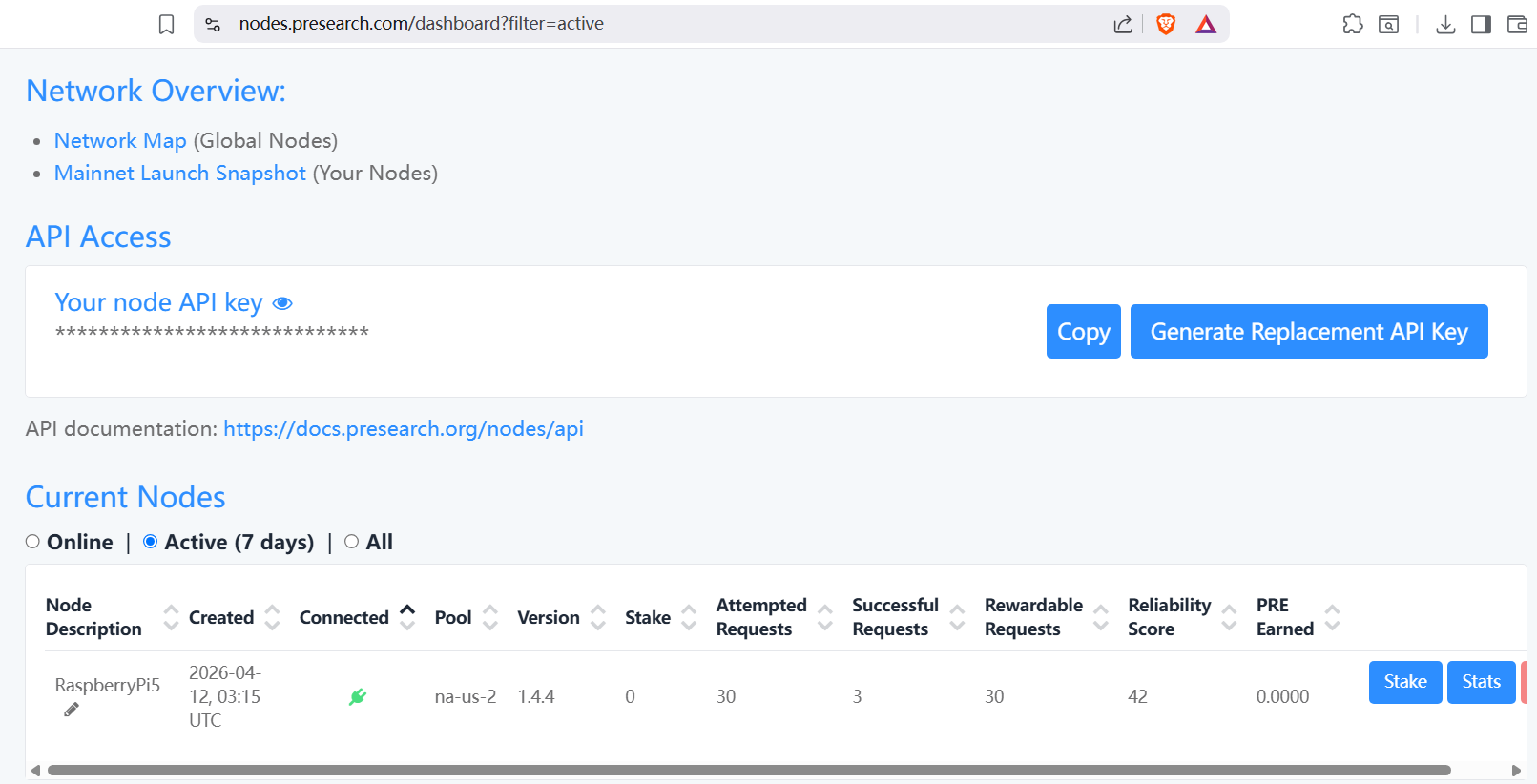

汇聚全球AI编程工具,助力开发者即刻编程。
更多推荐

 1
1 0
0- 0



 已为社区贡献2条内容

所有评论(0)