
Hive 复杂数据类型全解:Array/Map/Struct 实战与底层原理
·
1.sql相关操作复习
1)建表,传数据
在Linux上 /home/hivedata/建两张表进行练习
exam_info.txt表数据:
1 9001 SQL hard 60 2020-01-01 10:00:00
2 9002 C++ hard 80 2020-01-01 10:00:00
3 9003 Hadoop hard 80 2020-01-01 10:00:00
4 9004 PYTHON medium 70 2020-01-01 10:00:00
exam_record.txt表数据:
1    1001    9001    2020-08-02 10:01:01    2020-08-02 10:31:01    89
2    1002    9001    2020-04-01 18:01:01    2020-04-01 18:59:02    90
3    1001    9001    2020-04-01 09:01:01    2020-04-01 09:21:59    80
5    1002    9001    2021-03-02 19:01:01    2021-03-02 19:32:00    20
8    1003    9001    2021-05-02 12:01:01    2021-05-02 12:31:01    98
13    1003    9001    2020-01-02 10:01:01    2020-01-02 10:31:01    89
9    1001    9002    2020-02-02 12:01:01    2020-02-02 12:20:01    99
10    1002    9002    2021-02-02 12:01:01    2020-02-02 12:43:01    81
11    1001    9002    2020-01-02 19:01:01    2020-01-02 19:59:01    69
16    1002    9002    2020-02-02 12:01:01
17    1002    9002    2020-03-02 12:11:01
18    1001    9002    2021-05-05 18:01:01
4    1002    9003    2021-01-20 10:01:01    2021-01-20 10:10:01    81
6    1001    9003    2021-04-02 19:01:01    2021-04-02 19:40:01    89
15    1002    9003    2021-01-01 18:01:01    2021-01-01 18:59:02    90
7    1004    9004    2020-05-02 12:01:01    2020-05-02 12:20:01    99
12    1001    9004    2021-09-02 12:11:01
14    1002    9004    2020-01-01 12:11:01    2020-01-01 12:31:01    83
6    1003    9001    2020-01-02 12:01:01    2020-01-02 12:31:01    68
9    1001    9001    2020-01-02 10:01:01    2020-01-02 10:31:01    89
1    1001    9001    2020-01-01 09:01:01    2020-01-01 09:21:59    90
12    1002    9002    2021-05-05 18:01:01    (NULL)    (NULL)
3    1004    9002    2020-01-01 12:01:01    2020-01-01 12:11:01    60
2    1003    9002    2020-01-01 19:01:01    2020-01-01 19:30:01    75
7    1001    9002    2020-01-02 12:01:01    2020-01-02 12:43:01    81
10    1002    9002    2020-01-01 12:11:01    2020-01-01 12:31:01    83
4    1003    9002    2020-01-01 12:01:01    2020-01-01 12:41:01    90
5    1002    9002    2020-01-02 19:01:01    2020-01-02 19:32:00    90
11    1002    9004    2021-09-06 12:01:01    (NULL)    (NULL)
8    1001    9005    2020-01-02 12:11:01    (NULL)    (NULL)
然后在hive sql 中建表,并上传数据
create table emp(
    id int,
    ld int,
    work string,
    taidu string,
    hours int,
    times string
)
row format delimited
fields terminated by '\t';
load data local inpath '/home/hivedata/exam_info.txt' into table emp;

create table emps(
    id int,
    eid int,
    ldid int,
    ltimes string,
    ztimes string
)
row format delimited
fields terminated by '\t';
load data local inpath '/home/hivedata/exam_record.txt' into table emps;
select * from emp;
select * from emps;
2)union union all测试:
union: 可以去重的
union all: 不去重
select eid , ldid from emps where id>7
union
select id,ld from emp where taidu="hard";

select eid , ldid from emps where id>7
union all
select id,ld from emp where taidu="hard";
3)表内外连接
left semi join
-- 内连接:join 外连接  left join  right join  full join
select * from emps join emp on emps.ldid=emp.ld;
select * from emp left join emps on emps.ldid=emp.ld;
select * from emp right join emps on emps.ldid=emp.ld;

-- left semi join 左半开连接(hive独有)
-- 只能查询左表的信息,主要用于解决hive中左表的数据是否存在的问题。相当于exists关键字的用法。
select * from emp left semi join emps on emps.ldid=emp.ld;
select * from emp where exists (select * from emps where emps.ldid=emp.ld);
-- hive中不支持right semi join
2.复杂的数据类型 arrary map struct
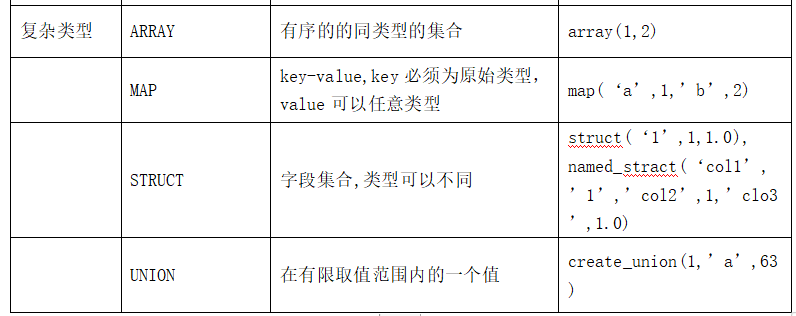
1)Array的使用
nvl函数
建表上传、加载数据
zhangsan	78,89,92,96
lisi	67,75,83,94
王五	23,12
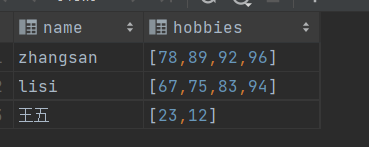
create table arr1(
    name string,
    hobbies array<int>
)
row format delimited
fields terminated by '\t'
collection items terminated by ',';
load data local inpath '/home/hivedata/arr1.txt' into table arr1;
select * from arr1;
-- 1、查询每一个学生的第一个成绩
select name,hobbies[0] from arr1;
-- 2、查询拥有四科成绩的学生的第二科成绩
select  name,hobbies[1] from arr1 where size(hobbies)=4;
-- 3、查询所有学生的总成绩
-- NVL(expr1, expr2) 是 Hive 中空值处理的标准函数,属于 SQL 标准兼容函数,核心作用是将 NULL 值替换为指定默认值。
select name,hobbies[0]+hobbies[1]+nvl(hobbies[2],0)+nvl(hobbies[3],0) as `总成绩` from arr1 ;
2)展开函数的使用 explode
虚表 lateral view
-- 展开函数的使用 explode
-- 行转列
-- explode(array/ map) 是 Hive 表生成函数
-- 作用:将一行中的复杂类型(数组 / 集合 / Map)拆分成多行,即行转列(炸裂)
select explode(hobbies) from arr1;
-- 错误 !
select name,explode(hobbies) from arr1;
-- 解决:使用虚拟表
-- lateral view:虚拟表。
-- 	会将UDTF函数生成的结果放到一个虚拟表中,然后这个虚拟表会和输入行进行join来达到数据聚合的目的。
select name,value from arr1 lateral view explode(hobbies) t as value;
-- 4、查询所有学生的总成绩
select name,sum(value) from arr1 lateral view explode(hobbies) t as value group by name;

select name,sum(value)
    from
    (select name,value from arr1 lateral view explode(hobbies) t as value) t group by name;

with t as (
select name,value from arr1 lateral view explode(hobbies) t as value)
select name,sum(value) from t group by name;
3)Map的使用
create table map1(
  name string,
  scores map<string,int>
)
row format delimited
fields terminated by '\t'
collection items terminated by ','
map keys terminated by ':';
load data local inpath '/home/hivedata/map1.txt' into table map1;
select * from map1;
-- 1. 查询数学大于35分的学生的英语和自然成绩
select name,scores['english'],scores['nature']
from map1 where scores['math']>35;
-- 2. 查看每个人的前两科的成绩总和
select  name ,
scores['chinese']+scores['math'] as `前两科成绩总和`
from map1;

/*
 3. 将数据展示为:
-- 展开效果
zhangsan	chinese		90
zhangsan	math	87
zhangsan	english 	63
zhangsan	nature		76*/
select name,key,value
from map1
lateral view explode(map1.scores) t as key,value;

-- 4.统计每个人的总成绩
select name,
sum(value)
from map1
lateral view explode(map1.scores) t as key,value
group by name;


with t as(
    select name,key,value
    from map1
    lateral view explode(map1.scores) t as key,value
)select name,sum(value) from t
group by name
;
行转列
需求5:
-- 将下面的数据格式
zhangsan        chinese 90
zhangsan        math    87
zhangsan        english 63
zhangsan        nature  76
lisi    chinese 60
lisi    math    30
lisi    english 78
lisi    nature  0
wangwu  chinese 89
wangwu  math    25
wangwu  english 81
wangwu  nature  9
-- 转成:
zhangsan chinese:90,math:87,english:63,nature:76
lisi chinese:60,math:30,english:78,nature:0
wangwu chinese:89,math:25,english:81,nature:9
可以按之前的操作建表,也可以按下面步骤建表
concat
collect_set()
collect_list()
concat_ws()
-- 行转列
drop table map2;
create table map2 as
    select name,
        subject,
        score
    from map1
    lateral view explode(scores) t as subject,score;

select * from map2;
-- 第一步,先将学科和成绩形成一个kv对,其实就是字符串拼接
-- concat的用法:
-- 多字符串拼接,遇 NULL 返 NULL,到时用nvl解决
select concat(subject,':',score) from map2;
select concat("xm",":","sl");
-- 实战,学科和成绩拼接
select name,concat(subject,':',score) from map2;
-- 聚合
-- collect_list(col)行转列聚合函数,将分组内多行的某一列值,聚合成一个 ARRAY 数组。
-- collect_set 行转列聚合函数,将分组内多行的某一列值,聚合成一个 SET 集合。
select name,collect_set(concat(subject,':',score))from map2 group by name;
-- 将集合中的元素通过逗号进行拼接:
select name,concat_ws(",",collect_set(concat(subject,':',score))) from map2 group by name;
此时的结果:
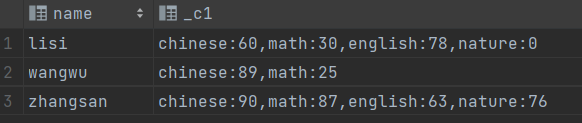
学习到了三个函数:
concat 进行字符串拼接
collect_set() 将分组的数据变成一个set集合。里面的元素是不可重复的。
collect_list(): 里面是可以重复的。
concat_ws(分隔符,集合) : 将集合中的所有元素通过分隔符变为字符串。
想将数据变为:
str_to_map()
lisi    {"chinese":"60","math":"30","english":"78","nature":"0"}
wangwu  {"chinese":"89","math":"25"}
zhangsan        {"chinese":"90","math":"87","english":"63","nature":"76"}
-- 需求:将字符串变为map集合  使用一个函数 str_to_map
select name,str_to_map(concat_ws(",",collect_set(concat(subject,':',score)))) from map2 group by name;

4)Struct结构体
create table tableName(
........
colName struct<subName1:Type,subName2:Type,........>
........
)有点类似于java类
调用的时候直接.
colName.subName
cast()函数
-- Struct结构体
create table struct1(
    name string,
    score struct<chinese:int,math:int,english:int,nature:int>
)
row format delimited
fields terminated by '\t'
collection items terminated by ',';
load data local inpath '/home/hivedata/struct1.txt' into table struct1;
-- 查看数据,有点像map:
select * from struct1;
-- 查询数学大于35分的学生的英语和语文成绩
select name,score.chinese,score.english
from struct1
where score.math>35;


-- 假如有这样的一组数据,里面的数据类型都是string
-- 我什么数据类型都不用,只使用 string 是否可行?
create table struct2(
    name string,
    score string
)
row format delimited
fields terminated by '\t';
load data local inpath '/home/hivedata/arr1.txt' into table struct2;
select * from struct2;
-- split(string str, string regex) 是 Hive 内置字符串分割函数,作用是按指定正则表达式分隔符,将字符串切分为 ARRAY 数组。
select name,split(score,',') from struct2;
-- 需求:获取每个学生的总成绩
select name,sum(score1) from struct2
    lateral view explode(split(score,',')) t as score1
group by name;

-- string可以自动转换为 int 执行sum,也可以使用一个函数 cast 进行类型转换

select "1"+2;
-- cast 函数  是 Hive 内置类型转换函数 可以 将数据类型转换成指定的类型
select cast("1" as int);


select name,sum(cast(score1 as int)) from struct2
    lateral view explode(split(score,',')) mytable as score1
  group by name;

汇聚全球AI编程工具,助力开发者即刻编程。
更多推荐

 11
11 0
0- 0


 已为社区贡献8条内容

所有评论(0)