
【Redis|实战篇6】黑马点评|达人探店、好友关注
文章目录
7.达人探店
7.1发布探店笔记
两张表:
- tb_blog:探店笔记表
- tb_blog_comments:其他用户对探店笔记的评价
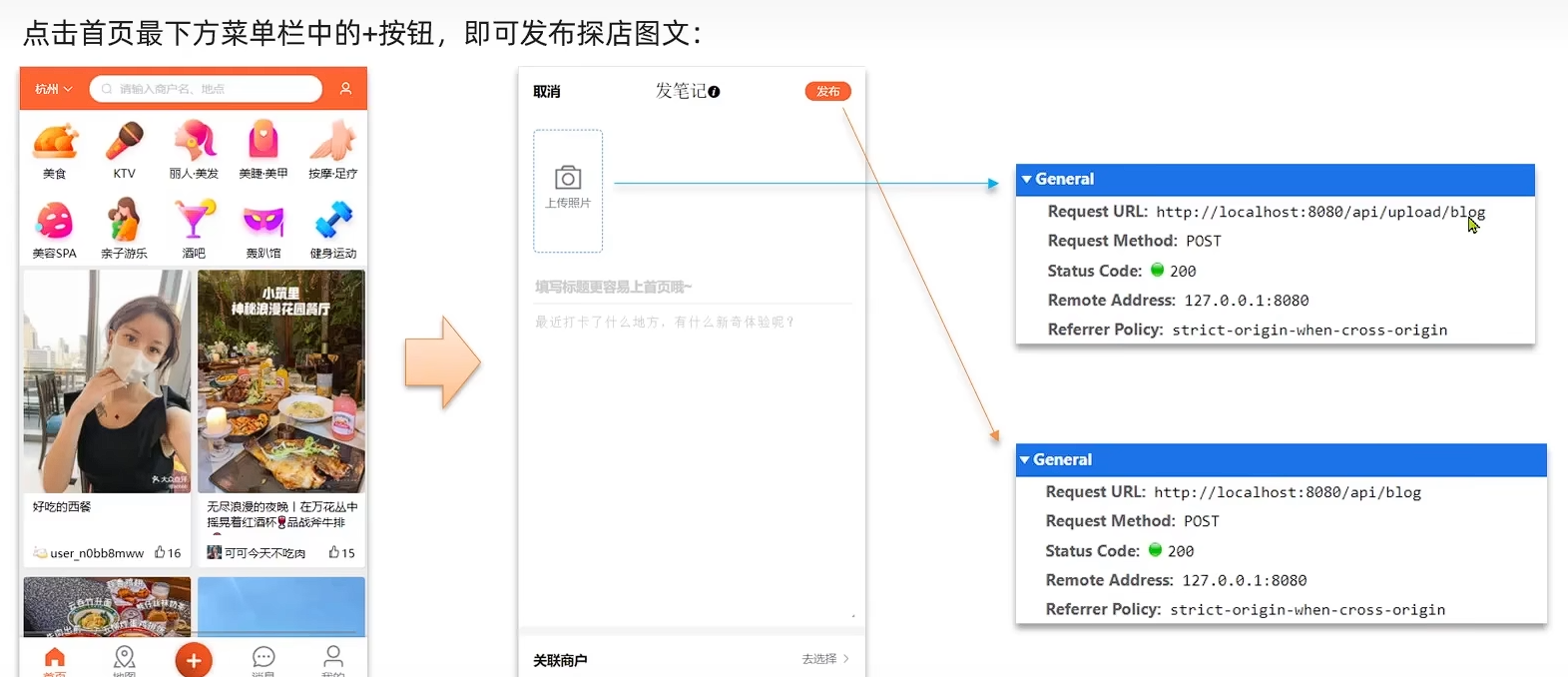
本项目发布的图片都存到了本地nginx里的/html/hmdp/imgs
这个目录是用来存储用户上传的图片文件的,例如探店笔记中的图片。
它的核心作用是作为静态资源服务器的一部分,让前端页面能够直接访问和展示这些图片
7.2查看探店笔记
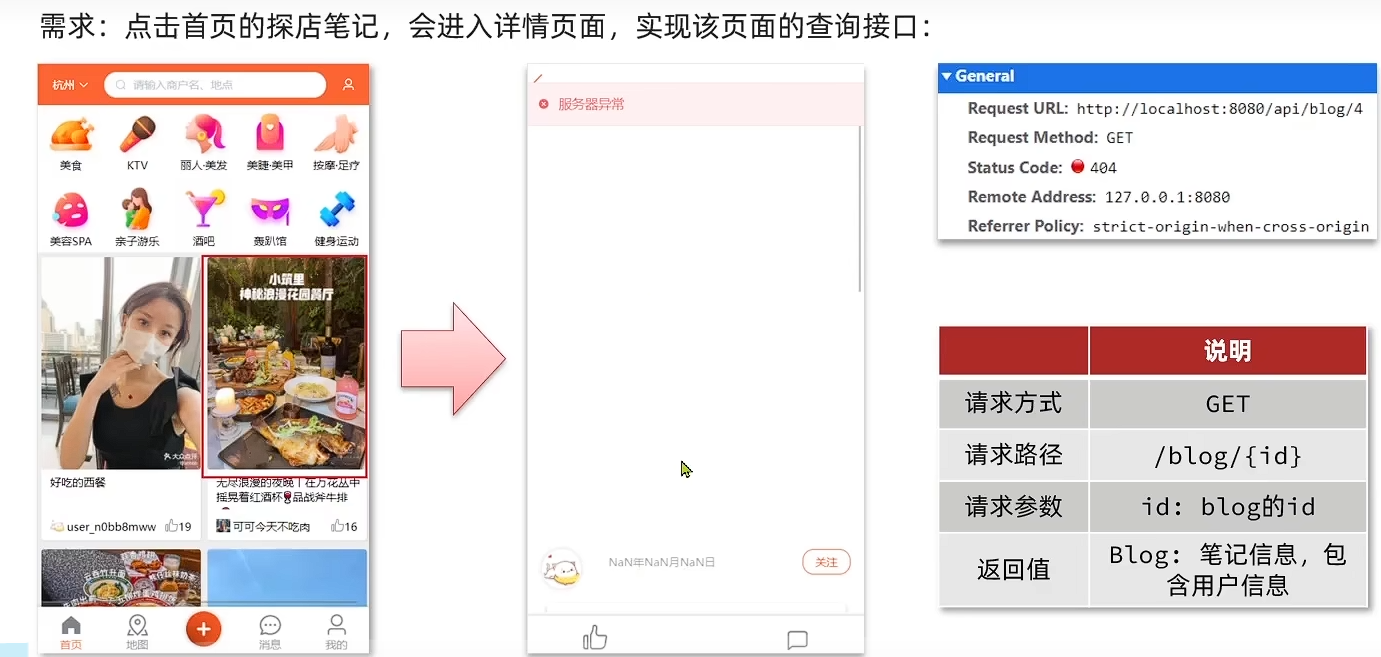
- 查blog
- 查blog有关的用户
在Blog类中加入几个属性用于放用户信息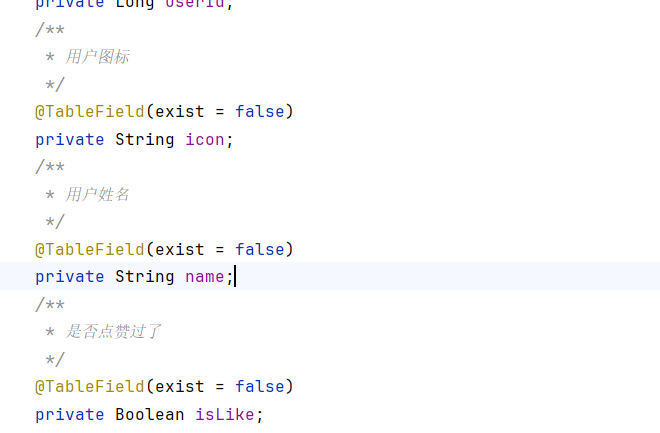
@TableField(exist = false)是 MyBatis-Plus 框架提供的一个注解,它的作用是明确告知框架:当前实体类中的这个字段,在数据库对应的表中是不存在的。因此,在执行增删改查(CRUD)操作时,MyBatis-Plus 会自动忽略这些字段,不会将它们包含在生成的 SQL 语句中
/**
     * 查看探店笔记
     * @param id
     * @return
     */
    @GetMapping("/{id}")
    public Result queryBlogById(@PathVariable("id") Long id) {
        return blogService.queryBlogById(id);
    }
/**
     * 查看探店笔记
     * @param id
     * @return
     */
    @Override
    public Result queryBlogById(Long id) {
        //1.查询blog
        Blog blog = getById(id);
        if(blog == null){
            return Result.fail("博客不存在");
        }
        //2.查询blog有关用户
        queryBlogUser(blog);
        return Result.ok(blog);
    }

    private void queryBlogUser(Blog blog) {
        Long userId = blog.getUserId();
        User user = userService.getById(userId);
        blog.setName(user.getNickName());
        blog.setIcon(user.getIcon());
    }
7.3点赞功能
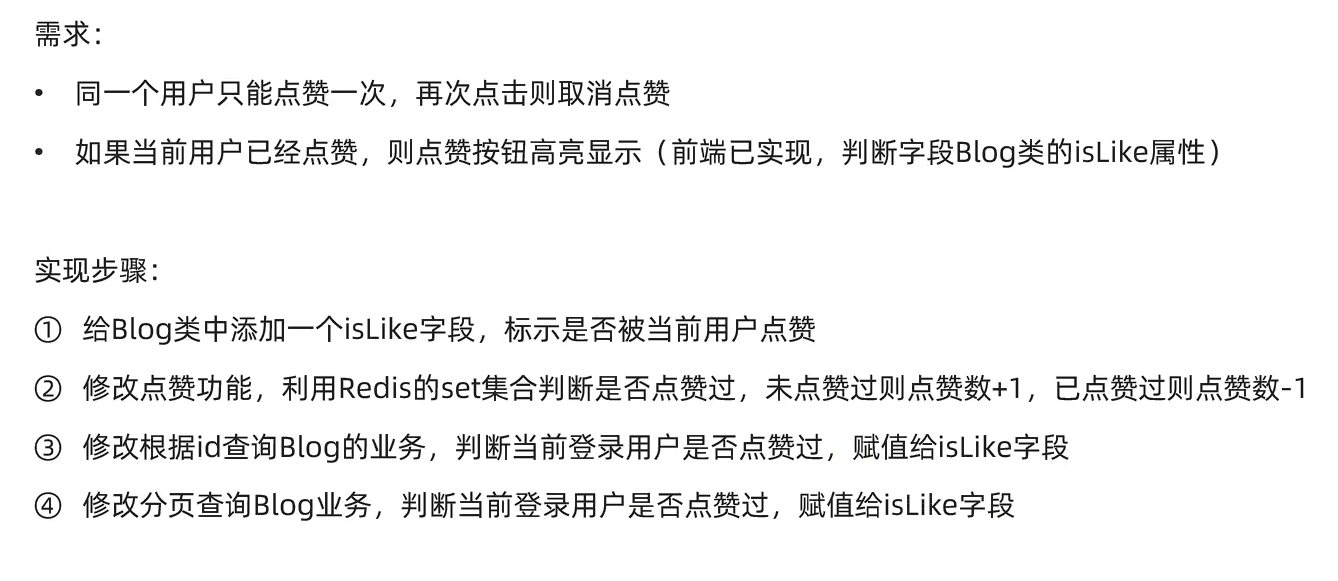
用set记录点赞过的用户
/**
     * 点赞笔记
     * @param id
     * @return
     */
    @Override
    public Result likeBlog(Long id) {
        //1.获取登录用户
        Long userId = UserHolder.getUser().getId();
        //2.判断当前用户是否已经点赞
        String key = "blog:liked:" + id;
        Boolean isMember = stringRedisTemplate.opsForSet().isMember(key, userId.toString());
        if(BooleanUtil.isFalse(isMember)){
            //3.如果未点赞可以点赞
            //3.1数据库点赞数+1
            boolean isSuccess = update().setSql("liked = liked + 1").eq("id", id).update();
            if(isSuccess){
                //3.2保存用户到Redis的set集合
                stringRedisTemplate.opsForSet().add(key,userId.toString());
            }
        }else {
            //4.如果已经点赞
            //4.1数据库点赞数-1
            boolean isSuccess = update().setSql("liked = liked - 1").eq("id", id).update();
            if(isSuccess){
                //4.2把用户从Redis的set集合移除
                stringRedisTemplate.opsForSet().remove(key,userId.toString());
            }
        }

        return Result.ok();
    }
在之前的查询blog里也需要添加判断博客是否被点赞
/**
     * 判断博客是否被点赞
     * @param blog
     */
    private void isBlogLiked(Blog blog) {
        //1.获取登录用户
        UserDTO user = UserHolder.getUser();
        if (user == null) {
            //用户未登录,无需查询是否点赞
            return;
        }
        Long userId = user.getId();
        //2.判断当前登录用户是否已被点赞
        String key = "blog:liked:" + blog.getId();
        Double score = stringRedisTemplate.opsForZSet().score(key, userId.toString());
        blog.setIsLike(score != null);

    }
7.4点赞排行榜
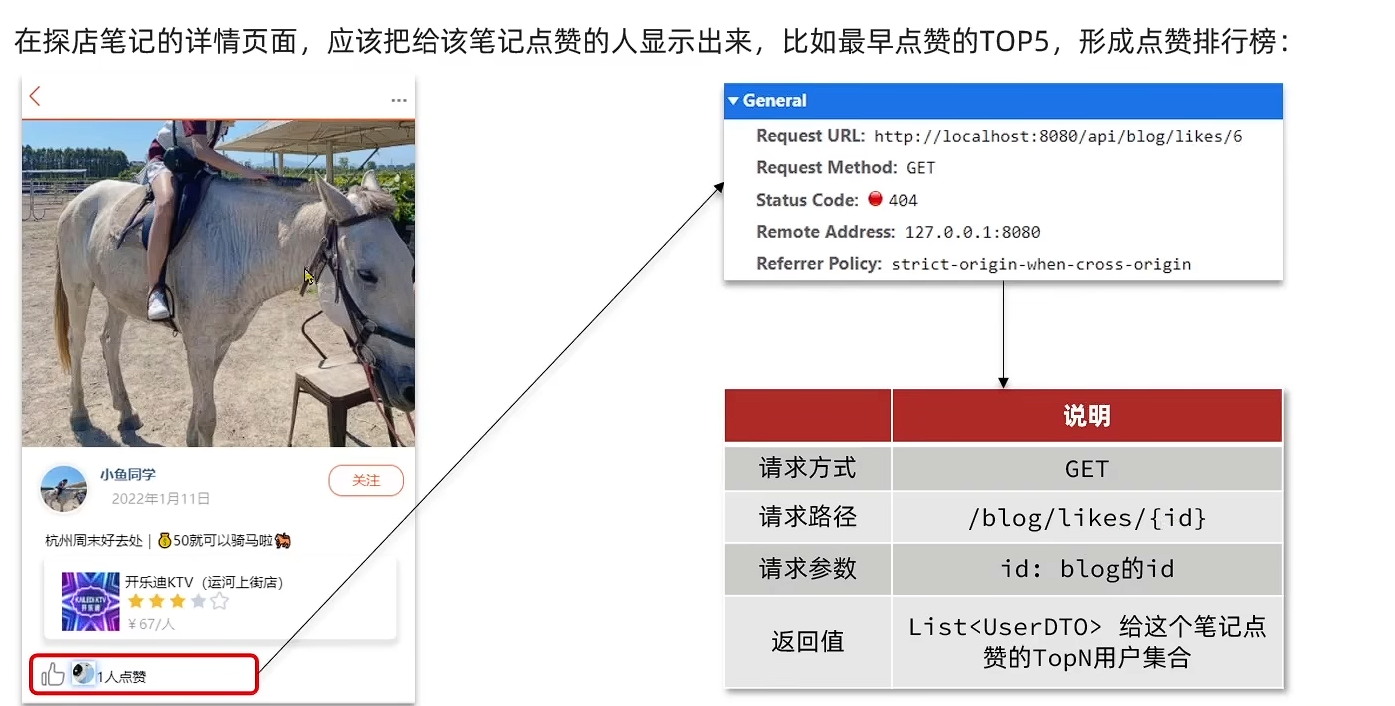
把之前用的Set改为SortedSet,因为SortedSet支持按Score排序。
在查询用用户ids查数据库时需自定义sql语句,为了自定义查询出来的数据顺序
最终的完整Service
@Service
public class BlogServiceImpl extends ServiceImpl<BlogMapper, Blog> implements IBlogService {

    @Resource
    private IUserService userService;

    @Resource
    private StringRedisTemplate stringRedisTemplate;

    /**
     * 查询热门博客
     * @param current
     * @return
     */
    @Override
    public Result queryHotBlog(Integer current) {
        // 根据用户查询
        Page<Blog> page = query()
                .orderByDesc("liked")
                .page(new Page<>(current, SystemConstants.MAX_PAGE_SIZE));
        // 获取当前页数据
        List<Blog> records = page.getRecords();
        // 查询用户
        records.forEach(blog ->{
            this.queryBlogUser(blog);
            this.isBlogLiked(blog);
        });
        return Result.ok(records);
    }

    /**
     * 查看探店笔记
     * @param id
     * @return
     */
    @Override
    public Result queryBlogById(Long id) {
        //1.查询blog
        Blog blog = getById(id);
        if(blog == null){
            return Result.fail("博客不存在");
        }
        //2.查询blog有关用户
        queryBlogUser(blog);
        //3.查询blog是否被点赞
        isBlogLiked(blog);
        return Result.ok(blog);
    }

    /**
     * 判断博客是否被点赞
     * @param blog
     */
    private void isBlogLiked(Blog blog) {
        //1.获取登录用户
        UserDTO user = UserHolder.getUser();
        if (user == null) {
            //用户未登录,无需查询是否点赞
            return;
        }
        Long userId = user.getId();
        //2.判断当前登录用户是否已被点赞
        String key = "blog:liked:" + blog.getId();
        Double score = stringRedisTemplate.opsForZSet().score(key, userId.toString());
        blog.setIsLike(score != null);

    }

    /**
     * 点赞笔记
     * @param id
     * @return
     */
    @Override
    public Result likeBlog(Long id) {
        //1.获取登录用户
        Long userId = UserHolder.getUser().getId();
        //2.判断当前用户是否已经点赞
        String key = "blog:liked:" + id;
        Double score = stringRedisTemplate.opsForZSet().score(key, userId.toString());
        if(score == null){
            //3.如果未点赞可以点赞
            //3.1数据库点赞数+1
            boolean isSuccess = update().setSql("liked = liked + 1").eq("id", id).update();
            if(isSuccess){
                //3.2保存用户到Redis的set集合
                stringRedisTemplate.opsForZSet().add(key,userId.toString(),System.currentTimeMillis());
            }
        }else {
            //4.如果已经点赞
            //4.1数据库点赞数-1
            boolean isSuccess = update().setSql("liked = liked - 1").eq("id", id).update();
            if(isSuccess){
                //4.2把用户从Redis的set集合移除
                stringRedisTemplate.opsForZSet().remove(key,userId.toString());
            }
        }

        return Result.ok();
    }

    /**
     * 查询点赞排行榜
     * @param id
     * @return
     */
    @Override
    public Result queryBlogLikes(Long id) {
        String key = "blog:liked:" + id;
        //1.查询top5的点赞用户
        Set<String> top5 = stringRedisTemplate.opsForZSet().range(key, 0, 4);
        if(top5 == null || top5.isEmpty()){
            return Result.ok(Collections.emptyList());
        }
        //2.解析出其中的用户id
        List<Long> ids = top5.stream().map(Long::valueOf).collect(Collectors.toList());
        //3.根据id查询用户
        String idStr = StrUtil.join(",", ids);
        List<UserDTO> userDTOs = userService.query().in("id",ids).last("ORDER BY FIELD(id," + idStr + ")").list()
                .stream()
                .map(user -> BeanUtil.copyProperties(user, UserDTO.class))
                .collect(Collectors.toList());
        //4.返回
        return Result.ok(userDTOs);
    }

    /**
     * 查询博客相关用户
     * @param blog
     */
    private void queryBlogUser(Blog blog) {
        Long userId = blog.getUserId();
        User user = userService.getById(userId);
        blog.setName(user.getNickName());
        blog.setIcon(user.getIcon());
    }
}
8.好友关注
8.1关注和取关
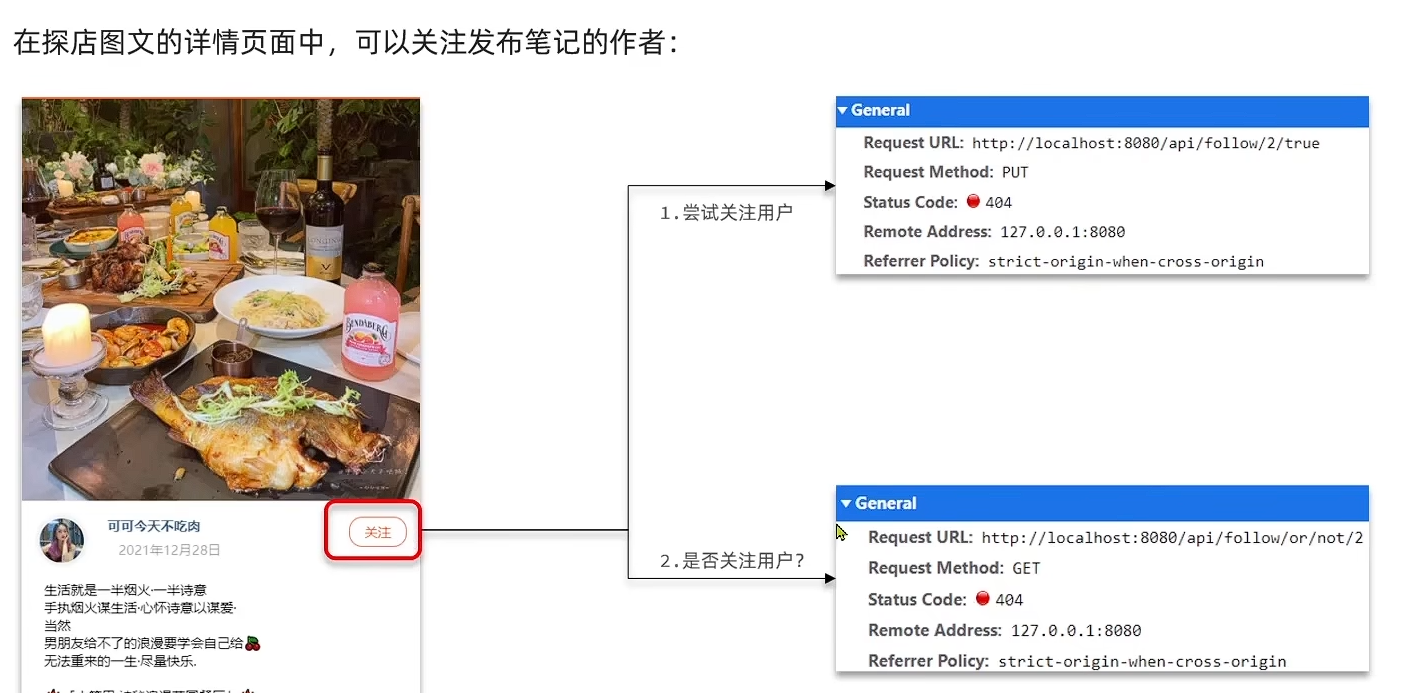
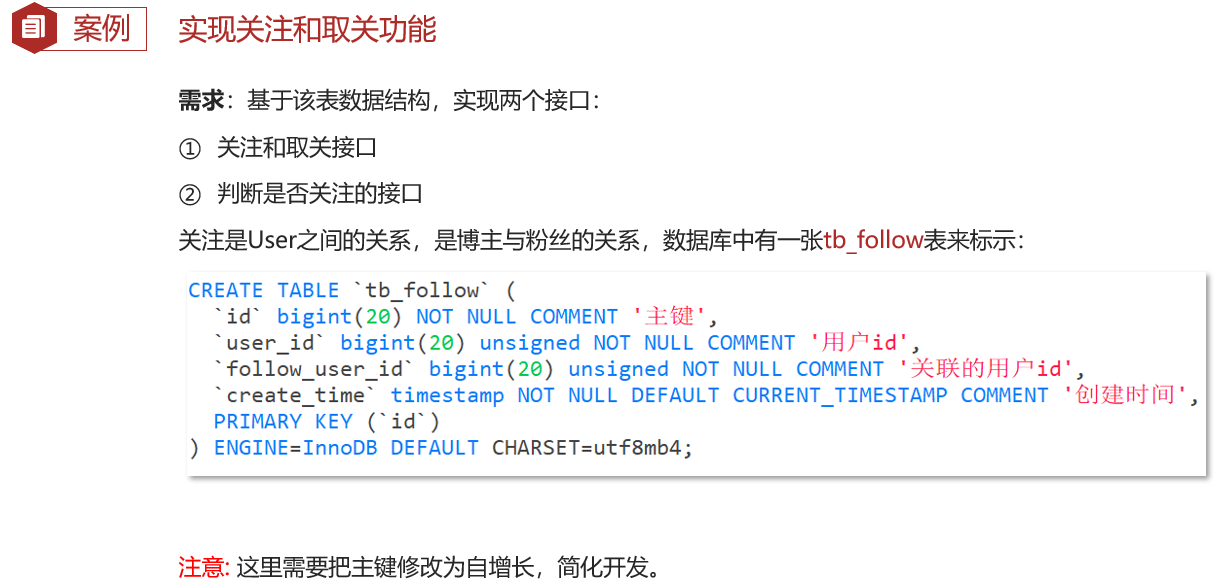
Controller
@RestController
@RequestMapping("/follow")
public class FollowController {

    @Resource
    private IFollowService followService;

    /**
     * 关注用户
     * @param followUserId 关注用户的id
     * @param isFollow 是否已关注
     * @return
     */
    @PutMapping("/{id}/{isFollow}")
    public Result follow(@PathVariable("id") Long followUserId, @PathVariable Boolean isFollow){
        return followService.follow(followUserId, isFollow);
    }

    /**
     * 是否关注用户
     * @param followUserId 关注用户的id
     * @return
     */
    @GetMapping("/or/not/{id}")
    public Result isFollow(@PathVariable("id") Long followUserId){
        return followService.isFollow(followUserId);
    }
}
Service
/**
 * 好友关注
 */
@Service
public class FollowServiceImpl extends ServiceImpl<FollowMapper, Follow> implements IFollowService {

    /**
     * 关注或取关
     *
     * @param followUserId 关注用户的id
     * @param isFollow     是否已关注
     * @return
     */
    @Override
    public Result follow(Long followUserId, Boolean isFollow) {
        //1.获取登录用户
        Long userId = UserHolder.getUser().getId();
        //2.判断是关注还是取关
        if(isFollow) {
            //关注,新增数据
            Follow follow = new Follow();
            follow.setUserId(userId);
            follow.setFollowUserId(followUserId);
            save(follow);
        } else {
            //取关,删除关注信息
            this.remove(new QueryWrapper<Follow>()
                    .eq("user_id", userId)
                    .eq("follow_user_id", followUserId));
        }
        return Result.ok();
    }

    /**
     * 是否关注用户
     *
     * @param followUserId 关注用户的id
     * @return
     */
    @Override
    public Result isFollow(Long followUserId) {
        //1.获取登录用户
        Long userId = UserHolder.getUser().getId();
        //2.查询是否关注
        Integer count = query().eq("user_id", userId).eq("follow_user_id", followUserId).count();
        return Result.ok(count > 0);
    }
}
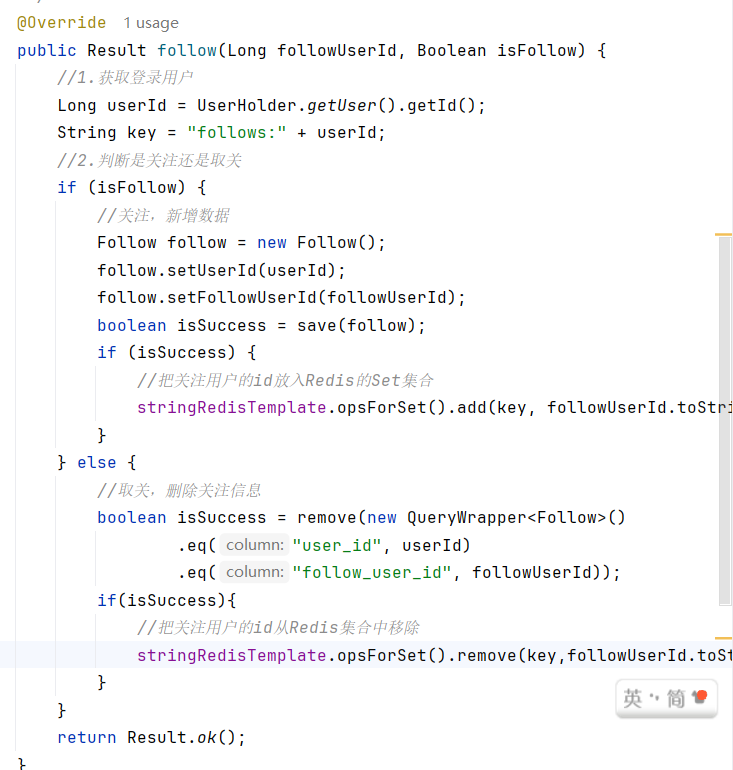
8.2共同关注
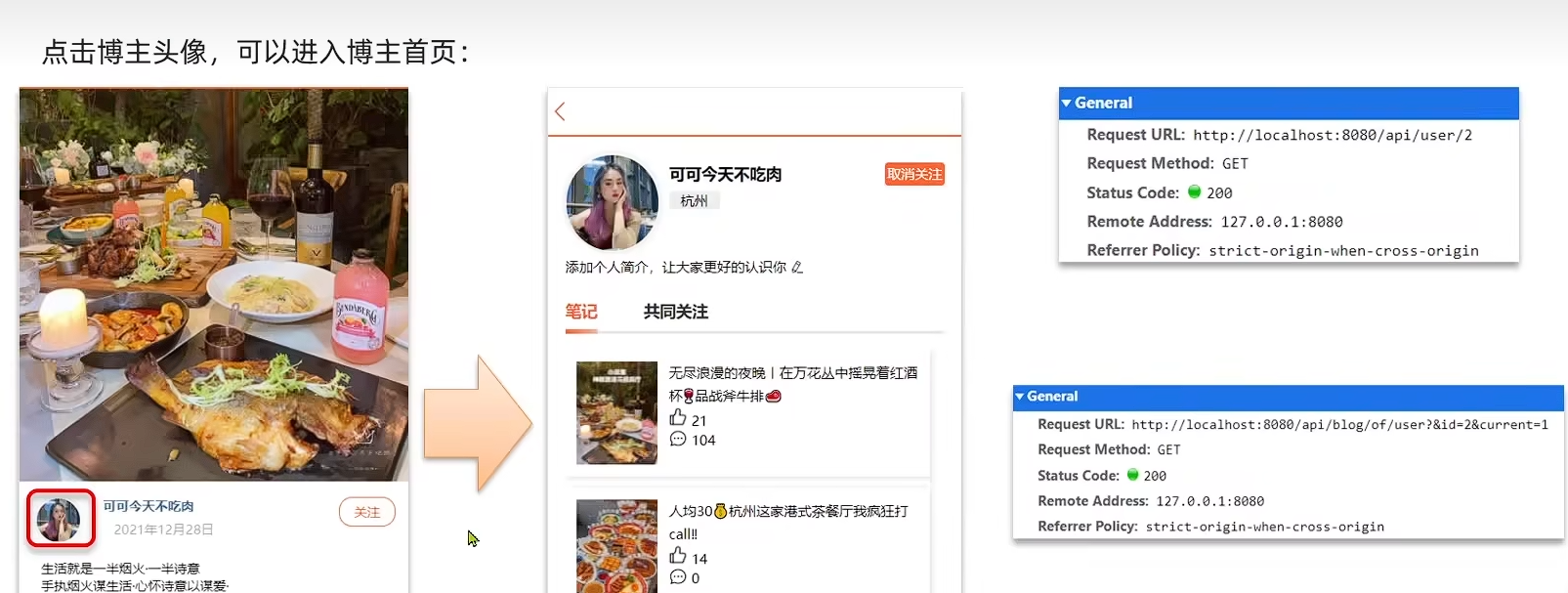
把每个用户关注列表缓存到Redis(在关注时就把关注 的缓存进Redis),用Set里的sinterstore取两集合交集
8.3Feed流实现
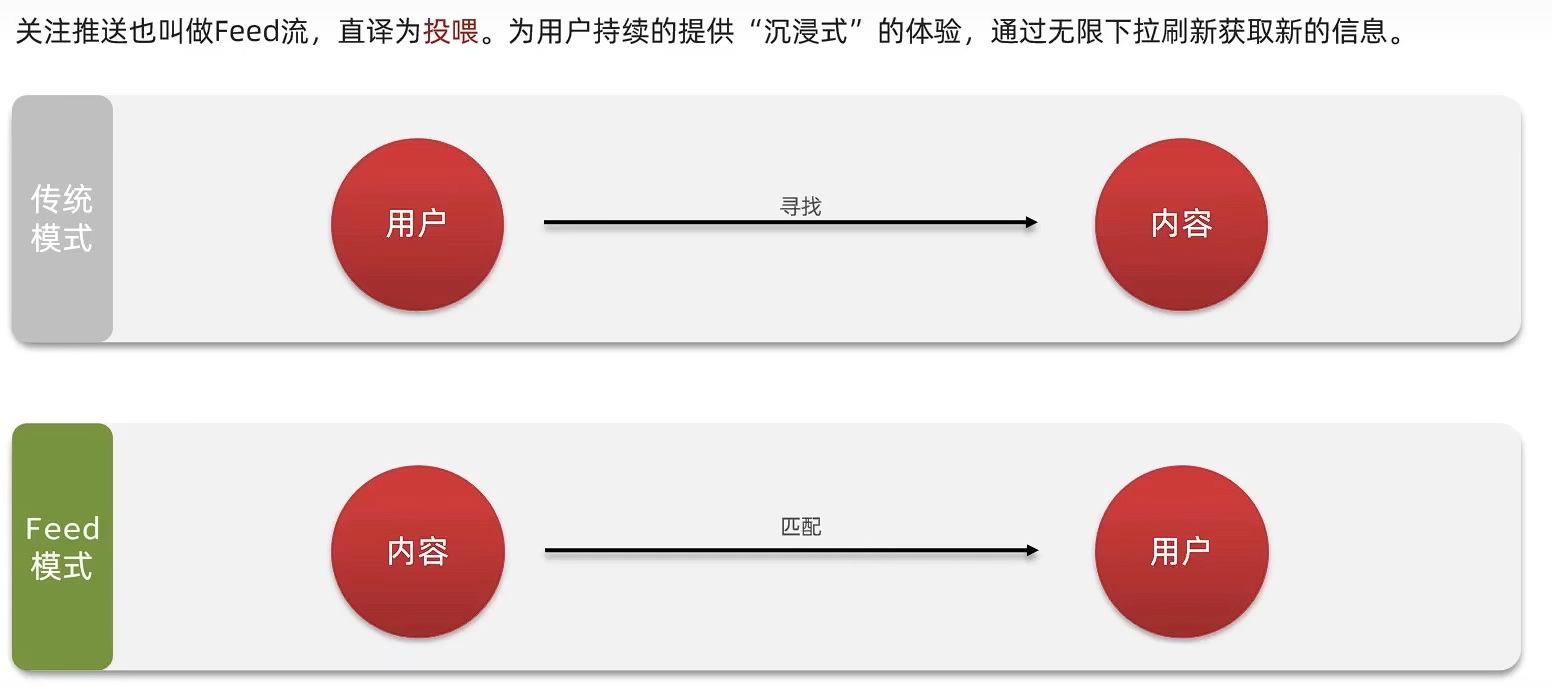
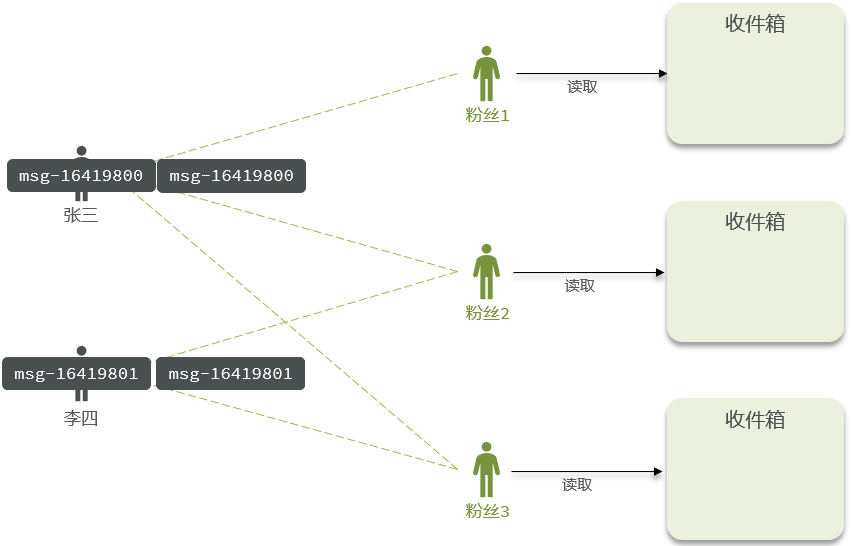
Feed流产品有两种常见模式:
-
时间排序(Timeline):不做内容筛选,简单的按照内容发布时间排序,常用于好友或关注。例如朋友圈
-
优点:信息全面,不会有缺失。并且实现也相对简单
-
缺点:信息噪音较多,用户不一定感兴趣,内容获取效率低
-
-
智能排序:利用智能算法屏蔽掉违规的、用户不感兴趣的内容。推送用户感兴趣信息来吸引用户
-
优点:投喂用户感兴趣信息,用户粘度很高,容易沉迷
-
缺点:如果算法不精准,可能起到反作用
-
本例中的页面基于关注的好友来做Feed流,因此用时间排序模式
时间排序模式的三种实现方案: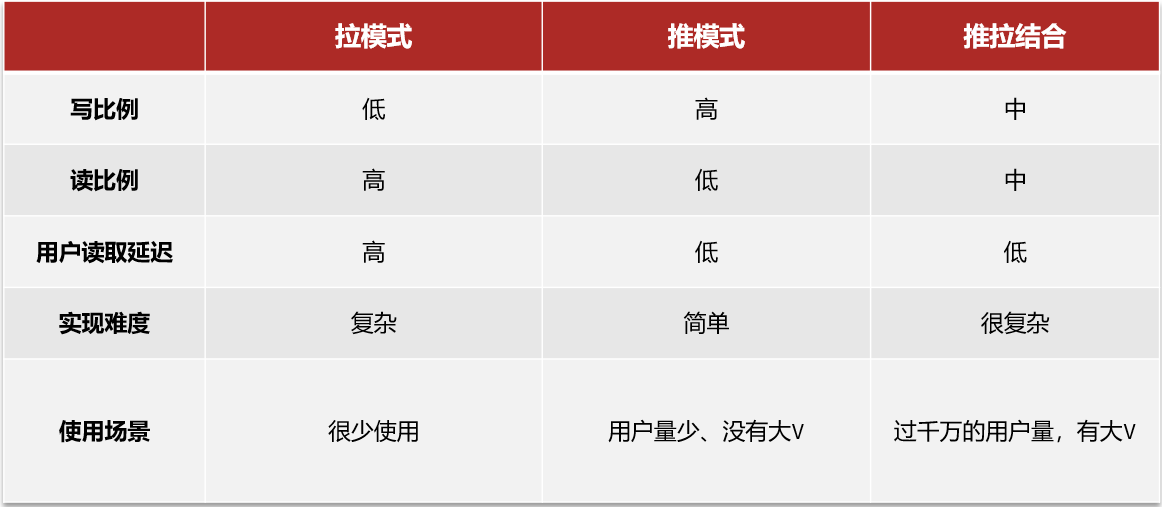
| 模式 | 核心原理 | 优点 | 缺点 | 适用场景 |
|---|---|---|---|---|
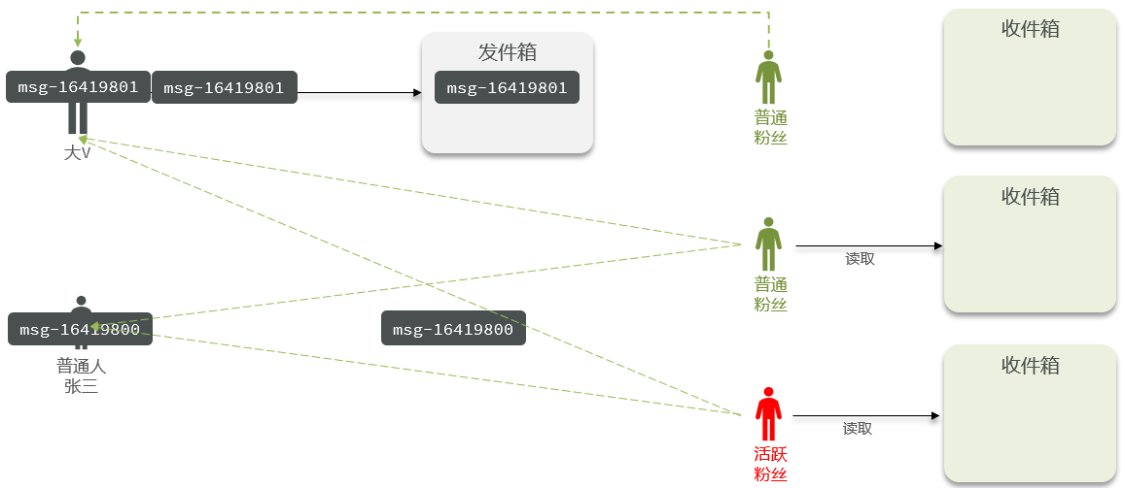
| 拉模式 (Pull) | 用户读取时,实时查询所有关注对象的内容并聚合。 | 写入快,存储成本低(内容只存一份)。 | 读取慢,关注人多时延迟高。 | 用户关注数少,或内容发布者是“大V”。 |
| 推模式 (Push) | 用户发布时,立即将内容推送给所有粉丝的收件箱。 | 读取极快(直接读自己的收件箱),实时性强。 | 写入压力大,存储冗余。 | 粉丝量不大的普通用户,或强实时性需求。 |
| 推拉结合 | 普通用户用推模式,大V用户用拉模式 | 写入压力大,存储冗余。 | 系统复杂,维护成本高。 | 大型社交平台(如微博、抖音)。 |
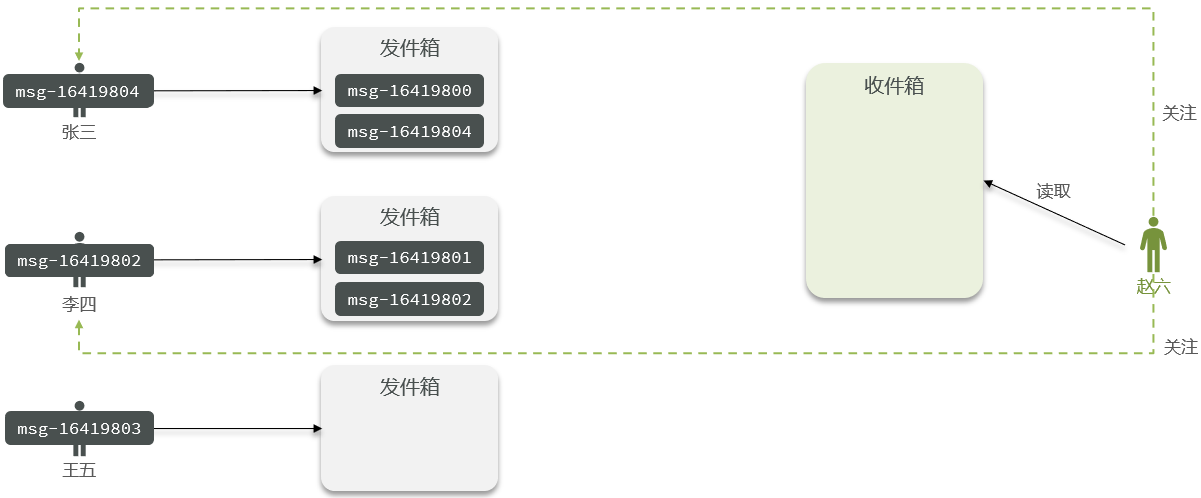
8.4推送到粉丝收件箱
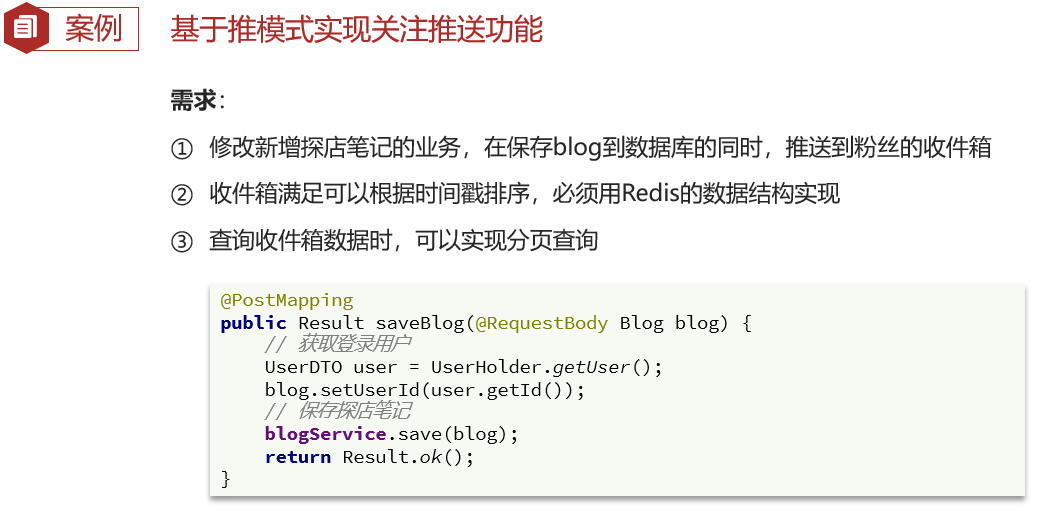
收件箱用Redis的SortedSet实现
/**
     * 上传博客
     * @param blog
     * @return
     */
    @PostMapping
    public Result saveBlog(@RequestBody Blog blog) {
        return blogService.saveBlog(blog);
    }
/**
     * 上传博客
     * @param blog
     * @return
     */
    @Override
    public Result saveBlog(Blog blog) {
        // 获取登录用户
        UserDTO user = UserHolder.getUser();
        blog.setUserId(user.getId());
        // 保存探店博文
        boolean isSuccess = save(blog);
        if(isSuccess){
            return Result.fail("新增笔记失败");
        }
        //查询笔记作者的所有粉丝
        List<Follow> follows = followService.query().eq("follow_user_id", user.getId()).list();
        //推送笔记id给所有粉丝
        for (Follow follow : follows) {
            //获取粉丝id
            Long userId = follow.getUserId();
            //推送
            String key = "feed:" + userId;
            stringRedisTemplate.opsForZSet().add(key,blog.getId().toString(),System.currentTimeMillis());
        }
        // 返回id
        return Result.ok(blog.getId());
    }
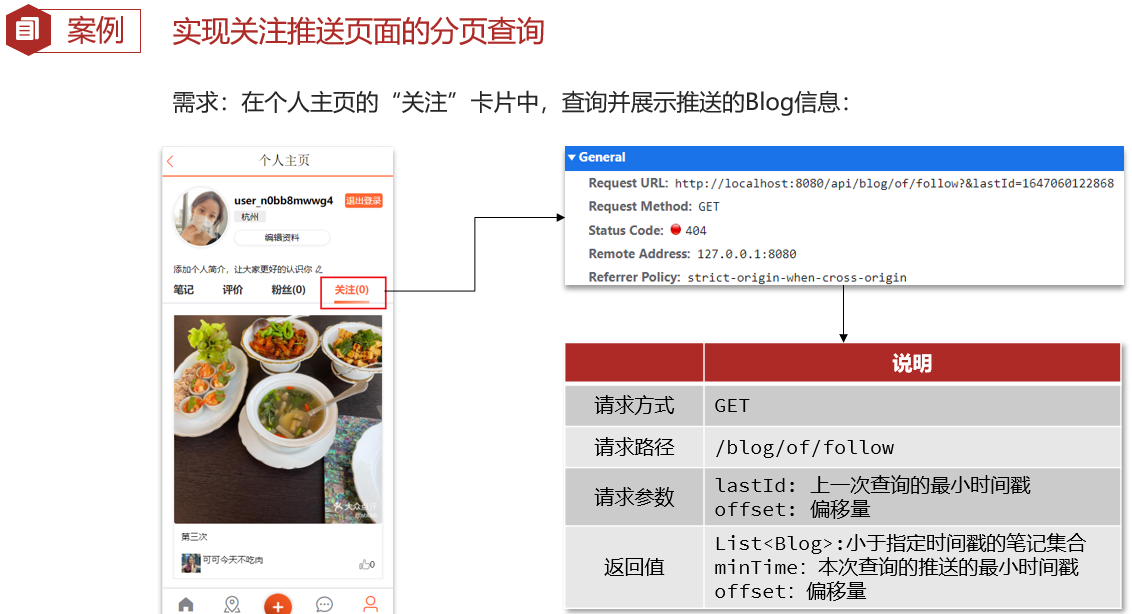
8.5滚动分页查询
查询命令
使用 Redis 的 ZREVRANGEBYSCORE 命令,按分数(时间戳)倒序查询
ZREVRANGEBYSCORE key max min WITHSCORES LIMIT offset count
key: 用户的收件箱。max: 查询的最大时间戳(游标)。min: 查询的最小时间戳(通常为0)。offset和count: 用于处理同一时间戳下有多条数据的情况
首次查询:max 设置为当前时间,offset 为 0,查询最新的一批数据

优化
- 并发问题:在高并发下,不同笔记的发布时间戳可能完全相同(毫秒级精度不够)
- 解决方案:为了避免查询混乱,在将笔记推送到粉丝收件箱时,可以为时间戳(Score)增加一个微小的随机值(如
System.currentTimeMillis() + random),确保每个元素的 Score 唯一,从而简化offset的计算逻辑
/**
     * 滚动分页查询
     * @param max
     * @param offset
     * @return
     */
    @GetMapping("/of/follow")
    public Result queryBlogOfFollow(@RequestParam("lastId") Long max,@RequestParam(value = "offset",defaultValue = "0") Integer offset){
        return blogService.queryBlogOfFollow(max,offset);
    }
/**
     * 滚动分页查询
     * @param max
     * @param offset
     * @return
     */
    @Override
    public Result queryBlogOfFollow(Long max, Integer offset) {
        //1.获取当前用户
        Long userId = UserHolder.getUser().getId();
        //2.查询收件箱
        String key = "feed:" + userId;
        Set<ZSetOperations.TypedTuple<String>> typedTuples = stringRedisTemplate.opsForZSet().reverseRangeByScoreWithScores(key, 0, max, offset, 2);
        if(typedTuples == null || typedTuples.isEmpty()){
            return Result.ok();
        }
        //3.解析数据:blogId、minTime(时间戳)、offset
        List<Long> ids = new ArrayList<>(typedTuples.size());
        long minTime = 0;
        int os = 1;
        for (ZSetOperations.TypedTuple<String> tuple : typedTuples) {
            //id
            String idStr = tuple.getValue();
            ids.add(Long.valueOf(idStr));
            //minTime
            long time = tuple.getScore().longValue();//.longValue()直接舍弃小数
            if(time == minTime){
                os++;
            }else {
                minTime = time;
                os = 1;
            }
        }
        //4.根据id查询blog
        String idStr = StrUtil.join(",", ids);
        List<Blog> blogs = query().in("id", ids).last("ORDER BY FIELD(id," + idStr + ")").list();
        for (Blog blog : blogs) {
            //查询blog有关用户
            queryBlogUser(blog);
            //查询blog是否被点赞
            isBlogLiked(blog);
        }
        //5.封装并返回
        ScrollResult r = new ScrollResult();
        r.setList(blogs);
        r.setOffset(os);
        r.setMinTime(minTime);

        return Result.ok(r);
    }
TypedTuple 里面有什么?
它主要包含两个核心属性:
- Value (成员)
- 类型:泛型
<String>(在黑马点评中通常是笔记ID的字符串形式)。- 含义:ZSet 中存储的实际数据。
- 获取方法:
tuple.getValue()
- Score (分数)
- 类型:
Double。- 含义:ZSet 中用于排序的分数(在黑马点评中是时间戳)。
- 获取方法:
tuple.getScore()

汇聚全球AI编程工具,助力开发者即刻编程。
更多推荐
 12
12 0
0- 0


 已为社区贡献9条内容

所有评论(0)