
云原生-redis
企业级NoSql数据库Redis集群
一 关系型数据库和 NoSQL 数据库
1.1 数据库主要分为两大类:关系型数据库与 NoSQL 数据库
关系型数据库,是建立在关系模型基础上的数据库,其借助于集合代数等数学概念和方法来处理数据库中的数据主流的 MySQL、Oracle、MS SQL Server 和 DB2 都属于这类传统数据库。
NoSQL 数据库,全称为 Not Only SQL,意思就是适用关系型数据库的时候就使用关系型数据库,不适用的时候也没有必要非使用关系型数据库不可,可以考虑使用更加合适的数据存储。主要分为临时性键值存储(memcached、Redis)、永久性键值存储(ROMA、Redis)、面向文档的数据库(MongoDB、CouchDB)、面向列的数据库(Cassandra、HBase),每种 NoSQL 都有其特有的使用场景及优点。
1.2 为什么还要用 NoSQL 数据库呢?
主要是由于随着互联网发展,数据量越来越大,对性能要求越来越高,传统数据库存在着先天性的缺陷,即单机(单库)性能瓶颈,并且扩展困难。这样既有单机单库瓶颈,却又扩展困难,自然无法满足日益增长的海量数据存储及其性能要求,所以才会出现了各种不同的 NoSQL 产品,NoSQL 根本性的优势在于在云计算时代,简单、易于大规模分布式扩展,并且读写性能非常高
1.3 RDBMS和NOSQL的特点及优缺点:
RDBMS(关系型数据库)
-
特点:遵循 ACID(原子性、一致性、隔离性、持久性),使用 SQL 查询,严格 Schema(表结构),支持多表关联和复杂事务。
-
优点:数据一致性高、强事务支持、适合复杂关联查询、成熟稳定。
-
缺点:扩展性差(主要为垂直扩展)、高并发下性能瓶颈、Schema 修改成本高、海量数据存储受限。
2. NoSQL(非关系型数据库)
-
特点:遵循 BASE(基本可用、软状态、最终一致性),灵活 Schema,分布式 架构,高吞吐量。
-
优点:水平扩展能力强、高并发读写性能好、数据结构灵活(键值、文档、图等)、适合海量数据。
-
缺点:事务支持弱(通常仅保证单行/文档原子性)、查询能力受限(关联查询复杂)、存在数据冗余、标准化程度低。
二 redis简介
中文官网
2.1 什么是redis
Redis (Remote Dictionary Server)
在2009年发布,开发者是意大利的萨尔瓦多·桑菲利波普(Salvatore Sanfilippo),他本想为自己的公司开发一个用于替换MySQL的产品Redis,但是没有想到他把Redis开源后大受欢迎,短短几年,Redis就有了很大的用户群体,目前国内外使用的公司众多,比如:阿里,百度,新浪微博,知乎网,GitHub,Twitter 等 Redis是一个开源的、遵循BSD协议的、基于内存的而且目前比较流行的键值数据库(key-value database),是一个非关系型数据库,redis 提供将内存通过网络远程共享的一种服务,提供类似功能的还有memcached,但相比memcached,redis还提供了易扩展、高性能、具备数据持久性等功能。Redis 在高并发、低延迟环境要求比较高的环境使用量非常广泛
2.2 Redis特性
-
速度快: 10W QPS,基于内存,C语言实现
-
单线程
-
持久化
-
支持多种数据结构
-
支持多种编程语言
-
功能丰富: 支持Lua脚本,发布订阅,事务,pipeline等功能
-
简单: 代码短小精悍(单机核心代码只有23000行左右),单线程开发容易,不依赖外部库,使用简单
-
主从复制
-
支持高可用和分布式
单线程为何如此快?
-
纯内存
-
非阻塞
-
避免线程切换和竞态消耗
2.3 Redis应用场景
-
Session 共享:常见于web集群中的Tomcat或者PHP中多web服务器session共享
-
缓存:数据查询、电商网站商品信息、新闻内容
-
计数器:访问排行榜、商品浏览数等和次数相关的数值统计场景
-
微博/微信社交场合:共同好友,粉丝数,关注,点赞评论等
-
消息队列:ELK的日志缓存、部分业务的订阅发布系统
-
地理位置: 基于GEO(地理信息定位),实现摇一摇,附近的人,外卖等功能
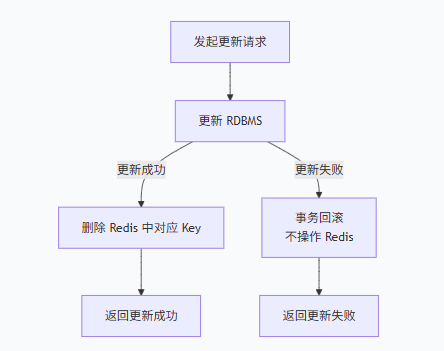
2.4 缓存的实现流程
数据更新操作流程
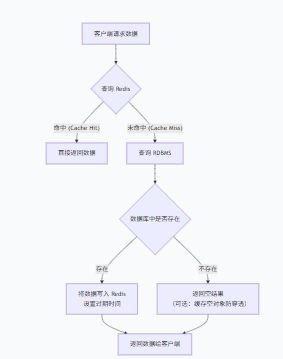
数据读操作流程
三 Redis的安装
官方下载地址:http://download.redis.io/releases/
3.1 rpm包方式安装
[root@redis-node1 ~]# dnf install redis -y
正在更新 Subscription Management 软件仓库。
无法读取客户身份
This system is not registered with an entitlement server. You can use "rhc" or "subscription-manager" to register.
上次元数据过期检查:0:01:14 前,执行于 2024年08月05日 星期一 13时30分23秒。
依赖关系解决。
=================================================================================================================
软件包 架构 版本 仓库 大小
=================================================================================================================
安装:
redis x86_64 6.2.7-1.el9 AppStream 1.3 M
事务概要
=================================================================================================================
安装 1 软件包
总计:1.3 M
安装大小:4.7 M3.2 源码安装
[!WARNING]
在一台主机中不能即用rpm安装也用源码安装
#解压源码包
[root@redis-node1 ~]# tar zxf redis-7.4.0.tar.gz
[root@redis-node1 ~]# ls
redis-7.4.0 redis-7.4.0.tar.gz
#安装编译工具
[root@redis-node1 redis-7.4.0]# dnf install make gcc initscripts-10.11.6-1.el9.x86_64 -y
#执行编译命令
[root@redis-node1 redis-7.4.0]# make
[root@redis-node1 redis-7.4.0]# make install
#启动Redis
[root@redis-node1 redis-7.4.0]# cd utils/
[root@redis-node1 utils]# ./install_server.sh
Welcome to the redis service installer
This script will help you easily set up a running redis server
This systems seems to use systemd. #提示系统使用的是systemd的初始化方式
Please take a look at the provided example service unit files in this directory, and adapt and install them. Sorry!
[root@redis-node1 utils]# vim install_server.sh #解决报错问题
#bail if this system is managed by systemd
#_pid_1_exe="$(readlink -f /proc/1/exe)"
#if [ "${_pid_1_exe##*/}" = systemd ]
#then
# echo "This systems seems to use systemd."
# echo "Please take a look at the provided example service unit files in this directory, and adapt and install them. Sorry!"
# exit 1
#fi
[root@redis-node1 utils]# ./install_server.sh
Welcome to the redis service installer
This script will help you easily set up a running redis server
Please select the redis port for this instance: [6379] #端口号
Selecting default: 6379
Please select the redis config file name [/etc/redis/6379.conf] #配置文件
Selected default - /etc/redis/6379.conf
Please select the redis log file name [/var/log/redis_6379.log] #日志
Selected default - /var/log/redis_6379.log
Please select the data directory for this instance [/var/lib/redis/6379] #数据目录
Selected default - /var/lib/redis/6379
Please select the redis executable path [/usr/local/bin/redis-server] #命令路径
Selected config:
Port : 6379
Config file : /etc/redis/6379.conf
Log file : /var/log/redis_6379.log
Data dir : /var/lib/redis/6379
Executable : /usr/local/bin/redis-server
Cli Executable : /usr/local/bin/redis-cli
Is this ok? Then press ENTER to go on or Ctrl-C to abort.
Copied /tmp/6379.conf => /etc/init.d/redis_6379
Installing service...
Successfully added to chkconfig!
Successfully added to runlevels 345!
Starting Redis server...
Installation successful!
#配置redis
[root@redis-node1 utils]# vim /etc/redis/6379.conf
bind * -::*
[root@redis-node1 utils]# /etc/init.d/redis_6379 restart
Stopping ...
Redis stopped
Starting Redis server...
[root@redis-node1 utils]# netstat -antlpe | grep redis
tcp 0 0 0.0.0.0:6379 0.0.0.0:* LISTEN 0 67267 38417/redis-server
tcp6 0 0 :::6379
#查看信息
[root@redis-node1 utils]# redis-cli
127.0.0.1:6379> info
四 Redis的基本操作
示例:
#查看配置
127.0.0.1:6379[1]> CONFIG GET bind
1) "bind"
2) "* -::*"
127.0.0.1:6379[1]> CONFIG GET *
#写入和读取数据
127.0.0.1:6379> SET name lee
OK
127.0.0.1:6379> GET name
"lee"
127.0.0.1:6379> set name lee ex 5
OK
127.0.0.1:6379> get name
"lee"
127.0.0.1:6379> get name
"lee"
127.0.0.1:6379> get name
"lee"
127.0.0.1:6379> get name
"lee"
127.0.0.1:6379> get name
(nil)
#如果没有设定数据过期时间会一直存在, /var/lib/redis/6379/dump.rdb内存快照中
127.0.0.1:6379> set name lee
OK
127.0.0.1:6379> KEYS * #查看所有key
1) "name"
#选择数据库 redisa中有0-15个数据库
127.0.0.1:6379> select 1
OK
127.0.0.1:6379[1]> get name
(nil)
127.0.0.1:6379> select 0
127.0.0.1:6379[1]> select 16
(error) ERR DB index is out of range
#移动数据
127.0.0.1:6379> set name lee
OK
127.0.0.1:6379> MOVE name 1
(integer) 1
127.0.0.1:6379> GET name
(nil)
127.0.0.1:6379> select 1
OK
127.0.0.1:6379[1]> get name
"lee"
#改变键名
127.0.0.1:6379[1]> RENAME name id
OK
127.0.0.1:6379[1]> get name
(nil)
127.0.0.1:6379[1]> get id
"lee"
#设定数据过期时间
127.0.0.1:6379> set name lee ex 10000
OK
127.0.0.1:6379> get name
"lee"
127.0.0.1:6379> EXPIRE name 3
(integer) 1
127.0.0.1:6379> get name
"lee"
127.0.0.1:6379> get name
(nil)
#删除
127.0.0.1:6379> set name lee
OK
127.0.0.1:6379> get name
"lee"
127.0.0.1:6379> del name
(integer) 1
127.0.0.1:6379> get name
(nil)
#持久化保存
127.0.0.1:6379> PERSIST name
(integer) 0
#判断key是否存在
127.0.0.1:6379> EXISTS name
(integer) 1
127.0.0.1:6379> EXISTS lee
(integer) 0
#清空当前库
127.0.0.1:6379> flushdb
OK
127.0.0.1:6379> GET name
(nil)
#清空所有库
127.0.0.1:6379[1]> FLUSHALL
OK五 Redis 主从复制
5.1 环境配置
redis-node1 master

redis-node2 slave

redis-node3 slave
[!NOTE]
在配置多台redis时建议用复制的方式节省编译时间
5.2 配置主从同步
1.修改mastser节点的配置文件
[root@redis-node1 & node2 & node3 ~]# vim /etc/redis/6379.conf
protected-mode no #关闭protected模式
[root@redis-node1 &node2 & node3 ~]# /etc/init.d/redis_6379 restart
Stopping ...
Redis stopped
Starting Redis server...2.配置slave节点
[root@redis-node2 & 3 ~]# vim /etc/redis/6379.conf
replicaof 172.25.254.100 6379
[root@redis-node2 & 3 ~]# /etc/init.d/redis_6379 restart
Stopping ...
Waiting for Redis to shutdown ...
Redis stopped
Starting Redis server...
3.测试效果
#在mastser节点
[root@redis-node1 ~]# redis-cli
127.0.0.1:6379> set name lee
OK
#在slave节点查看
[root@redis-node2 ~]# redis-cli
127.0.0.1:6379> get name
"lee"5.3 主从同步过程
-
slave节点发送同步亲求到master节点
-
slave节点通过master节点的认证开始进行同步
-
master节点会开启bgsave进程发送内存rbd到slave节点,在此过程中是异步操作,也就是说master节点仍然可以进行写入动作
-
slave节点收到rdb后首先清空自己的所有数据
-
slave节点加载rdb并进行数据恢复
-
在master和slave同步过程中master还会开启新的bgsave进程把没有同步的数据进行缓存
-
然后通过自有的replactionfeedslave函数把未通过内存快照发动到slave的数据一条一条写入到slave中
六 Redis的哨兵(高可用)
实验环境:我们用主两从来实现Redis的高可用架构
6.1 Redis哨兵
Sentinel 进程是用于监控redis集群中Master主服务器工作的状态,在Master主服务器发生故障的时候,可以实现Master和Slave服务器的切换,保证系统的高可用,此功能在redis2.6+的版本已引用,Redis的哨兵模式到了2.8版本之后就稳定了下来。一般在生产环境也建议使用Redis的2.8版本的以后版本
每个哨兵(Sentinel)进程会向其它哨兵(Sentinel)、Master、Slave定时发送消息,以确认对方是否”活”着,如果发现对方在指定配置时间(此项可配置)内未得到回应,则暂时认为对方已离线,也就是所谓的”主观认为宕机” (主观:是每个成员都具有的独自的而且可能相同也可能不同的意识),英文名称:Subjective Down,简称SDOWN
有主观宕机,对应的有客观宕机。当“哨兵群”中的多数Sentinel进程在对Master主服务器做出SDOWN 的判断,并且通过 SENTINEL is-master-down-by-addr 命令互相交流之后,得出的Master Server下线判断,这种方式就是“客观宕机”(客观:是不依赖于某种意识而已经实际存在的一切事物),英文名称是:Objectively Down, 简称 ODOWN
通过一定的vote算法,从剩下的slave从服务器节点中,选一台提升为Master服务器节点,然后自动修改相关配置,并开启故障转移(failover)
Sentinel 机制可以解决master和slave角色的自动切换问题,但单个 Master 的性能瓶颈问题无法解决,类似于MySQL中的MHA功能
Redis Sentinel中的Sentinel节点个数应该为大于等于3且最好为奇数
sentinel中的三个定时任务
-
每10秒每个sentinel对master和slave执行info
-
发现slave节点
-
确认主从关系
-
-
每2秒每个sentinel通过master节点的channel交换信息(pub/sub)
-
通过sentinel__:hello频道交互
-
交互对节点的“看法”和自身信息
-
-
每1秒每个sentinel对其他sentinel和redis执行pi
6.2 哨兵的实验过程
在所有阶段中关闭 protected-mode no
1.在master节点中
#编辑配置文件
[root@redis-node1 ~]# cd redis-7.4.0/
[root@redis-node1 redis-7.4.0]# cp sentinel.conf /etc/redis/
[root@redis-node1 redis-7.4.0]# vim /etc/redis/sentinel.conf
protected-mode no #关闭保护模式
port 26379 #监听端口
daemonize no #进入不打如后台
pidfile /var/run/redis-sentinel.pid #sentinel进程pid文件
loglevel notice #日志级别
sentinel monitor mymaster 172.25.254.100 6379 2 #创建sentinel监控监控master主机,2表示必须得到2票
sentinel down-after-milliseconds mymaster 10000 #master中断时长,10秒连不上视为master下线
sentinel parallel-syncs mymaster 1 #发生故障转移后,同时开始同步新master数据的slave数量
sentinel failover-timeout mymaster 180000 #整个故障切换的超时时间为3分钟
####复制配置文件到其他阶段
[root@redis-node1 redis-7.4.0]# scp /etc/redis/sentinel.conf root@172.25.254.201:/etc/redis/
root@172.25.254.201's password:
sentinel.conf 100% 14KB 9.7MB/s 00:00
[root@redis-node1 redis-7.4.0]# scp /etc/redis/sentinel.conf root@172.25.254.200:/etc/redis/
root@172.25.254.200's password:
sentinel.conf
2 启动服务
[root@redis-node1 redis-7.4.0]# redis-sentinel /etc/redis/sentinel.conf
39319:X 05 Aug 2024 20:53:16.807 # WARNING Memory overcommit must be enabled! Without it, a background save or replication may fail under low memory condition. Being disabled, it can also cause failures without low memory condition, see https://github.com/jemalloc/jemalloc/issues/1328. To fix this issue add 'vm.overcommit_memory = 1' to /etc/sysctl.conf and then reboot or run the command 'sysctl vm.overcommit_memory=1' for this to take effect.
39319:X 05 Aug 2024 20:53:16.807 * oO0OoO0OoO0Oo Redis is starting oO0OoO0OoO0Oo
39319:X 05 Aug 2024 20:53:16.807 * Redis version=7.4.0, bits=64, commit=00000000, modified=0, pid=39319, just started
39319:X 05 Aug 2024 20:53:16.807 * Configuration loaded
39319:X 05 Aug 2024 20:53:16.808 * Increased maximum number of open files to 10032 (it was originally set to 1024).
39319:X 05 Aug 2024 20:53:16.808 * monotonic clock: POSIX clock_gettime
_._
_.-``__ ''-._
_.-`` `. `_. ''-._ Redis Community Edition
.-`` .-```. ```\/ _.,_ ''-._ 7.4.0 (00000000/0) 64 bit
( ' , .-` | `, ) Running in sentinel mode
|`-._`-...-` __...-.``-._|'` _.-'| Port: 26379
| `-._ `._ / _.-' | PID: 39319
`-._ `-._ `-./ _.-' _.-'
|`-._`-._ `-.__.-' _.-'_.-'|
| `-._`-._ _.-'_.-' | https://redis.io
`-._ `-._`-.__.-'_.-' _.-'
|`-._`-._ `-.__.-' _.-'_.-'|
| `-._`-._ _.-'_.-' |
`-._ `-._`-.__.-'_.-' _.-'
`-._ `-.__.-' _.-'
`-._ _.-'
`-.__.-'
39319:X 05 Aug 2024 20:53:16.810 * Sentinel new configuration saved on disk
39319:X 05 Aug 2024 20:53:16.810 * Sentinel ID is e568add863fd7c132e03f7a6ce2c5ef367d3bdae
39319:X 05 Aug 2024 20:53:16.810 # +monitor master mymaster 172.25.254.100 6379 quorum 2
39319:X 05 Aug 2024 20:53:16.811 * +slave slave 172.25.254.201:6379 172.25.254.201 6379 @ mymaster 172.25.254.100 6379
39319:X 05 Aug 2024 20:53:16.812 * Sentinel new configuration saved on disk
39319:X 05 Aug 2024 20:53:16.812 * +slave slave 172.25.254.200:6379 172.25.254.200 6379 @ mymaster 172.25.254.100 6379
39319:X 05 Aug 2024 20:53:16.813 * Sentinel new configuration saved on disk
39319:X 05 Aug 2024 20:53:41.769 * +sentinel sentinel 4fe1dcbe25a801e75d6edfc5b0a8517bfa7992c3 172.25.254.200 26379 @ mymaster 172.25.254.100 6379
39319:X 05 Aug 2024 20:53:41.771 * Sentinel new configuration saved on disk
39319:X 05 Aug 2024 20:53:57.227 * +sentinel sentinel 83f928aafe317a5f9081eea8fc5c383ff31c55ef 172.25.254.201 26379 @ mymaster 172.25.254.100 6379
39319:X 05 Aug 2024 20:53:57.229 * Sentinel new configuration saved on disk
[!WARNING]
/etc/redis/sentinel.conf 文件在用哨兵程序调用后会更改其配置文件,如果需要重新做需要删掉文件重新编辑
测试:
在开一个master节点终端
[root@redis-node1 ~]# redis-cli
127.0.0.1:6379> SHUTDOWN
[root@redis-node2 ~]# redis-cli
127.0.0.1:6379> info replications
127.0.0.1:6379> info replication
# Replication
role:master
connected_slaves:2
slave0:ip=172.25.254.201,port=6379,state=online,offset=211455,lag=1
slave1:ip=172.25.254.100,port=6379,state=online,offset=211455,lag=1
master_failover_state:no-failover
master_replid:d42fd72f3dfae94c84ca722ad1653417495ef4fd
master_replid2:290c3407108cc6120086981b7149a6fa377594c4
master_repl_offset:211598
second_repl_offset:185931
repl_backlog_active:1
repl_backlog_size:1048576
repl_backlog_first_byte_offset:150986
repl_backlog_histlen:60613
6.3. 在整个架构中可能会出现的问题
问题:
在生产环境中如果master和slave中的网络出现故障,由于哨兵的存在会把master提出去
当网络恢复后,master发现环境发生改变,master就会把自己的身份转换成slave
master变成slave后会把网络故障那段时间写入自己中的数据清掉,这样数据就丢失了。
解决:
master在被写入数据时会持续连接slave,mater确保有2个slave可以写入我才允许写入
如果slave数量少于2个便拒绝写入
#在matster中设定
[root@redis-node2 ~]# redis-cli
127.0.0.1:6379> CONFIG GET min-slaves-to-write
1) "min-slaves-to-write"
2) "0"
127.0.0.1:6379> CONFIG set min-slaves-to-write 2
OK
127.0.0.1:6379> CONFIG GET min-slaves-to-write
1) "min-slaves-to-write"
2) "2"
#如果要永久保存写到配置文件中/etc/redis/6379.conf七 Redis Cluster(无中心化设计)
7.1 Redis Cluster 工作原理
在哨兵sentinel机制中,可以解决redis高可用问题,即当master故障后可以自动将slave提升为master,从而可以保证redis服务的正常使用,但是无法解决redis单机写入的瓶颈问题,即单机redis写入性能受限于单机的内存大小、并发数量、网卡速率等因素。
redis 3.0版本之后推出了无中心架构的redis cluster机制,在无中心的redis集群当中,其每个节点保存当前节点数据和整个集群状态,每个节点都和其他所有节点连接
Redis Cluster特点如下
-
所有Redis节点使用(PING机制)互联
-
集群中某个节点的是否失效,是由整个集群中超过半数的节点监测都失效,才能算真正的失效
-
客户端不需要proxy即可直接连接redis,应用程序中需要配置有全部的redis服务器IP
-
redis cluster把所有的redis node 平均映射到 0-16383个槽位(slot)上,读写需要到指定的redis node上进行操作,因此有多少个redis node相当于redis 并发扩展了多少倍,每个redis node 承担16384/N个槽位
-
Redis cluster预先分配16384个(slot)槽位,当需要在redis集群中写入一个key -value的时候,会使用CRC16(key) mod 16384之后的值,决定将key写入值哪一个槽位从而决定写入哪一个Redis节点上,从而有效解决单机瓶颈。
Redis cluster 架构
假如三个主节点分别是:A, B, C 三个节点,采用哈希槽 (hash slot)的方式来分配16384个slot 的话它们三个节点分别承担的slot 区间可以是:
节点A覆盖 0-5460
节点B覆盖 5461-10922
节点C覆盖 10923-16383
Redis cluster 主从架构
Redis cluster的架构虽然解决了并发的问题,但是又引入了一个新的问题,每个Redis master的高可用如何解决?
那就是对每个master 节点都实现主从复制,从而实现 redis 高可用性
Redis Cluster 部署架构说明
7.2 创建redis cluster的前提
1.每个redis node节点采用相同的硬件配置、相同的密码、相同的redis版本。
2.每个节点必须开启的参数
-
cluster-enabled yes #必须开启集群状态,开启后redis进程会有cluster显示
-
cluster-config-file nodes-6380.conf #此文件有redis cluster集群自动创建和维护,不需要任何手动操作
3.所有redis服务器必须没有任何数据
4.先启动为单机redis且没有任何key value
7.3 部署redis cluster
在所有redis主机中
[root@redis-masterx ~]# vim /etc/redis/redis.conf
masterauth "123456" #集群主从认证
requirepass "123456" #redis登陆密码 redis-cli 命令连接redis后要用“auth 密码”进行认证
cluster-enabled yes #开启cluster集群功能
cluster-config-file nodes-6379.conf #指定集群配置文件
cluster-node-timeout 15000 #节点加入集群的超时时间单位是ms
[root@redis-master1 ~]# systemctl restart redis.service
[root@redis-master1 ~]# redis-cli
127.0.0.1:6379> auth 123456
OK
127.0.0.1:6379> info
# Cluster
cluster_enabled:17.4 redis-cli --cluster 参数说明
[root@redis-master1 ~]# redis-cli --cluster help
Cluster Manager Commands:
create host1:port1 ... hostN:portN #创建集群
--cluster-replicas <arg> #指定master的副本数
check <host:port> or <host> <port> #检测集群信息
info <host:port> or <host> <port> #查看集群信息
fix <host:port> or <host> <port> #修复集群
reshard <host:port> or <host> <port> #在线热迁移集群指定主机的slots数据
rebalance <host:port> or <host> <port> #平衡各集群主机的slot数量
add-node new_host:new_port existing_host:existing_port #添加主机
del-node host:port node_id #删除主机
import host:port #导入外部redis服务器的数据到当前集群7.5. 创建redis-cluster
[root@redis-master1 ~]# redis-cli --cluster create -a 123456 \
> 172.25.254.10:6379 172.25.254.20:6379 172.25.254.30:6379 \
> 172.25.254.110:6379 172.25.254.120:6379 172.25.254.130:6379 \
> --cluster-replicas 1
>>> Performing hash slots allocation on 6 nodes...
Master[0] -> Slots 0 - 5460 #哈希槽分配
Master[1] -> Slots 5461 - 10922
Master[2] -> Slots 10923 - 16383
Adding replica 172.25.254.120:6379 to 172.25.254.10:6379 #主从分配情况
Adding replica 172.25.254.130:6379 to 172.25.254.20:6379
Adding replica 172.25.254.110:6379 to 172.25.254.30:6379
M: 5ab2e93f4f0783983676f7bd118efaacfb202bd1 172.25.254.10:6379
slots:[0-5460] (5461 slots) master
M: ba504e78f14df5944280f9035543277a0cf5976b 172.25.254.20:6379
slots:[5461-10922] (5462 slots) master
M: 1fcaeb1dd936b46f4ea1efe4330c54195e66acf7 172.25.254.30:6379
slots:[10923-16383] (5461 slots) master
S: c20c9b5465b2e64868161c0e285d55bc81358ba4 172.25.254.110:6379
replicates 1fcaeb1dd936b46f4ea1efe4330c54195e66acf7
S: d458f34fa900d83212c021dc1e65396e490b5495 172.25.254.120:6379
replicates 5ab2e93f4f0783983676f7bd118efaacfb202bd1
S: 83d7a82fe896cf9f4d8212cb533058659bba16ce 172.25.254.130:6379
replicates ba504e78f14df5944280f9035543277a0cf5976b
Can I set the above configuration? (type 'yes' to accept): yes
>>> Performing Cluster Check (using node 172.25.254.10:6379)
M: 5ab2e93f4f0783983676f7bd118efaacfb202bd1 172.25.254.10:6379
slots:[0-5460] (5461 slots) master
1 additional replica(s)
S: c20c9b5465b2e64868161c0e285d55bc81358ba4 172.25.254.110:6379
slots: (0 slots) slave
replicates 1fcaeb1dd936b46f4ea1efe4330c54195e66acf7
M: ba504e78f14df5944280f9035543277a0cf5976b 172.25.254.20:6379
slots:[5461-10922] (5462 slots) master
1 additional replica(s)
S: 83d7a82fe896cf9f4d8212cb533058659bba16ce 172.25.254.130:6379
slots: (0 slots) slave
replicates ba504e78f14df5944280f9035543277a0cf5976b
M: 1fcaeb1dd936b46f4ea1efe4330c54195e66acf7 172.25.254.30:6379
slots:[10923-16383] (5461 slots) master
1 additional replica(s)
S: d458f34fa900d83212c021dc1e65396e490b5495 172.25.254.120:6379
slots: (0 slots) slave
replicates 5ab2e93f4f0783983676f7bd118efaacfb202bd1
[OK] All nodes agree about slots configuration.
>>> Check for open slots... #检查打开的哈希槽位
>>> Check slots coverage... #检查槽位覆盖范围
[OK] All 16384 slots covered. #所有槽位分配完成
#配置文件位置
[root@redis-master1 ~]# ll /var/lib/redis/nodes-6379.conf检测redis集群状态
[root@redis-master1 ~]# redis-cli -a 123456 --cluster info 172.25.254.10:6379 #查看集群状态
Warning: Using a password with '-a' or '-u' option on the command line interface may not be safe.
172.25.254.10:6379 (5ab2e93f...) -> 0 keys | 5461 slots | 1 slaves.
172.25.254.20:6379 (ba504e78...) -> 0 keys | 5462 slots | 1 slaves.
172.25.254.30:6379 (1fcaeb1d...) -> 0 keys | 5461 slots | 1 slaves.
[OK] 0 keys in 3 masters.
0.00 keys per slot on average.
[root@redis-master1 ~]# redis-cli -a 123456 cluster info
Warning: Using a password with '-a' or '-u' option on the command line interface may not be safe.
cluster_state:ok
cluster_slots_assigned:16384
cluster_slots_ok:16384
cluster_slots_pfail:0
cluster_slots_fail:0
cluster_known_nodes:6
cluster_size:3
cluster_current_epoch:6
cluster_my_epoch:1
cluster_stats_messages_ping_sent:821
cluster_stats_messages_pong_sent:801
cluster_stats_messages_sent:1622
cluster_stats_messages_ping_received:796
cluster_stats_messages_pong_received:821
cluster_stats_messages_meet_received:5
cluster_stats_messages_received:1622
[root@redis-master1 ~]# redis-cli -a 123456 --cluster check 172.25.254.10:6379 #检测集群
Warning: Using a password with '-a' or '-u' option on the command line interface may not be safe.
172.25.254.10:6379 (5ab2e93f...) -> 0 keys | 5461 slots | 1 slaves.
172.25.254.20:6379 (ba504e78...) -> 0 keys | 5462 slots | 1 slaves.
172.25.254.30:6379 (1fcaeb1d...) -> 0 keys | 5461 slots | 1 slaves.
[OK] 0 keys in 3 masters.
0.00 keys per slot on average.
>>> Performing Cluster Check (using node 172.25.254.10:6379)
M: 5ab2e93f4f0783983676f7bd118efaacfb202bd1 172.25.254.10:6379
slots:[0-5460] (5461 slots) master
1 additional replica(s)
S: c20c9b5465b2e64868161c0e285d55bc81358ba4 172.25.254.110:6379
slots: (0 slots) slave
replicates 1fcaeb1dd936b46f4ea1efe4330c54195e66acf7
M: ba504e78f14df5944280f9035543277a0cf5976b 172.25.254.20:6379
slots:[5461-10922] (5462 slots) master
1 additional replica(s)
S: 83d7a82fe896cf9f4d8212cb533058659bba16ce 172.25.254.130:6379
slots: (0 slots) slave
replicates ba504e78f14df5944280f9035543277a0cf5976b
M: 1fcaeb1dd936b46f4ea1efe4330c54195e66acf7 172.25.254.30:6379
slots:[10923-16383] (5461 slots) master
1 additional replica(s)
S: d458f34fa900d83212c021dc1e65396e490b5495 172.25.254.120:6379
slots: (0 slots) slave
replicates 5ab2e93f4f0783983676f7bd118efaacfb202bd1
[OK] All nodes agree about slots configuration.
>>> Check for open slots...
>>> Check slots coverage...
[OK] All 16384 slots covered.
写入数据
[root@redis-master1 ~]# redis-cli -a 123456
Warning: Using a password with '-a' or '-u' option on the command line interface may not be safe.
127.0.0.1:6379> set key1 value1 #被分配到20的hash槽位上
(error) MOVED 9189 172.25.254.20:6379
[root@redis-master2 ~]# redis-cli -a 123456
Warning: Using a password with '-a' or '-u' option on the command line interface may not be safe.
127.0.0.1:6379> set key1 value1
OK7.6 集群扩容
#添加master
[root@redis-master1 ~]# redis-cli -a 123456 --cluster add-node 172.25.254.40:6379 172.25.254.10:6379
Warning: Using a password with '-a' or '-u' option on the command line interface may not be safe.
>>> Adding node 172.25.254.40:6379 to cluster 172.25.254.10:6379
>>> Performing Cluster Check (using node 172.25.254.10:6379)
M: 5ab2e93f4f0783983676f7bd118efaacfb202bd1 172.25.254.10:6379
slots:[0-5460] (5461 slots) master
1 additional replica(s)
S: c20c9b5465b2e64868161c0e285d55bc81358ba4 172.25.254.110:6379
slots: (0 slots) slave
replicates 1fcaeb1dd936b46f4ea1efe4330c54195e66acf7
M: ba504e78f14df5944280f9035543277a0cf5976b 172.25.254.20:6379
slots:[5461-10922] (5462 slots) master
1 additional replica(s)
S: 83d7a82fe896cf9f4d8212cb533058659bba16ce 172.25.254.130:6379
slots: (0 slots) slave
replicates ba504e78f14df5944280f9035543277a0cf5976b
M: 1fcaeb1dd936b46f4ea1efe4330c54195e66acf7 172.25.254.30:6379
slots:[10923-16383] (5461 slots) master
1 additional replica(s)
S: d458f34fa900d83212c021dc1e65396e490b5495 172.25.254.120:6379
slots: (0 slots) slave
replicates 5ab2e93f4f0783983676f7bd118efaacfb202bd1
[OK] All nodes agree about slots configuration.
>>> Check for open slots...
>>> Check slots coverage...
[OK] All 16384 slots covered.
>>> Getting functions from cluster
>>> Failed retrieving Functions from the cluster, skip this step as Redis version do not support function command (error = 'ERR unknown command `FUNCTION`, with args beginning with: `DUMP`, ')
>>> Send CLUSTER MEET to node 172.25.254.40:6379 to make it join the cluster.
[OK] New node added correctly.
[root@redis-master1 ~]# redis-cli -a 123456 --cluster info 172.25.254.10:6379
Warning: Using a password with '-a' or '-u' option on the command line interface may not be safe.
172.25.254.10:6379 (5ab2e93f...) -> 0 keys | 5461 slots | 1 slaves.
172.25.254.40:6379 (009571cb...) -> 0 keys | 0 slots | 0 slaves.
172.25.254.20:6379 (ba504e78...) -> 1 keys | 5462 slots | 1 slaves.
172.25.254.30:6379 (1fcaeb1d...) -> 0 keys | 5461 slots | 1 slaves.
[OK] 1 keys in 4 masters.
0.00 keys per slot on average.
#分配槽位
[root@redis-master1 ~]# redis-cli -a 123456 --cluster reshard 172.25.254.10:6379
Warning: Using a password with '-a' or '-u' option on the command line interface may not be safe.
>>> Performing Cluster Check (using node 172.25.254.10:6379)
M: 5ab2e93f4f0783983676f7bd118efaacfb202bd1 172.25.254.10:6379
slots:[0-5460] (5461 slots) master
1 additional replica(s)
S: c20c9b5465b2e64868161c0e285d55bc81358ba4 172.25.254.110:6379
slots: (0 slots) slave
replicates 1fcaeb1dd936b46f4ea1efe4330c54195e66acf7
M: 009571cb206a89afa6658b60b2d403136056ac09 172.25.254.40:6379
slots: (0 slots) master
M: ba504e78f14df5944280f9035543277a0cf5976b 172.25.254.20:6379
slots:[5461-10922] (5462 slots) master
1 additional replica(s)
S: 83d7a82fe896cf9f4d8212cb533058659bba16ce 172.25.254.130:6379
slots: (0 slots) slave
replicates ba504e78f14df5944280f9035543277a0cf5976b
M: 1fcaeb1dd936b46f4ea1efe4330c54195e66acf7 172.25.254.30:6379
slots:[10923-16383] (5461 slots) master
1 additional replica(s)
S: d458f34fa900d83212c021dc1e65396e490b5495 172.25.254.120:6379
slots: (0 slots) slave
replicates 5ab2e93f4f0783983676f7bd118efaacfb202bd1
[OK] All nodes agree about slots configuration.
>>> Check for open slots...
>>> Check slots coverage...
[OK] All 16384 slots covered.
How many slots do you want to move (from 1 to 16384)? 4096
What is the receiving node ID? 009571cb206a89afa6658b60b2d403136056ac09
Please enter all the source node IDs.
Type 'all' to use all the nodes as source nodes for the hash slots.
Type 'done' once you entered all the source nodes IDs.
Source node #1: all
#添加salve
[root@redis-master1 ~]# redis-cli -a 123456 --cluster add-node 172.25.254.140:6379 172.25.254.10:6379 --cluster-slave --cluster-master-id 009571cb206a89afa6658b60b2d403136056ac09
Warning: Using a password with '-a' or '-u' option on the command line interface may not be safe.
>>> Adding node 172.25.254.140:6379 to cluster 172.25.254.10:6379
>>> Performing Cluster Check (using node 172.25.254.10:6379)
M: 5ab2e93f4f0783983676f7bd118efaacfb202bd1 172.25.254.10:6379
slots:[1365-5460] (4096 slots) master
1 additional replica(s)
S: c20c9b5465b2e64868161c0e285d55bc81358ba4 172.25.254.110:6379
slots: (0 slots) slave
replicates 1fcaeb1dd936b46f4ea1efe4330c54195e66acf7
M: 009571cb206a89afa6658b60b2d403136056ac09 172.25.254.40:6379
slots:[0-1364],[5461-6826],[10923-12287] (4096 slots) master
M: ba504e78f14df5944280f9035543277a0cf5976b 172.25.254.20:6379
slots:[6827-10922] (4096 slots) master
1 additional replica(s)
S: 83d7a82fe896cf9f4d8212cb533058659bba16ce 172.25.254.130:6379
slots: (0 slots) slave
replicates ba504e78f14df5944280f9035543277a0cf5976b
M: 1fcaeb1dd936b46f4ea1efe4330c54195e66acf7 172.25.254.30:6379
slots:[12288-16383] (4096 slots) master
1 additional replica(s)
S: d458f34fa900d83212c021dc1e65396e490b5495 172.25.254.120:6379
slots: (0 slots) slave
replicates 5ab2e93f4f0783983676f7bd118efaacfb202bd1
[OK] All nodes agree about slots configuration.
>>> Check for open slots...
>>> Check slots coverage...
[OK] All 16384 slots covered.
>>> Send CLUSTER MEET to node 172.25.254.140:6379 to make it join the cluster.
Waiting for the cluster to join
>>> Configure node as replica of 172.25.254.40:6379.
[OK] New node added correctly.7.7 clsuter集群维护
添加节点的时候是先添加node节点到集群,然后分配槽位,删除节点的操作与添加节点的操作正好相反,是先将被删除的Redis node上的槽位迁移到集群中的其他Redis node节点上,然后再将其删除,如果一个Redis node节点上的槽位没有被完全迁移,删除该node的时候会提示有数据且无法删除。
#移除要下线主机的哈希槽位
[root@redis-master2 ~]# redis-cli -a 123456 --cluster reshard 172.25.254.20:6379
Warning: Using a password with '-a' or '-u' option on the command line interface may not be safe.
>>> Performing Cluster Check (using node 172.25.254.20:6379)
M: ba504e78f14df5944280f9035543277a0cf5976b 172.25.254.20:6379
slots:[6827-10922] (4096 slots) master
1 additional replica(s)
M: 1fcaeb1dd936b46f4ea1efe4330c54195e66acf7 172.25.254.30:6379
slots:[12288-16383] (4096 slots) master
1 additional replica(s)
M: 009571cb206a89afa6658b60b2d403136056ac09 172.25.254.40:6379
slots:[0-1364],[5461-6826],[10923-12287] (4096 slots) master
1 additional replica(s)
S: c20c9b5465b2e64868161c0e285d55bc81358ba4 172.25.254.110:6379
slots: (0 slots) slave
replicates 1fcaeb1dd936b46f4ea1efe4330c54195e66acf7
S: d458f34fa900d83212c021dc1e65396e490b5495 172.25.254.120:6379
slots: (0 slots) slave
replicates 5ab2e93f4f0783983676f7bd118efaacfb202bd1
M: 5ab2e93f4f0783983676f7bd118efaacfb202bd1 172.25.254.10:6379
slots:[1365-5460] (4096 slots) master
1 additional replica(s)
S: 83d7a82fe896cf9f4d8212cb533058659bba16ce 172.25.254.130:6379
slots: (0 slots) slave
replicates ba504e78f14df5944280f9035543277a0cf5976b
S: 86a4a8fb08e70e41b5a30f829deb983d23854ea7 172.25.254.140:6379
slots: (0 slots) slave
replicates 009571cb206a89afa6658b60b2d403136056ac09
[OK] All nodes agree about slots configuration.
>>> Check for open slots...
>>> Check slots coverage...
[OK] All 16384 slots covered.
How many slots do you want to move (from 1 to 16384)? 4096
What is the receiving node ID? 1fcaeb1dd936b46f4ea1efe4330c54195e66acf7
Please enter all the source node IDs.
Type 'all' to use all the nodes as source nodes for the hash slots.
Type 'done' once you entered all the source nodes IDs.
Source node #1: 5ab2e93f4f0783983676f7bd118efaacfb202bd1
Source node #2: done
#删除master
[root@redis-master2 ~]# redis-cli -a 123456 --cluster del-node 172.25.254.120:6379 d458f34fa900d83212c021dc1e65396e490b5495
Warning: Using a password with '-a' or '-u' option on the command line interface may not be safe.
>>> Removing node d458f34fa900d83212c021dc1e65396e490b5495 from cluster 172.25.254.120:6379
>>> Sending CLUSTER FORGET messages to the cluster...
>>> Sending CLUSTER RESET SOFT to the deleted node.
[root@redis-master2 ~]# redis-cli -a 123456 --cluster del-node 172.25.254.10:6379 5ab2e93f4f0783983676f7bd118efaacfb202bd1
Warning: Using a password with '-a' or '-u' option on the command line interface may not be safe.
>>> Removing node 5ab2e93f4f0783983676f7bd118efaacfb202bd1 from cluster 172.25.254.10:6379
>>> Sending CLUSTER FORGET messages to the cluster...
>>> Sending CLUSTER RESET SOFT to the deleted node.Redis安装部署
一. 安装依赖
[root@redis-node1 ~]# dnf install make gcc initscripts -y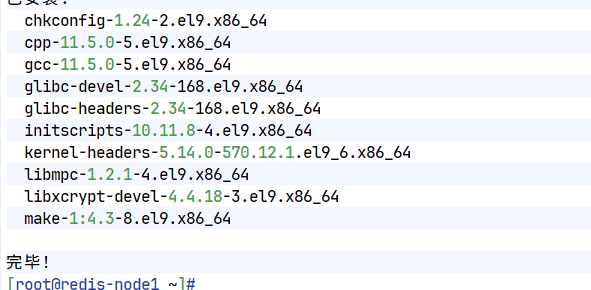
二. 源码编译redis
[root@redis-node1 ~]# wget https://download.redis.io/releases/redis-7.4.8.tar.gz
[root@redis-node1 ~]# tar zxf redis-7.4.8.tar.gz
[root@redis-node1 ~]# cd redis-7.4.8/
[root@redis-node1 redis-7.4.8]#
[root@redis-node1 redis-7.4.8]# make && make install
[root@redis-node1 redis-7.4.8]# cd utils/
[root@redis-node1 utils]# vim install_server.sh
#bail if this system is managed by systemd
#_pid_1_exe="$(readlink -f /proc/1/exe)"
#if [ "${_pid_1_exe##*/}" = systemd ]
#then
# echo "This systems seems to use systemd."
# echo "Please take a look at the provided example service unit files in this directory, and adapt and install them. Sorry!"
# exit 1
#fi
[root@redis-node1 utils]# ./install_server.sh
Welcome to the redis service installer
This script will help you easily set up a running redis server
Please select the redis port for this instance: [6379]
Selecting default: 6379
Please select the redis config file name [/etc/redis/6379.conf] /etc/redis/redis.conf
Please select the redis log file name [/var/log/redis_6379.log]
Selected default - /var/log/redis_6379.log
Please select the data directory for this instance [/var/lib/redis/6379]
Selected default - /var/lib/redis/6379
Please select the redis executable path [/usr/local/bin/redis-server]
Selected config:
Port : 6379
Config file : /etc/redis/redis.conf
Log file : /var/log/redis_6379.log
Data dir : /var/lib/redis/6379
Executable : /usr/local/bin/redis-server
Cli Executable : /usr/local/bin/redis-cli
Is this ok? Then press ENTER to go on or Ctrl-C to abort.
Copied /tmp/6379.conf => /etc/init.d/redis_6379
Installing service...
Successfully added to chkconfig!
Successfully added to runlevels 345!
Starting Redis server...
Installation successful!
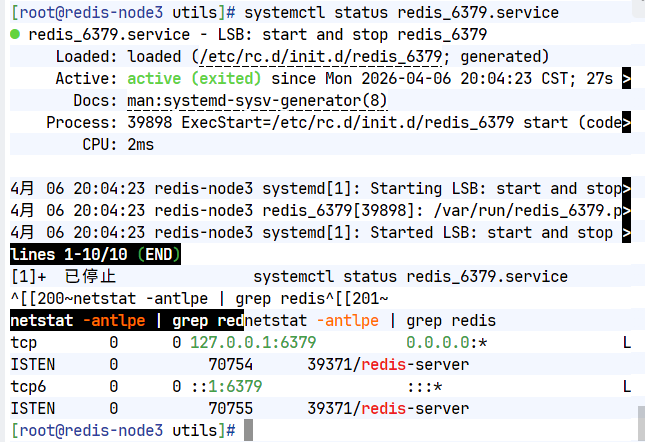
[root@redis-node2 utils]# systemctl daemon-reload
[root@redis-node2 utils]# systemctl status redis_6379.service
○ redis_6379.service - LSB: start and stop redis_6379
Loaded: loaded (/etc/rc.d/init.d/redis_6379; generated)
Active: inactive (dead)
Docs: man:systemd-sysv-generator(8)
[root@redis-node2 utils]# systemctl start redis_6379.service
[root@redis-node2 utils]# systemctl status redis_6379.service
● redis_6379.service - LSB: start and stop redis_6379
Loaded: loaded (/etc/rc.d/init.d/redis_6379; generated)
Active: active (exited) since Sun 2026-03-08 15:24:18 CST; 8s ago
Docs: man:systemd-sysv-generator(8)
Process: 35637 ExecStart=/etc/rc.d/init.d/redis_6379 start (code=exited, status=0/SUCCESS)
CPU: 1ms
[root@redis-node2 utils]# netstat -antlpe | grep redis
tcp 0 0 127.0.0.1:6379 0.0.0.0:* LISTEN 0 76854 35530/redis-server
tcp6 0 0 ::1:6379 :::* LISTEN 0 76855 35530/redis-server
Redis主从复制
一.Redis主节点配置
[root@redis-node1 ~]# vim /etc/redis/redis.conf
#bind 127.0.0.1 -::1
bind * -::*
protected-mode no
[root@redis-node1 ~]# systemctl restart redis_6379.service
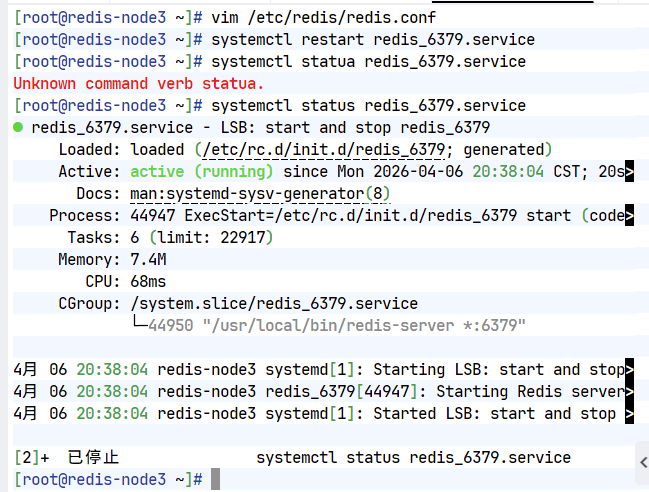
二.配置Redis从节点
#在redis-node2节点
[root@redis-node2 ~]# vim /etc/redis/redis.conf
#bind 127.0.0.1 -::1
bind * -::*
protected-mode no
replicaof 192.168.186.10 6379
[root@redis-node2 ~]# systemctl restart redis_6379.service
#在redis-node3节点
[root@redis-node3 ~]# vim /etc/redis/redis.conf
#bind 127.0.0.1 -::1
bind * -::*
protected-mode no
replicaof 192.168.186.10 6379
[root@redis-node3 ~]# systemctl restart redis_6379.service
三. 查看状态并测试
1.状态查看
[root@redis-node1 ~]# redis-cli
127.0.0.1:6379> info replication
# Replication
role:master
connected_slaves:2
slave0:ip=172.25.254.20,port=6379,state=online,offset=391,lag=0
slave1:ip=172.25.254.30,port=6379,state=online,offset=391,lag=1
master_failover_state:no-failover
master_replid:e5f5cddc017ab0d5223213592d0482b832d3af77
master_replid2:0000000000000000000000000000000000000000
master_repl_offset:391
second_repl_offset:-1
repl_backlog_active:1
repl_backlog_size:1048576
repl_backlog_first_byte_offset:1
repl_backlog_histlen:391
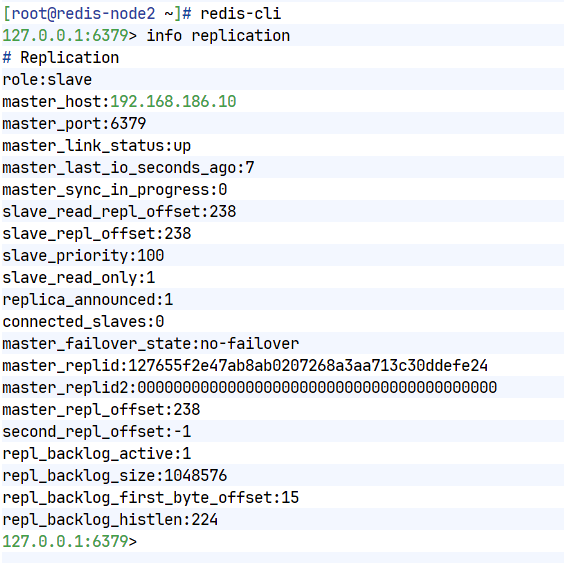
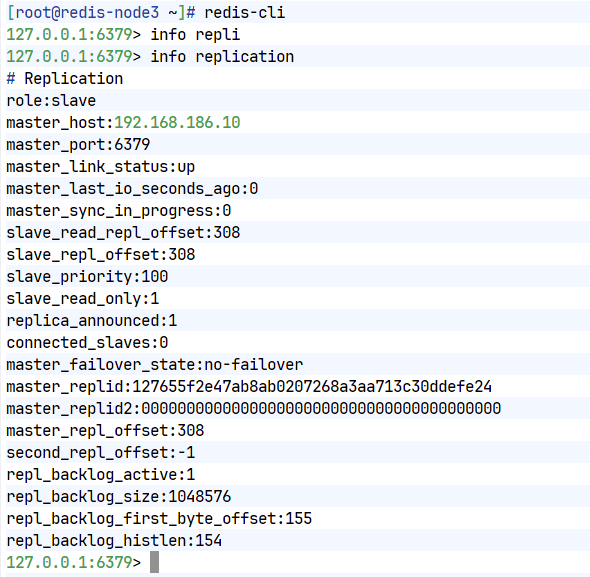
[root@redis-node2 ~]# redis-cli
127.0.0.1:6379> info replication
# Replication
role:slave
master_host:172.25.254.10
master_port:6379
master_link_status:up
master_last_io_seconds_ago:5
master_sync_in_progress:0
slave_read_repl_offset:433
slave_repl_offset:433
slave_priority:100
slave_read_only:1
replica_announced:1
connected_slaves:0
master_failover_state:no-failover
master_replid:e5f5cddc017ab0d5223213592d0482b832d3af77
master_replid2:0000000000000000000000000000000000000000
master_repl_offset:433
second_repl_offset:-1
repl_backlog_active:1
repl_backlog_size:1048576
repl_backlog_first_byte_offset:1
repl_backlog_histlen:433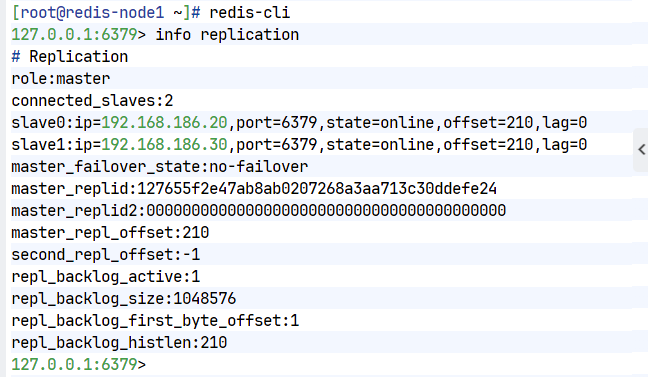
2.测试数据同步性
[root@redis-node1 ~]# redis-cli
127.0.0.1:6379> set name lee
OK
127.0.0.1:6379> get name
"lee"
[root@redis-node2 ~]# redis-cli
127.0.0.1:6379> get name
"lee"
#在从节点中不能写入数据
[root@redis-node3 ~]# redis-cli
127.0.0.1:6379> get name
"lee"
127.0.0.1:6379> set test 123
(error) READONLY You can't write against a read only replica.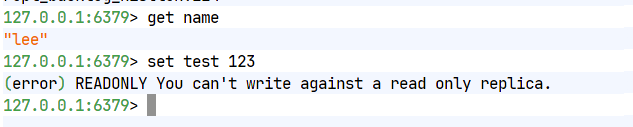
Redis哨兵模式
一.配置Redis哨兵模式
#redis 主节点
[root@redis-node1 ~]# cd redis-7.4.8/
[root@redis-node1 redis-7.4.8]# cp -p sentinel.conf /etc/redis/
[root@redis-node1 ~]# vim /etc/redis/sentinel.conf
[root@redis-node1 redis-7.4.0]# vim /etc/redis/sentinel.conf
protected-mode no #关闭保护模式
port 26379 #监听端口
daemonize no #进入不打如后台
pidfile /var/run/redis-sentinel.pid #sentinel进程pid文件
loglevel notice #日志级别
sentinel monitor mymaster 192.168.186.10 6379 2 #创建sentinel监控监控master主机,2表示必须得到2票
sentinel down-after-milliseconds mymaster 10000 #master中断时长,10秒连不上视为master下线
sentinel parallel-syncs mymaster 1 #发生故障转移后,同时开始同步新master数据的slave数量
sentinel failover-timeout mymaster 180000 #整个故障切换的超时时间为3分钟
#在从节点关闭protected-mode模式
[root@redis-node2 ~]# vim /etc/redis/redis.conf
protected-mode no
[root@redis-node2 ~]# systemctl restart redis_6379.service
[root@redis-node3 ~]# vim /etc/redis/redis.conf
protected-mode no
[root@redis-node3 ~]# systemctl restart redis_6379.service
#在主节点复制sentinel.conf到从节点
[root@redis-node1 ~]# scp /etc/redis/sentinel.conf root@192.168.186.20:/etc/redis/
sentinel.conf 100% 14KB 16.5MB/s 00:00
[root@redis-node1 ~]# scp /etc/redis/sentinel.conf root@172.25.254.30:/etc/redis/
sentinel.conf
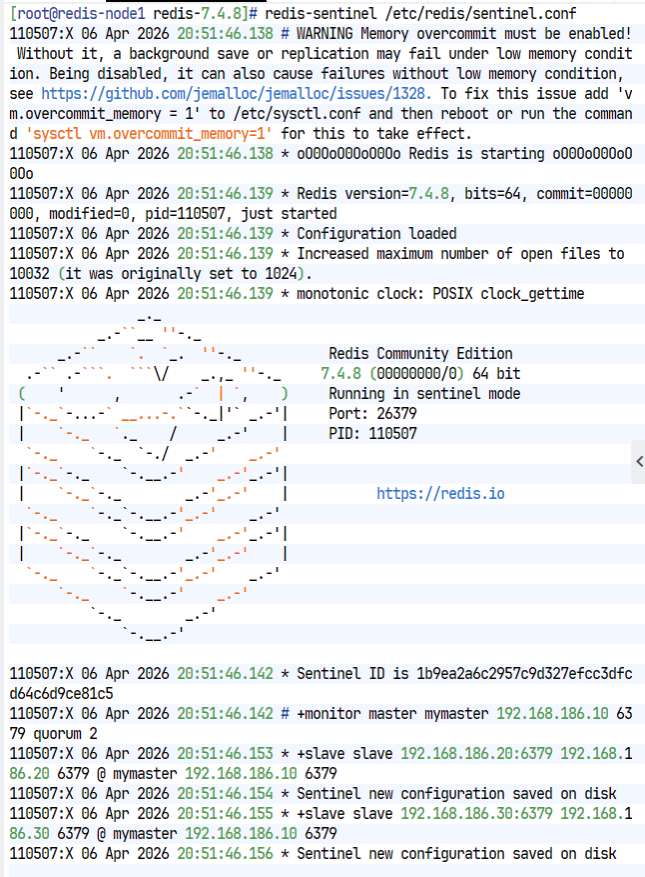
#所有节点开启哨兵
[root@redis-node1~3 ~]# redis-sentinel /etc/redis/sentinel.conf
36628:X 08 Mar 2026 16:55:25.041 # WARNING Memory overcommit must be enabled! Without it, a background save or replication may fail under low memory condition. Being disabled, it can also cause failures without low memory condition, see https://github.com/jemalloc/jemalloc/issues/1328. To fix this issue add 'vm.overcommit_memory = 1' to /etc/sysctl.conf and then reboot or run the command 'sysctl vm.overcommit_memory=1' for this to take effect.
36628:X 08 Mar 2026 16:55:25.041 * oO0OoO0OoO0Oo Redis is starting oO0OoO0OoO0Oo
36628:X 08 Mar 2026 16:55:25.041 * Redis version=7.4.8, bits=64, commit=00000000, modified=0, pid=36628, just started
36628:X 08 Mar 2026 16:55:25.041 * Configuration loaded
36628:X 08 Mar 2026 16:55:25.041 * Increased maximum number of open files to 10032 (it was originally set to 1024).
36628:X 08 Mar 2026 16:55:25.041 * monotonic clock: POSIX clock_gettime
_._
_.-``__ ''-._
_.-`` `. `_. ''-._ Redis Community Edition
.-`` .-```. ```\/ _.,_ ''-._ 7.4.8 (00000000/0) 64 bit
( ' , .-` | `, ) Running in sentinel mode
|`-._`-...-` __...-.``-._|'` _.-'| Port: 26379
| `-._ `._ / _.-' | PID: 36628
`-._ `-._ `-./ _.-' _.-'
|`-._`-._ `-.__.-' _.-'_.-'|
| `-._`-._ _.-'_.-' | https://redis.io
`-._ `-._`-.__.-'_.-' _.-'
|`-._`-._ `-.__.-' _.-'_.-'|
| `-._`-._ _.-'_.-' |
`-._ `-._`-.__.-'_.-' _.-'
`-._ `-.__.-' _.-'
`-._ _.-'
`-.__.-'
36628:X 08 Mar 2026 16:55:25.043 * Sentinel new configuration saved on disk
36628:X 08 Mar 2026 16:55:25.043 * Sentinel ID is c3a93bf0891df6ad009eb7945e8b17926b0ad35a
36628:X 08 Mar 2026 16:55:25.043 # +monitor master mymaster 172.25.254.10 6379 quorum 2
36628:X 08 Mar 2026 16:55:25.043 * +slave slave 172.25.254.20:6379 172.25.254.20 6379 @ mymaster 172.25.254.10 6379
36628:X 08 Mar 2026 16:55:25.044 * Sentinel new configuration saved on disk
36628:X 08 Mar 2026 16:55:25.044 * +slave slave 172.25.254.30:6379 172.25.254.30 6379 @ mymaster 172.25.254.10 6379
36628:X 08 Mar 2026 16:55:25.045 * Sentinel new configuration saved on disk
36628:X 08 Mar 2026 16:55:35.063 # +sdown slave 172.25.254.20:6379 172.25.254.20 6379 @ mymaster 172.25.254.10 6379
36628:X 08 Mar 2026 16:55:35.063 # +sdown slave 172.25.254.30:6379 172.25.254.30 6379 @ mymaster 172.25.254.10 6379
36628:X 08 Mar 2026 16:56:06.067 * +sentinel sentinel 28f2f3da2b20967c546118a9e1ab4b2276600d87 172.25.254.20 26379 @ mymaster 172.25.254.10 6379
36628:X 08 Mar 2026 16:56:06.069 * Sentinel new configuration saved on disk
36628:X 08 Mar 2026 16:56:17.710 * +sentinel sentinel 89568283004e144d0d7be04c65f5e85dbf6dc147 172.25.254.30 26379 @ mymaster 172.25.254.10 6379
36628:X 08 Mar 2026 16:56:17.712 * Sentinel new configuration saved on disk
二.测试故障切换
[root@redis-node1 6379]# redis-cli
127.0.0.1:6379> SHUTDOWN
not connected> quit
#切换信息
37502:X 08 Mar 2026 17:56:40.872 * Sentinel new configuration saved on disk
37502:X 08 Mar 2026 17:56:40.872 * Sentinel ID is d0780e7fd242a8f3244bc4dbead0fe63f793af03
37502:X 08 Mar 2026 17:56:40.872 # +monitor master mymaster 172.25.254.10 6379 quorum 2
37502:X 08 Mar 2026 17:56:40.873 * +slave slave 172.25.254.20:6379 172.25.254.20 6379 @ mymaster 172.25.254.10 6379
37502:X 08 Mar 2026 17:56:40.874 * Sentinel new configuration saved on disk
37502:X 08 Mar 2026 17:56:40.874 * +slave slave 172.25.254.30:6379 172.25.254.30 6379 @ mymaster 172.25.254.10 6379
37502:X 08 Mar 2026 17:56:40.902 * Sentinel new configuration saved on disk
37502:X 08 Mar 2026 17:57:02.726 * +sentinel sentinel ae862a91f4d7dba85c8e23da1c2e3e2758e5741d 172.25.254.20 26379 @ mymaster 172.25.254.10 6379
37502:X 08 Mar 2026 17:57:02.727 * Sentinel new configuration saved on disk
37502:X 08 Mar 2026 17:58:22.387 * +sentinel sentinel 7ef7c9ff4a5c9891530c9bd5f9379a39e5941079 172.25.254.30 26379 @ mymaster 172.25.254.10 6379
37502:X 08 Mar 2026 17:58:22.389 * Sentinel new configuration saved on disk
37502:X 08 Mar 2026 17:59:16.271 # +sdown master mymaster 172.25.254.10 6379
37502:X 08 Mar 2026 17:59:16.338 # +odown master mymaster 172.25.254.10 6379 #quorum 2/2
37502:X 08 Mar 2026 17:59:16.338 # +new-epoch 1
37502:X 08 Mar 2026 17:59:16.338 # +try-failover master mymaster 172.25.254.10 6379
37502:X 08 Mar 2026 17:59:16.340 * Sentinel new configuration saved on disk
37502:X 08 Mar 2026 17:59:16.340 # +vote-for-leader d0780e7fd242a8f3244bc4dbead0fe63f793af03 1
37502:X 08 Mar 2026 17:59:16.342 * 7ef7c9ff4a5c9891530c9bd5f9379a39e5941079 voted for d0780e7fd242a8f3244bc4dbead0fe63f793af03 1
37502:X 08 Mar 2026 17:59:16.343 * ae862a91f4d7dba85c8e23da1c2e3e2758e5741d voted for d0780e7fd242a8f3244bc4dbead0fe63f793af03 1
37502:X 08 Mar 2026 17:59:16.440 # +elected-leader master mymaster 172.25.254.10 6379
37502:X 08 Mar 2026 17:59:16.441 # +failover-state-select-slave master mymaster 172.25.254.10 6379
37502:X 08 Mar 2026 17:59:16.503 # +selected-slave slave 172.25.254.20:6379 172.25.254.20 6379 @ mymaster 172.25.254.10 6379
37502:X 08 Mar 2026 17:59:16.503 * +failover-state-send-slaveof-noone slave 172.25.254.20:6379 172.25.254.20 6379 @ mymaster 172.25.254.10 6379
37502:X 08 Mar 2026 17:59:16.580 * +failover-state-wait-promotion slave 172.25.254.20:6379 172.25.254.20 6379 @ mymaster 172.25.254.10 6379
37502:X 08 Mar 2026 17:59:16.641 * Sentinel new configuration saved on disk
37502:X 08 Mar 2026 17:59:16.641 # +promoted-slave slave 172.25.254.20:6379 172.25.254.20 6379 @ mymaster 172.25.254.10 6379
37502:X 08 Mar 2026 17:59:16.641 # +failover-state-reconf-slaves master mymaster 172.25.254.10 6379
37502:X 08 Mar 2026 17:59:16.693 * +slave-reconf-sent slave 172.25.254.30:6379 172.25.254.30 6379 @ mymaster 172.25.254.10 6379
37502:X 08 Mar 2026 17:59:17.520 # -odown master mymaster 172.25.254.10 6379 #客观下线
37502:X 08 Mar 2026 17:59:17.674 * +slave-reconf-inprog slave 172.25.254.30:6379 172.25.254.30 6379 @ mymaster 172.25.254.10 6379
37502:X 08 Mar 2026 17:59:17.674 * +slave-reconf-done slave 172.25.254.30:6379 172.25.254.30 6379 @ mymaster 172.25.254.10 6379
37502:X 08 Mar 2026 17:59:17.746 # +failover-end master mymaster 172.25.254.10 6379
37502:X 08 Mar 2026 17:59:17.746 # +switch-master mymaster 172.25.254.10 6379 172.25.254.20 6379 #主节点被切换到20
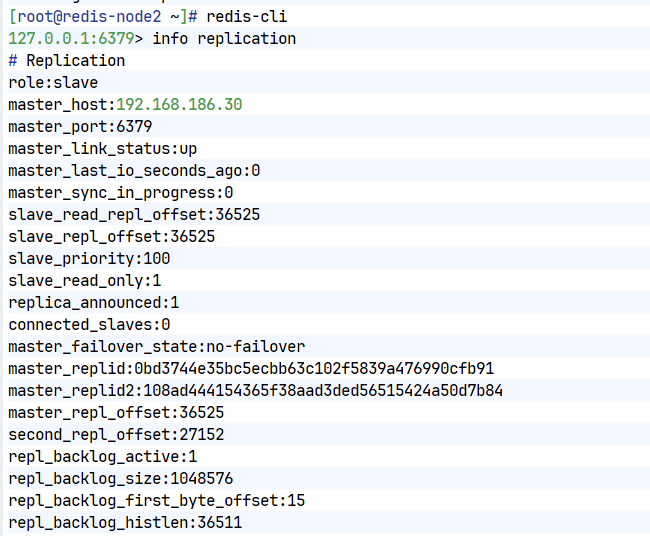
#在30中查看信息
[root@redis-node3 ~]# redis-cli
127.0.0.1:6379> info replication
# Replication
role:slave
master_host:172.25.254.20
master_port:6379
master_link_status:up
master_last_io_seconds_ago:1
master_sync_in_progress:0
slave_read_repl_offset:123299
slave_repl_offset:123299
slave_priority:100
slave_read_only:1
replica_announced:1
connected_slaves:0
master_failover_state:no-failover
master_replid:dcd9e887a20f05380a448cca1f332ec2501e5477
master_replid2:d4caee184d2c8ffdf82d30fc7267ec6cedbf08f8
master_repl_offset:123299
second_repl_offset:113351
repl_backlog_active:1
repl_backlog_size:1048576
repl_backlog_first_byte_offset:91236
repl_backlog_histlen:32064
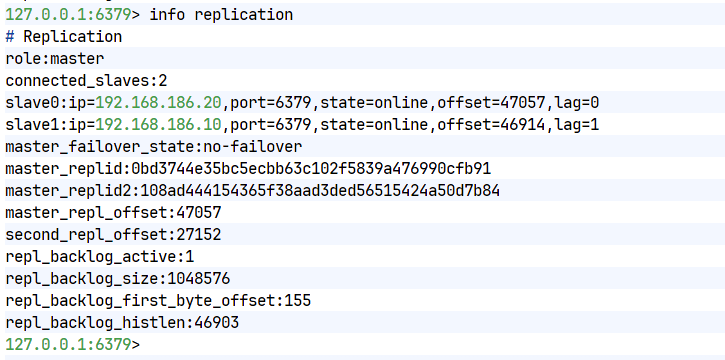
#恢复10redis
[root@redis-node1 6379]# /etc/init.d/redis_6379 start
Starting Redis server...
#在20查看信息
[root@redis-node2 ~]# redis-cli
127.0.0.1:6379> info replication
# Replication
role:master
connected_slaves:1
slave0:ip=172.25.254.30,port=6379,state=online,offset=130264,lag=1
slave1:ip=172.25.254.10,port=6379,state=online,offset=135673,lag=0
master_failover_state:no-failover
master_replid:dcd9e887a20f05380a448cca1f332ec2501e5477
master_replid2:d4caee184d2c8ffdf82d30fc7267ec6cedbf08f8
master_repl_offset:130405
second_repl_offset:113351
repl_backlog_active:1
repl_backlog_size:1048576
repl_backlog_first_byte_offset:91236
repl_backlog_histlen:39170
redis-cluster 集群
创建六个新的虚拟机,具体操作看redist安装部署部分内容
[root@redis-node1 ~]# dnf install make gcc initscripts -y
[root@redis-node1 ~]# wget https://download.redis.io/releases/redis-7.4.8.tar.gz
[root@redis-node1 ~]# tar zxf redis-7.4.8.tar.gz
[root@redis-node1 ~]# cd redis-7.4.8/
[root@redis-node1 redis-7.4.8]#
[root@redis-node1 redis-7.4.8]# make && make install
[root@redis-node1 redis-7.4.8]# cd utils/
[root@redis-node1 utils]# vim install_server.sh
#bail if this system is managed by systemd
#_pid_1_exe="$(readlink -f /proc/1/exe)"
#if [ "${_pid_1_exe##*/}" = systemd ]
#then
# echo "This systems seems to use systemd."
# echo "Please take a look at the provided example service unit files in this directory, and adapt and install them. Sorry!"
# exit 1
#fi
[root@redis-node1 utils]# ./install_server.sh
Welcome to the redis service installer
This script will help you easily set up a running redis server
Please select the redis port for this instance: [6379]
Selecting default: 6379
Please select the redis config file name [/etc/redis/6379.conf]
Selected default - /etc/redis/6379.conf
Please select the redis log file name [/var/log/redis_6379.log]
Selected default - /var/log/redis_6379.log
Please select the data directory for this instance [/var/lib/redis/6379]
Selected default - /var/lib/redis/6379
Please select the redis executable path [/usr/local/bin/redis-server]
Selected config:
Port : 6379
Config file : /etc/redis/6379.conf
Log file : /var/log/redis_6379.log
Data dir : /var/lib/redis/6379
Executable : /usr/local/bin/redis-server
Cli Executable : /usr/local/bin/redis-cli
Is this ok? Then press ENTER to go on or Ctrl-C to abort.
Copied /tmp/6379.conf => /etc/init.d/redis_6379
Installing service...
Successfully added to chkconfig!
Successfully added to runlevels 345!
Starting Redis server...
Installation successful!
[root@redis-node1 utils]# 一.修改所有节点配置文件
[root@redis-node1 ~]# vim /etc/redis/6379.conf
bind * -::*
protected-mode no
masterauth "123456" #集群主从认证
cluster-enabled yes #开启cluster集群功能
cluster-config-file nodes-6379.conf #指定集群配置文件
cluster-node-timeout 15000 #节点加入集群的超时时间单位是ms
[root@redis-node1 ~]# /etc/init.d/redis_6379 restart
二.启动集群
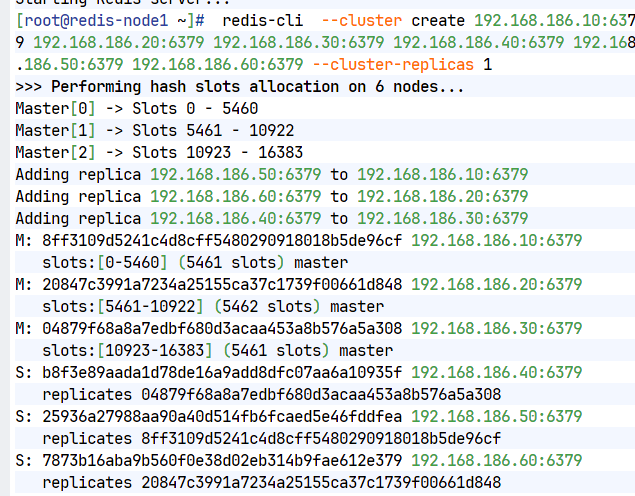
[root@redis-node1 ~]# redis-cli --cluster create 192.168.186.10:6379 192.168.186.20:6379 192.168.186.30:6379 192.168.186.40:6379 192.168.186.50:6379 192.168.186.60:6379 --cluster-replicas 1
>>> Performing hash slots allocation on 6 nodes...
Master[0] -> Slots 0 - 5460
Master[1] -> Slots 5461 - 10922
Master[2] -> Slots 10923 - 16383
Adding replica 192.168.186.50:6379 to 192.168.186.10:6379
Adding replica 192.168.186.60:6379 to 192.168.186.20:6379
Adding replica 192.168.186.40:6379 to 192.168.186.30:6379
M: 8ff3109d5241c4d8cff5480290918018b5de96cf 192.168.186.10:6379
slots:[0-5460] (5461 slots) master
M: 20847c3991a7234a25155ca37c1739f00661d848 192.168.186.20:6379
slots:[5461-10922] (5462 slots) master
M: 04879f68a8a7edbf680d3acaa453a8b576a5a308 192.168.186.30:6379
slots:[10923-16383] (5461 slots) master
S: b8f3e89aada1d78de16a9add8dfc07aa6a10935f 192.168.186.40:6379
replicates 04879f68a8a7edbf680d3acaa453a8b576a5a308
S: 25936a27988aa90a40d514fb6fcaed5e46fddfea 192.168.186.50:6379
replicates 8ff3109d5241c4d8cff5480290918018b5de96cf
S: 7873b16aba9b560f0e38d02eb314b9fae612e379 192.168.186.60:6379
replicates 20847c3991a7234a25155ca37c1739f00661d848
Can I set the above configuration? (type 'yes' to accept): yes
>>> Nodes configuration updated
>>> Assign a different config epoch to each node
>>> Sending CLUSTER MEET messages to join the cluster
Waiting for the cluster to join
.
>>> Performing Cluster Check (using node 192.168.186.10:6379)
M: 8ff3109d5241c4d8cff5480290918018b5de96cf 192.168.186.10:6379
slots:[0-5460] (5461 slots) master
1 additional replica(s)
S: 7873b16aba9b560f0e38d02eb314b9fae612e379 192.168.186.60:6379
slots: (0 slots) slave
replicates 20847c3991a7234a25155ca37c1739f00661d848
S: 25936a27988aa90a40d514fb6fcaed5e46fddfea 192.168.186.50:6379
slots: (0 slots) slave
replicates 8ff3109d5241c4d8cff5480290918018b5de96cf
S: b8f3e89aada1d78de16a9add8dfc07aa6a10935f 192.168.186.40:6379
slots: (0 slots) slave
replicates 04879f68a8a7edbf680d3acaa453a8b576a5a308
M: 04879f68a8a7edbf680d3acaa453a8b576a5a308 192.168.186.30:6379
slots:[10923-16383] (5461 slots) master
1 additional replica(s)
M: 20847c3991a7234a25155ca37c1739f00661d848 192.168.186.20:6379
slots:[5461-10922] (5462 slots) master
1 additional replica(s)
[OK] All nodes agree about slots configuration.
>>> Check for open slots...
>>> Check slots coverage...
[OK] All 16384 slots covered.
[root@redis-node1 ~]#
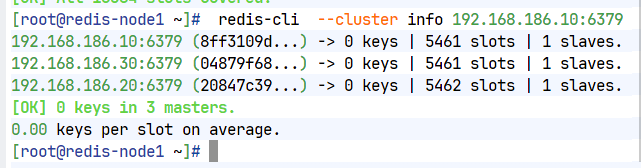
#查看集群状态
[root@redis-node1 ~]# redis-cli --cluster info 192.168.186.10:6379
172.25.254.10:6379 (8db833f3...) -> 0 keys | 5461 slots | 1 slaves.
172.25.254.30:6379 (d9300173...) -> 0 keys | 5461 slots | 1 slaves.
172.25.254.20:6379 (ca599940...) -> 0 keys | 5462 slots | 1 slaves.
[OK] 0 keys in 3 masters.
0.00 keys per slot on average.
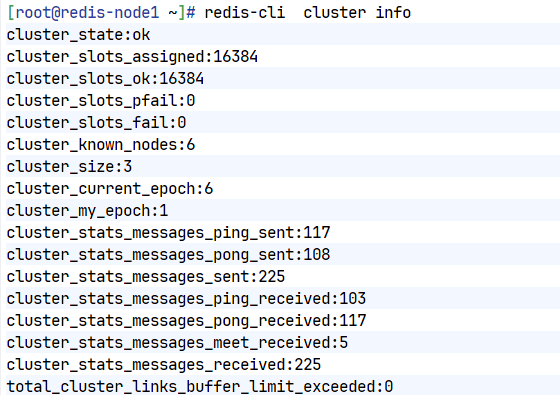
#查看集群信息
[root@redis-node1 ~]# redis-cli cluster info
cluster_state:ok
cluster_slots_assigned:16384
cluster_slots_ok:16384
cluster_slots_pfail:0
cluster_slots_fail:0
cluster_known_nodes:6
cluster_size:3
cluster_current_epoch:6
cluster_my_epoch:1
cluster_stats_messages_ping_sent:168
cluster_stats_messages_pong_sent:163
cluster_stats_messages_sent:331
cluster_stats_messages_ping_received:158
cluster_stats_messages_pong_received:168
cluster_stats_messages_meet_received:5
cluster_stats_messages_received:331
total_cluster_links_buffer_limit_exceeded:0
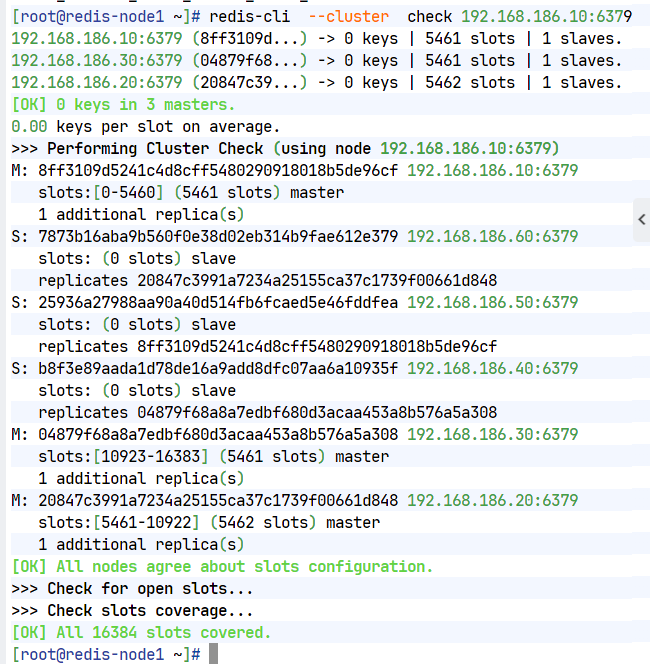
#检测当前集群
[root@redis-node1 ~]# redis-cli --cluster check 192.168.186.10:6379
172.25.254.10:6379 (8db833f3...) -> 0 keys | 5461 slots | 1 slaves.
172.25.254.30:6379 (d9300173...) -> 0 keys | 5461 slots | 1 slaves.
172.25.254.20:6379 (ca599940...) -> 0 keys | 5462 slots | 1 slaves.
[OK] 0 keys in 3 masters.
0.00 keys per slot on average.
>>> Performing Cluster Check (using node 172.25.254.10:6379)
M: 8db833f3c3bc6b8f93e87111f13f56d366f833a0 172.25.254.10:6379
slots:[0-5460] (5461 slots) master
1 additional replica(s)
S: c939a04358edc1ce7a1c1a44561d77fb402025fd 172.25.254.60:6379
slots: (0 slots) slave
replicates ca599940209f55c07d06951480703bb0a5d8873a
M: d9300173b75149d3056f0ee3edec063f8ec66e9a 172.25.254.30:6379
slots:[10923-16383] (5461 slots) master
1 additional replica(s)
M: ca599940209f55c07d06951480703bb0a5d8873a 172.25.254.20:6379
slots:[5461-10922] (5462 slots) master
1 additional replica(s)
S: ba6ef067c63d30c213493eb48d43427015018898 172.25.254.50:6379
slots: (0 slots) slave
replicates 8db833f3c3bc6b8f93e87111f13f56d366f833a0
S: 32d797eb30094b77edb896abcc0b0fc91ccdb4fd 172.25.254.40:6379
slots: (0 slots) slave
replicates d9300173b75149d3056f0ee3edec063f8ec66e9a
[OK] All nodes agree about slots configuration.
>>> Check for open slots...
>>> Check slots coverage...
[OK] All 16384 slots covered.
三.集群扩容
#添加master
[root@redis-node1 ~]# redis-cli --cluster add-node 192.168.186.70:6379 192.168.186.10:6379
>>> Adding node 192.168.186.70:6379 to cluster 192.168.186.10:6379
>>> Performing Cluster Check (using node 192.168.186.10:6379)
M: 8ff3109d5241c4d8cff5480290918018b5de96cf 192.168.186.10:6379
slots:[0-5460] (5461 slots) master
1 additional replica(s)
S: 7873b16aba9b560f0e38d02eb314b9fae612e379 192.168.186.60:6379
slots: (0 slots) slave
replicates 20847c3991a7234a25155ca37c1739f00661d848
S: 25936a27988aa90a40d514fb6fcaed5e46fddfea 192.168.186.50:6379
slots: (0 slots) slave
replicates 8ff3109d5241c4d8cff5480290918018b5de96cf
S: b8f3e89aada1d78de16a9add8dfc07aa6a10935f 192.168.186.40:6379
slots: (0 slots) slave
replicates 04879f68a8a7edbf680d3acaa453a8b576a5a308
M: 04879f68a8a7edbf680d3acaa453a8b576a5a308 192.168.186.30:6379
slots:[10923-16383] (5461 slots) master
1 additional replica(s)
M: 20847c3991a7234a25155ca37c1739f00661d848 192.168.186.20:6379
slots:[5461-10922] (5462 slots) master
1 additional replica(s)
[OK] All nodes agree about slots configuration.
>>> Check for open slots...
>>> Check slots coverage...
[OK] All 16384 slots covered.
>>> Getting functions from cluster
>>> Send FUNCTION LIST to 192.168.186.70:6379 to verify there is no functions in it
>>> Send FUNCTION RESTORE to 192.168.186.70:6379
>>> Send CLUSTER MEET to node 192.168.186.70:6379 to make it join the cluster.
[OK] New node added correctly.
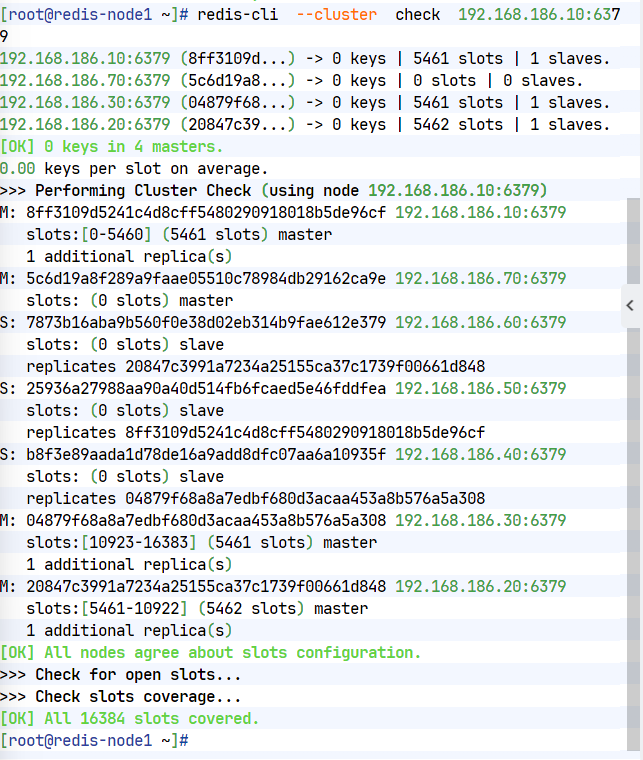
[root@redis-node1 ~]# redis-cli --cluster check 192.168.186.10:6379
192.168.186.10:6379 (8ff3109d...) -> 0 keys | 5461 slots | 1 slaves.
192.168.186.70:6379 (5c6d19a8...) -> 0 keys | 0 slots | 0 slaves.
192.168.186.30:6379 (04879f68...) -> 0 keys | 5461 slots | 1 slaves.
192.168.186.20:6379 (20847c39...) -> 0 keys | 5462 slots | 1 slaves.
[OK] 0 keys in 4 masters.
0.00 keys per slot on average.
>>> Performing Cluster Check (using node 192.168.186.10:6379)
M: 8ff3109d5241c4d8cff5480290918018b5de96cf 192.168.186.10:6379
slots:[0-5460] (5461 slots) master
1 additional replica(s)
M: 5c6d19a8f289a9faae05510c78984db29162ca9e 192.168.186.70:6379
slots: (0 slots) master
S: 7873b16aba9b560f0e38d02eb314b9fae612e379 192.168.186.60:6379
slots: (0 slots) slave
replicates 20847c3991a7234a25155ca37c1739f00661d848
S: 25936a27988aa90a40d514fb6fcaed5e46fddfea 192.168.186.50:6379
slots: (0 slots) slave
replicates 8ff3109d5241c4d8cff5480290918018b5de96cf
S: b8f3e89aada1d78de16a9add8dfc07aa6a10935f 192.168.186.40:6379
slots: (0 slots) slave
replicates 04879f68a8a7edbf680d3acaa453a8b576a5a308
M: 04879f68a8a7edbf680d3acaa453a8b576a5a308 192.168.186.30:6379
slots:[10923-16383] (5461 slots) master
1 additional replica(s)
M: 20847c3991a7234a25155ca37c1739f00661d848 192.168.186.20:6379
slots:[5461-10922] (5462 slots) master
1 additional replica(s)
[OK] All nodes agree about slots configuration.
>>> Check for open slots...
>>> Check slots coverage...
[OK] All 16384 slots covered.
[root@redis-node1 ~]#
#分配solt给新加入的主机
[root@redis-node1 ~]# redis-cli --cluster reshard 192.168.186.10:6379
>>> Performing Cluster Check (using node 172.25.254.10:6379)
M: 8db833f3c3bc6b8f93e87111f13f56d366f833a0 172.25.254.10:6379
slots:[0-5460] (5461 slots) master
1 additional replica(s)
M: dfabfe07170ac9b5d20a5a7a70c836877bd64504 172.25.254.70:6379
slots: (0 slots) master
S: c939a04358edc1ce7a1c1a44561d77fb402025fd 172.25.254.60:6379
slots: (0 slots) slave
replicates ca599940209f55c07d06951480703bb0a5d8873a
M: d9300173b75149d3056f0ee3edec063f8ec66e9a 172.25.254.30:6379
slots:[10923-16383] (5461 slots) master
1 additional replica(s)
M: ca599940209f55c07d06951480703bb0a5d8873a 172.25.254.20:6379
slots:[5461-10922] (5462 slots) master
1 additional replica(s)
S: ba6ef067c63d30c213493eb48d43427015018898 172.25.254.50:6379
slots: (0 slots) slave
replicates 8db833f3c3bc6b8f93e87111f13f56d366f833a0
S: 32d797eb30094b77edb896abcc0b0fc91ccdb4fd 172.25.254.40:6379
slots: (0 slots) slave
replicates d9300173b75149d3056f0ee3edec063f8ec66e9a
[OK] All nodes agree about slots configuration.
>>> Check for open slots...
>>> Check slots coverage...
[OK] All 16384 slots covered.
How many slots do you want to move (from 1 to 16384)? 4096 #分配solt的数量
What is the receiving node ID? dfabfe07170ac9b5d20a5a7a70c836877bd64504 #选择70主机的id
Please enter all the source node IDs.
Type 'all' to use all the nodes as source nodes for the hash slots.
Type 'done' once you entered all the source nodes IDs.
Source node #1: all #solt来源
Ready to move 4096 slots.
#给新主机添加slave
[root@redis-node1 ~]# redis-cli --cluster add-node 192.168.186.80:6379 192.168.186.10:6379 --cluster-slave --cluster-master-id dfabfe07170ac9b5d20a5a7a70c836877bd64504
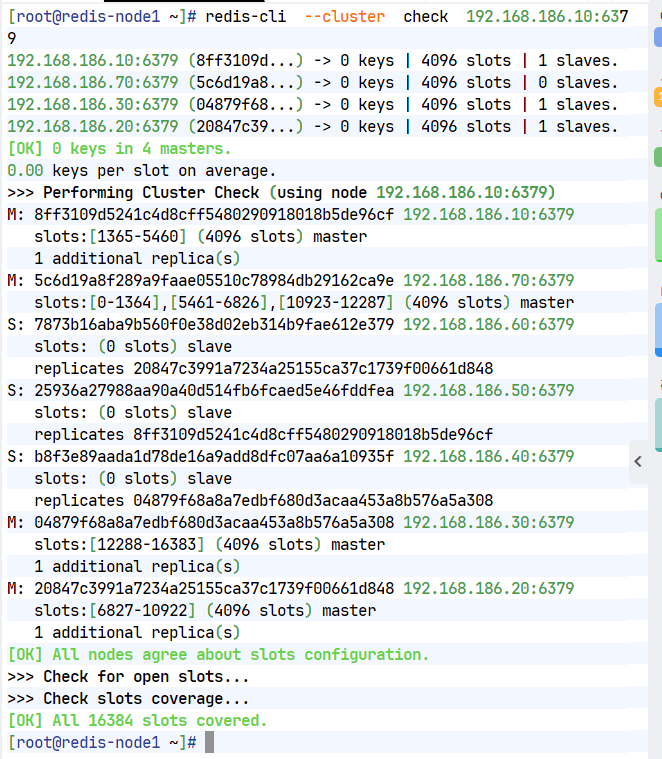
[root@redis-node1 ~]# redis-cli --cluster check 192.168.186.10:6379
172.25.254.10:6379 (8db833f3...) -> 0 keys | 4096 slots | 1 slaves.
172.25.254.70:6379 (dfabfe07...) -> 1 keys | 4096 slots | 1 slaves.
172.25.254.30:6379 (d9300173...) -> 0 keys | 4096 slots | 1 slaves.
172.25.254.20:6379 (ca599940...) -> 0 keys | 4096 slots | 1 slaves.
[OK] 1 keys in 4 masters.
0.00 keys per slot on average.
>>> Performing Cluster Check (using node 172.25.254.10:6379)
M: 8db833f3c3bc6b8f93e87111f13f56d366f833a0 172.25.254.10:6379
slots:[1365-5460] (4096 slots) master
1 additional replica(s)
S: 1176ee294e6b5071ca57e93374d04ac22028daed 172.25.254.80:6379
slots: (0 slots) slave
replicates dfabfe07170ac9b5d20a5a7a70c836877bd64504
M: dfabfe07170ac9b5d20a5a7a70c836877bd64504 172.25.254.70:6379
slots:[0-1364],[5461-6826],[10923-12287] (4096 slots) master
1 additional replica(s)
S: c939a04358edc1ce7a1c1a44561d77fb402025fd 172.25.254.60:6379
slots: (0 slots) slave
replicates ca599940209f55c07d06951480703bb0a5d8873a
M: d9300173b75149d3056f0ee3edec063f8ec66e9a 172.25.254.30:6379
slots:[12288-16383] (4096 slots) master
1 additional replica(s)
M: ca599940209f55c07d06951480703bb0a5d8873a 172.25.254.20:6379
slots:[6827-10922] (4096 slots) master
1 additional replica(s)
S: ba6ef067c63d30c213493eb48d43427015018898 172.25.254.50:6379
slots: (0 slots) slave
replicates 8db833f3c3bc6b8f93e87111f13f56d366f833a0
S: 32d797eb30094b77edb896abcc0b0fc91ccdb4fd 172.25.254.40:6379
slots: (0 slots) slave
replicates d9300173b75149d3056f0ee3edec063f8ec66e9a
[OK] All nodes agree about slots configuration.
>>> Check for open slots...
>>> Check slots coverage...
[OK] All 16384 slots covered.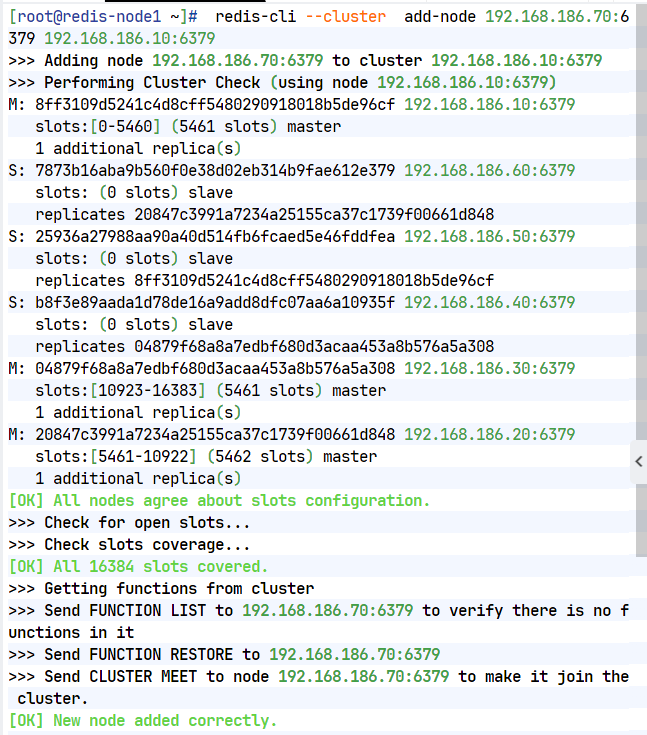
四,集群缩容
#集群槽位回收到10主机中
[root@redis-node1 ~]# redis-cli --cluster reshard 192.168.186.10:6379
>>> Performing Cluster Check (using node 172.25.254.10:6379)
M: 8db833f3c3bc6b8f93e87111f13f56d366f833a0 172.25.254.10:6379
slots:[1365-5460] (4096 slots) master
1 additional replica(s)
S: 1176ee294e6b5071ca57e93374d04ac22028daed 172.25.254.80:6379
slots: (0 slots) slave
replicates dfabfe07170ac9b5d20a5a7a70c836877bd64504
M: dfabfe07170ac9b5d20a5a7a70c836877bd64504 172.25.254.70:6379
slots:[0-1364],[5461-6826],[10923-12287] (4096 slots) master
1 additional replica(s)
S: c939a04358edc1ce7a1c1a44561d77fb402025fd 172.25.254.60:6379
slots: (0 slots) slave
replicates ca599940209f55c07d06951480703bb0a5d8873a
M: d9300173b75149d3056f0ee3edec063f8ec66e9a 172.25.254.30:6379
slots:[12288-16383] (4096 slots) master
1 additional replica(s)
M: ca599940209f55c07d06951480703bb0a5d8873a 172.25.254.20:6379
slots:[6827-10922] (4096 slots) master
1 additional replica(s)
S: ba6ef067c63d30c213493eb48d43427015018898 172.25.254.50:6379
slots: (0 slots) slave
replicates 8db833f3c3bc6b8f93e87111f13f56d366f833a0
S: 32d797eb30094b77edb896abcc0b0fc91ccdb4fd 172.25.254.40:6379
slots: (0 slots) slave
replicates d9300173b75149d3056f0ee3edec063f8ec66e9a
[OK] All nodes agree about slots configuration.
>>> Check for open slots...
>>> Check slots coverage...
[OK] All 16384 slots covered.
How many slots do you want to move (from 1 to 16384)? 4096
What is the receiving node ID? 8db833f3c3bc6b8f93e87111f13f56d366f833a0 #10id
Please enter all the source node IDs.
Type 'all' to use all the nodes as source nodes for the hash slots.
Type 'done' once you entered all the source nodes IDs.
Source node #1: dfabfe07170ac9b5d20a5a7a70c836877bd64504 #70id
Source node #2: done
#删除70和80节点
[root@redis-node1 ~]# redis-cli --cluster del-node 192.168.186.10:6379 dfabfe07170ac9b5d20a5a7a70c836877bd64504
>>> Removing node dfabfe07170ac9b5d20a5a7a70c836877bd64504 from cluster 172.25.254.10:6379
>>> Sending CLUSTER FORGET messages to the cluster...
>>> Sending CLUSTER RESET SOFT to the deleted node.
[root@redis-node1 ~]# redis-cli --cluster del-node 192.168.186.10:6379 1176ee294e6b5071ca57e93374d04ac22028daed
>>> Removing node 1176ee294e6b5071ca57e93374d04ac22028daed from cluster 172.25.254.10:6379
>>> Sending CLUSTER FORGET messages to the cluster...
>>> Sending CLUSTER RESET SOFT to the deleted node.
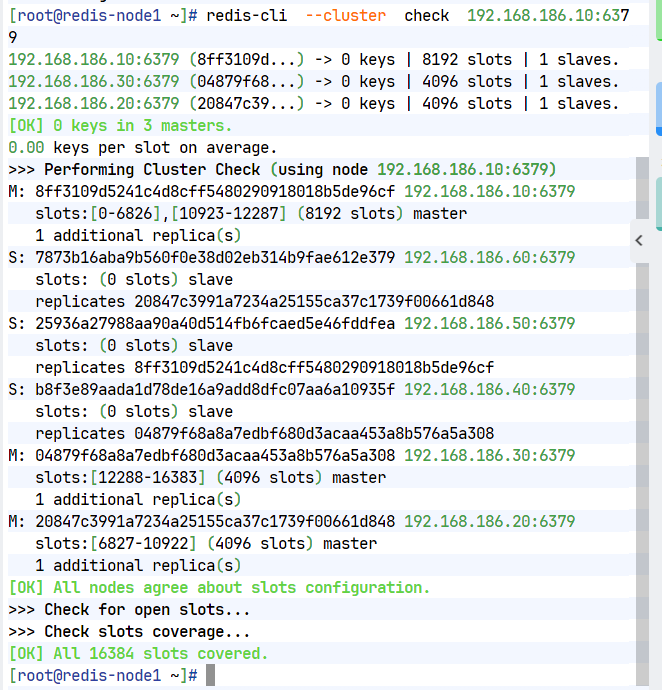
[root@redis-node1 ~]# redis-cli --cluster check 192.168.186.10:6379
172.25.254.10:6379 (8db833f3...) -> 1 keys | 8192 slots | 1 slaves.
172.25.254.30:6379 (d9300173...) -> 0 keys | 4096 slots | 1 slaves.
172.25.254.20:6379 (ca599940...) -> 0 keys | 4096 slots | 1 slaves.
[OK] 1 keys in 3 masters.
0.00 keys per slot on average.
>>> Performing Cluster Check (using node 172.25.254.10:6379)
M: 8db833f3c3bc6b8f93e87111f13f56d366f833a0 172.25.254.10:6379
slots:[0-6826],[10923-12287] (8192 slots) master
1 additional replica(s)
S: c939a04358edc1ce7a1c1a44561d77fb402025fd 172.25.254.60:6379
slots: (0 slots) slave
replicates ca599940209f55c07d06951480703bb0a5d8873a
M: d9300173b75149d3056f0ee3edec063f8ec66e9a 172.25.254.30:6379
slots:[12288-16383] (4096 slots) master
1 additional replica(s)
M: ca599940209f55c07d06951480703bb0a5d8873a 172.25.254.20:6379
slots:[6827-10922] (4096 slots) master
1 additional replica(s)
S: ba6ef067c63d30c213493eb48d43427015018898 172.25.254.50:6379
slots: (0 slots) slave
replicates 8db833f3c3bc6b8f93e87111f13f56d366f833a0
S: 32d797eb30094b77edb896abcc0b0fc91ccdb4fd 172.25.254.40:6379
slots: (0 slots) slave
replicates d9300173b75149d3056f0ee3edec063f8ec66e9a
[OK] All nodes agree about slots configuration.
>>> Check for open slots...
>>> Check slots coverage...
[OK] All 16384 slots covered.

汇聚全球AI编程工具,助力开发者即刻编程。
更多推荐

 9
9 0
0- 0


 已为社区贡献2条内容

所有评论(0)