
【Java】SpringBoot整合websocket简单使用
·
项目结构
本项目是一个基于SpringBoot框架的简单WebSocket应用,实现了基本的消息收发功能。项目结构如下:
socketDemo02/
├── src/
│   ├── main/
│   │   ├── java/com/zxh/socket/
│   │   │   ├── Application.java          # 应用入口类
│   │   │   ├── WebSocketConfig.java      # WebSocket配置类
│   │   │   └── WebSocketServer.java      # WebSocket服务端实现
│   │   └── resources/
│   │       └── public/
│   │           └── index.html            # 前端页面
├── CDSN.md                               # 本教程文件
实现流程
1. 项目依赖
在 pom.xml 文件中添加WebSocket相关依赖:
<dependencies>
    <!-- Spring Boot Web依赖 -->
    <dependency>
        <groupId>org.springframework.boot</groupId>
        <artifactId>spring-boot-starter-web</artifactId>
    </dependency>

    <!-- WebSocket依赖 -->
    <dependency>
        <groupId>org.springframework.boot</groupId>
        <artifactId>spring-boot-starter-websocket</artifactId>
    </dependency>

    <!-- Lombok依赖(可选,用于简化代码) -->
    <dependency>
        <groupId>org.projectlombok</groupId>
        <artifactId>lombok</artifactId>
        <optional>true</optional>
    </dependency>
</dependencies>
3. 代码编写
3.1 应用入口类(Application.java)
package com.zxh.socket;

import org.springframework.boot.SpringApplication;
import org.springframework.boot.autoconfigure.SpringBootApplication;

/**
 * @author zifeiyu
 */
@SpringBootApplication
public class Application {
    public static void main(String[] args) {
        SpringApplication.run(Application.class, args);
    }

}
3.2 WebSocket配置类(WebSocketConfig.java)
package com.zxh.socket;

import org.springframework.context.annotation.Bean;
import org.springframework.context.annotation.Configuration;
import org.springframework.web.socket.server.standard.ServerEndpointExporter;

/**
 * @author zifeiyu
 */
@Configuration
public class WebSocketConfig {

    @Bean
    public ServerEndpointExporter serverEndpointExporter(){
        return new ServerEndpointExporter();
    }

}
配置类解析:
ServerEndpointExporter是SpringBoot提供的WebSocket支持类,用于自动注册使用@ServerEndpoint注解标记的WebSocket端点- 这个配置类的作用是启用WebSocket功能,使得WebSocketServer类能够被正确注册和管理
核心配置项及其重要性:
ServerEndpointExporter:这是WebSocket应用的核心配置,它负责扫描并注册所有带有@ServerEndpoint注解的类作为WebSocket端点- 没有这个配置,SpringBoot将无法识别和管理WebSocket端点,导致WebSocket连接失败
3.3 WebSocket服务端实现(WebSocketServer.java)
package com.zxh.socket;

import jakarta.websocket.OnClose;
import jakarta.websocket.OnMessage;
import jakarta.websocket.OnOpen;
import jakarta.websocket.Session;
import jakarta.websocket.server.PathParam;
import jakarta.websocket.server.ServerEndpoint;
import lombok.extern.slf4j.Slf4j;
import org.springframework.stereotype.Component;

/**
 * @author zifeiyu
 */
@Slf4j
@ServerEndpoint("/api/ws/{user_id}")
@Component
public class WebSocketServer {

    private String userId;

    /**
     * 连接建立成功
     * @param session 会话
     * @param userId 用户ID
     */
    @OnOpen
    public void onOpen(Session session,@PathParam("user_id") String userId) {
        this.userId = userId;
        log.info("用户{}连接成功", userId);
    }

    @OnClose
    public void onClose() {
        log.info("连接关闭:{}", userId);
    }

    @OnMessage
    public void onMessage(String message, Session session) {
        try {
            log.info("收到用户{}的消息:{}", userId, message);
            session.getBasicRemote().sendText("已收到消息:" + message);
        }catch (Exception e){
            e.printStackTrace();
        }
    }
}
工作原理解析:
@ServerEndpoint("/api/ws/{user_id}")注解标记这是一个WebSocket端点,指定了WebSocket连接的URL路径,其中{user_id}是路径参数
Bean对象创建与连接处理:
- 当客户端发起WebSocket连接请求时,SpringBoot会为每个新连接创建一个
WebSocketServer实例 - 这是因为WebSocket是一种长连接,每个连接都需要独立的处理逻辑
- 连接建立时,会调用
@OnOpen注解标记的方法,获取用户ID并记录日志 - 当收到客户端消息时,会调用
@OnMessage注解标记的方法,处理消息并返回响应 - 当连接关闭时,会调用
@OnClose注解标记的方法,记录连接关闭信息
3.4 前端页面实现(index.html)
<!DOCTYPE html>
<html>
<head>
    <meta charset="UTF-8">
    <title>聊天室</title>
    <script src="https://unpkg.com/vue@3/dist/vue.global.js"></script>
</head>
<body>
<style>
    * { box-sizing: border-box; }
    body { font-family: 'Segoe UI', Tahoma, Geneva, Verdana, sans-serif; margin: 20px; background: #f0f2f5; }
    .message-area { height: 400px; overflow-y: auto; padding: 15px; background: #fafafa; border-bottom: 1px solid #e0e0e0; }
</style>

<div id="app">
    <div class="message-area" ref="messageContainer">
        <div v-for="(msg, idx) in messages" :key="idx">
            <span>{{msg}}</span>
        </div>
    </div>

    <input type="text" v-model="messageText" placeholder="输入消息..." @keypress.enter="sendMessage"/>
</div>

<script>
    const { createApp, ref, onUnmounted,onMounted } = Vue;

    createApp({
        setup() {
            const messages = ref([]);
            const messageText = ref([]);
            var websocket = null;


            const init = ()=>{
                if (typeof (WebSocket) == 'undefined'){
                    console.log('您的浏览器不支持 WebSocket');
                    return;
                }
                console.log('您的浏览器支持 WebSocket');
                let socketUrl = 'ws://localhost:8080/api/ws/1';
                websocket = new WebSocket(socketUrl);

                websocket.onopen = () => {
                    messages.value.push('已连接到服务器')
                };

                websocket.onclose = ()=>{
                    console.log('已断开连接')
                    messages.value.push('已断开连接')
                }

                websocket.onmessage = (res)=>{
                    console.log(res)
                    messages.value.push(res.data)
                }
            }

            const sendMessage = ()=>{
                if (messageText.value === ''){
                    return;
                }
                websocket.send(messageText.value)
            }

            onMounted(()=>{
                init()
            })

            onUnmounted(() => {
                init()
            });

            return {
                messages,
                messageText,
                sendMessage
            };
        }
    }).mount('#app');
</script>
</body>
</html>
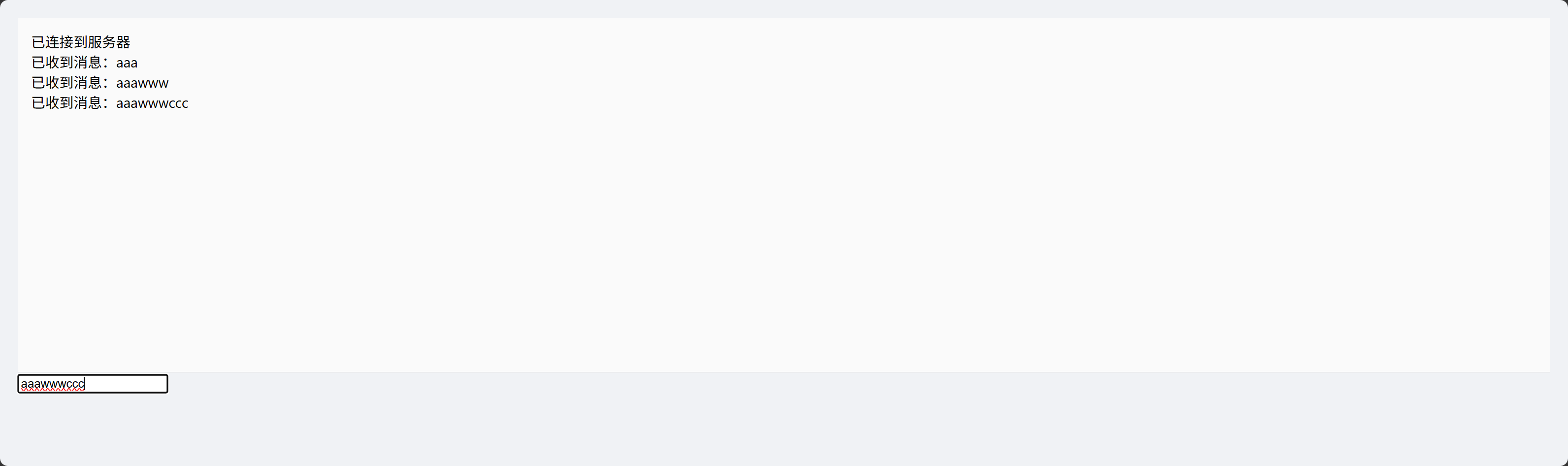
项目运行
启动SpringBoot项目
访问前端页面
http://localhost:8080/index.html
总结
本项目主要还是先了解,SpringBoot帮我们封装websocket是如何使用的。
特别是每个新连接都会创建一个 WebSocketServer 实例。这个就很像原来的Servlet有大不同。
原来Servlet采用的是单例模式,然后通过多线程来处理不同的请求。
但是WebSocket是长连接,每个客户端连接会创建一个独立的WebSocketServer实例,以维护连接的状态(如用户ID,会话信息等)。独立示例可以避免线程安全问题。
存在问题与后续优化
目前这套简单的代码还是存在很多问题。
- 目前代码上没有做会话管理:如服务器群发消息,广播消息。这个需要创建一个单例模式的类,将所有的用户ID与会话进行一个映射,以便管理所有用户的会话。这样就可以做到给指定用户发消息,也可以遍历所有用户给每个用户发消息。
- 没有自定义通信协议(消息):对于比较完善的websocket通信来说,我们会发送的消息可能是各种各样的,不单纯只是一段文本信息。因此一般情况下需要自定义消息。一般我们采用json来传递。所以我一般会定义如下数据结构
{ "type": "消息类型", "payload":"负荷的数据,一段json数据" } - 可扩展性差:目前一个连接就是一个
WebSocketServer实例,而消息类型又各种各样,负载的参数字段等也是各种各样。如果都在一个onMessage中处理要写一堆的if语句,对于项目的可扩展性很差。 - 不支持分布式:目前只有一个服务器,但是服务器部署多个进行负载均衡的话,会丢失会话,毕竟有的会话可能在另一台服务器上。这个则需要消息队列中间件来解决。或者使用redis的发布订阅模块

汇聚全球AI编程工具,助力开发者即刻编程。
更多推荐


 11
11 0
0- 0


 已为社区贡献5条内容

所有评论(0)