
Jenkins CI/CD 持续集成专题十三、[jenkins]iOS 自动打包上传 Appstore和fir
·
一、[jenkins]iOS 自动打包上传 fir
- Mac 系统作为服务器
- brew 安装 Jenkins,安装默认插件即可
- 启动 Jenkins 服务器
- 为了让局域网可以访问 Jenkins 可以修改如下配置
- 打包前提是 Mac 服务器已经具有打包 iOS 的能力
修改如下两个路径下的 httpListenAddress 配置 ip 为 0.0.0.0
~/Library/LaunchAgents/homebrew.mxcl.jenkins.plist
/usr/local/opt/jenkins/homebrew.mxcl.jenkins.plist
了解 Jenkins
运行逻辑
jenkins 和 gitlab 结合管理项目;
在 Jenkins 中创建的流水线项目 ios-project, 可以关联我们的 iOS 项目的 gitlab 地址;执行构建后,可以在 ~/.jenkins/workspace/ios-project中看到自己的 iOS 开发工程项目;
可以创建一个存放各种脚本的 gitlab 项目 ios-build-fir;这样执行构建流程后,就可以从远端的 gitlab 中同步所有相关的脚本到 ~/.jenkins/workspace/ios-build-fir中。
可以看出 ios-build-fir和ios-project在同一级目录中。
在 ios-build-fir构建后执行的脚本中添加如下代码:-ilex为了可以在 shell 脚本执行过程错误能够立即退出;
#!/bin/bash -ilex

version=$version
build=$build
rm -rf ~/Library/xxx/Xcode/DerivedData
dir=../ios-project/ios-project-Info.plist
# 修改项目的版本号和 build 号
version_t=$version
if [ version != "0" ]
then
/usr/libexec/PlistBuddy -c "Set :CFBundleShortVersionString $version_t" "${dir}"
fi

build_t=$build
if [ build != "0" ]
then
	/usr/libexec/PlistBuddy -c "Set :CFBundleVersion $build_t" "${dir}"
fi

# 修改 Extension 版本号和 build 号
ex_dir="../ios-project/BagExtension copy-Info.plist"

version_t=$version
if [ version != "0" ]
then
/usr/libexec/PlistBuddy -c "Set :CFBundleShortVersionString $version_t" "${ex_dir}"
fi

build_t=$build
if [ build != "0" ]
then
	/usr/libexec/PlistBuddy -c "Set :CFBundleVersion $build_t" "${ex_dir}"
fi

# 这里执行的是 ios-build-fir 中已经提前写好的 脚本
bash build.sh --version $version --build $build
6、 其中 version 和 build 的参数配置如下;获取方式如上 $build
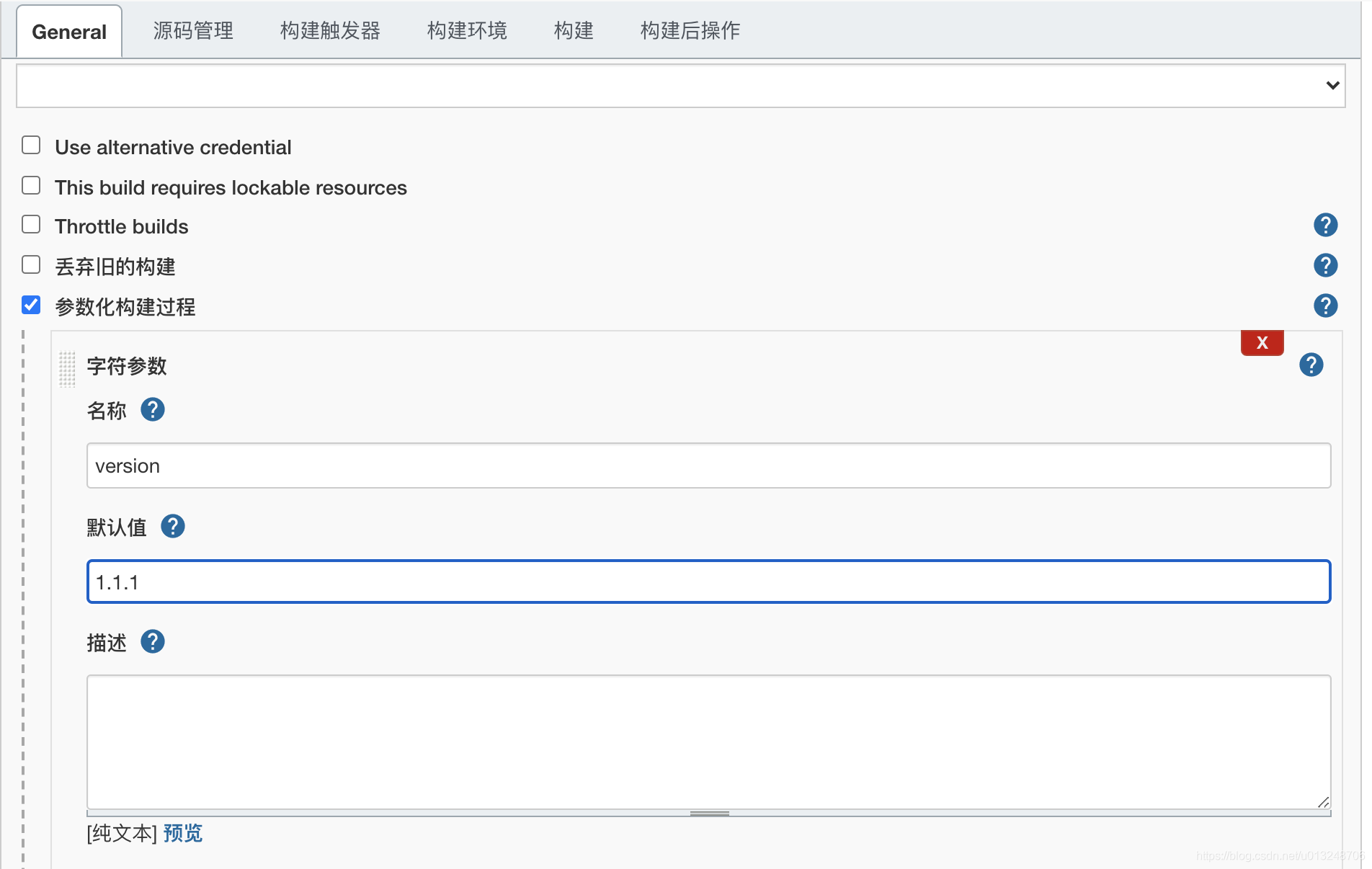
build.sh 打包脚本如下
#!/bin/bash
set -e

version=0 # 0 默认不修改版本号
build=0	# 0 默认不修改小版本号
info=$(date "+%Y.%m.%d_%H:%M:%S:%M")
dir=$(date "+%Y.%m.%d_%H:%M:%S:%M")
homedir=`pwd`
projectName=ios-project
workspace=../ios-project/ios-project.xcworkspace
# 这个文件可以在手动打包的结果中获取
optionsPlist=${homedir}/ExportOptions.plist
exportPath=~/Desktop/${dir}
archivePath=~/Desktop/${dir}/archive/archivearchive
firlog=~/Desktop/${dir}/fir.log
appNameWithExtension=晓黑板
appName=${appNameWithExtension}.ipa
# 导出后修改 ipa 名称。修改原因是,中文.ipa 上传 fir 过程中脚本会报错
appNameWithExtensionExport=apple
appNameExport=$appNameWithExtensionExport.ipa

publishInfo="publishinfo.txt"

help() {
	echo "--version 需要修改的版本号"
	echo "--build 需要填写的 build 号"
	echo "--info 提交到 fir 的附加信息,默认为大包的时间戳"
	echo "-h 帮助"
}

while [ $# -gt 0 ];
do
	case $1 in
		--version)
			shift
			version=$1
			echo $version
			shift
			;;
		--build)
			shift
			build=$1
			echo $build
			shift
			;;
		--info)
			shift
			info=$1
			shift
			;;
		-h)
			help
			exit 0
			;;
		*)
			echo "不是正确的指令${$1}"
			exit 1
	esac
done

echo 'remove cache before'
rm -rf ~/Desktop/archive
rm -rf ~/Desktop/${dir}
# clean 项目的 cache
xcodebuild clean -workspace ${workspace} -scheme ios-project_Develop -configuration Debug -sdk iphonesimulator
xcodebuild clean -workspace ${workspace} -scheme ios-project_Develop -configuration Release -sdk iphoneos

echo '===xcodebuild to archive---'
xcodebuild archive -workspace ${workspace} -scheme ios-project_Develop -archivePath ${archivePath}

echo '===build archive success!!!'

echo '===export ipa begin---'
xcodebuild -exportArchive -exportOptionsPlist ${optionsPlist} -archivePath ${archivePath}.xcarchive -exportPath ${exportPath}
echo 'export ipa success!!!'

echo '===fix version and build'
echo ${exportPath}/${appName}
echo `ls ${exportPath}`
mv ${exportPath}/${appName} ${exportPath}/${appNameExport}
echo "修改名称成功:"
echo ${exportPath}/${appName}
echo ${exportPath}/${appNameExport}

echo `ls ${exportPath}`

echo '' > ${exportPath}/${publishInfo}
echo ~/Desktop/${dir}/${appName} >> ${exportPath}/${publishInfo}
echo ${firlog} >> ${exportPath}/${publishInfo}
echo  "Version: ${version}" >> ${exportPath}/${publishInfo}
echo  "Build: ${build}" >> ${exportPath}/${publishInfo}
echo  "打包时间: ${info}" >> ${exportPath}/${publishInfo}

# ios-project 日志
cd ${homedir}
cd ../ios-project
echo "ios-project:`git log -1 --decorate=short --oneline`" >> ${exportPath}/${publishInfo}
echo "ios-project-last-commit: echo `git log -1 --pretty=format:%H`" >> ${exportPath}/${publishInfo}

fir p ~/Desktop/${dir}/${appNameExport} -L "${firlog}" -c ${exportPath}/${publishInfo} -Q

cd ${homedir}
echo ${exportPath}/${publishInfo} >> ${firlog}
echo ${dir} >> ${firlog}
echo ${info} >> ${firlog}

# 读取并写入,目的是为了收集相关数据
cat ${exportPath}/${publishInfo} | while read LINE
do
	echo $LINE >> ${firlog}
done
# 发送邮件到某个邮箱提示发版本成功
firotherinfo=$(cat ${firlog})
echo $firotherinfo
python semail.py 'iOS新版本发布' "${firotherinfo}"
二、[jenkins]iOS 自动打包上传 Appstore
- mac 系统
- mac 系统上搭建 jenkins 服务
// clean 内容
xcodebuild clean -workspace ${workspace} -scheme ${scheme} -configuration Debug -sdk iphonesimulator
xcodebuild clean -workspace ${workspace} -scheme ${scheme} -configuration Release -sdk iphoneos
// 打包 arhcive
xcodebuild archive -workspace ${workspace} -scheme ${scheme} -archivePath ${archivePath}

// 到处 ipa
// optionsPlist 可以在手动打包的 ipa 文件下找到
xcodebuild -exportArchive -exportOptionsPlist ${optionsPlist} -archivePath ${archivePath}.xcarchive -exportPath ${exportPath}

// 上传 appstore
// parameter_username 为 apple 开发者账号; parameter_password 为登陆的专用秘钥(获取方式请往下看)
// 1 校验 ipa
xcrun altool --validate-app -f ${exportPath}/${appNameExport} -t iOS -u "$parameter_username" -p "$parameter_password" --output-format xml

// 2 上传 ipa
xcrun altool --upload-app -f ${exportPath}/${appNameExport} -t iOS -u "$parameter_username" -p "$parameter_password" --output-format xml

汇聚全球AI编程工具,助力开发者即刻编程。
更多推荐

 2
2 0
0- 0


 已为社区贡献4条内容

所有评论(0)