
Flink 1.20 使用自带jdbc source 操作步骤
·
1 添加pom.xml 依赖
<dependency>
    <groupId>org.apache.flink</groupId>
    <artifactId>flink-connector-jdbc</artifactId>
    <version>3.3.0-1.20</version>
</dependency>
2 、操作mysql代码
package com.zyb.flink.basic;
import com.zyb.flink.basic.bean.Student;
import org.apache.flink.api.common.eventtime.WatermarkStrategy;
import org.apache.flink.api.common.typeinfo.TypeInformation;
import org.apache.flink.connector.jdbc.core.datastream.source.JdbcSource;
import org.apache.flink.streaming.api.datastream.DataStreamSource;
import org.apache.flink.streaming.api.environment.StreamExecutionEnvironment;


public class TestJDBCSource {
    public static void main(String[] args) throws Exception {

        //获取flink 上下文环境
        StreamExecutionEnvironment env = StreamExecutionEnvironment.getExecutionEnvironment();

        JdbcSource<Student> jdbc = JdbcSource.<Student>builder()
                .setSql("select id,name,age from student")
                .setDBUrl("jdbc:mysql://192.168.254.80:3306/pk_flink")
                .setUsername("root")
                .setPassword("123456")
                .setDriverName("com.mysql.cj.jdbc.Driver")
                .setTypeInformation(TypeInformation.of(Student.class))
                .setResultExtractor(rs->{
                    Student student = new Student();
                    student.setId(rs.getInt("id"));
                    student.setName(rs.getString("name"));
                    student.setAge(rs.getInt("age"));
                    return student;
                })
                .build();

        DataStreamSource<Student> source = env.fromSource(
                jdbc,
                WatermarkStrategy.noWatermarks(), // JDBC 源通常不使用事件时间水印,可以使用 NoWatermarks
                "JDBC-Source"
        );

        source.print();


        //执行
        env.execute();
    }
}
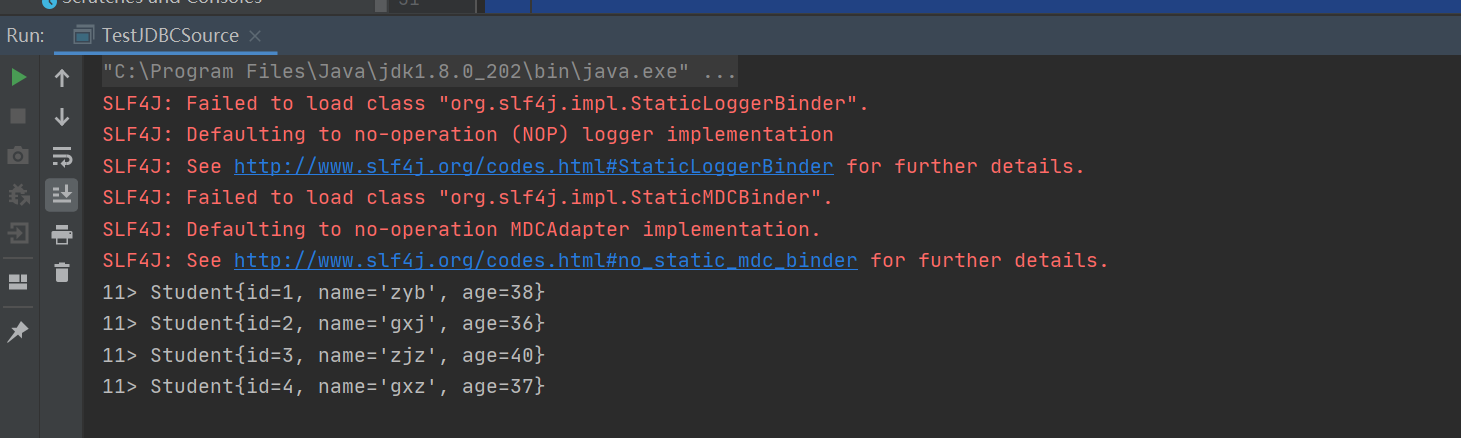
3、测试结果

汇聚全球AI编程工具,助力开发者即刻编程。
更多推荐

 6
6 0
0- 0


 已为社区贡献2条内容

所有评论(0)