
Spring AOP 入门实战:核心概念 + 保姆级代码,一篇就够了

一、AOP概述
1.1、什么是AOP?
AOP(Aspect-Oriented Programming,面向切面编程)是一种针对特定类型问题的编程范式。以上篇文章提到的拦截器、统一响应和全局异常处理为例,这些功能原本需要在每个路径或类中重复实现。通过AOP思想,我们可以将这些通用功能提取出来,并将其灵活应用到不同场景中:拦截器作用于URL,统一响应和全局异常处理则作用于方法层面,除此之外AOP可以对包、类、方法名、参数等更细致的维度进行拦截处理。这些都是AOP思想的具体实现方式。所以可以说:AOP是⼀种思想,是对某⼀类事情的集中处理(Spring AOP就是AOP思想的一种实现)
1.2、快速了解
这次我们以接口耗时来举例吧,我们想计算每个调用接口的耗时,按照常规的逻辑我们需要在每个方法中都加入下述变量,并输出日志
    @RequestMapping("getuser")
    public UserInfo getuser() {
        long begin=System.currentTimeMillis();
        UserInfo user=userMapper.getUserById(3);
        long end=System.currentTimeMillis();
        System.out.println("消耗时间为:"+(end-begin)+"ms");
        return user;
    }
但是,如果接口很多的情况下,我们添加在一个一个方法上非常非常麻烦耗时
这时我们就能把这个特定的功能提取出来,作用在每个接口上,也不用修改原有的代码,能给做到代码零侵入的情况下完成某一功能的实现:
1.2.1、引入 Spring AOP 依赖
<!-- Source: https://mvnrepository.com/artifact/org.springframework.boot/spring-boot-starter-aop -->
<dependency>
      <groupId>org.springframework.boot</groupId>
      <artifactId>spring-boot-starter-aop</artifactId>
      <version>3.5.10</version>
      <scope>compile</scope>
</dependency>
1.2.2、编写AOP程序
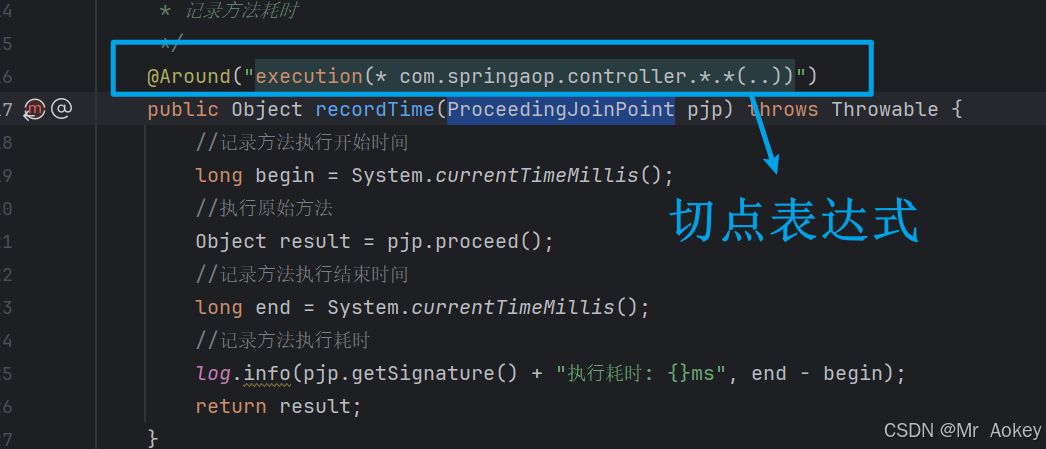
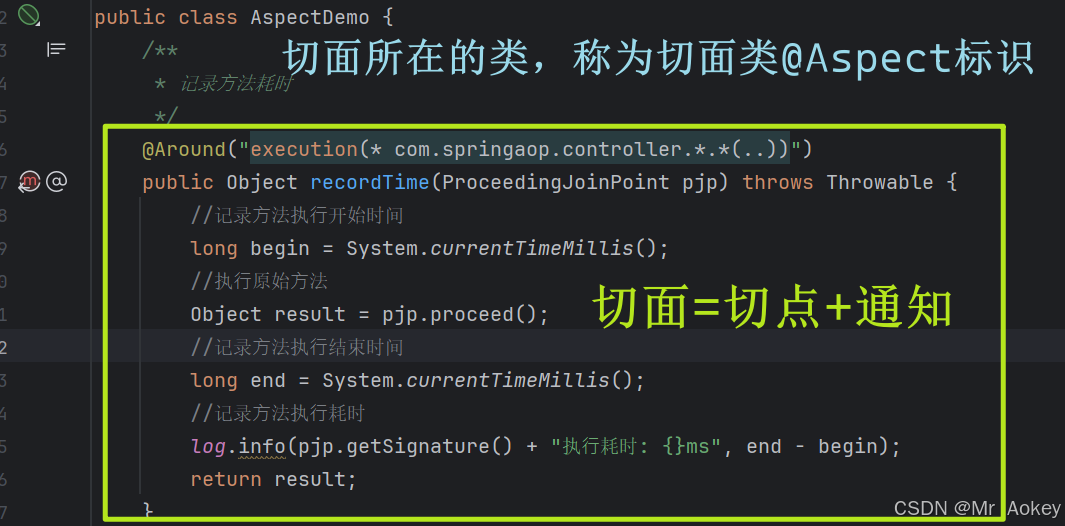
• @Aspect: 标识当前类为切面类
• @Around:定义环绕通知,在目标方法执行前后都会触发。括号内的表达式用于指定需要增强的目标方法
• ProceedingJoinPoint.proceed(): 调用此方法执行原始目标方法
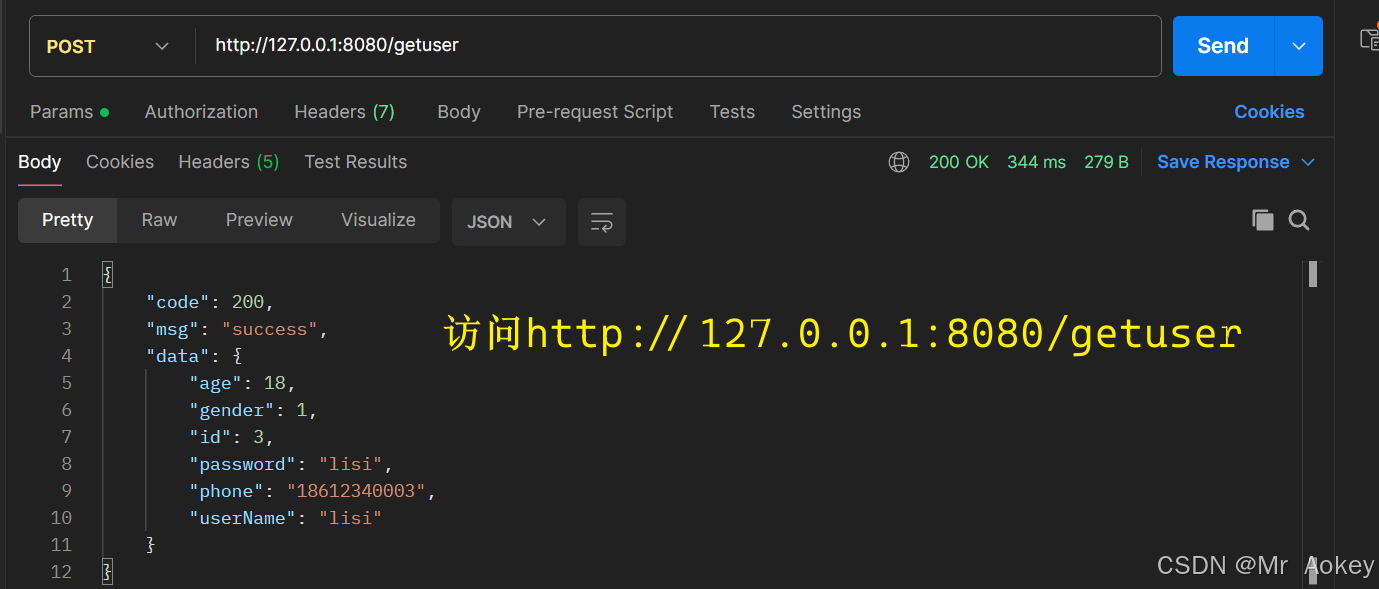
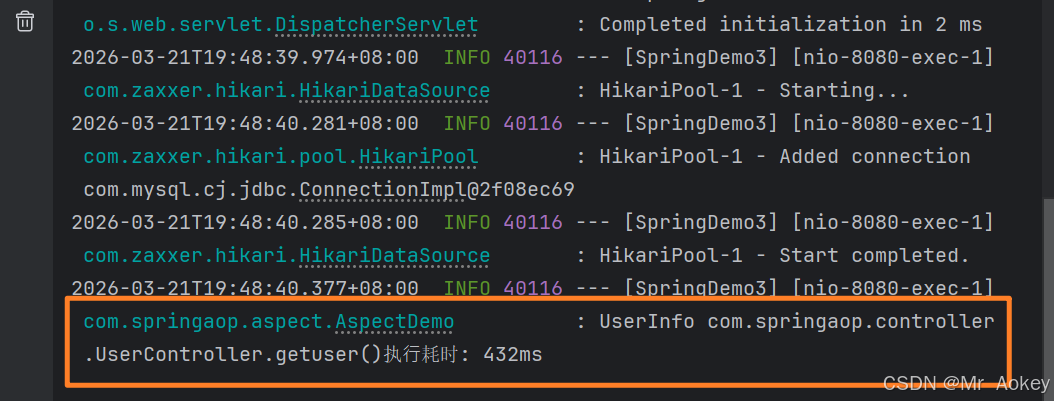
1.2.3、运行结果
二、Spring AOP详解
2.1、核心概念
2.1.1、切点(Pointcut)
切点也称切入点,就是提供一组规则来告诉程序需要对哪些方法进行功能加强
2.1.2、连接点(Join Point)
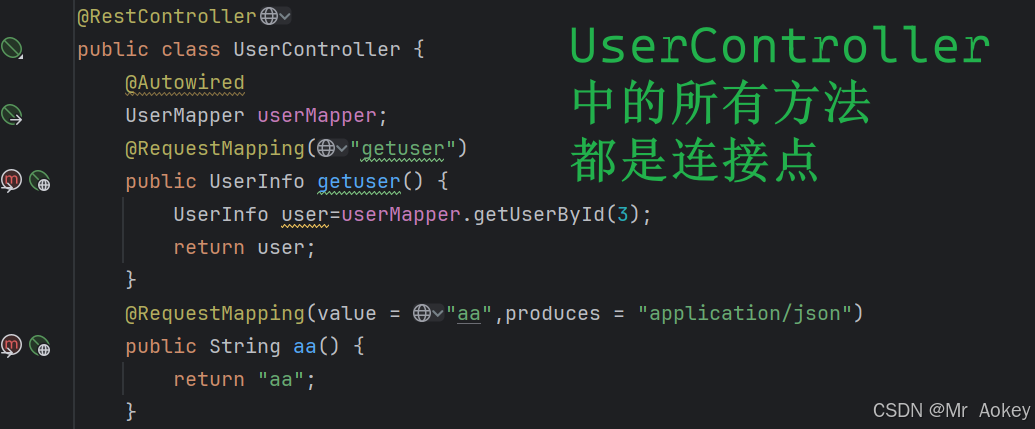
连接点就是满足切点表达式规则的方法,即可以被AOP控制的方法。以上方的切点表达式来说:com.springaop.controller 路径下的所有方法都是连接点
2.1.3、通知(Advice)
通知就是具体要做的工作,指那些共性功能(重复的逻辑),例如上述的计时操作就是通知
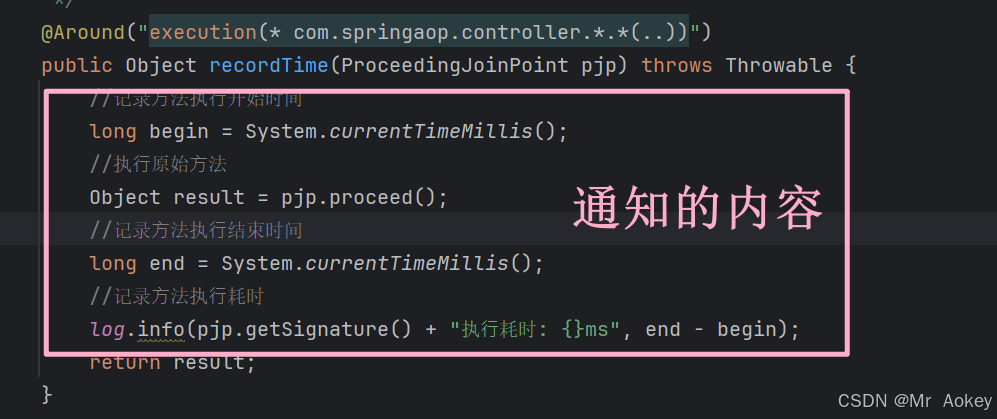
在面向切面编程(AOP)中,我们将重复的代码逻辑抽取出来单独定义,这部分抽取的代码就构成了通知的内容
2.1.4、切面(Aspect)
最后切面就是 切点+通知 ,用来描述当前AOP程序需要针对哪些方法,在何时执行什么操作,切面包含了通知逻辑的定义和连接点的定义
2.2、通知类型
2.2.1、类型
• @Around: 环绕通知,标注此注解的方法会在目标方法执行前后都被调用
• @Before: 前置通知,标注此注解的方法会在目标方法执行前被调用
• @After: 后置通知,标注此注解的方法会在目标方法执行后被调用,无论是否发生异常都会执行
• @AfterReturning: 返回后通知,标注此注解的方法会在目标方法正常返回后被调用,若发生异常则不执行
• @AfterThrowing: 异常通知,标注此注解的方法会在目标方法抛出异常时执行
2.2.2、效果演示
@Aspect
@Slf4j
@Component
public class AspectDemo {
    //前置通知
    @Before("execution(* com.springaop.controller.*.*(..))")
    public void doBefore() {
        log.info("执⾏ Before ⽅法");
    }
    //后置通知
    @After("execution(* com.springaop.controller.*.*(..))")
    public void doAfter() {
        log.info("执⾏ After ⽅法");
    }
    //返回后通知
    @AfterReturning("execution(* com.springaop.controller.*.*(..))")
    public void doAfterReturning() {
        log.info("执⾏ AfterReturning ⽅法");
    }
    //抛出异常后通知
    @AfterThrowing("execution(* com.springaop.controller.*.*(..))")
    public void doAfterThrowing() {
        log.info("执⾏ doAfterThrowing ⽅法");
    }
    //记录⽅法耗时
    @Around("execution(* com.springaop.controller.*.*(..))")
    public Object recordTime(ProceedingJoinPoint pjp) throws Throwable {
        log.info("方法执行前...");
        Object result = pjp.proceed();
        log.info("方法执行后...");
        return result;
    }
}
给目标方法加上日志便于结果观察:
    @RequestMapping("getuser")
    public UserInfo getuser() {
        UserInfo user=userMapper.getUserById(3);
        log.info("user:{}",user);
        return user;
    }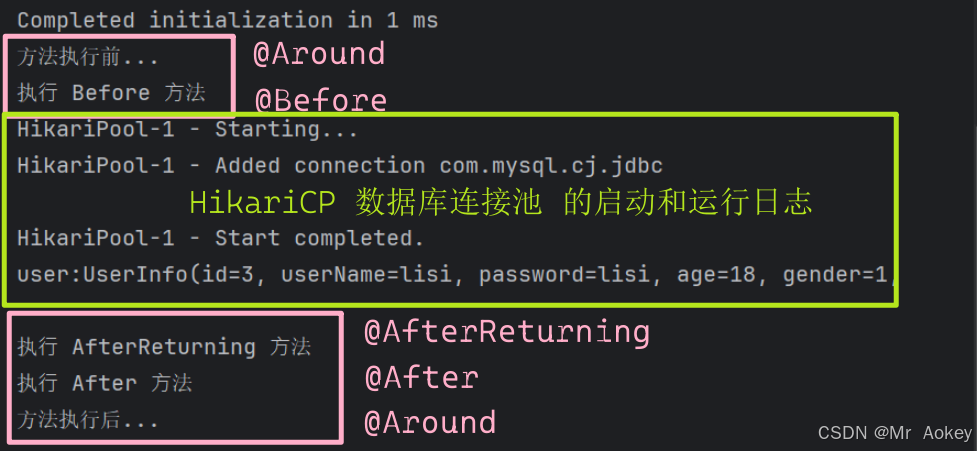
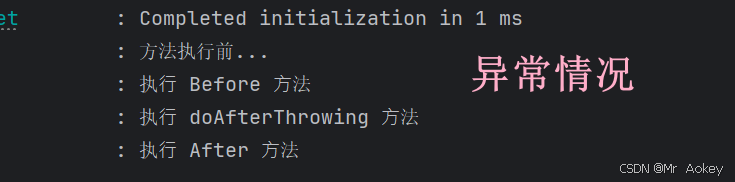
从图中可以看出,@Around 注解标识的通知方法包含两部分:前置逻辑和后置逻辑。其中,前置逻辑会在 @Before 标识的通知方法之前执行,而后置逻辑则在 @After 标识的通知方法之后执行。因为没有报错,所有 @AfterThrowing 效果未展示,与上方类似、如下

• 使用 @Around 环绕通知时,必须调用 ProceedingJoinPoint.proceed() 方法才能执行原始方法,而其他类型的通知无需考虑目标方法的执行问题
• @Around 环绕通知方法的返回值必须声明为 Object 类型,这样才能正确接收原始方法的返回值,否则无法获取到原始方法的执行结果
• 单个切面类可以定义多个切点
2.3、@PointCut 注解
通过切面,我们可以代码零侵入的情况下,完成一些类、方法等等上的功能增强,Spring为了方便管理这些切点表达式,提供了@PointCut 注解,能够把公共的切点表达式提取出来,需要时引用该切点表达式即可:
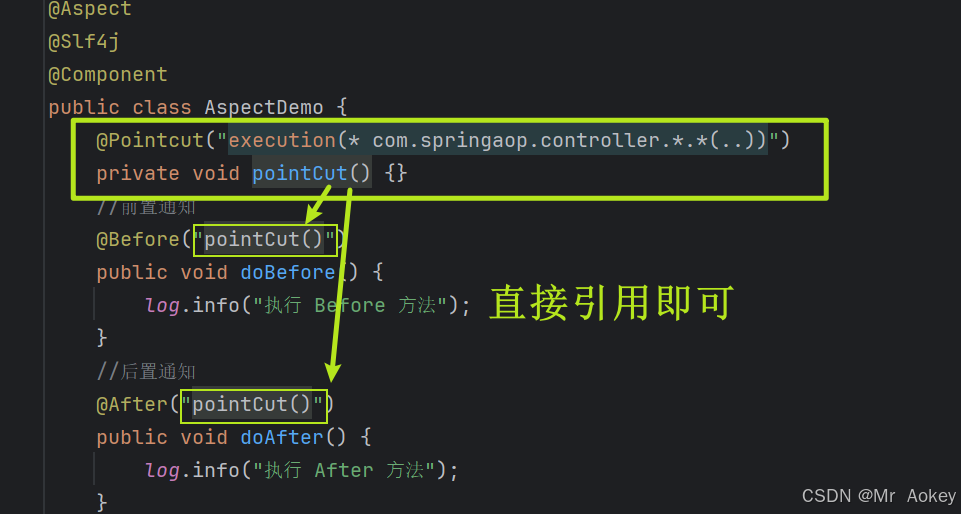
当切点使用 private 修饰时,仅限当前切面类内部访问。若其他切面类需要引用该切点,需将其改为 public 修饰。引用方式为:全限定类名.方法名()
2.4、切面优先级 @Order
当我们拥有多个切面类,并且这些切面类的多个切入点都匹配到同一个目标方法,当目标方法运行的时候,这些切面类的通知方法都会执行,那么执行这几个通知方法的执行顺序是怎么的呢?
@Aspect
@Component
@Slf4j
public class AspectDemo1 {
    @Before("execution(* com.springaop.controller.*.*(..))")
    public void doBefore() {
        log.info("AspectDemo1 执⾏ Before ⽅法");
    }
    @After("execution(* com.springaop.controller.*.*(..))")
    public void doAfter() {
        log.info("AspectDemo1 执⾏ After ⽅法");
    }
}
@Aspect
@Component
@Slf4j
public class AspectDemo2 {
@Before("execution(* com.springaop.controller.*.*(..))")
public void doBefore() {
log.info("AspectDemo2 执⾏ Before ⽅法");
}
@After("execution(* com.springaop.controller.*.*(..))")
public void doAfter() {
log.info("AspectDemo2 执⾏ After ⽅法");
}
}@Aspect
@Component
@Slf4j
public class AspectDemo3 {
@Before("execution(* com.springaop.controller.*.*(..))")
public void doBefore() {
log.info("AspectDemo3 执⾏ Before ⽅法");
}
@After("execution(* com.springaop.controller.*.*(..))")
public void doAfter() {
log.info("AspectDemo3 执⾏ After ⽅法");
}
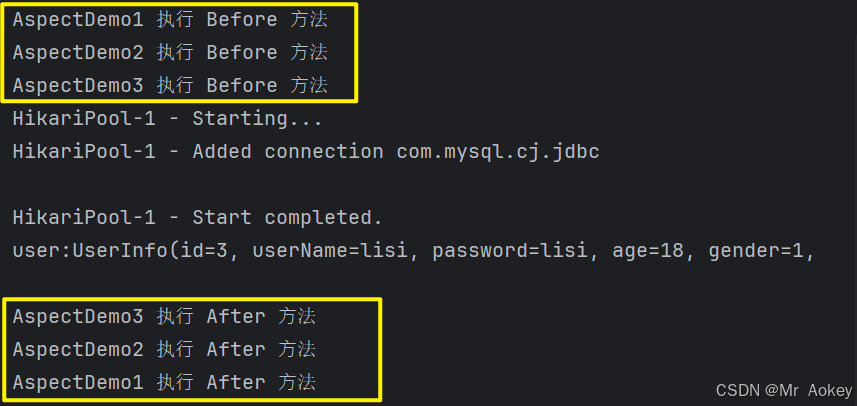
}运行结果:
多次访问该方法:
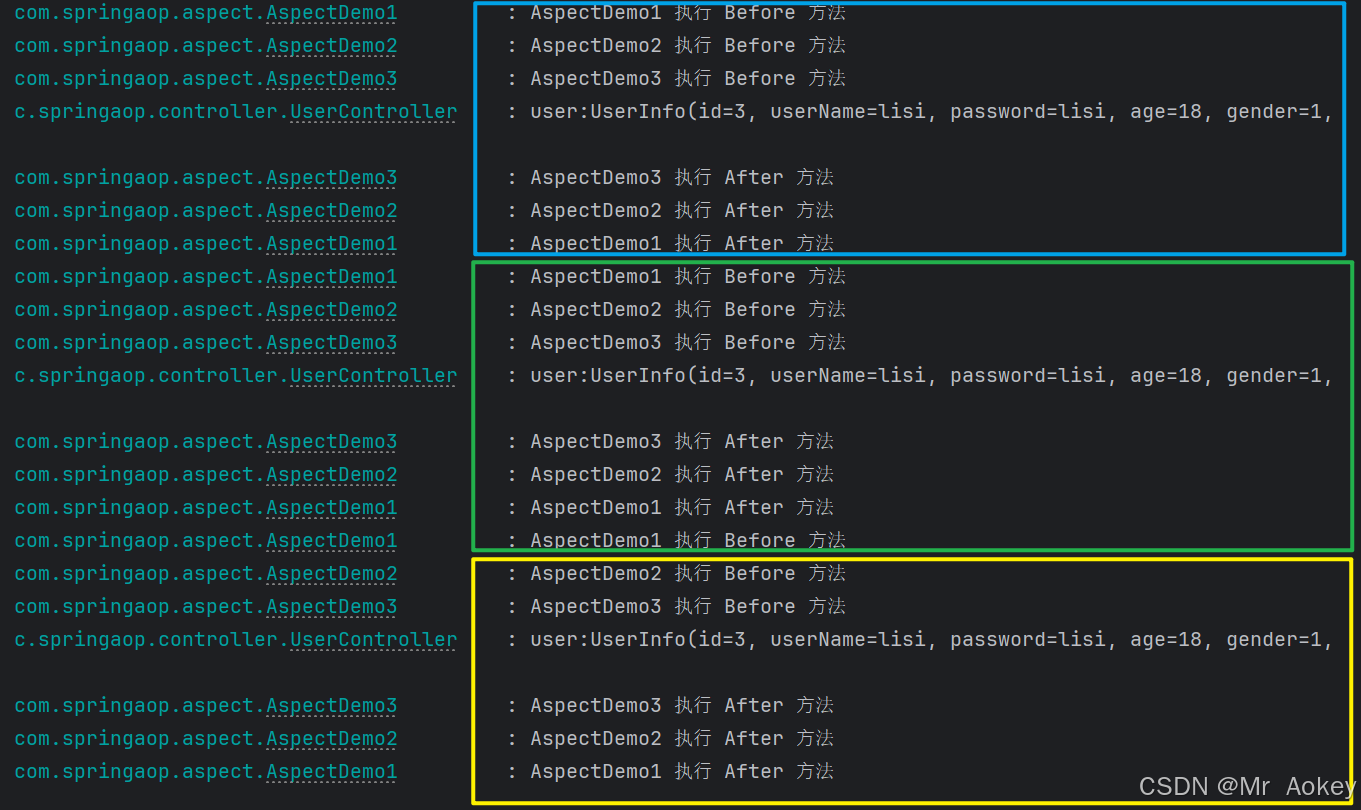
从上图我们可以发现:多次执行之后,这三个通知方法的执行顺序未发生变化:那么我们能够得出结论: 当存在多个切面类时,默认按照切面类的类名字母顺序执行:
- @Before 通知:字母顺序靠前的切面类优先执行
- @After 通知:字母顺序靠前的切面类最后执行
但是为了控制切面通知的执行顺序,Spring 提供了@Order注解来控制这些切面通知的顺序
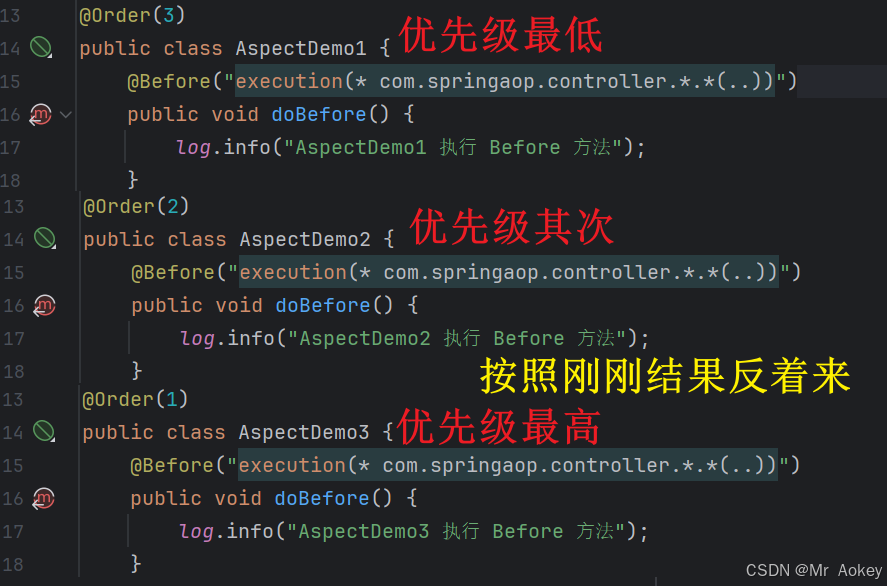
运行后:
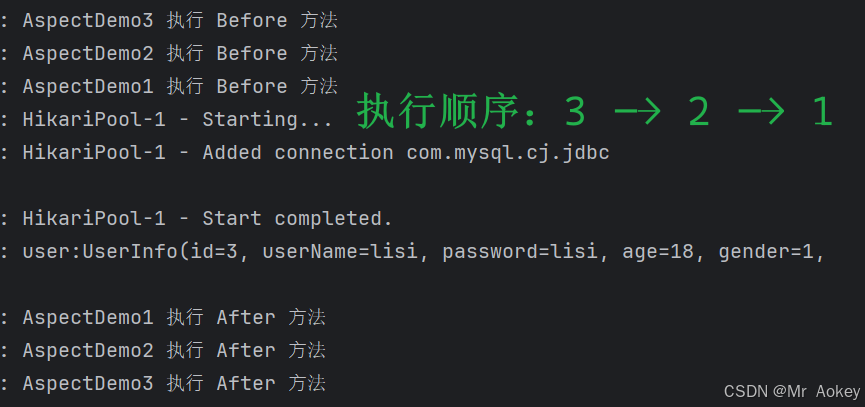
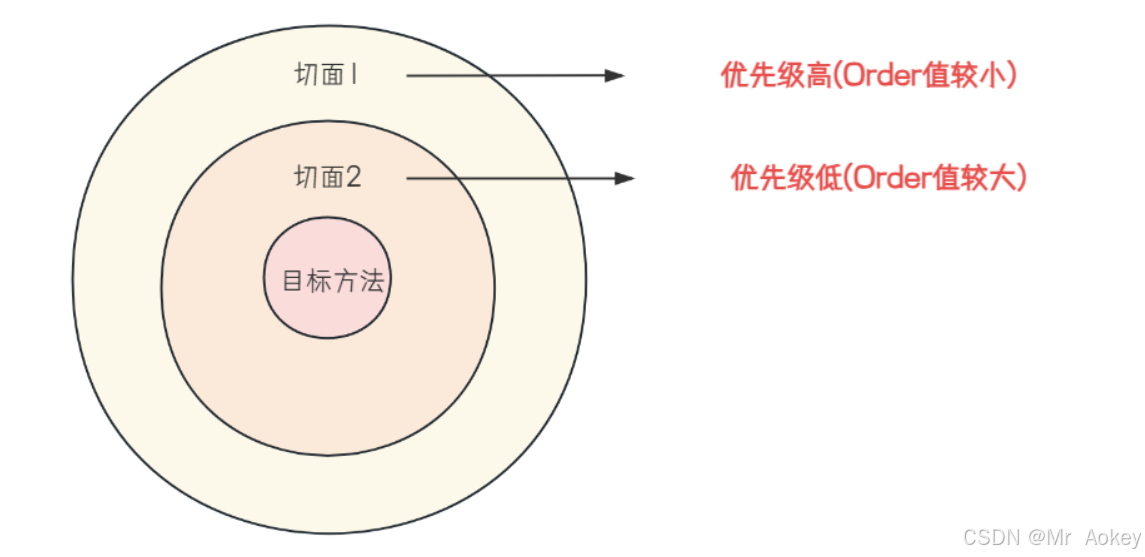
@Order 用于控制切面的执行顺序,数值越小优先级越高。切面按优先级从高到低依次执行,最后执行目标方法本身
2.5、切点表达式
2.5.1、execution 表达式
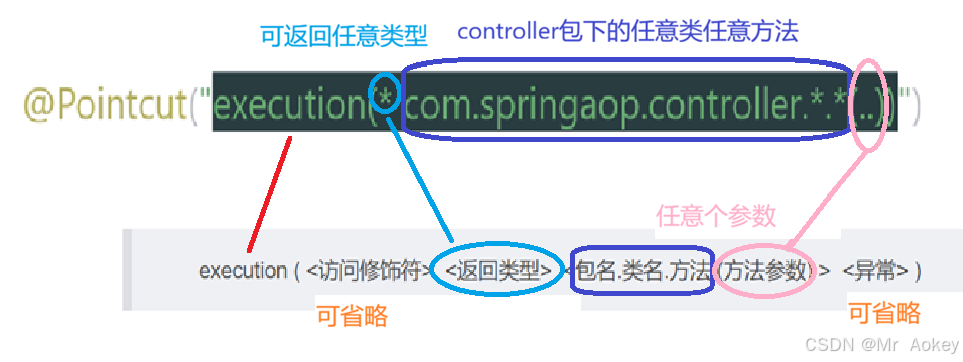
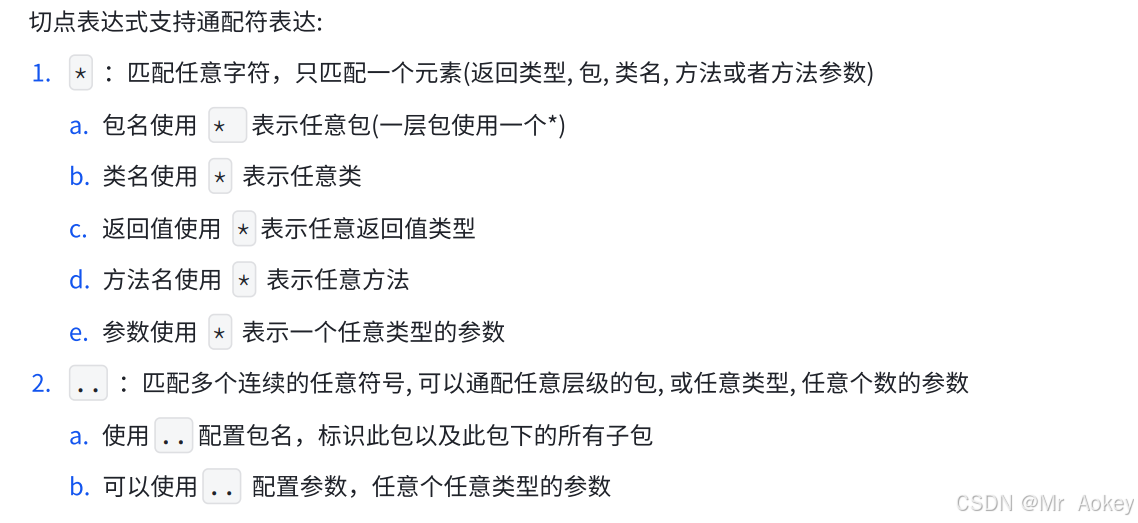
execution() 是最常用的切点表达式,用来匹配方法,语法:
execution ( <访问修饰符> <返回类型> <包名.类名.方法 (方法参数) > <异常> )
2.5.2、@annotation
当需要匹配多个无规则的方法时(例如 TestController中的 t1() 和 UserController 中的 u1() 方法),使用 execution 表达式就不太方便了。这种情况下,可以采用自定义注解配合 @annotation切点表达式来实现
具体实现步骤如下:
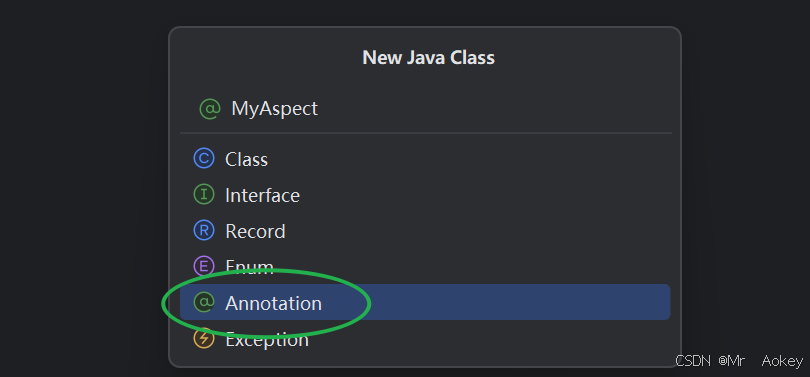
- 创建自定义注解
- 使用@annotation表达式定义切点
- 在目标方法上添加自定义注解
@RequestMapping("/user")
@RestController
public class UserController {
    @RequestMapping("/u1")
    public String u1(){
        return "u1";
    }
    @RequestMapping("/u2")
    public String u2(){
        return "u2";
    }
}
@RequestMapping("/test")
@RestController
public class TestController {
@RequestMapping("/t1")
public String t1() {
return "t1";
}
@RequestMapping("/t2")
public boolean t2() {
return true;
}
}2.5.2.1、自定义注解@MyAspect
@Target(ElementType.METHOD)
@Retention(RetentionPolicy.RUNTIME)
public @interface MyAspect {

}
了解即可:
@Target 定义了注解的适用范围,指明该注解可以应用于哪些程序元素
@Retention 指定了注解的生命周期,决定注解在何时会被保留
2.5.2.2、切面类
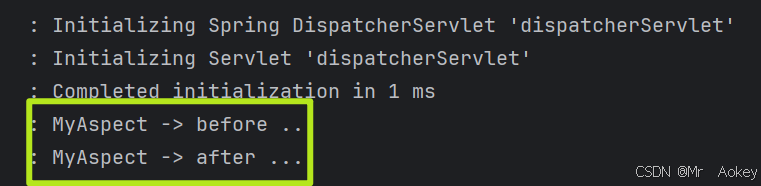
使用 @annotation 切点表达式定义切点,只对 @MyAspect 生效
@Slf4j
@Component
@Aspect
public class MyAspectDemo {
    @Before("@annotation(com.springaop.advice.MyAspect)")
    public void before(){
        log.info("MyAspect -> before ...");
    }
    @After("@annotation(com.springaop.advice.MyAspect)")
    public void after(){
        log.info("MyAspect -> after ...");
    }
}
2.5.2.3、添加自定义注解
在 TestController 的 t1() 方法和 UserController 的 u1() 方法上添加自定义注解 @MyAspect,其他方法保持不变
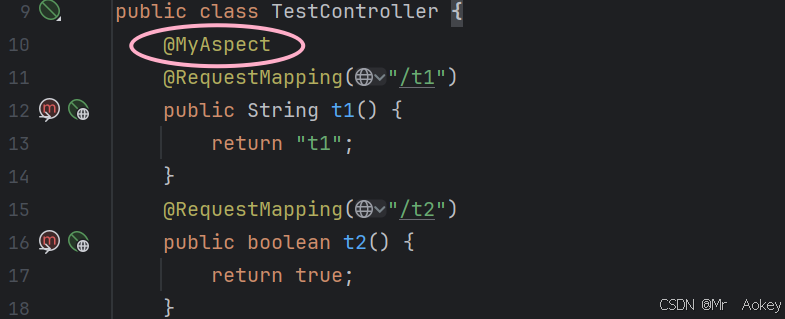
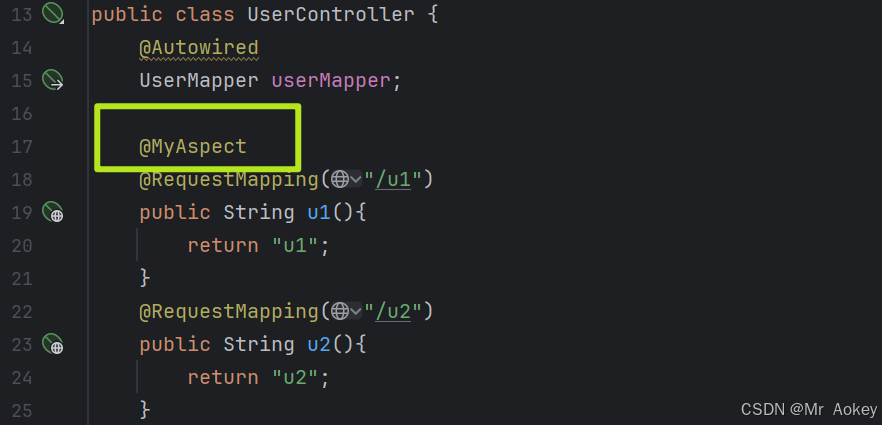
运行测试接口:127.0.0.1:8080/test/t1 (127.0.0.1:8080/user/u1 同理)
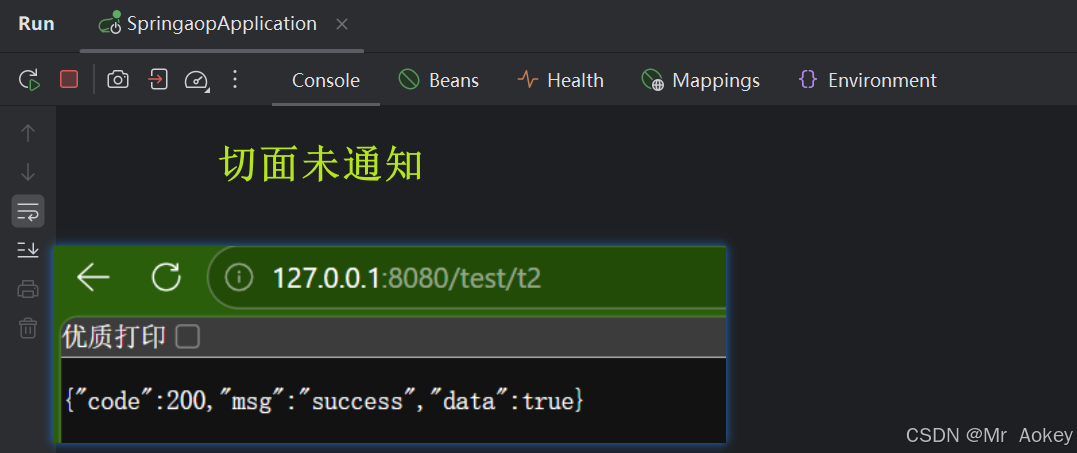
反之为方便观察日志,清理控制台并运行测试接口:127.0.0.1:8080/test/t2

汇聚全球AI编程工具,助力开发者即刻编程。
更多推荐



 10
10 0
0- 0


 已为社区贡献1条内容

所有评论(0)