
【Nginx】Nginx源码编译安装
·
前情提要:本篇博客介绍了Nginx的源码安装的方法,包括源码包的下载,依赖性的解决教程,以及编译安装完成后的初始化配置
系统:RHEL9.3
一、源码包下载
nginx社区版官网:https://www.nginx.org/

进入官网后点击下载按钮
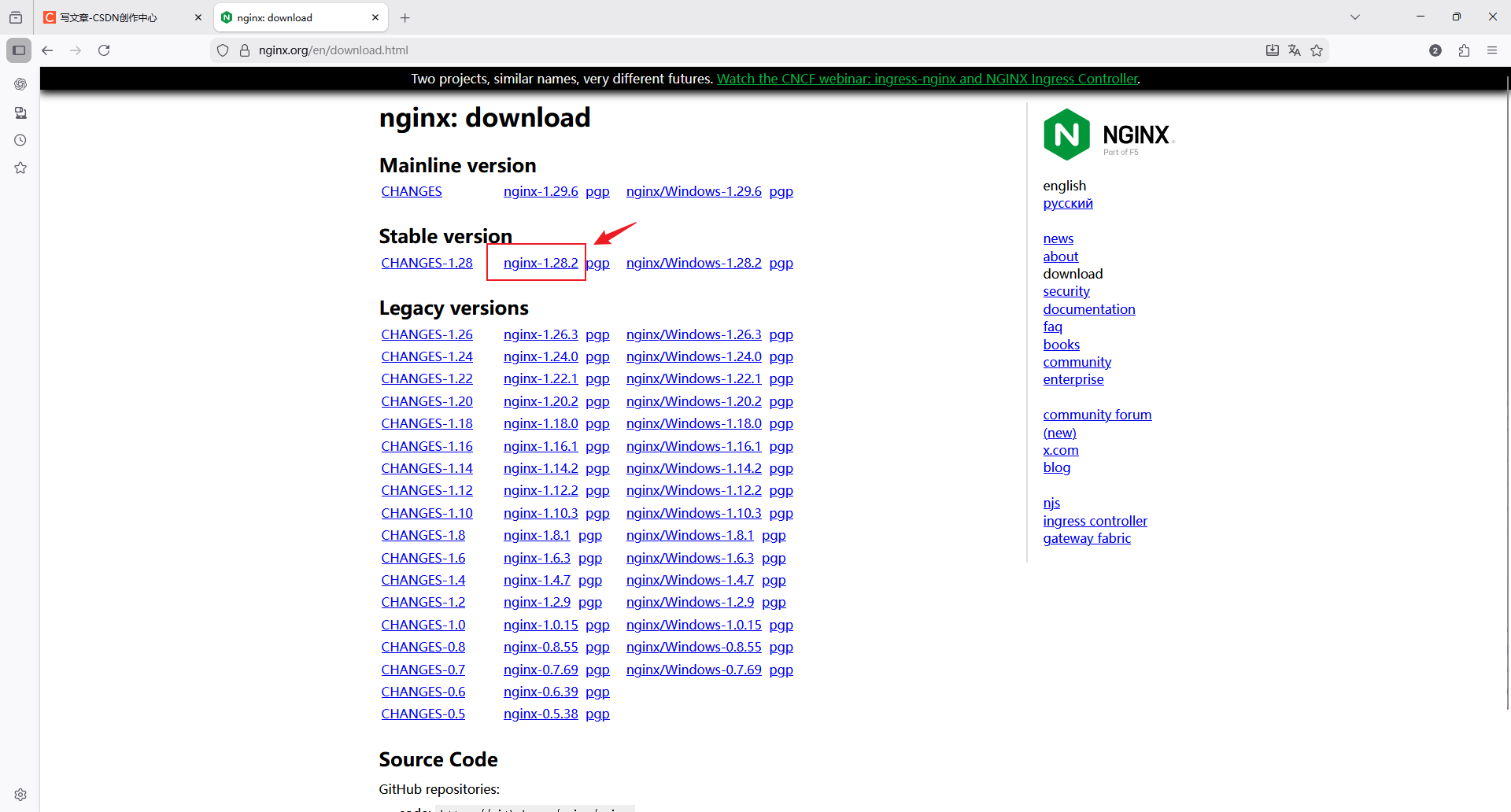
选择稳定版,复制下载链接在linux中下载或者直接下载传到linux中
二、解决依赖
2.1 编译器介绍
源码安装需要提前准备标准的编译器,GCC的全称是(GNU Compiler collection),其有GNU开发,并 以GPL即LGPL许可,是自由的类UNIX即苹果电脑Mac OS X操作系统的标准编译器,因为GCC原本只能处理C 语言,所以原名为GNU C语言编译器,后来得到快速发展,可以处理C++,Fortran,pascal, objectiveC,java以及Ada等其他语言,此外还需要Automake工具,以完成自动创建Makefile的工 作,Nginx的一些模块需要依赖第三方库,比如: pcre(支持rewrite),zlib(支持gzip模块)和 openssl(支持ssl模块)等。
2.2 编译安装示例
- 下载源码包
[root@Nginx ~]# wget https://nginx.org/download/nginx-1.28.2.tar.gz- 创建Nginx用户
[root@Nginx ~]# useradd -s /sbin/nologin -M nginx- 查看编译支持的参数(此处暂时部分)
[root@Nginx nginx-1.28.2]# ./configure --help
# 示例
  --prefix=PATH                      set installation prefix		# 安装路径
  --with-http_ssl_module             enable ngx_http_ssl_module		# with-xxx_xxx参数是默认nginx没有开启的功能,需要就要加上
--without-http_charset_module disable ngx_http_charset_module # without-xxx_xxx参数是默认nginx开启的功能,不需要就要加上- 解压并准备编译
[root@Nginx ~]# tar zxf nginx-1.28.2.tar.gz
[root@Nginx ~]# cd nginx-1.28.2/
[root@Nginx nginx-1.28.2]# ./configure --prefix=/usr/local/nginx \
> --user=nginx \						# 指定nginx运行用户
> --group=nginx \						# 指定nginx运行组
> --with-http_ssl_module \				# 支持https://
> --with-http_v2_module \				# 支持http版本2
> --with-http_realip_module \			# 支持IP透传
> --with-http_stub_status_module \		# 支持状态页面
> --with-http_gzip_static_module \		# 支持压缩
> --with-pcre \							# 支持正则
> --with-stream \						# 支持tcp反向代理
> --with-stream_ssl_module \			# 支持tcp的ssl加密
> --with-stream_realip_module			# 支持tcp的透传IP

./configure --prefix=/usr/local/nginx --user=nginx --group=nginx --with-http_ssl_module --with-http_v2_module --with-http_realip_module --with-http_stub_status_module --with-http_gzip_static_module --with-pcre --with-stream --with-stream_ssl_module --with-stream_realip_module- 遇见报错,开始解决依赖
checking for OS
 + Linux 5.14.0-362.8.1.el9_3.x86_64 x86_64
checking for C compiler ... not found

./configure: error: C compiler cc is not found

# 报错内容为找不到c编译器,进行下载
[root@Nginx nginx-1.28.2]# dnf install gcc -y

# 然后重新开始检测
[root@Nginx nginx-1.28.2]# ./configure --prefix=/usr/local/nginx --user=nginx --group=nginx --with-http_ssl_module --with-http_v2_module --with-http_realip_module --with-http_stub_status_module --with-http_gzip_static_module --with-pcre --with-stream --with-stream_ssl_module --with-stream_realip_module
- 遇见第二个报错
./configure: error: the HTTP rewrite module requires the PCRE library.
You can either disable the module by using --without-http_rewrite_module
option, or install the PCRE library into the system, or build the PCRE library
statically from the source with nginx by using --with-pcre=<path> option.

# 显示需要PCRE library
[root@Nginx nginx-1.28.2]# dnf search pcre-devel
正在更新 Subscription Management 软件仓库。
无法读取客户身份

本系统尚未在权利服务器中注册。可使用 subscription-manager 进行注册。

上次元数据过期检查:0:09:04 前,执行于 2026年03月22日 星期日 13时50分17秒。
====================================================== 名称 精准匹配:pcre-devel ======================================================
pcre-devel.i686 : Development files for pcre
pcre-devel.x86_64 : Development files for pcre

# 安装
[root@Nginx nginx-1.28.2]# dnf install pcre-devel.x86_64 -y

# 继续重新检测
[root@Nginx nginx-1.28.2]# ./configure --prefix=/usr/local/nginx --user=nginx --group=nginx --with-http_ssl_module --with-http_v2_module --with-http_realip_module --with-http_stub_status_module --with-http_gzip_static_module --with-pcre --with-stream --with-stream_ssl_module --with-stream_realip_module
- 遇见第三个报错
./configure: error: SSL modules require the OpenSSL library.
You can either do not enable the modules, or install the OpenSSL library
into the system, or build the OpenSSL library statically from the source
with nginx by using --with-openssl=<path> option.

# 显示缺少Openssl library
[root@Nginx nginx-1.28.2]# dnf search openssl-devel
正在更新 Subscription Management 软件仓库。
无法读取客户身份

本系统尚未在权利服务器中注册。可使用 subscription-manager 进行注册。

上次元数据过期检查:0:10:35 前,执行于 2026年03月22日 星期日 13时50分17秒。
==================================================== 名称 精准匹配:openssl-devel =====================================================
openssl-devel.i686 : Files for development of applications which will use OpenSSL
openssl-devel.x86_64 : Files for development of applications which will use OpenSSL

# 安装
[root@Nginx nginx-1.28.2]# dnf install openssl-devel.x86_64 -y

# 重新检测
[root@Nginx nginx-1.28.2]# ./configure --prefix=/usr/local/nginx --user=nginx --group=nginx --with-http_ssl_module --with-http_v2_module --with-http_realip_module --with-http_stub_status_module --with-http_gzip_static_module --with-pcre --with-stream --with-stream_ssl_module --with-stream_realip_module- 遇见第四个报错,解决完后就没有问题了,进行编译安装
./configure: error: the HTTP gzip module requires the zlib library.
You can either disable the module by using --without-http_gzip_module
option, or install the zlib library into the system, or build the zlib library
statically from the source with nginx by using --with-zlib=<path> option.

# 显示缺少zlib
[root@Nginx nginx-1.28.2]# dnf search zlib-devel
正在更新 Subscription Management 软件仓库。
无法读取客户身份

本系统尚未在权利服务器中注册。可使用 subscription-manager 进行注册。

上次元数据过期检查:0:11:59 前,执行于 2026年03月22日 星期日 13时50分17秒。
====================================================== 名称 精准匹配:zlib-devel ======================================================
zlib-devel.i686 : Header files and libraries for Zlib development
zlib-devel.x86_64 : Header files and libraries for Zlib development

# 安装
[root@Nginx nginx-1.28.2]# dnf install zlib-devel.x86_64 -y

# 重新检测
[root@Nginx nginx-1.28.2]# ./configure --prefix=/usr/local/nginx --user=nginx --group=nginx --with-http_ssl_module --with-http_v2_module --with-http_realip_module --with-http_stub_status_module --with-http_gzip_static_module --with-pcre --with-stream --with-stream_ssl_module --with-stream_realip_module

# 然后检测没有问题,可以开始编译安装
[root@Nginx nginx-1.28.2]# make && make install
三、Nginx初始化
- Nginx安装完成后有四个主要的目录
[root@Nginx ~]# ls /usr/local/nginx/
conf  html  logs  sbin

# conf:保存nginx所有的配置文件,其中nginx.conf是nginx服务器的最核心最主要的配置文件,其他的.conf则是用来配置nginx相关的功能的,例如fastcgi功能使用的是fastcgi.conf和 fastcgi_params两个文件,配置文件一般都有一个样板配置文件,是以.default为后缀,使用时可将其 复制并将default后缀去掉即可。

# html目录中保存了nginx服务器的web文件,但是可以更改为其他目录保存web文件,另外还有一个50x的web文件是默认的错误页面提示页面。

# logs:用来保存nginx服务器的访问日志错误日志等日志,logs目录可以放在其他路径,比如/var/logs/nginx里面。

# sbin:保存nginx二进制启动脚本,可以接受不同的参数以实现不同的功能。- 添加环境变量
[root@Nginx ~]# vim .bash_profile
export PATH=$PATH:/usr/local/nginx/sbin
[root@Nginx ~]# source .bash_profile

# 查看nginx版本和编译参数
[root@Nginx ~]# nginx -V
nginx version: nginx/1.28.2
built by gcc 11.4.1 20230605 (Red Hat 11.4.1-2) (GCC)
built with OpenSSL 3.0.7 1 Nov 2022
TLS SNI support enabled
configure arguments: --prefix=/usr/local/nginx --user=nginx --group=nginx --with-http_ssl_module --with-http_v2_module --with-http_realip_module --with-http_stub_status_module --with-http_gzip_static_module --with-pcre --with-stream --with-stream_ssl_module --with-stream_realip_module
- 编译Nginx启动文件
[root@Nginx ~]# vim /lib/systemd/system/nginx.service
[Unit]
Description=The NGINX HTTP and reverse proxy server
After=syslog.target network-online.target remote-fs.target nss-lookup.target
Wants=network-online.target

[Service]
Type=forking
ExecStartPre=/usr/local/nginx/sbin/nginx -t
ExecStart=/usr/local/nginx/sbin/nginx
ExecReload=/usr/local/nginx/sbin/nginx -s reload
ExecStop=/bin/kill -s QUIT $MAINPID
PrivateTmp=true

[Install]
WantedBy=multi-user.target

# 重载
[root@Nginx ~]# systemctl daemon-reload- 启动Nginx
# nginx自带命令启动
[root@Nginx ~]# nginx
[root@Nginx ~]# ps aux | grep nginx
root       42714  0.0  0.0   9916   936 ?        Ss   14:50   0:00 nginx: master process nginx
nginx      42715  0.0  0.1  13812  4756 ?        S    14:50   0:00 nginx: worker process
root       42717  0.0  0.0   6636  2204 pts/0    S+   14:50   0:00 grep --color=auto nginx

# systemctl启动
[root@Nginx ~]# systemctl enable --now nginx
汇聚全球AI编程工具,助力开发者即刻编程。
更多推荐

 5
5 0
0- 0


 已为社区贡献17条内容

所有评论(0)