
Redis Cluster 集群详解
·
Redis Cluster 集群详解
📅 创建时间:2026-02-25
🏷️ 标签:#redis #cluster #集群 #高可用 #分布式
一、什么是 Redis Cluster
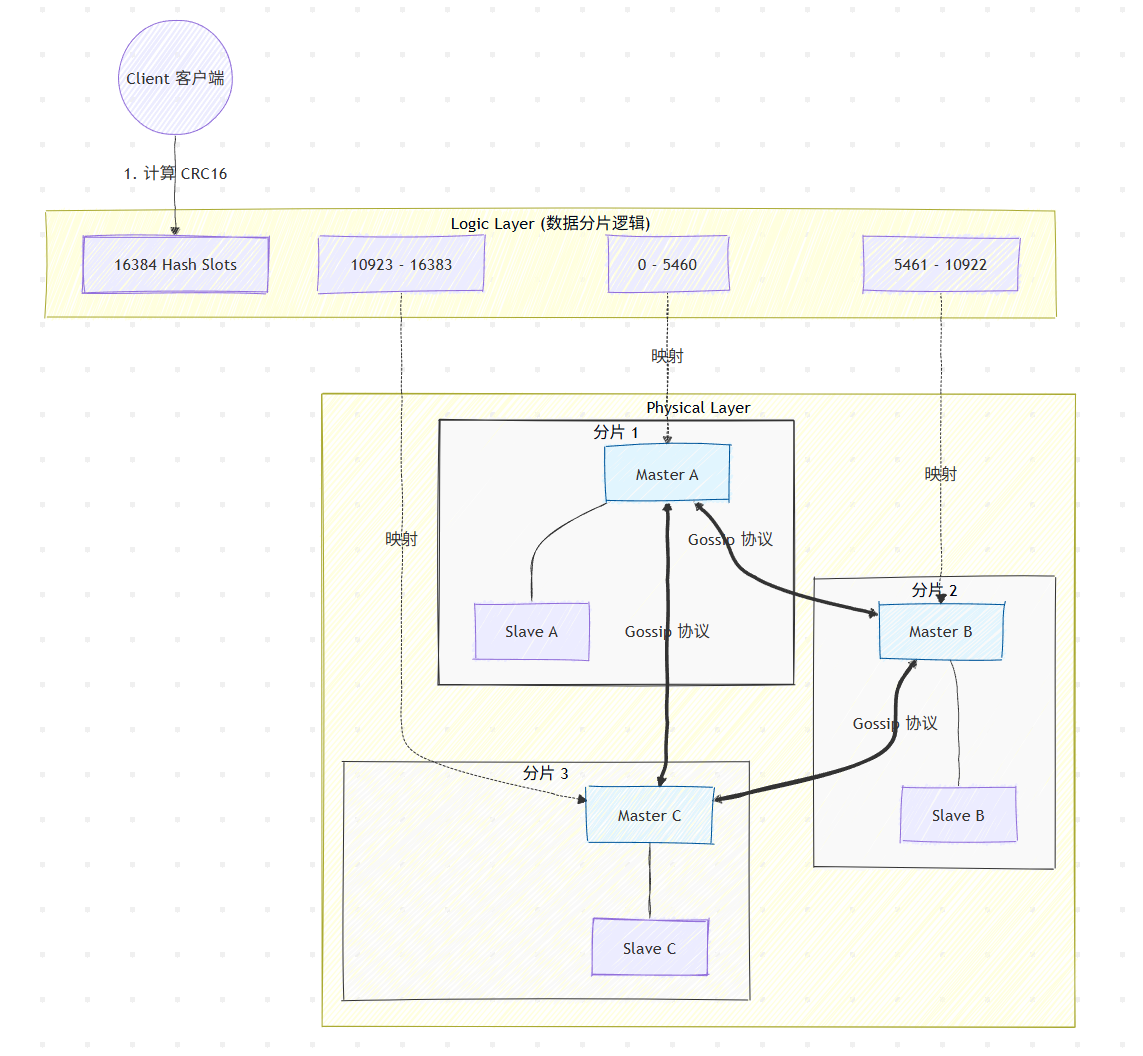
Redis Cluster 是 Redis 官方提供的分布式解决方案,通过数据分片(Sharding)和主从复制(Replication)相结合的方式,实现数据的分布式存储和高可用性。
二、核心特点
1. 数据分片(Sharding)
- 将整个数据集划分为 16384 个槽(slots)
- 每个节点负责一部分槽位
- 数据根据 key 的 CRC16 值取模 16384 分配到对应槽位
2. 高可用性(High Availability)
- 每个主节点可以有多个从节点
- 主节点故障时,从节点自动升级为主节点
- 内置故障检测和自动故障转移
3. 去中心化架构
- 无中心节点,每个节点都保存集群状态信息
- 节点间通过 Gossip 协议通信
4. 客户端智能路由
- 客户端连接到任意节点即可访问整个集群
- 节点会返回正确的节点地址让客户端重定向
三、Redis Cluster vs 其他方案
| 特性 | Redis Cluster | 主从复制+哨兵 | 第三方代理 |
|---|---|---|---|
| 数据分片 | ✅ 内置支持 | ❌ 需要客户端实现 | ✅ 代理实现 |
| 自动故障转移 | ✅ 内置 | ✅ 哨兵实现 | ❌ 依赖代理 |
| 扩展性 | ✅ 动态扩展 | ❌ 有限 | ✅ 较好 |
| 复杂度 | 中等 | 较低 | 较高 |
| 数据一致性 | 最终一致性 | 最终一致性 | 最终一致性 |
四、集群架构详解
1. 节点角色
- 主节点(Master):负责处理槽位数据,读写请求
- 从节点(Slave):复制主节点数据,提供读服务,故障时接替主节点
- 集群节点:所有节点都维护集群元数据
2. 槽位分配(Slot)
- 总共有 16384 个槽位(0-16383)
- 每个键通过以下公式计算所属槽位:
slot = CRC16(key) % 16384 - 槽位分配信息在所有节点间同步
3. Gossip 协议
- 节点间通过 Gossip 协议交换集群状态信息
- 定期发送 PING/PONG 消息检测节点健康状态
- 故障检测:当多数节点认为某节点下线时,触发故障转移
五、集群搭建实战
环境要求
- 至少 3 个主节点(生产环境建议 6 个节点:3 主 3 从)
- Redis 版本 3.0 及以上
- 所有节点网络互通
1. 准备配置文件
节点 1 (6379端口) redis-6379.conf:
port 6379
daemonize yes
pidfile /var/run/redis_6379.pid
logfile "/var/log/redis/redis-6379.log"
dir /var/lib/redis/6379

# 集群配置
cluster-enabled yes
cluster-config-file nodes-6379.conf
cluster-node-timeout 15000
cluster-require-full-coverage no
节点 2 (6380端口) redis-6380.conf:
port 6380
daemonize yes
pidfile /var/run/redis_6380.pid
logfile "/var/log/redis/redis-6380.log"
dir /var/lib/redis/6380

cluster-enabled yes
cluster-config-file nodes-6380.conf
cluster-node-timeout 15000
cluster-require-full-coverage no
节点 3 (6381端口) redis-6381.conf:
port 6381
daemonize yes
pidfile /var/run/redis_6381.pid
logfile "/var/log/redis/redis-6381.log"
dir /var/lib/redis/6381

cluster-enabled yes
cluster-config-file nodes-6381.conf
cluster-node-timeout 15000
cluster-require-full-coverage no
2. 启动所有节点
# 启动三个 Redis 实例
redis-server /path/to/redis-6379.conf
redis-server /path/to/redis-6380.conf
redis-server /path/to/redis-6381.conf

# 验证节点启动
redis-cli -p 6379 ping  # 返回 PONG
redis-cli -p 6380 ping
redis-cli -p 6381 ping
3. 创建集群
# 使用 redis-cli 创建集群
redis-cli --cluster create \
  127.0.0.1:6379 \
  127.0.0.1:6380 \
  127.0.0.1:6381 \
  --cluster-replicas 0  # 0 表示没有从节点,生产环境建议设置为 1

# 如果是 6 个节点(3主3从)
redis-cli --cluster create \
  127.0.0.1:6379 127.0.0.1:6380 127.0.0.1:6381 \
  127.0.0.1:6382 127.0.0.1:6383 127.0.0.1:6384 \
  --cluster-replicas 1
4. 验证集群状态
# 查看集群节点信息
redis-cli -p 6379 cluster nodes

# 查看集群信息
redis-cli -p 6379 cluster info

# 测试集群操作
redis-cli -c -p 6379 set key1 value1
redis-cli -c -p 6379 get key1
六、集群操作命令
1. 集群管理命令
# 查看集群节点
CLUSTER NODES

# 查看集群信息
CLUSTER INFO

# 查看槽位分配
CLUSTER SLOTS

# 手动故障转移(将当前节点设为主节点)
CLUSTER FAILOVER

# 添加新节点
CLUSTER MEET <ip> <port>
2. 键操作
# 计算 key 的槽位
CLUSTER KEYSLOT <key>

# 获取槽位对应的节点
CLUSTER GETKEYSINSLOT <slot> <count>

# 将槽位迁移到其他节点
CLUSTER SETSLOT <slot> MIGRATING <node-id>
CLUSTER SETSLOT <slot> IMPORTING <node-id>
3. 节点管理
# 从集群中移除节点
CLUSTER FORGET <node-id>

# 复制节点(设置主从)
CLUSTER REPLICATE <master-node-id>

# 保存集群配置
CLUSTER SAVECONFIG
七、集群扩容与缩容
1. 添加新主节点
# 1. 启动新节点
redis-server redis-6382.conf

# 2. 将新节点加入集群
redis-cli --cluster add-node 127.0.0.1:6382 127.0.0.1:6379

# 3. 重新分片(将部分槽位迁移到新节点)
redis-cli --cluster reshard 127.0.0.1:6379
2. 添加从节点
# 1. 启动新节点
redis-server redis-6383.conf

# 2. 将新节点加入集群作为从节点
redis-cli --cluster add-node \
  127.0.0.1:6383 127.0.0.1:6379 \
  --cluster-slave \
  --cluster-master-id <master-node-id>
3. 移除节点
# 安全移除节点(迁移槽位后再移除)
redis-cli --cluster del-node 127.0.0.1:6379 <node-id>
八、Spring Boot 集成 Redis Cluster
1. 添加依赖
<dependency>
    <groupId>org.springframework.boot</groupId>
    <artifactId>spring-boot-starter-data-redis</artifactId>
</dependency>
<dependency>
    <groupId>org.apache.commons</groupId>
    <artifactId>commons-pool2</artifactId>
</dependency>
2. 配置文件
spring:
  redis:
    cluster:
      nodes:
        - 127.0.0.1:6379
        - 127.0.0.1:6380
        - 127.0.0.1:6381
        - 127.0.0.1:6382
        - 127.0.0.1:6383
        - 127.0.0.1:6384
      max-redirects: 3  # 最大重定向次数
    timeout: 3000ms
    lettuce:
      pool:
        max-active: 8
        max-idle: 8
        min-idle: 0
3. 配置类
@Configuration
public class RedisClusterConfig {

    @Bean
    public RedisTemplate<String, Object> redisTemplate(
            RedisConnectionFactory redisConnectionFactory) {
        RedisTemplate<String, Object> template = new RedisTemplate<>();
        template.setConnectionFactory(redisConnectionFactory);

        // 序列化配置
        template.setKeySerializer(new StringRedisSerializer());
        template.setValueSerializer(new GenericJackson2JsonRedisSerializer());
        template.setHashKeySerializer(new StringRedisSerializer());
        template.setHashValueSerializer(new GenericJackson2JsonRedisSerializer());

        return template;
    }
}
九、故障处理与监控
1. 常见故障场景
- 节点故障:主节点故障,从节点自动接替
- 网络分区:集群分裂,需要人工干预
- 槽位迁移失败:迁移过程中节点故障
2. 监控指标
# 查看集群健康状态
redis-cli --cluster check 127.0.0.1:6379

# 监控集群事件
redis-cli -p 6379 monitor

# 查看慢查询
redis-cli -p 6379 slowlog get 10
3. 故障排查
# 1. 检查节点状态
redis-cli -p 6379 cluster nodes | grep fail

# 2. 查看集群日志
tail -f /var/log/redis/redis-6379.log

# 3. 检查网络连通性
redis-cli -p 6379 ping
redis-cli -p 6380 ping
十、最佳实践与注意事项
✅ 最佳实践
- 生产环境配置:至少 3 主 3 从,分布在不同的物理机
- 槽位分配:确保槽位均匀分布,避免热点节点
- 监控告警:监控节点状态、内存使用、网络延迟
- 定期备份:定期执行
BGSAVE备份数据 - 版本一致:确保所有节点 Redis 版本一致
⚠️ 注意事项
- 批量操作限制:涉及多个键的操作(如 MGET、MSET)要求所有键在同一个槽位
- 事务限制:事务中的所有键必须在同一个节点
- Lua脚本限制:脚本中访问的所有键必须在同一个槽位
- 键设计:使用哈希标签确保相关数据在同一节点:
# 使用 {} 定义哈希标签 set user:{1001}:name "张三" # user:1001:name 和 user:1001:age 会在同一槽位 set user:{1001}:age 25 - 内存管理:单个键值不宜过大(建议 < 1MB)
❌ 不适用场景
- 强一致性要求:Redis Cluster 是最终一致性
- 超大键值:单个键值过大影响集群性能
- 频繁跨节点事务:需要大量跨节点操作的应用
十一、性能优化建议
1. 客户端优化
- 使用连接池,避免频繁创建连接
- 实现客户端缓存,减少重定向次数
- 批量操作时确保键在同一槽位
2. 网络优化
- 节点间使用高速网络(建议 10G+)
- 避免跨机房部署,减少网络延迟
- 配置合理的超时时间
3. 内存优化
- 使用适当的数据类型,避免内存浪费
- 设置合理的过期时间,自动清理过期数据
- 监控内存使用,及时扩容
十二、学习资源
| 资源类型 | 链接/说明 |
|---|---|
| 官方文档 | Redis Cluster 教程 |
| 命令参考 | Cluster 命令 |
| GitHub | Redis 源码 |
| 在线工具 | Redis Cluster 模拟器 |
总结:Redis Cluster 是 Redis 官方的分布式解决方案,通过数据分片和主从复制实现了高可用和水平扩展。适用于数据量大、读写并发高的场景,但需要注意其限制(如事务、跨槽位操作等)。生产环境建议充分测试后再上线。

汇聚全球AI编程工具,助力开发者即刻编程。
更多推荐



 8
8 0
0- 0


 已为社区贡献2条内容

所有评论(0)