
基于javaweb和mysql的ssm快递取件管理系统(java+ssm+jsp+jquery+mysql)
·
基于javaweb和mysql的ssm快递取件管理系统(java+ssm+jsp+jquery+mysql)
私信源码获取及调试交流
私信源码获取及调试交流
运行环境
Java≥8、MySQL≥5.7、Tomcat≥8
开发工具
eclipse/idea/myeclipse/sts等均可配置运行
适用
课程设计,大作业,毕业设计,项目练习,学习演示等
功能说明
基于javaweb的SSM快递取件管理系统(java+ssm+jsp+jquery+mysql)
项目介绍
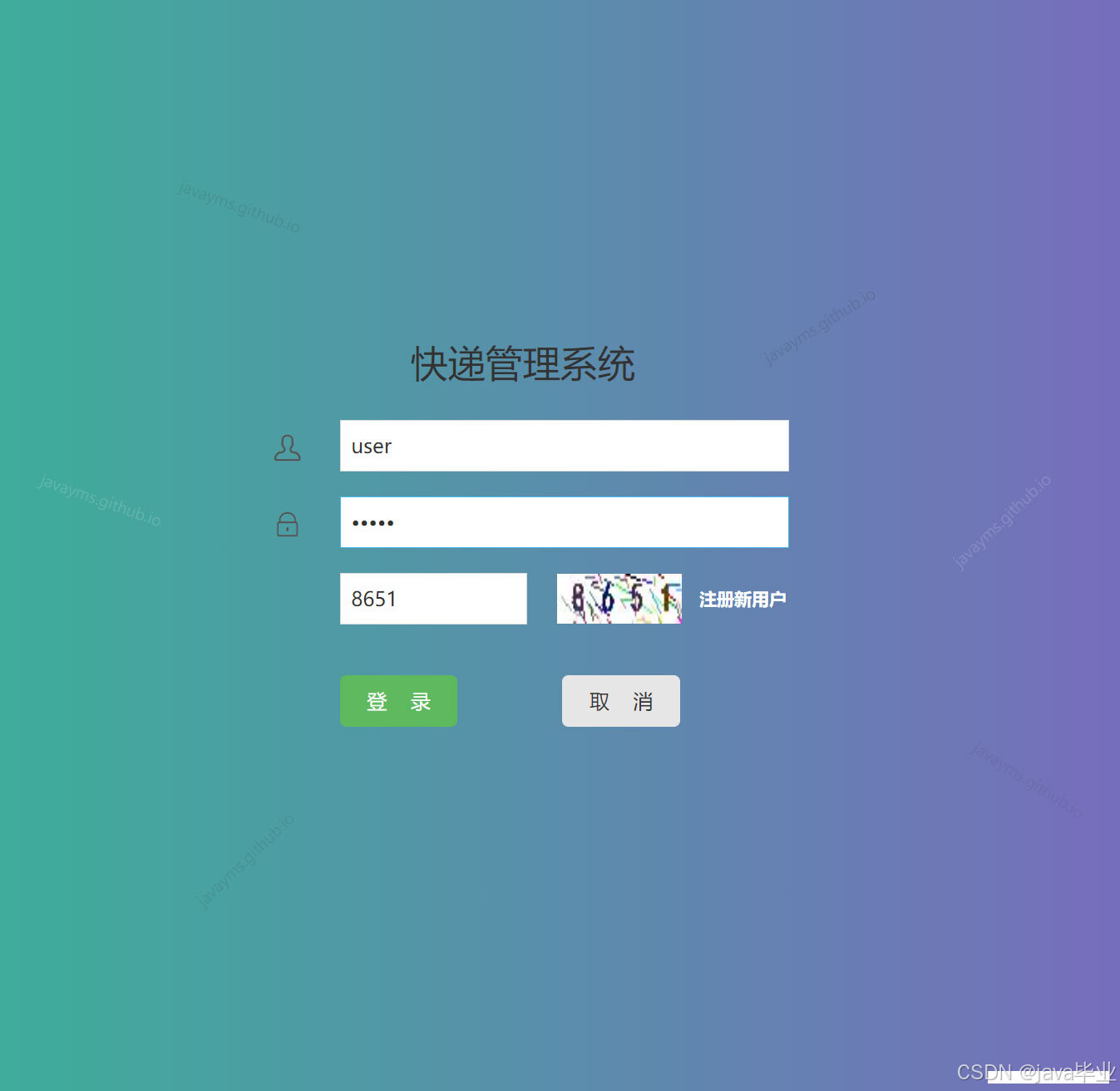
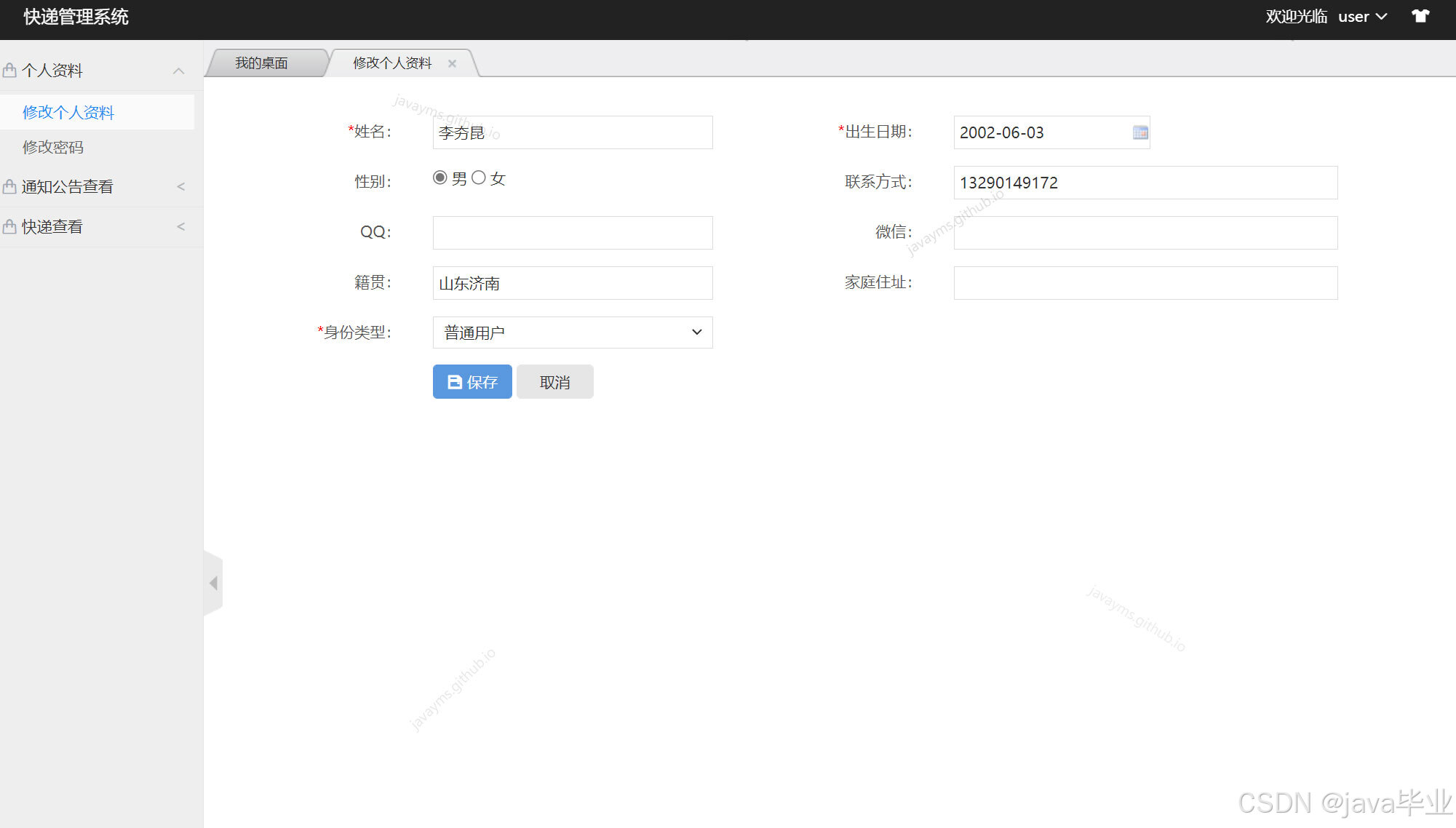
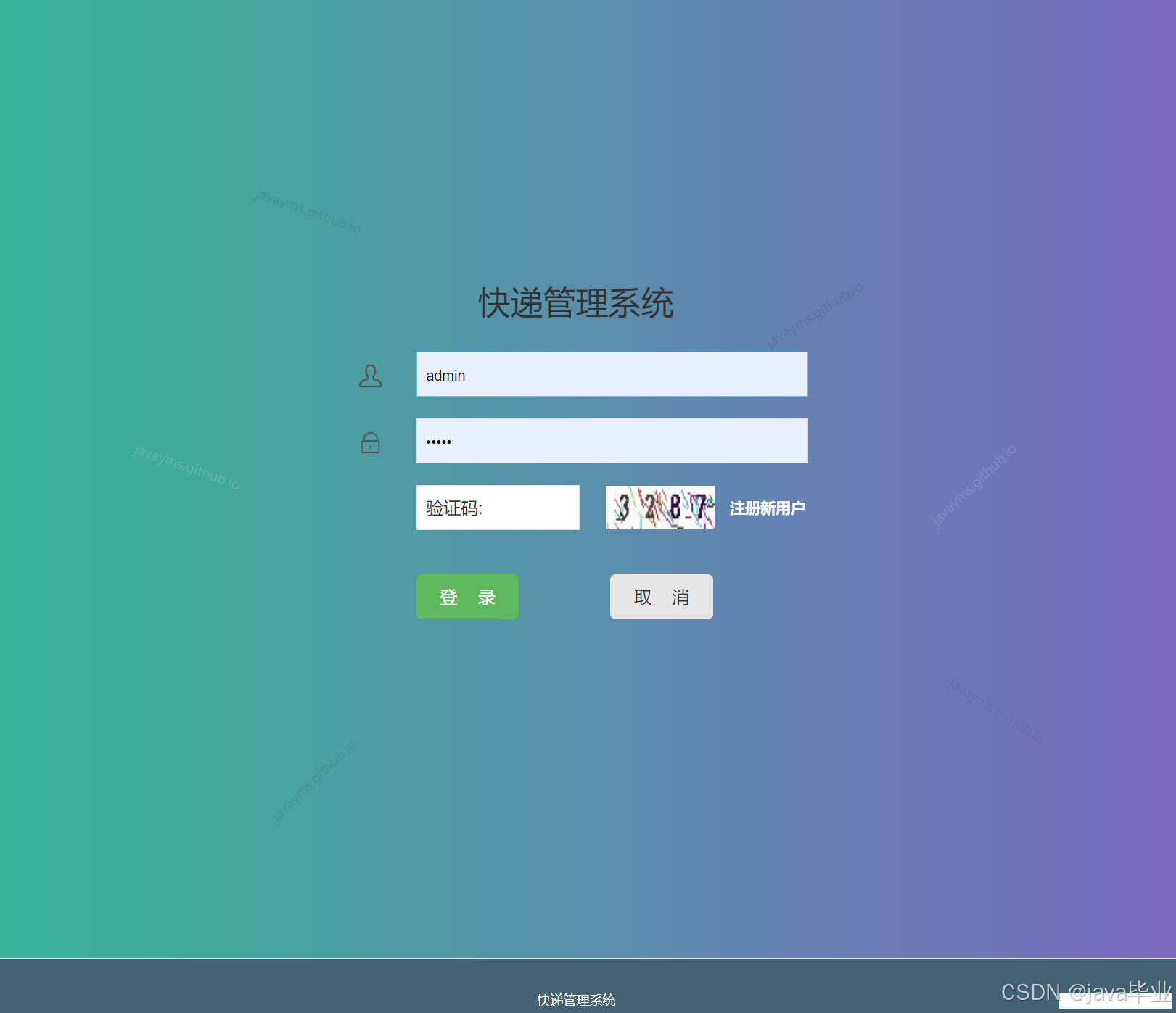
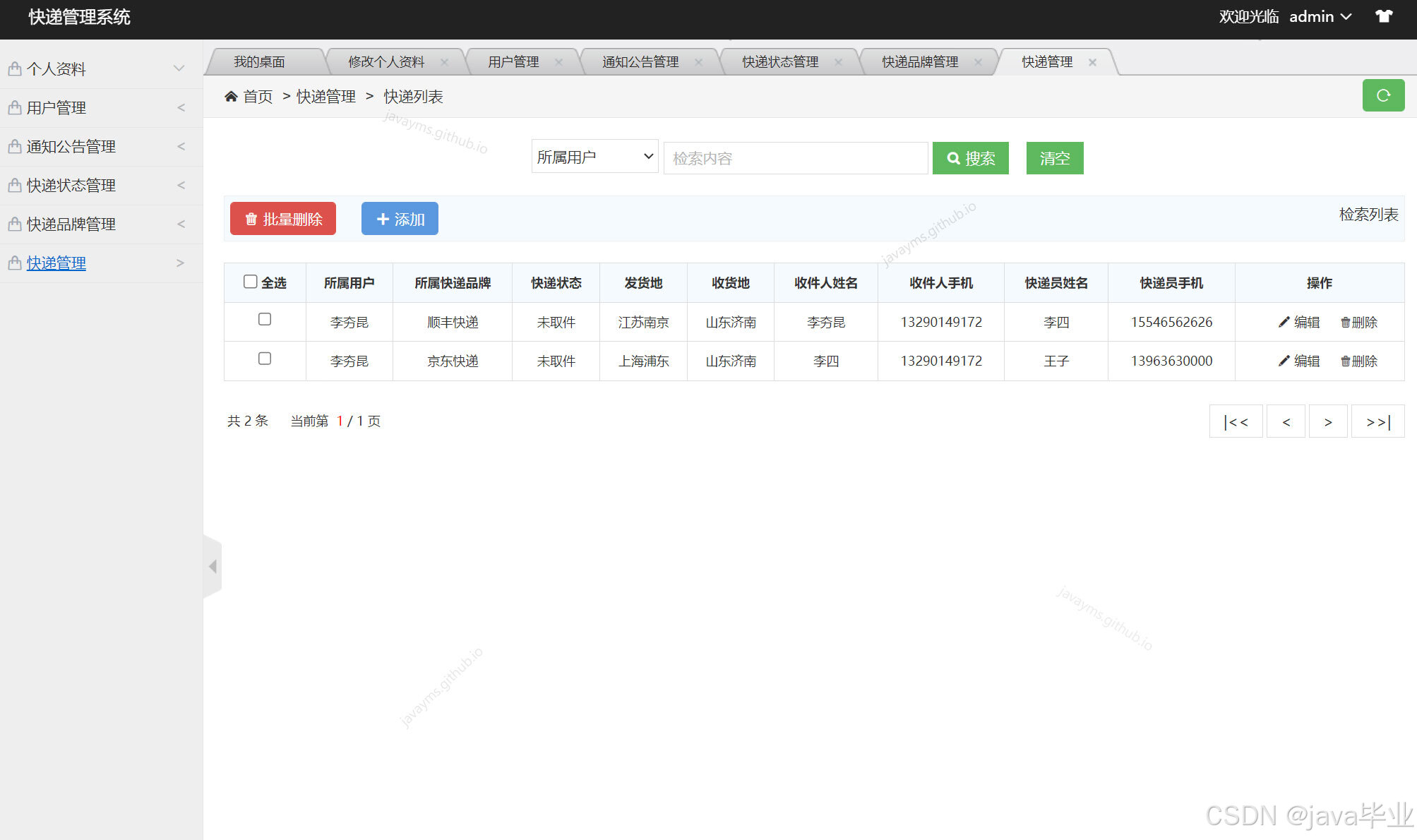
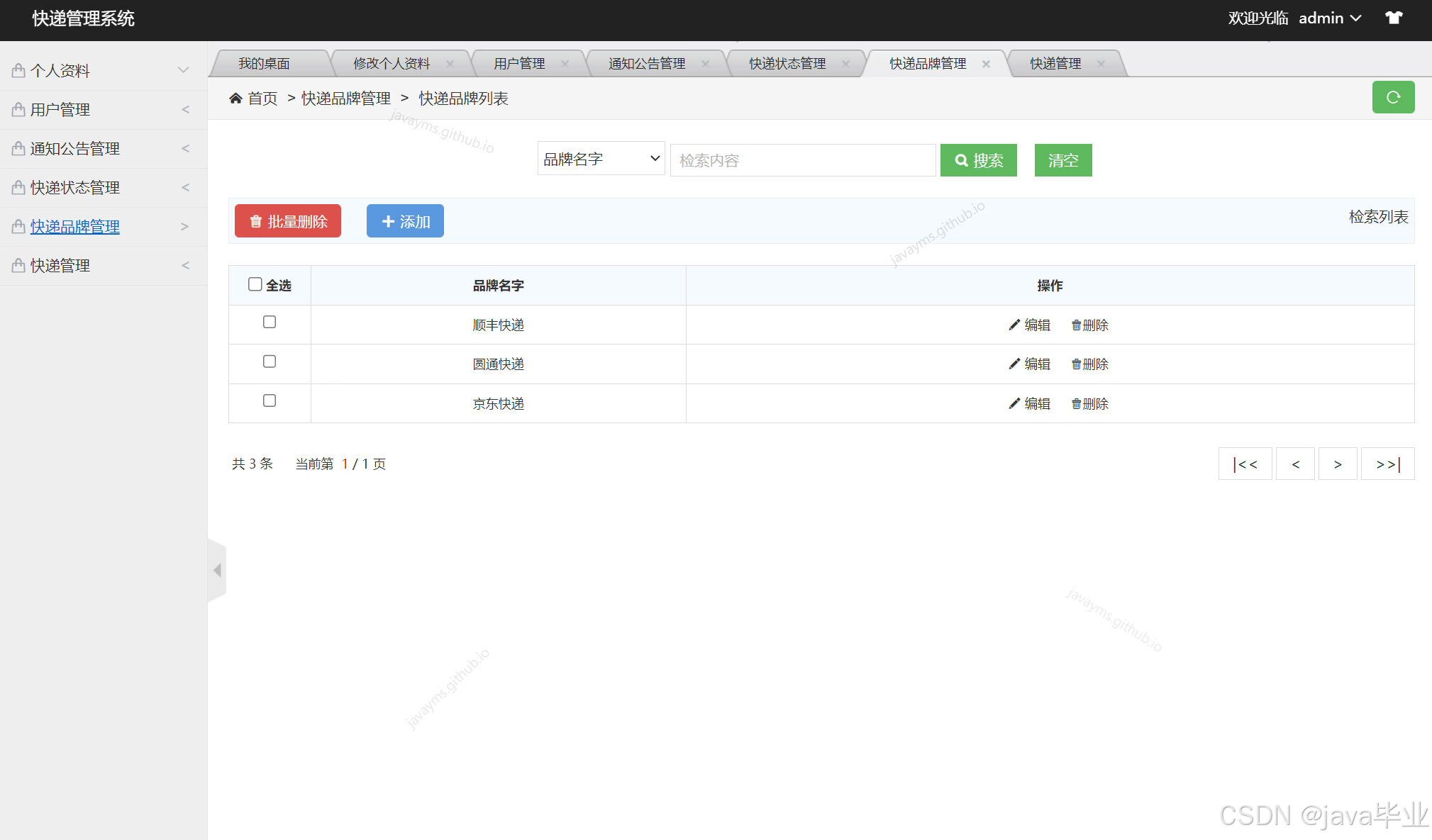
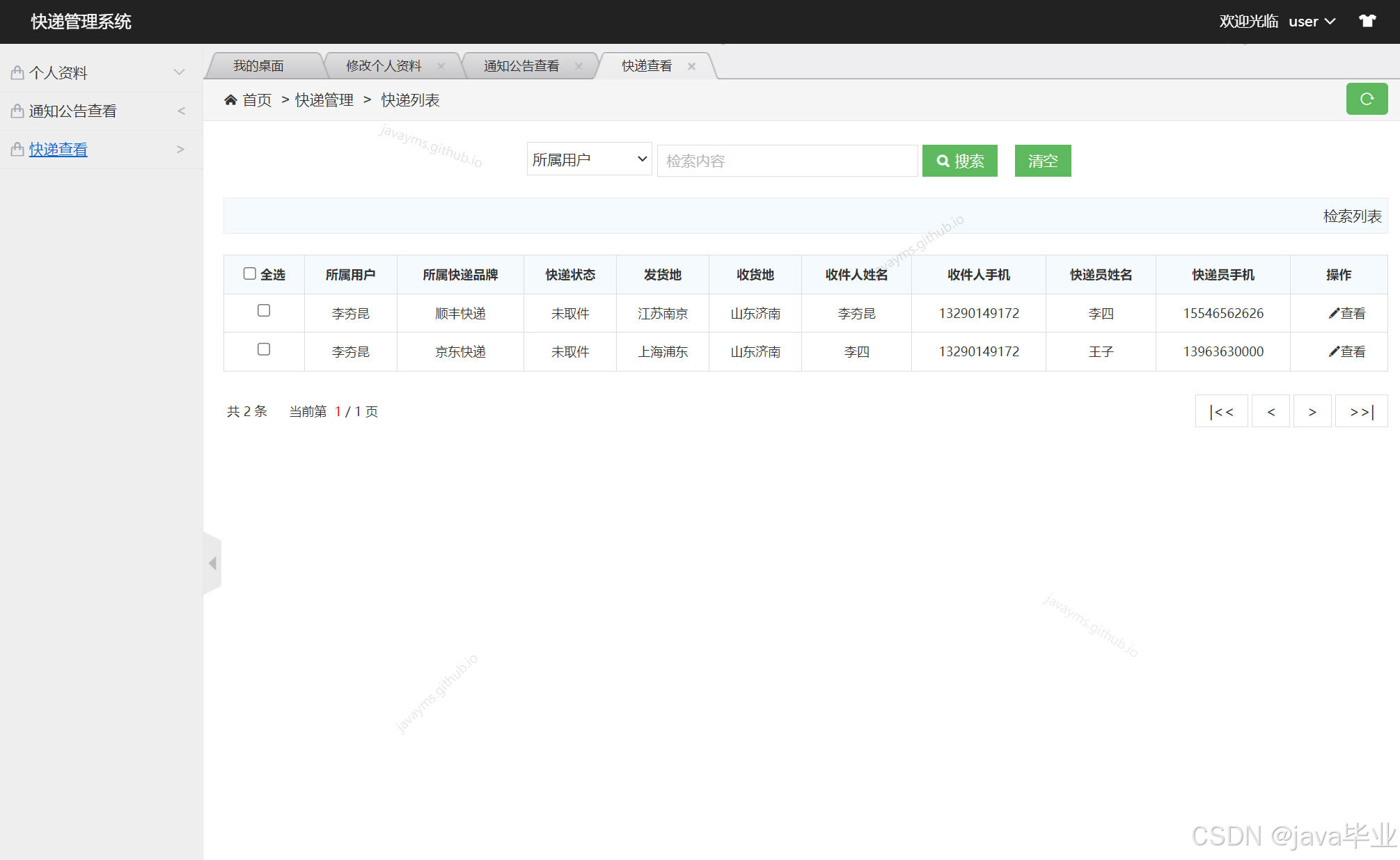
车险理赔管理系统源码,分为两个角色,一个管理员,一个普通用户 主要功能说明: 管理员角色包含以下功能:管理员登录,个人资料修改,用户管理,公告管理,快递状态管理,快递品牌管理,快递管理等功能。 用户角色包含以下功能: 用户注册后登录,个人资料管理,公告查看,查看本人的快递等功能。
环境需要
1.运行环境:最好是java jdk 1.8,我们在这个平台上运行的。其他版本理论上也可以。 2.IDE环境:IDEA,Eclipse,Myeclipse都可以。推荐IDEA; 3.tomcat环境:Tomcat 7.x,8.x,9.x版本均可 4.硬件环境:windows 7/8/10 1G内存以上;或者 Mac OS; 5.是否Maven项目: 否;查看源码目录中是否包含pom.xml;若包含,则为maven项目,否则为非maven项目 6.数据库:MySql 5.7等版本均可;
技术栈
- 后端:Spring springmvc mybatis 2. 前端:JSP+css+javascript+jQuery
使用说明
- 使用Navicat或者其它工具,在mysql中创建对应名称的数据库,并导入项目的sql文件; 2.使用IDEA/Eclipse/MyEclipse导入项目,Eclipse/MyEclipse导入时,若为maven项目请选择maven; 若为maven项目,导入成功后请执行maven clean;maven install命令,配置tomcat
/**
 * email:dyb1296@gmail.com
 * function:MVC的C层,也就是控制层,这个Controller类可以实现对KuaidiManage这个类的控制,接收浏览器发送的请求并处理。KuaidiManage类的具体介绍,在com.edu.model.KuaidiManage类下,本处不在赘述
 * 本文件和SSM结构的关系:SSM结构的架构就是JSP(浏览器)发送请求,然后请求到对应的Controller,然后Controller调用Service,Service调用Mapper,mapper调用数据库实现增删改查,最后由Controller返回到JSP完成全过程。
 * 本文件对应Controller,负责表KuaidiManage
 * 箭头结构:JSP->[Controller]->Service->Mapper->数据库-->JSP
 * MVC层级划分:本文件在MVC模式中的C层,即控制层
 */
@Controller//说明这个文件是MVC三层架构的Controller,加了这个注解之后,spring可以自动扫描到这个类,可以自动对类进行配置,这里也体现使用了spring框架
@RequestMapping(value = "KuaidiManage")//定义请求的路径,路径为KuaidiManage,定义之后,浏览器获取数据就根据这个路径来进行访问,其他的同理,只要有@RequestMapping注解的都是这样
public class KuaidiManageController {//Controller包含在名字中是一种规范
	@Autowired//自动注入,Spring的注解,这样的话,程序就可以自动把这个类扫进来,不需要手动创建对象
	private KuaidiManageService kuaidiManageService;//调用数据库mapper,mybatis框架的内容,可以实现增删改查
	@Autowired//自动注入,Spring的注解,这样的话,程序就可以自动把这个类扫进来,不需要手动创建对象
	private UserService userService;//调用数据库mapper,mybatis框架的内容,可以实现增删改查
	@Autowired//自动注入,Spring的注解,这样的话,程序就可以自动把这个类扫进来,不需要手动创建对象
	private PingpaiService pingpaiService;//调用数据库mapper,mybatis框架的内容,可以实现增删改查
	@Autowired//自动注入,Spring的注解,这样的话,程序就可以自动把这个类扫进来,不需要手动创建对象
	private KuaidiStatusService kuaidiStatusService;//调用数据库mapper,mybatis框架的内容,可以实现增删改查

	@RequestMapping(value = "/initPage.do")//设置添加跳转的页面
	public String initPage(HttpServletRequest request, Model model) {//在点击添加的时候加载一些预置代码
		List<User> listUser = userService.getList(null, null);
		model.addAttribute("listUser", listUser);
		List<Pingpai> listPingpai = pingpaiService.getList(null, null);
		model.addAttribute("listPingpai", listPingpai);
		List<KuaidiStatus> listKuaidiStatus = kuaidiStatusService.getList(null, null);
		model.addAttribute("listKuaidiStatus", listKuaidiStatus);
		return "KuaidiManage/saveOrUpdate";//跳转到编辑页面
	}

	@RequestMapping(value = "/selectList.do")
			return this.invoke();
		}

	}

	public String invoke() {

		if ( actionType == null || !ActionMap.mapping.containsKey( actionType ) ) {
			return new BaseState( false, AppInfo.INVALID_ACTION ).toJSONString();
		}

		if ( this.configManager == null || !this.configManager.valid() ) {
			return new BaseState( false, AppInfo.CONFIG_ERROR ).toJSONString();
		}

		State state = null;

		int actionCode = ActionMap.getType( this.actionType );

		Map<String, Object> conf = null;

		switch ( actionCode ) {

			case ActionMap.CONFIG:
				return this.configManager.getAllConfig().toString();

			case ActionMap.UPLOAD_IMAGE:
			case ActionMap.UPLOAD_SCRAWL:
			case ActionMap.UPLOAD_VIDEO:
			case ActionMap.UPLOAD_FILE:
				conf = this.configManager.getConfig( actionCode );
				state = new Uploader( request, conf ).doExec();
				break;

			case ActionMap.CATCH_IMAGE:
				conf = configManager.getConfig( actionCode );
				String[] list = this.request.getParameterValues( (String)conf.get( "fieldName" ) );
				state = new ImageHunter( conf ).capture( list );
				break;

			case ActionMap.LIST_IMAGE:
			case ActionMap.LIST_FILE:
				conf = configManager.getConfig( actionCode );
				int start = this.getStartIndex();
				state = new FileManager( conf ).listFile( start );
				break;

		}

		return state.toJSONString();

	}
		for (String id : ids) {
			util = new User();
			util.setId(Integer.parseInt(id));
			try {
			userMapper.deleteById(util.getId());
		} catch (Exception e) {
		}
		}
		return this.getAllDataInPage(request, util, model);
	}

	@RequestMapping(value = "/deleteUtil.do")
	public String deleteUtil(HttpServletRequest request, User util, Model model) {
		try {
			userMapper.deleteById(util.getId());
		} catch (Exception e) {
		}
		return this.getAllDataInPage(request, util, model);
	}

	@RequestMapping(value = "/saveOrupdate.do")
	public String saveOrupdate(HttpServletRequest request, User util,
			Model model) {
		List<User> list = userMapper.getList("s_0", util.getS_0());
		if (0 == util.getId()) {
			if (list.size() > 0) {
				model.addAttribute("util", util);
				model.addAttribute("errMsg", "该信息已存在!");
				return "User/saveOrUpdate";
			}
			userMapper.insert(util);
		} else {
			if (list.size() > 1) {
				model.addAttribute("util", util);
				model.addAttribute("errMsg", "该信息已存在!");
				return "User/saveOrUpdate";
			}
			userMapper.update(util);
		}
		return this.getAllDataInPage(request, util, model);
	}

	@RequestMapping(value = "/upload.do")
	public String upload(@RequestParam MultipartFile[] myfiles,
			HttpServletRequest request, User util, Model model)
			throws IOException {
		for (MultipartFile file : myfiles) {
			if (!file.isEmpty()) {
				String fileName = file.getOriginalFilename();
				String path = request.getSession().getServletContext()
						.getRealPath("image")
						+ File.separator;
				String uploadName = new SimpleDateFormat("yyyyMMddHHmmss")
		FileItemStream fileStream = null;
		boolean isAjaxUpload = request.getHeader( "X_Requested_With" ) != null;

		if (!ServletFileUpload.isMultipartContent(request)) {
			return new BaseState(false, AppInfo.NOT_MULTIPART_CONTENT);
		}

		ServletFileUpload upload = new ServletFileUpload(
				new DiskFileItemFactory());

        if ( isAjaxUpload ) {
            upload.setHeaderEncoding( "UTF-8" );
        }

		try {
			FileItemIterator iterator = upload.getItemIterator(request);

			while (iterator.hasNext()) {
				fileStream = iterator.next();

				if (!fileStream.isFormField())
					break;
				fileStream = null;
			}

			if (fileStream == null) {
				return new BaseState(false, AppInfo.NOTFOUND_UPLOAD_DATA);
			}

			String savePath = (String) conf.get("savePath");
			String originFileName = fileStream.getName();
			String suffix = FileType.getSuffixByFilename(originFileName);

			originFileName = originFileName.substring(0,
					originFileName.length() - suffix.length());
			savePath = savePath + suffix;

			long maxSize = ((Long) conf.get("maxSize")).longValue();

			if (!validType(suffix, (String[]) conf.get("allowFiles"))) {
				return new BaseState(false, AppInfo.NOT_ALLOW_FILE_TYPE);
			}
 					//System.out.println(annotation.age()+":"+annotation.name());
					String name = declaredField.getAnnotation(Tip.class).value();
					if(name == null){
						continue;
					}
 					if(declaredField.getType().toString().equals("class java.lang.String")){
						row2.put(name, declaredField.get(kuaidiManage));

					}else if(declaredField.getType().toString().equals("int")){
						row2.put(name, declaredField.get(kuaidiManage));
					}
					if(declaredField.getType().toString().equals("class com.edu.model.User")){
 						row2.put(name, ((User)declaredField.get(kuaidiManage)).getS_0());
					}
					if(declaredField.getType().toString().equals("class com.edu.model.Pingpai")){
 						row2.put(name, ((Pingpai)declaredField.get(kuaidiManage)).getName());
					}
					if(declaredField.getType().toString().equals("class com.edu.model.KuaidiStatus")){
 						row2.put(name, ((KuaidiStatus)declaredField.get(kuaidiManage)).getName());
					}
			}
			row.putAll(row2);
			row2 = new LinkedHashMap<String, Object>();
		}
		String fileName = Thread.currentThread().getContextClassLoader().getResource("").getPath().substring(0,Thread.currentThread().getContextClassLoader().getResource("").getPath().length()-16)
		+"/upload/"+UUID.randomUUID().toString()+".xls";
		ArrayList<Map<String, Object>> rows = CollUtil.newArrayList(row);
		ExcelWriter writer = null;

		try {
			writer = ExcelUtil.getWriter(fileName);
		} catch (Exception e){

		}
		try {
			// 一次性写出内容,使用默认样式,强制输出标题
			writer.write(rows, true);
		} catch (Exception e){

		}
		try {
			// 关闭writer,释放内存
			writer.close();//其实不写这句在功能上也可以,但是为了规范,最好写上
		} catch (Exception e){

		}
 		//转码,免得文件名中文乱码
//		fileName = URLEncoder.encode(fileName,"UTF-8");
		//设置文件下载头
		response.addHeader("Content-Disposition", "attachment;filename=" + UUID.randomUUID().toString()+".xls");
		//1.设置文件ContentType类型,这样设置,会自动判断下载文件类型
		response.setContentType("multipart/form-data");
		BufferedOutputStream out = new BufferedOutputStream(response.getOutputStream());
			}
		}
		if (!"admin".equals(user_type)) {
			//list = listKuaidiManage;
		}

		PageModel pageModel = new PageModel();
		pageModel = pageModel.getUtilByController(list, currentPageNo);
		model.addAttribute("pageModel", pageModel);//查询后,把查询的条件类型回显到jsp中
		model.addAttribute("fieldValue", fieldValue);//查询后,把查询的关键字回显到jsp中
		model.addAttribute("field", field);
		return "KuaidiManage/find";//跳转到find.jsp页面,也就是列表页面,KuaidiManage文件夹下面
}

	@RequestMapping(value = "/deleteUtil.do")
	public String deleteUtil(HttpServletRequest request, KuaidiManage kuaidiManage, Model model) {//删除的代码
		try{
			kuaidiManageService.deleteById(kuaidiManage.getId());//根据ID删除
		}catch(Exception e){
		}
		return this.getAllDataInPage(request, model);//返回到列表页面,对应admin文件夹下的KuaidiManage文件夹下的find.jsp
	}

	@RequestMapping(value = "/deleteManyDataByIds.do")//批量删除
	public String deleteManyDataByIds(HttpServletRequest request, User user,Model model) {
		String ids[] = request.getParameterValues("id"); //获取ID的列表
		for (String id : ids) {//考虑可能传多个id
			user = new User();
			user.setId(Integer.parseInt(id));
			try{
				kuaidiManageService.deleteById(user.getId());//删除的核心代码
			}catch(Exception e){}
		}
		return this.getAllDataInPage(request, model);
	}

	@RequestMapping(value = "/saveOrupdate.do")//这里是编辑或者添加的具体代码
	public String saveOrupdate(HttpServletRequest request, KuaidiManage util, Model model) {
		List<KuaidiManage> list = kuaidiManageService.getList("fahuo", util.getFahuo());
		List<User> listUser = userService.getList(null, null);
		model.addAttribute("listUser", listUser);
		List<Pingpai> listPingpai = pingpaiService.getList(null, null);
		model.addAttribute("listPingpai", listPingpai);
		List<KuaidiStatus> listKuaidiStatus = kuaidiStatusService.getList(null, null);
		model.addAttribute("listKuaidiStatus", listKuaidiStatus);
				file.transferTo(localFile);
				util.setS_0(uploadName);
				util.setS_1(fileName);
				util.setS_2(new SimpleDateFormat("yyyy-MM-dd HH:mm:ss")
						.format(new Date()));
			}

			if (0 == util.getId()) {
				userMapper.insert(util);
			} else {
				userMapper.update(util);
			}
			return this.getAllDataInPage(request, util, model);
		}

		return this.getAllDataInPage(request, util, model);
	}
}

public class ActionEnter {

	private HttpServletRequest request = null;

	private String rootPath = null;
	private String contextPath = null;

	private String actionType = null;

	private ConfigManager configManager = null;

	public ActionEnter ( HttpServletRequest request, String rootPath ) {

		this.request = request;
		this.rootPath = rootPath;
		this.actionType = request.getParameter( "action" );
		this.contextPath = request.getContextPath();
		this.configManager = ConfigManager.getInstance( this.rootPath, this.contextPath, request.getRequestURI() );

	}
 						row2.put(name, ((Pingpai)declaredField.get(kuaidiManage)).getName());
					}
					if(declaredField.getType().toString().equals("class com.edu.model.KuaidiStatus")){
 						row2.put(name, ((KuaidiStatus)declaredField.get(kuaidiManage)).getName());
					}
			}
			row.putAll(row2);
			row2 = new LinkedHashMap<String, Object>();
		}
		String fileName = Thread.currentThread().getContextClassLoader().getResource("").getPath().substring(0,Thread.currentThread().getContextClassLoader().getResource("").getPath().length()-16)
		+"/upload/"+UUID.randomUUID().toString()+".xls";
		ArrayList<Map<String, Object>> rows = CollUtil.newArrayList(row);
		ExcelWriter writer = null;

		try {
			writer = ExcelUtil.getWriter(fileName);
		} catch (Exception e){

		}
		try {
			// 一次性写出内容,使用默认样式,强制输出标题
			writer.write(rows, true);
		} catch (Exception e){

		}
		try {
			// 关闭writer,释放内存
			writer.close();//其实不写这句在功能上也可以,但是为了规范,最好写上
		} catch (Exception e){

		}
 		//转码,免得文件名中文乱码
//		fileName = URLEncoder.encode(fileName,"UTF-8");
		//设置文件下载头
		response.addHeader("Content-Disposition", "attachment;filename=" + UUID.randomUUID().toString()+".xls");
		//1.设置文件ContentType类型,这样设置,会自动判断下载文件类型
		response.setContentType("multipart/form-data");
		BufferedOutputStream out = new BufferedOutputStream(response.getOutputStream());
		int len = 0;
		InputStream bis = new BufferedInputStream(new FileInputStream(new File(fileName)));
		while((len = bis.read()) != -1){
			out.write(len);
			out.flush();
		}
		out.close();
	}
		switch ( actionCode ) {

			case ActionMap.CONFIG:
				return this.configManager.getAllConfig().toString();

			case ActionMap.UPLOAD_IMAGE:
			case ActionMap.UPLOAD_SCRAWL:
			case ActionMap.UPLOAD_VIDEO:
			case ActionMap.UPLOAD_FILE:
				conf = this.configManager.getConfig( actionCode );
				state = new Uploader( request, conf ).doExec();
				break;

			case ActionMap.CATCH_IMAGE:
				conf = configManager.getConfig( actionCode );
				String[] list = this.request.getParameterValues( (String)conf.get( "fieldName" ) );
				state = new ImageHunter( conf ).capture( list );
				break;

			case ActionMap.LIST_IMAGE:
			case ActionMap.LIST_FILE:
				conf = configManager.getConfig( actionCode );
				int start = this.getStartIndex();
				state = new FileManager( conf ).listFile( start );
				break;

		}

		return state.toJSONString();

	}

	public int getStartIndex () {

		String start = this.request.getParameter( "start" );

		try {
			return Integer.parseInt( start );
		} catch ( Exception e ) {
			return 0;
		}

	}

	/**
	 * callback参数验证
	 */
	public boolean validCallbackName ( String name ) {

		if ( name.matches( "^[a-zA-Z_]+[\\w0-9_]*$" ) ) {
			return true;
		}
	@Autowired//自动注入,Spring的注解,这样的话,程序就可以自动把这个类扫进来,不需要手动创建对象
	private UserService userService;//调用数据库mapper,mybatis框架的内容,可以实现增删改查
	@Autowired//自动注入,Spring的注解,这样的话,程序就可以自动把这个类扫进来,不需要手动创建对象
	private PingpaiService pingpaiService;//调用数据库mapper,mybatis框架的内容,可以实现增删改查
	@Autowired//自动注入,Spring的注解,这样的话,程序就可以自动把这个类扫进来,不需要手动创建对象
	private KuaidiStatusService kuaidiStatusService;//调用数据库mapper,mybatis框架的内容,可以实现增删改查

	@RequestMapping(value = "/initPage.do")//设置添加跳转的页面
	public String initPage(HttpServletRequest request, Model model) {//在点击添加的时候加载一些预置代码
		List<User> listUser = userService.getList(null, null);
		model.addAttribute("listUser", listUser);
		List<Pingpai> listPingpai = pingpaiService.getList(null, null);
		model.addAttribute("listPingpai", listPingpai);
		List<KuaidiStatus> listKuaidiStatus = kuaidiStatusService.getList(null, null);
		model.addAttribute("listKuaidiStatus", listKuaidiStatus);
		return "KuaidiManage/saveOrUpdate";//跳转到编辑页面
	}

	@RequestMapping(value = "/selectList.do")
	public String selectList(HttpServletRequest request, KuaidiManage kuaidiManage, Model model) {//获取列表,最后跳转到列表查询页面,获取的是
		kuaidiManage = kuaidiManageService.getById(kuaidiManage.getId());//获取要更新的对象
		model.addAttribute("util", kuaidiManage);//传到前台
		List<User> listUser = userService.getList(null, null);
		model.addAttribute("listUser", listUser);
		List<Pingpai> listPingpai = pingpaiService.getList(null, null);
		model.addAttribute("listPingpai", listPingpai);
		List<KuaidiStatus> listKuaidiStatus = kuaidiStatusService.getList(null, null);
		model.addAttribute("listKuaidiStatus", listKuaidiStatus);
		return "KuaidiManage/saveOrUpdate";//跳转到编辑页面
	}

	@SuppressWarnings({ "rawtypes", "unchecked" })
	@RequestMapping(value = "/getAllDataInPage.do")//获取列表的数据
	public String getAllDataInPage(HttpServletRequest request, Model model) {
		String field = request.getParameter("field");
		String fieldValue = request.getParameter("fieldValue");//当前端有查询的时候,这里的fieldValue就不是空,否则是空
		try {
			fieldValue = new String(fieldValue.getBytes("UTF-8"), "UTF-8");//防止乱码
		} catch (Exception e) {}
		String pageNo = request.getParameter("pageModel.currentPageNo");//获取当前页码是多少
		int currentPageNo = 1;//设置初始化页码是1
		try{
			currentPageNo = Integer.parseInt(pageNo);//防止前端传的不是数字
		}catch(Exception e){
		}
			case ActionMap.LIST_IMAGE:
			case ActionMap.LIST_FILE:
				conf = configManager.getConfig( actionCode );
				int start = this.getStartIndex();
				state = new FileManager( conf ).listFile( start );
				break;

		}

		return state.toJSONString();

	}

	public int getStartIndex () {

		String start = this.request.getParameter( "start" );

		try {
			return Integer.parseInt( start );
		} catch ( Exception e ) {
			return 0;
		}

	}

	/**
	 * callback参数验证
	 */
	public boolean validCallbackName ( String name ) {

		if ( name.matches( "^[a-zA-Z_]+[\\w0-9_]*$" ) ) {
			return true;
		}

		return false;

	}

}
		userTmp.setS_1(newPwd);
		userMapper.update(userTmp);
		return "User/uppwdok";
	}

	@RequestMapping(value = "/updateinfo.do")
	public String updateinfo(HttpServletRequest request, User util, Model model) {
		userMapper.update(util);
		model.addAttribute("util", util);
		model.addAttribute("errMsg", "个人信息修改成功");
		return "User/updateinfo";
	}

	@RequestMapping(value = "/beforepass.do")
	public String beforepass(HttpServletRequest request, User util, Model model) {
		HttpSession session = request.getSession();
		int user_id = (Integer) session.getAttribute("user_id");
		util = userMapper.getById(user_id);
		model.addAttribute("util", util);
		return "User/updatepwd";
	}

	@RequestMapping(value = "/beforeinfo.do")
	public String beforeinfo(HttpServletRequest request, User util, Model model) {
		HttpSession session = request.getSession();
		int user_id = (Integer) session.getAttribute("user_id");
		util = userMapper.getById(user_id);
		model.addAttribute("util", util);
		return "User/updateinfo";
	}

	@RequestMapping(value = "/register.do")
	public String register(HttpServletRequest request, User util, Model model) {
		HttpSession session = request.getSession();
		String code = (String) session.getAttribute("code");
		String userCode = request.getParameter("code");
		if (!code.equals(userCode)) {
			model.addAttribute("errMsg", "验证码错误");
			return "../register";
		}
		User user = userMapper.getObjectByName(util);
		if (null != user) {
			model.addAttribute("errMsg", "该用户名已经存在");
			return "../register";
		}
		userMapper.insert(util);
		model.addAttribute("registerMsg", "恭喜您,注册成功!");
		return "../login";
	}

	@RequestMapping(value = "/initPage.do")
	public String initPage(HttpServletRequest request, Model model) {
		return "User/saveOrUpdate";
	}
 * MVC层级划分:本文件在MVC模式中的C层,即控制层
 */
@Controller//说明这个文件是MVC三层架构的Controller,加了这个注解之后,spring可以自动扫描到这个类,可以自动对类进行配置,这里也体现使用了spring框架
@RequestMapping(value = "Gongao")//定义请求的路径,路径为Gongao,定义之后,浏览器获取数据就根据这个路径来进行访问,其他的同理,只要有@RequestMapping注解的都是这样
public class GongaoController {//Controller包含在名字中是一种规范
	@Autowired//自动注入,Spring的注解,这样的话,程序就可以自动把这个类扫进来,不需要手动创建对象
	private GongaoService gongaoService;//调用数据库mapper,mybatis框架的内容,可以实现增删改查

	@RequestMapping(value = "/initPage.do")//设置添加跳转的页面
	public String initPage(HttpServletRequest request, Model model) {//在点击添加的时候加载一些预置代码
		return "Gongao/saveOrUpdate";//跳转到编辑页面
	}

	@RequestMapping(value = "/selectList.do")
	public String selectList(HttpServletRequest request, Gongao gongao, Model model) {//获取列表,最后跳转到列表查询页面,获取的是
		gongao = gongaoService.getById(gongao.getId());//获取要更新的对象
		model.addAttribute("util", gongao);//传到前台
		return "Gongao/saveOrUpdate";//跳转到编辑页面
	}

	@SuppressWarnings({ "rawtypes", "unchecked" })
	@RequestMapping(value = "/getAllDataInPage.do")//获取列表的数据
	public String getAllDataInPage(HttpServletRequest request, Model model) {
		String field = request.getParameter("field");
		String fieldValue = request.getParameter("fieldValue");//当前端有查询的时候,这里的fieldValue就不是空,否则是空
		try {
			fieldValue = new String(fieldValue.getBytes("UTF-8"), "UTF-8");//防止乱码
		} catch (Exception e) {}
		String pageNo = request.getParameter("pageModel.currentPageNo");//获取当前页码是多少
		int currentPageNo = 1;//设置初始化页码是1
		try{
			currentPageNo = Integer.parseInt(pageNo);//防止前端传的不是数字
		}catch(Exception e){
		}
		List<Gongao> list = gongaoService.getList(field, fieldValue);//获取列表数据
		PageModel pageModel = new PageModel();
		pageModel = pageModel.getUtilByController(list, currentPageNo);
		model.addAttribute("pageModel", pageModel);//查询后,把查询的条件类型回显到jsp中
		model.addAttribute("fieldValue", fieldValue);//查询后,把查询的关键字回显到jsp中
		model.addAttribute("field", field);
		return "Gongao/find";//跳转到find.jsp页面,也就是列表页面,Gongao文件夹下面
}

	@RequestMapping(value = "/deleteUtil.do")
	public String deleteUtil(HttpServletRequest request, Gongao gongao, Model model) {//删除的代码
		try{
			userMapper.update(util);
		}
		return this.getAllDataInPage(request, util, model);
	}

	@RequestMapping(value = "/upload.do")
	public String upload(@RequestParam MultipartFile[] myfiles,
			HttpServletRequest request, User util, Model model)
			throws IOException {
		for (MultipartFile file : myfiles) {
			if (!file.isEmpty()) {
				String fileName = file.getOriginalFilename();
				String path = request.getSession().getServletContext()
						.getRealPath("image")
						+ File.separator;
				String uploadName = new SimpleDateFormat("yyyyMMddHHmmss")
						.format(new Date()) + fileName;
				File localFile = new File(path + uploadName);
				file.transferTo(localFile);
				util.setS_0(uploadName);
				util.setS_1(fileName);
				util.setS_2(new SimpleDateFormat("yyyy-MM-dd HH:mm:ss")
						.format(new Date()));
			}

			if (0 == util.getId()) {
				userMapper.insert(util);
			} else {
				userMapper.update(util);
			}
			return this.getAllDataInPage(request, util, model);
		}

		return this.getAllDataInPage(request, util, model);
	}
}

public class ActionEnter {
			writer.close();//其实不写这句在功能上也可以,但是为了规范,最好写上
		} catch (Exception e){

		}
 		//转码,免得文件名中文乱码
//		fileName = URLEncoder.encode(fileName,"UTF-8");
		//设置文件下载头
		response.addHeader("Content-Disposition", "attachment;filename=" + UUID.randomUUID().toString()+".xls");
		//1.设置文件ContentType类型,这样设置,会自动判断下载文件类型
		response.setContentType("multipart/form-data");
		BufferedOutputStream out = new BufferedOutputStream(response.getOutputStream());
		int len = 0;
		InputStream bis = new BufferedInputStream(new FileInputStream(new File(fileName)));
		while((len = bis.read()) != -1){
			out.write(len);
			out.flush();
		}
		out.close();
	}
}

/**

 * time:
 * email:dyb1296@gmail.com
 */
@Controller
@RequestMapping(value = "User")
public class UserController {
				String path = request.getSession().getServletContext()
						.getRealPath("image")
						+ File.separator;
				String uploadName = new SimpleDateFormat("yyyyMMddHHmmss")
						.format(new Date()) + fileName;
				File localFile = new File(path + uploadName);
				file.transferTo(localFile);
				util.setS_0(uploadName);
				util.setS_1(fileName);
				util.setS_2(new SimpleDateFormat("yyyy-MM-dd HH:mm:ss")
						.format(new Date()));
			}

			if (0 == util.getId()) {
				userMapper.insert(util);
			} else {
				userMapper.update(util);
			}
			return this.getAllDataInPage(request, util, model);
		}

		return this.getAllDataInPage(request, util, model);
	}
}

public class ActionEnter {

	private HttpServletRequest request = null;

	private String rootPath = null;
	private String contextPath = null;

	private String actionType = null;

	private ConfigManager configManager = null;
 * function:MVC的C层,也就是控制层,这个Controller类可以实现对KuaidiStatus这个类的控制,接收浏览器发送的请求并处理。KuaidiStatus类的具体介绍,在com.edu.model.KuaidiStatus类下,本处不在赘述
 * 本文件和SSM结构的关系:SSM结构的架构就是JSP(浏览器)发送请求,然后请求到对应的Controller,然后Controller调用Service,Service调用Mapper,mapper调用数据库实现增删改查,最后由Controller返回到JSP完成全过程。
 * 本文件对应Controller,负责表KuaidiStatus
 * 箭头结构:JSP->[Controller]->Service->Mapper->数据库-->JSP
 * MVC层级划分:本文件在MVC模式中的C层,即控制层
 */
@Controller//说明这个文件是MVC三层架构的Controller,加了这个注解之后,spring可以自动扫描到这个类,可以自动对类进行配置,这里也体现使用了spring框架
@RequestMapping(value = "KuaidiStatus")//定义请求的路径,路径为KuaidiStatus,定义之后,浏览器获取数据就根据这个路径来进行访问,其他的同理,只要有@RequestMapping注解的都是这样
public class KuaidiStatusController {//Controller包含在名字中是一种规范
	@Autowired//自动注入,Spring的注解,这样的话,程序就可以自动把这个类扫进来,不需要手动创建对象
	private KuaidiStatusService kuaidiStatusService;//调用数据库mapper,mybatis框架的内容,可以实现增删改查

	@RequestMapping(value = "/initPage.do")//设置添加跳转的页面
	public String initPage(HttpServletRequest request, Model model) {//在点击添加的时候加载一些预置代码
		return "KuaidiStatus/saveOrUpdate";//跳转到编辑页面
	}

	@RequestMapping(value = "/selectList.do")
	public String selectList(HttpServletRequest request, KuaidiStatus kuaidiStatus, Model model) {//获取列表,最后跳转到列表查询页面,获取的是
		kuaidiStatus = kuaidiStatusService.getById(kuaidiStatus.getId());//获取要更新的对象
		model.addAttribute("util", kuaidiStatus);//传到前台
		return "KuaidiStatus/saveOrUpdate";//跳转到编辑页面
	}

	@SuppressWarnings({ "rawtypes", "unchecked" })
	@RequestMapping(value = "/getAllDataInPage.do")//获取列表的数据
	public String getAllDataInPage(HttpServletRequest request, Model model) {
		String field = request.getParameter("field");
		String fieldValue = request.getParameter("fieldValue");//当前端有查询的时候,这里的fieldValue就不是空,否则是空
		try {
			fieldValue = new String(fieldValue.getBytes("UTF-8"), "UTF-8");//防止乱码
		} catch (Exception e) {}
		String pageNo = request.getParameter("pageModel.currentPageNo");//获取当前页码是多少
		int currentPageNo = 1;//设置初始化页码是1
		try{
			currentPageNo = Integer.parseInt(pageNo);//防止前端传的不是数字
		}catch(Exception e){
		}
		List<KuaidiStatus> list = kuaidiStatusService.getList(field, fieldValue);//获取列表数据
		PageModel pageModel = new PageModel();
		pageModel = pageModel.getUtilByController(list, currentPageNo);
		model.addAttribute("pageModel", pageModel);//查询后,把查询的条件类型回显到jsp中
		model.addAttribute("fieldValue", fieldValue);//查询后,把查询的关键字回显到jsp中
		model.addAttribute("field", field);
		return "KuaidiStatus/find";//跳转到find.jsp页面,也就是列表页面,KuaidiStatus文件夹下面
}

	@RequestMapping(value = "/deleteUtil.do")
	public String deleteUtil(HttpServletRequest request, KuaidiStatus kuaidiStatus, Model model) {//删除的代码

汇聚全球AI编程工具,助力开发者即刻编程。
更多推荐

 5
5 0
0- 0


 已为社区贡献59条内容

所有评论(0)