
【MySQL】MySQL Router结合MGR构建高可用集群
前情提要:本篇博客详细介绍了MySQL Router结合MGR集群构建高可用集群,实现负载均衡、读写分离的全部流程。通过本篇博客你可以依靠MySQL-Router成功搭建一个能负载均衡、读写分离的MGR高可用集群。
一、MySQL Router简介
MySQL Router是MySQL官方提供的一个轻量级中间件,主要用于在MySQL InnoDB集群或组复制环境中实现客户端连接的路由、负载均衡和高可用性。
它的核心功能是将应用程序的数据库连接请求智能地分发到后端可用的MySQL服务器节点。当主节点发生故障时,MySQL Router能够自动检测并将新的连接重定向到新的主节点,从而实现故障转移,对应用程序透明。
主要特性包括:
-
透明路由:应用程序像连接单个MySQL服务器一样连接Router,无需感知后端集群拓扑
-
读写分离:支持将写请求路由到主节点,读请求负载均衡到多个从节点
-
高可用:自动故障检测和重定向,支持应用程序重连机制
-
配置简单:通过MySQL Shell可快速部署和配置
-
轻量高效:作为独立进程运行,资源占用少
MySQL Router通常与MySQL InnoDB集群或MySQL组复制配合使用,是构建高可用MySQL架构的关键组件之一。
二、MySQL Router软件下载和安装
2.1 MySQL Rouetr下载
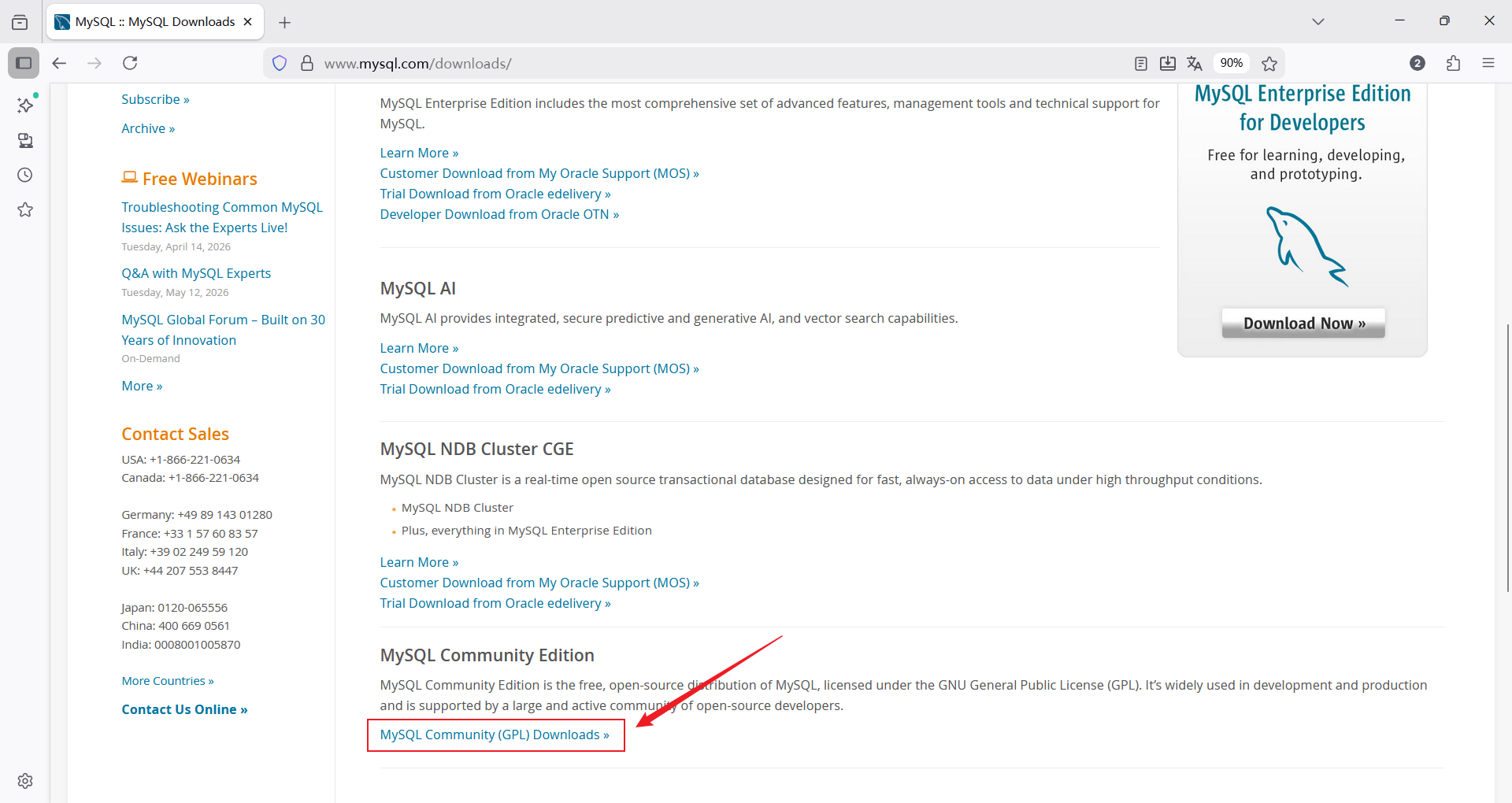
mysql官网下载页面选择社区版下载
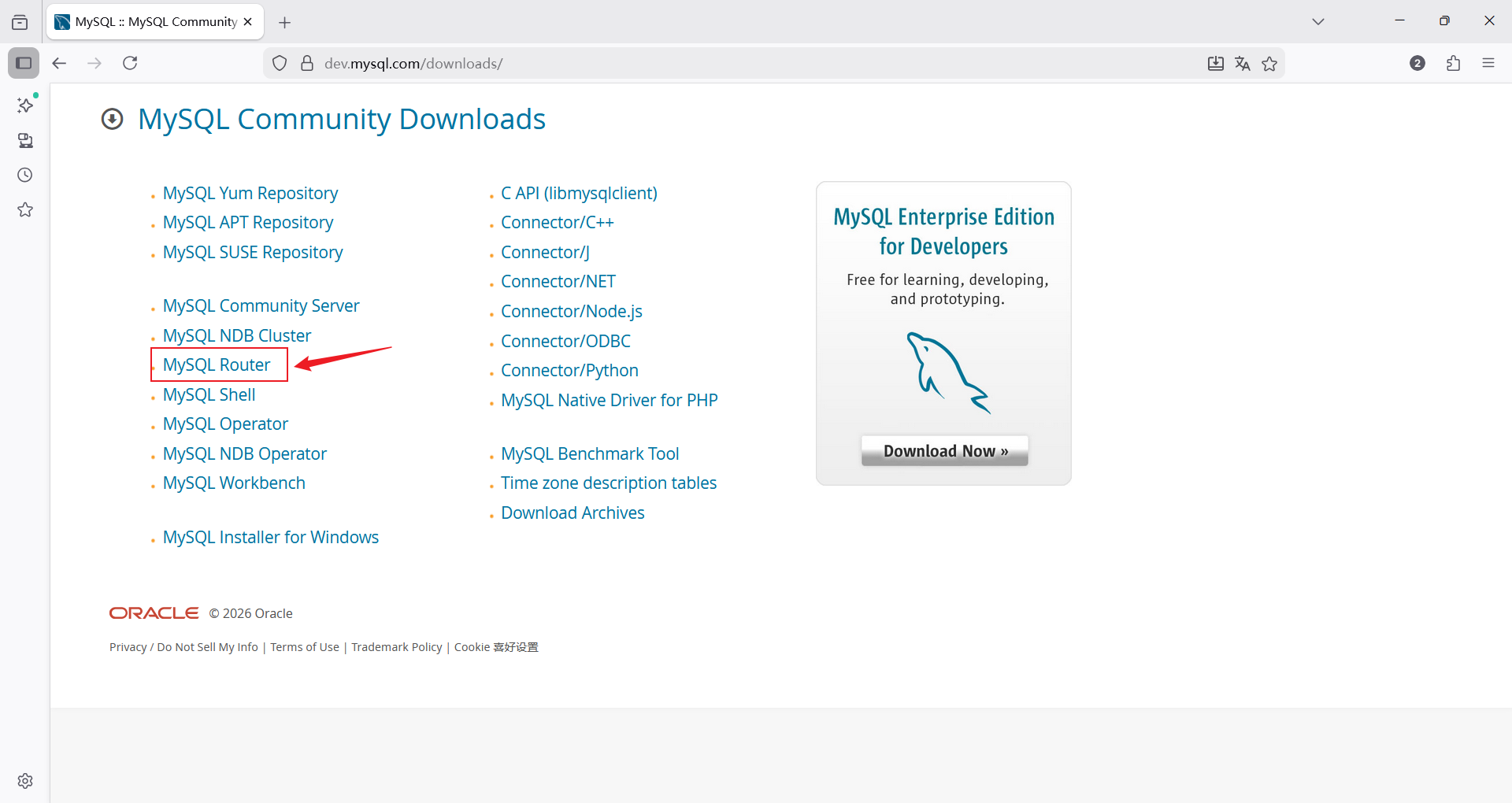
选择mysql router
选择archives寻找所需版本
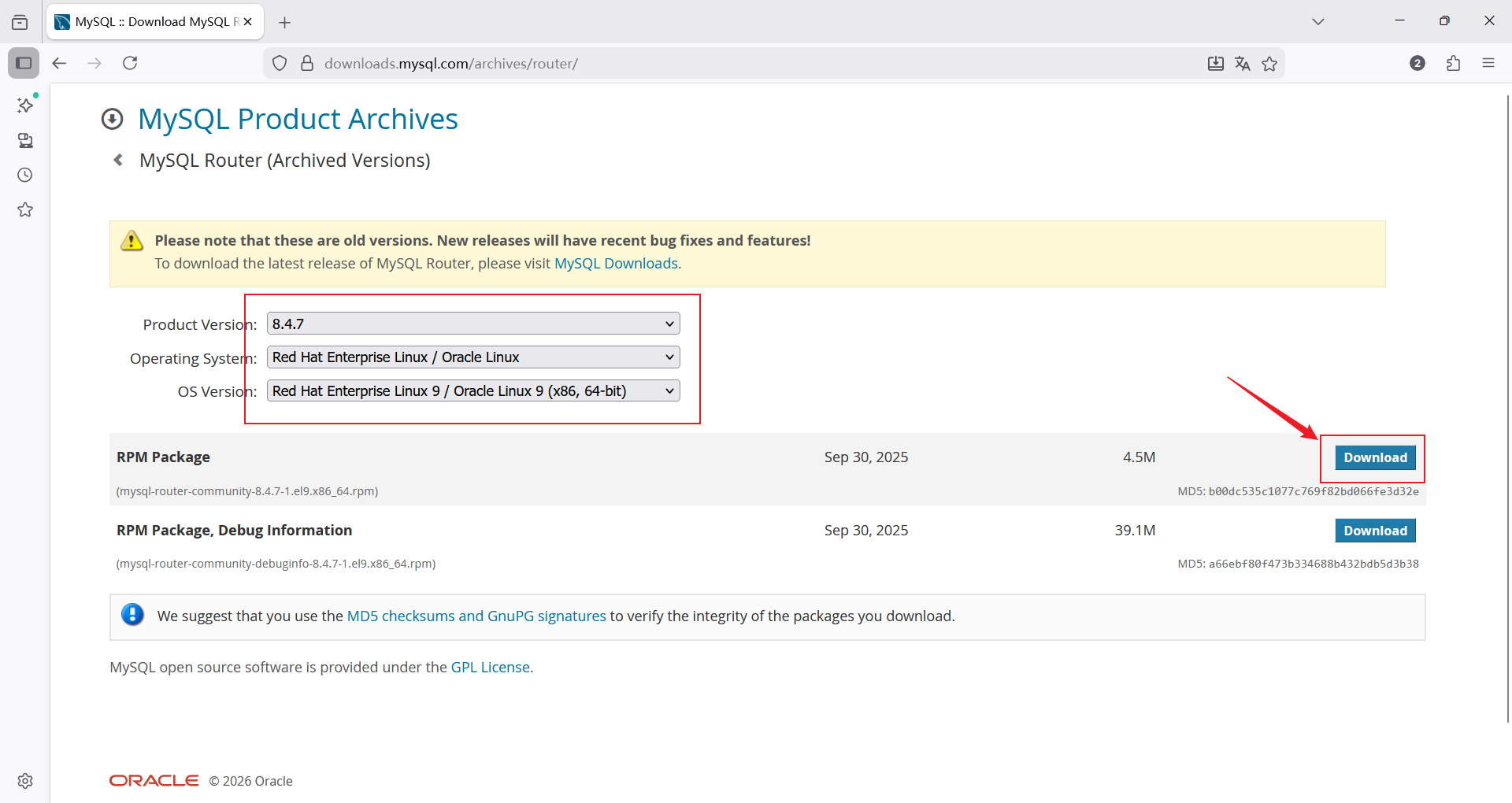
选择好对应操作系统版本和软件版本,然后右键下载按钮选择复制链接使用wget下载或者直接下载用xftp上传
# 使用wget下载
[root@mysql-router ~]# wget https://downloads.mysql.com/archives/get/p/41/file/mysql-router-community-8.4.7-1.el9.x86_64.rpm
2.2 MySQL Router安装
[root@mysqlrouter ~]# dnf install mysql-router-community-8.4.7-1.el9.x86_64.rpm -y三、系统架构介绍
mysql版本:8.3.0
mysql router版本:8.4.7
linux操作系统版本:RHEL9.3
MGR集群多主模式

注意:本次实验使用的MGR集群可以参考博主另外一篇博客进行部署,传送门:一文详解MySQL高可用集群之组复制(MGR)--多主模式搭建,单主--多主模式转换 https://blog.csdn.net/2301_79481320/article/details/158837400?fromshare=blogdetail&sharetype=blogdetail&sharerId=158837400&sharerefer=PC&sharesource=2301_79481320&sharefrom=from_link
环境清单:
| 主机名 | IP |
| mysql-node1 | 172.25.254.10 |
| mysql-node2 | 172.25.254.20 |
| mysql-node3 | 172.25.254.30 |
| mysql-router | 172.25.254.50 |
四、编辑MySQL Router配置文件
4.1 配置文件介绍
[root@mysql-router ~]# rpm -qc mysql-router-community
/etc/logrotate.d/mysqlrouter	#日志轮询及日志截断策略
/etc/mysqlrouter/mysqlrouter.conf	#主配置文件

[root@mysqlrouter ~]# systemctl status mysqlrouter.service		#启动脚本
4.2 编辑MySQL Router配置文件
[root@mysql-router ~]# cat /etc/mysqlrouter/mysqlrouter.conf
# Copyright (c) 2015, 2025, Oracle and/or its affiliates.
#
# This program is free software; you can redistribute it and/or modify
# it under the terms of the GNU General Public License, version 2.0,
# as published by the Free Software Foundation.
#
# This program is designed to work with certain software (including
# but not limited to OpenSSL) that is licensed under separate terms,
# as designated in a particular file or component or in included license
# documentation.  The authors of MySQL hereby grant you an additional
# permission to link the program and your derivative works with the
# separately licensed software that they have either included with
# the program or referenced in the documentation.
#
# This program is distributed in the hope that it will be useful,
# but WITHOUT ANY WARRANTY; without even the implied warranty of
# MERCHANTABILITY or FITNESS FOR A PARTICULAR PURPOSE.  See the
# GNU General Public License, version 2.0, for more details.
#
# You should have received a copy of the GNU General Public License
# along with this program; if not, write to the Free Software
# Foundation, Inc., 51 Franklin St, Fifth Floor, Boston, MA 02110-1301  USA

#
# MySQL Router configuration file
#
# Documentation is available at
#    http://dev.mysql.com/doc/mysql-router/en/

[DEFAULT]
logging_folder = /var/log/mysqlrouter		#存放 Router 运行日志的目录
runtime_folder = /run/mysqlrouter			#存放运行时文件(如进程ID文件)的目录
config_folder = /etc/mysqlrouter			#配置文件本身的目录

[logger]
level = INFO			#设置日志记录级别为 INFO。这意味着会记录一般信息性消息、警告和错误,但不会记录更详细的 DEBUG信息。适合生产环境

# If no plugin is configured which starts a service, keepalive
# will make sure MySQL Router will not immediately exit. It is
# safe to remove once Router is configured.
[keepalive]
interval = 60		#如果 Router 没有配置任何实际工作的插件(如路由规则),它会每60秒检查一次,防止进程空转并立即退出。一旦配置了有效的路由段(如下面的 [routing:*]),此段就不再起作用,可以删除

[routing:ro]			#创建一个用于处理 只读查询 (通常是 SELECT) 的连接池
bind_address = 0.0.0.0
bind_port = 7001
destinations = 172.25.254.10:3306,172.25.254.20:3306,172.25.254.30:3306
routing_strategy = round-robin


[routing:rw]			#创建一个用于处理 读写查询(如 INSERT, UPDATE, DELETE, 以及 SELECT) 的连接池
bind_address = 0.0.0.0
bind_port = 7002
destinations = 172.25.254.30:3306,172.25.254.20:3306,172.25.254.10:3306
routing_strategy = first-available

# 注意:由于本次实验架构为MGR多主模式,所以在没有做读写分离。如果使用MGR单主模式,就可以ro部分负载均衡导向从机,rw固定指向主机
五、访问测试
1、在三台mysql主机创建root@‘%’用户(由于MGR所以只需要在其中一台机创建即可)
mysql> create user root@'%' identified by '123';2、访问测试
# 第一次访问被调度到10主机
[root@mysql-node1 ~]# mysql -uroot -p123 -h172.25.254.50 -P 7001
mysql: [Warning] Using a password on the command line interface can be insecure.
Welcome to the MySQL monitor.  Commands end with ; or \g.
Your MySQL connection id is 23
Server version: 8.3.0 Source distribution

Copyright (c) 2000, 2024, Oracle and/or its affiliates.

Oracle is a registered trademark of Oracle Corporation and/or its
affiliates. Other names may be trademarks of their respective
owners.

Type 'help;' or '\h' for help. Type '\c' to clear the current input statement.

mysql> select @@server_id;
+-------------+
| @@server_id |
+-------------+
|          10 |
+-------------+
1 row in set (0.00 sec)

mysql>

# 第二次访问被调度到20
[root@mysql-node1 ~]# mysql -uroot -p123 -h172.25.254.50 -P 7001
mysql: [Warning] Using a password on the command line interface can be insecure.
Welcome to the MySQL monitor.  Commands end with ; or \g.
Your MySQL connection id is 22
Server version: 8.3.0 Source distribution

Copyright (c) 2000, 2024, Oracle and/or its affiliates.

Oracle is a registered trademark of Oracle Corporation and/or its
affiliates. Other names may be trademarks of their respective
owners.

Type 'help;' or '\h' for help. Type '\c' to clear the current input statement.

mysql> select @@server_id;
+-------------+
| @@server_id |
+-------------+
|          20 |
+-------------+
1 row in set (0.00 sec)

# 第三次访问被调度到30
[root@mysql-node1 ~]# mysql -uroot -p123 -h172.25.254.50 -P 7001
mysql: [Warning] Using a password on the command line interface can be insecure.
Welcome to the MySQL monitor.  Commands end with ; or \g.
Your MySQL connection id is 22
Server version: 8.3.0 Source distribution

Copyright (c) 2000, 2024, Oracle and/or its affiliates.

Oracle is a registered trademark of Oracle Corporation and/or its
affiliates. Other names may be trademarks of their respective
owners.

Type 'help;' or '\h' for help. Type '\c' to clear the current input statement.

mysql> select @@server_id;
+-------------+
| @@server_id |
+-------------+
|          30 |
+-------------+
1 row in set (0.00 sec)
至此实验结束

汇聚全球AI编程工具,助力开发者即刻编程。
更多推荐

 16
16 0
0- 0


 已为社区贡献17条内容

所有评论(0)