
Linux-C 匿名管道(PIPE) 3.19
·
前言:所有数据都不能在进程间共享,所以才会有信号,管道的需求
把从一个进程连接到另一个进程的一个数据流称为一个“管道”
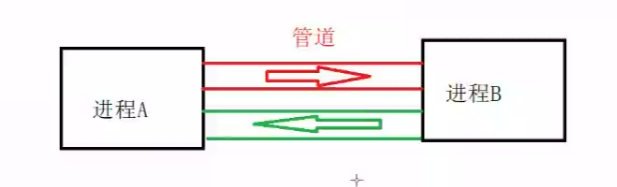
•管道是半双工的,数据只能向一个方向流动;需要双方通信时,需要建立起两个管道(早期的管道是半双现在不是了)
•只能用于父子进程或者兄弟进程之间(具有亲缘关系的进程)进行通信;通常,一个管道由一个进程创建,然后该进程调用fork,此后父、子进程之间就可应用该管道**。**
pipe()
头文件:#include<unistd.h>
功能:创建一无名管道
返回:成功返回0,失败返回错误
int pipe(int file_descriptor[2]);
//file_descriptor:文件描述符数组,其中file_descriptor[0]表示读端,file_descriptor[1]表示写端
#include<iostream>
#include <stdio.h>
#include <string.h>
#include<stdlib.h>

#include <sys/wait.h>
#include <signal.h>
#include <unistd.h>

using namespace std;

int main()
{
	int pid = 0;
	int fdarr_ptoc[2] = { 0 };
	int fdarr_ctop[2] = { 0 };
	if (pipe(fdarr_ptoc) < 0|| pipe(fdarr_ctop) < 0)//管道在fork前建立
	{
		perror("pipe create error");
		return 0;
	}
	else
	{
		cout << "pipe create success" << endl;
		//父进程给子进程发送数据   口诀:【读入】【写出】
		//fork会将以上数据分别拷贝给子进程和父进程
		pid = fork();
		if (pid == 0)
		{
			char sendbuf_c[50] = { 0 };
			char recbuf_c[50] = { 0 };
			close(fdarr_ptoc[1]);//读端,关闭写
			close(fdarr_ctop[0]);
			while (1)
			{
				read(fdarr_ptoc[0], recbuf_c, sizeof(recbuf_c));
				cout << "child prj  pid=" << getpid() << ";  recbuf_c=" << recbuf_c << endl;
				sleep(2);
				bzero(sendbuf_c, sizeof(sendbuf_c));
				fgets(sendbuf_c, sizeof(sendbuf_c), stdin);
				write(fdarr_ctop[1], sendbuf_c, sizeof(sendbuf_c));
			}
		}
		else if (pid > 0)
		{
			close(fdarr_ptoc[0]);//写端,关闭读
			close(fdarr_ctop[1]);
			char sendbuf_p[50] = { 0 };
			char recbuf_p[50] = { 0 };
			while (1)
			{
				bzero(sendbuf_p, sizeof(sendbuf_p));
				fgets(sendbuf_p, sizeof(sendbuf_p), stdin);
				write(fdarr_ptoc[1], sendbuf_p, sizeof(sendbuf_p));
				sleep(2);
				read(fdarr_ctop[0], recbuf_p, sizeof(recbuf_p));
				cout << "parent prj  pid=" << getpid() << ";  recbuf_p=" << recbuf_p << endl;
			}
		}
	}
	return 0;
}
Linux Shell管道详解 (biancheng.net)
Linux 管道使用竖线|连接多个命令,这被称为管道符
Linux 管道的具体语法格式如下:
command1 | command2
command1 | command2 [ | commandN... ]
当在两个命令之间设置管道时,管道符|左边命令的输出就变成了右边命令的输入。只要第一个命令向标准输出写入,而第二个命令是从标准输入读取,那么这两个命令就可以形成一个管道。大部分的 Linux 命令都可以用来形成管道
这里需要注意,command1 必须有正确输出,而 command2 必须可以处理 command2 的输出结果;而且 command2 只能处理 command1 的正确输出结果,不能处理 command1 的错误信息。
重定向和管道的区别
乍看起来,管道也有重定向的作用,它也改变了数据输入输出的方向,那么,管道和重定向之间到底有什么不同呢?
简单地说,重定向操作符>将命令与文件连接起来,用文件来接收命令的输出;而管道符|将命令与命令连接起来,用第二个命令来接收第一个命令的输出。如下所示:
command > file
command1 | command1

汇聚全球AI编程工具,助力开发者即刻编程。
更多推荐


 3
3 0
0- 0


 已为社区贡献5条内容

所有评论(0)