
[Java EE 进阶]Spring Web MVC 入门 (从零搭建 Spring Boot 图书管理系统)
·
一.准备工作 :
1.技术栈选型
- 后端:Spring Boot + Lombok + Servlet(Session)
- 前端:HTML + jQuery + jqPaginator(分页插件)
- 核心功能:用户登录校验、图书列表分页展示、图书单条删除 / 批量删除(未完成)
2.项目说明 :
- 环境要求:JDK 17 + Maven 3.6+;
- 启动项目:运行
BookApplication类的 main 方法; - 接口测试:
- 登录接口:POST http://localhost:8080/user/login(参数:name=admin&password=admin);
- 图书列表:GET http://localhost:8080/book/getListByPage?currentPage=1;
- 前端访问:直接打开 login.html,输入 admin/admin 登录即可查看图书列表。
3.专业版 lombok 失效解决方法 :
若使用 IDEA 专业版出现 Lombok 注解失效(如@Data不生成 get/set 方法),需在 pom.xml 中添加注解处理器配置,完整 pom 文件如下:
<?xml version="1.0" encoding="UTF-8"?>
<project xmlns="http://maven.apache.org/POM/4.0.0" xmlns:xsi="http://www.w3.org/2001/XMLSchema-instance"
  xsi:schemaLocation="http://maven.apache.org/POM/4.0.0 https://maven.apache.org/xsd/maven-4.0.0.xsd">
  <modelVersion>4.0.0</modelVersion>
  <parent>
    <groupId>org.springframework.boot</groupId>
    <artifactId>spring-boot-starter-parent</artifactId>
    <version>4.0.3</version>
    <relativePath/> <!-- lookup parent from repository -->
  </parent>
  <groupId>com.boop</groupId>
  <artifactId>Book</artifactId>
  <version>0.0.1-SNAPSHOT</version>
  <name>Book</name>
  <description>Book</description>
  <url/>
    <licenses>
      <license/>
    </licenses>
    <developers>
      <developer/>
    </developers>
    <scm>
      <connection/>
        <developerConnection/>
          <tag/>
            <url/>
            </scm>
              <properties>
                <java.version>17</java.version>
              </properties>
              <dependencies>
                <dependency>
                  <groupId>org.springframework.boot</groupId>
                  <artifactId>spring-boot-starter-webmvc</artifactId>
                </dependency>

                <dependency>
                  <groupId>org.projectlombok</groupId>
                  <artifactId>lombok</artifactId>
                  <optional>true</optional>
                </dependency>
                <dependency>
                  <groupId>org.springframework.boot</groupId>
                  <artifactId>spring-boot-starter-webmvc-test</artifactId>
                  <scope>test</scope>
                </dependency>
              </dependencies>

              <build>
                <plugins>
                  <plugin>
                    <groupId>org.apache.maven.plugins</groupId>
                    <artifactId>maven-compiler-plugin</artifactId>
                    <configuration>
                      <annotationProcessorPaths>
                        <path>
                          <groupId>org.projectlombok</groupId>
                          <artifactId>lombok</artifactId>
                          <version>${lombok.version}</version> <!-- 可在 properties 中定义版本,或直接写具体版本号 -->
                        </path>
                      </annotationProcessorPaths>
                    </configuration>
                  </plugin>
                  <plugin>
                    <groupId>org.springframework.boot</groupId>
                    <artifactId>spring-boot-maven-plugin</artifactId>
                    <configuration>
                      <excludes>
                        <exclude>
                          <groupId>org.projectlombok</groupId>
                          <artifactId>lombok</artifactId>
                        </exclude>
                      </excludes>
                    </configuration>
                  </plugin>
                </plugins>
              </build>
</project>
二.图书管理系统
1.需求 :
- 完善账号密码校验接口 : 根据输入用户名和密码校验登录是否通过
- 完善图书列表信息 : 提供图书列表信息
2.接口定义
①登录接口
[URL] POST /user/login
[请求参数] name=admin&password=admin
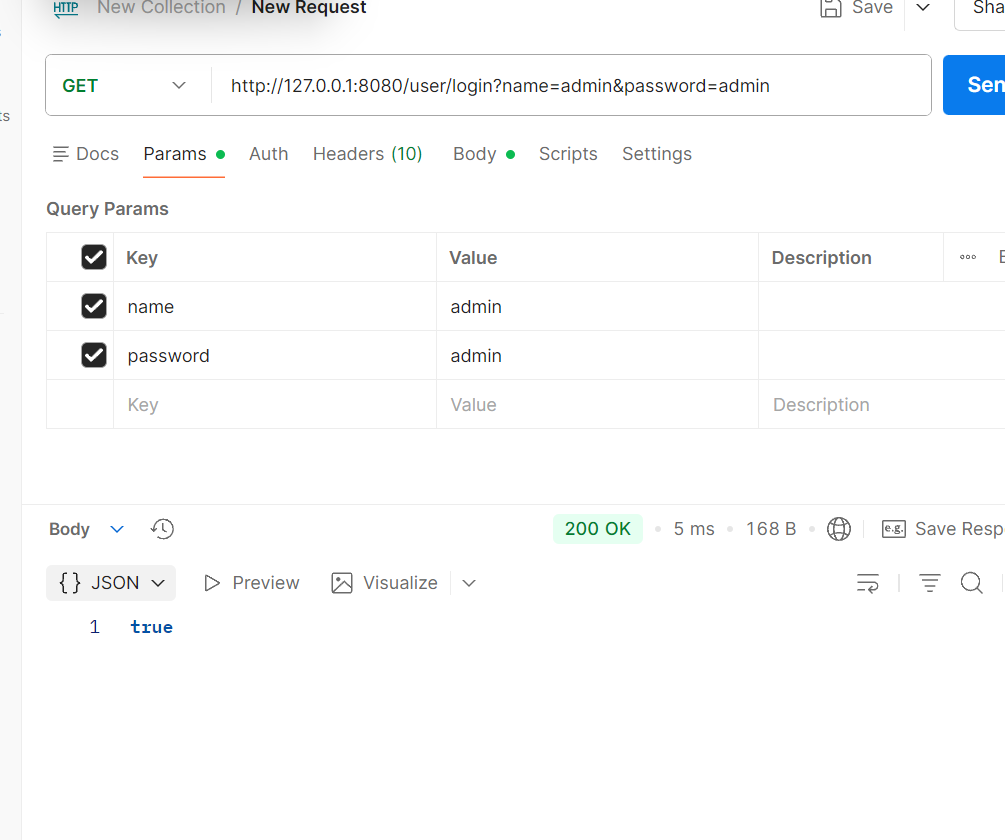
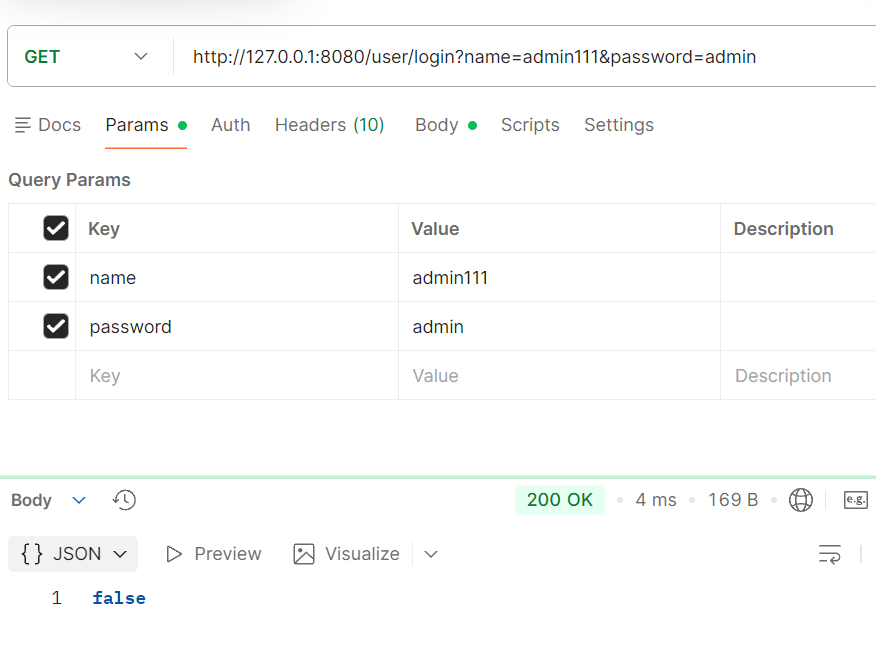
[响应] true //账号密码验证成功 false//账号密码验证失败
②图书列表展示
[URL] POST /book/getList
[请求参数] ⽆
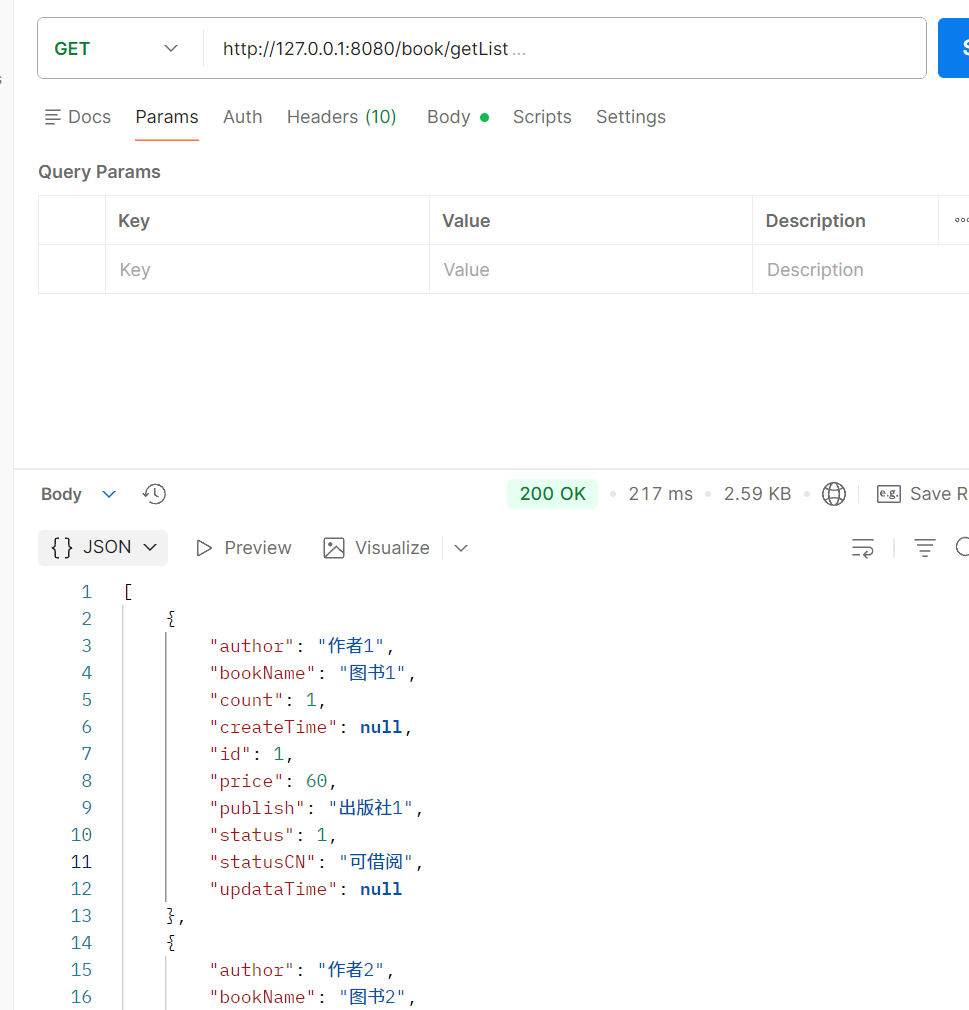
[响应] 返回图书列表
[
{ "id": 1, "bookName": "活着", "author": "余华", "count": 270, "price": 20, "publish": "北京⽂艺出版社", "status": 1, "statusCN": "可借阅" }
, ... ]
3. 图书信息字段说明
| 字段名 | 字段说明 |
|---|---|
| id | 图书 ID |
| bookName | 图书名称 |
| author | 作者 |
| count | 数量 |
| price | 定价 |
| publish | 图书出版社 |
| status | 图书状态:1 - 可借阅,其他 - 不可借阅 |
| statusCN | 图书状态中文含义 |
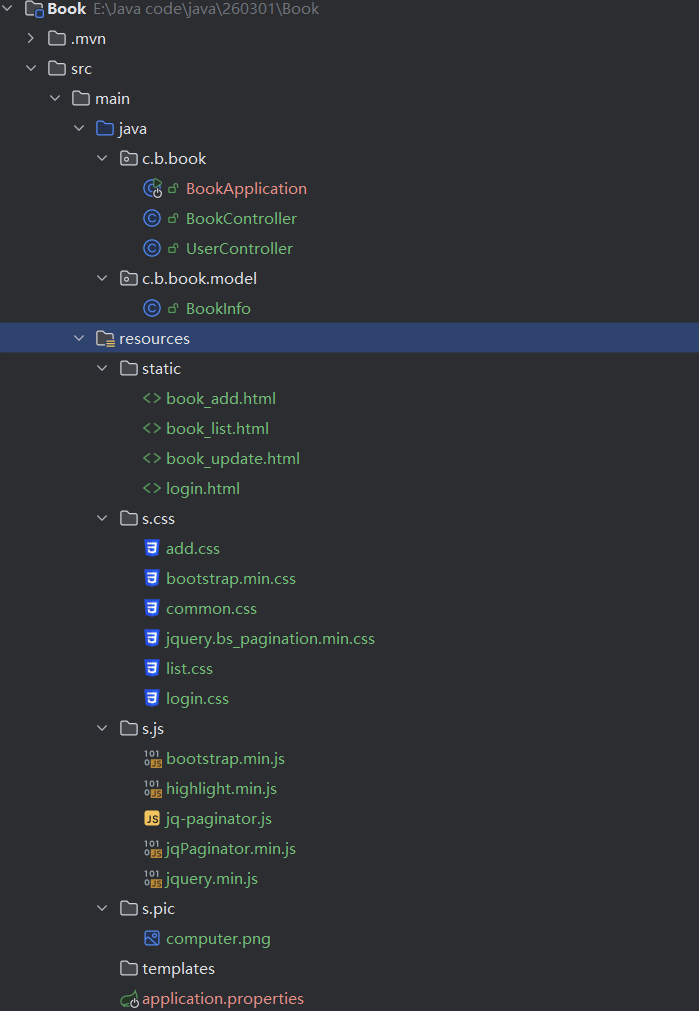
4. 图书管理系统项目结构说明
Book
├── .mvn/                                    # Maven wrapper 相关文件
├── src/
│   ├── main/
│   │   ├── java/
│   │   │   └── com.boop.book/               # 项目主包
│   │   │       ├── BookApplication.java     # Spring Boot 启动类
│   │   │       ├── BookController.java      # 图书相关接口控制器
│   │   │       ├── UserController.java      # 用户登录接口控制器
│   │   │       └── model/
│   │   │           └── BookInfo.java        # 图书实体类
│   │   └── resources/
│   │       ├── static/                      # 静态资源目录
│   │       │   ├── book_add.html            # 新增图书页面
│   │       │   ├── book_list.html           # 图书列表页面
│   │       │   ├── book_update.html         # 修改图书页面
│   │       │   ├── login.html               # 登录页面
│   │       │   ├── css/                     # 样式文件目录
│   │       │   │   ├── add.css             # 新增/修改页样式
│   │       │   │   ├── bootstrap.min.css    # Bootstrap 框架样式
│   │       │   │   ├── common.css           # 通用样式
│   │       │   │   ├── jquery.bs.pagination.min.css  # 分页插件样式
│   │       │   │   ├── list.css             # 列表页样式
│   │       │   │   └── login.css            # 登录页样式
│   │       │   ├── js/                      # JavaScript 脚本目录
│   │       │   └── pic/                     # 图片资源目录
│   │       ├── templates/                   # 模板页面目录
│   │       └── application.properties       # Spring Boot 配置文件
│   └── test/                                # 测试代码目录
├── .gitattributes                           # Git 属性配置
├── HELP.md                                  # 项目帮助文档
└── pom.xml                                  # Maven 项目配置文件
结构说明
- Java 代码:所有后端代码都在
src/main/java/com.boop.book下,分为启动类、控制器和实体类三层。 - 静态资源:前端页面、样式、脚本和图片统一放在
src/main/resources/static下,方便 Spring Boot 直接访问。 - 配置文件:
application.properties用于配置端口、数据库等项目参数。
5.代码
① BookApplication (启动类)
package com.boop.book;

import org.springframework.boot.SpringApplication;
import org.springframework.boot.autoconfigure.SpringBootApplication;

@SpringBootApplication
public class BookApplication {

    public static void main(String[] args) {
        SpringApplication.run(BookApplication.class, args);
    }

}
② BookController (信息提供类)
package com.boop.book;

import com.boop.book.model.BookInfo;
import org.springframework.web.bind.annotation.RequestMapping;
import org.springframework.web.bind.annotation.RestController;

import java.math.BigDecimal;
import java.util.ArrayList;
import java.util.List;
import java.util.Random;
@RestController
@RequestMapping("/book")
public class BookController {
    @RequestMapping("/getList")
    public List<BookInfo> getList(){
        //获取数据
        List<BookInfo> books = mockData();
        //处理页面展示
        for(BookInfo book:books){
            if(book.getStatus() == 1){
                book.setStatusCN("可借阅");
            }else{
                book.setStatusCN("不可借阅");
            }
        }
        return books;
    }

    //mock数据
    public List<BookInfo> mockData(){
        List<BookInfo> bookInfos = new ArrayList<>();
        for (int i = 1; i <= 15; i++) {
            BookInfo bookInfo = new BookInfo();
            bookInfo.setId(i);
            bookInfo.setBookName("图书"+i);
            bookInfo.setAuthor("作者"+i);
            bookInfo.setPublish("出版社"+i);
            bookInfo.setCount(new Random().nextInt(100));
            bookInfo.setPrice(new BigDecimal(new Random().nextInt(100)));
            bookInfo.setStatus(i%5==0?2:1); //1-可借阅   2-不可借阅
            bookInfos.add(bookInfo);
        }
        return bookInfos;
    }
}
③ UserController (登录)
基于 Session 实现登录状态临时存储,返回统一格式数据适配前端判断:
package com.boop.book;

import jakarta.servlet.http.HttpSession;
import org.springframework.util.StringUtils;
import org.springframework.web.bind.annotation.RequestMapping;
import org.springframework.web.bind.annotation.RestController;
@RestController
@RequestMapping("/user")
public class UserController {
    @RequestMapping("/login")
    public boolean login(String name, String password, HttpSession session){
        //账号或密码为空
        if(!StringUtils.hasLength(name)||!StringUtils.hasLength(password)){
            return false;
        }
        //模拟验证数据 , 账号密码正确
        if("admin".equals(name)&&"admin".equals(password)){
            session.setAttribute("userName",name);
            return true;
        }
        //账号或密码错误
        return false;
    }
}
④ BookInfo (实体类)
使用 Lombok 简化 get/set 方法,定义图书核心属性,注意日期类型和字段命名规范:
package com.boop.book.model;

import lombok.Data;

import java.math.BigDecimal;

@Data
public class BookInfo {

    private Integer id;//图书ID
    private String bookName;//书名
    private String author;//作者
    private Integer count;//数量
    private BigDecimal price;//价格
    private String publish;//出版社
    private Integer status;//状态 0无效,1允许借阅,2不可借阅
    private String statusCN;

    private Data createTime;//创建时间
    private Data updataTime;//更新时间
}
⑤ html
book_add.html
<!DOCTYPE html>
<html lang="en">

  <head>
    <meta charset="UTF-8">
    <meta name="viewport" content="width=device-width, initial-scale=1.0">
    <title>添加图书</title>
    <link rel="stylesheet" href="css/bootstrap.min.css">
    <link rel="stylesheet" href="css/add.css">

  </head>

  <body>

    <div class="container">

      <div class="form-inline">
        <h2 style="text-align: left; margin-left: 10px;"><svg xmlns="http://www.w3.org/2000/svg" width="40"
                                                           fill="#17a2b8" class="bi bi-book-half" viewBox="0 0 16 16">
          <path
            d="M8.5 2.687c.654-.689 1.782-.886 3.112-.752 1.234.124 2.503.523 3.388.893v9.923c-.918-.35-2.107-.692-3.287-.81-1.094-.111-2.278-.039-3.213.492V2.687zM8 1.783C7.015.936 5.587.81 4.287.94c-1.514.153-3.042.672-3.994 1.105A.5.5 0 0 0 0 2.5v11a.5.5 0 0 0 .707.455c.882-.4 2.303-.881 3.68-1.02 1.409-.142 2.59.087 3.223.877a.5.5 0 0 0 .78 0c.633-.79 1.814-1.019 3.222-.877 1.378.139 2.8.62 3.681 1.02A.5.5 0 0 0 16 13.5v-11a.5.5 0 0 0-.293-.455c-.952-.433-2.48-.952-3.994-1.105C10.413.809 8.985.936 8 1.783z" />
        </svg>
          <span>添加图书</span>
        </h2>
      </div>

      <form id="addBook">
        <div class="form-group">
          <label for="bookName">图书名称:</label>
          <input type="text" class="form-control" placeholder="请输入图书名称" id="bookName" name="bookName">
        </div>
        <div class="form-group">
          <label for="bookAuthor">图书作者</label>
          <input type="text" class="form-control" placeholder="请输入图书作者" id="bookAuthor" name="author" />
        </div>
        <div class="form-group">
          <label for="bookStock">图书库存</label>
          <input type="text" class="form-control" placeholder="请输入图书库存" id="bookStock" name="count"/>
        </div>

        <div class="form-group">
          <label for="bookPrice">图书定价:</label>
          <input type="number" class="form-control" placeholder="请输入价格" id="bookPrice" name="price">
        </div>

        <div class="form-group">
          <label for="bookPublisher">出版社</label>
          <input type="text" id="bookPublisher" class="form-control" placeholder="请输入图书出版社" name="publish" />
        </div>
        <div class="form-group">
          <label for="bookStatus">图书状态</label>
          <select class="custom-select" id="bookStatus" name="status">
            <option value="1" selected>可借阅</option>
            <option value="2">不可借阅</option>
          </select>
        </div>

        <div class="form-group" style="text-align: right">
          <button type="button" class="btn btn-info btn-lg" onclick="add()">确定</button>
          <button type="button" class="btn btn-secondary btn-lg" onclick="javascript:history.back()">返回</button>
        </div>
      </form>
    </div>
    <script type="text/javascript" src="js/jquery.min.js"></script>
    <script>
        function add() {
            alert("添加成功");
            location.href = "book_list.html";
        }
    </script>
</body>

</html>
book_list.html
<!DOCTYPE html>
<html lang="en">

  <head>
    <meta charset="UTF-8">
    <meta name="viewport" content="width=device-width, initial-scale=1.0">
    <title>图书列表展示</title>
    <link rel="stylesheet" href="css/bootstrap.min.css">

    <link rel="stylesheet" href="css/list.css">
    <script type="text/javascript" src="js/jquery.min.js"></script>
    <script type="text/javascript" src="js/bootstrap.min.js"></script>
    <script src="js/jq-paginator.js"></script>

  </head>

  <body>
    <div class="bookContainer">
      <h2>图书列表展示</h2>
      <div class="navbar-justify-between">
        <div>
          <button class="btn btn-outline-info" type="button" onclick="location.href='book_add.html'">添加图书</button>
          <button class="btn btn-outline-info" type="button" onclick="batchDelete()">批量删除</button>
        </div>
      </div>

      <table>
        <thead>
          <tr>
            <td>选择</td>
            <td class="width100">图书ID</td>
            <td>书名</td>
            <td>作者</td>
            <td>数量</td>
            <td>定价</td>
            <td>出版社</td>
            <td>状态</td>
            <td class="width200">操作</td>
          </tr>
        </thead>
        <tbody>

        </tbody>
      </table>

      <div class="demo">
        <ul id="pageContainer" class="pagination justify-content-center"></ul>
      </div>
      <script>

        getBookList();
        function getBookList() {
          $.ajax({
            type: "get",
            url: "/book/getList",
            success: function (books) {
              var finalHtml = "";
              for (var book of books) {
                finalHtml += '<tr>';
                finalHtml += '<td><input type="checkbox" name="selectBook"value="' + book.id + '" id="selectBook" class="book-select"></td>';
                finalHtml += '<td>' + book.id + '</td>';
                finalHtml += '<td>' + book.bookName + '</td>';
                finalHtml += '<td>' + book.author + '</td>';
                finalHtml += '<td>' + book.count + '</td>';
                finalHtml += '<td>' + book.price + '</td>';
                finalHtml += '<td>' + book.publish + '</td>';
                finalHtml += '<td>' + book.statusCN + '</td>';
                finalHtml += '<td><div class="op">';
                finalHtml += '<a href="book_update.html?bookId=' + book.id + '">修改</a>';
                finalHtml += '<a href="javascript:void(0)"onclick="deleteBook(' + book.id + ')">删除</a>';
                finalHtml += '</div></td>';
                finalHtml += "</tr>";
              }
              $("tbody").html(finalHtml);

            }
          });

        }

        //翻页信息
        $("#pageContainer").jqPaginator({
          totalCounts: 100, //总记录数
          pageSize: 10,    //每页的个数
          visiblePages: 5, //可视页数
          currentPage: 1,  //当前页码
            first: '<li class="page-item"><a class="page-link">首页</a></li>',
            prev: '<li class="page-item"><a class="page-link" href="javascript:void(0);">上一页<\/a><\/li>',
            next: '<li class="page-item"><a class="page-link" href="javascript:void(0);">下一页<\/a><\/li>',
            last: '<li class="page-item"><a class="page-link" href="javascript:void(0);">最后一页<\/a><\/li>',
            page: '<li class="page-item"><a class="page-link" href="javascript:void(0);">{{page}}<\/a><\/li>',
            //页面初始化和页码点击时都会执行
            onPageChange: function (page, type) {
                console.log("第"+page+"页, 类型:"+type);
            }
        });
        function deleteBook(id) {
            var isDelete = confirm("确认删除?");
            if (isDelete) {
                //删除图书
                alert("删除成功");
            }
        }
        function batchDelete() {
            var isDelete = confirm("确认批量删除?");
            if (isDelete) {
                //获取复选框的id
                var ids = [];
                $("input:checkbox[name='selectBook']:checked").each(function () {
                    ids.push($(this).val());
                });
                console.log(ids);
                alert("批量删除成功");
            }
        }

    </script>
</div>
</body>

</html>
book_update.html
<!DOCTYPE html>
<html lang="en">

  <head>
    <meta charset="UTF-8">
    <meta name="viewport" content="width=device-width, initial-scale=1.0">
    <title>修改图书</title>
    <link rel="stylesheet" href="css/bootstrap.min.css">
    <link rel="stylesheet" href="css/add.css">
  </head>

  <body>

    <div class="container">
      <div class="form-inline">
        <h2 style="text-align: left; margin-left: 10px;"><svg xmlns="http://www.w3.org/2000/svg" width="40"
                                                           fill="#17a2b8" class="bi bi-book-half" viewBox="0 0 16 16">
          <path
            d="M8.5 2.687c.654-.689 1.782-.886 3.112-.752 1.234.124 2.503.523 3.388.893v9.923c-.918-.35-2.107-.692-3.287-.81-1.094-.111-2.278-.039-3.213.492V2.687zM8 1.783C7.015.936 5.587.81 4.287.94c-1.514.153-3.042.672-3.994 1.105A.5.5 0 0 0 0 2.5v11a.5.5 0 0 0 .707.455c.882-.4 2.303-.881 3.68-1.02 1.409-.142 2.59.087 3.223.877a.5.5 0 0 0 .78 0c.633-.79 1.814-1.019 3.222-.877 1.378.139 2.8.62 3.681 1.02A.5.5 0 0 0 16 13.5v-11a.5.5 0 0 0-.293-.455c-.952-.433-2.48-.952-3.994-1.105C10.413.809 8.985.936 8 1.783z" />
        </svg>
          <span>修改图书</span>
        </h2>
      </div>

      <form id="updateBook">
        <input type="hidden" class="form-control" id="bookId" name="id">
        <div class="form-group">
          <label for="bookName">图书名称:</label>
          <input type="text" class="form-control" id="bookName" name="bookName">
        </div>
        <div class="form-group">
          <label for="bookAuthor">图书作者</label>
          <input type="text" class="form-control" id="bookAuthor" name="author"/>
        </div>
        <div class="form-group">
          <label for="bookStock">图书库存</label>
          <input type="text" class="form-control" id="bookStock" name="count"/>
        </div>
        <div class="form-group">
          <label for="bookPrice">图书定价:</label>
          <input type="number" class="form-control" id="bookPrice" name="price">
        </div>
        <div class="form-group">
          <label for="bookPublisher">出版社</label>
          <input type="text" id="bookPublisher" class="form-control" name="publish"/>
        </div>
        <div class="form-group">
          <label for="bookStatus">图书状态</label>
          <select class="custom-select" id="bookStatus" name="status">
            <option value="1" selected>可借阅</option>
            <option value="2">不可借阅</option>
          </select>
        </div>
        <div class="form-group" style="text-align: right">
          <button type="button" class="btn btn-info btn-lg" onclick="update()">确定</button>
          <button type="button" class="btn btn-secondary btn-lg" onclick="javascript:history.back()">返回</button>
        </div>
      </form>
    </div>
    <script type="text/javascript" src="js/jquery.min.js"></script>
  <script>

        function update() {
            alert("更新成功");
            location.href = "book_list.html"
        }
    </script>
</body>

</html>
login.html
<!DOCTYPE html>
<html lang="en">

  <head>
    <meta charset="UTF-8">
    <meta name="viewport" content="width=device-width, initial-scale=1.0">
    <title>Document</title>
    <link rel="stylesheet" href="css/bootstrap.min.css">
    <link rel="stylesheet" href="css/login.css">
    <script type="text/javascript" src="js/jquery.min.js"></script>
  </head>

  <body>
    <div class="container-login">
      <div class="container-pic">
        <img src="pic/computer.png" width="350px">
      </div>
      <div class="login-dialog">
        <h3>登陆</h3>
        <div class="row">
          <span>用户名</span>
          <input type="text" name="userName" id="userName" class="form-control">
        </div>
        <div class="row">
          <span>密码</span>
          <input type="password" name="password" id="password" class="form-control">
        </div>
        <div class="row">
          <button type="button" class="btn btn-info btn-lg" onclick="login()">登录</button>
        </div>
      </div>
    </div>
    <script src="js/jquery.min.js"></script>
    <script>
      function login() {
        $.ajax({
          type:"post",
          url:"/user/login",
          data:{
            name:$("#userName").val(),
            password:$("#password").val()
          },
          success:function(result){
            if(result){
              location.href = "book_list.html";
            }else {
              alert("账号或密码不正确");
            }
          }
        });
      }
    </script>
  </body>

</html>
⑥css
此处省略 , 在压缩包中查找
⑦js
此处省略 , 在压缩包中查找
⑧照片

6.测试 :
① 测试登录接口 :
http://127.0.0.1:8080/user/login?name=admin&password=admin
http://127.0.0.1:8080/user/login?name=admin111&password=admin
② 测试获取图书列表接口 :
http://127.0.0.1:8080/book/getList
③项目测试 :
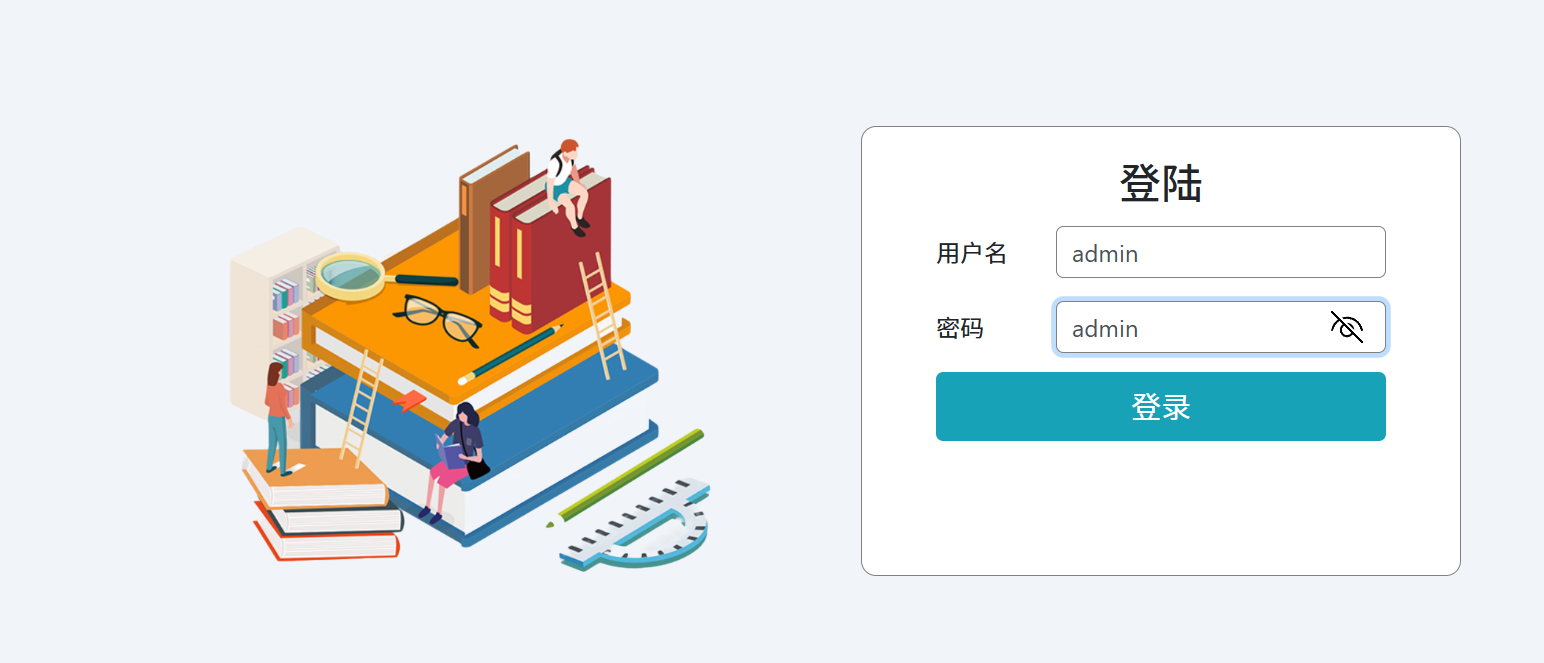
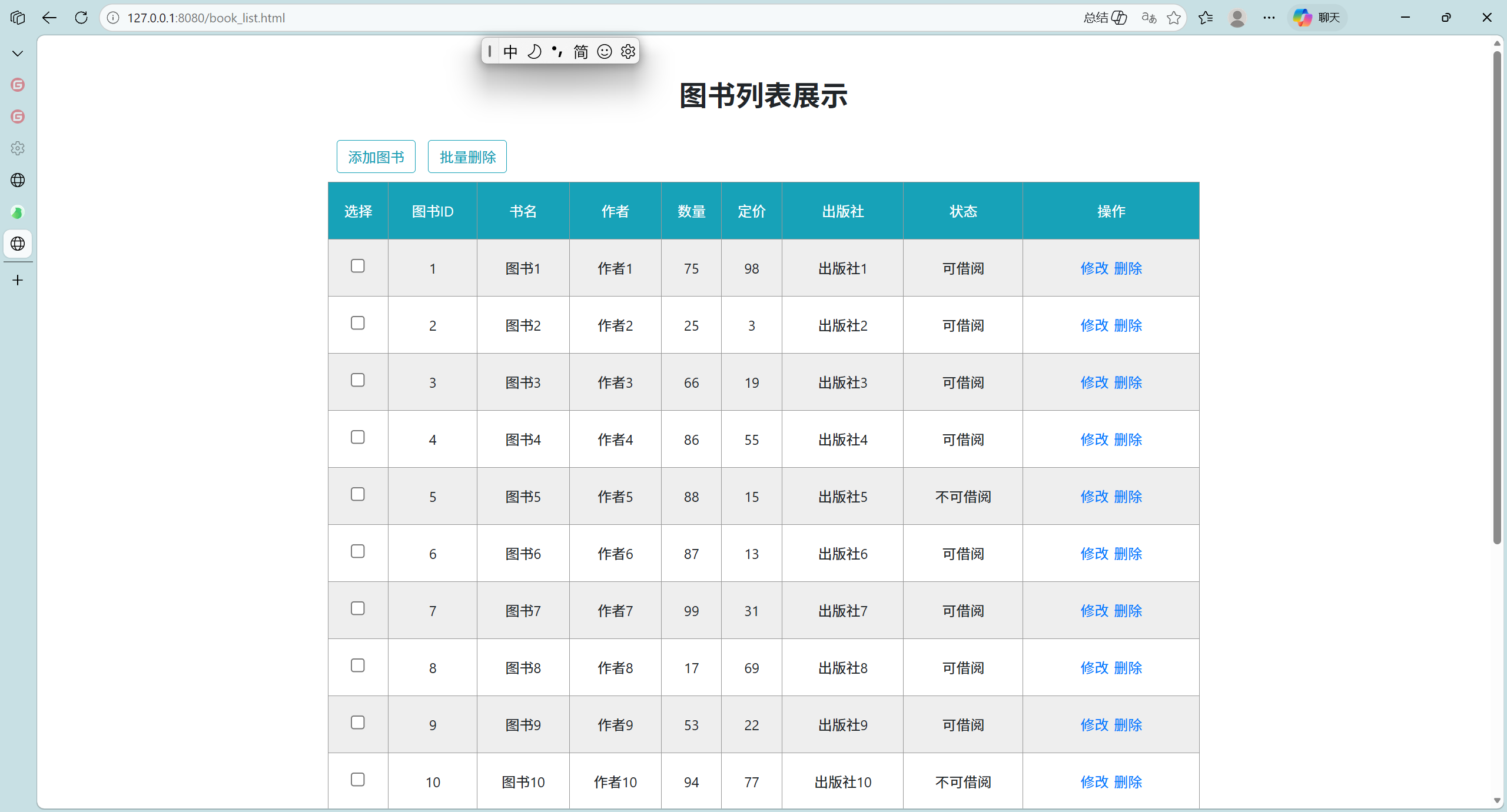
访问 http://127.0.0.1:8080/login.html 输入账号密码 admin,admin 登录成功 , 跳转到图书列表展示页面

汇聚全球AI编程工具,助力开发者即刻编程。
更多推荐

 8
8 0
0- 0


 已为社区贡献29条内容

所有评论(0)