
【MySQL】6. MySQL表的约束
真正约束字段的是数据类型,但数据类型的约束较为单一,需要额外约束来更好地保证数据的合法性,从业务逻辑角度确保数据正确性。例如,email 字段要求值唯一。
表的约束种类较多,这里主要介绍以下几种:null/not null、default、comment、zerofill、primary key、auto_increment、unique key。
表的约束:表中一定要有各种约束,通过约束,让我们未来插入数据库表中的数据是符合预期的。约束本质是通过技术手段,倒逼程序员,插入正确的数据。反过来,站在mysql的视角,凡是插入进来的数据,都是符合数据约束的!
约束的最终目标:保证数据的完整性和可预期性。
1. 空属性
- 包含两个值:
null(默认值)和not null(不为空)。 - 数据库默认字段基本都允许为空,但在实际开发中,应尽可能保证字段不为空,因为空值无法参与运算。
mysql> select null;
+-------+
| NULL  |
+-------+
| NULL  |
+-------+
1 row in set (0.00 sec)

mysql> select 1+null;
+-------+
| 1+null|
+-------+
| NULL  |
+-------+
1 row in set (0.00 sec)
案例:创建班级表
创建一个班级表,包含班级名和班级所在的教室。
从业务逻辑来看:
- 如果班级没有名字,就无法确定所属班级。
- 如果教室名字为空,就无法确定上课地点。
因此,在设计数据库表时,需要在表中进行限制,不允许插入不满足上述条件的数据,这就是 “约束”。
mysql> create table if not exists myclass(
    -> class_name varchar(20) not null,
    -> class_room varchar(20) not null,
    -> other varchar(20)
    -> );
Query OK, 0 rows affected (0.01 sec)

mysql> desc myclass;
+------------+-------------+------+-----+---------+-------+
| Field      | Type        | Null | Key | Default | Extra |
+------------+-------------+------+-----+---------+-------+
| class_name | varchar(20) | NO   |     | NULL    |       |
| class_room | varchar(20) | NO   |     | NULL    |       |
| other      | varchar(20) | YES  |     | NULL    |       |
+------------+-------------+------+-----+---------+-------+
插入数据时,如果未给教室字段赋值,插入会失败:
mysql> insert into myclass (class_name,class_room,other) values('高三2版','101教室','普通班');
Query OK, 1 row affected (0.01 sec)
mysql> insert into myclass (class_name,class_room) values('高三2版','102教室');
Query OK, 1 row affected (0.01 sec)
mysql> insert into myclass (class_name) values('高三2版');
ERROR 1364 (HY000): Field 'class_room' doesn't have a default value

mysql> select * from myclass;
+------------+------------+-----------+
| class_name | class_room | other     |
+------------+------------+-----------+
| 高三2版    | 101教室    | 普通班    |
| 高三2版    | 102教室    | NULL      |
+------------+------------+-----------+
2 rows in set (0.00 sec)
2. 默认值
默认值:当某类数据经常出现某个具体值时,可以在表创建时预先指定。在需要真实数据时,用户可以选择使用默认值。
mysql> create table if not exists t13(
    -> name varchar(20) not null,
    -> age tinyint unsigned default 18,
    -> gender char(1) default '男'
    -> );

mysql> desc t13;
+--------+------------------+------+-----+---------+-------+
| Field  | Type             | Null | Key | Default | Extra |
+--------+------------------+------+-----+---------+-------+
| name   | varchar(20)      | NO   |     | NULL    |       |
| age    | tinyint unsigned | YES  |     | 18      |       |
| gender | char(1)          | YES  |     | 男      |       |
+--------+------------------+------+-----+---------+-------+
3 rows in set (0.01 sec)
默认值的生效
在插入数据时,如果未对该字段赋值,就会使用默认值。
mysql> insert into t13 (name, age,gender) values ('张三', 19, '女');
Query OK, 1 row affected (0.00 sec)

mysql> insert into t13 (name) values ('李四');
Query OK, 1 row affected (0.00 sec)

mysql> select * from t13;
+--------+------+--------+
| name   | age  | gender |
+--------+------+--------+
| 张三   |   19 | 女     |
| 李四   |   18 | 男     |
+--------+------+--------+
2 rows in set (0.01 sec)
注意:只有设置了
default的列,才可以在插入数据时省略对该列的赋值。
补:如果在创建表时,没有显示指定默认值,则默认值位default=NULL;
3. 列描述
列描述(comment)没有实际含义,专门用于描述字段,会随表创建语句保存,方便程序员或 DBA 理解字段用途。
mysql> create table if not exists t16(
    -> name varchar(20) not null comment '用户名',
    -> age tinyint unsigned default 18 comment '年龄',
    -> gender char(1) default '男' comment '性别'
    -> );
注意:
not null和default一般不需要同时出现,因为default本身有默认值,不会为空。
通过 desc 无法查看注释信息:
mysql> desc t16;
+--------+------------------+------+-----+---------+-------+
| Field  | Type             | Null | Key | Default | Extra |
+--------+------------------+------+-----+---------+-------+
| name   | varchar(20)      | NO   |     | NULL    |       |
| age    | tinyint unsigned | YES  |     | 18      |       |
| gender | char(1)          | YES  |     | 男      |       |
+--------+------------------+------+-----+---------+-------+
3 rows in set (0.01 sec)
通过 show 命令可以查看:
mysql> show create table t16\G
*************************** 1. row ***************************
       Table: t16
Create Table: CREATE TABLE `t16` (
  `name` varchar(20) COLLATE utf8mb4_unicode_ci NOT NULL COMMENT '用户名',
  `age` tinyint unsigned DEFAULT '18' COMMENT '年龄',
  `gender` char(1) COLLATE utf8mb4_unicode_ci DEFAULT '男' COMMENT '性别'
) ENGINE=InnoDB DEFAULT CHARSET=utf8mb4 COLLATE=utf8mb4_unicode_ci
1 row in set (0.00 sec)
4. zerofill
很多初学者对数字类型后括号内的数字感到困惑。通过查看表 t17 的建表语句:
mysql> create table if not exists t17(
    -> a int unsigned not null,
    -> b int unsigned not null
    -> );
Query OK, 0 rows affected (0.02 sec)

mysql> show create table t17\G
*************************** 1. row ***************************
       Table: t17
Create Table: CREATE TABLE `t17` (
  `a` int unsigned NOT NULL,
  `b` int unsigned NOT NULL
) ENGINE=InnoDB DEFAULT CHARSET=utf8mb4 COLLATE=utf8mb4_unicode_ci
1 row in set (0.00 sec)

mysql> desc t17;
+-------+---------------------------+------+-----+---------+-------+
| Field | Type                      | Null | Key | Default | Extra |
+-------+---------------------------+------+-----+---------+-------+
| a     | int unsigned              | NO   |     | NULL    |       |
| b     | int unsigned              | NO   |     | NULL    |       |
+-------+---------------------------+------+-----+---------+-------+
2 rows in set (0.01 sec)
在没有 zerofill 属性时,括号内的数字(如 int(10) 中的 10)是无意义的,它不代表存储长度。插入数据后,直接显示原值:
mysql> insert into t17 (a,b) values(1,2);
Query OK, 1 row affected (0.00 sec)
mysql> select * from t17;
+---+---+
| a | b |
+---+---+
| 1 | 2 |
+---+---+

mysql> alter table t17 modify b int unsigned zerofill;
Query OK, 0 rows affected, 1 warning (0.03 sec)
Records: 0  Duplicates: 0  Warnings: 1

mysql> desc t17;
+-------+---------------------------+------+-----+---------+-------+
| Field | Type                      | Null | Key | Default | Extra |
+-------+---------------------------+------+-----+---------+-------+
| a     | int unsigned              | NO   |     | NULL    |       |
| b     | int(10) unsigned zerofill | YES  |     | NULL    |       |
+-------+---------------------------+------+-----+---------+-------+
2 rows in set (0.01 sec)

mysql> select * from t17;
+---+------------+
| a | b          |
+---+------------+
| 1 | 0000000002 |
+---+------------+
1 row in set (0.00 sec)
当对列添加 zerofill 属性后,显示结果会改变。修改表结构:
mysql> alter table tt3 change a a int(5) unsigned zerofill;
mysql> show create table tt3\G
*************************** 1. row ***************************
       Table: tt3
Create Table: CREATE TABLE `tt3` (
  `a` int(5) unsigned zerofill DEFAULT NULL, -- 具有了zerofill
  `b` int(10) unsigned DEFAULT NULL
) ENGINE=MyISAM DEFAULT CHARSET=gbk
1 row in set (0.00 sec)
再次查询,a 列的值会被填充前导零:
mysql> select * from tt3;
+-------+---+
| a     | b |
+-------+---+
| 00001 | 2 |
+-------+---+
zerofill 的作用是:当实际值的宽度小于设定的宽度(这里是 5)时,自动用 0 填充。这只是格式化输出,数据库内部实际存储的值仍然是 1。可以用 hex() 函数验证:
mysql> select a, hex(a) from tt3;
+-------+--------+
| a     | hex(a) |
+-------+--------+
| 00001 | 1      |
+-------+--------+
# 个别查找方法(选)
mysql> insert into t17 (a,b) values(100,200);
Query OK, 1 row affected (0.02 sec)

mysql> select * from t17;
+-----+------------+
| a   | b          |
+-----+------------+
|   1 | 0000000002 |
| 100 | 0000000200 |
+-----+------------+
2 rows in set (0.00 sec)

mysql> select * from t17 where b = 200;
+-----+------------+
| a   | b          |
+-----+------------+
| 100 | 0000000200 |
+-----+------------+
1 row in set (0.00 sec)

mysql> select a,b from t17;
+-----+------------+
| a   | b          |
+-----+------------+
|   1 | 0000000002 |
| 100 | 0000000200 |
+-----+------------+
2 rows in set (0.00 sec)

mysql> select hex(3.14);
+-----------+
| hex(3.14) |
+-----------+
| 3         |
+-----------+
1 row in set (0.00 sec)

mysql> select a,hex(b) from t17;
+-----+--------+
| a   | hex(b) |
+-----+--------+
|   1 | 2      |
| 100 | C8     |
+-----+--------+
2 rows in set (0.00 sec)
5. 主键
primary key 用于唯一约束字段数据,值不能重复、不能为空,一张表中最多只能有一个主键,主键所在列通常是整数类型。
案例
-
创建表时直接指定主键
mysql> create table if not exists test_key( -> id int unsigned primary key comment '学号', -> name varchar(20) not null -> ); Query OK, 0 rows affected (0.03 sec) mysql> desc test_key; +-------+--------------+------+-----+---------+-------+ | Field | Type | Null | Key | Default | Extra | +-------+--------------+------+-----+---------+-------+ | id | int unsigned | NO | PRI | NULL | | -key列中'PRI'表示该字段是主键 | name | varchar(20) | NO | | NULL | | +-------+--------------+------+-----+---------+-------+ 2 rows in set (0.01 sec) mysql> show create table test_key\G *************************** 1. row *************************** Table: test_key Create Table: CREATE TABLE `test_key` ( `id` int unsigned NOT NULL COMMENT '学号', `name` varchar(20) COLLATE utf8mb4_unicode_ci NOT NULL, PRIMARY KEY (`id`) ) ENGINE=InnoDB DEFAULT CHARSET=utf8mb4 COLLATE=utf8mb4_unicode_ci 1 row in set (0.00 sec) -
主键约束
主键对应字段不能重复,重复插入会失败:
mysql> insert into test_key values(1,'aaa'); Query OK, 1 row affected (0.01 sec) mysql> insert into test_key values(1,'bbb'); ERROR 1062 (23000): Duplicate entry '1' for key 'test_key.PRIMARY' # 主键不能冲突,如果冲突则不能插入 # 则可以根据主键针对性的准确的对数据进行增删查改。 mysql> insert into test_key values(2,'bbb'); Query OK, 1 row affected (0.01 sec) mysql> select * from test_key; +----+------+ | id | name | +----+------+ | 1 | aaa | | 2 | bbb | +----+------+ 2 rows in set (0.00 sec) -
追加 / 删除主键
-
追加主键:
alter table 表名 add primary key(字段列表); -
删除主键:
alter table 表名 drop primary key;
示例:
mysql> alter table test_key drop primary key; mysql> desc test_key; +-------+------------------+------+-----+---------+-------+ | Field | Type | Null | Key | Default | Extra | +-------+------------------+------+-----+---------+-------+ | id | int(10) unsigned | NO | | NULL | | | name | varchar(20) | NO | | NULL | | +-------+------------------+------+-----+---------+-------+ -
如果建表之后,有冲突元素时,再设置主键,则会报错。
- 复合主键
在创建表时,可在所有字段后使用 primary key(主键字段列表) 创建复合主键,由多个字段共同构成主键:
mysql> create table tt14 (
    -> id int unsigned comment '课程代号',
    -> course char(10) comment '课程',
    -> score tinyint unsigned default 60 comment '成绩',
    -> primary key(id, course)  -- id和course为复合主键
    -> );
Query OK, 0 rows affected (0.01 sec)

mysql> desc tt14;
+--------+------------------+------+-----+---------+-------+
| Field  | Type             | Null | Key | Default | Extra |
+--------+------------------+------+-----+---------+-------+
| id     | int(10) unsigned | NO   | PRI | 0       |       |  -- 两列合成主键
| course | char(10)         | NO   | PRI |         |       |
| score  | tinyint unsigned | YES  |     | 60      |       |
+--------+------------------+------+-----+---------+-------+

mysql> insert into tt14 (id,course) values(1, '123');
Query OK, 1 row affected (0.02 sec)

mysql> insert into tt14 (id,course) values(1, '123');
ERROR 1062 (23000): Duplicate entry '1-123' for key 'PRIMARY'  -- 主键冲突
6. 自增长
auto_increment:当对应字段不给值时,会自动被系统触发,系统会从当前字段中已有的最大值 +1 操作,得到一个新的不同值。它通常和主键搭配使用,作为逻辑主键。
自增长的特点
- 任何一个字段要做自增长,前提是其本身是一个索引(
key栏有值)。 - 自增长字段必须是整数。
- 一张表最多只能有一个自增长。
案例
mysql> create table if not exists tt21(
    -> id int unsigned primary key auto_increment,
    -> name varchar(20) not null
    -> );

mysql> insert into tt21(name) values('a');
mysql> insert into tt21(name) values('b');

mysql> select * from tt21;
+----+------+
| id | name |
+----+------+
|  1 | a    |
|  2 | b    |
+----+------+mysql> insert into tt21(name) values('a');
Query OK, 1 row affected (0.00 sec)

mysql> insert into tt21(name) values('b');
Query OK, 1 row affected (0.00 sec)

mysql> select * from tt21;
+----+------+
| id | name |
+----+------+
|  1 | a    |
|  2 | b    |
+----+------+
2 rows in set (0.00 sec)

mysql> insert into tt21(id,name) values(1000,'c');
Query OK, 1 row affected (0.00 sec)

mysql> insert into tt21(name) values('d');
Query OK, 1 row affected (0.01 sec)

mysql> select * from tt21;
+------+------+
| id   | name |
+------+------+
|    1 | a    |
|    2 | b    |
| 1000 | c    |
| 1001 | d    |
+------+------+
4 rows in set (0.00 sec)
可以一开始就设置到自增长值
mysql>
mysql> create table tt22(
    -> id int unsigned primary key auto_increment,
    -> name varchar(20) not null
    -> )auto_increment=500;	# 创建表时同时这是自增长值
Query OK, 0 rows affected (0.02 sec)

mysql> show create table tt22\G
*************************** 1. row ***************************
       Table: tt22
Create Table: CREATE TABLE `tt22` (
  `id` int unsigned NOT NULL AUTO_INCREMENT,
  `name` varchar(20) COLLATE utf8mb4_unicode_ci NOT NULL,
  PRIMARY KEY (`id`)
) ENGINE=InnoDB AUTO_INCREMENT=500 DEFAULT CHARSET=utf8mb4 COLLATE=utf8mb4_unicode_ci
1 row in set (0.00 sec)

mysql> insert into tt22 (name) values('a');
Query OK, 1 row affected (0.00 sec)

mysql> insert into tt22 (name) values('b');
Query OK, 1 row affected (0.00 sec)

mysql> select * from tt22;
+-----+------+
| id  | name |
+-----+------+
| 500 | a    |
| 501 | b    |
+-----+------+
2 rows in set (0.00 sec)
在插入后,可以使用 select last_insert_id(); 获取上次插入的 AUTO_INCREMENT 值(批量插入时,获取的是第一个值):
mysql> select last_insert_id();
+------------------+
| last_insert_id() |
+------------------+
|              501 |
+------------------+
索引:
在关系数据库中,索引是一种单独的、物理的对数据库表中一列或多列的值进行排序的一种存储结构,它是某个表中一列或若干列值的集合和相应的指向表中物理标识这些值的数据页的逻辑指针清单。索引的作用相当于图书的目录,可以根据目录中的页码快速找到所需的内容。
索引提供指向存储在表的指定列中的数据值的指针,然后根据您指定的排序顺序对这些指针排序。数据库使用索引以找到特定值,然后顺指针找到包含该值的行。这样可以使对应于表的SQL语句执行得更快,可快速访问数据库表中的特定信息。
7. 唯一键
在一张表中,往往有多个字段需要保证唯一性,即数据不能重复,但一张表中只能有一个主键。唯一键(unique key)可以解决表中有多个字段需要唯一性约束的问题。
- 本质:唯一键的本质和主键类似,但唯一键允许为空,且可以有多个空值,空字段不做唯一性比较。
- 与主键的区别:主键更多用于标识唯一性;唯一键更多用于保证业务上的信息不重复。
- 例如:在员工管理系统中,身份证号可作为主键,员工工号可设计为唯一键,确保工号在业务上不重复。
- 建议:主键设计为与当前业务无关的字段,便于业务调整时减少对主键的修改。
案例
mysql> create table stu(
    -> id char(20) unique comment '这是一个学生的唯一键',
    -> name varchar(32) not null
    -> );
Query OK, 0 rows affected (0.03 sec)

mysql> desc stu;
+-------+-------------+------+-----+---------+-------+
| Field | Type        | Null | Key | Default | Extra |
+-------+-------------+------+-----+---------+-------+
| id    | char(20)    | YES  | UNI | NULL    |       |
| name  | varchar(32) | NO   |     | NULL    |       |
+-------+-------------+------+-----+---------+-------+
2 rows in set (0.00 sec)

mysql> insert into stu(id, name) values('12345', '张三');
Query OK, 1 row affected (0.01 sec)

mysql> select * from stu;
+-------+--------+
| id    | name   |
+-------+--------+
| 12345 | 张三   |
+-------+--------+
1 row in set (0.00 sec)

mysql> insert into stu(id, name) values('12345', '李四');
ERROR 1062 (23000): Duplicate entry '12345' for key 'stu.id'
mysql> insert into stu(id, name) values(NULL, '李四');
Query OK, 1 row affected (0.00 sec)

mysql> select * from stu;
+-------+--------+
| id    | name   |
+-------+--------+
| 12345 | 张三   |
| NULL  | 李四   |
+-------+--------+
2 rows in set (0.00 sec)

mysql> insert into stu(id, name) values(NULL, '李四');
Query OK, 1 row affected (0.00 sec)

mysql> insert into stu(id, name) values(NULL, '李四');
Query OK, 1 row affected (0.00 sec)

mysql> select * from stu;
+-------+--------+
| id    | name   |
+-------+--------+
| 12345 | 张三   |
| NULL  | 李四   |
| NULL  | 李四   |
| NULL  | 李四   |
+-------+--------+
4 rows in set (0.00 sec)
举例2:唯一键和主键配合使用
mysql> create table student(
    -> id char(20) primary key,
    -> name varchar(32) not null,
    -> telphone char(20) unique key,
    -> qq varchar(64) unique key
    -> );
Query OK, 0 rows affected (0.02 sec)

mysql> desc student;
+----------+-------------+------+-----+---------+-------+
| Field    | Type        | Null | Key | Default | Extra |
+----------+-------------+------+-----+---------+-------+
| id       | char(20)    | NO   | PRI | NULL    |       |
| name     | varchar(32) | NO   |     | NULL    |       |
| telphone | char(20)    | YES  | UNI | NULL    |       |
| qq       | varchar(64) | YES  | UNI | NULL    |       |
+----------+-------------+------+-----+---------+-------+
4 rows in set (0.01 sec)

mysql> insert into student values ('123','aaa','1341234');
ERROR 1136 (21S01): Column count doesn't match value count at row 1
mysql> insert into student values ('123','aaa','1341234','23456');
Query OK, 1 row affected (0.00 sec)

mysql> select * from student;
+-----+------+----------+-------+
| id  | name | telphone | qq    |
+-----+------+----------+-------+
| 123 | aaa  | 1341234  | 23456 |
+-----+------+----------+-------+
1 row in set (0.00 sec)

mysql> insert into student values ('123','aaa','1341234','23456');
ERROR 1062 (23000): Duplicate entry '123' for key 'student.PRIMARY'
mysql> insert into student values ('1234','aaa','1341234','23456');
ERROR 1062 (23000): Duplicate entry '1341234' for key 'student.telphone'
mysql> insert into student values ('1234','bbb','1341234','23456');
ERROR 1062 (23000): Duplicate entry '1341234' for key 'student.telphone'
mysql> insert into student values ('1234','bbb','1341235','23456');
ERROR 1062 (23000): Duplicate entry '23456' for key 'student.qq'
mysql> insert into student values ('1234','bbb','1341235','23457');
Query OK, 1 row affected (0.01 sec)
创建表时,unique key和unique完全等价,没有区别。
8. 外键
外键用于定义主表和从表之间的关系,外键约束主要定义在从表上,主表则必须有主键约束或 unique 约束。定义外键后,要求外键列数据必须在主表的主键列存在或为 null。
-
语法:
foreign key (字段名) references 主表(列)
案例:学生表与班级表
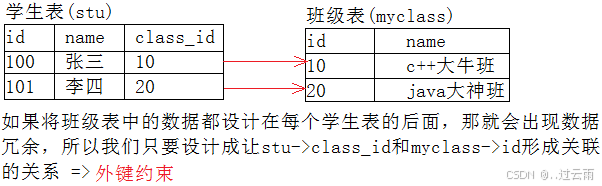
对上面的示意图进行设计:
-
先创建主键表(班级表):
create table myclass ( id int primary key, name varchar(30) not null comment '班级名' ); -
再创建从表(学生表):
create table stu ( id int primary key, name varchar(30) not null comment '学生名', class_id int, foreign key (class_id) references myclass(id) ); -
正常插入数据:
mysql> insert into myclass values(10, 'C++大牛班'),(20, 'java大神班'); Query OK, 2 rows affected (0.03 sec) mysql> insert into stu values(100, '张三', 10),(101, '李四',20); Query OK, 2 rows affected (0.01 sec) -
插入不存在的班级(失败):
mysql> insert into stu values(102, 'wangwu',30); ERROR 1452 (23000): Cannot add or update a child row: a foreign key constraint fails (mytest.stu, CONSTRAINT stu_ibfk_1 FOREIGN KEY (class_id) REFERENCES myclass (id)) -
插入空班级(成功):
mysql> insert into stu values(102, 'wangwu', null);
如何理解外键约束
数据之间存在相关性,若不建立外键约束,可能插入不符合业务逻辑的数据(如学生属于不存在的班级)。外键的本质是将相关性交给 MySQL 审核,提前告知表间约束关系,不允许插入不符合逻辑的数据。
9. 综合案例 - 网购
有一个商店的数据,记录客户及购物情况,由以下三个表组成:
- 商品表
goods(商品编号goods_id,商品名goods_name,单价unit_price,商品类别category,供应商provider) - 客户表
customer(客户编号customer_id,姓名name,地址address,邮箱email,性别sex,身份证card_id) - 购买表
purchase(订单号order_id,客户号customer_id,商品号goods_id,购买数量nums)
要求:
- 每个表的主键/外键
- 客户的姓名不能为空值
- 邮箱不能重复
- 客户的性别(男,女)
SQL 实现
-- 创建数据库
create database if not exists bit32mall;
use bit32mall;

-- 商品表
create table if not exists goods
(
    goods_id int primary key auto_increment comment '商品编号',
    goods_name varchar(32) not null comment '商品名称',
    unit_price int not null default 0 comment '单价,单位分',
    category varchar(64) not null comment '商品分类',
    provider varchar(64) not null comment '供应商名称'
);

-- 客户表
create table if not exists customer
(
    customer_id int primary key auto_increment comment '客户编号',
    name varchar(32) not null comment '客户姓名',
    address varchar(64) comment '客户地址',
    email varchar(64) unique key comment '电子邮箱',
    sex enum('男','女') not null comment '性别',
    card_id char(18) unique key comment '身份证'
);

-- 购买表
create table if not exists purchase
(
    order_id int primary key auto_increment comment '订单号',
    customer_id int comment '客户编号',
    goods_id int comment '商品编号',
    nums int default 0 comment '购买数量',
    foreign key (customer_id) references customer(customer_id),
    foreign key (goods_id) references goods(goods_id)
);

汇聚全球AI编程工具,助力开发者即刻编程。
更多推荐
 12
12 0
0- 0


 已为社区贡献6条内容

所有评论(0)