
【MySQL|进阶】存储过程
·
1.什么是存储过程
存储过程就是把一段经常要执行的 SQL 代码,提前打包好、起个名字,存到数据库里,以后直接调用名字就能运行。可以把它理解成数据库里的 “快捷指令”或封装好的函数
2.环境和数据准备
MySQL版本:8.0以上
-- 新建数据库
DROP DATABASE IF EXISTS topic01;
CREATE DATABASE topic01 CHARACTER SET utf8mb4 COLLATE utf8mb4_0900_ai_ci;
use topic01;

-- 班级表
drop table if exists class;
create table class (
  id bigint primary key auto_increment,
  name varchar(20)
);

-- 学生表
drop table if exists student;
create table student (
  id bigint primary key auto_increment,
  name varchar(20) not null,
  sno varchar(10) not null,
  age int default 18,
  gender tinyint(1),
  enroll_date date,
  class_id bigint,
  foreign key (class_id) references class(id)
);

-- 课程表
drop table if exists course;
create table course (
  id bigint primary key auto_increment,
  name varchar(20)
);

-- 分数表
drop table if exists score;
create table score (
  id bigint primary key auto_increment,
  score float,
  student_id bigint,
  course_id bigint,
  foreign key (student_id) references student(id),
  foreign key (course_id) references course(id)
);

-- 课程表
insert into course (name) values ('Java'), ('C++'), ('MySQL'), ('操作系统'), ('计算机网络'), ('数据结构');

-- 班级表
insert into class(name) values ('Java001班'), ('C++001班'), ('前端001班');

-- 学生表
insert into student (name, sno, age, gender, enroll_date, class_id) values
('唐三藏', '100001', 18, 1, '1986-09-01', 1),
('孙悟空', '100002', 18, 1, '1986-09-01', 1),
('猪悟能', '100003', 18, 1, '1986-09-01', 1),
('沙悟净', '100004', 18, 1, '1986-09-01', 1),
('宋江', '200001', 18, 1, '2000-09-01', 2),
('武松', '200002', 18, 1, '2000-09-01', 2),
('李逹', '200003', 18, 1, '2000-09-01', 2),
('不想毕业', '200004', 18, 1, '2000-09-01', 2);

-- 成绩表
insert into score (score, student_id, course_id) values
(70.5, 1, 1),(98.5, 1, 3),(33, 1, 5),(98, 1, 6),
(60, 2, 1),(59.5, 2, 5),
(33, 3, 1),(68, 3, 3),(99, 3, 5),
(67, 4, 1),(23, 4, 3),(56, 4, 5),(72, 4, 6),
(81, 5, 1),(37, 5, 5),
(56, 6, 2),(43, 6, 4),(79, 6, 6),
(80, 7, 2),(92, 7, 6);


-- 创建考试成绩表练习表
DROP TABLE IF EXISTS exam;
CREATE TABLE exam (
id bigint,
name VARCHAR(20),
chinese DECIMAL(4,1),
math DECIMAL(4,1),
english DECIMAL(4,1)
);
-- 插入测试数据
INSERT INTO exam (id,name, chinese, math, english) VALUES
(1,'唐三藏', 67, 98, 56),
(2,'孙悟空', 87.5, 78, 77),
(3,'猪悟能', 88, 98, 90),
(4,'曹孟德', 82, 84, 67),
(5,'刘玄德', 55.5, 85, 45),
(6,'孙权', 70, 73, 78.5),
(7,'宋公明', 75, 65, 30);
3.存储过程的语法
- 创建存储过程
CREATE PROCEDURE [存储过程名(参数列表)]
BEGIN
 -- sql语句...(可以有多条)
END
例如 计算上述表中所有学生的总分
CREATE PROCEDURE p_calAvg()
BEGIN
 SELECT name,chinese+math+english as total from exam;
END
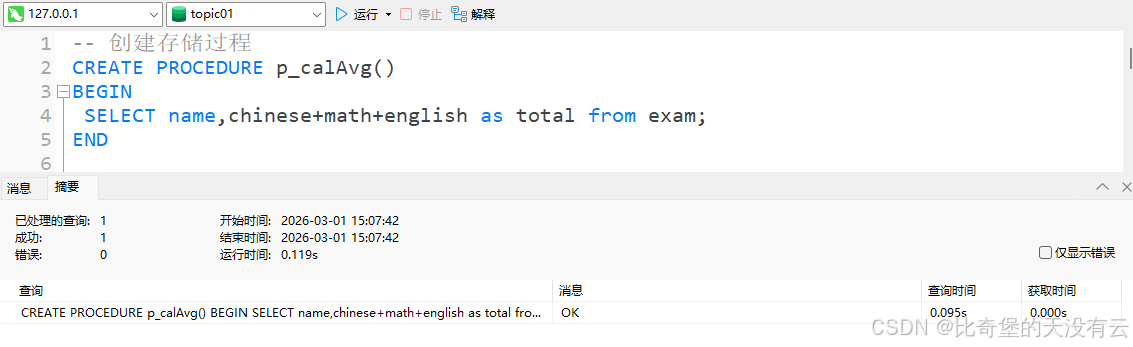
可以看到存储过程已经创建成功了,也可以在navicat图形化界面工具里,对应表下的函数中 看到已经创建的存储过程
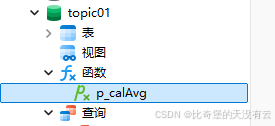
有一点需要注意,目前这里执行的创建存储过程 是在navicat图形化界面中执行的,如果是在cmd命令行中执行,会报错,如下图所示

原因:MySQL 会把分号 ; 当成 “结束命令”,当执行begin中的sql语句时,遇到;,MySQL 提前截断命令,导致MySQL执行的命令不完整,因此创建失败
解决办法就是 修改MySQL的结束标识符
DELIMITER //
CREATE PROCEDURE p_calAvg()
BEGIN
 SELECT name,chinese+math+english as total from exam;
END //
DELIMITER ;

这个SQL语句的作用是先把MySQL的结束标识符改成
//,然后创建好存储过程之后,再修改回;
2.调用存储过程 语法:
call [存储过程名(参数列表)]
CALL p_calAvg();
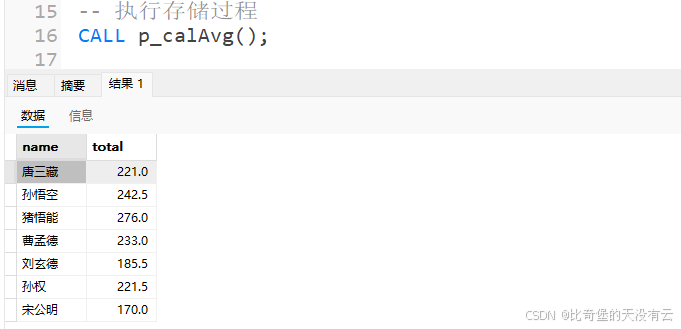
3.查看指定数据库中创建的存储过程
SELECT * from information_schema.ROUTINES WHERE ROUTINE_SCHEMA = '数据库名';
SELECT * from information_schema.ROUTINES WHERE ROUTINE_SCHEMA = 'topic01';

4.创建存储过程的SQL
语法:
SHOW CREATE PROCEDURE [存储过程];
SHOW CREATE PROCEDURE p_calAvg;

5.删除存储过程
DROP PROCEDURE [存储过程名];
DROP PROCEDURE p_calAvg;

需要注意的是,存储过程并非“万能工具”。它的优势在于复用性和高效性,但也存在调试不便、跨数据库兼容性差的短板。在实际开发中,我们需根据业务场景合理选择:复杂的数据库层逻辑、高频复用的SQL片段,适合用存储过程封装;而简单的单条查询、需要灵活调整的逻辑,直接编写SQL可能更便捷。

汇聚全球AI编程工具,助力开发者即刻编程。
更多推荐



 10
10 0
0- 0


 已为社区贡献1条内容

所有评论(0)